Guides
Practical guides for learning to type and getting better at our games.
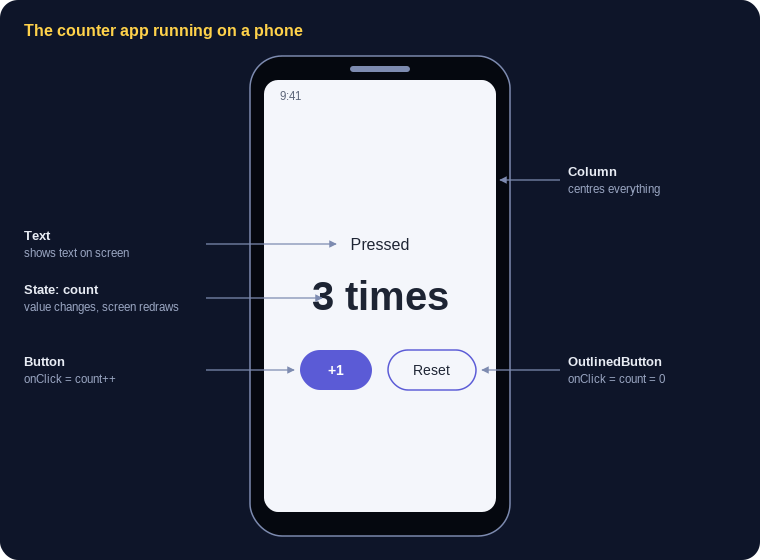
Android App Development for Beginners 2026: Start from Zero
Learn Android app development step by step: install Android Studio, learn Kotlin basics, build your first app with Jetpack Compose and publish it on Google Play. Made for beginners.

History of Computer Games: 7 Eras from Pong to AI
The history of computer games in 7 eras – Tennis for Two, Spacewar!, Pong, Pac-Man, Super Mario Bros., Doom, World of Warcraft and Minecraft to cloud gaming and AI – with a timeline and summary table.

BLOCKO Guide: How to Score a QUAD and Reach High Levels
How to get a high score in BLOCKO, the free 3D falling-blocks puzzle: the scoring table, how to set up a QUAD, using hold and the ghost piece, T-spins and tips for fast levels.

SKY ACE Guide: Beat All 6 Bosses and Dodge the Kamikaze Divers
How to beat SKY ACE, the free 3D air combat shooter: how the POW power-ups work, how to dodge kamikaze divers, when to use bombs and how to beat all six bosses and their three phases.
robotShock Guide: Weapons, Turrets and How to Beat the SHOCK TITAN
How to win robotShock, the free 3D third-person robot shooter: the six guns and when to use them, power-up items, explosive barrels, how to beat every turret type and the 8-metre SHOCK TITAN boss.
Scifi Guide: How to Beat All 10 Stages of the Lab and Reach the Top 10
A complete Scifi guide: the four enemy types, how to use the scoped Tavor rifle, pickups, the 10 stages and how the score works in the free browser shooter.
Bullet Storm II Guide: 8-Way Aiming, Weapons and Beating Every Boss
A complete Bullet Storm II guide: how to aim in 8 directions, the rifle, machine gun, spread gun and rockets, every enemy and boss, the five lands and how the score works in the free WW2 side-scrolling run-and-gun.

FURY Guide: The Tiger Tank, Rockets, Armour and Beating All 15 Stages
A complete FURY guide: driving the Tiger and aiming its turret with the mouse, the four rocket levels, the machine gun, armour and damage, enemy Tiger, Sherman and Maus tanks, rescuing prisoners, every boss and how the score works.
Behind Enemy Lines Guide: Guns, Enemies, Bunkers and Forests
A complete Behind Enemy Lines guide: the MP40, StG 44, Kar98k and Luger, every enemy type, how bunker and forest stages work, lives, pickups and how the score is counted in the free WW2 browser FPS.

Dark Fortress Guide: Machine Gun Heat, Cannon Shells and Stopping the Maus
A complete Dark Fortress guide: how the four-barrel machine gun and the cannon work, every soldier, vehicle and aircraft, the 10 waves, the Maus boss and how the score is counted in the free WW2 hilltop gun-defence game.
Hostage Guide: Weapons, Escorting Hostages and Beating All 15 Stages
A complete Hostage guide: Thompson or bazooka, the four bazooka levels, how to free, escort and deliver hostages, tower gunners, gun emplacements and medkits, every boss and how the score works in the free 3rd-person WW2 shooter.
Jeep Raider Guide: Weapons, Rescuing Prisoners and Beating All 15 Bosses
A complete Jeep Raider guide: when to use the machine gun or rockets, the four weapon levels, how to free and deliver prisoners, every enemy and boss, the five lands and how the score works in the free top-down WW2 jeep shooter.
SpaceXp Guide: How to Beat All 20 Bosses and Clear 20 Stages
A complete SpaceXp guide: the controls, the enemy types, the weapon upgrades and pickups, the five boss attack patterns, the 20 stages and how the score works in this free browser space shooter.

S.W.A.T Guide: How to Clear All 15 Stages and Reach the World Top 10
A complete S.W.A.T guide: the three hostile squads, the M4A1, Colt 1911, MP5N and AKM, keycards and extraction, pickups, the 15 stages and how the score works in the free browser SWAT shooter.
Wehrmacht Bunker Guide: How to Clear All 15 Stages of 30 Soldiers and Reach the Top 10
A complete Wehrmacht Bunker guide: the four soldier types, when to use the MP5K or the G3, holding doorways against reinforcements, explosive drums, the 15 stages and how the score works in the free browser WW2 shooter.
WorldWarII Guide: How to Beat All 12 Stages of the Compound and Reach the Top 10
A complete WorldWarII guide: the five enemy types, the MP40 and the Tommy gun, dodging bazooka rockets, pickups, the 12 stages and how the score works in the free browser WW2 shooter.

DarkBIO Guide: How to Survive the Raknos and Reach the Exit
How to win DarkBIO, the free 3D first-person zombie and monster shooter: Chugshot shotgun tips, how the Raknos attack, where the ammo and health packs are, and how to get a high score for the world top 10.
Motocross 3D Guide: Controls, Ramps, Overheating and Race Tips
How to win Motocross 3D, the free dirt bike race in your browser: the controls, how to use ramps and jumps, the engine heat rule, and tips to beat your three rivals over three laps.
Barbarian Warrior Guide: Charge, Steer and Win All 10 Stages
How to play Barbarian Warrior, the free third-person mounted sword game in your browser: the controls, the charge, the five enemy types and tips for all 10 stages.
SPATON Guide: Weapons, Blocking and Tips for All 10 Stages
How to win SPATON, the free first-person sword game in your browser: which weapon to use, how blocking works, the monsters, both bosses and tips for all 10 stages.
Desert Storm Guide: Street Fighting in the Desert Town
How to win Desert Storm, the free 3D desert first-person shooter: moving from cover to cover, clearing houses, beating the snipers, the weather of all 12 stages and how to score for the world top 10.
FPS Shooter Guide: How to Beat the Snipers and Reach the Exit
How to win FPS Shooter, the free 3D first-person shooter: how the machine-gunners and snipers fight, AK rifle tips, where the ammo and health are, and how to get a high score for the world top 10.
How to Learn Touch Typing: A Step-by-Step Guide for Beginners
Learn to type without looking at the keyboard: home row position, finger zones, a daily practice plan and the mistakes that slow beginners down.
What Is a Good Typing Speed? WPM Explained
Average, good and excellent typing speeds in words per minute, how WPM and accuracy are calculated, and how to improve your score.
Typing Posture: How to Sit and Type Comfortably
Simple posture and desk setup tips for typing comfortably: chair, screen height, wrist position, breaks and exercises for your hands.
Keyboard Shortcuts Every Typist Should Know (Windows and Mac)
The keyboard shortcuts that save the most time when you type: selecting, moving, copying, undoing and switching windows on Windows and Mac.
Typing Practice for Kids: A Parent's Guide to Starting Young
When children should start typing, how long to practice, and how to make touch typing practice fun and short enough to keep their attention.
PIRATE RUN Guide: Tips for Every Stage and Boss
Beat PIRATE RUN with these tips: which pirate to choose, how to use power-ups, and a stage-by-stage guide to all ten levels and bosses.
KID SHOOTER Guide: Weapons, Tips and All 8 Bosses
How to beat KID SHOOTER: choosing Blaze or Ranger, the best weapon for each situation and a guide to all eight stages and bosses.

TANK CITY Guide: Best Tank, Power-ups and Tips for All 10 Stages
How to win TANK CITY, the free 3D tank game in the style of Battle City: which tank to choose, what every power-up does, the enemy tanks and tips for all 10 stages.
SPACE SHOOTER Guide: All 8 Planets, Bosses and Tips
How to win SPACE SHOOTER, the free 3D space run-and-gun game: Finn or Rae, the controls, all 8 planets and their bosses, and tips for the flying ships and water.

How to Choose a Laptop: A Buyer's Guide for 2026
What to look at when buying a laptop: processor, memory, storage, screen, battery and weight, and how to match them to your daily work.
How to Choose a Desktop PC for Home and Work
A plain guide to choosing a desktop computer: when a desktop beats a laptop, which parts matter, and how to upgrade it later.
SSD vs Hard Disk: Which Storage Should You Buy?
The difference between solid-state drives and hard disk drives in speed, noise, durability and price, and which one to choose for your computer.
How Much RAM Do You Need? A Simple Answer
How much memory a computer needs for browsing, office work, games and editing, and how to check the RAM you already have.
What Is a CPU? How to Compare Processors Simply
What the processor does, what the core and clock speed numbers mean, and how to compare CPUs for office work, gaming and creative tasks.

What Is a GPU? Do You Need a Graphics Card?
What a graphics processing unit does, when integrated graphics are enough, and how to choose a graphics card for games and creative work.
How to Build a PC: A Step-by-Step Overview
An overview of building a desktop PC from parts: compatibility checks, the order of assembly, and the common mistakes that cause a machine not to start.
How to Clean Dust Out of a Computer Safely
Why dust builds up inside a computer, how to clean fans, vents and the keyboard safely, and how often to do it.
How to Make Your Laptop Battery Last Longer
Practical settings and habits that extend laptop battery life, from screen brightness and background apps to charging habits and battery health checks.
How to Set Up a Second Monitor for More Desk Space
How to connect a second monitor to Windows or Mac, arrange the screens, set the resolution and avoid common display problems.
Windows 11 Tips for Beginners
Everyday Windows 11 tips: the taskbar, Snap layouts, the clipboard, Focus sessions, file search and keyboard shortcuts that save time.
Mac Basics for Windows Users Switching Over
The main differences between macOS and Windows, and the Mac habits that make the switch easier: Finder, Command key, Dock and app installation.
How to Organize Files and Folders So You Can Find Them
A simple folder system for documents, photos and downloads, with naming rules that make files easy to find on Windows and Mac.
How to Take Screenshots on Windows and Mac
Every common way to capture a screenshot on Windows and Mac: full screen, a selected area, a window, and screen recordings, plus where the files go.
How to Search Your Computer Faster
Practical tips for finding files, apps and settings quickly on Windows and Mac, using built-in search operators and shortcuts.
How to Free Up Disk Space on Windows and Mac
Safe ways to get back storage space on a Windows or Mac computer: temporary files, downloads, large files, unused apps and cloud storage.
How to Update Your Computer Safely
Why updates matter, how to install Windows and Mac updates and driver updates safely, and what to do if an update causes a problem.

How to Speed Up a Slow Computer Without Buying New Parts
Free and low-cost ways to make a slow Windows or Mac computer faster: startup programs, memory use, storage, updates and simple maintenance.
Word Processing Tips for Beginners
Practical tips for writing documents in Word or Google Docs: styles, headings, spacing, lists, templates and saving versions safely.
Spreadsheet Basics for Beginners: Cells, Formulas and Charts
A beginner's guide to spreadsheets in Excel or Google Sheets: cells, simple formulas, sorting, filtering and making a basic chart.
How to Back Up Your Computer: A Simple 3-2-1 Plan
A simple backup plan for home computers using the 3-2-1 rule, with built-in tools on Windows and Mac and cloud storage for important files.

How to Use Cloud Storage: OneDrive, Google Drive and iCloud Explained
What cloud storage is, how the main services sync files, how to share safely, and how to avoid running out of space.
How to Organise Email with Folders and Filters
A simple email system using labels or folders and filters, so messages sort themselves and important mail stays visible.
How to Work with PDF Files: Reading, Filling and Sharing
How to open, fill in, annotate, merge, split and share PDF files on Windows and Mac using built-in tools and free options.
How to Use a Calendar to Plan Your Week
A practical way to use a digital calendar for planning: time blocks, reminders, recurring events and a weekly review that keeps you on track.

How to Improve Your Webcam and Microphone for Video Calls
Simple steps to improve the sound and picture for video calls: lighting, camera position, background noise, microphone choice and app settings.
How to Uninstall Programs Properly on Windows and Mac
The right way to remove programs from Windows and Mac, how to clean leftover files, and how to avoid removing something you still need.
How to Use Task Manager: What Each Tab Tells You
A guide to Windows Task Manager and macOS Activity Monitor: finding slow programs, ending frozen apps and reading CPU, memory and disk figures.
What Is a File Extension and Why It Matters
What the letters after a file name mean, how file types open in different programs, and how to show extensions on Windows and Mac.
How to Read Computer Error Messages and What to Do
A method for understanding error messages on Windows and Mac: what to read first, how to search for solutions safely, and when to get help.
How to Choose a Printer for Home or Small Office
How to choose between inkjet, laser and all-in-one printers, and how to compare running costs, print quality and connectivity.
How to Create Strong Passwords You Can Remember
What makes a password strong, how to build passphrases you can remember, and why each account needs its own password.

What Is Two-Factor Authentication and How to Turn It On
How two-factor authentication protects accounts, the different kinds of second step, and how to enable it on email, banking and social accounts.
How to Spot Phishing Emails and Fake Messages
The common signs of phishing emails and texts, how to check a link before clicking, and what to do if you have already responded.
How to Use a Password Manager: A Beginner's Guide
What a password manager does, how to choose one, how to move your passwords into it, and how to keep the master password safe.
How to Keep Windows Secure with Microsoft Defender
A checklist for Windows security: turning on Microsoft Defender protection, running scans, enabling Firewall and checking account security.

How to Set Up a Home Wi-Fi Router Securely
Setting up a home Wi-Fi router: placing it well, changing the default admin password, using WPA3 or WPA2, and keeping its firmware updated.

How to Speed Up Slow Home Wi-Fi
Practical ways to improve home Wi-Fi speed and reliability: router placement, channel choice, frequency bands, interference and when to upgrade.

How to Use a VPN: What It Does and What It Does Not Do
What a VPN does for privacy and public Wi-Fi, what it cannot protect against, and how to choose and set up a reputable VPN service.

How to Browse the Web More Privately
Practical privacy settings for web browsers: tracking protection, cookies, search engines, extensions and what private browsing mode really does.
What Is Malware and How to Remove It from Your Computer
The main types of malware, the signs your computer may be infected, how to run a scan and clean up, and when to seek professional help.
Why Your Computer Keeps Restarting and How to Fix It
Common causes of random restarts on Windows and Mac, including overheating, faulty updates, power problems and failing memory, with steps to narrow it down.
What to Do When Your Computer Will Not Turn On
A step-by-step checklist for a computer that does not start: power checks, displays, memory reseating and when the problem is probably hardware.

How to Check Your Internet Speed Correctly
How to run an accurate internet speed test, what download, upload and ping numbers mean, and how to tell whether your provider or your home is the cause.
Command Prompt and Terminal Basics for Beginners
A friendly introduction to the Windows Command Prompt and the Mac Terminal: opening them, moving between folders, listing files and safe commands to learn first.

How to Start Learning Programming on Your Computer
A practical starting path for learning to code on Windows or Mac: choosing a first language, free tools, a weekly routine and small projects to build.
RAM vs Storage: What Is the Difference?
A plain explanation of the difference between memory (RAM) and storage (SSD or hard disk), with an analogy and tips on which one to upgrade.
How to Set Up a New Computer in One Afternoon
A checklist for setting up a new Windows or Mac computer: updates, accounts, backups, security settings, essential apps and moving your files.
How to Choose a Computer Monitor for Work and Play
How to choose a monitor by size, resolution, panel type, refresh rate and connections, with advice for office work, creative work and gaming.
How to Use a USB Drive Safely
Safe habits for USB flash drives and external drives: ejecting correctly, scanning unknown drives, encrypting sensitive files and avoiding data loss.
Why Your Computer Is Stuck on a Loading Screen
What to try when a computer gets stuck on a loading or spinning screen after an update, restart or startup: patience, safe mode, startup repair and backups.