Designing a Used-Car Marketplace Database: Tables, Sample Data, Transactions and App Mockups, 100 Examples from Zero to Professional
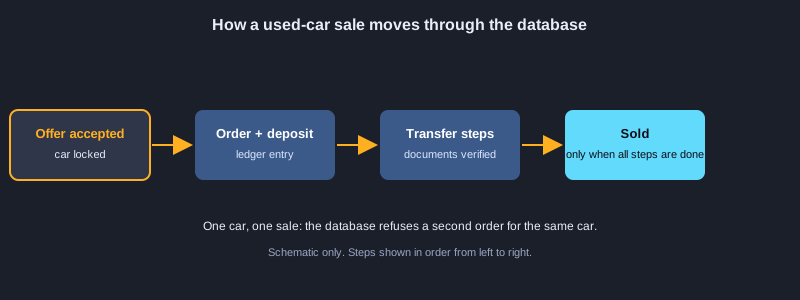
A used-car marketplace connects buyers, sellers and dealers around one asset that is expensive, unique and legally transferred. Every car has a VIN, a mileage history, an inspection report and a registration that must change owner correctly. This article designs the database for such a marketplace from an empty schema to a production-minded release in 100 examples. You will list the business rules, create tables for users and dealers, a car catalog with makes, models and trims, listings with photos, inspections and mileage readings, search indexes, offers and counter-offers, orders with a clear status flow, payments recorded as a ledger, the steps of an ownership transfer with documents, financing and warranties, reviews and fraud reports, and the transactions that keep all of this consistent under concurrent use. Each part includes sample data, what happens inside the transaction when it runs, and a mockup of the app screen that uses it. Honesty note: MySQL was not installed on the computer used to prepare this article, so none of the 100 examples were executed here. The SQL follows MySQL 8.4 syntax, but you should run each part yourself on a test database before you rely on it.
What you need
MySQL 8.4 (or Docker to run it in a container), a SQL client such as MySQL Workbench or the mysql command-line tool, and a basic understanding of tables, keys and joins. Use placeholder people, emails and VINs, never real customer data, and never paste real passwords, API keys or bank details into the scripts.
How to use an example
SQL examples run on MySQL 8.4 in a test database, in the order given. HTML examples are screen mockups that open in a browser. JSON examples show the API data shape, and bash examples use the mysql and curl commands.
Topic 1: Business Rules and Setup
Start with the rules, not the tables. Who may list a car, who may buy it, what must be true before a car goes live and what must never happen, such as selling the same car twice. The database enforces these rules so that a bug in the application cannot break them.
Actors and what they need
Buyers search, save favourites and make offers. Sellers list cars and answer offers. Dealers list many cars and carry a verified badge. Inspectors score cars, and admins review reports. Each role needs its own permissions and its own screens.
Rules the database must keep
A car can be sold to only one buyer at a time. A listing can go live only after a passing inspection. A deposit is held until the ownership transfer is complete. Every price and status change is recorded. Write these rules down first, then decide which ones CHECK constraints, foreign keys and transactions enforce.
Character set and the database
Create the database with utf8mb4 so that Thai text, emojis and names are stored exactly as typed. Use the same character set on every table, because mixed encodings cause garbled text and comparison bugs.
Illustrations
Example 1: Write the business rules first
Who does what, and which rules the database must enforce.
{
  "buyers": "search, favorite, make an offer, pay a deposit, buy",
  "sellers": "list a car with photos and a price, accept or reject offers",
  "dealers": "list many cars, get a verified badge after a document check",
  "rules": [
    "a car can be sold to one buyer only",
    "a deposit is held until the ownership transfer is done",
    "every price change and status change is recorded"
  ]
}
*This example was not run here because MySQL was not installed on the computer that prepared this article.*
Example 2: Create the database
Use utf8mb4 so Thai and emoji are stored correctly.
CREATE DATABASE IF NOT EXISTS carmarket
  CHARACTER SET utf8mb4
  COLLATE utf8mb4_unicode_ci;
USE carmarket;
*This example was not run here because MySQL was not installed on the computer that prepared this article.*
Example 3: A users table
One account table for buyers, sellers, dealers and staff.
CREATE TABLE users (
  id            BIGINT UNSIGNED AUTO_INCREMENT PRIMARY KEY,
  email         VARCHAR(190) NOT NULL UNIQUE,
  phone         VARCHAR(20)  NULL,
  password_hash CHAR(60)     NOT NULL,
  full_name     VARCHAR(120) NOT NULL,
  role          ENUM('buyer','seller','dealer','inspector','admin') NOT NULL DEFAULT 'buyer',
  is_active     TINYINT(1)   NOT NULL DEFAULT 1,
  created_at    TIMESTAMP    NOT NULL DEFAULT CURRENT_TIMESTAMP
) ENGINE=InnoDB;
*This example was not run here because MySQL was not installed on the computer that prepared this article.*
Example 4: Sample users
Fake accounts with placeholder password hashes.
INSERT INTO users (email, phone, password_hash, full_name, role) VALUES
  ('[email protected]', '0810000001', '$2b$12$exampleexampleexampleexampleexampleexampleexampleexa', 'Somchai Example', 'seller'),
  ('[email protected]',   '0810000002', '$2b$12$exampleexampleexampleexampleexampleexampleexampleexa', 'Malee Example',   'buyer'),
  ('[email protected]','0810000003', '$2b$12$exampleexampleexampleexampleexampleexampleexampleexa', 'Prime Auto Example', 'dealer'),
  ('[email protected]','0810000004','$2b$12$exampleexampleexampleexampleexampleexampleexampleexa', 'Inspector Example', 'inspector');
*This example was not run here because MySQL was not installed on the computer that prepared this article.*
Example 5: A dealers table
Business details kept apart from the login account.
CREATE TABLE dealers (
  id            BIGINT UNSIGNED AUTO_INCREMENT PRIMARY KEY,
  user_id       BIGINT UNSIGNED NOT NULL UNIQUE,
  business_name VARCHAR(160) NOT NULL,
  tax_id        CHAR(13)     NOT NULL UNIQUE,
  is_verified   TINYINT(1)   NOT NULL DEFAULT 0,
  FOREIGN KEY (user_id) REFERENCES users(id) ON DELETE CASCADE
) ENGINE=InnoDB;
*This example was not run here because MySQL was not installed on the computer that prepared this article.*
Example 6: A sample dealer
Link a verified business to its user account.
INSERT INTO dealers (user_id, business_name, tax_id, is_verified)
SELECT id, 'Prime Auto Example Co., Ltd.', '0105500000001', 1
FROM users WHERE email = '[email protected]';
*This example was not run here because MySQL was not installed on the computer that prepared this article.*
Topic 2: Users, Dealers and Addresses
Everyone who logs in has one row in users, with a role. Dealers have extra business details in their own table, and addresses let search filter cars by province. Keeping these separate makes each table small and each rule easy to check.
One account table with roles
The users table holds the email, the password hash and the role. A role such as seller, buyer, dealer, inspector or admin decides which screens and actions are allowed. Never store a plain password. Store only a bcrypt hash.
Dealers as a separate table
A dealer is a user with a registered business, so the business name and tax ID live in dealers and point to users with a foreign key. The is_verified flag is set only after staff check the documents, and only verified dealers show the badge.
Addresses and preferences
The province is stored on each address and on each listing, and it has an index so that a search for one province is fast. Buyer preferences such as a budget and a fuel type are kept apart so that they can change without touching the account.
Example 7: Addresses
Store locations so search can filter by province.
CREATE TABLE addresses (
  id           BIGINT UNSIGNED AUTO_INCREMENT PRIMARY KEY,
  user_id      BIGINT UNSIGNED NOT NULL,
  line1        VARCHAR(200) NOT NULL,
  district     VARCHAR(100) NOT NULL,
  province     VARCHAR(100) NOT NULL,
  postal_code  CHAR(5)      NOT NULL,
  FOREIGN KEY (user_id) REFERENCES users(id) ON DELETE CASCADE,
  INDEX idx_addresses_province (province)
) ENGINE=InnoDB;
*This example was not run here because MySQL was not installed on the computer that prepared this article.*
Example 8: A sample address
One address for a seller in Chonburi.
INSERT INTO addresses (user_id, line1, district, province, postal_code)
SELECT id, '99/1 Example Road', 'Mueang', 'Chonburi', '20000'
FROM users WHERE email = '[email protected]';
*This example was not run here because MySQL was not installed on the computer that prepared this article.*
Example 9: Buyer preferences
Remember a budget and a preferred fuel type.
CREATE TABLE buyer_preferences (
  user_id      BIGINT UNSIGNED PRIMARY KEY,
  max_budget   DECIMAL(12,2) NULL,
  preferred_fuel ENUM('petrol','diesel','hybrid','ev','lpg','cng') NULL,
  FOREIGN KEY (user_id) REFERENCES users(id) ON DELETE CASCADE
) ENGINE=InnoDB;
*This example was not run here because MySQL was not installed on the computer that prepared this article.*
Example 10: Login sessions
Expire sessions and remove them with the user.
CREATE TABLE sessions (
  id           CHAR(64) PRIMARY KEY,
  user_id      BIGINT UNSIGNED NOT NULL,
  expires_at   DATETIME NOT NULL,
  FOREIGN KEY (user_id) REFERENCES users(id) ON DELETE CASCADE,
  INDEX idx_sessions_expires (expires_at)
) ENGINE=InnoDB;
*This example was not run here because MySQL was not installed on the computer that prepared this article.*
Example 11: Car makes
One row per brand, with a unique name.
CREATE TABLE car_makes (
  id    SMALLINT UNSIGNED AUTO_INCREMENT PRIMARY KEY,
  name  VARCHAR(60) NOT NULL UNIQUE
) ENGINE=InnoDB;
INSERT INTO car_makes (name) VALUES ('Toyota'), ('Honda'), ('Mazda'), ('Isuzu'), ('Mitsubishi');
*This example was not run here because MySQL was not installed on the computer that prepared this article.*
Example 12: Car models
Each model belongs to exactly one make.
CREATE TABLE car_models (
  id           INT UNSIGNED AUTO_INCREMENT PRIMARY KEY,
  make_id      SMALLINT UNSIGNED NOT NULL,
  name         VARCHAR(80) NOT NULL,
  body_type    ENUM('sedan','hatchback','suv','pickup','van') NOT NULL,
  UNIQUE KEY uq_model (make_id, name),
  FOREIGN KEY (make_id) REFERENCES car_makes(id)
) ENGINE=InnoDB;
*This example was not run here because MySQL was not installed on the computer that prepared this article.*
Example 13: Sample models
Insert models with a join to the makes table.
INSERT INTO car_models (make_id, name, body_type)
SELECT m.id, x.name, x.body
FROM car_makes m
JOIN (SELECT 'Toyota' AS make, 'Camry' AS name, 'sedan' AS body
      UNION ALL SELECT 'Toyota', 'Yaris Ativ', 'sedan'
      UNION ALL SELECT 'Honda', 'City', 'sedan'
      UNION ALL SELECT 'Honda', 'CR-V', 'suv'
      UNION ALL SELECT 'Mazda', 'CX-5', 'suv'
      UNION ALL SELECT 'Isuzu', 'D-Max', 'pickup') x ON x.make = m.name;
*This example was not run here because MySQL was not installed on the computer that prepared this article.*
Example 14: Trims
The same model comes in versions with different engines.
CREATE TABLE car_trims (
  id            INT UNSIGNED AUTO_INCREMENT PRIMARY KEY,
  model_id      INT UNSIGNED NOT NULL,
  name          VARCHAR(80) NOT NULL,
  year_from     SMALLINT UNSIGNED NOT NULL,
  year_to       SMALLINT UNSIGNED NULL,
  engine_cc     SMALLINT UNSIGNED NOT NULL,
  fuel          ENUM('petrol','diesel','hybrid','ev','lpg','cng') NOT NULL,
  transmission  ENUM('auto','manual','cvt') NOT NULL,
  seats         TINYINT UNSIGNED NOT NULL DEFAULT 5,
  FOREIGN KEY (model_id) REFERENCES car_models(id),
  INDEX idx_trims_model_fuel (model_id, fuel)
) ENGINE=InnoDB;
*This example was not run here because MySQL was not installed on the computer that prepared this article.*
Topic 3: The Car Catalog: Makes, Models and Trims
A catalog keeps the facts about a model once instead of repeating them on every listing. A make has many models, a model has many trims, and a trim has the engine, fuel and gearbox that the buyer actually compares.
Make, model, trim
A make such as Toyota has models such as Camry. A trim such as G 2.5 is a version of that model with its own engine and gearbox. The same model can have several trims in different years, so year ranges belong on the trim.
Options and many-to-many links
Options such as a sunroof or a rear camera are not on every trim. A link table connects options to trims, so one option can appear on many trims and one trim can have many options.
Why the catalog matters
When a seller picks a trim, the engine, fuel and seat count come from the catalog. The seller cannot mistype them, and search can filter by fuel or gearbox reliably, because the values are stored as codes instead of free text.
Example 15: A catalog trim
Petrol automatic trim for one model year range.
INSERT INTO car_trims (model_id, name, year_from, year_to, engine_cc, fuel, transmission)
SELECT id, 'G 2.5', 2018, 2023, 2487, 'petrol', 'auto'
FROM car_models WHERE name = 'Camry';
*This example was not run here because MySQL was not installed on the computer that prepared this article.*
Example 16: A hybrid trim
Hybrid trim with a CVT transmission and no end year.
INSERT INTO car_trims (model_id, name, year_from, year_to, engine_cc, fuel, transmission)
SELECT id, 'Hybrid Premium', 2019, NULL, 1798, 'hybrid', 'cvt'
FROM car_models WHERE name = 'Camry';
*This example was not run here because MySQL was not installed on the computer that prepared this article.*
Example 17: Options
Sunroof, camera, lane assist and leather seats as codes.
CREATE TABLE car_options (
  id    SMALLINT UNSIGNED AUTO_INCREMENT PRIMARY KEY,
  code  VARCHAR(40) NOT NULL UNIQUE,
  label VARCHAR(80) NOT NULL
) ENGINE=InnoDB;
INSERT INTO car_options (code, label) VALUES
  ('sunroof', 'Sunroof'), ('rear_camera', 'Rear camera'), ('lane_assist', 'Lane assist'), ('leather', 'Leather seats');
*This example was not run here because MySQL was not installed on the computer that prepared this article.*
Example 18: Trim options
Link options to trims with a many-to-many table.
CREATE TABLE trim_options (
  trim_id   INT UNSIGNED NOT NULL,
  option_id SMALLINT UNSIGNED NOT NULL,
  PRIMARY KEY (trim_id, option_id),
  FOREIGN KEY (trim_id) REFERENCES car_trims(id) ON DELETE CASCADE,
  FOREIGN KEY (option_id) REFERENCES car_options(id)
) ENGINE=InnoDB;
*This example was not run here because MySQL was not installed on the computer that prepared this article.*
Example 19: Car listings
One row per physical car for sale, with CHECK rules.
CREATE TABLE car_listings (
  id            BIGINT UNSIGNED AUTO_INCREMENT PRIMARY KEY,
  seller_id     BIGINT UNSIGNED NOT NULL,
  trim_id       INT UNSIGNED NOT NULL,
  vin           CHAR(17) NOT NULL UNIQUE,
  plate         VARCHAR(20) NULL,
  year          SMALLINT UNSIGNED NOT NULL,
  mileage_km    INT UNSIGNED NOT NULL,
  color         VARCHAR(40) NOT NULL,
  asking_price  DECIMAL(12,2) NOT NULL,
  status        ENUM('draft','pending_review','active','reserved','sold','removed') NOT NULL DEFAULT 'draft',
  province      VARCHAR(100) NOT NULL,
  created_at    TIMESTAMP NOT NULL DEFAULT CURRENT_TIMESTAMP,
  updated_at    TIMESTAMP NOT NULL DEFAULT CURRENT_TIMESTAMP ON UPDATE CURRENT_TIMESTAMP,
  FOREIGN KEY (seller_id) REFERENCES users(id),
  FOREIGN KEY (trim_id) REFERENCES car_trims(id),
  CHECK (asking_price > 0),
  CHECK (mileage_km >= 0)
) ENGINE=InnoDB;
*This example was not run here because MySQL was not installed on the computer that prepared this article.*
Example 20: A sample active listing
A 2019 Camry for sale in Chonburi.
INSERT INTO car_listings (seller_id, trim_id, vin, plate, year, mileage_km, color, asking_price, status, province)
SELECT u.id, t.id, 'JTNB11HK103000001', 'กข 1234', 2019, 48250, 'White', 765000.00, 'active', 'Chonburi'
FROM users u, car_trims t
WHERE u.email = '[email protected]' AND t.name = 'G 2.5' AND t.year_from = 2018
LIMIT 1;
*This example was not run here because MySQL was not installed on the computer that prepared this article.*
Example 21: Car photos
Store photo URLs with a fixed display order.
CREATE TABLE car_images (
  id           BIGINT UNSIGNED AUTO_INCREMENT PRIMARY KEY,
  listing_id   BIGINT UNSIGNED NOT NULL,
  url          VARCHAR(500) NOT NULL,
  position     TINYINT UNSIGNED NOT NULL DEFAULT 0,
  FOREIGN KEY (listing_id) REFERENCES car_listings(id) ON DELETE CASCADE,
  UNIQUE KEY uq_image_position (listing_id, position)
) ENGINE=InnoDB;
*This example was not run here because MySQL was not installed on the computer that prepared this article.*
Example 22: Sample photos
Three photos for the first listing.
INSERT INTO car_images (listing_id, url, position) VALUES
  (1, 'https://cdn.example.com/cars/1/front.jpg', 0),
  (1, 'https://cdn.example.com/cars/1/side.jpg', 1),
  (1, 'https://cdn.example.com/cars/1/interior.jpg', 2);
*This example was not run here because MySQL was not installed on the computer that prepared this article.*
Topic 4: Listings and Photos
A listing is one physical car for sale. It has its own VIN, mileage, colour, price and status. Photos are a separate table with a fixed order, so the first photo is always the front view and the gallery loads in the same order every time.
One row per physical car
Each car has a unique VIN, so the same car cannot be listed twice. The status moves from draft to pending review, then to active, reserved, sold or removed. CHECK rules stop a negative price or negative mileage from being stored.
Changing a listing safely
Only the seller may change the price. Put the seller check in the same UPDATE statement as the change, so there is no gap between the check and the write. Move the status only along the allowed steps, and record each change.
Photos and the detail page
Store the photo URL and its position, not the image file. The detail page loads the car, the seller and the photos in one query, and the mockup shows how the result is laid out on a phone and on a desktop.
Example 23: A draft listing
A seller creates a car before it goes live.
INSERT INTO car_listings (seller_id, trim_id, vin, year, mileage_km, color, asking_price, status, province)
SELECT u.id, t.id, 'JTNB11HK103000002', 2020, 31000, 'Silver', 720000.00, 'draft', 'Bangkok'
FROM users u, car_trims t
WHERE u.email = '[email protected]' AND t.name = 'G 2.5'
LIMIT 1;
*This example was not run here because MySQL was not installed on the computer that prepared this article.*
Example 24: Change a price as the owner
Check the seller in the same statement.
UPDATE car_listings
SET asking_price = 745000.00
WHERE id = 2 AND seller_id = (SELECT id FROM users WHERE email = '[email protected]');
*This example was not run here because MySQL was not installed on the computer that prepared this article.*
Example 25: Move a listing forward
Allow a status change only from the step before.
UPDATE car_listings
SET status = 'pending_review'
WHERE id = 2 AND status = 'draft';
*This example was not run here because MySQL was not installed on the computer that prepared this article.*
Example 26: Active listings in a province
Join the catalog to show make, model and trim.
SELECT l.id, l.year, l.mileage_km, l.asking_price, t.name AS trim, m.name AS model, mk.name AS make
FROM car_listings l
JOIN car_trims t  ON t.id = l.trim_id
JOIN car_models m ON m.id = t.model_id
JOIN car_makes mk ON mk.id = m.make_id
WHERE l.status = 'active' AND l.province = 'Chonburi'
ORDER BY l.asking_price;
*This example was not run here because MySQL was not installed on the computer that prepared this article.*
Example 27: The listing detail page
Load the car, its photos and its seller in one query.
SELECT l.*, u.full_name AS seller_name, GROUP_CONCAT(i.url ORDER BY i.position) AS photos
FROM car_listings l
JOIN users u ON u.id = l.seller_id
LEFT JOIN car_images i ON i.listing_id = l.id
WHERE l.id = 1
GROUP BY l.id;
*This example was not run here because MySQL was not installed on the computer that prepared this article.*
Example 28: Mockup: the search card
The car card with price, specs and an offer button.
<article class="car-card">
  <img src="https://cdn.example.com/cars/1/front.jpg" alt="Toyota Camry 2019 white">
  <h3>Toyota Camry G 2.5 (2019)</h3>
  <p class="meta">48,250 km · Auto · Petrol · Chonburi</p>
  <p class="price">฿765,000</p>
  <button>Make an offer</button>
  <button class="icon" aria-label="Save to favorites">♡</button>
</article>
*This example was not run here because MySQL was not installed on the computer that prepared this article.*
Example 29: Mockup: the detail page
Gallery, summary and actions on one screen.
<main class="detail">
  <section class="gallery">
    <img src="front.jpg" alt="Front view">
    <div class="thumbs"><img src="side.jpg" alt="Side view"><img src="interior.jpg" alt="Interior"></div>
  </section>
  <aside class="summary">
    <h1>Toyota Camry G 2.5 (2019)</h1>
    <p class="price">฿765,000</p>
    <ul>
      <li>Mileage: 48,250 km</li>
      <li>Color: White</li>
      <li>Province: Chonburi</li>
      <li>Inspection score: <strong>4.5 / 5</strong></li>
    </ul>
    <button class="primary">Make an offer</button>
    <button>Ask the seller</button>
  </aside>
</main>
*This example was not run here because MySQL was not installed on the computer that prepared this article.*
Example 30: Mockup: colours and spacing
Design tokens as CSS variables.
<style>
  :root {
    --brand: #1f5fbf;
    --ink: #1b1f2a;
    --muted: #6b7280;
    --radius: 12px;
    --gap: 16px;
  }
  .car-card { border: 1px solid #e5e7eb; border-radius: var(--radius); padding: var(--gap); }
  .price { color: var(--brand); font-size: 1.25rem; font-weight: 700; }
  .meta { color: var(--muted); }
</style>
*This example was not run here because MySQL was not installed on the computer that prepared this article.*
Topic 5: Inspections and Condition
A used car is only as good as its condition. An inspector scores the car, grades each part and attaches a report. The listing goes live only when the inspection passes, so buyers see the same facts that the inspector recorded.
The inspection and its items
An inspection has an overall score from 0 to 5 and a PDF report. Each part, such as the engine, the brakes or the tyres, gets its own row with a grade of good, fair, repair or replace. The grades explain the score, so a buyer can see where the problems are.
Mileage readings
Keep every mileage reading, from the seller, the inspector and the service record. If a new reading is lower than an older one, the odometer may have been rolled back, so the system flags the listing for review instead of showing a wrong number.
Publishing after the check
The listing moves to active only when an inspection with a score of at least 3.0 exists. The rule lives in the database as well as in the application, so no code path can publish an uninspected car.
Example 31: Inspections
A certified inspector scores each car.
CREATE TABLE inspections (
  id             BIGINT UNSIGNED AUTO_INCREMENT PRIMARY KEY,
  listing_id     BIGINT UNSIGNED NOT NULL,
  inspector_id   BIGINT UNSIGNED NOT NULL,
  overall_score  DECIMAL(2,1) NOT NULL,
  report_url     VARCHAR(500) NULL,
  inspected_at   DATETIME NOT NULL,
  FOREIGN KEY (listing_id) REFERENCES car_listings(id),
  FOREIGN KEY (inspector_id) REFERENCES users(id),
  CHECK (overall_score BETWEEN 0 AND 5)
) ENGINE=InnoDB;
*This example was not run here because MySQL was not installed on the computer that prepared this article.*
Example 32: A sample inspection
Score 4.5 out of 5 with a PDF report.
INSERT INTO inspections (listing_id, inspector_id, overall_score, report_url, inspected_at)
SELECT 1, u.id, 4.5, 'https://cdn.example.com/reports/1.pdf', NOW()
FROM users u WHERE u.email = '[email protected]';
*This example was not run here because MySQL was not installed on the computer that prepared this article.*
Example 33: Inspection items
Grade each part as good, fair, repair or replace.
CREATE TABLE inspection_items (
  id             BIGINT UNSIGNED AUTO_INCREMENT PRIMARY KEY,
  inspection_id  BIGINT UNSIGNED NOT NULL,
  part           VARCHAR(60) NOT NULL,
  grade          ENUM('good','fair','repair','replace') NOT NULL,
  note           VARCHAR(255) NULL,
  FOREIGN KEY (inspection_id) REFERENCES inspections(id) ON DELETE CASCADE
) ENGINE=InnoDB;
*This example was not run here because MySQL was not installed on the computer that prepared this article.*
Example 34: Sample inspection items
Brakes at 40 percent and a scratch on the door.
INSERT INTO inspection_items (inspection_id, part, grade, note) VALUES
  (1, 'engine', 'good', 'No leaks'),
  (1, 'brakes', 'fair', 'Front pads at 40 percent'),
  (1, 'tyres',  'good', 'Above 4 mm tread'),
  (1, 'paint',  'repair', 'Small scratch on the rear door');
*This example was not run here because MySQL was not installed on the computer that prepared this article.*
Example 35: Find the parts that need repair
Count the problems per listing.
SELECT i.listing_id, COUNT(*) AS problems
FROM inspection_items ii
JOIN inspections i ON i.id = ii.inspection_id
WHERE ii.grade IN ('repair','replace')
GROUP BY i.listing_id;
*This example was not run here because MySQL was not installed on the computer that prepared this article.*
Example 36: Publish only after inspection
A listing goes live only with a passing score.
UPDATE car_listings l
SET l.status = 'active'
WHERE l.id = 2
  AND l.status = 'pending_review'
  AND EXISTS (SELECT 1 FROM inspections i WHERE i.listing_id = l.id AND i.overall_score >= 3.0);
*This example was not run here because MySQL was not installed on the computer that prepared this article.*
Example 37: Mockup: the inspection report
The grades shown on the listing page.
<section class="inspection">
  <h2>Inspection report</h2>
  <p>Overall score <strong>4.5 / 5</strong> · Inspected 12 Oct 2026</p>
  <ul class="grades">
    <li class="good">Engine: good</li>
    <li class="fair">Brakes: fair, front pads at 40%</li>
    <li class="good">Tyres: good</li>
    <li class="repair">Paint: small scratch on the rear door</li>
  </ul>
  <a href="https://cdn.example.com/reports/1.pdf">Download the full PDF</a>
</section>
*This example was not run here because MySQL was not installed on the computer that prepared this article.*
Example 38: Mileage readings
Keep every reading to catch a rolled-back odometer.
CREATE TABLE mileage_readings (
  id           BIGINT UNSIGNED AUTO_INCREMENT PRIMARY KEY,
  listing_id   BIGINT UNSIGNED NOT NULL,
  reading_km   INT UNSIGNED NOT NULL,
  source       ENUM('seller','inspector','service_record') NOT NULL,
  read_at      DATETIME NOT NULL,
  FOREIGN KEY (listing_id) REFERENCES car_listings(id) ON DELETE CASCADE,
  INDEX idx_mileage_listing_time (listing_id, read_at)
) ENGINE=InnoDB;
*This example was not run here because MySQL was not installed on the computer that prepared this article.*
Topic 6: Search, Filters and Performance
Buyers search by province, price, year, fuel and gearbox, and expect results in well under a second. Indexes on the columns that appear in WHERE and ORDER BY make this possible, and keyset pagination keeps deep pages fast.
Indexes that match the query
A composite index on status, province, price and year serves the common search. The column order matters: put the equality columns first and the range column last. EXPLAIN shows whether the index is used, and EXPLAIN ANALYZE shows the real timing.
Full-text and joined filters
A FULLTEXT index on the description supports words such as sunroof or leather. Fuel and gearbox live on the trims table, so the search joins that table, and the join uses the trim index.
Keyset pagination and saved searches
OFFSET reads and throws away every earlier row, so deep pages get slower. Keyset pagination remembers the last created time and id and continues from there. A saved search stores the filters as JSON so that the buyer can receive matching new listings.
Example 39: A search index
Index status, province, price and year together.
CREATE INDEX idx_listings_search
  ON car_listings (status, province, asking_price, year);
EXPLAIN SELECT id, asking_price FROM car_listings
WHERE status = 'active' AND province = 'Chonburi' AND asking_price BETWEEN 500000 AND 900000;
*This example was not run here because MySQL was not installed on the computer that prepared this article.*
Example 40: Full-text search
Search the description with MATCH AGAINST.
ALTER TABLE car_listings ADD COLUMN description TEXT NULL,
  ADD FULLTEXT INDEX ft_listings_description (description);
SELECT id, asking_price FROM car_listings
WHERE status = 'active' AND MATCH(description) AGAINST ('sunroof leather' IN NATURAL LANGUAGE MODE);
*This example was not run here because MySQL was not installed on the computer that prepared this article.*
Example 41: Filter by fuel and gearbox
Join the trims table for hybrid CVT cars.
SELECT l.id, l.asking_price, t.fuel, t.transmission
FROM car_listings l
JOIN car_trims t ON t.id = l.trim_id
WHERE l.status = 'active' AND t.fuel = 'hybrid' AND t.transmission = 'cvt'
ORDER BY l.asking_price
LIMIT 20;
*This example was not run here because MySQL was not installed on the computer that prepared this article.*
Example 42: Keyset pagination
Page through results without an expensive OFFSET.
SELECT id, asking_price, created_at
FROM car_listings
WHERE status = 'active'
  AND (created_at, id) < ('2026-10-01 10:00:00', 1000)
ORDER BY created_at DESC, id DESC
LIMIT 20;
*This example was not run here because MySQL was not installed on the computer that prepared this article.*
Example 43: Saved searches
Store the filters a buyer picked as JSON.
CREATE TABLE saved_searches (
  id          BIGINT UNSIGNED AUTO_INCREMENT PRIMARY KEY,
  user_id     BIGINT UNSIGNED NOT NULL,
  filters     JSON NOT NULL,
  created_at  TIMESTAMP NOT NULL DEFAULT CURRENT_TIMESTAMP,
  FOREIGN KEY (user_id) REFERENCES users(id) ON DELETE CASCADE
) ENGINE=InnoDB;
INSERT INTO saved_searches (user_id, filters)
SELECT id, JSON_OBJECT('make','Toyota','fuel','hybrid','max_price',900000)
FROM users WHERE email = '[email protected]';
*This example was not run here because MySQL was not installed on the computer that prepared this article.*
Example 44: Mockup: the filter sidebar
Make, price, year and fuel filters with a count button.
<aside class="filters">
  <h3>Filters</h3>
  <label>Make <select><option>Toyota</option><option>Honda</option></select></label>
  <label>Price (THB) <input type="range" min="100000" max="2000000"></label>
  <label>Year from <input type="number" value="2018"></label>
  <fieldset>
    <legend>Fuel</legend>
    <label><input type="checkbox" checked> Hybrid</label>
    <label><input type="checkbox"> Petrol</label>
  </fieldset>
  <button>Show 24 cars</button>
</aside>
*This example was not run here because MySQL was not installed on the computer that prepared this article.*
Example 45: Count cars per make
Show the numbers next to each filter option.
SELECT mk.name AS make, COUNT(*) AS cars
FROM car_listings l
JOIN car_trims t ON t.id = l.trim_id
JOIN car_models m ON m.id = t.model_id
JOIN car_makes mk ON mk.id = m.make_id
WHERE l.status = 'active'
GROUP BY mk.name
ORDER BY cars DESC;
*This example was not run here because MySQL was not installed on the computer that prepared this article.*
Example 46: Check the query plan
Use EXPLAIN ANALYZE to see whether the index is used.
EXPLAIN ANALYZE
SELECT id FROM car_listings
WHERE status = 'active' AND province = 'Chonburi'
ORDER BY asking_price
LIMIT 20;
*This example was not run here because MySQL was not installed on the computer that prepared this article.*
Topic 7: Offers and Bidding
An offer is a buyer's proposal for a car at a price, with an expiry time. The asking price stays the same, so several buyers can make offers, and the seller can accept one, reject the others, or counter with a new price.
Offers as their own table
An offer is a row with the listing, the buyer, the amount, a status and an expiry time. A seller's counter-offer is a new row that points to the buyer's offer, so the full negotiation stays visible in the history.
Minimum prices and checks
A seller may set a minimum price. Compare the offer with the minimum before showing it to the seller as acceptable. Store the decision with a reason, so disputes can be answered later.
Expiry and the mockup
A scheduled job marks old offers as expired. The make-an-offer dialog shows the expiry time and explains what the seller can do, so the buyer knows what happens next.
Example 47: Offers
A buyer proposes a price; the asking price stays unchanged.
CREATE TABLE offers (
  id           BIGINT UNSIGNED AUTO_INCREMENT PRIMARY KEY,
  listing_id   BIGINT UNSIGNED NOT NULL,
  buyer_id     BIGINT UNSIGNED NOT NULL,
  amount       DECIMAL(12,2) NOT NULL,
  status       ENUM('open','accepted','rejected','withdrawn','expired') NOT NULL DEFAULT 'open',
  expires_at   DATETIME NOT NULL,
  created_at   TIMESTAMP NOT NULL DEFAULT CURRENT_TIMESTAMP,
  FOREIGN KEY (listing_id) REFERENCES car_listings(id),
  FOREIGN KEY (buyer_id) REFERENCES users(id),
  INDEX idx_offers_listing_status (listing_id, status),
  CHECK (amount > 0)
) ENGINE=InnoDB;
*This example was not run here because MySQL was not installed on the computer that prepared this article.*
Example 48: A sample offer
A buyer offers 720,000 baht for 48 hours.
INSERT INTO offers (listing_id, buyer_id, amount, expires_at)
SELECT 1, u.id, 720000.00, DATE_ADD(NOW(), INTERVAL 48 HOUR)
FROM users u WHERE u.email = '[email protected]';
*This example was not run here because MySQL was not installed on the computer that prepared this article.*
Example 49: Mockup: the make-an-offer dialog
Amount field, expiry note and send button.
<dialog id="offer">
  <form method="dialog">
    <h2>Make an offer</h2>
    <p>Asking price: ฿765,000</p>
    <label>Your offer (THB)
      <input type="number" min="1" step="1000" value="720000" required>
    </label>
    <p class="hint">The offer expires in 48 hours. The seller can accept, reject or counter.</p>
    <button value="cancel">Cancel</button>
    <button value="send" class="primary">Send offer</button>
  </form>
</dialog>
*This example was not run here because MySQL was not installed on the computer that prepared this article.*
Example 50: Reject a low offer
Compare the offer with the minimum the seller allows.
ALTER TABLE car_listings ADD COLUMN min_offer DECIMAL(12,2) NULL;
UPDATE car_listings SET min_offer = 700000.00 WHERE id = 1;
SELECT CASE WHEN 650000.00 < min_offer THEN 'reject: below minimum' ELSE 'accept for review' END AS decision
FROM car_listings WHERE id = 1;
*This example was not run here because MySQL was not installed on the computer that prepared this article.*
Example 51: Accept an offer in one transaction
Lock the car, accept the offer and reserve the listing together.
START TRANSACTION;
SELECT id, status FROM car_listings WHERE id = 1 FOR UPDATE;
UPDATE offers SET status = 'accepted' WHERE id = 1 AND status = 'open';
UPDATE car_listings SET status = 'reserved' WHERE id = 1 AND status = 'active';
COMMIT;
*This example was not run here because MySQL was not installed on the computer that prepared this article.*
Example 52: Reject the other offers
When one offer wins, the others for the same car close.
UPDATE offers
SET status = 'rejected'
WHERE listing_id = 1 AND status = 'open' AND id <> 1;
*This example was not run here because MySQL was not installed on the computer that prepared this article.*
Example 53: Expire old offers
A scheduled job closes offers past their deadline.
UPDATE offers
SET status = 'expired'
WHERE status = 'open' AND expires_at < NOW();
*This example was not run here because MySQL was not installed on the computer that prepared this article.*
Example 54: A counter-offer from the seller
Store the seller's counter as a new offer linked to the buyer's.
ALTER TABLE offers ADD COLUMN parent_offer_id BIGINT UNSIGNED NULL,
  ADD COLUMN made_by ENUM('buyer','seller') NOT NULL DEFAULT 'buyer';
INSERT INTO offers (listing_id, buyer_id, amount, expires_at, parent_offer_id, made_by)
SELECT 1, buyer_id, 735000.00, DATE_ADD(NOW(), INTERVAL 24 HOUR), id, 'seller'
FROM offers WHERE id = 1;
*This example was not run here because MySQL was not installed on the computer that prepared this article.*
Topic 8: Orders and the Status Flow
When a seller accepts an offer, an order is created. The order moves through a fixed set of statuses, and every change is recorded, so support staff can always see how a sale reached its current state.
One confirmed order per car
The listing_id column has a UNIQUE constraint on orders, so the database refuses a second order for the same car, even if two requests arrive at the same moment. The deposit due is calculated from the final price, here 10 percent.
Creating the order in the same transaction
Accepting the offer, reserving the listing and inserting the order happen inside one transaction. If any step fails, all of them roll back, so a car is never reserved without an order or an order without a reserved car.
Status history and allowed steps
Each change to the order is written to a history table with the old status, the new status, the actor and the time. The UPDATE checks the current status, so an order cannot jump from pending deposit straight to completed.
Example 55: An orders table
One confirmed purchase per car, with the final price and deposit.
CREATE TABLE orders (
  id            BIGINT UNSIGNED AUTO_INCREMENT PRIMARY KEY,
  listing_id    BIGINT UNSIGNED NOT NULL UNIQUE,
  buyer_id      BIGINT UNSIGNED NOT NULL,
  seller_id     BIGINT UNSIGNED NOT NULL,
  final_price   DECIMAL(12,2) NOT NULL,
  deposit_due   DECIMAL(12,2) NOT NULL,
  status        ENUM('pending_deposit','deposit_paid','documents_pending','completed','cancelled','refunded') NOT NULL DEFAULT 'pending_deposit',
  created_at    TIMESTAMP NOT NULL DEFAULT CURRENT_TIMESTAMP,
  FOREIGN KEY (listing_id) REFERENCES car_listings(id),
  FOREIGN KEY (buyer_id) REFERENCES users(id),
  FOREIGN KEY (seller_id) REFERENCES users(id),
  CHECK (final_price > 0),
  CHECK (deposit_due <= final_price)
) ENGINE=InnoDB;
*This example was not run here because MySQL was not installed on the computer that prepared this article.*
Example 56: Create the order from the accepted offer
Insert the order inside the same transaction as the acceptance.
START TRANSACTION;
SELECT status FROM car_listings WHERE id = 1 FOR UPDATE;
INSERT INTO orders (listing_id, buyer_id, seller_id, final_price, deposit_due)
SELECT o.listing_id, o.buyer_id, l.seller_id, o.amount, ROUND(o.amount * 0.10, 2)
FROM offers o JOIN car_listings l ON l.id = o.listing_id
WHERE o.id = 1 AND o.status = 'accepted';
COMMIT;
*This example was not run here because MySQL was not installed on the computer that prepared this article.*
Example 57: Order status history
Record every status change with who made it and when.
CREATE TABLE order_status_history (
  id          BIGINT UNSIGNED AUTO_INCREMENT PRIMARY KEY,
  order_id    BIGINT UNSIGNED NOT NULL,
  from_status VARCHAR(30) NULL,
  to_status   VARCHAR(30) NOT NULL,
  actor_id    BIGINT UNSIGNED NULL,
  changed_at  TIMESTAMP NOT NULL DEFAULT CURRENT_TIMESTAMP,
  FOREIGN KEY (order_id) REFERENCES orders(id) ON DELETE CASCADE,
  INDEX idx_history_order (order_id, changed_at)
) ENGINE=InnoDB;
*This example was not run here because MySQL was not installed on the computer that prepared this article.*
Example 58: Move the order one step
Change the status only from the expected step.
UPDATE orders
SET status = 'deposit_paid'
WHERE id = 1 AND status = 'pending_deposit';
INSERT INTO order_status_history (order_id, from_status, to_status, actor_id)
VALUES (1, 'pending_deposit', 'deposit_paid', 2);
*This example was not run here because MySQL was not installed on the computer that prepared this article.*
Example 59: Cancel an order and release the car
Return the listing to active when the order is cancelled early.
START TRANSACTION;
UPDATE orders SET status = 'cancelled' WHERE id = 1 AND status IN ('pending_deposit','deposit_paid');
UPDATE car_listings SET status = 'active' WHERE id = 1 AND status = 'reserved';
COMMIT;
*This example was not run here because MySQL was not installed on the computer that prepared this article.*
Example 60: Mockup: the order progress page
Steps from accepted offer to completed sale.
<section class="order">
  <h2>Order #1 · Toyota Camry G 2.5 (2019)</h2>
  <ol class="steps">
    <li class="done">Offer accepted</li>
    <li class="done">Deposit paid ฿76,500</li>
    <li class="current">Documents in progress</li>
    <li>Ownership transferred</li>
    <li>Completed</li>
  </ol>
  <button>Cancel order</button>
  <p class="hint">You can cancel until the documents step starts.</p>
</section>
*This example was not run here because MySQL was not installed on the computer that prepared this article.*
Topic 9: Payments as a Ledger
Money is never stored as a single number that gets edited. Each payment, refund and balance is a row in a ledger. The totals are calculated from the rows, so the history is always complete and the numbers always add up.
One row per money movement
A payment has a kind, such as deposit, balance or refund, an amount, a provider reference and a status. The provider reference is UNIQUE, so the same payment cannot be recorded twice, and it links the row to the bank or payment provider's own record.
Webhooks that arrive twice
Payment providers may send the same notification more than once. The update changes the status only when the row is still pending, so the second message changes nothing. This makes the handler safe to retry.
Refunds and the net paid
A refund is a new row, never a negative payment that overwrites the old one. The net paid for an order is the sum of succeeded payments minus succeeded refunds, and a release check stops the release if the net paid ever exceeds the final price.
Example 61: A payments table
Every money movement is a row with a provider reference.
CREATE TABLE payments (
  id            BIGINT UNSIGNED AUTO_INCREMENT PRIMARY KEY,
  order_id      BIGINT UNSIGNED NOT NULL,
  kind          ENUM('deposit','balance','refund') NOT NULL,
  amount        DECIMAL(12,2) NOT NULL,
  provider      VARCHAR(40) NOT NULL,
  provider_ref  VARCHAR(100) NOT NULL UNIQUE,
  status        ENUM('pending','succeeded','failed') NOT NULL DEFAULT 'pending',
  created_at    TIMESTAMP NOT NULL DEFAULT CURRENT_TIMESTAMP,
  FOREIGN KEY (order_id) REFERENCES orders(id),
  CHECK (amount > 0)
) ENGINE=InnoDB;
*This example was not run here because MySQL was not installed on the computer that prepared this article.*
Example 62: Record a deposit before the payment call
Store the payment as pending first, then update it.
INSERT INTO payments (order_id, kind, amount, provider, provider_ref, status)
VALUES (1, 'deposit', 76500.00, 'example-pay', 'ref-0001', 'pending');
*This example was not run here because MySQL was not installed on the computer that prepared this article.*
Example 63: Handle a repeated payment webhook
Update once, so a duplicate message changes nothing.
UPDATE payments
SET status = 'succeeded'
WHERE provider_ref = 'ref-0001' AND status = 'pending';
-- 0 rows changed on the second call, so the order is not moved twice
UPDATE orders SET status = 'deposit_paid'
WHERE id = 1 AND status = 'pending_deposit'
  AND (SELECT status FROM payments WHERE provider_ref = 'ref-0001') = 'succeeded';
*This example was not run here because MySQL was not installed on the computer that prepared this article.*
Example 64: Net paid per order
Add deposits and balances, subtract refunds, from the ledger.
SELECT o.id,
  o.final_price,
  COALESCE(SUM(CASE WHEN p.kind IN ('deposit','balance') AND p.status = 'succeeded' THEN p.amount END), 0)
  - COALESCE(SUM(CASE WHEN p.kind = 'refund' AND p.status = 'succeeded' THEN p.amount END), 0) AS net_paid
FROM orders o
LEFT JOIN payments p ON p.order_id = o.id
WHERE o.id = 1
GROUP BY o.id, o.final_price;
*This example was not run here because MySQL was not installed on the computer that prepared this article.*
Example 65: Refund a deposit
Insert a refund row linked to the original deposit.
INSERT INTO payments (order_id, kind, amount, provider, provider_ref, status)
SELECT order_id, 'refund', amount, provider, CONCAT('refund-', provider_ref), 'pending'
FROM payments
WHERE order_id = 1 AND kind = 'deposit' AND status = 'succeeded';
*This example was not run here because MySQL was not installed on the computer that prepared this article.*
Example 66: Mockup: the deposit payment screen
Deposit amount, hold note and pay button.
<form class="payment">
  <h2>Pay the deposit</h2>
  <p>Deposit (10%): <strong>฿76,500</strong></p>
  <p class="hint">Held until the ownership transfer is done. Refunded if the sale fails.</p>
  <label>Card number <input name="card" autocomplete="cc-number" placeholder="•••• •••• •••• ••••"></label>
  <button type="submit" class="primary">Pay ฿76,500</button>
</form>
*This example was not run here because MySQL was not installed on the computer that prepared this article.*
Topic 10: Ownership Transfer and Documents
In many countries a car changes owner only at the transport office, with signed papers. The database models this as a list of steps, each with its documents, so the buyer can see exactly what is left and staff can verify every document before the car is marked as sold.
Steps as rows
Each transfer step has a number, a name and a status of todo, doing, done or blocked. The order is completed only when every step is done, which is checked in the same transaction that marks the car as sold.
Documents and verification
Each document has a type, such as the sale agreement or the registration book, a file URL, the uploader and the time it was verified. A step can be marked done only when its document is verified, so an unverified photo of a form is never enough.
The checklist for the buyer
The mockup shows the buyer a checklist with ticks and an upload button. The checklist is generated from the steps table, so the screen and the database always agree about what is complete.
Example 67: Transfer steps
One row per step of the ownership change.
CREATE TABLE transfer_steps (
  id          BIGINT UNSIGNED AUTO_INCREMENT PRIMARY KEY,
  order_id    BIGINT UNSIGNED NOT NULL,
  step_no     TINYINT UNSIGNED NOT NULL,
  name        VARCHAR(80) NOT NULL,
  status      ENUM('todo','doing','done','blocked') NOT NULL DEFAULT 'todo',
  done_at     DATETIME NULL,
  UNIQUE KEY uq_step (order_id, step_no),
  FOREIGN KEY (order_id) REFERENCES orders(id) ON DELETE CASCADE
) ENGINE=InnoDB;
*This example was not run here because MySQL was not installed on the computer that prepared this article.*
Example 68: Standard steps for an order
Five steps from the sale agreement to the handover of keys.
INSERT INTO transfer_steps (order_id, step_no, name) VALUES
  (1, 1, 'Seller signs the sale agreement'),
  (1, 2, 'Buyer checks the registration book'),
  (1, 3, 'Land Transport Office appointment booked'),
  (1, 4, 'Ownership changed at the office'),
  (1, 5, 'Balance paid and keys handed over');
*This example was not run here because MySQL was not installed on the computer that prepared this article.*
Example 69: Documents
Store each uploaded document with its type and verification time.
CREATE TABLE documents (
  id            BIGINT UNSIGNED AUTO_INCREMENT PRIMARY KEY,
  order_id      BIGINT UNSIGNED NOT NULL,
  doc_type      ENUM('sale_agreement','registration_book','id_card','tax_receipt','transfer_form') NOT NULL,
  file_url      VARCHAR(500) NOT NULL,
  uploaded_by   BIGINT UNSIGNED NOT NULL,
  verified_at   DATETIME NULL,
  FOREIGN KEY (order_id) REFERENCES orders(id) ON DELETE CASCADE,
  FOREIGN KEY (uploaded_by) REFERENCES users(id)
) ENGINE=InnoDB;
*This example was not run here because MySQL was not installed on the computer that prepared this article.*
Example 70: Complete a step only with a verified document
Check the document before marking the step done.
UPDATE transfer_steps s
SET s.status = 'done', s.done_at = NOW()
WHERE s.order_id = 1 AND s.step_no = 1
  AND EXISTS (SELECT 1 FROM documents d
              WHERE d.order_id = s.order_id AND d.doc_type = 'sale_agreement' AND d.verified_at IS NOT NULL);
*This example was not run here because MySQL was not installed on the computer that prepared this article.*
Example 71: Mockup: the transfer checklist
Checkboxes for each step with an upload button.
<ul class="checklist">
  <li><input type="checkbox" checked disabled> Seller signed the sale agreement</li>
  <li><input type="checkbox" checked disabled> Registration book checked</li>
  <li><input type="checkbox"> Book an appointment at the office</li>
  <li><input type="checkbox"> Ownership changed</li>
  <li><input type="checkbox"> Balance paid</li>
</ul>
<button>Upload a document</button>
*This example was not run here because MySQL was not installed on the computer that prepared this article.*
Example 72: Change the ownership at the end
Complete the order only when every step is done.
START TRANSACTION;
UPDATE transfer_steps SET status = 'done', done_at = NOW()
WHERE order_id = 1 AND step_no = 4 AND status = 'doing';
UPDATE orders SET status = 'completed'
WHERE id = 1 AND status = 'documents_pending'
  AND NOT EXISTS (SELECT 1 FROM transfer_steps WHERE order_id = 1 AND status <> 'done');
UPDATE car_listings SET status = 'sold' WHERE id = 1 AND status = 'reserved';
COMMIT;
*This example was not run here because MySQL was not installed on the computer that prepared this article.*
Topic 11: Financing and Warranties
Most buyers do not pay the full price in cash. A bank loan is an application linked to the order, and a warranty protects the buyer for a period of months or kilometres after the sale.
Financing applications
A financing application belongs to an order and records the bank, the amount, the term and the status: submitted, approved, declined or withdrawn. The term is limited by a CHECK rule, such as 6 to 84 months, so impossible loans cannot be entered.
Warranties from the sale date
A warranty is created only when the order is completed. It stores the months and the kilometre limit, plus the start date. Checking whether it still applies compares both the date and the mileage, so the buyer gets the correct answer.
Showing the offer clearly
The order page shows the monthly payment as an estimate and the warranty terms in plain words. Clear information reduces disputes after the sale, which is cheaper than handling complaints later.
Example 73: Financing applications
A buyer asks a bank for a loan on the purchase.
CREATE TABLE financing_applications (
  id              BIGINT UNSIGNED AUTO_INCREMENT PRIMARY KEY,
  order_id        BIGINT UNSIGNED NOT NULL,
  bank            VARCHAR(80) NOT NULL,
  amount          DECIMAL(12,2) NOT NULL,
  term_months     SMALLINT UNSIGNED NOT NULL,
  status          ENUM('submitted','approved','declined','withdrawn') NOT NULL DEFAULT 'submitted',
  FOREIGN KEY (order_id) REFERENCES orders(id),
  CHECK (term_months BETWEEN 6 AND 84)
) ENGINE=InnoDB;
*This example was not run here because MySQL was not installed on the computer that prepared this article.*
Example 74: A sample application
A 60-month loan request for 600,000 baht.
INSERT INTO financing_applications (order_id, bank, amount, term_months)
VALUES (1, 'Example Bank', 600000.00, 60);
*This example was not run here because MySQL was not installed on the computer that prepared this article.*
Example 75: Warranties
One warranty per order, with months and kilometres.
CREATE TABLE warranties (
  id           BIGINT UNSIGNED AUTO_INCREMENT PRIMARY KEY,
  order_id     BIGINT UNSIGNED NOT NULL UNIQUE,
  months       SMALLINT UNSIGNED NOT NULL,
  km_limit     INT UNSIGNED NOT NULL,
  starts_on    DATE NOT NULL,
  FOREIGN KEY (order_id) REFERENCES orders(id)
) ENGINE=InnoDB;
*This example was not run here because MySQL was not installed on the computer that prepared this article.*
Example 76: Start the warranty when the sale completes
Create the warranty from the completed order.
INSERT INTO warranties (order_id, months, km_limit, starts_on)
SELECT id, 6, 10000, CURDATE() FROM orders WHERE id = 1 AND status = 'completed';
*This example was not run here because MySQL was not installed on the computer that prepared this article.*
Example 77: Check whether the warranty is still valid
Compare the date and the mileage with the limits.
SELECT w.id,
  (CURDATE() < DATE_ADD(w.starts_on, INTERVAL w.months MONTH)) AND (48250 + 1500 <= 48250 + w.km_limit) AS still_valid
FROM warranties w WHERE w.order_id = 1;
*This example was not run here because MySQL was not installed on the computer that prepared this article.*
Example 78: Mockup: the loan and warranty box
Estimated payment and warranty terms on the order page.
<aside class="box">
  <h3>Pay with a loan</h3>
  <p>Example Bank · 60 months</p>
  <p>Monthly payment is an estimate: <strong>฿11,800</strong></p>
  <p class="status">Status: Submitted</p>
  <h3>Warranty</h3>
  <p>6 months or 10,000 km, whichever comes first</p>
</aside>
*This example was not run here because MySQL was not installed on the computer that prepared this article.*
Topic 12: Reviews, Reports and Trust
A marketplace works only when people trust it. Reviews come after a completed sale, reports let users flag problems, and the rules that hide listings must be clear and fair, so that one angry user cannot hide a good car.
Reviews after the sale
A review is allowed only for a completed order, and each person may review once per order. Ratings are limited to 1 to 5 by a CHECK rule. The average rating is shown only after three reviews, so one review cannot make a seller look perfect or terrible.
Reports from several people
A report says what is wrong, such as a fake price or a wrong mileage. Count distinct reporters before hiding a listing, so one person cannot hide a car alone. Hidden listings go to a staff queue for review.
Mockup of the review and report actions
The review form asks for stars and a comment, and the report link is visible but not in the way. Good design makes it easy to report and hard to post a review by mistake.
Example 79: Reviews after a completed sale
One review per person per order, rating 1 to 5.
CREATE TABLE reviews (
  id           BIGINT UNSIGNED AUTO_INCREMENT PRIMARY KEY,
  order_id     BIGINT UNSIGNED NOT NULL,
  reviewer_id  BIGINT UNSIGNED NOT NULL,
  reviewee_id  BIGINT UNSIGNED NOT NULL,
  rating       TINYINT UNSIGNED NOT NULL,
  comment      VARCHAR(1000) NULL,
  created_at   TIMESTAMP NOT NULL DEFAULT CURRENT_TIMESTAMP,
  UNIQUE KEY uq_review (order_id, reviewer_id),
  FOREIGN KEY (order_id) REFERENCES orders(id),
  CHECK (rating BETWEEN 1 AND 5)
) ENGINE=InnoDB;
*This example was not run here because MySQL was not installed on the computer that prepared this article.*
Example 80: Add a review for a completed order
Only the completed order can receive a review.
INSERT INTO reviews (order_id, reviewer_id, reviewee_id, rating, comment)
SELECT o.id, o.buyer_id, o.seller_id, 5, 'Car as described, smooth transfer.'
FROM orders o WHERE o.id = 1 AND o.status = 'completed';
*This example was not run here because MySQL was not installed on the computer that prepared this article.*
Example 81: Average rating per seller
Show a seller's rating only after three reviews.
SELECT r.reviewee_id, ROUND(AVG(r.rating), 2) AS avg_rating, COUNT(*) AS reviews
FROM reviews r
GROUP BY r.reviewee_id
HAVING COUNT(*) >= 3;
*This example was not run here because MySQL was not installed on the computer that prepared this article.*
Example 82: Listing reports
Buyers and sellers can flag a suspicious listing.
CREATE TABLE listing_reports (
  id           BIGINT UNSIGNED AUTO_INCREMENT PRIMARY KEY,
  listing_id   BIGINT UNSIGNED NOT NULL,
  reporter_id  BIGINT UNSIGNED NOT NULL,
  reason       ENUM('fake_price','stolen','wrong_mileage','duplicate','other') NOT NULL,
  status       ENUM('open','investigating','closed') NOT NULL DEFAULT 'open',
  created_at   TIMESTAMP NOT NULL DEFAULT CURRENT_TIMESTAMP,
  FOREIGN KEY (listing_id) REFERENCES car_listings(id),
  FOREIGN KEY (reporter_id) REFERENCES users(id)
) ENGINE=InnoDB;
*This example was not run here because MySQL was not installed on the computer that prepared this article.*
Example 83: Hide a listing after several reports
Count distinct reporters before taking action.
SELECT listing_id, COUNT(DISTINCT reporter_id) AS reporters
FROM listing_reports
WHERE status = 'open'
GROUP BY listing_id
HAVING COUNT(DISTINCT reporter_id) >= 3;
*This example was not run here because MySQL was not installed on the computer that prepared this article.*
Example 84: Mockup: the review form and report button
Star rating, comment box and report link.
<form class="review">
  <h3>Rate your purchase</h3>
  <div class="stars" role="radiogroup" aria-label="Rating">
    <label><input type="radio" name="rating" value="1"> 1</label>
    <label><input type="radio" name="rating" value="5" checked> 5</label>
  </div>
  <textarea maxlength="1000" placeholder="How was the car and the transfer?"></textarea>
  <button>Post review</button>
  <button type="button" class="link">Report this listing</button>
</form>
*This example was not run here because MySQL was not installed on the computer that prepared this article.*
Topic 13: Transactions in Action: Race Conditions
Two buyers can press Accept at the same moment. Without care, both requests read the car as active, and both sell it. This topic shows how transactions, row locks, the order of locks and idempotency keys prevent that and the other failures of a real system.
What happens without a lock
Session A reads the car as active. Session B reads the same status. Both update it to reserved. Both create an order. The car is sold twice. A lock on the car row, taken with SELECT FOR UPDATE, makes the second session wait until the first commits, and then the second session sees reserved and stops.
Check the number of rows changed
An UPDATE with WHERE status = active changes one row for the winner and zero rows for the loser. The application reads the affected row count and returns 409 Conflict to the loser, so the buyer sees a clear message instead of a false success.
Deadlocks, rollbacks and retries
Two transactions that lock the same rows in different orders can deadlock, and MySQL then rolls one back. Lock the car first, then the offers, then the orders, in every code path. When something fails halfway, ROLLBACK undoes every change of that transaction, and the caller may retry safely with the same idempotency key.
Example 85: Two buyers accept at the same time
Lock the row so only one transaction wins.
-- Session A
START TRANSACTION;
SELECT status FROM car_listings WHERE id = 1 FOR UPDATE;
-- Session B waits here until A commits, then reads 'reserved' and stops.
UPDATE car_listings SET status = 'reserved' WHERE id = 1 AND status = 'active';
COMMIT;
*This example was not run here because MySQL was not installed on the computer that prepared this article.*
Example 86: Check the row count
A count of 1 means this request won; 0 means it lost.
UPDATE car_listings SET status = 'reserved'
WHERE id = 1 AND status = 'active';
-- Application code: if ROW_COUNT() = 0, return 409 Conflict to the second buyer.
SELECT ROW_COUNT() AS won;
*This example was not run here because MySQL was not installed on the computer that prepared this article.*
Example 87: Lock in a fixed order
Every code path locks the car before the offers to avoid deadlocks.
-- Every code path locks in this order: car_listings, then offers, then orders
START TRANSACTION;
SELECT id FROM car_listings WHERE id = 1 FOR UPDATE;
SELECT id FROM offers WHERE listing_id = 1 FOR UPDATE;
COMMIT;
*This example was not run here because MySQL was not installed on the computer that prepared this article.*
Example 88: Roll back when the car is taken
Undo the order when the reservation fails midway.
START TRANSACTION;
UPDATE car_listings SET status = 'reserved' WHERE id = 2 AND status = 'active';
-- If the car was not reserved, nothing else should happen.
-- Application code: when ROW_COUNT() = 0, run ROLLBACK instead of inserting the order.
ROLLBACK;
*This example was not run here because MySQL was not installed on the computer that prepared this article.*
Example 89: Idempotency keys
A repeated request with the same key returns the first result.
CREATE TABLE idempotency_keys (
  key_value   CHAR(36) PRIMARY KEY,
  user_id     BIGINT UNSIGNED NOT NULL,
  response    JSON NULL,
  created_at  TIMESTAMP NOT NULL DEFAULT CURRENT_TIMESTAMP,
  FOREIGN KEY (user_id) REFERENCES users(id)
) ENGINE=InnoDB;
INSERT IGNORE INTO idempotency_keys (key_value, user_id)
VALUES ('5f3c2a10-0000-4000-8000-000000000001', 2);
-- ROW_COUNT() = 0 means the key already exists: return the stored response.
*This example was not run here because MySQL was not installed on the computer that prepared this article.*
Example 90: An audit log
Keep who changed what, with the old and new values.
CREATE TABLE audit_log (
  id           BIGINT UNSIGNED AUTO_INCREMENT PRIMARY KEY,
  actor_id     BIGINT UNSIGNED NULL,
  action       VARCHAR(60) NOT NULL,
  entity       VARCHAR(40) NOT NULL,
  entity_id    BIGINT UNSIGNED NOT NULL,
  detail       JSON NULL,
  created_at   TIMESTAMP NOT NULL DEFAULT CURRENT_TIMESTAMP,
  INDEX idx_audit_entity (entity, entity_id, created_at)
) ENGINE=InnoDB;
*This example was not run here because MySQL was not installed on the computer that prepared this article.*
Topic 14: Reporting and Analytics
The business needs numbers: sales per day, stock value per dealer and the funnel from listing to sale. Reports read the same tables, so they must use the right statuses and never count a cancelled order as income.
Daily sales from completed orders
Count only completed orders for revenue. Group by the day the order was created, or by the day it was completed if your accounting needs that. Explain the choice on the report, so two people reading the same number agree on what it means.
Views for dealers
A view gives dealers their stock count, stock value and average days on the market in one place. The view hides the joins, so the application queries it like a table, and the rules live in one definition.
The conversion funnel and the dashboard
Count listed cars, cars with at least one offer and completed orders. The dashboard shows the key numbers at the top and a table of active cars below, so the seller can see what needs attention first.
Example 91: A daily sales report
Gross value of completed orders per day.
SELECT DATE(o.created_at) AS day,
  COUNT(*) AS orders,
  SUM(o.final_price) AS gross_value
FROM orders o
WHERE o.status = 'completed'
GROUP BY DATE(o.created_at)
ORDER BY day DESC;
*This example was not run here because MySQL was not installed on the computer that prepared this article.*
Example 92: A dealer stock view
Cars, stock value and days on the market for each dealer.
CREATE VIEW v_dealer_stock AS
SELECT d.id AS dealer_id,
  COUNT(l.id) AS cars,
  SUM(l.asking_price) AS stock_value,
  AVG(DATEDIFF(NOW(), l.created_at)) AS avg_days_listed
FROM dealers d
JOIN car_listings l ON l.seller_id = d.user_id
WHERE l.status = 'active'
GROUP BY d.id;
*This example was not run here because MySQL was not installed on the computer that prepared this article.*
Example 93: A conversion funnel
Count listed cars, cars with offers and completed orders.
SELECT
  (SELECT COUNT(*) FROM car_listings WHERE status IN ('active','reserved','sold')) AS listed,
  (SELECT COUNT(DISTINCT listing_id) FROM offers) AS got_offers,
  (SELECT COUNT(*) FROM orders WHERE status = 'completed') AS completed;
*This example was not run here because MySQL was not installed on the computer that prepared this article.*
Example 94: Mockup: the seller dashboard
Key numbers and a table of active cars.
<section class="dashboard">
  <div class="kpi"><span>Active cars</span><strong>12</strong></div>
  <div class="kpi"><span>Open offers</span><strong>3</strong></div>
  <div class="kpi"><span>Sold this month</span><strong>2</strong></div>
  <table>
    <tr><th>Car</th><th>Price</th><th>Offers</th><th>Days listed</th></tr>
    <tr><td>Camry 2019</td><td>฿765,000</td><td>2</td><td>14</td></tr>
  </table>
</section>
*This example was not run here because MySQL was not installed on the computer that prepared this article.*
Topic 15: Production: API, Security, Backup and Release
A database that works on a laptop is not yet a marketplace. Production needs a clean API contract, least-privilege database users, backups that can be restored, safe schema changes and a release checklist that stops a bad release before it reaches buyers.
The API contract and idempotency
Return listings as a stable JSON shape with a cursor for the next page. Require an Idempotency-Key header for offers and orders, so a retry after a timeout does not create a second order. Document the status values, because the mobile app and the web app must read them the same way.
Least privilege, backup and migration
The application user may read, insert and update the car database, but not delete payments or audit records. Back up with a single-transaction dump so writes are not blocked, and test the restore on another machine. Change the schema in small steps: add a nullable column, backfill in batches, then tighten the rule in a later release.
The release checklist
Before each release, run the business checks: no active car without a passing inspection, and no order where the net paid is more than the final price. If any check fails, the release script stops, so a broken rule never reaches a buyer.
Example 95: The public listing API
The JSON shape of a listing page with a cursor for the next page.
{
  "method": "GET",
  "path": "/api/v1/listings?province=Chonburi&max_price=900000&page_size=20",
  "response": {
    "items": [
      { "id": 1, "make": "Toyota", "model": "Camry", "trim": "G 2.5", "year": 2019, "mileage_km": 48250, "asking_price": 765000, "province": "Chonburi" }
    ],
    "next_cursor": "eyJpZCI6MX0"
  }
}
*This example was not run here because MySQL was not installed on the computer that prepared this article.*
Example 96: Make an offer through the API
Send an idempotency key so retries are safe.
curl -X POST https://api.example.com/api/v1/listings/1/offers \
  -H "Authorization: Bearer <token>" \
  -H "Idempotency-Key: 5f3c2a10-0000-4000-8000-000000000002" \
  -H "Content-Type: application/json" \
  -d '{"amount": 720000}'
*This example was not run here because MySQL was not installed on the computer that prepared this article.*
Example 97: Least privilege for the application
The app user cannot delete payments or audit records.
CREATE USER IF NOT EXISTS 'carmarket_app'@'%' IDENTIFIED BY '<strong-password>';
GRANT SELECT, INSERT, UPDATE ON carmarket.* TO 'carmarket_app'@'%';
-- No DELETE on orders, payments or audit_log: those are kept for legal reasons.
REVOKE DELETE ON carmarket.payments FROM 'carmarket_app'@'%';
*This example was not run here because MySQL was not installed on the computer that prepared this article.*
Example 98: Back up without blocking writes
Use a single-transaction dump and test the restore.
mysqldump --single-transaction --routines --triggers carmarket \
  | gzip > carmarket-$(date +%F).sql.gz
# Restore test on another machine:
gunzip -c carmarket-2026-10-30.sql.gz | mysql carmarket_restore_test
*This example was not run here because MySQL was not installed on the computer that prepared this article.*
Example 99: A safe schema change
Add a nullable column, backfill in batches, then tighten it later.
-- Step 1: add the column as nullable (old code keeps working)
ALTER TABLE car_listings ADD COLUMN accident_free TINYINT(1) NULL;
-- Step 2: backfill in batches, not in one huge UPDATE
UPDATE car_listings SET accident_free = 1 WHERE id BETWEEN 1 AND 1000 AND accident_free IS NULL;
-- Step 3 (later release): set NOT NULL after every row has a value.
*This example was not run here because MySQL was not installed on the computer that prepared this article.*
Example 100: A business-rule release checklist
Stop the release when a rule such as net paid breaks.
#!/usr/bin/env bash
set -euo pipefail
# 1. No active listing without a passing inspection
mysql -N carmarket -e "SELECT COUNT(*) FROM car_listings l WHERE l.status='active' AND NOT EXISTS (SELECT 1 FROM inspections i WHERE i.listing_id=l.id AND i.overall_score>=3)" | grep -q '^0$'
# 2. Net paid never exceeds the final price
mysql -N carmarket -e "SELECT COUNT(*) FROM orders o JOIN (SELECT order_id, SUM(amount) s FROM payments WHERE status='succeeded' AND kind IN ('deposit','balance') GROUP BY order_id) p ON p.order_id=o.id WHERE p.s > o.final_price" | grep -q '^0$'
echo "business checks passed"
*This example was not run here because MySQL was not installed on the computer that prepared this article.*
Lab: Build and Test the Car Marketplace Database
Put the article together on a test database: create the tables in order, insert sample cars and users, run an offer through acceptance and the order flow, simulate two buyers at once, and finish with the release checklist.
1. Create the carmarket database with utf8mb4, then create the users, dealers, car_makes, car_models and car_trims tables in that order.
2. Insert the sample users, one dealer, the makes and models, and one trim, then check the row counts with SELECT COUNT(*).
3. Create car_listings, car_images, inspections and inspection_items, then insert one listing with photos and a passing inspection.
4. Publish the listing only through the rule that requires a passing inspection, and confirm that a listing without one stays pending.
5. Create offers and orders, accept one offer inside a transaction, and check the order status history.
6. Open two MySQL sessions, lock the same car in both, and show that only one reservation succeeds.
7. Run the release checklist from example 100 against the test data, and fix any rule that breaks before you go on.
Next steps
After the lab, read the database design guides for your own stack, add the mobile app screens from the mockups, and test every transaction with two sessions at once before you launch. Keep the scripts in a repository and rerun them after every schema change, because the marketplace's rules will grow as the business does.
Summary
A used-car marketplace is a set of rules that the database must keep: one sale per car, an inspection before publication, a deposit held until the transfer is complete, and a ledger that always adds up. You learned to write the rules first, model users, dealers and the car catalog, publish listings with photos and inspections, search with indexes and keyset pagination, handle offers and orders with clear status flows, record payments as a ledger, track each step of the ownership transfer, add financing and warranties, protect trust with reviews and reports, handle race conditions with locks and idempotency, report on the business, and release safely.