Building an Online FPS in Unity: Multiplayer, Server Authority and Testing
An online FPS puts several players in the same match over a network. This article uses **Netcode for GameObjects** (NGO), Unity's official networking package, to build the basics: starting as a host or client, player objects that sync across machines, server-decided shooting, respawning and kill scores.
The most important rule in online games is **server authority**. A client may say it fired, but it cannot decide whether the shot hit or how much health a player has. The code below follows that rule.
Important: the match rules (damage, death, respawn, scoring) were compiled and run in this environment: 8 tests, all passing. The networked part (NGO) was not run here, because it needs the Unity Editor and at least two players. Follow the steps and test it yourself before relying on it.
Note: the code keeps the Thai comments from the original version.
What you need
- Unity Hub and the latest LTS Unity Editor
- The FPS project from the article **Building a First-Person Shooter in Unity** (with `MouseLook`, `FPSMovement`, `Weapon` and `Target`)
- The internet or a shared LAN for playing across machines
Step 1: install Netcode for GameObjects
1. Open the FPS project and go to **Window → Package Manager**.
2. Select **Unity Registry**, search for **Netcode for GameObjects** and click **Install**.
3. Install **Unity Transport** as NGO recommends. It is usually installed automatically.
4. Check **Edit → Project Settings → Player**. Active Input Handling should still be Both or Input Manager (Old), as in the FPS article.
Step 2: create the NetworkManager and the start menu
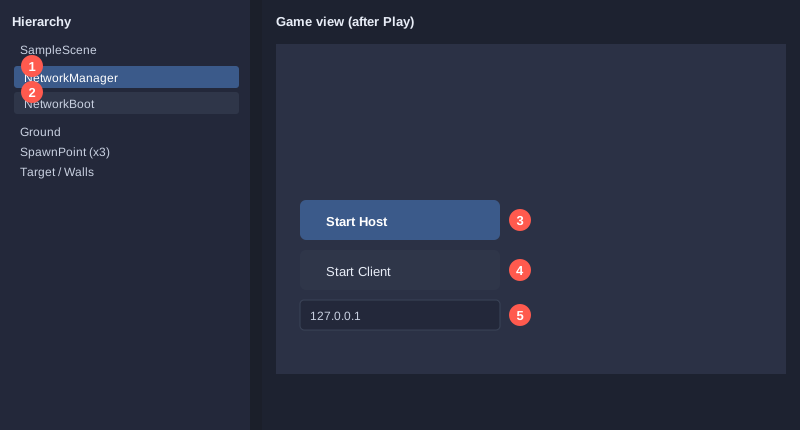
1. Right-click in the Hierarchy, choose **Create Empty** and name it `NetworkManager`.
2. Click **Add Component** and add **Network Manager** and **Unity Transport**.
3. Create another empty object named `NetworkBoot` and add the `NetworkBoot` script below.
4. Press **Play**. Two buttons appear in the top-left corner.
using Unity.Netcode;
using UnityEngine;

// ปุ่มเริ่มเกม: เลือกเป็นโฮสต์ (เซิร์ฟเวอร์ + ผู้เล่น) หรือไคลเอนต์ (เข้าร่วม)
// วางบน GameObject ชื่อ NetworkBoot ในฉาก และให้มี NetworkManager อยู่ในฉากด้วย
public class NetworkBoot : MonoBehaviour
{
    [SerializeField] private string address = "127.0.0.1";  // ที่อยู่ของโฮสต์ (ใส่ IP ของเครื่องโฮสต์เมื่อเล่นข้ามเครื่อง)

    private void OnGUI()
    {
        if (NetworkManager.Singleton.IsClient || NetworkManager.Singleton.IsServer) return;

        GUILayout.BeginArea(new Rect(10, 10, 220, 120));
        if (GUILayout.Button("Start Host (server + player)")) NetworkManager.Singleton.StartHost();
        if (GUILayout.Button("Start Client (join)")) NetworkManager.Singleton.StartClient();
        address = GUILayout.TextField(address);
        GUILayout.EndArea();
    }
}
The address field here is only a text box for testers. Set the real address on the **Unity Transport** component when you play across machines.
Step 3: make the Player prefab
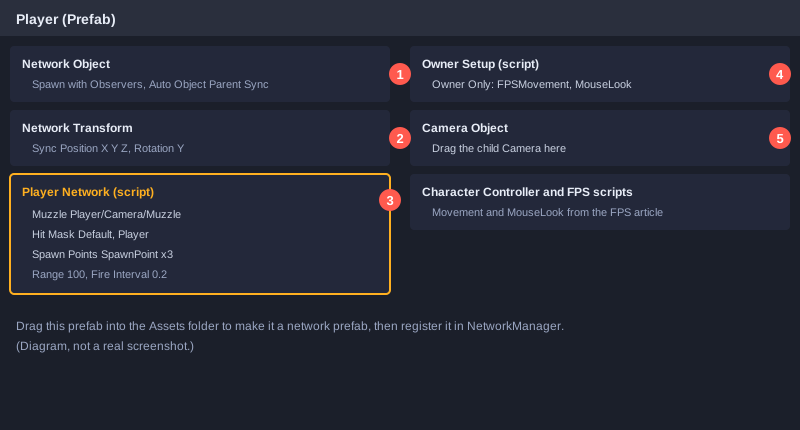
1. Start from the `Player` GameObject of the FPS project (Character Controller, FPSMovement, MouseLook, and a child camera with a Muzzle).
2. Add **Network Object**. This tells NGO that the object is synced.
3. Add **Network Transform** to sync position and rotation to every machine.
4. Remove the `Weapon` component. Shooting moves into `PlayerNetwork`.
5. Add the `PlayerNetwork` and `OwnerSetup` scripts (below).
6. Drag `Player/Camera/Muzzle` into the **Muzzle** field and the child camera into the **Camera Object** field of `OwnerSetup`.
7. In `OwnerSetup`, add `FPSMovement` and `MouseLook` to **Owner Only**, so only the owning player controls them.
8. Drag `Player` from the Hierarchy into `Assets/Prefabs/` to make it a prefab, then delete it from the scene.
9. Select `NetworkManager` and drag this prefab into its **Player Prefab** field.
Step 4: match rules in plain C#
The rules live in a plain class that does not use `UnityEngine`, so it can be tested without the editor. This is the logic the server uses.
// กติกาของแมตช์ เขียนเป็น C# ธรรมดา (ไม่ใช้ UnityEngine) เพื่อให้ทดสอบได้โดยไม่ต้องเปิด Unity
// เซิร์ฟเวอร์เป็นผู้ตัดสินทุกอย่างด้วยกติกานี้ ไคลเอนต์ไม่มีสิทธิ์เปลี่ยนเลือดหรือคะแนนเอง
public class MatchRules
{
    public const int MaxHealth = 100;
    public const int DamagePerShot = 25;
    public const int KillsToWin = 10;
    public const float RespawnSeconds = 3f;

    public int Health { get; private set; }
    public int Kills { get; private set; }
    public int Deaths { get; private set; }
    public float RespawnTimer { get; private set; }

    public bool IsDead => Health <= 0;

    public MatchRules()
    {
        Health = MaxHealth;
    }

    // คืน true ถ้าการยิงนี้ทำให้ผู้ถูกยิงตาย
    public bool ApplyDamage(int amount)
    {
        if (IsDead) return false;
        Health -= amount;
        if (Health <= 0)
        {
            Health = 0;
            Deaths++;
            RespawnTimer = RespawnSeconds;
            return true;
        }
        return false;
    }

    // เรียกทุกเฟรม (หรือทุกรอบของเซิร์ฟเวอร์) คืน true เมื่อครบเวลาและฟื้นคืนชีพแล้ว
    public bool Tick(float deltaSeconds)
    {
        if (!IsDead) return false;
        RespawnTimer -= deltaSeconds;
        if (RespawnTimer > 0f) return false;

        Health = MaxHealth;
        RespawnTimer = 0f;
        return true;
    }

    public void AddKill()
    {
        Kills++;
    }

    public bool HasWon()
    {
        return Kills >= KillsToWin;
    }
}
Step 5: the online player script
It has three parts:
- The **owner** side reads the fire button and sends a request to the server with a `ServerRpc`.
- The **server** side raycasts and applies damage.
- The **values everyone sees** are `NetworkVariable`s that only the server can write.
using Unity.Netcode;
using UnityEngine;

// ผู้เล่นออนไลน์: ผู้เล่นเจ้าของเครื่องส่งคำสั่งยิง แต่เซิร์ฟเวอร์เป็นคนตรวจการยิง คิดดาเมจ และนับคะแนน
// ต้องติดอยู่บน Player prefab พร้อม NetworkObject และ NetworkTransform
public class PlayerNetwork : NetworkBehaviour
{
    [SerializeField] private Transform muzzle;                 // ปากกระบอกปืน (อยู่ใต้กล้องของผู้เล่น)
    [SerializeField] private float range = 100f;
    [SerializeField] private float fireInterval = 0.2f;
    [SerializeField] private LayerMask hitMask;                // เลเยอร์ที่ยิงโดน (ผู้เล่นและกำแพง)
    [SerializeField] private Transform[] spawnPoints;          // จุดเกิดที่เซิร์ฟเวอร์เลือกตอนฟื้นคืนชีพ

    // เลือดและคะแนน: ทุกเครื่องอ่านได้ แต่มีเพียงเซิร์ฟเวอร์ที่เขียนค่าได้
    public NetworkVariable<int> Health = new NetworkVariable<int>(
        MatchRules.MaxHealth, NetworkVariableReadPermission.Everyone, NetworkVariableWritePermission.Server);
    public NetworkVariable<int> Kills = new NetworkVariable<int>(
        0, NetworkVariableReadPermission.Everyone, NetworkVariableWritePermission.Server);

    private float nextFireTime;
    private float respawnTimer;

    public bool IsAlive => Health.Value > 0;

    private void Update()
    {
        // ฝั่งผู้เล่น: รับปุ่มยิง แล้วส่งคำขอไปยังเซิร์ฟเวอร์
        if (IsOwner && Input.GetMouseButtonDown(0) && Time.time >= nextFireTime && IsAlive)
        {
            nextFireTime = Time.time + fireInterval;
            FireServerRpc(muzzle.position, muzzle.forward);
        }

        // ฝั่งเซิร์ฟเวอร์: นับเวลาฟื้นคืนชีพ
        if (IsServer && Health.Value <= 0)
        {
            respawnTimer -= Time.deltaTime;
            if (respawnTimer <= 0f) Respawn();
        }
    }

    // ทำงานบนเซิร์ฟเวอร์เท่านั้น เมื่อผู้เล่นส่งคำขอยิง
    [ServerRpc]
    private void FireServerRpc(Vector3 origin, Vector3 direction)
    {
        if (!IsAlive) return;                                  // คนตายยิงไม่ได้

        if (Physics.Raycast(origin, direction, out RaycastHit hit, range, hitMask))
        {
            PlayerNetwork target = hit.collider.GetComponentInParent<PlayerNetwork>();
            if (target != null && target != this)
            {
                target.TakeDamageOnServer(MatchRules.DamagePerShot, OwnerClientId);
            }
        }
    }

    // เรียกได้เฉพาะบนเซิร์ฟเวอร์ คิดดาเมจและให้คะแนนผู้ยิงเมื่อฆ่าสำเร็จ
    public void TakeDamageOnServer(int amount, ulong shooterClientId)
    {
        if (!IsServer || !IsAlive) return;

        int remaining = Health.Value - amount;
        Health.Value = remaining < 0 ? 0 : remaining;   // ใช้การเช็คเอง เพราะ Mathf.Max รับ float
        if (Health.Value > 0) return;

        respawnTimer = MatchRules.RespawnSeconds;
        var shooter = NetworkManager.Singleton.ConnectedClients[shooterClientId].PlayerObject;
        if (shooter != null)
        {
            shooter.GetComponent<PlayerNetwork>().Kills.Value++;
        }
    }

    private void Respawn()
    {
        Health.Value = MatchRules.MaxHealth;
        if (spawnPoints != null && spawnPoints.Length > 0)
        {
            transform.position = spawnPoints[Random.Range(0, spawnPoints.Length)].position;
        }
    }
}
Key points:
- The method name must end with `ServerRpc`. NGO uses that suffix to recognise a request to the server.
- `NetworkVariableWritePermission.Server` means clients cannot change health or score, even by editing their own code.
- The "dead players cannot fire" check runs on the server, not the client, because a client can be modified.
- When damage reduces health to zero, the server gives the kill to the shooter immediately.
- The code avoids `Mathf.Max` with an int, the same mistake seen in other articles in this series.
Step 6: owner-only control and camera
Every player has a copy of the Player prefab. Without this step, one player could control another's character and see extra cameras. `OwnerSetup` handles that.
using Unity.Netcode;
using UnityEngine;

// เปิดการควบคุมและกล้องเฉพาะผู้เล่นเจ้าของตัวละครนั้น ผู้เล่นคนอื่นที่เห็นตัวละครนี้จะไม่มีกล้องและไม่รับปุ่ม
public class OwnerSetup : NetworkBehaviour
{
    [SerializeField] private Behaviour[] ownerOnly;   // สคริปต์ที่ต้องเปิดเฉพาะเจ้าของ เช่น FPSMovement และ MouseLook
    [SerializeField] private GameObject cameraObject; // กล้องลูกของผู้เล่น

    public override void OnNetworkSpawn()
    {
        foreach (Behaviour script in ownerOnly)
        {
            script.enabled = IsOwner;
        }
        if (cameraObject != null)
        {
            cameraObject.SetActive(IsOwner);
        }
    }
}
Step 7: how the data flows
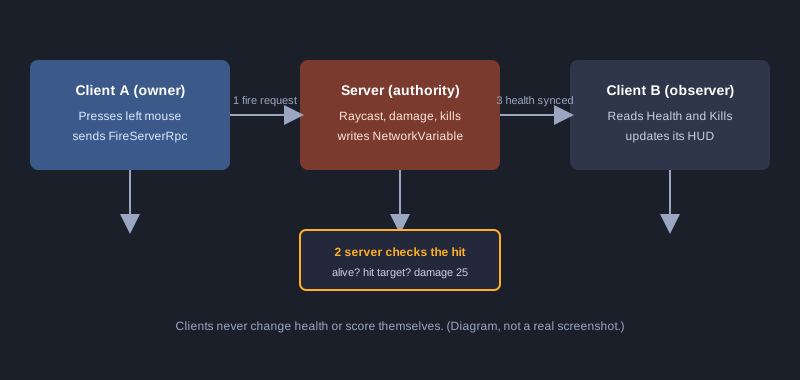
When player A shoots and hits player B:
1. Player A clicks. A's client calls `FireServerRpc` with the muzzle position and direction.
2. The server receives it, checks that A is alive, and raycasts from that position.
3. If the ray hits B, the server calls `TakeDamageOnServer` and reduces B's health.
4. B's health is a `NetworkVariable`, so NGO syncs it to every machine. Everyone sees the same number.
5. If B's health reaches zero, the server gives A a kill and starts B's respawn timer.
Step 8: testing
Match rules (run in this environment)
The test file `MatchRulesTests.cs` (in the Thai version) checks damage, death, respawn timing and the win condition without Unity. Compile `MatchRules.cs` and `MatchRulesTests.cs` together with a recent C# compiler (for example `csc -langversion:latest -out:MatchRulesTests.exe *.cs`) and run the output.
PASS  one shot: health drops from 100 to 75
PASS  four shots: player dies on the fourth
PASS  four shots: death is counted
PASS  damage while dead: no extra death counted
PASS  respawn: still dead after 1 second
PASS  respawn: back to full health after 3 seconds
PASS  win: not yet at 9 kills
PASS  win: wins at 10 kills

Passed 8 / Failed 0
Networked play (do this in the Unity Editor)
This was not run here. Do it yourself:
1. Press **Play** in the editor and click **Start Host**. You are one player.
2. Open a second Unity window on the same project, or use **ParrelSync** (a popular tool for running multiple editor instances), and click **Start Client**.
3. Check that each player sees the other and that each moves only their own character.
4. Shoot the other player four times. Check that health drops on both screens and the shooter gains a kill.
5. Check that the player respawns three seconds after dying.
Common problems
- **The other player does not appear:** check the Player prefab is in the Player Prefab field of NetworkManager and has a Network Object.
- **You control another player's character:** check FPSMovement and MouseLook are in the Owner Only list of OwnerSetup.
- **Shots miss:** check the Hit Mask includes the player and walls, and the Muzzle points forward.
- **The console says the RPC name is invalid:** check the method name ends with `ServerRpc`.
- **Cannot join across machines:** check the Unity Transport address matches the host's IP and that the host's firewall allows the port in use.
- **Health does not sync:** check the server is the only one writing `Health.Value`.
Limits of this article
- Shooting is a single raycast with no client-side prediction. Players with high latency will feel a delay. Real games add lag compensation.
- Movement sync uses Network Transform only, with no movement prediction.
- There is no lobby, room system or matchmaking.
- Anti-cheat is not complete.
Study these topics before releasing a game to many players.
Summary
Online FPS games rely on server authority: clients send requests, the server decides, and the values everyone sees are written only by the server. The rules are in a plain class that can be tested. The networking uses NGO as described above. The rule tests pass here. The networked play must be tested in the Unity Editor.