SQL from Scratch
SQL (Structured Query Language) controls relational databases. Whether you use SQLite, PostgreSQL, MySQL or SQL Server, most basic commands are the same. This article creates tables, adds data, searches, joins tables, groups results and changes data, using SQLite so no server is needed.
Every command here was run with SQLite 3.50 and the output shown is real.
What you need
- SQLite (check with `sqlite3 --version`) or the free DB Browser for SQLite
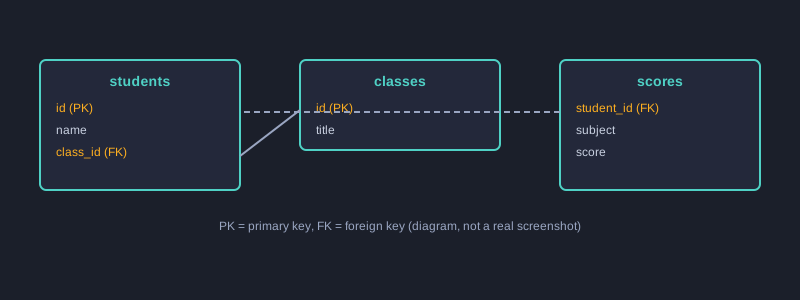
How the tables relate
Create tables and add data
CREATE TABLE students (
  id INTEGER PRIMARY KEY,
  name TEXT NOT NULL,
  class_id INTEGER
);
CREATE TABLE classes (
  id INTEGER PRIMARY KEY,
  title TEXT NOT NULL
);
CREATE TABLE scores (
  student_id INTEGER REFERENCES students(id),
  subject TEXT,
  score INTEGER
);
INSERT INTO classes VALUES (1, 'ม.4/1'), (2, 'ม.4/2');
INSERT INTO students VALUES (1, 'สมชาย', 1), (2, 'สมหญิง', 1), (3, 'สมศักดิ์', 2);
INSERT INTO scores VALUES (1, 'คณิต', 85), (1, 'อังกฤษ', 70), (2, 'คณิต', 72), (3, 'คณิต', 45), (3, 'อังกฤษ', 60);
- `PRIMARY KEY` gives each row a unique key.
- `NOT NULL` requires a value.
- `REFERENCES` links tables, so `scores.student_id` must exist in `students`.
Search with SELECT and WHERE
SELECT name FROM students WHERE class_id = 1;
Join tables with JOIN
SELECT s.name, c.title FROM students s JOIN classes c ON c.id = s.class_id ORDER BY s.name;
`JOIN` combines rows from two tables where the keys match. `s` and `c` are short names for the tables.
Group with GROUP BY
SELECT subject, AVG(score) AS avg_score, COUNT(*) AS n FROM scores GROUP BY subject ORDER BY subject;
Aggregate functions such as `AVG`, `COUNT` and `SUM` work on each group. Use `HAVING` to filter after grouping:
SELECT student_id, SUM(score) AS total FROM scores GROUP BY student_id HAVING SUM(score) >= 100;
Change and delete data
UPDATE scores SET score = score + 5 WHERE student_id = 3 AND subject = 'คณิต';
DELETE FROM scores WHERE score < 50;
SELECT student_id, subject, score FROM scores ORDER BY student_id, subject;
The `UPDATE` raises the 45 to 50, so the `DELETE` removes nothing. Notice that the result is correct for the order the statements ran in.
Real results
name
------
สมชาย
สมหญิง

name      title
--------  -----
สมชาย     ม.4/1
สมศักดิ์     ม.4/2
สมหญิง     ม.4/1

subject  avg_score         n
-------  ----------------  -
คณิต      67.3333333333333  3
อังกฤษ    65.0              2

student_id  total
----------  -----
1           155
3           105

student_id  subject  score
----------  -------  -----
1           คณิต      85
1           อังกฤษ    70
2           คณิต      72
3           คณิต      50
3           อังกฤษ    60
Common mistakes
- **Forgetting `WHERE` in `UPDATE` or `DELETE`:** this changes or deletes every row. Run a `SELECT` with the same condition first.
- **Putting a condition on an aggregate in `WHERE`:** use `HAVING` for conditions on totals.
- **Using double quotes for text values:** standard SQL uses single quotes `'...'` for text.
- **Expecting `ORDER BY` by default:** without it, row order is not guaranteed.
Next steps
Design your own tables, such as products and orders, and write a `JOIN` that totals sales per product. Then learn indexes and transactions, which matter as data grows.
Summary
SQL defines structure with `CREATE`, manages data with `INSERT`, `UPDATE` and `DELETE`, and searches with `SELECT` together with `WHERE`, `JOIN`, `GROUP BY` and `HAVING`. Testing on small sample data makes the effect of each statement clear.