Object Detection with YOLO: Finding Objects in Images and Video
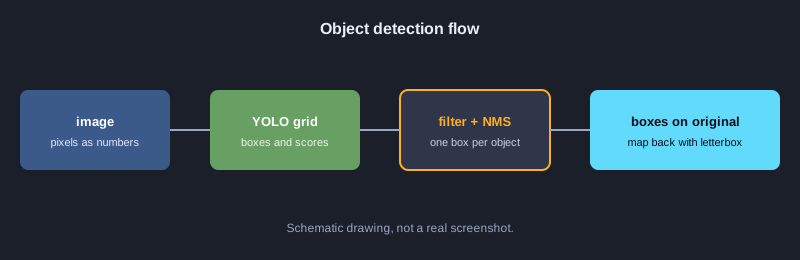
Object detection finds what objects are in an image and where they are. The output is a bounding box with a class name and a confidence score. The YOLO family of models is fast enough for video. This article explains the ideas behind it: box coordinates, IoU, NMS, decoding grid cells, letterbox resizing, and measuring quality with precision, recall and AP. Every example is JavaScript that uses only standard libraries, so it runs immediately without downloading a model.
What you need
You need Node.js 18 or later and basic JavaScript. Run each example with node filename.js. No extra packages are needed. Running a real YOLO model on images needs Python and the ultralytics library. That was not run on the test machine for this article, so it appears only in the next steps.
Illustrations
Example 1: An image is an array of numbers
A digital image is a grid of pixel values, so a model works on numbers. This example builds a 4x4 black-and-white image and counts the bright pixels.
// ภาพขาวดำ 4x4 เก็บเป็นอาร์เรย์ของค่าความสว่าง 0-255
const image = [
  [0, 0, 255, 255],
  [0, 0, 255, 255],
  [0, 0, 0, 0],
  [0, 0, 0, 0],
];
const height = image.length;
const width = image[0].length;
console.log(`ขนาดภาพ: กว้าง ${width} x สูง ${height}`);
let bright = 0;
for (const row of image) for (const p of row) if (p > 127) bright++;
console.log("จำนวนพิกเซลสว่าง:", bright);
console.log("ค่าพิกเซลมุมบนซ้าย:", image[0][0]);
**Real output**
ขนาดภาพ: กว้าง 4 x สูง 4
จำนวนพิกเซลสว่าง: 4
ค่าพิกเซลมุมบนซ้าย: 0
Example 2: Converting box formats
YOLO returns a center point with width and height (cx, cy, w, h). Drawing and IoU usually need the top-left and bottom-right corners (x1, y1, x2, y2).
// โมเดล YOLO คืนกรอบเป็น (cx, cy, w, h) แต่การวาดและคำนวณมักใช้ (x1, y1, x2, y2)
function xywhToXyxy([cx, cy, w, h]) {
  return [cx - w / 2, cy - h / 2, cx + w / 2, cy + h / 2];
}
const box = [320, 240, 100, 50];
const [x1, y1, x2, y2] = xywhToXyxy(box);
console.log("มุมบนซ้าย:", x1, y1);
console.log("มุมล่างขวา:", x2, y2);
console.log("กว้าง:", x2 - x1, "สูง:", y2 - y1);
**Real output**
มุมบนซ้าย: 270 215
มุมล่างขวา: 370 265
กว้าง: 100 สูง: 50
Example 3: IoU measures box overlap
IoU is the overlapping area divided by the combined area. It ranges from 0 to 1, and 1 means the boxes are identical.
// IoU = พื้นที่ที่ซ้อนกัน / พื้นที่รวมของทั้งสองกรอบ
function area([x1, y1, x2, y2]) {
  return Math.max(0, x2 - x1) * Math.max(0, y2 - y1);
}
function iou(a, b) {
  const ix1 = Math.max(a[0], b[0]);
  const iy1 = Math.max(a[1], b[1]);
  const ix2 = Math.min(a[2], b[2]);
  const iy2 = Math.min(a[3], b[3]);
  const inter = Math.max(0, ix2 - ix1) * Math.max(0, iy2 - iy1);
  return inter / (area(a) + area(b) - inter);
}
const a = [0, 0, 100, 100];
console.log("กรอบเดียวกัน:", iou(a, a).toFixed(2));
console.log("ซ้อนกันหนึ่งในสาม:", iou(a, [50, 0, 150, 100]).toFixed(2));
console.log("ไม่ซ้อนกัน:", iou(a, [200, 200, 300, 300]).toFixed(2));
**Real output**
กรอบเดียวกัน: 1.00
ซ้อนกันหนึ่งในสาม: 0.33
ไม่ซ้อนกัน: 0.00
Example 4: Filter by confidence
A model predicts many boxes. Boxes with confidence below a threshold are dropped before the next step.
// กรองกรอบที่มั่นใจน้อยออกก่อน ด้วยเกณฑ์ความมั่นใจ (confidence threshold)
const detections = [
  { label: "car", score: 0.94, box: [40, 60, 180, 140] },
  { label: "car", score: 0.31, box: [200, 70, 260, 130] },
  { label: "person", score: 0.88, box: [300, 50, 340, 170] },
  { label: "dog", score: 0.12, box: [10, 150, 60, 200] },
];
const THRESHOLD = 0.5;
const kept = detections.filter(d => d.score >= THRESHOLD);
console.log(`เหลือ ${kept.length} จาก ${detections.length} กรอบ (เกณฑ์ ${THRESHOLD})`);
for (const d of kept) console.log(d.label, d.score.toFixed(2));
**Real output**
เหลือ 2 จาก 4 กรอบ (เกณฑ์ 0.5)
car 0.94
person 0.88
Example 5: Non-Maximum Suppression (NMS)
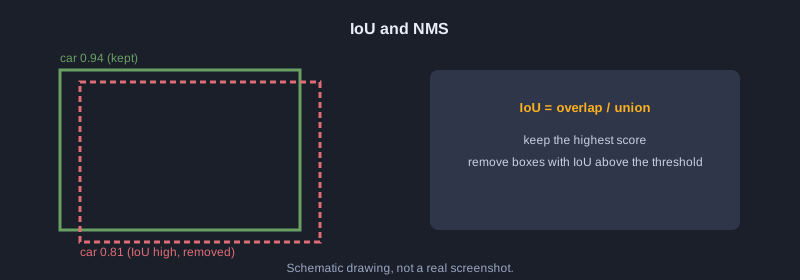
NMS sorts boxes by confidence, keeps the best one, and removes other boxes with high IoU to it. The result is one box per object.
// Non-Maximum Suppression: เก็บกรอบที่มั่นใจสุด และตัดกรอบที่ซ้อนทับกันมากออก
function iou(a, b) {
  const ix1 = Math.max(a[0], b[0]), iy1 = Math.max(a[1], b[1]);
  const ix2 = Math.min(a[2], b[2]), iy2 = Math.min(a[3], b[3]);
  const inter = Math.max(0, ix2 - ix1) * Math.max(0, iy2 - iy1);
  const areaA = (a[2] - a[0]) * (a[3] - a[1]);
  const areaB = (b[2] - b[0]) * (b[3] - b[1]);
  return inter / (areaA + areaB - inter);
}
function nms(dets, iouThreshold) {
  const sorted = [...dets].sort((p, q) => q.score - p.score);
  const keep = [];
  for (const d of sorted) {
    if (keep.every(k => iou(k.box, d.box) < iouThreshold)) keep.push(d);
  }
  return keep;
}
const dets = [
  { label: "car", score: 0.94, box: [40, 60, 180, 140] },
  { label: "car", score: 0.81, box: [45, 62, 185, 142] },
  { label: "car", score: 0.67, box: [200, 70, 260, 130] },
  { label: "person", score: 0.88, box: [300, 50, 340, 170] },
];
const result = nms(dets, 0.5);
console.log(`ก่อน NMS ${dets.length} กรอบ -> หลัง NMS ${result.length} กรอบ`);
for (const d of result) console.log(d.label, d.score.toFixed(2));
**Real output**
ก่อน NMS 4 กรอบ -> หลัง NMS 3 กรอบ
car 0.94
person 0.88
car 0.67
Example 6: NMS per class
If NMS mixes all classes, a car and a dog that overlap can lose one box. Run NMS separately for each class.
// NMS แยกตามคลาส: กรอบของคนละคลาสที่ซ้อนกันยังเก็บไว้ทั้งคู่
function iou(a, b) {
  const ix1 = Math.max(a[0], b[0]), iy1 = Math.max(a[1], b[1]);
  const ix2 = Math.min(a[2], b[2]), iy2 = Math.min(a[3], b[3]);
  const inter = Math.max(0, ix2 - ix1) * Math.max(0, iy2 - iy1);
  return inter / ((a[2] - a[0]) * (a[3] - a[1]) + (b[2] - b[0]) * (b[3] - b[1]) - inter);
}
function nms(dets, iouThreshold) {
  const sorted = [...dets].sort((p, q) => q.score - p.score);
  const keep = [];
  for (const d of sorted) if (keep.every(k => iou(k.box, d.box) < iouThreshold)) keep.push(d);
  return keep;
}
function nmsPerClass(dets, iouThreshold) {
  const groups = {};
  for (const d of dets) (groups[d.label] = groups[d.label] || []).push(d);
  return Object.values(groups).flatMap(g => nms(g, iouThreshold));
}
const dets = [
  { label: "car", score: 0.94, box: [40, 60, 180, 140] },
  { label: "dog", score: 0.90, box: [50, 65, 170, 150] },
  { label: "car", score: 0.85, box: [45, 62, 185, 142] },
];
const result = nmsPerClass(dets, 0.5);
console.log("หลัง NMS แยกคลาส:");
for (const d of result) console.log(d.label, d.score.toFixed(2));
**Real output**
หลัง NMS แยกคลาส:
car 0.94
dog 0.90
Example 7: Decoding grid cells
YOLO divides the image into a grid, and each cell predicts raw values. Apply sigmoid to the center and exp to the width and height to get pixel coordinates.
// YOLO แบ่งภาพเป็นตาราง แต่ละเซลล์ทำนายกรอบออกมา ค่าดิบต้องแปลงด้วย sigmoid และ exp
const sigmoid = x => 1 / (1 + Math.exp(-x));
const STRIDE = 100; // ภาพ 400x400 แบ่งเป็น 4x4 เซลล์ ขนาดเซลล์ละ 100 พิกเซล
const raw = [
  { name: "เซลล์ A", row: 1, col: 2, tx: 0.2, ty: -0.4, tw: 0.0, th: 0.5, obj: 3.0 },
  { name: "เซลล์ B", row: 3, col: 0, tx: -1.5, ty: 1.0, tw: -0.3, th: 0.1, obj: -2.0 },
];
for (const r of raw) {
  const cx = (r.col + sigmoid(r.tx)) * STRIDE;
  const cy = (r.row + sigmoid(r.ty)) * STRIDE;
  const w = Math.exp(r.tw) * STRIDE;
  const h = Math.exp(r.th) * STRIDE;
  const conf = sigmoid(r.obj);
  console.log(`${r.name}: cx=${cx.toFixed(1)} cy=${cy.toFixed(1)} w=${w.toFixed(1)} h=${h.toFixed(1)} conf=${conf.toFixed(2)}`);
}
**Real output**
เซลล์ A: cx=255.0 cy=140.1 w=100.0 h=164.9 conf=0.95
เซลล์ B: cx=18.2 cy=373.1 w=74.1 h=110.5 conf=0.12
Example 8: Softmax picks a class
Raw class scores become probabilities that add up to 100 percent. The highest one is the prediction.
// แปลงคะแนนดิบของแต่ละคลาสเป็นความน่าจะเป็นด้วย softmax แล้วเลือกคลาสที่สูงสุด
const names = ["person", "car", "dog"];
const logits = [1.2, 3.1, 0.4];
const exps = logits.map(Math.exp);
const sum = exps.reduce((a, b) => a + b, 0);
const probs = exps.map(e => e / sum);
probs.forEach((p, i) => console.log(names[i].padEnd(8), (p * 100).toFixed(1) + "%"));
const best = probs.indexOf(Math.max(...probs));
console.log("ผลทาย:", names[best]);
**Real output**
person   12.3%
car      82.2%
dog      5.5%
ผลทาย: car
Example 9: Letterbox and mapping back
The model takes a fixed size such as 640x640, so the image is scaled with its aspect ratio and padded. After detection, remove the padding and divide by the scale to return to the original size.
// โมเดลรับภาพขนาดคงที่ 640x640 จึงต้องย่อโดยรักษาสัดส่วน แล้วเติมขอบดำ (letterbox)
// และต้องแปลงพิกัดกรอบกลับไปยังขนาดภาพจริง
const orig = { w: 1280, h: 720 };
const INPUT = 640;
const scale = Math.min(INPUT / orig.w, INPUT / orig.h);
const newW = Math.round(orig.w * scale);
const newH = Math.round(orig.h * scale);
const padX = (INPUT - newW) / 2;
const padY = (INPUT - newH) / 2;
console.log(`scale=${scale} ขนาดใหม่=${newW}x${newH} padX=${padX} padY=${padY}`);
// กรอบที่โมเดลทำนายในพื้นที่ 640x640
const boxInInput = [100, 200, 300, 400];
const back = [
  (boxInInput[0] - padX) / scale,
  (boxInInput[1] - padY) / scale,
  (boxInInput[2] - padX) / scale,
  (boxInInput[3] - padY) / scale,
];
console.log("กรอบในภาพจริง:", back.map(v => Math.round(v)));
**Real output**
scale=0.5 ขนาดใหม่=640x360 padX=0 padY=140
กรอบในภาพจริง: [ 200, 120, 600, 520 ]
Example 10: Drawing boxes with characters
This example draws boxes on a 40x12 character canvas so you can see where objects are without a graphics library.
// วาดกรอบลงบนผืนผ้าใบตัวอักษร เพื่อดูผลการตรวจจับโดยไม่ต้องใช้ไลบรารีกราฟิก
// ภาพจริง 400x240 พิกเซล ย่อเป็นตาราง 40x12 ช่อง (ช่องละ 10x20 พิกเซล)
const COLS = 40, ROWS = 12, SX = 10, SY = 20;
const canvas = Array.from({ length: ROWS }, () => Array(COLS).fill("."));
const dets = [
  { label: "car", box: [40, 60, 180, 140] },
  { label: "person", box: [300, 50, 340, 170] },
];
for (const d of dets) {
  const [x1, y1, x2, y2] = d.box;
  const c1 = Math.floor(x1 / SX), c2 = Math.floor(x2 / SX);
  const r1 = Math.floor(y1 / SY), r2 = Math.floor(y2 / SY);
  for (let c = c1; c <= c2; c++) { canvas[r1][c] = "-"; canvas[r2][c] = "-"; }
  for (let r = r1; r <= r2; r++) { canvas[r][c1] = "|"; canvas[r][c2] = "|"; }
  canvas[r1][c1] = d.label[0].toUpperCase();
}
console.log(canvas.map(row => row.join("")).join("\n"));
**Real output**
........................................
........................................
..............................P---|.....
....C-------------|...........|...|.....
....|.............|...........|...|.....
....|.............|...........|...|.....
....|.............|...........|...|.....
....|-------------|...........|...|.....
..............................|---|.....
........................................
........................................
........................................
Example 11: Writing results as SVG
SVG is a text format that code can generate. Use it to draw boxes and labels over an image. It opens in any browser.
// สร้างไฟล์ SVG ซ้อนกรอบบนภาพ เพื่อนำไปแสดงหรือบันทึกผลการตรวจจับ
const dets = [
  { label: "car", score: 0.94, box: [40, 60, 180, 140] },
  { label: "person", score: 0.88, box: [300, 50, 340, 170] },
];
const lines = ['<svg xmlns="http://www.w3.org/2000/svg" width="400" height="240">'];
lines.push('<rect width="400" height="240" fill="#1b1f2a"/>');
for (const d of dets) {
  const [x1, y1, x2, y2] = d.box;
  lines.push(`<rect x="${x1}" y="${y1}" width="${x2 - x1}" height="${y2 - y1}" fill="none" stroke="#ffb020" stroke-width="2"/>`);
  lines.push(`<text x="${x1}" y="${y1 - 4}" font-size="12" fill="#ffb020">${d.label} ${d.score.toFixed(2)}</text>`);
}
lines.push("</svg>");
const svg = lines.join("\n");
console.log(svg);
console.log("จำนวนบรรทัด:", lines.length, "ความยาว:", svg.length, "ตัวอักษร");
**Real output**
<svg xmlns="http://www.w3.org/2000/svg" width="400" height="240">
<rect width="400" height="240" fill="#1b1f2a"/>
<rect x="40" y="60" width="140" height="80" fill="none" stroke="#ffb020" stroke-width="2"/>
<text x="40" y="56" font-size="12" fill="#ffb020">car 0.94</text>
<rect x="300" y="50" width="40" height="120" fill="none" stroke="#ffb020" stroke-width="2"/>
<text x="300" y="46" font-size="12" fill="#ffb020">person 0.88</text>
</svg>
จำนวนบรรทัด: 7 ความยาว: 441 ตัวอักษร
Example 12: Precision and recall
Compare predictions with the ground truth. TP is a correct detection, FP is a false alarm, and FN is a missed object. Precision is the share of predictions that are correct. Recall is the share of real objects that were found.
// เทียบผลทายกับเฉลย: กรอบที่ IoU >= 0.5 และคลาสตรงกันคือ TP ที่เหลือคือ FP
// เฉลยที่ยังไม่ถูกทายคือ FN
function iou(a, b) {
  const ix1 = Math.max(a[0], b[0]), iy1 = Math.max(a[1], b[1]);
  const ix2 = Math.min(a[2], b[2]), iy2 = Math.min(a[3], b[3]);
  const inter = Math.max(0, ix2 - ix1) * Math.max(0, iy2 - iy1);
  return inter / ((a[2] - a[0]) * (a[3] - a[1]) + (b[2] - b[0]) * (b[3] - b[1]) - inter);
}
const gts = [
  { label: "car", box: [40, 60, 180, 140] },
  { label: "person", box: [300, 50, 340, 170] },
  { label: "dog", box: [10, 150, 60, 200] },
];
const preds = [
  { label: "car", score: 0.94, box: [40, 60, 180, 140] },
  { label: "person", score: 0.88, box: [305, 55, 345, 175] },
  { label: "car", score: 0.40, box: [200, 70, 260, 130] },
];
const used = new Array(gts.length).fill(false);
let tp = 0, fp = 0;
for (const p of [...preds].sort((a, b) => b.score - a.score)) {
  let best = -1, bestIou = 0.5;
  gts.forEach((g, i) => {
    const v = iou(p.box, g.box);
    if (!used[i] && g.label === p.label && v >= bestIou) { bestIou = v; best = i; }
  });
  if (best >= 0) { used[best] = true; tp++; } else fp++;
  console.log(`${p.label.padEnd(7)} ${p.score.toFixed(2)} ${best >= 0 ? "TP" : "FP"}`);
}
const fn = gts.length - tp;
console.log(`TP=${tp} FP=${fp} FN=${fn}`);
console.log("precision =", (tp / (tp + fp)).toFixed(2));
console.log("recall =", (tp / (tp + fn)).toFixed(2));
**Real output**
car     0.94 TP
person  0.88 TP
car     0.40 FP
TP=2 FP=1 FN=1
precision = 0.67
recall = 0.67
Example 13: Average Precision (AP)
AP is the area under the precision-recall curve, with predictions sorted by confidence. It gives one number for comparing models.
// Average Precision (AP): สรุปกราฟ precision-recall เป็นตัวเลขเดียว
// เรียงกรอบตามความมั่นใจ แล้วคำนวณ precision และ recall สะสมทีละกรอบ
function iou(a, b) {
  const ix1 = Math.max(a[0], b[0]), iy1 = Math.max(a[1], b[1]);
  const ix2 = Math.min(a[2], b[2]), iy2 = Math.min(a[3], b[3]);
  const inter = Math.max(0, ix2 - ix1) * Math.max(0, iy2 - iy1);
  return inter / ((a[2] - a[0]) * (a[3] - a[1]) + (b[2] - b[0]) * (b[3] - b[1]) - inter);
}
const gts = [
  { label: "car", box: [40, 60, 180, 140] },
  { label: "person", box: [300, 50, 340, 170] },
  { label: "dog", box: [10, 150, 60, 200] },
];
const preds = [
  { label: "car", score: 0.94, box: [40, 60, 180, 140] },
  { label: "person", score: 0.88, box: [305, 55, 345, 175] },
  { label: "car", score: 0.40, box: [200, 70, 260, 130] },
  { label: "dog", score: 0.30, box: [12, 152, 62, 202] },
];
const sorted = [...preds].sort((a, b) => b.score - a.score);
const used = new Array(gts.length).fill(false);
const flags = sorted.map(p => {
  let best = -1, bestIou = 0.5;
  gts.forEach((g, i) => {
    const v = iou(p.box, g.box);
    if (!used[i] && g.label === p.label && v >= bestIou) { bestIou = v; best = i; }
  });
  if (best >= 0) { used[best] = true; return 1; }
  return 0;
});
let tp = 0, fp = 0;
const precision = [], recall = [];
flags.forEach(f => {
  if (f) tp++; else fp++;
  precision.push(tp / (tp + fp));
  recall.push(tp / gts.length);
});
for (let i = precision.length - 2; i >= 0; i--) precision[i] = Math.max(precision[i], precision[i + 1]);
let ap = 0, prevRecall = 0;
recall.forEach((r, i) => { ap += (r - prevRecall) * precision[i]; prevRecall = r; });
sorted.forEach((p, i) => console.log(`${p.score.toFixed(2)} ${flags[i] ? "TP" : "FP"} recall=${recall[i].toFixed(2)} precision=${precision[i].toFixed(2)}`));
console.log("AP =", ap.toFixed(3));
**Real output**
0.94 TP recall=0.33 precision=1.00
0.88 TP recall=0.67 precision=1.00
0.40 FP recall=0.67 precision=0.75
0.30 TP recall=1.00 precision=0.75
AP = 0.917
Example 14: A full pipeline
This example combines the steps: decoding raw output, filtering, NMS, and mapping boxes back to the original image.
// ตัวอย่างรวม: ถอดผลดิบ -> กรองด้วยเกณฑ์ -> NMS -> แปลงพิกัดกลับไปยังภาพจริง
const sigmoid = x => 1 / (1 + Math.exp(-x));
const NAMES = ["person", "car", "dog"];
const STRIDE = 100, INPUT = 400;
const ORIG = { w: 1280, h: 720 };
const scale = Math.min(INPUT / ORIG.w, INPUT / ORIG.h);
const padX = (INPUT - ORIG.w * scale) / 2;
const padY = (INPUT - ORIG.h * scale) / 2;
const raw = [
  { row: 1, col: 1, tx: 0.1, ty: -0.2, tw: 0.2, th: 0.0, obj: 2.5, cls: [-1.0, 3.0, 0.2] },
  { row: 1, col: 2, tx: 0.0, ty: 0.1, tw: 0.1, th: 0.2, obj: 2.0, cls: [-0.5, 2.8, 0.0] },
  { row: 2, col: 0, tx: 0.3, ty: 0.0, tw: -0.4, th: -0.2, obj: 1.5, cls: [2.5, -1.0, 0.1] },
  { row: 3, col: 3, tx: -0.5, ty: 0.2, tw: 0.0, th: 0.1, obj: -2.0, cls: [0.0, 0.0, 3.0] },
];
const dets = raw.map(r => {
  const cls = r.cls.map(sigmoid);
  const best = cls.indexOf(Math.max(...cls));
  const cx = (r.col + sigmoid(r.tx)) * STRIDE;
  const cy = (r.row + sigmoid(r.ty)) * STRIDE;
  const w = Math.exp(r.tw) * STRIDE;
  const h = Math.exp(r.th) * STRIDE;
  const score = sigmoid(r.obj) * cls[best];
  return { label: NAMES[best], score, box: [cx - w / 2, cy - h / 2, cx + w / 2, cy + h / 2] };
});
const kept = dets.filter(d => d.score >= 0.5);
console.log("หลังกรองด้วยเกณฑ์ 0.5:", kept.length, "กรอบ");
function iou(a, b) {
  const ix1 = Math.max(a[0], b[0]), iy1 = Math.max(a[1], b[1]);
  const ix2 = Math.min(a[2], b[2]), iy2 = Math.min(a[3], b[3]);
  const inter = Math.max(0, ix2 - ix1) * Math.max(0, iy2 - iy1);
  return inter / ((a[2] - a[0]) * (a[3] - a[1]) + (b[2] - b[0]) * (b[3] - b[1]) - inter);
}
const final = [];
for (const d of [...kept].sort((a, b) => b.score - a.score)) {
  if (final.every(f => f.label !== d.label || iou(f.box, d.box) < 0.5)) final.push(d);
}
console.log("หลัง NMS:", final.length, "กรอบ");
for (const d of final) {
  const [x1, y1, x2, y2] = d.box.map((v, i) => (v - (i % 2 === 0 ? padX : padY)) / scale);
  console.log(`${d.label.padEnd(7)} ${d.score.toFixed(2)} [${[x1, y1, x2, y2].map(v => Math.round(v)).join(", ")}]`);
}
**Real output**
หลังกรองด้วยเกณฑ์ 0.5: 3 กรอบ
หลัง NMS: 3 กรอบ
car     0.88 [293, 24, 683, 344]
car     0.83 [623, 13, 977, 403]
person  0.76 [77, 389, 291, 651]
Example 15: Counting objects in video
A video is many frames in sequence. This example counts classes in each frame, then uses the most common class in the last three frames to reduce flicker.
// วิดีโอคือภาพต่อกันหลายเฟรม ตรวจทุกเฟรมแล้วนับคลาส
// การดูค่าจากหลายเฟรมที่อยู่ใกล้กันช่วยลดการกระพริบของผลทาย
const frames = [
  ["car", "car", "person"],
  ["car", "person", "person"],
  ["car", "car", "person"],
  ["car", "car"],
  ["person", "car", "car"],
];
frames.forEach((objs, i) => {
  const counts = {};
  for (const o of objs) counts[o] = (counts[o] || 0) + 1;
  console.log(`เฟรม ${i + 1}:`, JSON.stringify(counts));
});
// ใช้คลาสที่ปรากฏบ่อยที่สุดในหน้าต่าง 3 เฟรม
function majority(window) {
  const c = {};
  for (const x of window) c[x] = (c[x] || 0) + 1;
  return Object.entries(c).sort((a, b) => b[1] - a[1])[0][0];
}
const labels = frames.map(f => f[0]);
const smoothed = labels.map((_, i) => majority(labels.slice(Math.max(0, i - 2), i + 1)));
console.log("ป้ายรายเฟรม:", labels.join(" "));
console.log("หลังดูย้อนหลัง 3 เฟรม:", smoothed.join(" "));
**Real output**
เฟรม 1: {"car":2,"person":1}
เฟรม 2: {"car":1,"person":2}
เฟรม 3: {"car":2,"person":1}
เฟรม 4: {"car":2}
เฟรม 5: {"person":1,"car":2}
ป้ายรายเฟรม: car car car car person
หลังดูย้อนหลัง 3 เฟรม: car car car car car
Next steps
To run a real model, install Python 3.12, run pip install ultralytics, and load a trained model such as YOLO('yolo11n.pt'). Pass an image to get boxes, classes and confidence scores. The output has the same shape as the examples here, so the NMS and coordinate logic still applies.
Summary
Object detection finds the boxes and classes of objects in an image. The main steps are decoding grid output, filtering by confidence, applying NMS, and mapping boxes back to the original image. Quality is measured with precision, recall and AP. Every output in this article comes from a real run of the example code.