Kubernetes from Zero to Professional: 100 Examples with kubectl, Manifests, Helm and GitOps
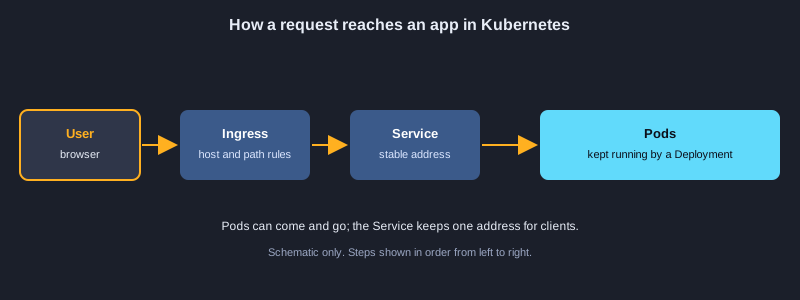
Kubernetes runs containers across a cluster of machines. It restarts failed containers, spreads them over nodes, rolls out new versions without downtime, and scales them with load. This article takes you from your first Pod to a production-minded setup in 100 examples. You will learn kubectl and contexts, Pods, Deployments and rolling updates, Services and Ingress, ConfigMaps and Secrets, persistent storage, Jobs and CronJobs, StatefulSets and DaemonSets, autoscaling, resource requests and probes, scheduling, RBAC and Pod security, Helm and Kustomize, observability and debugging, GitOps and backups. Honesty note: no Kubernetes cluster and no kubectl were installed on the computer used to prepare this article, so none of the 100 examples were executed here. The manifests follow the current Kubernetes API, but you should apply each one to a test cluster yourself before you rely on it.
What you need
Docker Desktop with its built-in Kubernetes, or kind or minikube for a local practice cluster, plus kubectl and Helm. Basic knowledge of containers helps; the Docker article in this series is a good start. Some examples use a cloud provider such as Azure Kubernetes Service and an ingress controller. Use placeholder hosts such as shop.example.com and placeholder passwords such as <strong-password>, and never paste real credentials into manifests or commands.
How to use an example
Bash examples use kubectl, Helm and Kustomize. YAML examples go into a .yaml file that you apply with kubectl apply -f, using the file name given in the text. Python examples use the official Kubernetes Python client.
Topic 1: Getting Started with Kubernetes
Kubernetes is a control loop. You describe the state you want in YAML, and the cluster keeps working until reality matches it. Learn the parts of a cluster, the kubectl client, contexts and namespaces.
Control plane and nodes
The control plane stores the desired state and makes decisions, and the worker nodes run your containers. You talk to the cluster through the API server, and kubectl is the standard client that sends your requests.
Contexts and namespaces
A context stores which cluster, user and namespace your commands use. Check it with kubectl config current-context before you change anything, so you never delete resources in the wrong cluster.
Manifests and declarative change
A manifest has apiVersion, kind, metadata and spec. kubectl apply compares your file with the cluster and changes only what differs, which makes changes repeatable and easy to review in Git.
Illustrations
Example 1: Check the client and the cluster
Confirm that kubectl can talk to the cluster.
kubectl version --client
kubectl cluster-info
kubectl get nodes -o wide
*This example was not run here because no Kubernetes cluster or kubectl was installed on the computer that prepared this article.*
Example 2: Create a practice cluster with kind
A local cluster on your computer for learning.
kind create cluster --name learn
kubectl config current-context
kubectl get nodes
*This example was not run here because no Kubernetes cluster or kubectl was installed on the computer that prepared this article.*
Example 3: Switch between contexts
Choose which cluster your commands target.
kubectl config get-contexts
kubectl config use-context kind-learn
kubectl config view --minify --output "jsonpath={.current-context}"
*This example was not run here because no Kubernetes cluster or kubectl was installed on the computer that prepared this article.*
Example 4: Create a namespace
Separate teams and apps inside one cluster.
kubectl create namespace shop
kubectl config set-context --current --namespace=shop
kubectl get pods
*This example was not run here because no Kubernetes cluster or kubectl was installed on the computer that prepared this article.*
Example 5: Read a manifest
The four top-level fields every object has.
apiVersion: v1
kind: Namespace
metadata:
  name: shop
  labels:
    team: platform
*This example was not run here because no Kubernetes cluster or kubectl was installed on the computer that prepared this article.*
Example 6: Apply a manifest
Make declarative changes with kubectl apply.
kubectl apply -f namespace.yaml
kubectl get namespace shop --show-labels
kubectl describe namespace shop
*This example was not run here because no Kubernetes cluster or kubectl was installed on the computer that prepared this article.*
Topic 2: Pods: The Smallest Unit
A Pod is one or more containers that share a network address and storage. Most Pods run one container, but a Pod can also hold helpers that must run next to the main application.
What a Pod is
All containers in a Pod share the same IP address and can reach each other on localhost. Pods are temporary: when one dies, the cluster creates a new one with a new name and address, so do not depend on a Pod's address.
Init and sidecar containers
Init containers run to completion before the main containers start, which suits waiting for a database. Sidecar containers run next to the main container for logging, proxies or file sync and share its volumes.
Logs, events and exec
kubectl logs shows output, kubectl describe shows events such as image pull errors and scheduling failures, and kubectl exec opens a shell. Read describe first, because it explains most startup failures.
Example 7: Run a Pod quickly
An imperative command, for quick tests only.
kubectl run hello --image=nginx:1.27 --port=80
kubectl get pod hello -o wide
*This example was not run here because no Kubernetes cluster or kubectl was installed on the computer that prepared this article.*
Example 8: A declarative Pod
The smallest unit you deploy.
apiVersion: v1
kind: Pod
metadata:
  name: web
  labels:
    app: web
spec:
  containers:
    - name: web
      image: nginx:1.27
      ports:
        - containerPort: 80
*This example was not run here because no Kubernetes cluster or kubectl was installed on the computer that prepared this article.*
Example 9: Read logs and events
Find out what happened to a Pod.
kubectl logs web
kubectl logs web --previous
kubectl get events --sort-by=.lastTimestamp
*This example was not run here because no Kubernetes cluster or kubectl was installed on the computer that prepared this article.*
Example 10: Run commands inside a Pod
Debug from the inside.
kubectl exec -it web -- sh
kubectl exec web -- nginx -v
*This example was not run here because no Kubernetes cluster or kubectl was installed on the computer that prepared this article.*
Example 11: Port-forward to a Pod
Reach a Pod from your computer for testing.
kubectl port-forward pod/web 8080:80
curl http://localhost:8080
*This example was not run here because no Kubernetes cluster or kubectl was installed on the computer that prepared this article.*
Example 12: Two containers share a volume
The sidecar pattern.
apiVersion: v1
kind: Pod
metadata:
  name: sidecar-demo
spec:
  volumes:
    - name: logs
      emptyDir: {}
  containers:
    - name: app
      image: busybox:1.36
      command: ["sh", "-c", "while true; do date >> /logs/app.log; sleep 5; done"]
      volumeMounts:
        - name: logs
          mountPath: /logs
    - name: log-reader
      image: busybox:1.36
      command: ["sh", "-c", "tail -F /logs/app.log"]
      volumeMounts:
        - name: logs
          mountPath: /logs
*This example was not run here because no Kubernetes cluster or kubectl was installed on the computer that prepared this article.*
Example 13: An init container waits
Run setup steps before the app starts.
apiVersion: v1
kind: Pod
metadata:
  name: init-demo
spec:
  initContainers:
    - name: wait-for-db
      image: busybox:1.36
      command: ["sh", "-c", "until nslookup db; do sleep 2; done"]
  containers:
    - name: app
      image: nginx:1.27
*This example was not run here because no Kubernetes cluster or kubectl was installed on the computer that prepared this article.*
Example 14: Delete test Pods
Clean up objects you no longer need.
kubectl delete pod hello web sidecar-demo init-demo --ignore-not-found
kubectl get pods
*This example was not run here because no Kubernetes cluster or kubectl was installed on the computer that prepared this article.*
Topic 3: Deployments and Rolling Updates
You rarely create Pods directly. A Deployment manages a ReplicaSet, which keeps the requested number of Pods running, and it performs rolling updates so new versions replace old ones gradually.
Replicas and selectors
The replicas field sets how many Pods you want. The selector must match the Pod labels, so the Deployment knows which Pods it owns. A mismatch is rejected at creation time.
Rolling update strategy
maxSurge sets how many extra Pods may exist during an update, and maxUnavailable sets how many may be missing. Setting maxUnavailable to 0 keeps full capacity during a release.
Rollout history and rollback
Each change creates a new ReplicaSet and a revision number. kubectl rollout undo returns to the previous version, and kubectl rollout history lists revisions so you can pick a specific one.
Example 15: A Deployment keeps replicas running
Rolling updates managed for you.
apiVersion: apps/v1
kind: Deployment
metadata:
  name: web
spec:
  replicas: 3
  selector:
    matchLabels:
      app: web
  template:
    metadata:
      labels:
        app: web
    spec:
      containers:
        - name: web
          image: nginx:1.27
          ports:
            - containerPort: 80
*This example was not run here because no Kubernetes cluster or kubectl was installed on the computer that prepared this article.*
Example 16: Create and watch a Deployment
Check rollout status.
kubectl apply -f deployment.yaml
kubectl rollout status deployment/web
kubectl get deploy,rs,pods -l app=web
*This example was not run here because no Kubernetes cluster or kubectl was installed on the computer that prepared this article.*
Example 17: Scale by hand
Change the number of replicas.
kubectl scale deployment web --replicas=5
kubectl get pods -l app=web -o wide
*This example was not run here because no Kubernetes cluster or kubectl was installed on the computer that prepared this article.*
Example 18: Roll out a new image
Update the application version.
kubectl set image deployment/web web=nginx:1.27.2
kubectl rollout status deployment/web
kubectl rollout history deployment/web
*This example was not run here because no Kubernetes cluster or kubectl was installed on the computer that prepared this article.*
Example 19: Roll back a bad release
Undo a rollout that went wrong.
kubectl rollout undo deployment/web
kubectl rollout undo deployment/web --to-revision=1
*This example was not run here because no Kubernetes cluster or kubectl was installed on the computer that prepared this article.*
Example 20: Control the rolling update
maxSurge and maxUnavailable.
spec:
  replicas: 4
  strategy:
    type: RollingUpdate
    rollingUpdate:
      maxSurge: 1
      maxUnavailable: 0
*This example was not run here because no Kubernetes cluster or kubectl was installed on the computer that prepared this article.*
Example 21: Pause and resume a rollout
Batch several changes together.
kubectl rollout pause deployment/web
kubectl set resources deployment/web -c web --limits=memory=256Mi
kubectl rollout resume deployment/web
*This example was not run here because no Kubernetes cluster or kubectl was installed on the computer that prepared this article.*
Example 22: A readiness probe
Traffic waits until the app is ready.
containers:
  - name: web
    image: nginx:1.27
    readinessProbe:
      httpGet:
        path: /
        port: 80
      initialDelaySeconds: 3
      periodSeconds: 5
*This example was not run here because no Kubernetes cluster or kubectl was installed on the computer that prepared this article.*
Topic 4: Services and Networking
Pods come and go, so clients need a stable name and address. A Service selects Pods by label and gives them one virtual IP and a DNS name that stays the same.
Service types
ClusterIP is reachable only inside the cluster. NodePort opens a port on every node. LoadBalancer asks the cloud provider for an external load balancer. Choose the smallest type that meets the need.
DNS and endpoints
Every Service gets a DNS name such as web-svc.shop.svc.cluster.local, and inside the same namespace the short name works. kubectl get endpoints shows the Pod addresses behind the Service, which is the first thing to check when a Service does not answer.
Headless Services
With clusterIP set to None, DNS returns the individual Pod addresses instead of one virtual IP. Databases and clustered systems use this so that clients can talk to specific members.
Example 23: A ClusterIP Service
A stable address inside the cluster.
apiVersion: v1
kind: Service
metadata:
  name: web
spec:
  type: ClusterIP
  selector:
    app: web
  ports:
    - port: 80
      targetPort: 80
*This example was not run here because no Kubernetes cluster or kubectl was installed on the computer that prepared this article.*
Example 24: Expose with kubectl
A quick way to create a Service.
kubectl expose deployment web --port=80 --target-port=80 --name=web-svc
kubectl get svc web-svc
kubectl get endpoints web-svc
*This example was not run here because no Kubernetes cluster or kubectl was installed on the computer that prepared this article.*
Example 25: Call a Service from a temporary Pod
Test in-cluster DNS.
kubectl run tmp-client --rm -it --image=busybox:1.36 --restart=Never -- wget -qO- http://web-svc
*This example was not run here because no Kubernetes cluster or kubectl was installed on the computer that prepared this article.*
Example 26: A NodePort Service
Open a port on every node.
apiVersion: v1
kind: Service
metadata:
  name: web-nodeport
spec:
  type: NodePort
  selector:
    app: web
  ports:
    - port: 80
      targetPort: 80
      nodePort: 30080
*This example was not run here because no Kubernetes cluster or kubectl was installed on the computer that prepared this article.*
Example 27: A LoadBalancer Service
A cloud load balancer for public access.
apiVersion: v1
kind: Service
metadata:
  name: web-public
  annotations:
    service.beta.kubernetes.io/azure-load-balancer-internal: "false"
spec:
  type: LoadBalancer
  selector:
    app: web
  ports:
    - port: 80
      targetPort: 80
*This example was not run here because no Kubernetes cluster or kubectl was installed on the computer that prepared this article.*
Example 28: Find the external address
Read the address the cloud assigned.
kubectl get svc web-public -o jsonpath="{.status.loadBalancer.ingress[0].ip}"
kubectl get svc web-public -w
*This example was not run here because no Kubernetes cluster or kubectl was installed on the computer that prepared this article.*
Example 29: A named port
Use port names so you can change numbers safely.
apiVersion: v1
kind: Service
metadata:
  name: api
spec:
  selector:
    app: api
  ports:
    - name: http
      port: 8000
      targetPort: http
*This example was not run here because no Kubernetes cluster or kubectl was installed on the computer that prepared this article.*
Example 30: A headless Service
Get the addresses of individual Pods.
apiVersion: v1
kind: Service
metadata:
  name: db-headless
spec:
  clusterIP: None
  selector:
    app: db
  ports:
    - port: 5432
*This example was not run here because no Kubernetes cluster or kubectl was installed on the computer that prepared this article.*
Topic 5: Configuration with ConfigMaps and Secrets
Keep configuration outside the image. ConfigMaps hold ordinary settings, and Secrets hold sensitive values. Both can become environment variables or files inside a Pod, so you can change settings without rebuilding the image.
ConfigMaps
A ConfigMap stores key and value pairs or whole files. Use envFrom to load every key as an environment variable, or mount the ConfigMap as a directory when the application reads a file.
Secrets
A Secret stores base64-encoded values. Base64 is encoding, not encryption, so enable encryption at rest in the cluster, limit who can read Secrets with RBAC, and mount them as files when possible.
Reloading changes
Environment variables are read only at start, so a changed ConfigMap needs a new rollout. Mounted files update after a delay, but the application must read them again. Plan the reload when you change configuration.
Example 31: A ConfigMap from literals
Store settings that are not secret.
kubectl create configmap app-config --from-literal=LOG_LEVEL=info --from-literal=FEATURE_X=on
kubectl get configmap app-config -o yaml
*This example was not run here because no Kubernetes cluster or kubectl was installed on the computer that prepared this article.*
Example 32: A ConfigMap manifest
Settings written as YAML.
apiVersion: v1
kind: ConfigMap
metadata:
  name: app-config
data:
  LOG_LEVEL: info
  FEATURE_X: "on"
*This example was not run here because no Kubernetes cluster or kubectl was installed on the computer that prepared this article.*
Example 33: ConfigMap as environment variables
Load every key with envFrom.
containers:
  - name: api
    image: sample-api:1.4.2
    envFrom:
      - configMapRef:
          name: app-config
*This example was not run here because no Kubernetes cluster or kubectl was installed on the computer that prepared this article.*
Example 34: Mount a ConfigMap as files
Configuration files inside the container.
containers:
  - name: web
    image: nginx:1.27
    volumeMounts:
      - name: site-config
        mountPath: /etc/nginx/conf.d
        readOnly: true
volumes:
  - name: site-config
    configMap:
      name: nginx-conf
*This example was not run here because no Kubernetes cluster or kubectl was installed on the computer that prepared this article.*
Example 35: Create a Secret
Store a password without writing it to a file.
kubectl create secret generic db-secret --from-literal=DB_PASSWORD='<strong-password>'
kubectl get secret db-secret -o jsonpath="{.type}"
*This example was not run here because no Kubernetes cluster or kubectl was installed on the computer that prepared this article.*
Example 36: A Secret manifest
stringData lets you write plain text.
apiVersion: v1
kind: Secret
metadata:
  name: db-secret
type: Opaque
stringData:
  DB_PASSWORD: <strong-password>
*This example was not run here because no Kubernetes cluster or kubectl was installed on the computer that prepared this article.*
Example 37: Read a Secret value
Check a decoded value and keep it private.
kubectl get secret db-secret -o jsonpath="{.data.DB_PASSWORD}" | base64 --decode; echo
# Do not print secrets in shared logs or screenshots.
*This example was not run here because no Kubernetes cluster or kubectl was installed on the computer that prepared this article.*
Example 38: Mount a Secret as files
Read-only credential files.
containers:
  - name: api
    image: sample-api:1.4.2
    volumeMounts:
      - name: db-creds
        mountPath: /var/run/secrets/db
        readOnly: true
volumes:
  - name: db-creds
    secret:
      secretName: db-secret
*This example was not run here because no Kubernetes cluster or kubectl was installed on the computer that prepared this article.*
Topic 6: Persistent Storage
Containers lose their files when they restart. A PersistentVolumeClaim asks for storage that outlives a Pod, and a StorageClass tells the cluster how to create that storage.
PV, PVC and StorageClass
A PersistentVolume is the actual storage, a PersistentVolumeClaim is a request for it, and a StorageClass defines how volumes are created on demand. Most clusters provide a default StorageClass, so a claim often needs only a size.
Access modes
ReadWriteOnce mounts a volume on one node at a time, which suits most databases. ReadWriteMany lets many nodes write, but only some storage types support it. Pick the mode the storage supports.
Reclaim policy
Delete removes the storage when the claim is deleted, and Retain keeps the data for manual recovery. Use Retain for data that must survive an accidental delete, and back up important data either way.
Example 39: A PersistentVolumeClaim
Ask the cluster for storage.
apiVersion: v1
kind: PersistentVolumeClaim
metadata:
  name: data-pvc
spec:
  accessModes: ["ReadWriteOnce"]
  resources:
    requests:
      storage: 1Gi
*This example was not run here because no Kubernetes cluster or kubectl was installed on the computer that prepared this article.*
Example 40: A Pod that uses a claim
Data survives Pod restarts.
apiVersion: v1
kind: Pod
metadata:
  name: writer
spec:
  containers:
    - name: writer
      image: busybox:1.36
      command: ["sh", "-c", "echo hello >> /data/out.txt; sleep 3600"]
      volumeMounts:
        - name: data
          mountPath: /data
  volumes:
    - name: data
      persistentVolumeClaim:
        claimName: data-pvc
*This example was not run here because no Kubernetes cluster or kubectl was installed on the computer that prepared this article.*
Example 41: Check bound storage
Read the claim and the volume status.
kubectl get pvc data-pvc
kubectl get pv
kubectl describe pvc data-pvc
*This example was not run here because no Kubernetes cluster or kubectl was installed on the computer that prepared this article.*
Example 42: Choose a StorageClass
Pick the type of disk.
apiVersion: v1
kind: PersistentVolumeClaim
metadata:
  name: fast-pvc
spec:
  storageClassName: managed-premium
  accessModes: ["ReadWriteOnce"]
  resources:
    requests:
      storage: 10Gi
*This example was not run here because no Kubernetes cluster or kubectl was installed on the computer that prepared this article.*
Example 43: List StorageClasses
Find the default class.
kubectl get storageclass
kubectl get storageclass -o custom-columns=NAME:.metadata.name,DEFAULT:.metadata.annotations."storageclass\.kubernetes\.io/is-default-class"
*This example was not run here because no Kubernetes cluster or kubectl was installed on the computer that prepared this article.*
Example 44: Expand a claim
Grow storage where the class supports it.
kubectl patch pvc data-pvc -p '{"spec":{"resources":{"requests":{"storage":"2Gi"}}}}'
kubectl get pvc data-pvc
*This example was not run here because no Kubernetes cluster or kubectl was installed on the computer that prepared this article.*
Example 45: Reclaim policy
Keep data after the claim is deleted.
apiVersion: v1
kind: PersistentVolume
metadata:
  name: archive-pv
spec:
  capacity:
    storage: 5Gi
  accessModes: ["ReadWriteOnce"]
  persistentVolumeReclaimPolicy: Retain
  hostPath:
    path: /srv/archive
*This example was not run here because no Kubernetes cluster or kubectl was installed on the computer that prepared this article.*
Example 46: Limit ephemeral storage
Stop runaway temporary files.
containers:
  - name: worker
    image: busybox:1.36
    resources:
      limits:
        ephemeral-storage: 1Gi
*This example was not run here because no Kubernetes cluster or kubectl was installed on the computer that prepared this article.*
Topic 7: Ingress and Traffic Routing
An Ingress exposes HTTP and HTTPS routes from outside the cluster to Services. It routes by host name and path, and it terminates TLS, so one public address can serve many applications.
Ingress and the controller
An Ingress resource does nothing alone. An ingress controller, such as ingress-nginx, reads the Ingress objects and configures the proxy. Install one controller per cluster and set ingressClassName on each Ingress.
TLS certificates
The tls section points to a Secret that holds the certificate and key. cert-manager can request and renew certificates automatically, so you do not handle expiry by hand.
Path and host routing
Rules match a host name and a path prefix. The most specific path wins, so /api can go to the API while / goes to the website. Keep routes simple so that the routing table stays easy to review.
Example 47: An Ingress by host name
HTTP routing to Services.
apiVersion: networking.k8s.io/v1
kind: Ingress
metadata:
  name: web-ingress
spec:
  ingressClassName: nginx
  rules:
    - host: shop.example.com
      http:
        paths:
          - path: /
            pathType: Prefix
            backend:
              service:
                name: web
                port:
                  number: 80
*This example was not run here because no Kubernetes cluster or kubectl was installed on the computer that prepared this article.*
Example 48: An Ingress with TLS
HTTPS using a certificate stored in a Secret.
apiVersion: networking.k8s.io/v1
kind: Ingress
metadata:
  name: web-tls
spec:
  ingressClassName: nginx
  tls:
    - hosts: [shop.example.com]
      secretName: shop-tls
  rules:
    - host: shop.example.com
      http:
        paths:
          - path: /
            pathType: Prefix
            backend:
              service:
                name: web
                port:
                  number: 80
*This example was not run here because no Kubernetes cluster or kubectl was installed on the computer that prepared this article.*
Example 49: Install an ingress controller
Install the controller with Helm.
helm repo add ingress-nginx https://kubernetes.github.io/ingress-nginx
helm repo update
helm install ingress ingress-nginx/ingress-nginx --namespace ingress --create-namespace
*This example was not run here because no Kubernetes cluster or kubectl was installed on the computer that prepared this article.*
Example 50: Route by path
Send /api and / to different Services.
apiVersion: networking.k8s.io/v1
kind: Ingress
metadata:
  name: shop-routes
spec:
  ingressClassName: nginx
  rules:
    - host: shop.example.com
      http:
        paths:
          - path: /api
            pathType: Prefix
            backend:
              service:
                name: api
                port:
                  number: 8000
          - path: /
            pathType: Prefix
            backend:
              service:
                name: web
                port:
                  number: 80
*This example was not run here because no Kubernetes cluster or kubectl was installed on the computer that prepared this article.*
Example 51: Ingress annotations for uploads
Raise the upload size limit and the timeout for one site.
apiVersion: networking.k8s.io/v1
kind: Ingress
metadata:
  name: upload-ingress
  annotations:
    nginx.ingress.kubernetes.io/proxy-body-size: "20m"
    nginx.ingress.kubernetes.io/proxy-read-timeout: "60"
spec:
  ingressClassName: nginx
  rules:
    - host: upload.example.com
      http:
        paths:
          - path: /
            pathType: Prefix
            backend:
              service:
                name: uploader
                port:
                  number: 80
*This example was not run here because no Kubernetes cluster or kubectl was installed on the computer that prepared this article.*
Example 52: A cert-manager ClusterIssuer
Ask Let's Encrypt for certificates automatically.
apiVersion: cert-manager.io/v1
kind: ClusterIssuer
metadata:
  name: letsencrypt-prod
spec:
  acme:
    server: https://acme-v02.api.letsencrypt.org/directory
    email: [email protected]
    privateKeySecretRef:
      name: letsencrypt-prod-key
    solvers:
      - http01:
          ingress:
            ingressClassName: nginx
*This example was not run here because no Kubernetes cluster or kubectl was installed on the computer that prepared this article.*
Example 53: Request a certificate from an Ingress
Use an annotation so TLS is managed for you.
metadata:
  annotations:
    cert-manager.io/cluster-issuer: letsencrypt-prod
spec:
  tls:
    - hosts: [shop.example.com]
      secretName: shop-tls
*This example was not run here because no Kubernetes cluster or kubectl was installed on the computer that prepared this article.*
Example 54: NetworkPolicy for the API
Only the web tier may reach the API.
apiVersion: networking.k8s.io/v1
kind: NetworkPolicy
metadata:
  name: api-allow-web
spec:
  podSelector:
    matchLabels:
      app: api
  policyTypes: [Ingress]
  ingress:
    - from:
        - podSelector:
            matchLabels:
              app: web
      ports:
        - port: 8000
*This example was not run here because no Kubernetes cluster or kubectl was installed on the computer that prepared this article.*
Topic 8: Jobs and CronJobs
Not every workload runs forever. A Job runs a task until it succeeds, and a CronJob starts Jobs on a schedule, like a cron table that runs inside the cluster.
Jobs and completions
A Job creates Pods until the requested number of completions succeed. backoffLimit caps the retries. Use restartPolicy Never or OnFailure, because Always is not allowed for Jobs.
Parallel work
parallelism sets how many Pods run at once and completions sets how many successful runs are needed. This pattern processes a batch of items with several workers.
CronJobs and history
A CronJob uses cron syntax in its schedule. concurrencyPolicy Forbid prevents overlapping runs, and history limits remove old Jobs so the cluster stays tidy.
Example 55: A Job runs to completion
One-off tasks such as database migrations.
apiVersion: batch/v1
kind: Job
metadata:
  name: db-migrate
spec:
  backoffLimit: 2
  template:
    spec:
      restartPolicy: Never
      containers:
        - name: migrate
          image: sample-api:1.4.2
          command: ["python", "manage.py", "migrate"]
*This example was not run here because no Kubernetes cluster or kubectl was installed on the computer that prepared this article.*
Example 56: Run a Job and wait
Block until the task completes, then read the logs.
kubectl apply -f job.yaml
kubectl wait --for=condition=complete job/db-migrate --timeout=120s
kubectl logs job/db-migrate
*This example was not run here because no Kubernetes cluster or kubectl was installed on the computer that prepared this article.*
Example 57: A parallel Job
Process many items with several workers.
apiVersion: batch/v1
kind: Job
metadata:
  name: thumbnails
spec:
  completions: 10
  parallelism: 3
  template:
    spec:
      restartPolicy: OnFailure
      containers:
        - name: worker
          image: thumbnailer:2.0
*This example was not run here because no Kubernetes cluster or kubectl was installed on the computer that prepared this article.*
Example 58: A CronJob on a schedule
Run a report every night at 02:00.
apiVersion: batch/v1
kind: CronJob
metadata:
  name: nightly-report
spec:
  schedule: "0 2 * * *"
  concurrencyPolicy: Forbid
  jobTemplate:
    spec:
      template:
        spec:
          restartPolicy: OnFailure
          containers:
            - name: report
              image: reporter:1.1
*This example was not run here because no Kubernetes cluster or kubectl was installed on the computer that prepared this article.*
Example 59: Inspect and trigger CronJobs
Check past runs and start one manually.
kubectl get cronjob nightly-report
kubectl get jobs --sort-by=.metadata.creationTimestamp
kubectl create job --from=cronjob/nightly-report manual-report-1
*This example was not run here because no Kubernetes cluster or kubectl was installed on the computer that prepared this article.*
Example 60: Job history limits
Keep finished Jobs from piling up.
spec:
  successfulJobsHistoryLimit: 3
  failedJobsHistoryLimit: 5
  startingDeadlineSeconds: 300
*This example was not run here because no Kubernetes cluster or kubectl was installed on the computer that prepared this article.*
Topic 9: StatefulSets and DaemonSets
Some workloads need stable identity or one Pod per node. A StatefulSet gives Pods ordered names and their own storage, and a DaemonSet runs one copy of a Pod on every node that matches.
StatefulSet identity
Pods are named name-0, name-1 and so on, and each keeps its own claim from volumeClaimTemplates. The name stays with the Pod when it restarts, which suits databases and message brokers.
Ordered operations
A StatefulSet starts and stops Pods in order by default. Partitioned updates let you change only the highest-numbered Pods first, which gives a controlled canary of a stateful system.
DaemonSets
A DaemonSet keeps one Pod on each node, which suits log collectors, monitoring agents and network plugins. nodeSelector or tolerations limit it to particular nodes.
Example 61: A StatefulSet
Stable names and storage for databases.
apiVersion: apps/v1
kind: StatefulSet
metadata:
  name: redis
spec:
  serviceName: redis
  replicas: 3
  selector:
    matchLabels:
      app: redis
  template:
    metadata:
      labels:
        app: redis
    spec:
      containers:
        - name: redis
          image: redis:7-alpine
          volumeMounts:
            - name: data
              mountPath: /data
  volumeClaimTemplates:
    - metadata:
        name: data
      spec:
        accessModes: ["ReadWriteOnce"]
        resources:
          requests:
            storage: 1Gi
*This example was not run here because no Kubernetes cluster or kubectl was installed on the computer that prepared this article.*
Example 62: Check a StatefulSet
Ordinal names and one claim per Pod.
kubectl get statefulset redis
kubectl get pods -l app=redis
kubectl get pvc
*This example was not run here because no Kubernetes cluster or kubectl was installed on the computer that prepared this article.*
Example 63: A DaemonSet
One Pod on every node, for agents.
apiVersion: apps/v1
kind: DaemonSet
metadata:
  name: node-agent
spec:
  selector:
    matchLabels:
      app: node-agent
  template:
    metadata:
      labels:
        app: node-agent
    spec:
      containers:
        - name: agent
          image: busybox:1.36
          command: ["sh", "-c", "sleep 3600"]
*This example was not run here because no Kubernetes cluster or kubectl was installed on the computer that prepared this article.*
Example 64: A DaemonSet on labelled nodes
Use nodeSelector to choose nodes.
spec:
  template:
    spec:
      nodeSelector:
        workload: edge
*This example was not run here because no Kubernetes cluster or kubectl was installed on the computer that prepared this article.*
Example 65: A StatefulSet partition
Update only some Pods first.
spec:
  updateStrategy:
    type: RollingUpdate
    rollingUpdate:
      partition: 2
*This example was not run here because no Kubernetes cluster or kubectl was installed on the computer that prepared this article.*
Example 66: Scale a StatefulSet carefully
Check the claims after you scale down.
kubectl get statefulset redis -o jsonpath="{.spec.replicas}"; echo
kubectl scale statefulset redis --replicas=2
kubectl get pvc -l app=redis
*This example was not run here because no Kubernetes cluster or kubectl was installed on the computer that prepared this article.*
Topic 10: Autoscaling
Load changes through the day. Autoscaling adds Pods when demand is high and removes them when it falls, so you pay for what you use and users still get fast responses.
Horizontal Pod Autoscaler
The HPA compares a metric, such as average CPU use, with a target and changes the replica count. It needs the metrics server and CPU requests on the Pods, because utilization is measured against the request.
Scaling behaviour
The behavior field controls how fast the HPA scales up and down. A stabilization window on scale-down prevents rapid flapping after a short spike.
Event-driven scaling
KEDA scales on external signals such as queue length or message lag, and it can scale to zero when there is no work. Use it for workers that consume queues.
Example 67: Live resource usage
kubectl top needs the metrics server.
kubectl top nodes
kubectl top pods -l app=web
*This example was not run here because no Kubernetes cluster or kubectl was installed on the computer that prepared this article.*
Example 68: Autoscale on CPU
Add Pods when the average load is high.
apiVersion: autoscaling/v2
kind: HorizontalPodAutoscaler
metadata:
  name: web
spec:
  scaleTargetRef:
    apiVersion: apps/v1
    kind: Deployment
    name: web
  minReplicas: 2
  maxReplicas: 10
  metrics:
    - type: Resource
      resource:
        name: cpu
        target:
          type: Utilization
          averageUtilization: 70
*This example was not run here because no Kubernetes cluster or kubectl was installed on the computer that prepared this article.*
Example 69: Create an HPA from the command line
Autoscale and watch it react.
kubectl autoscale deployment web --min=2 --max=10 --cpu-percent=70
kubectl get hpa web -w
*This example was not run here because no Kubernetes cluster or kubectl was installed on the computer that prepared this article.*
Example 70: Autoscale on memory
Use more than one metric.
spec:
  metrics:
    - type: Resource
      resource:
        name: memory
        target:
          type: Utilization
          averageUtilization: 75
*This example was not run here because no Kubernetes cluster or kubectl was installed on the computer that prepared this article.*
Example 71: Limit how fast the HPA scales down
Avoid flapping with a stabilization window.
spec:
  behavior:
    scaleDown:
      stabilizationWindowSeconds: 300
      policies:
        - type: Pods
          value: 1
          periodSeconds: 60
*This example was not run here because no Kubernetes cluster or kubectl was installed on the computer that prepared this article.*
Example 72: Event-driven scaling
Scale a worker on queue length with KEDA.
apiVersion: keda.sh/v1alpha1
kind: ScaledObject
metadata:
  name: worker-scaler
spec:
  scaleTargetRef:
    name: worker
  minReplicaCount: 0
  maxReplicaCount: 20
  triggers:
    - type: rabbitmq
      metadata:
        queueName: orders
        mode: QueueLength
        value: "50"
*This example was not run here because no Kubernetes cluster or kubectl was installed on the computer that prepared this article.*
Topic 11: Resources, Probes and Scheduling
Tell Kubernetes how much CPU and memory each container needs, and how to tell whether it is healthy. The scheduler uses requests to place Pods, and probes decide when to restart or send traffic.
Requests and limits
A request is what the scheduler reserves for a container. A limit is the most it may use. Memory over the limit gets the container killed, and CPU over the limit is throttled. Set both based on measured use.
Probes
A liveness probe restarts a container that is stuck. A readiness probe removes it from Service endpoints while it is not ready. A startup probe holds off the other probes for slow starts.
Spreading and disruption
Topology spread constraints place replicas on different nodes or zones. A PodDisruptionBudget limits how many Pods voluntary actions such as drains may remove at once.
Example 73: Requests and limits
How the scheduler and the kernel use them.
containers:
  - name: api
    image: sample-api:1.4.2
    resources:
      requests:
        cpu: 250m
        memory: 256Mi
      limits:
        cpu: "1"
        memory: 512Mi
*This example was not run here because no Kubernetes cluster or kubectl was installed on the computer that prepared this article.*
Example 74: A liveness probe
Restart a container that is stuck.
livenessProbe:
  httpGet:
    path: /healthz
    port: 8000
  initialDelaySeconds: 10
  periodSeconds: 15
  failureThreshold: 3
*This example was not run here because no Kubernetes cluster or kubectl was installed on the computer that prepared this article.*
Example 75: A startup probe
Give a slow application time to start.
startupProbe:
  httpGet:
    path: /healthz
    port: 8000
  failureThreshold: 30
  periodSeconds: 10
*This example was not run here because no Kubernetes cluster or kubectl was installed on the computer that prepared this article.*
Example 76: A PodDisruptionBudget
Keep enough replicas during maintenance.
apiVersion: policy/v1
kind: PodDisruptionBudget
metadata:
  name: web-pdb
spec:
  minAvailable: 2
  selector:
    matchLabels:
      app: web
*This example was not run here because no Kubernetes cluster or kubectl was installed on the computer that prepared this article.*
Example 77: Spread replicas across nodes
Avoid putting every replica on one machine.
spec:
  topologySpreadConstraints:
    - maxSkew: 1
      topologyKey: kubernetes.io/hostname
      whenUnsatisfiable: ScheduleAnyway
      labelSelector:
        matchLabels:
          app: web
*This example was not run here because no Kubernetes cluster or kubectl was installed on the computer that prepared this article.*
Example 78: A PriorityClass
Keep important Pods scheduled when the cluster is full.
apiVersion: scheduling.k8s.io/v1
kind: PriorityClass
metadata:
  name: business-critical
value: 100000
globalDefault: false
description: "Keep these Pods running when the cluster is full."
*This example was not run here because no Kubernetes cluster or kubectl was installed on the computer that prepared this article.*
Topic 12: Security: RBAC and Pod Security
Least privilege applies to people and to applications. RBAC decides who can do what, and Pod security settings limit what a container can do on the node.
ServiceAccounts, Roles and bindings
A ServiceAccount is the identity of a Pod. A Role lists allowed verbs on resources in one namespace, and a RoleBinding attaches it. Grant only the verbs the application needs, and avoid cluster-admin for applications.
Checking access
kubectl auth can-i tests a permission, optionally as another user or ServiceAccount. Run it in your review step so that a mistake shows up before deployment, not after an incident.
Pod Security
Namespace labels enforce Pod Security Standards, such as restricted, which blocks root containers and privilege escalation. Combine them with a securityContext that drops capabilities and sets a read-only root file system.
Example 79: A ServiceAccount
An identity for Pods, with the token turned off.
apiVersion: v1
kind: ServiceAccount
metadata:
  name: api-sa
automountServiceAccountToken: false
*This example was not run here because no Kubernetes cluster or kubectl was installed on the computer that prepared this article.*
Example 80: A Role with least privilege
Read ConfigMaps in one namespace only.
apiVersion: rbac.authorization.k8s.io/v1
kind: Role
metadata:
  name: read-config
  namespace: shop
rules:
  - apiGroups: [""]
    resources: ["configmaps"]
    verbs: ["get", "list"]
*This example was not run here because no Kubernetes cluster or kubectl was installed on the computer that prepared this article.*
Example 81: A RoleBinding
Attach the role to the ServiceAccount.
apiVersion: rbac.authorization.k8s.io/v1
kind: RoleBinding
metadata:
  name: api-read-config
  namespace: shop
subjects:
  - kind: ServiceAccount
    name: api-sa
    namespace: shop
roleRef:
  kind: Role
  name: read-config
  apiGroup: rbac.authorization.k8s.io
*This example was not run here because no Kubernetes cluster or kubectl was installed on the computer that prepared this article.*
Example 82: Check permissions with auth can-i
Verify RBAC before you deploy.
kubectl auth can-i list configmaps --as=system:serviceaccount:shop:api-sa -n shop
kubectl auth can-i delete pods --as=system:serviceaccount:shop:api-sa -n shop
*This example was not run here because no Kubernetes cluster or kubectl was installed on the computer that prepared this article.*
Example 83: Pod Security Standards
Enforce the restricted profile on a namespace.
kubectl label namespace shop pod-security.kubernetes.io/enforce=restricted
kubectl label namespace shop pod-security.kubernetes.io/warn=restricted
*This example was not run here because no Kubernetes cluster or kubectl was installed on the computer that prepared this article.*
Example 84: A hardened security context
Non-root, read-only, no extra capabilities.
securityContext:
  runAsNonRoot: true
  runAsUser: 10001
  allowPrivilegeEscalation: false
  readOnlyRootFilesystem: true
  capabilities:
    drop: ["ALL"]
  seccompProfile:
    type: RuntimeDefault
*This example was not run here because no Kubernetes cluster or kubectl was installed on the computer that prepared this article.*
Topic 13: Helm and Kustomize
Real applications have many manifests and several environments. Helm packages them as charts with values, and Kustomize keeps one base and applies small overlays for each environment.
Helm charts and releases
A chart is a template package with default values. A release is one installed copy. Install, upgrade and roll back with helm, and use --atomic so a failed upgrade reverts automatically.
Values per environment
Keep one values file per environment and pass it with -f. Check the rendered output with helm template before you install, so you know exactly what will reach the cluster.
Kustomize overlays
Kustomize combines a base with overlays that change replicas, images or labels without templates. kubectl apply -k applies the result, and kubectl diff shows the change first.
Example 85: Install an application with Helm
Use a chart from a repository.
helm repo add bitnami https://charts.bitnami.com/bitnami
helm repo update
helm install shop-cache bitnami/redis --namespace shop --set architecture=standalone
*This example was not run here because no Kubernetes cluster or kubectl was installed on the computer that prepared this article.*
Example 86: Render and check a chart
Preview the YAML and validate it on the server.
helm template shop-web ./chart --values values-prod.yaml > rendered.yaml
kubectl apply --dry-run=server -f rendered.yaml
*This example was not run here because no Kubernetes cluster or kubectl was installed on the computer that prepared this article.*
Example 87: A Helm values file
Settings for one environment.
replicaCount: 3
image:
  repository: registry.example.com/team/web
  tag: "1.4.2"
resources:
  limits:
    memory: 512Mi
ingress:
  enabled: true
  host: shop.example.com
*This example was not run here because no Kubernetes cluster or kubectl was installed on the computer that prepared this article.*
Example 88: Upgrade and roll back with Helm
Atomic upgrades that undo themselves on failure.
helm upgrade shop-web ./chart -n shop -f values-prod.yaml --atomic --wait
helm history shop-web -n shop
helm rollback shop-web 1 -n shop
*This example was not run here because no Kubernetes cluster or kubectl was installed on the computer that prepared this article.*
Example 89: A Kustomize overlay
Environment changes without templates.
# overlays/prod/kustomization.yaml
apiVersion: kustomize.config.k8s.io/v1beta1
kind: Kustomization
resources:
  - ../../base
replicas:
  - name: web
    count: 5
images:
  - name: web
    newTag: "1.4.2"
*This example was not run here because no Kubernetes cluster or kubectl was installed on the computer that prepared this article.*
Example 90: Apply a Kustomize overlay
Diff first, then apply.
kubectl kustomize overlays/prod | kubectl diff -f -
kubectl apply -k overlays/prod
*This example was not run here because no Kubernetes cluster or kubectl was installed on the computer that prepared this article.*
Topic 14: Observability and Debugging
When a Pod misbehaves, the answers are in its status, events, logs and metrics. A calm, ordered routine finds most faults quickly, and the same signals feed dashboards and alerts.
Status, events and describe
kubectl get pod shows the phase and restart count. kubectl describe lists events, such as ImagePullBackOff, CrashLoopBackOff, or FailedScheduling, and explains why the Pod is stuck.
Logs across Pods
Select Pods by label with kubectl logs -l and use --prefix to see which Pod wrote each line. Use --previous to read the logs of a container that crashed and restarted.
Ephemeral debug containers
kubectl debug attaches a temporary container to a running Pod, so you can use tools that the application image does not contain, without restarting the application.
Example 91: Logs from several Pods
Select Pods by label.
kubectl logs -l app=web --all-containers --prefix --tail=20
kubectl logs -l app=web -f --max-log-requests=10
*This example was not run here because no Kubernetes cluster or kubectl was installed on the computer that prepared this article.*
Example 92: Why a Pod does not start
Read the describe output and the container state.
kubectl describe pod web-6d4cf56db6-abcde
kubectl get pod web-6d4cf56db6-abcde -o jsonpath="{.status.containerStatuses[0].state}"
*This example was not run here because no Kubernetes cluster or kubectl was installed on the computer that prepared this article.*
Example 93: An ephemeral debug container
Debug a running Pod without restarting it.
kubectl debug -it web-6d4cf56db6-abcde --image=busybox:1.36 --target=web -- sh
*This example was not run here because no Kubernetes cluster or kubectl was installed on the computer that prepared this article.*
Example 94: Events and node pressure
Find capacity and eviction problems.
kubectl get events -A --sort-by=.lastTimestamp | tail -20
kubectl describe node worker-1 | grep -A5 "Conditions"
*This example was not run here because no Kubernetes cluster or kubectl was installed on the computer that prepared this article.*
Topic 15: Production Operations and GitOps
Production means repeatable releases, safe maintenance and recovery. GitOps keeps the cluster matching a Git repository, and backups protect the objects and data that you cannot rebuild.
GitOps
A GitOps tool such as Argo CD watches a repository and applies its manifests to the cluster. Every change goes through a pull request, and selfHeal reverts manual changes that drift from Git.
Maintenance without downtime
kubectl drain moves Pods off a node before you upgrade it, and the PodDisruptionBudget keeps enough replicas running. Run kubectl uncordon when the node is ready again.
Backups and recovery
Velero backs up cluster objects and persistent volumes to object storage. Test the restore in a separate cluster, because a backup you have never restored is not proven.
Example 95: GitOps with Argo CD
Keep the cluster in sync with a Git repository.
apiVersion: argoproj.io/v1alpha1
kind: Application
metadata:
  name: shop
  namespace: argocd
spec:
  project: default
  source:
    repoURL: https://github.com/example/shop-deploy
    targetRevision: main
    path: overlays/prod
  destination:
    server: https://kubernetes.default.svc
    namespace: shop
  syncPolicy:
    automated:
      prune: true
      selfHeal: true
*This example was not run here because no Kubernetes cluster or kubectl was installed on the computer that prepared this article.*
Example 96: A production Deployment
Probes, limits and a safe rollout together.
apiVersion: apps/v1
kind: Deployment
metadata:
  name: api
  labels:
    app: api
spec:
  replicas: 3
  revisionHistoryLimit: 5
  selector:
    matchLabels:
      app: api
  strategy:
    rollingUpdate:
      maxSurge: 1
      maxUnavailable: 0
  template:
    metadata:
      labels:
        app: api
    spec:
      containers:
        - name: api
          image: registry.example.com/team/api:1.4.2
          ports:
            - containerPort: 8000
          resources:
            requests: {cpu: 250m, memory: 256Mi}
            limits: {memory: 512Mi}
          readinessProbe:
            httpGet: {path: /ready, port: 8000}
          livenessProbe:
            httpGet: {path: /healthz, port: 8000}
*This example was not run here because no Kubernetes cluster or kubectl was installed on the computer that prepared this article.*
Example 97: Back up with Velero
Save cluster objects and volumes to storage.
velero install --provider azure --plugins velero/velero-plugin-for-microsoft-azure:v1.10.0 --bucket k8s-backups
velero backup create shop-daily --include-namespaces shop
velero backup describe shop-daily
*This example was not run here because no Kubernetes cluster or kubectl was installed on the computer that prepared this article.*
Example 98: Drain and uncordon a node
Maintenance without downtime for the Pods.
kubectl cordon worker-1
kubectl drain worker-1 --ignore-daemonsets --delete-emptydir-data
kubectl uncordon worker-1
*This example was not run here because no Kubernetes cluster or kubectl was installed on the computer that prepared this article.*
Example 99: Check replicas from Python
Use the official Kubernetes client.
from kubernetes import client, config

config.load_kube_config()
apps = client.AppsV1Api()
for d in apps.list_namespaced_deployment("shop").items:
    ready = d.status.ready_replicas or 0
    print(d.metadata.name, f"{ready}/{d.spec.replicas}")
*This example was not run here because no Kubernetes cluster or kubectl was installed on the computer that prepared this article.*
Example 100: A release checklist script
Stop the release if a check fails.
#!/usr/bin/env bash
set -euo pipefail
NS="$1"
kubectl -n "$NS" rollout status deployment --timeout=180s
kubectl -n "$NS" get pdb
kubectl -n "$NS" auth can-i --list --as=system:serviceaccount:"$NS":default | grep -q "\*" && { echo "default account has wildcard rights"; exit 1; }
kubectl -n "$NS" get pods -o jsonpath="{range .items[*]}{.metadata.name}{' runAsRoot='}{.spec.securityContext.runAsNonRoot}{'\n'}{end}"
echo "release checks passed for namespace $NS"
*This example was not run here because no Kubernetes cluster or kubectl was installed on the computer that prepared this article.*
Lab: Deploy, Expose and Release a Small Web App
Put the article together in one practice cluster: a Deployment with probes and limits, a Service, an Ingress, a ConfigMap and Secret, a rolling update with rollback, and a release check.
1. Create a practice cluster with kind, then create a shop namespace and make it the default.
2. Apply a Deployment with three replicas, resource requests and limits, a readiness probe and a liveness probe.
3. Add a ClusterIP Service and check its endpoints, then call it from a temporary Pod.
4. Create a ConfigMap for settings and a Secret for a placeholder password, and mount both into the Pods.
5. Roll out a new image version, watch the rollout, then undo it with kubectl rollout undo.
6. Add an Ingress for shop.example.com, then restrict the API with a NetworkPolicy.
7. Run the release checklist from example 100 against the namespace and stop if any check fails.
Next steps
After the lab, practise on a managed cluster in a sandbox subscription, learn Helm charts for your own applications, and set up GitOps so every change is reviewed in Git. Keep the examples in a repository and rerun them when you upgrade the cluster, because Kubernetes APIs change between versions.
Summary
Kubernetes keeps your containers running, spreads them across nodes, updates them without downtime and scales them with demand. You learned kubectl and contexts, Pods, Deployments and rollbacks, Services and Ingress, configuration and secrets, storage, Jobs and CronJobs, StatefulSets and DaemonSets, autoscaling, resource requests and probes, RBAC and Pod security, Helm and Kustomize, debugging, and GitOps with backups for production.