Java Programming from Scratch
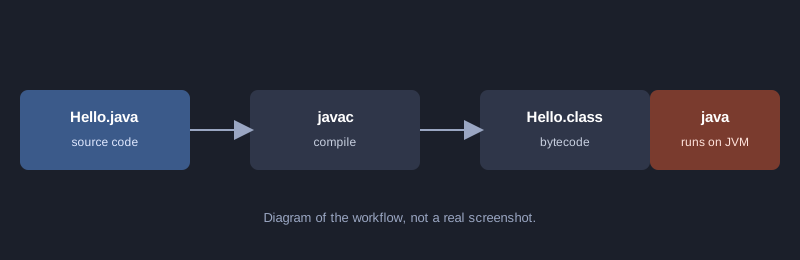
Java is widely used in enterprise systems, Android and servers. Its strength is that one program runs on many operating systems: the source is compiled to bytecode and runs on the JVM (Java Virtual Machine). This article walks you through your first program, variables, conditions, loops and classes, then compiling and running it yourself.
Every example here was compiled and run with Java 17, and the output shown is real.
What you need
- JDK 17 or newer (check with `java -version` and `javac -version`)
- A text editor such as VS Code or Notepad++
How it works
Three steps: write a `.java` file, compile it with `javac` to get a `.class` file, then run it with `java`.
Your first program
Create `Hello.java`. The class name must match the file name. Type this code:
public class Hello {
    public static void main(String[] args) {
        System.out.println("สวัสดี Java");
    }
}
Compile and run:
javac -encoding UTF-8 Hello.java
java -Dfile.encoding=UTF-8 Hello
Output:
สวัสดี Java
`main` is the starting point of the program. `System.out.println` prints text. The `-encoding UTF-8` option makes sure Thai text in the file is read correctly.
Variables and types
Java is statically typed: you declare the type of every variable.
| Type | Stores | Example |
|---|---|---|
| int | whole numbers | `int age = 20;` |
| double | decimal numbers | `double price = 19.5;` |
| boolean | true or false | `boolean passed = true;` |
| String | text | `String name = "สมชาย";` |
Conditions and loops
This example has a `Student` class that decides a grade from a score, and a `for` loop that walks through a list of students.
import java.util.ArrayList;
import java.util.List;

public class Hello {
    static class Student {
        String name;
        int score;

        Student(String name, int score) {
            this.name = name;
            this.score = score;
        }

        String grade() {
            if (score >= 80) return "A";
            else if (score >= 70) return "B";
            else if (score >= 50) return "C";
            return "F";
        }
    }

    public static void main(String[] args) {
        System.out.println("สวัสดี Java");

        List<Student> students = new ArrayList<>();
        students.add(new Student("สมชาย", 85));
        students.add(new Student("สมหญิง", 72));
        students.add(new Student("สมศักดิ์", 45));

        int total = 0;
        for (Student s : students) {
            System.out.println(s.name + " ได้เกรด " + s.grade());
            total += s.score;
        }
        System.out.println("คะแนนเฉลี่ย: " + (total / students.size()));
    }
}
Real output:
สวัสดี Java
สมชาย ได้เกรด A
สมหญิง ได้เกรด B
สมศักดิ์ ได้เกรด F
คะแนนเฉลี่ย: 67
Things to notice:
- `class Student` is nested inside `Hello` as a static nested class, grouping related code.
- `this.name = name` separates the parameter from the field of the same name.
- `total / students.size()` is integer division, so the result is 67 rather than 67.33. Use `double` if you need decimals.
Common beginner mistakes
- **File name does not match class name:** if the class is `public class Hello`, the file must be `Hello.java`.
- **Missing semicolon:** every statement ends with `;`. The error message points to the line.
- **Garbled Thai text:** compile with `-encoding UTF-8` and run with `-Dfile.encoding=UTF-8`.
- **`javac` not recognised:** check that PATH points to the JDK's `bin` folder.
Next steps
Try a small calculator, store a list with `ArrayList`, and split your code into several classes in several files, before moving on to web development with Spring Boot.
Summary
Java compiles source code and runs it on the JVM. The starting point is the `main` method, variables have explicit types, and classes organise the program.