Comparing 10 Popular Game Engines: Pros, Cons and Which to Choose
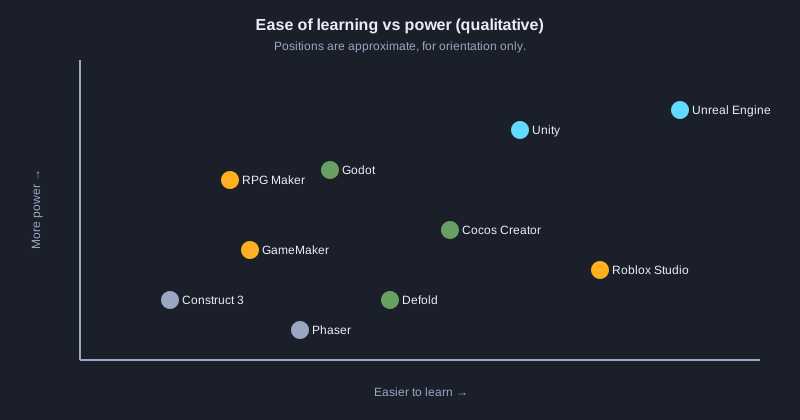
If you want to make a game, the first question is usually which engine to use. This article covers 10 engines that are widely used today, from large 3D engines to 2D tools for the web. For each one it lists the main language, platforms, price or license, pros, cons and who it suits. The end has a comparison table and a decision diagram.
Before you read
Pricing and license information is based on official pages checked in October 2026. Unity's Personal plan applies while revenue or funding stays under 200,000 US dollars over the previous 12 months. Unreal Engine charges no royalty until lifetime gross revenue exceeds 1 million US dollars, then 5% of the amount above that. GameMaker is free for non-commercial use, and selling games requires a one-time Professional license. These terms can change, so check the official site before deciding.
Illustrations
1. Comparison table
This table summarizes the language, dimensions, approximate price and main strength of each engine.
| Engine | Main language | Dimension | Price (checked Oct 2026) | Main strength |
|---|---|---|---|---|
| Unity | C# | 2D and 3D | Free Personal plan under 200K USD revenue | Mobile and many indie games |
| Unreal Engine | C++ and Blueprint | Mainly 3D | Free; 5% royalty above 1M USD lifetime revenue | High-end graphics, AAA games |
| Godot | GDScript, C# | 2D and 3D | Free and open source (MIT) | Light and fully open source |
| GameMaker | GML | 2D | Free for non-commercial use; one-time license to sell | Fast 2D game creation |
| Construct 3 | None (Event Sheets) | 2D | Subscription | No coding needed |
| Cocos Creator | TypeScript, JavaScript | 2D and 3D | Free and open source (MIT) | Mobile and web games |
| Defold | Lua | 2D and 3D | Free | Small, fast mobile games |
| RPG Maker | JavaScript (plugins) | 2D | One-time purchase | Fast RPG creation |
| Roblox Studio | Luau | 3D | Free; revenue through Robux | Large existing player base |
| Phaser | JavaScript, TypeScript | 2D | Free and open source (MIT) | Games that run in a browser |
2. Unity
One of the most widely used engines for mobile and indie games. It supports both 2D and 3D, has a large number of libraries and tutorials, and uses C# in Visual Studio or Rider.
**Pros**
- Lots of resources and tutorials, so answers are easy to find
- Runs on many platforms, including mobile, console and PC
- The Asset Store has many models and tools
**Cons**
- Pricing and terms change often, so check your revenue and licence yourself
- Large projects can get heavy and asset management is up to you
- Some default settings need changing for big projects
**Best for:** Indie developers and small to medium studios that want mobile games or 2D/3D games
3. Unreal Engine
A high-end engine developed by Epic Games. It excels at 3D graphics, lighting and animation. It uses C++ for core systems and Blueprint for visual scripting.
**Pros**
- High-end realistic graphics without building an engine yourself
- Blueprint lets you start without writing code
- Free until lifetime gross revenue exceeds 1 million USD
**Cons**
- Needs a powerful computer and produces large project files
- Harder to learn at first than most other engines
- Simple 2D games can be overkill
**Best for:** Teams making high-quality 3D games or projects that need cinematic graphics and lighting
4. Godot
An open-source engine that is growing in popularity. Its main language is GDScript, which looks like Python. It has an editor, a scene system and nodes that are easy to understand.
**Pros**
- Free and open source under MIT, with no royalty
- Small download and fast to open
- Especially good for 2D
**Cons**
- Fewer asset-store items and ready-made libraries than Unity
- Its 3D tools are not yet at the level of the largest engines
- Console export usually goes through third-party providers
**Best for:** Beginners who want a free engine, and developers making 2D or small indie games
5. GameMaker
An engine for 2D games that uses GML, a language that is easy to learn. Several well-known games were made with it.
**Pros**
- Very quick for learning and making 2D games
- Free for non-commercial use
- Export to several platforms with a paid licence
**Cons**
- Focused on 2D, so not suited to large 3D games
- Selling requires a licence, and console export needs a higher-priced package
- Smaller community than Unity and Godot
**Best for:** Developers who want to make 2D games quickly on a limited budget
6. Construct 3
A 2D engine that needs no coding. It uses Event Sheets, a visual language, which suits learning game logic.
**Pros**
- No coding required, so you can start on day one
- Easy to export to web and mobile
- Simple interface
**Cons**
- Requires an ongoing subscription
- Very complex games can be hard to manage
- Focused on 2D, not suited to 3D
**Best for:** Beginners with no coding background who want to make simple games quickly
7. Cocos Creator
An open-source engine from China, popular for mobile games and mini games that run inside chat platforms. It uses TypeScript or JavaScript.
**Pros**
- Free and open source under MIT
- Exports to web, mobile and mini-game platforms in several formats
- Good performance for mobile games
**Cons**
- Smaller community and fewer English resources than Unity
- Some tools are less complete than in the largest engines
- Learning the whole editor means learning a new system
**Best for:** Web and mobile developers who know TypeScript and want to make mini games
8. Defold
An engine designed to be light and fast. It uses Lua and focuses on mobile games. The editor works without installing heavy tools.
**Pros**
- Small game files that start quickly
- Free, with support for all mobile platforms
- Lean structure, good for small games
**Cons**
- Small community and fewer English resources than Unity
- Few advanced 3D features
- Lua may be unfamiliar to beginners
**Best for:** Small teams making small mobile games that need very light game files
9. RPG Maker
A tool for making role-playing games (RPGs) in 2D. It comes with story, battle and map systems already built in. It uses JavaScript for custom changes.
**Pros**
- Quick to make RPGs without writing basic systems
- One-time purchase, with no monthly subscription
- Large community sharing assets and plugins
**Cons**
- Focused on RPGs, so other genres are harder to make
- Art can look similar unless you customize it
- Not suited to 3D
**Best for:** People who want to tell a story in an RPG style without writing much code
10. Roblox Studio
The tool for building games on the Roblox platform. It uses Luau, a version of Lua. Creators can publish to the platform's players immediately.
**Pros**
- Free, with immediate publishing to a large audience
- Shared assets and ready-made scripts are available
- Earnings through Robux
**Cons**
- Tied to the Roblox platform, so moving elsewhere is hard
- Performance control and file sharing are limited
- Income depends on players and platform rules
**Best for:** People who want to publish on Roblox and build multiplayer games
11. Phaser
A 2D game library for the web. It uses JavaScript or TypeScript and runs in a browser without installing anything on the player's computer.
**Pros**
- Free and open source under MIT
- Games run in the browser immediately and are easy to publish
- Clear documentation and examples
**Cons**
- Focused on 2D web games, with no full visual editor
- Mobile packaging needs extra tools
- You manage more of the project structure yourself
**Best for:** Web developers who want to make 2D browser games
12. How to choose an engine
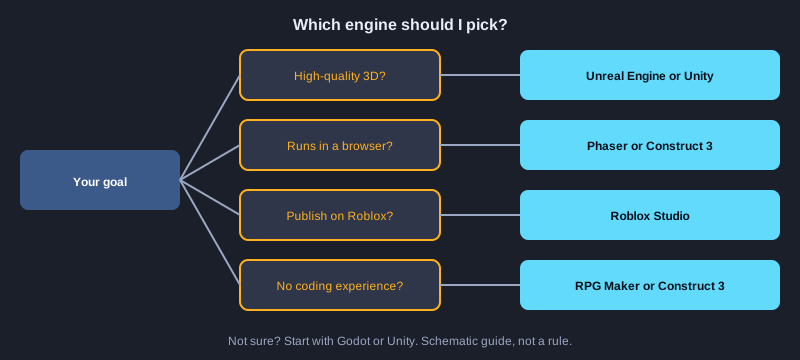
Answer the questions in the diagram below in order to find the engine that matches your goal.
1. Do you want high-quality 3D? If yes, look at Unreal Engine or Unity
2. Do you want the game to run in a browser? If yes, look at Phaser or Construct 3
3. Do you want to publish on Roblox? If yes, use Roblox Studio
4. Have you never written code? If yes, try RPG Maker or Construct 3
5. Do you want a free, open-source engine? If yes, try Godot or Cocos Creator
6. Still not sure? Start with Godot or Unity, which have many tutorials
Next steps
Pick one engine and finish one small game before comparing more. Before you decide on costs, check the current terms on each engine's official website again.
Summary
There is no single best engine for everyone. Unity and Unreal cover large projects, Godot and GameMaker suit 2D and limited budgets, Construct 3 and RPG Maker suit people who do not code much, Cocos Creator, Defold and Phaser suit mobile and web games, and Roblox Studio suits publishing on the Roblox platform. Decide by your goal, your skills and your budget.