Full-Stack Development with Angular, Node.js and MySQL: 100 Examples from Zero to Professional
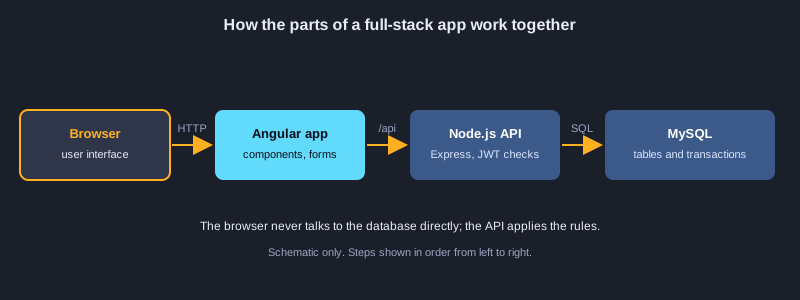
A full-stack application has three parts that must agree with one another: an Angular front end that people use in the browser, a Node.js API that applies the rules, and a MySQL database that keeps the data safe. This article builds one small shop from an empty folder to a production-minded release in 100 examples. You will set up the project, learn enough Node.js and Express to build a REST API, design MySQL tables and write safe queries, connect the API to the database with transactions, validate input, add login with hashed passwords and JWT tokens, build Angular components, services, routes, forms and interceptors, connect everything through a proxy and environment files, test each layer, package the stack with Docker, and prepare it for production. Honesty note: MySQL and the Angular CLI were not installed on the computer used to prepare this article, so none of the 100 examples were executed here. The code follows current Node.js, Express, mysql2, Angular and MySQL syntax, but you should run each part yourself before you rely on it.
What you need
Node.js 20 or newer with npm, MySQL 8.4 (or Docker to run it in a container), the Angular CLI, and a code editor such as Visual Studio Code. Basic JavaScript and a little HTML help. Use placeholder passwords such as <strong-password> and placeholder domains such as shop.example.com, and never commit a real .env file or paste real credentials into code or commands.
How to use an example
Bash examples use npm, the Angular CLI and Docker. JavaScript and TypeScript examples go into the Node.js and Angular project files named in the text. SQL examples run in MySQL 8.4, and HTML examples go into Angular templates.
Topic 1: Project Setup
Start with a clean structure: one folder for the API, one for the Angular app and one for the database scripts. Good structure makes each part easy to test, deploy and explain to someone new.
Three parts, one repository
Keep the API, the web app and the database scripts in one repository so that a single change can update all three together. Each part has its own package file and its own commands.
Tools and versions
Check Node.js, npm and MySQL first. Node.js 20 or newer is recommended because it includes the built-in test runner and modern fetch. The Angular CLI generates code and runs the development server.
Secrets stay out of Git
Passwords and signing keys belong in a .env file that is listed in .gitignore. Commit an example file with placeholder values so others know which settings they need.
Illustrations
Example 1: Check the tools
Confirm Node.js, npm and MySQL are installed.
node --version
npm --version
mysql --version
*This example was not run here because MySQL and the Angular CLI were not installed on the computer that prepared this article.*
Example 2: Create the project folders
Separate the API, the web app and the database.
mkdir shop-fullstack && cd shop-fullstack
mkdir api web db
git init
*This example was not run here because MySQL and the Angular CLI were not installed on the computer that prepared this article.*
Example 3: Set up the Node.js API
Install Express, the MySQL driver and dotenv.
cd api
npm init -y
npm install express mysql2 dotenv
npm install --save-dev nodemon
*This example was not run here because MySQL and the Angular CLI were not installed on the computer that prepared this article.*
Example 4: Install the Angular CLI
Create the Angular front end with routing.
npm install -g @angular/cli
cd ..
ng new web --routing --style=css --skip-git
*This example was not run here because MySQL and the Angular CLI were not installed on the computer that prepared this article.*
Example 5: Project layout
Keep the three parts in clear folders.
shop-fullstack/
  api/        Node.js + Express + MySQL
  web/        Angular front end
  db/         SQL schema and seed data
  docker-compose.yml
*This example was not run here because MySQL and the Angular CLI were not installed on the computer that prepared this article.*
Example 6: Keep secrets out of Git
Ignore .env and commit an example file instead.
cat > .gitignore <<'EOF'
node_modules/
.env
dist/
EOF
cat > api/.env.example <<'EOF'
DB_HOST=localhost
DB_USER=shop
DB_PASSWORD=<strong-password>
DB_NAME=shop
PORT=3000
EOF
*This example was not run here because MySQL and the Angular CLI were not installed on the computer that prepared this article.*
Topic 2: Node.js Fundamentals
Node.js runs JavaScript outside the browser. Learn modules, asynchronous code, environment variables and the small set of ideas that every server file uses.
Modules and asynchronous code
Each file is a module that exports what other files need. Most server work is asynchronous, so use promises with async and await, and handle errors with try and catch so that one failure does not crash the process.
Configuration from the environment
Read settings such as the port and the database address from process.env. The dotenv package loads a .env file during development, and production servers usually receive the variables from the platform.
Scripts and the event loop
npm scripts give every team member the same commands. Remember that one slow synchronous operation blocks every request, so keep heavy work out of request handlers.
Example 7: Read a file with Node.js
Synchronous file reading and its trade-off.
const fs = require("node:fs");

const text = fs.readFileSync("notes.txt", "utf8");
console.log(text.split("\n").length, "lines");
*This example was not run here because MySQL and the Angular CLI were not installed on the computer that prepared this article.*
Example 8: Asynchronous file reads
Use promises with async and await.
const fs = require("node:fs/promises");

async function main() {
  const text = await fs.readFile("notes.txt", "utf8");
  console.log(text.trim());
}
main().catch(console.error);
*This example was not run here because MySQL and the Angular CLI were not installed on the computer that prepared this article.*
Example 9: Modules in Node.js
Export a function and import it in another file.
// math.js
exports.add = (a, b) => a + b;

// main.js
const { add } = require("./math");
console.log(add(2, 3));
*This example was not run here because MySQL and the Angular CLI were not installed on the computer that prepared this article.*
Example 10: Environment variables
Read settings from .env with dotenv.
require("dotenv").config();

const port = Number(process.env.PORT || 3000);
console.log("port", port);
*This example was not run here because MySQL and the Angular CLI were not installed on the computer that prepared this article.*
Example 11: Arrays and filters
Filter and map data the way the API does.
const orders = [
  { id: 1, total: 120 },
  { id: 2, total: 80 },
  { id: 3, total: 200 },
];
const big = orders.filter((o) => o.total >= 100).map((o) => o.id);
console.log(big); // [1, 3]
*This example was not run here because MySQL and the Angular CLI were not installed on the computer that prepared this article.*
Example 12: Promises and await
Wait for work without blocking the server.
const wait = (ms) => new Promise((resolve) => setTimeout(resolve, ms));

async function run() {
  console.log("start");
  await wait(500);
  console.log("done after 500 ms");
}
run();
*This example was not run here because MySQL and the Angular CLI were not installed on the computer that prepared this article.*
Example 13: Errors with try and catch
Handle failures and return a safe default.
async function readConfig(path) {
  try {
    const fs = require("node:fs/promises");
    return JSON.parse(await fs.readFile(path, "utf8"));
  } catch (err) {
    console.error("could not read config:", err.message);
    return {};
  }
}
*This example was not run here because MySQL and the Angular CLI were not installed on the computer that prepared this article.*
Example 14: npm scripts
Start, develop and test the API with one command.
{
  "name": "api",
  "scripts": {
    "start": "node server.js",
    "dev": "nodemon server.js",
    "test": "node --test"
  }
}
*This example was not run here because MySQL and the Angular CLI were not installed on the computer that prepared this article.*
Topic 3: Express REST APIs
Express maps HTTP methods and paths to functions. A REST API uses GET to read, POST to create, PUT or PATCH to change and DELETE to remove, and returns JSON that the front end can display.
Routes, parameters and bodies
app.get, app.post and their siblings match a method and a path. Read URL parameters from req.params, query strings from req.query, and JSON bodies from req.body after app.use(express.json()).
Routers and middleware
A router groups the routes of one resource in its own file. Middleware runs in order for every request, which makes it the right place for logging, authentication and error handling.
Status codes that mean something
Return 200 for reads, 201 for created resources, 204 for deletes with no body, 400 for bad input, 401 when the user is not logged in, 403 when they are not allowed and 404 when the item does not exist.
Example 15: A first Express server
Answer a request in a few lines.
const express = require("express");
const app = express();

app.get("/", (req, res) => {
  res.send("Shop API is running");
});

app.listen(3000, () => console.log("listening on http://localhost:3000"));
*This example was not run here because MySQL and the Angular CLI were not installed on the computer that prepared this article.*
Example 16: A JSON route
Return structured data for the front end.
app.get("/api/health", (req, res) => {
  res.json({ status: "ok", time: new Date().toISOString() });
});
*This example was not run here because MySQL and the Angular CLI were not installed on the computer that prepared this article.*
Example 17: Route parameters and query strings
Read values from the URL.
app.get("/api/products/:id", (req, res) => {
  const id = Number(req.params.id);
  const detail = req.query.detail === "1";
  res.json({ id, detail });
});
*This example was not run here because MySQL and the Angular CLI were not installed on the computer that prepared this article.*
Example 18: Parse a JSON body
Accept data from a form or from Angular.
app.use(express.json());

app.post("/api/products", (req, res) => {
  const { name, price } = req.body;
  res.status(201).json({ name, price });
});
*This example was not run here because MySQL and the Angular CLI were not installed on the computer that prepared this article.*
Example 19: Organize routes in a router
Keep each feature in its own file.
// routes/products.js
const { Router } = require("express");
const router = Router();

router.get("/", (req, res) => res.json([]));
router.get("/:id", (req, res) => res.json({ id: req.params.id }));

module.exports = router;

// server.js
app.use("/api/products", require("./routes/products"));
*This example was not run here because MySQL and the Angular CLI were not installed on the computer that prepared this article.*
Example 20: Request logging middleware
Log method, path, status and time.
app.use((req, res, next) => {
  const started = Date.now();
  res.on("finish", () => {
    console.log(req.method, req.originalUrl, res.statusCode, Date.now() - started, "ms");
  });
  next();
});
*This example was not run here because MySQL and the Angular CLI were not installed on the computer that prepared this article.*
Example 21: A central error handler
Return one error format from every route.
app.use((err, req, res, next) => {
  console.error(err);
  res.status(err.status || 500).json({ error: "Something went wrong" });
});
*This example was not run here because MySQL and the Angular CLI were not installed on the computer that prepared this article.*
Example 22: 404 for unknown routes
Answer clearly when a URL does not exist.
app.use((req, res) => {
  res.status(404).json({ error: "Not found" });
});
*This example was not run here because MySQL and the Angular CLI were not installed on the computer that prepared this article.*
Topic 4: MySQL Basics and SQL
MySQL stores data in tables with typed columns, keys and relationships. SQL creates, reads, changes and removes rows, and good design prevents many bugs before any code runs.
Databases, users and least privilege
Create a database for the shop and a user that can only read and write that database. Never let the application connect as the root account, because a leaked password would then expose the whole server.
Tables, keys and types
Give every table a primary key, choose types that match the data, such as DECIMAL for money, and use foreign keys so that an order cannot refer to a product that does not exist. Use UNIQUE for values that must not repeat, such as email addresses.
Reading and changing rows
SELECT with WHERE, ORDER BY and LIMIT returns the rows you need. UPDATE and DELETE should always have a WHERE clause that you have tested with a SELECT first, because a missing condition changes every row.
Example 23: Create the database and user
Give the application only the rights it needs.
CREATE DATABASE IF NOT EXISTS shop CHARACTER SET utf8mb4 COLLATE utf8mb4_unicode_ci;
CREATE USER IF NOT EXISTS 'shop'@'localhost' IDENTIFIED BY '<strong-password>';
GRANT SELECT, INSERT, UPDATE, DELETE ON shop.* TO 'shop'@'localhost';
*This example was not run here because MySQL and the Angular CLI were not installed on the computer that prepared this article.*
Example 24: Create a table
Define columns, keys and defaults.
USE shop;
CREATE TABLE products (
  id INT UNSIGNED AUTO_INCREMENT PRIMARY KEY,
  name VARCHAR(120) NOT NULL,
  price DECIMAL(10,2) NOT NULL,
  stock INT NOT NULL DEFAULT 0,
  created_at TIMESTAMP DEFAULT CURRENT_TIMESTAMP
);
*This example was not run here because MySQL and the Angular CLI were not installed on the computer that prepared this article.*
Example 25: Insert rows
Add several rows in one statement.
INSERT INTO products (name, price, stock)
VALUES ('Keyboard', 790.00, 12),
       ('Mouse', 350.00, 30),
       ('Monitor', 5490.00, 4);
*This example was not run here because MySQL and the Angular CLI were not installed on the computer that prepared this article.*
Example 26: Select with filter and sort
Read only the rows you need, in order.
SELECT id, name, price
FROM products
WHERE stock > 0
ORDER BY price DESC;
*This example was not run here because MySQL and the Angular CLI were not installed on the computer that prepared this article.*
Example 27: Update a row
Change values with a WHERE clause.
UPDATE products
SET price = 690.00
WHERE name = 'Keyboard';
*This example was not run here because MySQL and the Angular CLI were not installed on the computer that prepared this article.*
Example 28: Delete a row safely
Always limit deletes to the rows you intend.
DELETE FROM products
WHERE id = 3
LIMIT 1;
*This example was not run here because MySQL and the Angular CLI were not installed on the computer that prepared this article.*
Example 29: Join and aggregate
Count sales per product with GROUP BY.
CREATE TABLE orders (
  id INT UNSIGNED AUTO_INCREMENT PRIMARY KEY,
  product_id INT UNSIGNED NOT NULL,
  quantity INT NOT NULL,
  ordered_at TIMESTAMP DEFAULT CURRENT_TIMESTAMP,
  FOREIGN KEY (product_id) REFERENCES products(id)
);
SELECT p.name, SUM(o.quantity) AS sold
FROM orders o
JOIN products p ON p.id = o.product_id
GROUP BY p.name
ORDER BY sold DESC;
*This example was not run here because MySQL and the Angular CLI were not installed on the computer that prepared this article.*
Example 30: Index a searched column
Speed up lookups and check the plan with EXPLAIN.
CREATE INDEX idx_products_name ON products (name);
EXPLAIN SELECT * FROM products WHERE name = 'Mouse';
*This example was not run here because MySQL and the Angular CLI were not installed on the computer that prepared this article.*
Topic 5: Data Access from Node.js
The API talks to MySQL through a connection pool. Parameterized queries keep user input separate from SQL, transactions keep related changes together, and pagination keeps responses small.
Connection pools
A pool keeps a set of open connections and hands one to each request, then takes it back. Create the pool once at startup and reuse it, instead of opening a new connection for every request.
Placeholders prevent SQL injection
Never join user input into SQL text. Write ? in the query and pass the values in an array, so the driver escapes them. This single habit prevents one of the most common security failures on the web.
Transactions and pagination
A transaction groups several statements so that all succeed or none do, which matters when an order reduces stock and creates an order row. Use LIMIT and OFFSET, or better a keyset, to return one page at a time.
Example 31: A connection pool
Reuse connections instead of opening one per request.
const mysql = require("mysql2/promise");

const pool = mysql.createPool({
  host: process.env.DB_HOST,
  user: process.env.DB_USER,
  password: process.env.DB_PASSWORD,
  database: process.env.DB_NAME,
  waitForConnections: true,
  connectionLimit: 10,
});
module.exports = pool;
*This example was not run here because MySQL and the Angular CLI were not installed on the computer that prepared this article.*
Example 32: Query from Node.js
Send SQL from a route and return the rows.
const pool = require("./db");

app.get("/api/products", async (req, res, next) => {
  try {
    const [rows] = await pool.query("SELECT id, name, price, stock FROM products ORDER BY name");
    res.json(rows);
  } catch (err) {
    next(err);
  }
});
*This example was not run here because MySQL and the Angular CLI were not installed on the computer that prepared this article.*
Example 33: Placeholders against SQL injection
Never join user input into SQL text.
// Unsafe: never build SQL by joining user input
// const [rows] = await pool.query("SELECT * FROM products WHERE name = '" + name + "'");

// Safe: the driver escapes the value
const [rows] = await pool.query("SELECT * FROM products WHERE name = ?", [name]);
*This example was not run here because MySQL and the Angular CLI were not installed on the computer that prepared this article.*
Example 34: Insert and return the new id
Create a row and report its id to the client.
app.post("/api/products", async (req, res, next) => {
  try {
    const { name, price, stock = 0 } = req.body;
    const [result] = await pool.execute(
      "INSERT INTO products (name, price, stock) VALUES (?, ?, ?)",
      [name, price, stock]
    );
    res.status(201).json({ id: result.insertId, name, price, stock });
  } catch (err) {
    next(err);
  }
});
*This example was not run here because MySQL and the Angular CLI were not installed on the computer that prepared this article.*
Example 35: Update with a check
Return 404 when no row matched.
app.put("/api/products/:id", async (req, res, next) => {
  try {
    const { price, stock } = req.body;
    const [result] = await pool.execute(
      "UPDATE products SET price = ?, stock = ? WHERE id = ?",
      [price, stock, req.params.id]
    );
    if (result.affectedRows === 0) return res.status(404).json({ error: "Not found" });
    res.json({ updated: true });
  } catch (err) {
    next(err);
  }
});
*This example was not run here because MySQL and the Angular CLI were not installed on the computer that prepared this article.*
Example 36: Delete with a check
Return 204 or 404 based on the result.
app.delete("/api/products/:id", async (req, res, next) => {
  try {
    const [result] = await pool.execute("DELETE FROM products WHERE id = ?", [req.params.id]);
    res.status(result.affectedRows ? 204 : 404).end();
  } catch (err) {
    next(err);
  }
});
*This example was not run here because MySQL and the Angular CLI were not installed on the computer that prepared this article.*
Example 37: A transaction
Reserve stock and create an order together, or not at all.
async function placeOrder(productId, quantity) {
  const conn = await pool.getConnection();
  try {
    await conn.beginTransaction();
    const [stock] = await conn.execute("SELECT stock FROM products WHERE id = ? FOR UPDATE", [productId]);
    if (stock[0].stock < quantity) throw new Error("not enough stock");
    await conn.execute("UPDATE products SET stock = stock - ? WHERE id = ?", [quantity, productId]);
    await conn.execute("INSERT INTO orders (product_id, quantity) VALUES (?, ?)", [productId, quantity]);
    await conn.commit();
  } catch (err) {
    await conn.rollback();
    throw err;
  } finally {
    conn.release();
  }
}
*This example was not run here because MySQL and the Angular CLI were not installed on the computer that prepared this article.*
Example 38: Pagination
Return pages of results instead of the whole table.
app.get("/api/products", async (req, res, next) => {
  const page = Math.max(1, Number(req.query.page) || 1);
  const size = Math.min(50, Number(req.query.size) || 20);
  try {
    const [rows] = await pool.execute(
      "SELECT id, name, price FROM products ORDER BY id LIMIT ? OFFSET ?",
      [size, (page - 1) * size]
    );
    res.json({ page, size, items: rows });
  } catch (err) {
    next(err);
  }
});
*This example was not run here because MySQL and the Angular CLI were not installed on the computer that prepared this article.*
Topic 6: Validation and Error Handling
The API should never trust the browser. Check every input, return clear messages for mistakes and convert database errors into responses that the front end can show without leaking internal details.
Validate on the server
Checks in Angular improve the experience, but the server must check again because anyone can send a request directly. A schema library describes the fields once and reports every problem in one response.
One error format
Use a central error handler that returns the same JSON shape for every failure. Map known database errors such as duplicate keys to 409 and log the full error on the server, but send the client only a safe message.
Errors from async routes
Express 4 does not catch rejected promises from route handlers automatically. Wrap async routes so that errors reach the error handler, or use Express 5, which handles them for you.
Example 39: Validate input
Check fields before they reach the database.
function validateProduct(body) {
  const errors = [];
  if (typeof body.name !== "string" || body.name.trim().length < 2) errors.push("name must be at least 2 characters");
  if (typeof body.price !== "number" || body.price < 0) errors.push("price must be a number >= 0");
  return errors;
}
*This example was not run here because MySQL and the Angular CLI were not installed on the computer that prepared this article.*
Example 40: Return 400 for bad input
Explain each validation error to the client.
app.post("/api/products", async (req, res, next) => {
  const errors = validateProduct(req.body);
  if (errors.length) return res.status(400).json({ errors });
  // ...insert as in example 34
});
*This example was not run here because MySQL and the Angular CLI were not installed on the computer that prepared this article.*
Example 41: Validate with a schema
Describe the data once and reuse the rules.
const { z } = require("zod");

const productSchema = z.object({
  name: z.string().min(2).max(120),
  price: z.number().nonnegative(),
  stock: z.number().int().nonnegative().default(0),
});

const parsed = productSchema.safeParse(req.body);
if (!parsed.success) return res.status(400).json({ errors: parsed.error.issues });
*This example was not run here because MySQL and the Angular CLI were not installed on the computer that prepared this article.*
Example 42: Turn database errors into responses
Map duplicates and missing references to clear codes.
app.use((err, req, res, next) => {
  if (err.code === "ER_DUP_ENTRY") return res.status(409).json({ error: "Already exists" });
  if (err.code === "ER_NO_REFERENCED_ROW_2") return res.status(422).json({ error: "Related item not found" });
  next(err);
});
*This example was not run here because MySQL and the Angular CLI were not installed on the computer that prepared this article.*
Example 43: A custom error class
Carry an HTTP status with the error message.
class HttpError extends Error {
  constructor(status, message) {
    super(message);
    this.status = status;
  }
}

// usage
throw new HttpError(404, "Product not found");
*This example was not run here because MySQL and the Angular CLI were not installed on the computer that prepared this article.*
Example 44: An async route wrapper
Send errors from async routes to the handler.
const asyncRoute = (fn) => (req, res, next) => Promise.resolve(fn(req, res, next)).catch(next);

app.get("/api/products/:id", asyncRoute(async (req, res) => {
  const [rows] = await pool.execute("SELECT * FROM products WHERE id = ?", [req.params.id]);
  if (!rows.length) throw new HttpError(404, "Product not found");
  res.json(rows[0]);
}));
*This example was not run here because MySQL and the Angular CLI were not installed on the computer that prepared this article.*
Example 45: CORS for the Angular dev server
Allow the browser to call the API from another port.
const cors = require("cors");

app.use(cors({ origin: "http://localhost:4200" }));
*This example was not run here because MySQL and the Angular CLI were not installed on the computer that prepared this article.*
Example 46: Security headers
Set safe HTTP headers with helmet.
const helmet = require("helmet");

app.use(helmet());
app.disable("x-powered-by");
*This example was not run here because MySQL and the Angular CLI were not installed on the computer that prepared this article.*
Topic 7: Authentication and Authorization
Authentication proves who the user is. Authorization decides what that user may do. Store passwords as hashes, issue short-lived tokens and check the role on every protected route.
Hashed passwords
bcrypt turns a password into a one-way hash with a built-in salt and a cost factor. Store only the hash, compare with bcrypt.compare at login, and never log passwords or return them in responses.
Tokens and their lifetime
A JSON Web Token carries the user id and role, signed with a secret. Keep the lifetime short, such as one hour, and use a refresh token that can be revoked for longer sessions. Store the refresh token as a hash in the database.
Roles and route protection
Verify the token in middleware, then check the role for admin-only actions. Remember that the front end can hide a button, but only the server can enforce a rule.
Example 47: Hash passwords
Store a bcrypt hash, never the password.
const bcrypt = require("bcrypt");

async function hashPassword(plain) {
  return bcrypt.hash(plain, 12);
}

async function checkPassword(plain, hash) {
  return bcrypt.compare(plain, hash);
}
*This example was not run here because MySQL and the Angular CLI were not installed on the computer that prepared this article.*
Example 48: A users table
Store unique emails, password hashes and roles.
CREATE TABLE users (
  id INT UNSIGNED AUTO_INCREMENT PRIMARY KEY,
  email VARCHAR(190) NOT NULL UNIQUE,
  password_hash VARCHAR(255) NOT NULL,
  role ENUM('customer', 'admin') NOT NULL DEFAULT 'customer',
  created_at TIMESTAMP DEFAULT CURRENT_TIMESTAMP
);
*This example was not run here because MySQL and the Angular CLI were not installed on the computer that prepared this article.*
Example 49: Register a user
Create an account with a hashed password.
app.post("/api/auth/register", asyncRoute(async (req, res) => {
  const { email, password } = req.body;
  const hash = await hashPassword(password);
  const [result] = await pool.execute(
    "INSERT INTO users (email, password_hash) VALUES (?, ?)",
    [email.toLowerCase(), hash]
  );
  res.status(201).json({ id: result.insertId, email });
})));
*This example was not run here because MySQL and the Angular CLI were not installed on the computer that prepared this article.*
Example 50: Log in and issue a token
Return a signed JWT after a correct password.
const jwt = require("jsonwebtoken");

app.post("/api/auth/login", asyncRoute(async (req, res) => {
  const [rows] = await pool.execute("SELECT id, password_hash, role FROM users WHERE email = ?", [req.body.email]);
  if (!rows.length || !(await checkPassword(req.body.password, rows[0].password_hash))) {
    throw new HttpError(401, "Wrong email or password");
  }
  const token = jwt.sign({ sub: rows[0].id, role: rows[0].role }, process.env.JWT_SECRET, { expiresIn: "1h" });
  res.json({ token });
})));
*This example was not run here because MySQL and the Angular CLI were not installed on the computer that prepared this article.*
Example 51: Verify the JWT in middleware
Read the bearer token and reject bad or expired tokens.
const jwt = require("jsonwebtoken");

function requireAuth(req, res, next) {
  const header = req.headers.authorization || "";
  const token = header.startsWith("Bearer ") ? header.slice(7) : null;
  if (!token) return res.status(401).json({ error: "Missing token" });
  try {
    req.user = jwt.verify(token, process.env.JWT_SECRET);
    next();
  } catch {
    res.status(401).json({ error: "Invalid or expired token" });
  }
}
*This example was not run here because MySQL and the Angular CLI were not installed on the computer that prepared this article.*
Example 52: Allow only some roles
Return 403 when the user lacks the role.
function requireRole(...roles) {
  return (req, res, next) => {
    if (!req.user || !roles.includes(req.user.role)) {
      return res.status(403).json({ error: "Forbidden" });
    }
    next();
  };
}
*This example was not run here because MySQL and the Angular CLI were not installed on the computer that prepared this article.*
Example 53: Protect routes
Require a login for orders and admin-only deletes.
app.get("/api/orders", requireAuth, asyncRoute(async (req, res) => {
  const [rows] = await pool.execute("SELECT id, product_id, quantity FROM orders WHERE user_id = ?", [req.user.sub]);
  res.json(rows);
})));

app.delete("/api/products/:id", requireAuth, requireRole("admin"), asyncRoute(async (req, res) => {
  await pool.execute("DELETE FROM products WHERE id = ?", [req.params.id]);
  res.status(204).end();
}));
*This example was not run here because MySQL and the Angular CLI were not installed on the computer that prepared this article.*
Example 54: Store refresh tokens
Keep a hash of each refresh token so it can be revoked.
CREATE TABLE refresh_tokens (
  id INT UNSIGNED AUTO_INCREMENT PRIMARY KEY,
  user_id INT UNSIGNED NOT NULL,
  token_hash CHAR(64) NOT NULL,
  expires_at DATETIME NOT NULL,
  revoked TINYINT(1) NOT NULL DEFAULT 0,
  FOREIGN KEY (user_id) REFERENCES users(id) ON DELETE CASCADE
);
*This example was not run here because MySQL and the Angular CLI were not installed on the computer that prepared this article.*
Topic 8: Angular Components and Templates
Angular builds the interface from components. Each component has a class with the logic, a template with the markup and styles. Standalone components, control flow and bindings are the modern way to write them.
Standalone components
A standalone component lists its own imports and does not need an NgModule. Generate one with ng generate component and use the selector in another template to display it.
Bindings
Interpolation shows values with double curly braces. Property binding sets a DOM property in square brackets, and event binding runs a method in parentheses. Two-way binding is possible, but one-way data flow is easier to debug.
Control flow
Use @if to show content conditionally, @for with a track expression to repeat items, and @switch to choose between several views. Tracking by id keeps the page efficient when the list changes.
Example 55: A standalone Angular component
A component that needs no NgModule.
import { Component } from "@angular/core";

@Component({
  selector: "app-hello",
  standalone: true,
  template: `<h1>Welcome to the shop</h1>`,
})
export class HelloComponent {}
*This example was not run here because MySQL and the Angular CLI were not installed on the computer that prepared this article.*
Example 56: Data binding in a template
Show values, bind attributes and handle clicks.
<h2>{{ product.name }}</h2>
<p>Price: {{ product.price | currency:'THB' }}</p>
<button [disabled]="product.stock === 0" (click)="addToCart(product)">Add to cart</button>
*This example was not run here because MySQL and the Angular CLI were not installed on the computer that prepared this article.*
Example 57: Control flow with @if and @for
Show lists and empty states in the template.
@if (products.length > 0) {
  <ul>
    @for (p of products; track p.id) {
      <li>{{ p.name }} ({{ p.stock }} left)</li>
    }
  </ul>
} @else {
  <p>No products yet.</p>
}
*This example was not run here because MySQL and the Angular CLI were not installed on the computer that prepared this article.*
Example 58: Inputs and outputs
Pass data into a child and send events back up.
import { Component, Input, Output, EventEmitter } from "@angular/core";

@Component({ selector: "app-product-card", standalone: true, template: "" })
export class ProductCardComponent {
  @Input({ required: true }) product!: { id: number; name: string; price: number };
  @Output() added = new EventEmitter<number>();

  add() {
    this.added.emit(this.product.id);
  }
}
*This example was not run here because MySQL and the Angular CLI were not installed on the computer that prepared this article.*
Example 59: Bootstrap a standalone app
Provide the router and HttpClient at startup.
import { bootstrapApplication } from "@angular/platform-browser";
import { provideRouter } from "@angular/router";
import { provideHttpClient } from "@angular/common/http";
import { AppComponent } from "./app/app.component";
import { routes } from "./app/app.routes";

bootstrapApplication(AppComponent, {
  providers: [provideRouter(routes), provideHttpClient()],
});
*This example was not run here because MySQL and the Angular CLI were not installed on the computer that prepared this article.*
Example 60: Generate and run with the CLI
Create components and services, then serve the app.
cd web
ng generate component products/product-list
ng generate service products/product
ng serve --open
*This example was not run here because MySQL and the Angular CLI were not installed on the computer that prepared this article.*
Topic 9: Services, HTTP and Routing
Services hold logic and talk to the API, so components stay small. The router maps URLs to components, guards protect pages and lazy loading keeps the first download small.
Injectable services and HttpClient
Mark a service as providedIn root so that Angular creates one instance for the app. Inject HttpClient, and return Observables typed with the response interface, so the compiler checks the fields you use.
Routes and parameters
Define routes as an array of path and component pairs. Read parameters from ActivatedRoute, and add a wildcard route at the end that shows a not-found page.
Guards and lazy loading
A CanActivate guard returns true or a redirect. Lazy routes use loadComponent with a dynamic import, so the admin code downloads only when the user opens it.
Example 61: An injectable service
Share state between components with one instance.
import { Injectable } from "@angular/core";

@Injectable({ providedIn: "root" })
export class CartService {
  private items: { id: number; qty: number }[] = [];

  add(id: number) {
    const found = this.items.find((i) => i.id === id);
    if (found) found.qty++;
    else this.items.push({ id, qty: 1 });
  }

  count() {
    return this.items.reduce((sum, i) => sum + i.qty, 0);
  }
}
*This example was not run here because MySQL and the Angular CLI were not installed on the computer that prepared this article.*
Example 62: Call the API with HttpClient
Typed requests that return Observables.
import { Injectable, inject } from "@angular/core";
import { HttpClient } from "@angular/common/http";
import { Observable } from "rxjs";

export interface Product { id: number; name: string; price: number; stock: number; }

@Injectable({ providedIn: "root" })
export class ProductService {
  private http = inject(HttpClient);

  list(): Observable<Product[]> {
    return this.http.get<Product[]>("/api/products");
  }
}
*This example was not run here because MySQL and the Angular CLI were not installed on the computer that prepared this article.*
Example 63: Define routes
Map URLs to components, with a fallback page.
import { Routes } from "@angular/router";

export const routes: Routes = [
  { path: "", pathMatch: "full", redirectTo: "products" },
  { path: "products", component: ProductListComponent },
  { path: "products/:id", component: ProductDetailComponent },
  { path: "**", component: NotFoundComponent },
];
*This example was not run here because MySQL and the Angular CLI were not installed on the computer that prepared this article.*
Example 64: A route guard
Send anonymous users to the login page.
import { inject } from "@angular/core";
import { CanActivateFn, Router } from "@angular/router";
import { AuthService } from "./auth.service";

export const authGuard: CanActivateFn = () => {
  const auth = inject(AuthService);
  return auth.isLoggedIn() || inject(Router).createUrlTree(["/login"]);
};
*This example was not run here because MySQL and the Angular CLI were not installed on the computer that prepared this article.*
Example 65: Read a route parameter
Load one product from the URL.
import { Component, inject } from "@angular/core";
import { ActivatedRoute } from "@angular/router";

@Component({ selector: "app-product-detail", standalone: true, template: "" })
export class ProductDetailComponent {
  private route = inject(ActivatedRoute);
  readonly id = Number(this.route.snapshot.paramMap.get("id"));
}
*This example was not run here because MySQL and the Angular CLI were not installed on the computer that prepared this article.*
Example 66: Lazy-load a feature
Download the admin code only when it is needed.
export const routes: Routes = [
  {
    path: "admin",
    canActivate: [authGuard],
    loadComponent: () => import("./admin/admin.component").then((m) => m.AdminComponent),
  },
];
*This example was not run here because MySQL and the Angular CLI were not installed on the computer that prepared this article.*
Topic 10: Forms and Validation
Forms collect the data that the API stores. Reactive forms keep the model in TypeScript, which makes validation and testing straightforward and keeps the template simple.
Reactive forms
Build the form with FormBuilder, describe each field with its default value and validators, and bind the template with formGroup and formControlName. The form value is typed, so the submit code is checked by the compiler.
Custom and async validation
A validator is a function that returns null when the value is valid, or an object describing the error. Write one for rules that the built-in validators do not cover, such as values that contain only spaces.
Showing errors and sending data
Show messages only after the user has touched a field, so the form does not start in an error state. When the server returns validation errors, display them next to the form instead of showing a generic alert.
Example 67: A reactive form
Build a form in TypeScript with validators.
import { Component, inject } from "@angular/core";
import { FormBuilder, ReactiveFormsModule, Validators } from "@angular/forms";

@Component({ selector: "app-product-form", standalone: true, imports: [ReactiveFormsModule], templateUrl: "./product-form.html" })
export class ProductFormComponent {
  private fb = inject(FormBuilder);
  form = this.fb.nonNullable.group({
    name: ["", [Validators.required, Validators.minLength(2)]],
    price: [0, [Validators.required, Validators.min(0)]],
    stock: [0, [Validators.min(0)]],
  });
}
*This example was not run here because MySQL and the Angular CLI were not installed on the computer that prepared this article.*
Example 68: The form template
Bind inputs to the form model.
<form [formGroup]="form" (ngSubmit)="save()">
  <label>Name <input formControlName="name"></label>
  <label>Price <input type="number" formControlName="price"></label>
  <label>Stock <input type="number" formControlName="stock"></label>
  <button type="submit" [disabled]="form.invalid">Save</button>
</form>
*This example was not run here because MySQL and the Angular CLI were not installed on the computer that prepared this article.*
Example 69: A custom validator
Reject values that contain only spaces.
import { AbstractControl, ValidationErrors } from "@angular/forms";

export function noSpacesOnly(control: AbstractControl): ValidationErrors | null {
  const value = String(control.value ?? "");
  return value.trim().length === 0 && value.length > 0 ? { spacesOnly: true } : null;
}
*This example was not run here because MySQL and the Angular CLI were not installed on the computer that prepared this article.*
Example 70: Show validation messages
Display errors after the user touches a field.
@if (form.controls.name.touched && form.controls.name.invalid) {
  <p class="error">
    @if (form.controls.name.errors?.['required']) { Name is required. }
    @if (form.controls.name.errors?.['minlength']) { Name must be at least 2 characters. }
  </p>
}
*This example was not run here because MySQL and the Angular CLI were not installed on the computer that prepared this article.*
Example 71: Submit the form to the API
Post data and navigate after success.
save() {
  if (this.form.invalid) return;
  this.http.post("/api/products", this.form.getRawValue()).subscribe({
    next: () => this.router.navigate(["/products"]),
    error: (err) => (this.serverError = err.error?.errors ?? ["Could not save"]),
  });
}
*This example was not run here because MySQL and the Angular CLI were not installed on the computer that prepared this article.*
Example 72: Show server errors
Display the validation messages the API returns.
// After a 400 response, the API sends { errors: ["price must be a number >= 0"] }
serverError: string[] = [];

// in the template
// @for (e of serverError; track e) { <p class="error">{{ e }}</p> }
*This example was not run here because MySQL and the Angular CLI were not installed on the computer that prepared this article.*
Topic 11: State, Observables and Interceptors
Data changes over time, and many requests must be coordinated. Observables and signals describe that change, and interceptors add cross-cutting behavior such as tokens and error logging to every request.
Observables and the async pipe
An Observable emits values over time. The async pipe subscribes in the template and unsubscribes automatically, which avoids memory leaks and manual subscription code.
Signals for local state
A signal holds a value that notifies the template when it changes. computed derives values from signals, and effect runs code when they change. Signals suit simple state such as a counter or a cart total.
Interceptors
An HTTP interceptor sees every request and response. Use one to attach the Authorization header and another to log failures or redirect to the login page when the token has expired.
Example 73: Observables and the async pipe
Render a list without manual subscriptions.
@Component({
  selector: "app-products",
  standalone: true,
  imports: [AsyncPipe],
  template: `
    @for (p of products$ | async; track p.id) {
      <div>{{ p.name }}</div>
    }`,
})
export class ProductsComponent {
  products$ = inject(ProductService).list();
}
*This example was not run here because MySQL and the Angular CLI were not installed on the computer that prepared this article.*
Example 74: An interceptor that adds the token
Attach the Authorization header to every request.
import { HttpInterceptorFn } from "@angular/common/http";
import { inject } from "@angular/core";
import { AuthService } from "./auth.service";

export const authInterceptor: HttpInterceptorFn = (req, next) => {
  const token = inject(AuthService).token();
  return next(token ? req.clone({ setHeaders: { Authorization: `Bearer ${token}` } }) : req);
};
*This example was not run here because MySQL and the Angular CLI were not installed on the computer that prepared this article.*
Example 75: A global error interceptor
Log API failures in one place.
import { HttpErrorResponse, HttpInterceptorFn } from "@angular/common/http";
import { catchError, throwError } from "rxjs";

export const errorInterceptor: HttpInterceptorFn = (req, next) =>
  next(req).pipe(
    catchError((err: HttpErrorResponse) => {
      console.error("API error", err.status, req.url);
      return throwError(() => err);
    })
  );
*This example was not run here because MySQL and the Angular CLI were not installed on the computer that prepared this article.*
Example 76: Signals for local state
Track a value and derive another from it.
import { Component, computed, signal } from "@angular/core";

@Component({ selector: "app-counter", standalone: true, template: "" })
export class CounterComponent {
  count = signal(0);
  double = computed(() => this.count() * 2);

  increment() {
    this.count.update((n) => n + 1);
  }
}
*This example was not run here because MySQL and the Angular CLI were not installed on the computer that prepared this article.*
Example 77: A small store with signals
Keep the cart state in one service.
import { Injectable, computed, signal } from "@angular/core";

@Injectable({ providedIn: "root" })
export class CartStore {
  private readonly lines = signal<{ id: number; qty: number }[]>([]);
  readonly totalQty = computed(() => this.lines().reduce((s, l) => s + l.qty, 0));

  add(id: number) {
    this.lines.update((ls) => [...ls, { id, qty: 1 }]);
  }
}
*This example was not run here because MySQL and the Angular CLI were not installed on the computer that prepared this article.*
Example 78: Unsubscribe automatically
Stop a stream when the component is destroyed.
import { Component, DestroyRef, inject } from "@angular/core";
import { takeUntilDestroyed } from "@angular/core/rxjs-interop";

export class ClockComponent {
  constructor() {
    interval(1000).pipe(takeUntilDestroyed()).subscribe(() => this.tick());
  }
  tick() {}
}
*This example was not run here because MySQL and the Angular CLI were not installed on the computer that prepared this article.*
Topic 12: Full-Stack Integration
Connecting the parts is where many projects break. A proxy in development, environment files for each deployment and shared types keep the front end and the API in step.
Development proxy
Forward /api from the Angular dev server to the Node.js server, so the browser sees one origin and no CORS configuration is needed during development. Restart ng serve after changing the proxy file.
Environment files
Angular environment files give each build its own settings, such as the API address. Keep the production address out of the source when it is secret, and read it from the build configuration instead.
Shared types
Describe the Product shape once in a shared folder and import it in both the API and the front end. A field renamed in one place then shows up as a compiler error in the other, instead of as a runtime bug.
Example 79: Proxy API calls in development
Forward /api to the Node.js server.
{
  "/api": {
    "target": "http://localhost:3000",
    "secure": false,
    "changeOrigin": true
  }
}
*This example was not run here because MySQL and the Angular CLI were not installed on the computer that prepared this article.*
Example 80: Environment files
Use a different API address in production.
// src/environments/environment.ts
export const environment = {
  production: false,
  apiBaseUrl: "/api",
};

// src/environments/environment.prod.ts
export const environment = {
  production: true,
  apiBaseUrl: "https://api.shop.example.com",
};
*This example was not run here because MySQL and the Angular CLI were not installed on the computer that prepared this article.*
Example 81: Build the API URL
Combine the base address and the path in one place.
import { environment } from "../environments/environment";

export const api = (path: string) => `${environment.apiBaseUrl}${path}`;
*This example was not run here because MySQL and the Angular CLI were not installed on the computer that prepared this article.*
Example 82: Run the API and the front end
Start both servers in two terminals.
# terminal 1
cd api && npm run dev
# terminal 2
cd web && ng serve --proxy-config proxy.conf.json
*This example was not run here because MySQL and the Angular CLI were not installed on the computer that prepared this article.*
Example 83: Share types between front end and back end
Keep the Product shape the same on both sides.
// shared/product.ts (used by both web and api through a path alias)
export interface Product {
  id: number;
  name: string;
  price: number;
  stock: number;
}

export type CreateProduct = Omit<Product, "id">;
*This example was not run here because MySQL and the Angular CLI were not installed on the computer that prepared this article.*
Example 84: Check the API health from Angular
Show whether the back end is reachable.
export class AppComponent {
  private http = inject(HttpClient);
  apiOk = signal<boolean | null>(null);

  constructor() {
    this.http.get<{ status: string }>("/api/health").subscribe({
      next: (r) => this.apiOk.set(r.status === "ok"),
      error: () => this.apiOk.set(false),
    });
  }
}
*This example was not run here because MySQL and the Angular CLI were not installed on the computer that prepared this article.*
Topic 13: Testing Every Layer
Tests catch mistakes before users do. Test pure functions, API routes, Angular components and services, and finally the whole stack with a separate database.
API tests
Supertest sends requests to the Express app without opening a real port, and Jest or node:test checks the result. Test the success path and at least one failure, such as a missing token or an invalid price.
Angular tests
TestBed creates a component with its dependencies. HttpTestingController answers HTTP calls with fake data, so the component can be tested without a running API.
Integration and coverage
Run integration tests against a separate test database that is reset before each run, so tests never change real data. Coverage shows which code no test reaches, which is a starting point, not a guarantee.
Example 85: Test an Express route
Call the route with Supertest and check the response.
const request = require("supertest");
const app = require("../app");

test("GET /api/health returns ok", async () => {
  const res = await request(app).get("/api/health");
  expect(res.status).toBe(200);
  expect(res.body.status).toBe("ok");
});
*This example was not run here because MySQL and the Angular CLI were not installed on the computer that prepared this article.*
Example 86: Test a pure function
Use the built-in node:test runner.
const { test } = require("node:test");
const assert = require("node:assert/strict");
const { validateProduct } = require("../validate");

test("rejects a short name", () => {
  assert.equal(validateProduct({ name: "A", price: 10 }).length, 1);
});
*This example was not run here because MySQL and the Angular CLI were not installed on the computer that prepared this article.*
Example 87: Test a component
Create the component with TestBed.
import { TestBed } from "@angular/core/testing";
import { ProductListComponent } from "./product-list.component";

it("creates the component", () => {
  TestBed.configureTestingModule({ imports: [ProductListComponent] });
  const fixture = TestBed.createComponent(ProductListComponent);
  expect(fixture.componentInstance).toBeTruthy();
});
*This example was not run here because MySQL and the Angular CLI were not installed on the computer that prepared this article.*
Example 88: Mock HTTP with HttpTestingController
Answer requests without a real server.
import { TestBed } from "@angular/core/testing";
import { provideHttpClient } from "@angular/common/http";
import { HttpTestingController, provideHttpClientTesting } from "@angular/common/http/testing";
import { ProductService } from "./product.service";

it("loads products", () => {
  TestBed.configureTestingModule({ providers: [provideHttpClient(), provideHttpClientTesting()] });
  const service = TestBed.inject(ProductService);
  const http = TestBed.inject(HttpTestingController);
  service.list().subscribe((items) => expect(items.length).toBe(1));
  http.expectOne("/api/products").flush([{ id: 1, name: "Mouse", price: 350, stock: 3 }]);
  http.verify();
});
*This example was not run here because MySQL and the Angular CLI were not installed on the computer that prepared this article.*
Example 89: Integration test with a test database
Run the API against a separate database.
# create a separate test database
mysql -u root -p -e "CREATE DATABASE IF NOT EXISTS shop_test"
DB_NAME=shop_test npm test -- --runInBand
*This example was not run here because MySQL and the Angular CLI were not installed on the computer that prepared this article.*
Example 90: Coverage reports
Measure how much code the tests reach.
cd api && npx jest --coverage
cd ../web && ng test --code-coverage --watch=false
*This example was not run here because MySQL and the Angular CLI were not installed on the computer that prepared this article.*
Topic 14: Docker and Deployment
Containers package each part with its exact dependencies. Docker Compose starts the database, the API and the web server together, and the same images can run on a laptop, a test server or a cloud service.
Images for the API and the web app
Use multi-stage builds: install and build in one stage, then copy only what the final image needs. The API image runs as a non-root user, and the Angular image contains only the built files served by Nginx.
Compose and database startup
Compose starts MySQL first and waits for its health check before starting the API. Put schema scripts in an init folder, which MySQL runs only when its data volume is empty.
Reverse proxy
Nginx serves the Angular files, forwards /api to the API container and handles the try_files rule that lets client-side routes survive a page refresh.
Example 91: Dockerfile for the API
A small production image that runs as a non-root user.
FROM node:20-alpine AS deps
WORKDIR /app
COPY package*.json ./
RUN npm ci --omit=dev

FROM node:20-alpine
WORKDIR /app
ENV NODE_ENV=production
COPY --from=deps /app/node_modules ./node_modules
COPY . .
USER node
EXPOSE 3000
CMD ["node", "server.js"]
*This example was not run here because MySQL and the Angular CLI were not installed on the computer that prepared this article.*
Example 92: Dockerfile for the Angular app
Build the app and serve it with Nginx.
FROM node:20-alpine AS build
WORKDIR /app
COPY package*.json ./
RUN npm ci
COPY . .
RUN npx ng build --configuration production

FROM nginx:1.27-alpine
COPY --from=build /app/dist/web/browser /usr/share/nginx/html
COPY nginx.conf /etc/nginx/conf.d/default.conf
*This example was not run here because MySQL and the Angular CLI were not installed on the computer that prepared this article.*
Example 93: Compose with MySQL, API and web
Start the whole stack with one command.
services:
  db:
    image: mysql:8.4
    environment:
      MYSQL_DATABASE: shop
      MYSQL_USER: shop
      MYSQL_PASSWORD: <strong-password>
      MYSQL_ROOT_PASSWORD: <root-password>
    volumes:
      - db-data:/var/lib/mysql
      - ./db/init:/docker-entrypoint-initdb.d:ro
    healthcheck:
      test: ["CMD", "mysqladmin", "ping", "-h", "localhost"]
      interval: 5s
      retries: 20
  api:
    build: ./api
    env_file: ./api/.env
    depends_on:
      db:
        condition: service_healthy
  web:
    build: ./web
    ports:
      - "80:80"
    depends_on:
      - api
volumes:
  db-data:
*This example was not run here because MySQL and the Angular CLI were not installed on the computer that prepared this article.*
Example 94: Run the schema on first start
Create tables automatically in a new volume.
# db/init/01-schema.sql is run once when the data volume is empty
services:
  db:
    volumes:
      - ./db/init:/docker-entrypoint-initdb.d:ro
*This example was not run here because MySQL and the Angular CLI were not installed on the computer that prepared this article.*
Topic 15: Production Operations
A release is not finished when it runs once. Production needs safe configuration, structured logs, backups, a continuous integration pipeline and a checklist that stops bad releases.
Safe configuration
Refuse to start when the signing key is missing, trust the proxy header only when a proxy is in front, and disable framework headers that reveal the server software.
Logs and backups
Write structured JSON logs that include the request id, so one problem can be followed across the stack. Back up the database with mysqldump and --single-transaction, and test a restore on a separate machine.
Pipeline and release checklist
A CI workflow runs the API tests, the Angular tests and the production builds on every push. A release script checks the health endpoint and the containers before the new version is announced.
Example 95: Production settings in the API
Refuse to start without a secret key.
const isProd = process.env.NODE_ENV === "production";

if (isProd && !process.env.JWT_SECRET) {
  throw new Error("JWT_SECRET must be set in production");
}
app.set("trust proxy", 1);
*This example was not run here because MySQL and the Angular CLI were not installed on the computer that prepared this article.*
Example 96: A reverse proxy with Nginx
Serve the app and forward /api to the API.
server {
  listen 80;
  root /usr/share/nginx/html;
  location /api/ {
    proxy_pass http://api:3000;
    proxy_set_header Host $host;
  }
  location / {
    try_files $uri /index.html;
  }
}
*This example was not run here because MySQL and the Angular CLI were not installed on the computer that prepared this article.*
Example 97: Structured logs with pino
Write JSON logs that tools can search.
const pino = require("pino");
const logger = pino({ level: process.env.LOG_LEVEL || "info" });

app.use(require("pino-http")({ logger }));
logger.info({ port: 3000 }, "API started");
*This example was not run here because MySQL and the Angular CLI were not installed on the computer that prepared this article.*
Example 98: Back up the MySQL database
Create a consistent dump and compress it.
mysqldump -h db -u shop -p shop --single-transaction > backup-$(date +%F).sql
gzip backup-$(date +%F).sql
*This example was not run here because MySQL and the Angular CLI were not installed on the computer that prepared this article.*
Example 99: A CI workflow on GitHub Actions
Test and build on every push to main.
name: ci
on:
  push:
    branches: [main]
jobs:
  test:
    runs-on: ubuntu-latest
    steps:
      - uses: actions/checkout@v4
      - uses: actions/setup-node@v4
        with:
          node-version: 20
      - run: npm ci --prefix api
      - run: npm test --prefix api
      - run: npm ci --prefix web
      - run: npx ng test --watch=false --prefix web
      - run: npx ng build --configuration production --prefix web
*This example was not run here because MySQL and the Angular CLI were not installed on the computer that prepared this article.*
Example 100: A release checklist script
Stop the release if a check fails.
#!/usr/bin/env bash
set -euo pipefail
curl -fsS https://shop.example.com/api/health | grep -q '"status":"ok"'
docker compose ps --format json | grep -q '"Health":"healthy"'
gzip -t backup-latest.sql.gz
echo "release checks passed"
*This example was not run here because MySQL and the Angular CLI were not installed on the computer that prepared this article.*
Lab: Build, Test and Release a Small Shop
Put the article together in one project: an API with login and product routes, a MySQL schema with a safe query layer, an Angular product page with a reactive form, tests for each layer, and a Docker Compose stack.
1. Create the api and web folders, install Express, mysql2, dotenv and bcrypt in the API, and generate the Angular app with routing.
2. Create the products and users tables in MySQL with a user that has limited rights, then insert a few products.
3. Write the product routes with placeholders, validation and a central error handler, and check them with curl or Supertest.
4. Add register and login with hashed passwords and a JWT, then protect the order route with the middleware.
5. Build the Angular product list with HttpClient, a route for product details and a reactive form for adding a product.
6. Add the proxy file and run the API and the web app together, then test the full flow in the browser.
7. Write one API test and one component test, run them, then start the whole stack with docker compose up and run the release checklist from example 100.
Next steps
After the lab, read the official documentation for Angular, Express and MySQL, add pagination and search to the shop, and build a second feature from start to finish without copying code. Keep the examples in a repository and rerun the tests after each dependency upgrade, because frameworks change between major versions.
Summary
A full-stack application connects three parts that must agree. You learned to set up the project and the tools, write Node.js and Express code, design MySQL tables and safe queries, connect the API with pools and transactions, validate input and handle errors, protect routes with hashed passwords and tokens, build Angular components, services, routes, forms and interceptors, connect the front end to the API, test each layer, package the stack with Docker, and prepare it for production.