Making an FPS in C with raylib: From the First Window to Shooting Enemies
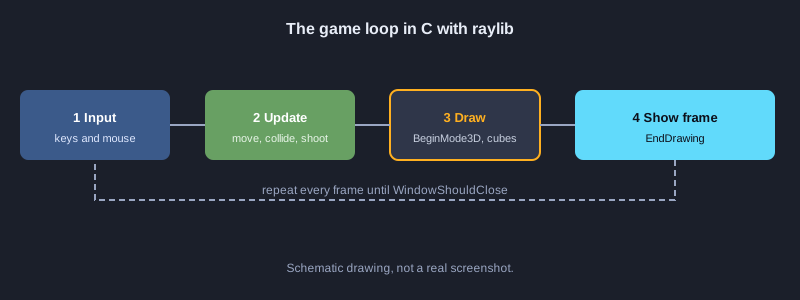
This article shows how to make a first-person shooter (FPS) in C. It uses raylib, an open-source engine library, for the window, 3D graphics and input. The game logic, including the map, wall collision, shooting and HUD, is written in C. Each part is a set of steps you can follow one at a time, with a structure diagram and code files you can copy.
What you need
You need a Windows 10 or 11 computer, Visual Studio 2022 Build Tools with the C++ (MSVC) toolset and the Windows SDK, and raylib downloaded from the GitHub Releases page. raylib is released under the zlib license, which allows commercial use. Note: the code here is written against the raylib 5 and 6 documentation, but the complete program has not been compiled and tested on the machine used to write this article. The results listed are what you should see when the steps are done correctly. The default raylib font only shows Latin letters, so the examples use English on-screen text.
Illustrations
1. Install the tools and raylib
Use MSVC to compile C, and use raylib as the open-source engine library.
1. Download Visual Studio 2022 Build Tools from Microsoft and install the Desktop development with C++ workload
2. Open Developer Command Prompt for VS 2022 from the Start menu
3. Go to github.com/raysan5/raylib/releases and download the Windows file whose name ends with win64_msvc16.zip
4. Unzip it and copy the include and lib folders into a project folder named raylib
**What you should see:** The raylib/include folder contains raylib.h, and the raylib/lib folder contains raylib.lib
2. Project structure
Keep the game code in a src folder and store the raylib library separately.
**Code: project-tree.txt**
fps-c-raylib/
├── raylib/                 ไลบรารี raylib ที่ดาวน์โหลดจาก GitHub Releases
│   ├── include/raylib.h
│   └── lib/raylib.lib
├── src/
│   └── main.c              โค้ดเกมทั้งหมด
├── build.bat               คำสั่งคอมไพล์สำหรับ MSVC
└── fps-c-raylib.exe        ไฟล์ที่ได้หลังคอมไพล์
3. Open a window and draw text
Every raylib game follows the same loop: open the window, keep looping until the window closes, and draw one frame at a time.
1. Create a src folder and a file named main.c inside it
2. Paste the code below into main.c
**Code: 01_window.c**
// ไฟล์: src/main.c  (ขั้นแรก เปิดหน้าต่างและวาดข้อความ)
#include "raylib.h"

int main(void)
{
    InitWindow(960, 540, "FPS ด้วย C และ raylib");
    SetTargetFPS(60);

    while (!WindowShouldClose())
    {
        BeginDrawing();
        ClearBackground(RAYWHITE);
        DrawText("Hello FPS", 40, 40, 32, DARKGRAY);
        EndDrawing();
    }

    CloseWindow();
    return 0;
}
**What you should see:** A 960x540 window opens with a white background and the text Hello FPS in the top-left corner
4. Draw the map as 3D walls
Store the map as an array of 1s and 0s. A 1 is a wall and a 0 is empty space. Loop over the array and draw a box for each wall cell.
**Code: 02_map_render.c**
// ไฟล์: src/main.c  (ขั้นที่สอง แผนที่เป็นตารางตัวเลข แล้ววาดกำแพงเป็นกล่อง 3 มิติ)
#include "raylib.h"

#define MAP_W 8
#define MAP_H 8
#define CELL 4.0f // ขนาดของหนึ่งช่องในโลก 3 มิติ

// 1 = กำแพง, 0 = พื้นที่ว่าง
static const int map[MAP_H][MAP_W] = {
    {1, 1, 1, 1, 1, 1, 1, 1},
    {1, 0, 0, 0, 0, 0, 0, 1},
    {1, 0, 1, 1, 0, 0, 0, 1},
    {1, 0, 0, 0, 0, 1, 0, 1},
    {1, 0, 0, 1, 0, 1, 0, 1},
    {1, 0, 0, 0, 0, 0, 0, 1},
    {1, 1, 1, 1, 1, 1, 1, 1},
    {1, 1, 1, 1, 1, 1, 1, 1},
};

static void DrawMap(void)
{
    for (int row = 0; row < MAP_H; row++)
    {
        for (int col = 0; col < MAP_W; col++)
        {
            if (map[row][col] == 1)
            {
                // ช่อง (col, row) ครอบคลุมพื้นที่ [col*CELL, (col+1)*CELL] ดังนั้นศูนย์กลางอยู่ที่ +CELL/2
                Vector3 pos = { (col + 0.5f) * CELL, CELL / 2.0f, (row + 0.5f) * CELL };
                DrawCube(pos, CELL, CELL, CELL, DARKGRAY);
                DrawCubeWires(pos, CELL, CELL, CELL, BLACK);
            }
        }
    }
}

int main(void)
{
    InitWindow(960, 540, "แผนที่ FPS");
    SetTargetFPS(60);

    Camera3D camera = { 0 };
    camera.position = (Vector3){ 6.0f, 2.0f, 6.0f };
    camera.target = (Vector3){ 10.0f, 1.0f, 10.0f };
    camera.up = (Vector3){ 0.0f, 1.0f, 0.0f };
    camera.fovy = 60.0f;
    camera.projection = CAMERA_PERSPECTIVE;

    while (!WindowShouldClose())
    {
        BeginDrawing();
        ClearBackground(SKYBLUE);

        BeginMode3D(camera);
        DrawPlane((Vector3){ 16.0f, 0.0f, 16.0f }, (Vector2){ 32.0f, 32.0f }, LIGHTGRAY);
        DrawMap();
        EndMode3D();

        DrawFPS(10, 10);
        EndDrawing();
    }

    CloseWindow();
    return 0;
}
**What you should see:** Dark gray walls form the map in 3D, and the FPS counter appears in the top-left corner
5. Walk and turn with WASD and the mouse
raylib's UpdateCamera supports CAMERA_FIRST_PERSON, which uses WASD to walk and the mouse to look around, so you do not have to write the angle math yourself.
**Code: 03_movement.c**
// ไฟล์: src/main.c  (ขั้นที่สาม การเดินและหมุนกล้องด้วยคีย์บอร์ดและเมาส์)
#include "raylib.h"

int main(void)
{
    InitWindow(960, 540, "เดินในแผนที่");
    SetTargetFPS(60);
    DisableCursor(); // ซ่อนเคอร์เซอร์เพื่อให้หมุนกล้องด้วยเมาส์ได้

    Camera3D camera = { 0 };
    camera.position = (Vector3){ 6.0f, 2.0f, 6.0f };
    camera.target = (Vector3){ 10.0f, 1.0f, 10.0f };
    camera.up = (Vector3){ 0.0f, 1.0f, 0.0f };
    camera.fovy = 60.0f;
    camera.projection = CAMERA_PERSPECTIVE;

    while (!WindowShouldClose())
    {
        // WASD เดิน และเมาส์หมุนมอง ทำงานตามโหมด CAMERA_FIRST_PERSON
        UpdateCamera(&camera, CAMERA_FIRST_PERSON);

        BeginDrawing();
        ClearBackground(SKYBLUE);
        BeginMode3D(camera);
        DrawPlane((Vector3){ 16.0f, 0.0f, 16.0f }, (Vector2){ 32.0f, 32.0f }, LIGHTGRAY);
        EndMode3D();
        DrawText("WASD move, mouse look", 10, 40, 20, DARKGRAY);
        EndDrawing();
    }

    CloseWindow();
    return 0;
}
**What you should see:** W A S D move the camera and the mouse turns the view. The cursor is hidden.
6. Check wall collision
Check the four corners around the player before accepting a new position. If a corner hits a wall, undo only that axis so the player can slide along the wall. Shift the look target by the same amount so the view direction does not change.
**Code: 04_collision.c**
// ไฟล์: src/main.c  (ขั้นที่สี่ ตรวจชนกำแพงก่อนยอมรับการขยับ)
#include "raylib.h"
#include "raymath.h"

#define MAP_W 8
#define MAP_H 8
#define CELL 4.0f
#define PLAYER_RADIUS 0.4f

static const int map[MAP_H][MAP_W] = {
    {1, 1, 1, 1, 1, 1, 1, 1},
    {1, 0, 0, 0, 0, 0, 0, 1},
    {1, 0, 1, 1, 0, 0, 0, 1},
    {1, 0, 0, 0, 0, 1, 0, 1},
    {1, 0, 0, 1, 0, 1, 0, 1},
    {1, 0, 0, 0, 0, 0, 0, 1},
    {1, 1, 1, 1, 1, 1, 1, 1},
    {1, 1, 1, 1, 1, 1, 1, 1},
};

// ตรวจว่าจุด (x, z) ในโลกอยู่ในช่องกำแพงหรือไม่
static bool IsWall(float x, float z)
{
    int col = (int)(x / CELL);
    int row = (int)(z / CELL);
    if (col < 0 || col >= MAP_W || row < 0 || row >= MAP_H) return true;
    return map[row][col] == 1;
}

// ตรวจทั้งสี่มุมรอบตัวผู้เล่น ถ้ามีมุมใดชนกำแพงให้ถือว่าไปไม่ได้
static bool CanMoveTo(Vector3 p)
{
    float r = PLAYER_RADIUS;
    return !IsWall(p.x - r, p.z - r) && !IsWall(p.x + r, p.z - r) &&
           !IsWall(p.x - r, p.z + r) && !IsWall(p.x + r, p.z + r);
}

int main(void)
{
    InitWindow(960, 540, "ชนกำแพง");
    SetTargetFPS(60);
    DisableCursor();

    Camera3D camera = { 0 };
    camera.position = (Vector3){ 6.0f, 2.0f, 6.0f };
    camera.target = (Vector3){ 10.0f, 1.0f, 10.0f };
    camera.up = (Vector3){ 0.0f, 1.0f, 0.0f };
    camera.fovy = 60.0f;
    camera.projection = CAMERA_PERSPECTIVE;

    while (!WindowShouldClose())
    {
        // เก็บตำแหน่งก่อนขยับ แล้วให้ UpdateCamera คำนวณตำแหน่งใหม่
        Vector3 before = camera.position;
        UpdateCamera(&camera, CAMERA_FIRST_PERSON);

        // ถ้าตำแหน่งใหม่ชนกำแพง ให้ย้อนกลับไปเฉพาะแกนที่ชน เพื่อให้เลื่อนไปตามกำแพงได้
        Vector3 wanted = camera.position;
        Vector3 fixed = wanted;
        if (!CanMoveTo((Vector3){ fixed.x, fixed.y, before.z })) fixed.x = before.x;
        if (!CanMoveTo(fixed)) fixed.z = before.z;

        // ย้ายจุดมองตามไปด้วย เพื่อให้ทิศทางการมองไม่เพี้ยน
        Vector3 shift = Vector3Subtract(fixed, wanted);
        camera.position = fixed;
        camera.target = Vector3Add(camera.target, shift);

        BeginDrawing();
        ClearBackground(SKYBLUE);
        BeginMode3D(camera);
        DrawPlane((Vector3){ 16.0f, 0.0f, 16.0f }, (Vector2){ 32.0f, 32.0f }, LIGHTGRAY);
        for (int row = 0; row < MAP_H; row++)
            for (int col = 0; col < MAP_W; col++)
                if (map[row][col] == 1)
                {
                    Vector3 pos = { (col + 0.5f) * CELL, CELL / 2.0f, (row + 0.5f) * CELL };
                    DrawCube(pos, CELL, CELL, CELL, DARKGRAY);
                }
        EndMode3D();
        DrawText("Walls block you", 10, 40, 20, DARKGRAY);
        EndDrawing();
    }

    CloseWindow();
    return 0;
}
**What you should see:** Walking into a wall stops you without going through it, and you can still slide along the wall.
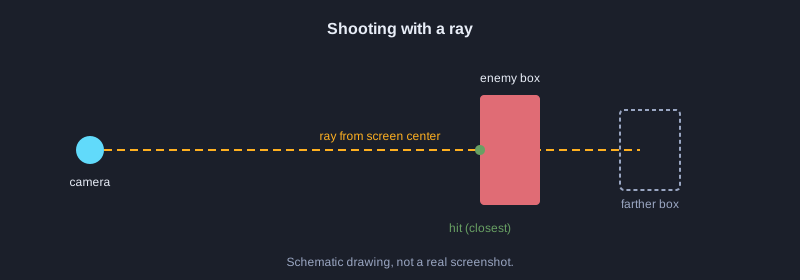
7. Shoot with a ray from the screen center
GetMouseRay builds a ray from a point on the screen. This example uses the center of the screen, then GetRayCollisionBox checks whether the ray hits an enemy box.
**Code: 05_shoot.c**
// ไฟล์: src/main.c  (ขั้นที่ห้า ยิงด้วยรังสีจากเมาส์ไปชนกล่องของศัตรู)
#include "raylib.h"

// กล่องขอบเขตของศัตรูหนึ่งตัว
static BoundingBox enemyBox = {
    { 14.0f, 0.0f, 14.0f }, // มุมต่ำสุด
    { 15.5f, 2.5f, 15.5f }, // มุมสูงสุด
};
static bool enemyAlive = true;

int main(void)
{
    InitWindow(960, 540, "ยิงศัตรู");
    SetTargetFPS(60);
    DisableCursor();

    Camera3D camera = { 0 };
    camera.position = (Vector3){ 6.0f, 2.0f, 6.0f };
    camera.target = (Vector3){ 14.0f, 1.0f, 14.0f };
    camera.up = (Vector3){ 0.0f, 1.0f, 0.0f };
    camera.fovy = 60.0f;
    camera.projection = CAMERA_PERSPECTIVE;

    while (!WindowShouldClose())
    {
        UpdateCamera(&camera, CAMERA_FIRST_PERSON);

        // คลิกซ้ายแล้วยิงรังสีจากกลางจอไปข้างหน้า
        if (IsMouseButtonPressed(MOUSE_BUTTON_LEFT) && enemyAlive)
        {
            Ray ray = GetMouseRay((Vector2){ GetScreenWidth() / 2.0f, GetScreenHeight() / 2.0f }, camera);
            RayCollision hit = GetRayCollisionBox(ray, enemyBox);
            if (hit.hit)
            {
                enemyAlive = false; // ยิงโดนแล้วศัตรูหายไป
            }
        }

        BeginDrawing();
        ClearBackground(SKYBLUE);
        BeginMode3D(camera);
        DrawPlane((Vector3){ 16.0f, 0.0f, 16.0f }, (Vector2){ 32.0f, 32.0f }, LIGHTGRAY);
        if (enemyAlive)
        {
            Vector3 center = { 14.75f, 1.25f, 14.75f };
            DrawCubeV(center, (Vector3){ 1.5f, 2.5f, 1.5f }, RED);
        }
        EndMode3D();

        DrawLine(GetScreenWidth() / 2 - 10, GetScreenHeight() / 2, GetScreenWidth() / 2 + 10, GetScreenHeight() / 2, BLACK);
        DrawLine(GetScreenWidth() / 2, GetScreenHeight() / 2 - 10, GetScreenWidth() / 2, GetScreenHeight() / 2 + 10, BLACK);
        EndDrawing();
    }

    CloseWindow();
    return 0;
}
**What you should see:** Aiming at the red box and left-clicking makes it disappear. Shooting elsewhere does nothing.
8. A HUD that shows ammo and health
The HUD draws text and bars in 2D after EndMode3D is called. The ammo count goes down with each shot.
**Code: 06_hud.c**
// ไฟล์: src/main.c  (ขั้นที่หก หน้าจอข้อมูล HUD แสดงกระสุนและพลังชีวิต)
#include <stdio.h>
#include "raylib.h"

typedef struct
{
    int ammo;
    int health;
} Player;

static void DrawHud(const Player *p)
{
    char text[64];

    // แถบพลังชีวิตมุมซ้ายล่าง
    DrawRectangle(20, GetScreenHeight() - 40, 200, 20, DARKGRAY);
    DrawRectangle(20, GetScreenHeight() - 40, (int)(200 * p->health / 100.0f), 20, RED);

    // จำนวนกระสุนมุมขวาล่าง
    snprintf(text, sizeof(text), "Ammo %d", p->ammo);
    DrawText(text, GetScreenWidth() - 180, GetScreenHeight() - 40, 24, BLACK);
}

int main(void)
{
    InitWindow(960, 540, "HUD");
    SetTargetFPS(60);

    Player player = { .ammo = 12, .health = 100 };

    while (!WindowShouldClose())
    {
        if (IsMouseButtonPressed(MOUSE_BUTTON_LEFT) && player.ammo > 0)
        {
            player.ammo--; // ยิงหนึ่งนัดจะลดกระสุน
        }

        BeginDrawing();
        ClearBackground(SKYBLUE);
        DrawHud(&player);
        EndDrawing();
    }

    CloseWindow();
    return 0;
}
**What you should see:** The bottom-right shows ammo 12, and the red bar at the bottom-left shows full health. Ammo drops by 1 on each click.
9. Put it all together
This file combines the map, wall collision, two enemies with health, shooting toward the nearest hit, and the HUD.
**Code: 07_full_main.c**
// ไฟล์: src/main.c  (รวมทุกขั้นตอนเป็นไฟล์เดียว)
#include <stdio.h>
#include "raylib.h"
#include "raymath.h"

#define MAP_W 8
#define MAP_H 8
#define CELL 4.0f
#define PLAYER_RADIUS 0.4f
#define ENEMY_COUNT 2

static const int map[MAP_H][MAP_W] = {
    {1, 1, 1, 1, 1, 1, 1, 1},
    {1, 0, 0, 0, 0, 0, 0, 1},
    {1, 0, 1, 1, 0, 0, 0, 1},
    {1, 0, 0, 0, 0, 1, 0, 1},
    {1, 0, 0, 1, 0, 1, 0, 1},
    {1, 0, 0, 0, 0, 0, 0, 1},
    {1, 1, 1, 1, 1, 1, 1, 1},
    {1, 1, 1, 1, 1, 1, 1, 1},
};

typedef struct
{
    BoundingBox box;
    int health;
} Enemy;

typedef struct
{
    int ammo;
    int health;
} Player;

static bool IsWall(float x, float z)
{
    int col = (int)(x / CELL);
    int row = (int)(z / CELL);
    if (col < 0 || col >= MAP_W || row < 0 || row >= MAP_H) return true;
    return map[row][col] == 1;
}

static bool CanMoveTo(Vector3 p)
{
    float r = PLAYER_RADIUS;
    return !IsWall(p.x - r, p.z - r) && !IsWall(p.x + r, p.z - r) &&
           !IsWall(p.x - r, p.z + r) && !IsWall(p.x + r, p.z + r);
}

static void ApplyCollision(Camera3D *camera, Vector3 before)
{
    Vector3 wanted = camera->position;
    Vector3 fixed = wanted;
    if (!CanMoveTo((Vector3){ fixed.x, fixed.y, before.z })) fixed.x = before.x;
    if (!CanMoveTo(fixed)) fixed.z = before.z;
    Vector3 shift = Vector3Subtract(fixed, wanted);
    camera->position = fixed;
    camera->target = Vector3Add(camera->target, shift);
}

static void DrawMap(void)
{
    for (int row = 0; row < MAP_H; row++)
    {
        for (int col = 0; col < MAP_W; col++)
        {
            if (map[row][col] == 1)
            {
                Vector3 pos = { (col + 0.5f) * CELL, CELL / 2.0f, (row + 0.5f) * CELL };
                DrawCube(pos, CELL, CELL, CELL, DARKGRAY);
                DrawCubeWires(pos, CELL, CELL, CELL, BLACK);
            }
        }
    }
}

int main(void)
{
    InitWindow(960, 540, "FPS ด้วย C และ raylib");
    SetTargetFPS(60);
    DisableCursor();

    Camera3D camera = { 0 };
    camera.position = (Vector3){ 6.0f, 2.0f, 6.0f };
    camera.target = (Vector3){ 10.0f, 1.0f, 10.0f };
    camera.up = (Vector3){ 0.0f, 1.0f, 0.0f };
    camera.fovy = 60.0f;
    camera.projection = CAMERA_PERSPECTIVE;

    Player player = { .ammo = 12, .health = 100 };
    Enemy enemies[ENEMY_COUNT] = {
        { { { 14.0f, 0.0f, 14.0f }, { 15.5f, 2.5f, 15.5f } }, 50 },
        { { { 18.0f, 0.0f, 4.0f }, { 19.5f, 2.5f, 5.5f } }, 50 },
    };

    while (!WindowShouldClose())
    {
        Vector3 before = camera.position;
        UpdateCamera(&camera, CAMERA_FIRST_PERSON);
        ApplyCollision(&camera, before);

        if (IsMouseButtonPressed(MOUSE_BUTTON_LEFT) && player.ammo > 0)
        {
            player.ammo--;
            Vector2 center = { GetScreenWidth() / 2.0f, GetScreenHeight() / 2.0f };
            Ray ray = GetMouseRay(center, camera);

            // ยิงหาศัตรูที่ใกล้ที่สุดที่รังสีชน
            int target = -1;
            float best = 1e9f;
            for (int i = 0; i < ENEMY_COUNT; i++)
            {
                if (enemies[i].health <= 0) continue;
                RayCollision hit = GetRayCollisionBox(ray, enemies[i].box);
                if (hit.hit && hit.distance < best)
                {
                    best = hit.distance;
                    target = i;
                }
            }
            if (target >= 0) enemies[target].health -= 25;
        }

        BeginDrawing();
        ClearBackground(SKYBLUE);
        BeginMode3D(camera);
        DrawPlane((Vector3){ 16.0f, 0.0f, 16.0f }, (Vector2){ 32.0f, 32.0f }, LIGHTGRAY);
        DrawMap();
        for (int i = 0; i < ENEMY_COUNT; i++)
        {
            if (enemies[i].health <= 0) continue;
            Vector3 c = {
                (enemies[i].box.min.x + enemies[i].box.max.x) / 2.0f,
                1.25f,
                (enemies[i].box.min.z + enemies[i].box.max.z) / 2.0f,
            };
            DrawCubeV(c, (Vector3){ 1.5f, 2.5f, 1.5f }, RED);
        }
        EndMode3D();

        // จุดเล็งกลางจอ
        DrawLine(GetScreenWidth() / 2 - 10, GetScreenHeight() / 2, GetScreenWidth() / 2 + 10, GetScreenHeight() / 2, BLACK);
        DrawLine(GetScreenWidth() / 2, GetScreenHeight() / 2 - 10, GetScreenWidth() / 2, GetScreenHeight() / 2 + 10, BLACK);

        // HUD
        char text[64];
        snprintf(text, sizeof(text), "Ammo %d", player.ammo);
        DrawText(text, GetScreenWidth() - 180, GetScreenHeight() - 40, 24, BLACK);
        DrawRectangle(20, GetScreenHeight() - 40, 200, 20, DARKGRAY);
        DrawRectangle(20, GetScreenHeight() - 40, (int)(200 * player.health / 100.0f), 20, RED);
        DrawFPS(10, 10);
        EndDrawing();
    }

    CloseWindow();
    return 0;
}
**What you should see:** You walk in a room with walls and shoot red enemies. One enemy needs two hits to disappear, and ammo drops on each shot.
10. Compile and run
Use the cl command in Developer Command Prompt to compile and link against raylib.lib.
1. Open Developer Command Prompt for VS 2022 and go to the project folder
2. Run the compile command in the block below
3. Run the resulting fps-c-raylib.exe
cl /nologo /W3 /I raylib\include src\main.c /link /LIBPATH:raylib\lib raylib.lib winmm.lib gdi32.lib user32.lib shell32.lib
**What you should see:** No errors appear during compilation, and the game window opens when the .exe runs.
Next steps
Next, add gunshot sounds, enemies that walk toward the player, a start menu, and load maps from a text file. More examples are at github.com/raysan5/raylib/tree/master/examples.
Summary
Use raylib as the open-source engine with C, and write the map, movement, wall collision, ray shooting and HUD yourself. Compile with MSVC into one .exe. Each step can be followed in order.