Designing the Database for an Online Buying and Selling System: 100 Examples from Zero to Professional with MySQL 8
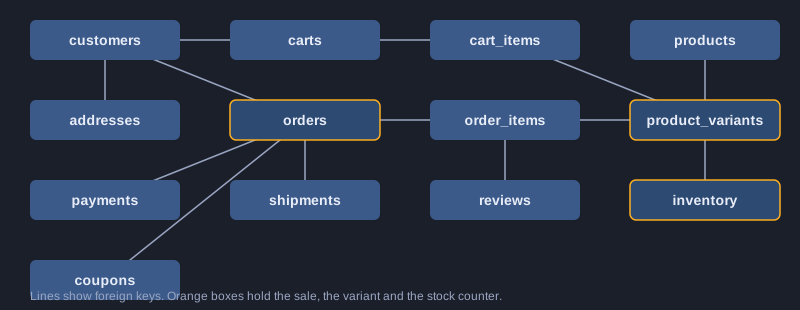
An online shop is mostly a database problem. Customers log in, products have sizes and colours, stock must never go negative, a payment can arrive twice, and two buyers can click Buy for the last item in the same second. This article designs the database for such a shop step by step. You will see the tables an online shop needs, with primary keys, foreign keys, indexes and the reason for each one. You will see sample data for every table, then what happens inside the important transactions: placing an order, reserving stock, a successful or failed payment, cancellation, refund, and two buyers taking the last item, together with what goes wrong when the transaction is missing. Mockups of the product list, product page, cart, checkout, order history and admin orders show how the screens read these tables. The article ends with 100 numbered examples in MySQL 8 syntax: DDL, seed data, queries, indexes, transactions, locking, views, partitioning, reports and professional practice. Honesty note: MySQL 8 was not installed on the computer that prepared this article, so none of the 100 examples were executed here. Run them yourself in a practice database and check the results before you rely on them.
What you need
A computer with MySQL 8.0 or later (Community Server, or a Docker image of mysql:8.0), a client such as the mysql command-line program or MySQL Workbench, and basic SQL: SELECT, INSERT, UPDATE and JOIN. Use a practice database, never a real shop database, while you learn. Use the InnoDB engine, which is the default in MySQL 8, because only InnoDB supports transactions, row locks and foreign keys.
How to use an example
SQL examples are written for MySQL 8 with InnoDB. Run them in order in a practice database (for example shop_practice). A ? marks a parameter that your application passes in. Bash examples run in a terminal.
Topic 1: Start with the questions the shop must answer
Before you write any CREATE TABLE, list the questions the shop has to answer: What does this customer own? How many units can I sell right now? Which orders are waiting to be packed? Each table exists to answer one of these questions without contradicting another. This topic sets up MySQL 8 safely and shows the rules that every table in the rest of the article follows.
The tables and what they hold
A shop needs customers, addresses, categories, products, product variants, inventory, carts, cart items, orders, order items, payments, refunds, shipments, shipment items, reviews, coupons and, for a marketplace, sellers and payouts. Products describe what a shop sells, while variants are the sellable items with a SKU and a price. Inventory counts stock. Order items copy the product name and price at the moment of purchase, so a later price change does not rewrite history.
Keys, constraints and indexes
Every table has a primary key. Foreign keys stop orphan rows, for example an order without a customer. UNIQUE keys protect values such as an email or a SKU. CHECK constraints reject impossible values such as negative stock. Indexes speed up the queries the screens run, such as the order history of one customer, and each index in this article has a reason that is written next to it.
Set up MySQL 8 safely
Create a database with utf8mb4 so that Thai, Japanese, Chinese, Arabic and emoji are stored correctly. Create an application user that can read and write data but cannot change the schema, and turn on strict SQL mode so that bad values are refused instead of silently changed. Keep the password in a secret store, never in the article or in source code.
Illustrations
Example 1: Check the server version and defaults
Confirm MySQL 8, utf8mb4 and the isolation level.
SELECT VERSION() AS server_version,
       @@character_set_server AS charset,
       @@collation_server AS collation,
       @@transaction_isolation AS isolation_level;
*This example was not run here because MySQL 8 was not installed on the computer that prepared this article.*
Example 2: Create the shop database
utf8mb4 and one collation for the whole shop.
CREATE DATABASE IF NOT EXISTS shop
  CHARACTER SET utf8mb4 COLLATE utf8mb4_0900_ai_ci;
USE shop;
*This example was not run here because MySQL 8 was not installed on the computer that prepared this article.*
Example 3: Create a least-privilege application user
The app reads and writes data but cannot change the schema.
CREATE USER IF NOT EXISTS 'shop_app'@'localhost' IDENTIFIED BY '<strong-password>';
GRANT SELECT, INSERT, UPDATE, DELETE ON shop.* TO 'shop_app'@'localhost';
-- No DROP, ALTER or GRANT: the application cannot change the schema.
*This example was not run here because MySQL 8 was not installed on the computer that prepared this article.*
Example 4: Turn on strict SQL mode
Reject bad data instead of silently changing it.
SET SESSION sql_mode = 'STRICT_TRANS_TABLES,NO_ZERO_IN_DATE,NO_ZERO_DATE,ONLY_FULL_GROUP_BY';
SELECT @@SESSION.sql_mode AS sql_mode;
*This example was not run here because MySQL 8 was not installed on the computer that prepared this article.*
Example 5: Confirm InnoDB
Transactions and foreign keys need the InnoDB engine.
SELECT ENGINE, SUPPORT, TRANSACTIONS, XA
FROM information_schema.ENGINES
WHERE ENGINE = 'InnoDB';
*This example was not run here because MySQL 8 was not installed on the computer that prepared this article.*
Example 6: Reset a practice database
Practise without touching the shop data.
-- Practice only: this removes the practice copy and nothing else.
DROP DATABASE IF EXISTS shop_practice;
CREATE DATABASE shop_practice CHARACTER SET utf8mb4 COLLATE utf8mb4_0900_ai_ci;
*This example was not run here because MySQL 8 was not installed on the computer that prepared this article.*
Topic 2: Customers and addresses
A customer is an account with a unique email and a status. Addresses belong to a customer, and the order keeps its own copy of the shipping address, because the customer may edit or delete an address later. This topic covers the tables, sample data and the rule that each customer has at most one default address.
One row per account
The customers table has an auto-increment customer_id as the primary key and a UNIQUE key on email. MySQL 8 with the utf8mb4_0900_ai_ci collation compares email addresses without regard to case, so [email protected] and [email protected] are the same account. Store only a password hash, never the password. The status column lets you block an account without deleting its history.
Addresses belong to a customer
The addresses table references customers with a foreign key and ON DELETE CASCADE, so deleting a customer also removes their saved addresses. The orders table does not depend on this, because each order copies the recipient, line and postal code. A generated column can enforce one default address per customer, since a UNIQUE key allows many NULL values.
Privacy: keep card data out of the database
The shop never needs the full card number. Store the payment provider's token and the last four digits only, and let the provider handle the card. Keep personal data in as few tables as possible, and remember that backups, logs and reports also contain it, so they need the same protection.
Example 7: Create the customers table
Accounts with a unique email and a status.
CREATE TABLE customers (
  customer_id   BIGINT UNSIGNED NOT NULL AUTO_INCREMENT,
  email         VARCHAR(254) NOT NULL,
  password_hash VARCHAR(255) NOT NULL,
  full_name     VARCHAR(120) NOT NULL,
  phone         VARCHAR(20) NULL,
  status        ENUM('active','blocked') NOT NULL DEFAULT 'active',
  created_at    DATETIME(3) NOT NULL DEFAULT CURRENT_TIMESTAMP(3),
  PRIMARY KEY (customer_id),
  UNIQUE KEY uq_customers_email (email)
) ENGINE=InnoDB;
*This example was not run here because MySQL 8 was not installed on the computer that prepared this article.*
Example 8: Create the addresses table
Several addresses per customer, with a foreign key.
CREATE TABLE addresses (
  address_id     BIGINT UNSIGNED NOT NULL AUTO_INCREMENT,
  customer_id    BIGINT UNSIGNED NOT NULL,
  label          VARCHAR(40) NOT NULL DEFAULT 'Home',
  recipient_name VARCHAR(120) NOT NULL,
  line1          VARCHAR(200) NOT NULL,
  line2          VARCHAR(200) NULL,
  city           VARCHAR(100) NOT NULL,
  postal_code    VARCHAR(20) NOT NULL,
  country_code   CHAR(2) NOT NULL,
  is_default     TINYINT(1) NOT NULL DEFAULT 0,
  PRIMARY KEY (address_id),
  KEY idx_addresses_customer (customer_id),
  CONSTRAINT fk_addresses_customer FOREIGN KEY (customer_id)
    REFERENCES customers (customer_id) ON DELETE CASCADE
) ENGINE=InnoDB;
*This example was not run here because MySQL 8 was not installed on the computer that prepared this article.*
Example 9: Seed customers
Sample accounts for testing.
INSERT INTO customers (email, password_hash, full_name, phone) VALUES
  ('[email protected]',  '<bcrypt-hash-1>', 'Mali Sun',   '0812345678'),
  ('[email protected]', '<bcrypt-hash-2>', 'Niran Chai', '0898765432'),
  ('[email protected]',  '<bcrypt-hash-3>', 'Ploy Wong',  NULL);
*This example was not run here because MySQL 8 was not installed on the computer that prepared this article.*
Example 10: Seed addresses
Sample addresses, one default per customer.
INSERT INTO addresses
  (customer_id, label, recipient_name, line1, city, postal_code, country_code, is_default) VALUES
  (1, 'Home',   'Mali Sun',   '12/3 Sukhumvit Road', 'Bangkok',    '10110', 'TH', 1),
  (1, 'Office', 'Mali Sun',   '99 Rama IX Road',     'Bangkok',    '10310', 'TH', 0),
  (2, 'Home',   'Niran Chai', '45 Moo 2',            'Chiang Mai', '50000', 'TH', 1);
*This example was not run here because MySQL 8 was not installed on the computer that prepared this article.*
Example 11: Find the default address
A lookup that uses the composite index.
SELECT address_id, recipient_name, line1, city
FROM addresses
WHERE customer_id = 1 AND is_default = 1;
*This example was not run here because MySQL 8 was not installed on the computer that prepared this article.*
Example 12: One default address per customer
A generated column makes the unique rule possible.
-- A generated column is NULL unless is_default = 1, and UNIQUE allows many NULLs.
ALTER TABLE addresses
  ADD COLUMN default_owner BIGINT UNSIGNED
    GENERATED ALWAYS AS (CASE WHEN is_default = 1 THEN customer_id END) STORED,
  ADD UNIQUE KEY uq_one_default_address (default_owner);
*This example was not run here because MySQL 8 was not installed on the computer that prepared this article.*
Example 13: Count addresses per customer
LEFT JOIN keeps customers who have no address.
SELECT c.customer_id, c.full_name, COUNT(a.address_id) AS address_count
FROM customers AS c
LEFT JOIN addresses AS a ON a.customer_id = c.customer_id
GROUP BY c.customer_id, c.full_name
ORDER BY address_count DESC, c.customer_id;
*This example was not run here because MySQL 8 was not installed on the computer that prepared this article.*
Example 14: Foreign keys and blocking
An orphan row is refused, and blocking is an UPDATE.
-- Fails with error 1452 (foreign key constraint) because customer 999 does not exist.
INSERT INTO addresses (customer_id, recipient_name, line1, city, postal_code, country_code)
VALUES (999, 'Nobody', 'Unknown', 'Nowhere', '00000', 'TH');

UPDATE customers SET status = 'blocked' WHERE customer_id = 3;
*This example was not run here because MySQL 8 was not installed on the computer that prepared this article.*
Topic 3: Products, categories and variants
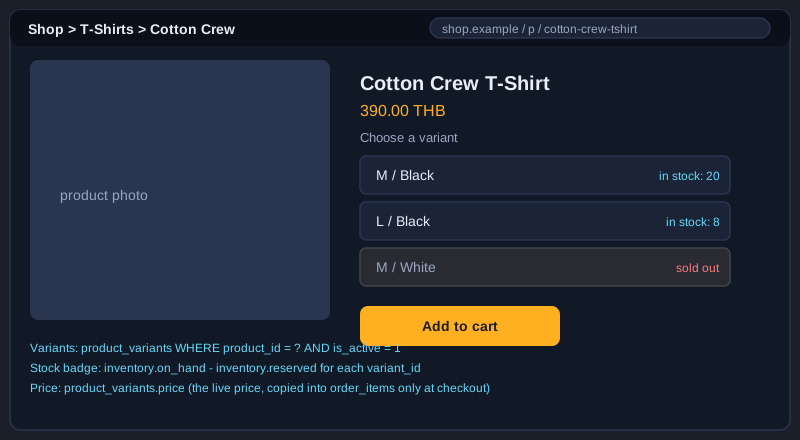
The catalogue has three levels. A category groups products, a product is what the shop sells, and a variant is the exact item with its SKU, size, colour and price. Stock and the cart always point at a variant, never at a product, because a black T-shirt size M and a white T-shirt size L are different things to count.
Products and variants
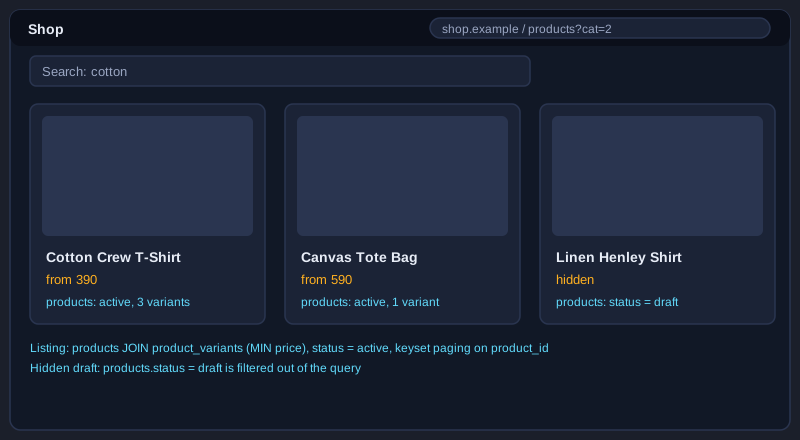
products holds the name, slug, description, base price and status (draft, active or archived). product_variants holds the SKU, the option label such as M / Black, the price and an is_active flag. A UNIQUE key on (product_id, option_label) prevents two identical variants of one product. A draft product stays hidden from the listing until its status changes to active.
Categories as a tree
categories references itself through parent_id, so Clothing can contain T-shirts. The foreign key uses ON DELETE SET NULL, which turns a child into a top-level category if the parent is removed. Use a recursive common table expression to list all products under a category, including its sub-categories.
Search and listing queries
A listing shows the lowest active variant price for each product. Keyset paging, which uses the last product_id from the previous page, stays fast on large catalogues, where OFFSET gets slower with every page. A FULLTEXT index with the ngram parser supports searching words in Thai, Japanese and Chinese, where words are not separated by spaces.
Illustrations
Example 15: Categories with a parent
A self-referencing foreign key builds a tree.
CREATE TABLE categories (
  category_id INT UNSIGNED NOT NULL AUTO_INCREMENT,
  parent_id   INT UNSIGNED NULL,
  name        VARCHAR(100) NOT NULL,
  slug        VARCHAR(120) NOT NULL,
  PRIMARY KEY (category_id),
  UNIQUE KEY uq_categories_slug (slug),
  KEY idx_categories_parent (parent_id),
  CONSTRAINT fk_categories_parent FOREIGN KEY (parent_id)
    REFERENCES categories (category_id) ON DELETE SET NULL
) ENGINE=InnoDB;
*This example was not run here because MySQL 8 was not installed on the computer that prepared this article.*
Example 16: Create the products table
Name, slug, base price and status.
CREATE TABLE products (
  product_id  BIGINT UNSIGNED NOT NULL AUTO_INCREMENT,
  category_id INT UNSIGNED NOT NULL,
  name        VARCHAR(200) NOT NULL,
  slug        VARCHAR(220) NOT NULL,
  description TEXT NULL,
  base_price  DECIMAL(10,2) NOT NULL,
  status      ENUM('draft','active','archived') NOT NULL DEFAULT 'draft',
  created_at  DATETIME(3) NOT NULL DEFAULT CURRENT_TIMESTAMP(3),
  PRIMARY KEY (product_id),
  UNIQUE KEY uq_products_slug (slug),
  KEY idx_products_category_status (category_id, status),
  CONSTRAINT fk_products_category FOREIGN KEY (category_id)
    REFERENCES categories (category_id) ON DELETE RESTRICT,
  CONSTRAINT chk_products_price CHECK (base_price >= 0)
) ENGINE=InnoDB;
*This example was not run here because MySQL 8 was not installed on the computer that prepared this article.*
Example 17: Create the variants table
The sellable item: SKU, option and price.
CREATE TABLE product_variants (
  variant_id   BIGINT UNSIGNED NOT NULL AUTO_INCREMENT,
  product_id   BIGINT UNSIGNED NOT NULL,
  sku          VARCHAR(40) NOT NULL,
  option_label VARCHAR(80) NOT NULL,
  price        DECIMAL(10,2) NOT NULL,
  weight_grams INT UNSIGNED NULL,
  is_active    TINYINT(1) NOT NULL DEFAULT 1,
  PRIMARY KEY (variant_id),
  UNIQUE KEY uq_variants_sku (sku),
  UNIQUE KEY uq_variants_option (product_id, option_label),
  CONSTRAINT fk_variants_product FOREIGN KEY (product_id)
    REFERENCES products (product_id) ON DELETE RESTRICT,
  CONSTRAINT chk_variants_price CHECK (price >= 0)
) ENGINE=InnoDB;
*This example was not run here because MySQL 8 was not installed on the computer that prepared this article.*
Example 18: Seed categories and products
Sample catalogue data.
INSERT INTO categories (category_id, parent_id, name, slug) VALUES
  (1, NULL, 'Clothing',    'clothing'),
  (2, 1,    'T-shirts',    't-shirts'),
  (3, NULL, 'Accessories', 'accessories');

INSERT INTO products (product_id, category_id, name, slug, description, base_price, status) VALUES
  (1, 2, 'Cotton Crew T-Shirt', 'cotton-crew-tshirt', 'Soft combed cotton, regular fit.', 390.00, 'active'),
  (2, 3, 'Canvas Tote Bag',     'canvas-tote-bag',    'Heavy canvas with an inner pocket.', 590.00, 'active'),
  (3, 2, 'Linen Henley Shirt',  'linen-henley',       'Summer linen, long sleeve.',         890.00, 'draft');
*This example was not run here because MySQL 8 was not installed on the computer that prepared this article.*
Example 19: Seed variants
Five variants, one of them inactive.
INSERT INTO product_variants
  (variant_id, product_id, sku, option_label, price, weight_grams, is_active) VALUES
  (1, 1, 'TS-CREW-M-BLK', 'M / Black', 390.00, 180, 1),
  (2, 1, 'TS-CREW-L-BLK', 'L / Black', 390.00, 190, 1),
  (3, 1, 'TS-CREW-M-WHT', 'M / White', 390.00, 180, 1),
  (4, 2, 'TOTE-NAT',      'Natural',    590.00, 420, 1),
  (5, 3, 'LIN-HEN-M-BLU', 'M / Blue',   890.00, 200, 0);
*This example was not run here because MySQL 8 was not installed on the computer that prepared this article.*
Example 20: Product listing with keyset paging
Fast next-page queries without OFFSET.
SELECT p.product_id, p.name, MIN(v.price) AS from_price
FROM products AS p
JOIN product_variants AS v
  ON v.product_id = p.product_id AND v.is_active = 1
WHERE p.status = 'active'
  AND p.category_id = 2
  AND p.product_id > ?          -- last product_id from the previous page
GROUP BY p.product_id, p.name
ORDER BY p.product_id
LIMIT 20;
*This example was not run here because MySQL 8 was not installed on the computer that prepared this article.*
Example 21: Variants on a product page
Only the active variants of one product.
SELECT v.variant_id, v.sku, v.option_label, v.price, v.weight_grams
FROM product_variants AS v
WHERE v.product_id = 1
  AND v.is_active = 1
ORDER BY v.option_label;
*This example was not run here because MySQL 8 was not installed on the computer that prepared this article.*
Example 22: Full-text search
A FULLTEXT index with the ngram parser.
ALTER TABLE products
  ADD FULLTEXT KEY ft_products_name_desc (name, description) WITH PARSER ngram;

SELECT product_id, name
FROM products
WHERE status = 'active'
  AND MATCH (name, description) AGAINST ('cotton' IN NATURAL LANGUAGE MODE);
*This example was not run here because MySQL 8 was not installed on the computer that prepared this article.*
Topic 4: Inventory and the stock ledger
Stock is the part of the shop where mistakes cost money. This design keeps three numbers per variant: on_hand, the units physically present; reserved, the units promised to orders that are not yet paid or shipped; and available, which is on_hand minus reserved. A ledger table records every change, so the counters can always be checked against the history.
Counters with CHECK rules
The inventory table has one row per variant. CHECK constraints require on_hand to be zero or more, and reserved to be between zero and on_hand. Since MySQL 8.0.16, the server enforces CHECK constraints, so an UPDATE that would make stock negative fails with error 3819 instead of quietly writing a bad value.
The ledger
inventory_movements records each change with a signed delta for on_hand and for reserved, a reason such as reserve, release, sale, cancel, return, restock or adjustment, and the order it belongs to. The ledger is append-only: a mistake is corrected by a new row, not by editing an old one. This gives an audit trail for every unit that left the shop.
Reconcile counters with the ledger
A nightly job sums the ledger for each variant and compares the result with the counter. A mismatch means a bug or a manual edit, and it should raise an alert. Seed rows are inserted with an opening balance in the ledger so the reconciliation starts from zero.
Example 23: Create the inventory table
Stock on hand and reserved, with CHECK rules.
CREATE TABLE inventory (
  variant_id BIGINT UNSIGNED NOT NULL,
  on_hand    INT NOT NULL DEFAULT 0,
  reserved   INT NOT NULL DEFAULT 0,
  updated_at DATETIME(3) NOT NULL DEFAULT CURRENT_TIMESTAMP(3) ON UPDATE CURRENT_TIMESTAMP(3),
  PRIMARY KEY (variant_id),
  CONSTRAINT fk_inventory_variant FOREIGN KEY (variant_id)
    REFERENCES product_variants (variant_id) ON DELETE RESTRICT,
  CONSTRAINT chk_inventory_on_hand CHECK (on_hand >= 0),
  CONSTRAINT chk_inventory_reserved CHECK (reserved >= 0 AND reserved <= on_hand)
) ENGINE=InnoDB;
*This example was not run here because MySQL 8 was not installed on the computer that prepared this article.*
Example 24: Create the inventory ledger
Every stock change leaves a row.
CREATE TABLE inventory_movements (
  movement_id    BIGINT UNSIGNED NOT NULL AUTO_INCREMENT,
  variant_id     BIGINT UNSIGNED NOT NULL,
  delta_on_hand  INT NOT NULL DEFAULT 0,
  delta_reserved INT NOT NULL DEFAULT 0,
  reason         ENUM('adjustment','restock','reserve','release','sale','cancel','return') NOT NULL,
  order_id       BIGINT UNSIGNED NULL,
  created_at     DATETIME(3) NOT NULL DEFAULT CURRENT_TIMESTAMP(3),
  PRIMARY KEY (movement_id),
  KEY idx_movements_variant_time (variant_id, created_at),
  KEY idx_movements_order (order_id),
  CONSTRAINT fk_movements_variant FOREIGN KEY (variant_id)
    REFERENCES product_variants (variant_id) ON DELETE RESTRICT
) ENGINE=InnoDB;
*This example was not run here because MySQL 8 was not installed on the computer that prepared this article.*
Example 25: Seed inventory and the opening balance
Stock levels with matching ledger rows.
INSERT INTO inventory (variant_id, on_hand, reserved) VALUES
  (1, 20, 0),
  (2, 8, 0),
  (3, 0, 0),   -- sold out
  (4, 50, 0);

INSERT INTO inventory_movements (variant_id, delta_on_hand, delta_reserved, reason) VALUES
  (1, 20, 0, 'adjustment'),
  (2, 8, 0, 'adjustment'),
  (4, 50, 0, 'adjustment');
*This example was not run here because MySQL 8 was not installed on the computer that prepared this article.*
Example 26: Available-to-sell quantity
On hand minus reserved.
SELECT variant_id, on_hand - reserved AS available
FROM inventory
WHERE on_hand - reserved > 0
ORDER BY variant_id;
*This example was not run here because MySQL 8 was not installed on the computer that prepared this article.*
Example 27: Low-stock report
Variants that need restocking.
SELECT v.sku, i.on_hand - i.reserved AS available
FROM inventory AS i
JOIN product_variants AS v ON v.variant_id = i.variant_id
WHERE i.on_hand - i.reserved BETWEEN 0 AND 5
ORDER BY available, v.sku;
*This example was not run here because MySQL 8 was not installed on the computer that prepared this article.*
Example 28: Restock with a ledger row
One transaction for the stock and its record.
START TRANSACTION;
UPDATE inventory
   SET on_hand = on_hand + 30
 WHERE variant_id = 3;
INSERT INTO inventory_movements (variant_id, delta_on_hand, delta_reserved, reason)
VALUES (3, 30, 0, 'restock');
COMMIT;
*This example was not run here because MySQL 8 was not installed on the computer that prepared this article.*
Example 29: Refuse negative stock
A CHECK constraint stops impossible values.
-- Fails with error 3819 (check constraint violated) on MySQL 8.0.16 and later.
UPDATE inventory SET on_hand = -1 WHERE variant_id = 2;
*This example was not run here because MySQL 8 was not installed on the computer that prepared this article.*
Example 30: Reconcile stock with the ledger
Find counters that disagree with the history.
SELECT i.variant_id, i.on_hand, COALESCE(SUM(m.delta_on_hand), 0) AS ledger_on_hand
FROM inventory AS i
LEFT JOIN inventory_movements AS m ON m.variant_id = i.variant_id
GROUP BY i.variant_id, i.on_hand
HAVING i.on_hand <> COALESCE(SUM(m.delta_on_hand), 0);
*This example was not run here because MySQL 8 was not installed on the computer that prepared this article.*
Topic 5: Carts
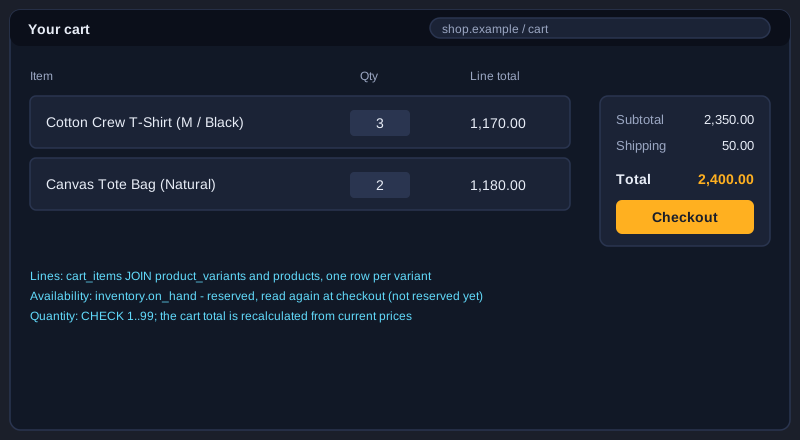
A cart holds the items a buyer intends to buy. A guest has a cart identified by a session token, and a customer has a cart identified by customer_id. Carts are not orders: nothing is reserved, and the price shown in the cart is read again at checkout. This topic covers the cart tables, adding items safely and merging a guest cart after login.
Guest and customer carts
The carts table has an optional customer_id and an optional session_token. When a guest logs in, the cart's customer_id is set and the guest cart's items are merged into the customer's open cart. The cart_items table has a UNIQUE key on (cart_id, variant_id), so one variant appears once per cart and the quantity is updated instead of duplicated.
Add to cart in one statement
INSERT ... AS new ON DUPLICATE KEY UPDATE adds the quantity in one atomic statement. Two taps on the same button do not create two rows, and the quantity is capped at 99 by a CHECK constraint and by LEAST in the update.
Carts are not orders
Adding an item to a cart does not reserve stock, because thousands of carts are abandoned every day. Reservation starts only when the customer places an order. This is why the cart page must check availability again and show a clear message when an item has sold out.
Illustrations
Example 31: Create the carts table
Guest carts use a session token; customers use an ID.
CREATE TABLE carts (
  cart_id       BIGINT UNSIGNED NOT NULL AUTO_INCREMENT,
  customer_id   BIGINT UNSIGNED NULL,
  session_token CHAR(36) NULL,
  status        ENUM('open','converted','abandoned') NOT NULL DEFAULT 'open',
  created_at    DATETIME(3) NOT NULL DEFAULT CURRENT_TIMESTAMP(3),
  updated_at    DATETIME(3) NOT NULL DEFAULT CURRENT_TIMESTAMP(3) ON UPDATE CURRENT_TIMESTAMP(3),
  PRIMARY KEY (cart_id),
  UNIQUE KEY uq_carts_session (session_token),
  KEY idx_carts_customer_status (customer_id, status),
  KEY idx_carts_status_updated (status, updated_at),
  CONSTRAINT fk_carts_customer FOREIGN KEY (customer_id)
    REFERENCES customers (customer_id) ON DELETE CASCADE
) ENGINE=InnoDB;
*This example was not run here because MySQL 8 was not installed on the computer that prepared this article.*
Example 32: Create the cart lines table
One row per variant per cart.
CREATE TABLE cart_items (
  cart_item_id BIGINT UNSIGNED NOT NULL AUTO_INCREMENT,
  cart_id      BIGINT UNSIGNED NOT NULL,
  variant_id   BIGINT UNSIGNED NOT NULL,
  quantity     INT NOT NULL,
  added_at     DATETIME(3) NOT NULL DEFAULT CURRENT_TIMESTAMP(3),
  PRIMARY KEY (cart_item_id),
  UNIQUE KEY uq_cart_variant (cart_id, variant_id),
  KEY idx_cart_items_variant (variant_id),
  CONSTRAINT fk_cart_items_cart FOREIGN KEY (cart_id)
    REFERENCES carts (cart_id) ON DELETE CASCADE,
  CONSTRAINT fk_cart_items_variant FOREIGN KEY (variant_id)
    REFERENCES product_variants (variant_id) ON DELETE RESTRICT,
  CONSTRAINT chk_cart_quantity CHECK (quantity BETWEEN 1 AND 99)
) ENGINE=InnoDB;
*This example was not run here because MySQL 8 was not installed on the computer that prepared this article.*
Example 33: Seed carts
A customer cart and a guest cart.
INSERT INTO carts (cart_id, customer_id, session_token, status) VALUES
  (1, 1, NULL, 'open'),
  (2, NULL, 'b0a1c2d3-0000-4000-8000-000000000002', 'open');

INSERT INTO cart_items (cart_id, variant_id, quantity) VALUES
  (1, 1, 1),
  (1, 4, 2),
  (2, 2, 1);
*This example was not run here because MySQL 8 was not installed on the computer that prepared this article.*
Example 34: Add to cart
Insert or increase the quantity in one statement.
INSERT INTO cart_items (cart_id, variant_id, quantity)
VALUES (1, 1, 2) AS new
ON DUPLICATE KEY UPDATE
  quantity = LEAST(cart_items.quantity + new.quantity, 99);
*This example was not run here because MySQL 8 was not installed on the computer that prepared this article.*
Example 35: Merge a guest cart after login
Move the items in one transaction.
START TRANSACTION;
INSERT INTO cart_items (cart_id, variant_id, quantity)
SELECT 1, variant_id, quantity
FROM cart_items
WHERE cart_id = 2
ON DUPLICATE KEY UPDATE quantity = LEAST(quantity + VALUES(quantity), 99);
UPDATE carts SET status = 'abandoned' WHERE cart_id = 2;
COMMIT;
*This example was not run here because MySQL 8 was not installed on the computer that prepared this article.*
Example 36: Cart with live prices and stock
Prices and availability are read when the cart is shown.
SELECT ci.variant_id, v.sku, p.name, v.price, ci.quantity,
       v.price * ci.quantity AS line_total,
       COALESCE(i.on_hand - i.reserved, 0) AS available
FROM cart_items AS ci
JOIN product_variants AS v ON v.variant_id = ci.variant_id
JOIN products AS p ON p.product_id = v.product_id
LEFT JOIN inventory AS i ON i.variant_id = ci.variant_id
WHERE ci.cart_id = 1;
*This example was not run here because MySQL 8 was not installed on the computer that prepared this article.*
Example 37: Mark idle carts as abandoned
A periodic job that uses the status index.
UPDATE carts
   SET status = 'abandoned'
 WHERE status = 'open'
   AND updated_at < NOW(3) - INTERVAL 7 DAY;
*This example was not run here because MySQL 8 was not installed on the computer that prepared this article.*
Example 38: Check the cart query plan
EXPLAIN shows whether an index is used.
EXPLAIN SELECT cart_id
FROM carts
WHERE status = 'open'
  AND updated_at < NOW(3) - INTERVAL 7 DAY;
*This example was not run here because MySQL 8 was not installed on the computer that prepared this article.*
Topic 6: Orders and order items
An order is a record of a purchase. It stores the totals, the status and a copy of the shipping address. Each order line copies the SKU, product name and unit price, so the order keeps its meaning even when the catalogue changes later. This topic also covers the rule that totals must always add up, and how to page through a customer's history quickly.
Snapshot the order
order_items stores sku_snapshot, product_name_snapshot and unit_price, copied from product_variants when the order is created. The line_total column is a generated column, unit_price times quantity, so it can never disagree with its inputs. The variant_id foreign key uses ON DELETE RESTRICT, so a variant that was ever sold cannot be deleted; deactivate it instead.
Totals must add up
A CHECK constraint on orders requires grand_total = subtotal - discount_total + shipping_fee. Any code path that changes one of these numbers must change the others in the same transaction, or the statement fails. The totals are recalculated from the order lines before the order is committed, so the header always matches the lines.
Paging the order history
The composite index (customer_id, created_at) serves the query for one customer's newest orders. Keyset paging with (created_at, order_id) returns the next page without scanning the earlier rows. Use EXPLAIN to confirm that the index is used, and make the sort order match the index.
Illustrations
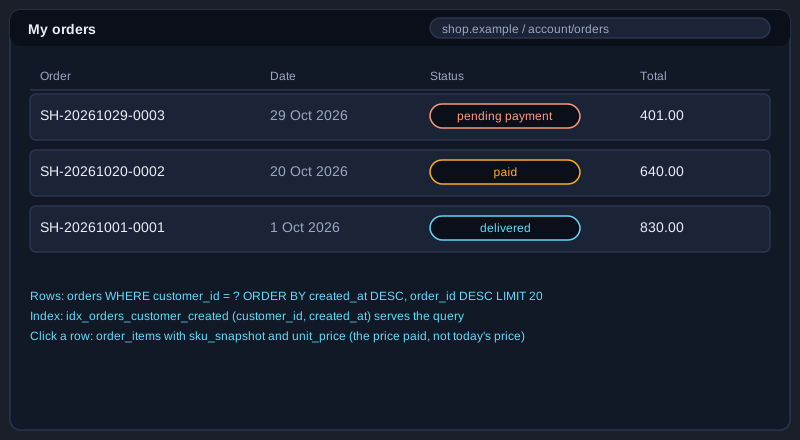
Example 39: Create the orders table
The header of a purchase, with totals and a snapshot address.
CREATE TABLE orders (
  order_id          BIGINT UNSIGNED NOT NULL AUTO_INCREMENT,
  order_number      VARCHAR(20) NOT NULL,
  customer_id       BIGINT UNSIGNED NOT NULL,
  status            ENUM('pending_payment','paid','packed','shipped','delivered','cancelled','refunded')
                    NOT NULL DEFAULT 'pending_payment',
  currency          CHAR(3) NOT NULL DEFAULT 'THB',
  subtotal          DECIMAL(12,2) NOT NULL,
  discount_total    DECIMAL(12,2) NOT NULL DEFAULT 0.00,
  shipping_fee      DECIMAL(12,2) NOT NULL DEFAULT 0.00,
  grand_total       DECIMAL(12,2) NOT NULL,
  coupon_id         INT UNSIGNED NULL,
  ship_recipient    VARCHAR(120) NOT NULL,
  ship_line1        VARCHAR(200) NOT NULL,
  ship_city         VARCHAR(100) NOT NULL,
  ship_postal_code  VARCHAR(20) NOT NULL,
  ship_country_code CHAR(2) NOT NULL,
  created_at        DATETIME(3) NOT NULL DEFAULT CURRENT_TIMESTAMP(3),
  updated_at        DATETIME(3) NOT NULL DEFAULT CURRENT_TIMESTAMP(3) ON UPDATE CURRENT_TIMESTAMP(3),
  PRIMARY KEY (order_id),
  UNIQUE KEY uq_orders_number (order_number),
  KEY idx_orders_customer_created (customer_id, created_at),
  KEY idx_orders_status_created (status, created_at),
  CONSTRAINT fk_orders_customer FOREIGN KEY (customer_id)
    REFERENCES customers (customer_id) ON DELETE RESTRICT,
  CONSTRAINT chk_orders_total CHECK (grand_total = subtotal - discount_total + shipping_fee)
) ENGINE=InnoDB;
*This example was not run here because MySQL 8 was not installed on the computer that prepared this article.*
Example 40: Create the order lines table
Prices copied at purchase, with a generated line total.
CREATE TABLE order_items (
  order_item_id         BIGINT UNSIGNED NOT NULL AUTO_INCREMENT,
  order_id              BIGINT UNSIGNED NOT NULL,
  variant_id            BIGINT UNSIGNED NOT NULL,
  sku_snapshot          VARCHAR(40) NOT NULL,
  product_name_snapshot VARCHAR(200) NOT NULL,
  unit_price            DECIMAL(10,2) NOT NULL,
  quantity              INT UNSIGNED NOT NULL,
  line_total            DECIMAL(12,2) GENERATED ALWAYS AS (unit_price * quantity) STORED,
  PRIMARY KEY (order_item_id),
  UNIQUE KEY uq_order_variant (order_id, variant_id),
  KEY idx_order_items_variant (variant_id),
  CONSTRAINT fk_order_items_order FOREIGN KEY (order_id)
    REFERENCES orders (order_id) ON DELETE RESTRICT,
  CONSTRAINT fk_order_items_variant FOREIGN KEY (variant_id)
    REFERENCES product_variants (variant_id) ON DELETE RESTRICT,
  CONSTRAINT chk_order_items_qty CHECK (quantity > 0)
) ENGINE=InnoDB;
*This example was not run here because MySQL 8 was not installed on the computer that prepared this article.*
Example 41: Copy a cart into an order
The price is saved at checkout.
-- @order_id is the id of the order created just before this statement.
INSERT INTO order_items
  (order_id, variant_id, sku_snapshot, product_name_snapshot, unit_price, quantity)
SELECT @order_id, v.variant_id, v.sku, p.name, v.price, ci.quantity
FROM cart_items AS ci
JOIN product_variants AS v ON v.variant_id = ci.variant_id
JOIN products AS p ON p.product_id = v.product_id
WHERE ci.cart_id = 1;
*This example was not run here because MySQL 8 was not installed on the computer that prepared this article.*
Example 42: Seed three orders
Orders in three different states.
INSERT INTO orders
  (order_id, order_number, customer_id, status, subtotal, discount_total, shipping_fee, grand_total,
   ship_recipient, ship_line1, ship_city, ship_postal_code, ship_country_code, created_at) VALUES
  (1, 'SH-20261001-0001', 1, 'delivered',       780.00, 0.00,  50.00, 830.00, 'Mali Sun',   '12/3 Sukhumvit Road', 'Bangkok',    '10110', 'TH', '2026-10-01 10:12:00'),
  (2, 'SH-20261020-0002', 2, 'paid',            590.00, 0.00,  50.00, 640.00, 'Niran Chai', '45 Moo 2',            'Chiang Mai', '50000', 'TH', '2026-10-20 18:40:00'),
  (3, 'SH-20261029-0003', 1, 'pending_payment', 390.00, 39.00, 50.00, 401.00, 'Mali Sun',   '12/3 Sukhumvit Road', 'Bangkok',    '10110', 'TH', '2026-10-29 09:05:00');
*This example was not run here because MySQL 8 was not installed on the computer that prepared this article.*
Example 43: Seed the order lines
The lines behind the three sample orders.
INSERT INTO order_items
  (order_id, variant_id, sku_snapshot, product_name_snapshot, unit_price, quantity) VALUES
  (1, 1, 'TS-CREW-M-BLK', 'Cotton Crew T-Shirt', 390.00, 2),
  (2, 4, 'TOTE-NAT',      'Canvas Tote Bag',     590.00, 1),
  (3, 2, 'TS-CREW-L-BLK', 'Cotton Crew T-Shirt', 390.00, 1);
*This example was not run here because MySQL 8 was not installed on the computer that prepared this article.*
Example 44: Order history with keyset paging
Newest first for one customer.
SELECT order_id, order_number, status, grand_total, created_at
FROM orders
WHERE customer_id = 1
  AND (created_at, order_id) < (?, ?)  -- last row of the previous page
ORDER BY created_at DESC, order_id DESC
LIMIT 20;
*This example was not run here because MySQL 8 was not installed on the computer that prepared this article.*
Example 45: Order detail
Header and lines in one query.
SELECT o.order_number, o.status, oi.sku_snapshot, oi.product_name_snapshot,
       oi.unit_price, oi.quantity, oi.line_total
FROM orders AS o
JOIN order_items AS oi ON oi.order_id = o.order_id
WHERE o.order_id = 1
ORDER BY oi.order_item_id;
*This example was not run here because MySQL 8 was not installed on the computer that prepared this article.*
Example 46: Admin queue: paid orders
What the warehouse must pack next.
SELECT order_id, order_number, created_at
FROM orders
WHERE status = 'paid'
ORDER BY created_at
LIMIT 50;
*This example was not run here because MySQL 8 was not installed on the computer that prepared this article.*
Topic 7: Payments and refunds
A payment is an attempt to charge an order. A single order can have several attempts: one fails because the card is declined, and the next succeeds. Payment providers also send webhooks that can arrive twice or out of order. The payments and refunds tables are designed so that retries and duplicate messages cannot charge a customer twice or record a sale twice.
Idempotency keys
Each payment attempt has an idempotency_key that is UNIQUE. If the application retries a request because of a network timeout, the second INSERT finds the existing row instead of creating a new charge. The provider_ref column, unique per provider, links the row to the provider's own transaction ID.
Payment rows and webhooks
A webhook says that a payment succeeded or failed. The handler finds the payment by provider and provider_ref, and changes its status only from pending. If the status is already final, the update changes zero rows, and the handler does nothing else. This is what makes a repeated webhook harmless.
Refund rules
Refunds reference a payment and have their own status. The refundable amount is the payment minus all refunds that did not fail. The refund row is written before the provider is called, and its status is updated afterwards. The provider call is never made while a database transaction holds row locks, because a slow network call would block other buyers.
Example 47: Create the payments table
One row per charge attempt, with an idempotency key.
CREATE TABLE payments (
  payment_id      BIGINT UNSIGNED NOT NULL AUTO_INCREMENT,
  order_id        BIGINT UNSIGNED NOT NULL,
  provider        VARCHAR(30) NOT NULL,
  provider_ref    VARCHAR(100) NULL,
  idempotency_key VARCHAR(64) NOT NULL,
  amount          DECIMAL(12,2) NOT NULL,
  status          ENUM('pending','succeeded','failed') NOT NULL DEFAULT 'pending',
  created_at      DATETIME(3) NOT NULL DEFAULT CURRENT_TIMESTAMP(3),
  updated_at      DATETIME(3) NOT NULL DEFAULT CURRENT_TIMESTAMP(3) ON UPDATE CURRENT_TIMESTAMP(3),
  PRIMARY KEY (payment_id),
  UNIQUE KEY uq_payments_idempotency (idempotency_key),
  UNIQUE KEY uq_payments_provider_ref (provider, provider_ref),
  KEY idx_payments_order (order_id),
  CONSTRAINT fk_payments_order FOREIGN KEY (order_id)
    REFERENCES orders (order_id) ON DELETE RESTRICT,
  CONSTRAINT chk_payments_amount CHECK (amount > 0)
) ENGINE=InnoDB;
*This example was not run here because MySQL 8 was not installed on the computer that prepared this article.*
Example 48: Create the refunds table
Each refund points at a payment and has its own status.
CREATE TABLE refunds (
  refund_id    BIGINT UNSIGNED NOT NULL AUTO_INCREMENT,
  payment_id   BIGINT UNSIGNED NOT NULL,
  amount       DECIMAL(12,2) NOT NULL,
  status       ENUM('pending','succeeded','failed') NOT NULL DEFAULT 'pending',
  reason       VARCHAR(200) NULL,
  provider_ref VARCHAR(100) NULL,
  created_at   DATETIME(3) NOT NULL DEFAULT CURRENT_TIMESTAMP(3),
  updated_at   DATETIME(3) NOT NULL DEFAULT CURRENT_TIMESTAMP(3) ON UPDATE CURRENT_TIMESTAMP(3),
  PRIMARY KEY (refund_id),
  KEY idx_refunds_payment (payment_id),
  CONSTRAINT fk_refunds_payment FOREIGN KEY (payment_id)
    REFERENCES payments (payment_id) ON DELETE RESTRICT,
  CONSTRAINT chk_refunds_amount CHECK (amount > 0)
) ENGINE=InnoDB;
*This example was not run here because MySQL 8 was not installed on the computer that prepared this article.*
Example 49: Record a payment attempt safely
A retry with the same key returns the same row.
INSERT INTO payments
  (order_id, provider, provider_ref, idempotency_key, amount, status)
VALUES
  (3, 'sample-gateway', NULL, 'order-3-attempt-1', 401.00, 'pending')
ON DUPLICATE KEY UPDATE updated_at = updated_at;
*This example was not run here because MySQL 8 was not installed on the computer that prepared this article.*
Example 50: Seed successful payments
Payments for orders 1 and 2.
-- No explicit payment_id: example 49 may already have used the first auto-increment value.
INSERT INTO payments
  (order_id, provider, provider_ref, idempotency_key, amount, status) VALUES
  (1, 'sample-gateway', 'test-ch-0001', 'order-1-attempt-1', 830.00, 'succeeded'),
  (2, 'sample-gateway', 'test-ch-0002', 'order-2-attempt-1', 640.00, 'succeeded');
*This example was not run here because MySQL 8 was not installed on the computer that prepared this article.*
Example 51: Refundable amount
The payment minus refunds that did not fail.
SELECT p.payment_id,
       p.amount - COALESCE(SUM(CASE WHEN r.status <> 'failed' THEN r.amount END), 0) AS refundable
FROM payments AS p
LEFT JOIN refunds AS r ON r.payment_id = p.payment_id
WHERE p.payment_id = ?
GROUP BY p.payment_id, p.amount;
*This example was not run here because MySQL 8 was not installed on the computer that prepared this article.*
Example 52: Payment and order mismatch
Find payments that succeeded while the order still waits.
SELECT p.payment_id, p.order_id, o.status
FROM payments AS p
JOIN orders AS o ON o.order_id = p.order_id
WHERE p.status = 'succeeded'
  AND o.status = 'pending_payment';
*This example was not run here because MySQL 8 was not installed on the computer that prepared this article.*
Topic 8: Shipments and fulfilment
Fulfilment is the work of packing and sending the goods. One order can ship in several parcels, for example when one item is out of stock. The shipments table is one row per parcel, and shipment_items says which order lines are in each parcel and how many units. A status column moves in one direction only, so a parcel cannot go from delivered back to preparing.
Parcels and partial shipments
shipments references orders, and shipment_items references shipments and order_items. The UNIQUE key on (shipment_id, order_item_id) stops the same line from appearing twice in one parcel. Together, the two tables allow any split of an order into parcels.
Status moves one way
Changing a parcel from preparing to in_transit, and from in_transit to delivered, uses an UPDATE with the old status in the WHERE clause. An out-of-order update changes zero rows, and the application reports the conflict instead of overwriting the status.
Track quantities
The quantity still to ship for a line is the ordered quantity minus the sum of the shipment_items rows for that line. A HAVING clause finds the lines that are not complete, which the admin screen uses to show partially shipped orders.
Illustrations
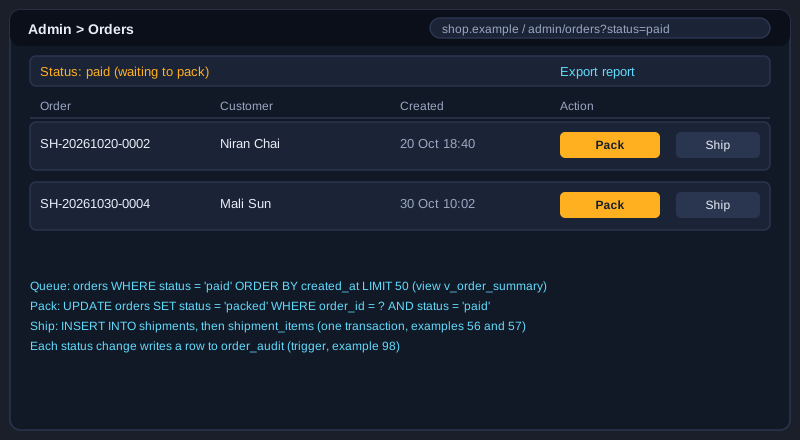
Example 53: Create the shipments table
A parcel for an order, with carrier and tracking.
CREATE TABLE shipments (
  shipment_id     BIGINT UNSIGNED NOT NULL AUTO_INCREMENT,
  order_id        BIGINT UNSIGNED NOT NULL,
  carrier         VARCHAR(60) NOT NULL,
  tracking_number VARCHAR(60) NULL,
  status          ENUM('preparing','in_transit','delivered','returned') NOT NULL DEFAULT 'preparing',
  shipped_at      DATETIME(3) NULL,
  delivered_at    DATETIME(3) NULL,
  PRIMARY KEY (shipment_id),
  UNIQUE KEY uq_shipments_tracking (tracking_number),
  KEY idx_shipments_order (order_id),
  CONSTRAINT fk_shipments_order FOREIGN KEY (order_id)
    REFERENCES orders (order_id) ON DELETE RESTRICT
) ENGINE=InnoDB;
*This example was not run here because MySQL 8 was not installed on the computer that prepared this article.*
Example 54: Create the shipment lines table
Which order lines are in which parcel, so partial shipments work.
CREATE TABLE shipment_items (
  shipment_item_id BIGINT UNSIGNED NOT NULL AUTO_INCREMENT,
  shipment_id      BIGINT UNSIGNED NOT NULL,
  order_item_id    BIGINT UNSIGNED NOT NULL,
  quantity         INT UNSIGNED NOT NULL,
  PRIMARY KEY (shipment_item_id),
  UNIQUE KEY uq_shipment_line (shipment_id, order_item_id),
  KEY idx_shipment_items_line (order_item_id),
  CONSTRAINT fk_shipment_items_shipment FOREIGN KEY (shipment_id)
    REFERENCES shipments (shipment_id) ON DELETE CASCADE,
  CONSTRAINT fk_shipment_items_line FOREIGN KEY (order_item_id)
    REFERENCES order_items (order_item_id) ON DELETE RESTRICT,
  CONSTRAINT chk_shipment_items_qty CHECK (quantity > 0)
) ENGINE=InnoDB;
*This example was not run here because MySQL 8 was not installed on the computer that prepared this article.*
Example 55: Seed a delivered shipment
Sample shipment data for order 1.
INSERT INTO shipments
  (shipment_id, order_id, carrier, tracking_number, status, shipped_at, delivered_at) VALUES
  (1, 1, 'Sample Courier', 'SC0000000001', 'delivered', '2026-10-02 09:00:00', '2026-10-04 15:20:00');

INSERT INTO shipment_items (shipment_id, order_item_id, quantity) VALUES (1, 1, 2);
*This example was not run here because MySQL 8 was not installed on the computer that prepared this article.*
Example 56: Pack and create a shipment
One transaction for the order status and the parcel.
START TRANSACTION;
UPDATE orders SET status = 'packed' WHERE order_id = 2 AND status = 'paid';
-- ROW_COUNT() = 0 means the order was not in the paid state: ROLLBACK.
INSERT INTO shipments (order_id, carrier, status) VALUES (2, 'Sample Courier', 'preparing');
SET @shipment_id = LAST_INSERT_ID();
INSERT INTO shipment_items (shipment_id, order_item_id, quantity)
SELECT @shipment_id, order_item_id, quantity
FROM order_items
WHERE order_id = 2;
COMMIT;
*This example was not run here because MySQL 8 was not installed on the computer that prepared this article.*
Example 57: Hand over and deliver
Shipment status moves forward only.
UPDATE shipments
   SET status = 'in_transit', tracking_number = 'SC0000000002', shipped_at = NOW(3)
 WHERE shipment_id = 2 AND status = 'preparing';

UPDATE shipments
   SET status = 'delivered', delivered_at = NOW(3)
 WHERE shipment_id = 2 AND status = 'in_transit';
*This example was not run here because MySQL 8 was not installed on the computer that prepared this article.*
Example 58: Quantity still to ship
Ordered minus shipped for each line.
SELECT oi.order_item_id, oi.quantity AS ordered,
       COALESCE(SUM(si.quantity), 0) AS shipped
FROM order_items AS oi
LEFT JOIN shipment_items AS si ON si.order_item_id = oi.order_item_id
WHERE oi.order_id = 2
GROUP BY oi.order_item_id, oi.quantity
HAVING shipped < ordered;
*This example was not run here because MySQL 8 was not installed on the computer that prepared this article.*
Topic 9: Reviews and coupons
Reviews build trust, and coupons drive sales, but both can be abused. A review should come only from a real delivered purchase, and a coupon should be used only within its dates and usage limit. The constraints in this topic protect both rules inside the database, so that a bug in the screen code cannot break them.
Verified reviews
The reviews table references order_items, not only products. The UNIQUE key on order_item_id allows one review per purchased line. The insert statement selects the line only when the order status is delivered, so a review cannot be written for a cancelled or unpaid order.
Coupons with limits
A coupon has a code, a percentage or fixed discount, a minimum subtotal, a start and end date and an optional maximum number of uses. CHECK constraints require the end date to be after the start, the discount to be positive, and used_count not to exceed max_uses.
Guarded redemption
Two buyers may apply the last use of a coupon at the same moment. A conditional UPDATE that checks the dates and used_count in the WHERE clause handles this safely. The application applies the discount only when ROW_COUNT is 1.
Example 59: Create the reviews table
One review per order line, rating from 1 to 5.
CREATE TABLE reviews (
  review_id     BIGINT UNSIGNED NOT NULL AUTO_INCREMENT,
  product_id    BIGINT UNSIGNED NOT NULL,
  customer_id   BIGINT UNSIGNED NOT NULL,
  order_item_id BIGINT UNSIGNED NOT NULL,
  rating        TINYINT UNSIGNED NOT NULL,
  body          TEXT NULL,
  created_at    DATETIME(3) NOT NULL DEFAULT CURRENT_TIMESTAMP(3),
  PRIMARY KEY (review_id),
  UNIQUE KEY uq_reviews_order_item (order_item_id),
  KEY idx_reviews_product_created (product_id, created_at),
  CONSTRAINT fk_reviews_product FOREIGN KEY (product_id)
    REFERENCES products (product_id) ON DELETE RESTRICT,
  CONSTRAINT fk_reviews_customer FOREIGN KEY (customer_id)
    REFERENCES customers (customer_id) ON DELETE CASCADE,
  CONSTRAINT fk_reviews_order_item FOREIGN KEY (order_item_id)
    REFERENCES order_items (order_item_id) ON DELETE RESTRICT,
  CONSTRAINT chk_reviews_rating CHECK (rating BETWEEN 1 AND 5)
) ENGINE=InnoDB;
*This example was not run here because MySQL 8 was not installed on the computer that prepared this article.*
Example 60: Create the coupons table
Dates, usage limit and sanity checks.
CREATE TABLE coupons (
  coupon_id      INT UNSIGNED NOT NULL AUTO_INCREMENT,
  code           VARCHAR(40) NOT NULL,
  discount_type  ENUM('percent','fixed') NOT NULL,
  discount_value DECIMAL(10,2) NOT NULL,
  min_subtotal   DECIMAL(10,2) NOT NULL DEFAULT 0.00,
  starts_at      DATETIME(3) NOT NULL,
  ends_at        DATETIME(3) NOT NULL,
  max_uses       INT UNSIGNED NULL,
  used_count     INT UNSIGNED NOT NULL DEFAULT 0,
  PRIMARY KEY (coupon_id),
  UNIQUE KEY uq_coupons_code (code),
  CONSTRAINT chk_coupons_value CHECK (discount_value > 0),
  CONSTRAINT chk_coupons_dates CHECK (ends_at > starts_at),
  CONSTRAINT chk_coupons_uses CHECK (max_uses IS NULL OR used_count <= max_uses)
) ENGINE=InnoDB;
*This example was not run here because MySQL 8 was not installed on the computer that prepared this article.*
Example 61: Link orders to coupons
A foreign key added after both tables exist.
ALTER TABLE orders
  ADD CONSTRAINT fk_orders_coupon FOREIGN KEY (coupon_id)
    REFERENCES coupons (coupon_id) ON DELETE SET NULL;
*This example was not run here because MySQL 8 was not installed on the computer that prepared this article.*
Example 62: Seed coupons
A percentage coupon and a fixed coupon.
INSERT INTO coupons
  (coupon_id, code, discount_type, discount_value, min_subtotal, starts_at, ends_at, max_uses, used_count) VALUES
  (1, 'WELCOME10', 'percent', 10.00, 300.00, '2026-01-01 00:00:00', '2027-01-01 00:00:00', NULL, 0),
  (2, 'SHIP50',    'fixed',   50.00,   0.00, '2026-10-01 00:00:00', '2026-12-31 23:59:59', 100, 0);
*This example was not run here because MySQL 8 was not installed on the computer that prepared this article.*
Example 63: Redeem a coupon safely
A guarded UPDATE stops overuse.
UPDATE coupons
   SET used_count = used_count + 1
 WHERE coupon_id = ?
   AND starts_at <= NOW(3)
   AND ends_at > NOW(3)
   AND (max_uses IS NULL OR used_count < max_uses);
-- The application applies the discount only when ROW_COUNT() = 1.
*This example was not run here because MySQL 8 was not installed on the computer that prepared this article.*
Example 64: Verified-purchase review
Only a delivered order line can be reviewed.
INSERT INTO reviews (product_id, customer_id, order_item_id, rating, body)
SELECT v.product_id, o.customer_id, oi.order_item_id, 5, 'Fits well and the cotton feels soft.'
FROM order_items AS oi
JOIN orders AS o ON o.order_id = oi.order_id
JOIN product_variants AS v ON v.variant_id = oi.variant_id
WHERE oi.order_item_id = 1
  AND o.status = 'delivered';
*This example was not run here because MySQL 8 was not installed on the computer that prepared this article.*
Topic 10: Sellers and the marketplace
A marketplace lets many sellers sell in one shop. The database must know which seller owns each product, which seller earned each order line, and how much commission the platform keeps. The design copies the seller onto each order line, so that a product moving to another seller later does not change the sales history of the first seller.
Sellers own products
sellers holds the name, email, status and commission percentage. products.seller_id is a nullable foreign key added with ALTER TABLE, so that the single-shop tables from earlier topics still work. A status of pending keeps a new seller's products hidden until an administrator approves the seller.
Snapshot the seller on each line
order_items.seller_id is copied when the order is created, not looked up later through products. This keeps the order history correct when a product changes owner, and makes the commission report a simple join.
Payouts and commission
payouts stores one row per seller per period, with the gross amount, the commission and the net amount. A CHECK constraint requires net = gross - commission, and a UNIQUE key on (seller_id, period_start) prevents a payout from being created twice for the same period.
Example 65: Create the sellers table
Marketplace sellers with a commission rate.
CREATE TABLE sellers (
  seller_id          INT UNSIGNED NOT NULL AUTO_INCREMENT,
  name               VARCHAR(120) NOT NULL,
  email              VARCHAR(254) NOT NULL,
  status             ENUM('pending','active','suspended') NOT NULL DEFAULT 'pending',
  commission_percent DECIMAL(5,2) NOT NULL DEFAULT 10.00,
  created_at         DATETIME(3) NOT NULL DEFAULT CURRENT_TIMESTAMP(3),
  PRIMARY KEY (seller_id),
  UNIQUE KEY uq_sellers_email (email),
  CONSTRAINT chk_sellers_commission CHECK (commission_percent BETWEEN 0 AND 100)
) ENGINE=InnoDB;
*This example was not run here because MySQL 8 was not installed on the computer that prepared this article.*
Example 66: Products belong to sellers
A nullable foreign key added with ALTER.
ALTER TABLE products
  ADD COLUMN seller_id INT UNSIGNED NULL,
  ADD KEY idx_products_seller (seller_id),
  ADD CONSTRAINT fk_products_seller FOREIGN KEY (seller_id)
    REFERENCES sellers (seller_id) ON DELETE RESTRICT;
*This example was not run here because MySQL 8 was not installed on the computer that prepared this article.*
Example 67: Copy the seller onto order lines
History stays correct when products change owner.
ALTER TABLE order_items
  ADD COLUMN seller_id INT UNSIGNED NULL,
  ADD KEY idx_order_items_seller (seller_id),
  ADD CONSTRAINT fk_order_items_seller FOREIGN KEY (seller_id)
    REFERENCES sellers (seller_id) ON DELETE RESTRICT;

UPDATE order_items AS oi
JOIN product_variants AS v ON v.variant_id = oi.variant_id
JOIN products AS p ON p.product_id = v.product_id
SET oi.seller_id = p.seller_id
WHERE oi.seller_id IS NULL;
*This example was not run here because MySQL 8 was not installed on the computer that prepared this article.*
Example 68: Create the payouts table
One payout per seller per period, with a check.
CREATE TABLE payouts (
  payout_id         INT UNSIGNED NOT NULL AUTO_INCREMENT,
  seller_id         INT UNSIGNED NOT NULL,
  period_start      DATE NOT NULL,
  period_end        DATE NOT NULL,
  gross_amount      DECIMAL(12,2) NOT NULL,
  commission_amount DECIMAL(12,2) NOT NULL,
  net_amount        DECIMAL(12,2) NOT NULL,
  status            ENUM('pending','paid') NOT NULL DEFAULT 'pending',
  PRIMARY KEY (payout_id),
  UNIQUE KEY uq_payouts_period (seller_id, period_start),
  CONSTRAINT fk_payouts_seller FOREIGN KEY (seller_id)
    REFERENCES sellers (seller_id) ON DELETE RESTRICT,
  CONSTRAINT chk_payouts_net CHECK (net_amount = gross_amount - commission_amount)
) ENGINE=InnoDB;
*This example was not run here because MySQL 8 was not installed on the computer that prepared this article.*
Example 69: Seed sellers and assignments
Two sellers and their products.
INSERT INTO sellers (seller_id, name, email, status, commission_percent) VALUES
  (1, 'Lanna Threads', '[email protected]', 'active', 12.00),
  (2, 'Sample Bags Co', '[email protected]',   'active', 10.00);

UPDATE products SET seller_id = 1 WHERE product_id IN (1, 3);
UPDATE products SET seller_id = 2 WHERE product_id = 2;
UPDATE order_items SET seller_id = 1 WHERE variant_id IN (1, 2, 3);
UPDATE order_items SET seller_id = 2 WHERE variant_id = 4;
*This example was not run here because MySQL 8 was not installed on the computer that prepared this article.*
Example 70: Commission report for one month
Gross sales and commission per seller.
SELECT s.name,
       COUNT(DISTINCT oi.order_id) AS orders,
       SUM(oi.line_total) AS gross,
       ROUND(SUM(oi.line_total) * s.commission_percent / 100, 2) AS commission
FROM order_items AS oi
JOIN orders AS o ON o.order_id = oi.order_id
JOIN sellers AS s ON s.seller_id = oi.seller_id
WHERE o.status IN ('paid','packed','shipped','delivered')
  AND o.created_at >= '2026-10-01'
  AND o.created_at < '2026-11-01'
GROUP BY s.seller_id, s.name, s.commission_percent
ORDER BY gross DESC;
*This example was not run here because MySQL 8 was not installed on the computer that prepared this article.*
Topic 11: Transactions: placing an order and reserving stock
Placing an order is the most important transaction in the shop. It creates the order, copies the lines, reserves the stock and closes the cart. All of these steps must succeed together or fail together. This topic walks through each step in the order it runs, shows the SQL, and explains what goes wrong when the steps are not wrapped in one transaction.
Inside the checkout transaction, step by step
1. START TRANSACTION. 2. Lock the inventory rows of the cart with SELECT ... FOR UPDATE, in ascending variant_id order. 3. Compute the subtotal from the current prices. 4. Insert the order header with the default address copied in. 5. Insert the order lines with the price snapshot. 6. Reserve the stock with one UPDATE that joins order_items. 7. Write one ledger row per line with reason reserve. 8. Set the cart to converted. 9. COMMIT. The stored procedure in example 76 shows all nine steps in one place.
What goes wrong without a transaction
Without a transaction, a crash after step 4 leaves an order with no reserved stock, so the same unit can be sold twice. A crash after step 6 but before step 7 leaves a counter the ledger cannot explain. A failure after the order is created but before the cart is closed lets the customer pay twice for the same cart. Each of these is an ordinary outage, not an exotic one.
Lock order and short transactions
Lock rows in the same order everywhere. If one checkout locks variant 4 and then variant 1, and another locks variant 1 and then variant 4, the two can deadlock, and MySQL rolls one of them back with error 1213. Keep the transaction short: do not call the payment provider, send email or wait for a user inside it. The reservation is a promise that lasts for a time limit, and the payment result decides whether it becomes a sale.
Illustrations
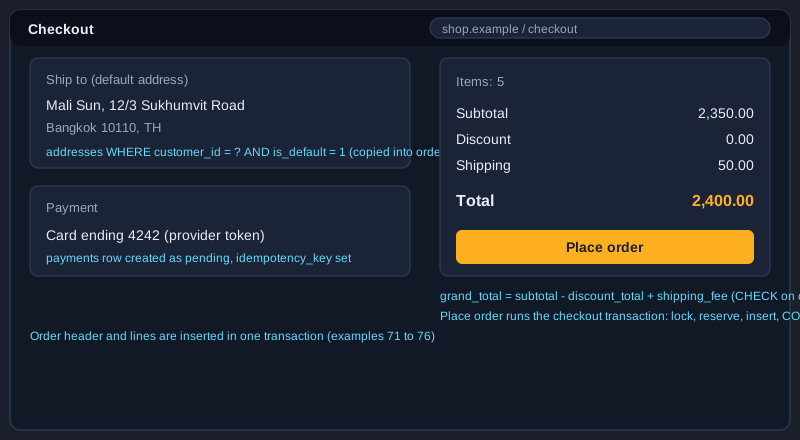
Example 71: Checkout: lock the stock rows
SELECT FOR UPDATE in ascending order.
-- Cart 1 holds three of variant 1 and two of variant 4 (after example 34).
START TRANSACTION;
SELECT variant_id, on_hand, reserved
FROM inventory
WHERE variant_id IN (1, 4)
ORDER BY variant_id
FOR UPDATE;
*This example was not run here because MySQL 8 was not installed on the computer that prepared this article.*
Example 72: Checkout: create the order header
Totals and a snapshot of the default address.
-- Subtotal: 3 x 390.00 + 2 x 590.00 = 2350.00. Shipping 50.00. No discount.
INSERT INTO orders
  (order_number, customer_id, status, subtotal, discount_total, shipping_fee, grand_total,
   ship_recipient, ship_line1, ship_city, ship_postal_code, ship_country_code)
SELECT 'SH-20261030-0004', 1, 'pending_payment', 2350.00, 0.00, 50.00, 2400.00,
       a.recipient_name, a.line1, a.city, a.postal_code, a.country_code
FROM addresses AS a
WHERE a.customer_id = 1 AND a.is_default = 1;
SET @order_id = LAST_INSERT_ID();
*This example was not run here because MySQL 8 was not installed on the computer that prepared this article.*
Example 73: Checkout: copy the cart lines
Prices at the moment of purchase.
INSERT INTO order_items
  (order_id, variant_id, sku_snapshot, product_name_snapshot, unit_price, quantity)
SELECT @order_id, v.variant_id, v.sku, p.name, v.price, ci.quantity
FROM cart_items AS ci
JOIN product_variants AS v ON v.variant_id = ci.variant_id
JOIN products AS p ON p.product_id = v.product_id
WHERE ci.cart_id = 1;
*This example was not run here because MySQL 8 was not installed on the computer that prepared this article.*
Example 74: Checkout: recalculate the totals
Totals come from the lines, not from the cart.
UPDATE orders AS o
JOIN (
  SELECT order_id, SUM(line_total) AS lines_total
  FROM order_items
  WHERE order_id = @order_id
  GROUP BY order_id
) AS t ON t.order_id = o.order_id
SET o.subtotal = t.lines_total,
    o.grand_total = t.lines_total - o.discount_total + o.shipping_fee;
*This example was not run here because MySQL 8 was not installed on the computer that prepared this article.*
Example 75: Checkout: reserve stock and write the ledger
The CHECK rule makes short stock fail.
-- If a line asks for more than is on hand, the CHECK constraint fails this statement with error 3819.
-- The whole statement is undone, and the transaction is rolled back by the caller.
UPDATE inventory AS i
JOIN order_items AS oi ON oi.variant_id = i.variant_id
SET i.reserved = i.reserved + oi.quantity
WHERE oi.order_id = @order_id;

INSERT INTO inventory_movements (variant_id, delta_on_hand, delta_reserved, reason, order_id)
SELECT variant_id, 0, quantity, 'reserve', @order_id
FROM order_items
WHERE order_id = @order_id;
*This example was not run here because MySQL 8 was not installed on the computer that prepared this article.*
Example 76: Place an order in a stored procedure
The whole checkout, with rollback on any error.
DELIMITER $$
CREATE PROCEDURE place_order(
  IN  p_customer_id  BIGINT UNSIGNED,
  IN  p_cart_id      BIGINT UNSIGNED,
  IN  p_order_number VARCHAR(20),
  OUT p_order_id     BIGINT UNSIGNED)
BEGIN
  DECLARE v_subtotal DECIMAL(12,2) DEFAULT 0;
  DECLARE EXIT HANDLER FOR SQLEXCEPTION
  BEGIN
    ROLLBACK;
    RESIGNAL;
  END;

  START TRANSACTION;

  -- 1 lock the stock rows of the cart in ascending variant_id order
  SELECT i.variant_id
  FROM inventory AS i
  JOIN cart_items AS ci ON ci.variant_id = i.variant_id
  WHERE ci.cart_id = p_cart_id
  ORDER BY i.variant_id
  FOR UPDATE;

  -- 2 the cart must be open and belong to this customer
  IF NOT EXISTS (SELECT 1 FROM carts
                 WHERE cart_id = p_cart_id AND customer_id = p_customer_id AND status = 'open') THEN
    SIGNAL SQLSTATE '45000' SET MESSAGE_TEXT = 'cart is not open for this customer';
  END IF;

  -- 3 subtotal from the current prices
  SELECT COALESCE(SUM(v.price * ci.quantity), 0) INTO v_subtotal
  FROM cart_items AS ci
  JOIN product_variants AS v ON v.variant_id = ci.variant_id
  WHERE ci.cart_id = p_cart_id;
  IF v_subtotal = 0 THEN
    SIGNAL SQLSTATE '45000' SET MESSAGE_TEXT = 'cart is empty';
  END IF;

  -- 4 order header with the default address
  INSERT INTO orders
    (order_number, customer_id, status, subtotal, discount_total, shipping_fee, grand_total,
     ship_recipient, ship_line1, ship_city, ship_postal_code, ship_country_code)
  SELECT p_order_number, p_customer_id, 'pending_payment', v_subtotal, 0.00, 50.00, v_subtotal + 50.00,
         a.recipient_name, a.line1, a.city, a.postal_code, a.country_code
  FROM addresses AS a
  WHERE a.customer_id = p_customer_id AND a.is_default = 1;
  IF ROW_COUNT() = 0 THEN
    SIGNAL SQLSTATE '45000' SET MESSAGE_TEXT = 'customer has no default address';
  END IF;
  SET p_order_id = LAST_INSERT_ID();

  -- 5 order lines with the price snapshot
  INSERT INTO order_items
    (order_id, variant_id, sku_snapshot, product_name_snapshot, unit_price, quantity)
  SELECT p_order_id, v.variant_id, v.sku, p.name, v.price, ci.quantity
  FROM cart_items AS ci
  JOIN product_variants AS v ON v.variant_id = ci.variant_id
  JOIN products AS p ON p.product_id = v.product_id
  WHERE ci.cart_id = p_cart_id;

  -- 6 reserve stock; the CHECK constraint stops oversell
  UPDATE inventory AS i
  JOIN order_items AS oi ON oi.variant_id = i.variant_id
  SET i.reserved = i.reserved + oi.quantity
  WHERE oi.order_id = p_order_id;

  -- 7 ledger and cart status
  INSERT INTO inventory_movements (variant_id, delta_on_hand, delta_reserved, reason, order_id)
  SELECT variant_id, 0, quantity, 'reserve', p_order_id
  FROM order_items
  WHERE order_id = p_order_id;
  UPDATE carts SET status = 'converted' WHERE cart_id = p_cart_id;

  COMMIT;
END$$
DELIMITER ;
*This example was not run here because MySQL 8 was not installed on the computer that prepared this article.*
Topic 12: Transactions: payment success, failure, cancellation and refund
After the order is placed, the payment result decides what happens to the reservation. A success turns the reservation into a sale, a failure releases it, and a cancellation or refund puts the goods back. Each of these transactions is written so that a repeated message from the payment provider changes nothing the second time.
Payment success
The webhook handler starts a transaction and updates the payment from pending to succeeded. If zero rows change, the webhook is a duplicate, and the handler rolls back and returns 200. Otherwise it marks the order paid, moves the reservation into on_hand by subtracting it from both on_hand and reserved, and writes a sale row for each line. Example 77 shows the full sequence.
Payment failure and cancellation
A failed payment marks the payment failed, cancels the order from pending_payment, and releases the reservation by subtracting the reserved quantity. The release happens only when the order update changed one row, so the reservation is never released twice. Cancelling a paid order before packing adds the quantity back to on_hand and writes a cancel row, as example 79 shows.
Refunds without holding locks
A refund runs in two short transactions around the provider call. The first records a pending refund and commits. The provider is called with no lock held. The second stores the provider's reference, marks the refund succeeded and marks the order refunded only when the succeeded refunds cover the payment. Example 81 locks the payment row so two refund requests cannot both pass the refundable-amount check.
Illustrations
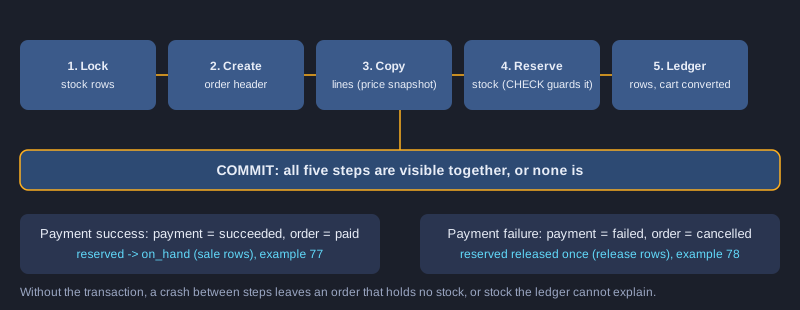
Example 77: Payment success webhook
Guarded steps: a repeated webhook changes nothing.
START TRANSACTION;
UPDATE payments
   SET status = 'succeeded'
 WHERE provider = 'sample-gateway' AND provider_ref = ? AND status = 'pending';
-- ROW_COUNT() = 0: this webhook was already handled. ROLLBACK and answer 200 to the gateway.
UPDATE orders
   SET status = 'paid'
 WHERE order_id = ? AND status = 'pending_payment';
UPDATE inventory AS i
JOIN order_items AS oi ON oi.variant_id = i.variant_id
SET i.on_hand = i.on_hand - oi.quantity,
    i.reserved = i.reserved - oi.quantity
WHERE oi.order_id = ?;
INSERT INTO inventory_movements (variant_id, delta_on_hand, delta_reserved, reason, order_id)
SELECT variant_id, -quantity, -quantity, 'sale', order_id
FROM order_items
WHERE order_id = ?;
COMMIT;
*This example was not run here because MySQL 8 was not installed on the computer that prepared this article.*
Example 78: Payment failure releases stock
Release the reservation exactly once.
START TRANSACTION;
UPDATE payments
   SET status = 'failed'
 WHERE provider = 'sample-gateway' AND provider_ref = ? AND status = 'pending';
-- ROW_COUNT() = 0: already handled, ROLLBACK.
UPDATE orders
   SET status = 'cancelled'
 WHERE order_id = ? AND status = 'pending_payment';
-- ROW_COUNT() = 0 here too: ROLLBACK, so the reservation is never released twice.
UPDATE inventory AS i
JOIN order_items AS oi ON oi.variant_id = i.variant_id
SET i.reserved = i.reserved - oi.quantity
WHERE oi.order_id = ?;
INSERT INTO inventory_movements (variant_id, delta_on_hand, delta_reserved, reason, order_id)
SELECT variant_id, 0, -quantity, 'release', order_id
FROM order_items
WHERE order_id = ?;
COMMIT;
*This example was not run here because MySQL 8 was not installed on the computer that prepared this article.*
Example 79: Cancel a paid order before packing
Stock goes back on hand.
START TRANSACTION;
UPDATE orders
   SET status = 'cancelled'
 WHERE order_id = ? AND status = 'paid';
-- ROW_COUNT() = 0: the order was packed or shipped already. ROLLBACK and show a return flow instead.
UPDATE inventory AS i
JOIN order_items AS oi ON oi.variant_id = i.variant_id
SET i.on_hand = i.on_hand + oi.quantity
WHERE oi.order_id = ?;
INSERT INTO inventory_movements (variant_id, delta_on_hand, delta_reserved, reason, order_id)
SELECT variant_id, quantity, 0, 'cancel', order_id
FROM order_items
WHERE order_id = ?;
COMMIT;
*This example was not run here because MySQL 8 was not installed on the computer that prepared this article.*
Example 80: Refund around the provider call
No row lock is held during the network call.
-- Transaction 1: record the intent, then commit before calling the provider.
START TRANSACTION;
SELECT payment_id FROM payments WHERE payment_id = ? AND status = 'succeeded' FOR UPDATE;
INSERT INTO refunds (payment_id, amount, status, reason)
VALUES (?, ?, 'pending', 'Customer returned the item');
COMMIT;

-- The provider call happens here, outside any database transaction, so no row lock is held.

-- Transaction 2: store the provider result and update the order.
START TRANSACTION;
UPDATE refunds
   SET status = 'succeeded', provider_ref = ?
 WHERE refund_id = ? AND status = 'pending';
UPDATE orders AS o
JOIN payments AS p ON p.order_id = o.order_id AND p.status = 'succeeded'
SET o.status = 'refunded'
WHERE o.order_id = ?
  AND o.status IN ('paid','packed','shipped','delivered')
  AND (SELECT COALESCE(SUM(r.amount), 0) FROM refunds AS r
       WHERE r.payment_id = p.payment_id AND r.status = 'succeeded') >= p.amount;
COMMIT;
*This example was not run here because MySQL 8 was not installed on the computer that prepared this article.*
Example 81: Refund cap with a row lock
Two refund requests cannot both pass the check.
START TRANSACTION;
SELECT amount FROM payments WHERE payment_id = ? FOR UPDATE;
SELECT COALESCE(SUM(CASE WHEN status <> 'failed' THEN amount END), 0) AS already_refunded
FROM refunds
WHERE payment_id = ?;
-- The application compares the requested amount with (amount - already_refunded). ROLLBACK when it is too large.
INSERT INTO refunds (payment_id, amount, status, reason)
VALUES (?, ?, 'pending', ?);
COMMIT;
*This example was not run here because MySQL 8 was not installed on the computer that prepared this article.*
Example 82: Restock returned goods
Only when the goods are inspected and resaleable.
START TRANSACTION;
UPDATE inventory
   SET on_hand = on_hand + 1
 WHERE variant_id = 1;
INSERT INTO inventory_movements (variant_id, delta_on_hand, delta_reserved, reason, order_id)
VALUES (1, 1, 0, 'return', 1);
COMMIT;
-- Restock only when the goods are inspected and resaleable. Otherwise write an adjustment instead.
*This example was not run here because MySQL 8 was not installed on the computer that prepared this article.*
Topic 13: Concurrency: two buyers and the last item
Many buyers can read the same stock at the same moment. If the code reads a number, decides and then writes, two buyers can both see one unit and both buy it. This topic shows the bug, two ways to fix it, the lock types MySQL 8 offers, and the deadlock that appears when locks are taken in a different order.
Two buyers, one item
Buyer A reads available = 1 and buyer B reads available = 1. Both then increase reserved by one. Without protection, reserved becomes 2 while on_hand is 1, which is an oversell. The CHECK constraint stops the second write with error 3819, which is a safety net and not the whole fix. The fix belongs in the statement that checks and writes at the same time.
Locks: FOR UPDATE, NOWAIT and SKIP LOCKED
SELECT ... FOR UPDATE makes other transactions wait until this one commits. NOWAIT fails at once with error 3572 instead of waiting, which suits a user-facing screen. SKIP LOCKED lets a worker take the next jobs that no other worker holds, which suits a queue of payment checks. Use SELECT ... FOR SHARE only when you need to read a row and make sure it does not change.
Deadlocks and optimistic locking
A deadlock happens when two transactions each hold a lock the other needs. InnoDB detects it and rolls one back with error 1213, so the application must retry the whole transaction. The cure is the same lock order everywhere. For a product edit that is rarely contended, optimistic locking with a version column avoids holding locks at all: the UPDATE includes the version it read, and zero rows changed means someone else saved first.
Example 83: Reproduce the oversell
Two buyers, one unit, and no protection.
-- Setup: one unit of variant 2 is left.
UPDATE inventory SET on_hand = 1, reserved = 0 WHERE variant_id = 2;

-- Buyer A and buyer B run these two statements at nearly the same time (no locking, no transaction):
SELECT on_hand - reserved AS available FROM inventory WHERE variant_id = 2;  -- both read 1
UPDATE inventory SET reserved = reserved + 1 WHERE variant_id = 2;          -- both write

-- Without the CHECK constraint, reserved would become 2 while on_hand is 1: an oversell.
-- With it, the second write fails with error 3819.
*This example was not run here because MySQL 8 was not installed on the computer that prepared this article.*
Example 84: The last item: an atomic UPDATE
One conditional statement gives the item to one buyer.
UPDATE inventory
   SET reserved = reserved + 1
 WHERE variant_id = 2
   AND on_hand - reserved >= 1;
-- ROW_COUNT() = 1: this buyer got the item.
-- ROW_COUNT() = 0: sold out. Show "sold out" and do not create an order.
*This example was not run here because MySQL 8 was not installed on the computer that prepared this article.*
Example 85: NOWAIT and SKIP LOCKED
Fail fast, or let workers skip rows that are held.
-- NOWAIT: error 3572 at once if another transaction holds the row.
START TRANSACTION;
SELECT on_hand, reserved FROM inventory WHERE variant_id = 2 FOR UPDATE NOWAIT;
ROLLBACK;

-- SKIP LOCKED: a worker takes up to 10 pending payment checks that no other worker holds.
START TRANSACTION;
SELECT payment_id FROM payments
WHERE status = 'pending'
ORDER BY payment_id
LIMIT 10
FOR UPDATE SKIP LOCKED;
-- ...check each payment with the provider, update its row, then:
COMMIT;
*This example was not run here because MySQL 8 was not installed on the computer that prepared this article.*
Example 86: Inspect the locks
performance_schema shows who holds and waits for what.
SELECT engine_transaction_id, object_name, index_name, lock_type, lock_mode, lock_status, lock_data
FROM performance_schema.data_locks
WHERE object_name = 'inventory';

SELECT requesting_engine_transaction_id, blocking_engine_transaction_id
FROM performance_schema.data_lock_waits;
*This example was not run here because MySQL 8 was not installed on the computer that prepared this article.*
Example 87: Deadlock and the fix
Lock rows in the same order everywhere.
-- Session A                                   -- Session B
START TRANSACTION;                              START TRANSACTION;
UPDATE inventory SET reserved = reserved + 1    UPDATE inventory SET reserved = reserved + 1
 WHERE variant_id = 1;                           WHERE variant_id = 4;
UPDATE inventory SET reserved = reserved + 1    UPDATE inventory SET reserved = reserved + 1
 WHERE variant_id = 4;   -- waits for B          WHERE variant_id = 1;   -- deadlock

-- One session gets error 1213 and is rolled back. The fix: both sessions lock in the same order (1, then 4).
-- Inspect the last deadlock with: SHOW ENGINE INNODB STATUS;
*This example was not run here because MySQL 8 was not installed on the computer that prepared this article.*
Example 88: Optimistic locking with a version column
Detect a lost update without holding locks.
ALTER TABLE products ADD COLUMN version INT UNSIGNED NOT NULL DEFAULT 0;

UPDATE products
   SET base_price = 420.00, version = version + 1
 WHERE product_id = 1 AND version = 0;
-- ROW_COUNT() = 0: someone else changed the product first. Reload it and try again.
*This example was not run here because MySQL 8 was not installed on the computer that prepared this article.*
Topic 14: Indexes and query plans
An index is a sorted copy of some columns that lets MySQL find rows without reading the whole table. Every index also slows down writes and takes space, so each one needs a reason. This topic explains how to choose the column order, how to read EXPLAIN and EXPLAIN ANALYZE, and how to find indexes that nobody uses.
Choose the composite index order
A composite index works from left to right. The index (customer_id, created_at) serves a query that filters on customer_id and sorts by created_at. It does not serve a query that filters only on created_at. Put the equality columns first and the sort column after them. Use a descending index such as (created_at DESC, order_id DESC) when the newest rows are read most often.
Read EXPLAIN
EXPLAIN shows the access type, the index chosen, the number of rows estimated and whether a temporary table or a filesort is needed. EXPLAIN ANALYZE, available since MySQL 8.0.18, runs the query and shows the actual time and row counts for each step. Compare the estimate with the actual number: a large difference often means the statistics are out of date, and ANALYZE TABLE fixes that.
Find unused and redundant indexes
The sys schema views sys.schema_unused_indexes and sys.schema_redundant_indexes list candidates. An index on (status) is redundant when (status, created_at) already exists. Counters reset when the server restarts, so check over a full business cycle, such as a month-end run, before you drop an index. An invisible index lets you test a drop without losing the index.
Example 89: Test an invisible index
Check the plan before you drop an index.
ALTER TABLE orders ALTER INDEX idx_orders_status_created INVISIBLE;

EXPLAIN SELECT order_id FROM orders WHERE status = 'paid' ORDER BY created_at LIMIT 50;

-- Bring it back if the plans get worse:
ALTER TABLE orders ALTER INDEX idx_orders_status_created VISIBLE;
*This example was not run here because MySQL 8 was not installed on the computer that prepared this article.*
Example 90: Covering index for the lowest price
Answer the query from the index alone.
CREATE INDEX idx_variants_product_active_price
  ON product_variants (product_id, is_active, price);

EXPLAIN SELECT product_id, MIN(price)
FROM product_variants
WHERE is_active = 1
GROUP BY product_id;
*This example was not run here because MySQL 8 was not installed on the computer that prepared this article.*
Example 91: EXPLAIN ANALYZE and histograms
Measure real work and help the optimiser.
EXPLAIN ANALYZE
SELECT order_id, order_number, created_at
FROM orders
WHERE customer_id = 1
ORDER BY created_at DESC
LIMIT 20;

ANALYZE TABLE orders UPDATE HISTOGRAM ON status;
*This example was not run here because MySQL 8 was not installed on the computer that prepared this article.*
Example 92: Unused and redundant indexes
The sys schema finds candidates to remove.
SELECT * FROM sys.schema_unused_indexes WHERE object_schema = 'shop';

SELECT * FROM sys.schema_redundant_indexes WHERE table_schema = 'shop';
-- Usage counters restart when the server restarts. Check over a full business cycle before you drop an index.
*This example was not run here because MySQL 8 was not installed on the computer that prepared this article.*
Topic 15: Views, reports and partitioning
The screens and the reports ask the same questions again and again. Views give those questions a name, reports summarise the sales, and partitioning keeps very large history tables manageable. This topic covers the views for the stock screen and the admin list, a monthly report with totals, and a partitioned event log.
Views hide joins
A view such as v_available_stock joins inventory, product_variants and products once, so each screen does not have to repeat the join. Views are not a cache: MySQL runs the view's SELECT each time, and a view on a join cannot be updated. Grant the reporting role SELECT on the view, not on the base tables.
Reports
A monthly sales report sums grand_total for the orders that were paid or later, grouped by month. GROUP BY ... WITH ROLLUP adds a total row. Reports read the live tables, so run heavy reports on a read replica or at night, and never let a report hold locks that block checkout.
Partitions for history
PARTITION BY RANGE COLUMNS splits a table into periods, here by created_at. The primary key must include the partition column, so it is (event_id, created_at). Dropping an old partition removes a whole month at once and avoids a long DELETE that fills the undo log. Partitioning helps with large history tables, but it does not replace a good index.
Example 93: Stock view
A view that hides the join from the screen code.
CREATE OR REPLACE VIEW v_available_stock AS
SELECT v.variant_id, v.sku, p.name AS product_name,
       i.on_hand, i.reserved, i.on_hand - i.reserved AS available
FROM inventory AS i
JOIN product_variants AS v ON v.variant_id = i.variant_id
JOIN products AS p ON p.product_id = v.product_id;
*This example was not run here because MySQL 8 was not installed on the computer that prepared this article.*
Example 94: Order summary view
One row per order for the admin screen.
CREATE OR REPLACE VIEW v_order_summary AS
SELECT o.order_id, o.order_number, o.status, c.full_name AS customer_name,
       o.grand_total, o.created_at,
       COUNT(oi.order_item_id) AS line_count,
       COALESCE(SUM(oi.quantity), 0) AS unit_count
FROM orders AS o
JOIN customers AS c ON c.customer_id = o.customer_id
LEFT JOIN order_items AS oi ON oi.order_id = o.order_id
GROUP BY o.order_id, o.order_number, o.status, c.full_name, o.grand_total, o.created_at;
*This example was not run here because MySQL 8 was not installed on the computer that prepared this article.*
Example 95: Monthly sales with a total row
GROUP BY WITH ROLLUP.
SELECT DATE_FORMAT(created_at, '%Y-%m') AS month,
       COUNT(*) AS orders,
       SUM(grand_total) AS revenue
FROM orders
WHERE status IN ('paid','packed','shipped','delivered')
GROUP BY month WITH ROLLUP;
*This example was not run here because MySQL 8 was not installed on the computer that prepared this article.*
Example 96: Partitioned event log
Range partitions, and cheap removal of old months.
CREATE TABLE payment_events (
  event_id   BIGINT UNSIGNED NOT NULL AUTO_INCREMENT,
  payment_id BIGINT UNSIGNED NOT NULL,
  event_type VARCHAR(40) NOT NULL,
  created_at DATETIME(3) NOT NULL DEFAULT CURRENT_TIMESTAMP(3),
  PRIMARY KEY (event_id, created_at)
) ENGINE=InnoDB
PARTITION BY RANGE COLUMNS (created_at) (
  PARTITION p2026h1 VALUES LESS THAN ('2026-07-01'),
  PARTITION p2026h2 VALUES LESS THAN ('2027-01-01'),
  PARTITION pmax    VALUES LESS THAN (MAXVALUE)
);

-- Later: remove a whole old period at once.
-- ALTER TABLE payment_events DROP PARTITION p2026h1;
*This example was not run here because MySQL 8 was not installed on the computer that prepared this article.*
Topic 16: Professional practice: migrations, audit, backups and privileges
A database in production changes over time, can be damaged, and holds personal data. Professional practice means changes are versioned and reviewed, every status change is recorded, backups are tested with a restore, and each program has only the rights it needs. This topic covers the habits that separate a learning project from a shop that people trust.
Versioned migrations
Each schema change is a numbered file that runs once, in order. A schema_migrations table records the version and a checksum of the file, so an edited migration is detected. Never edit a migration that has already run in production; write a new one that corrects it.
Audit trails and backups
An AFTER UPDATE trigger on orders writes every status change with the user and the time to order_audit. A backup with mysqldump --single-transaction gives a consistent snapshot of InnoDB tables without locking them. A backup that has never been restored is not a backup, so restore it into an empty test database and compare row counts.
Least privilege
The application user has SELECT, INSERT, UPDATE and DELETE on the shop, but not DROP or ALTER. Reports use a role that reads two views only. Keep administrator accounts for migrations, store every password in a secret store, and review grants with SHOW GRANTS each quarter.
Example 97: Versioned migrations
Each change runs once, in order, with a checksum.
CREATE TABLE schema_migrations (
  version    VARCHAR(20) NOT NULL,
  checksum   CHAR(64) NOT NULL,
  applied_at DATETIME(3) NOT NULL DEFAULT CURRENT_TIMESTAMP(3),
  PRIMARY KEY (version)
) ENGINE=InnoDB;

-- File V003__add_order_audit.sql: each migration runs once, in order, and the checksum detects edits.
-- The migration tool inserts ('V003', '<sha256 of the file>') after it succeeds.
*This example was not run here because MySQL 8 was not installed on the computer that prepared this article.*
Example 98: Audit trigger for order status
Every status change is recorded with who made it.
CREATE TABLE order_audit (
  audit_id   BIGINT UNSIGNED NOT NULL AUTO_INCREMENT,
  order_id   BIGINT UNSIGNED NOT NULL,
  old_status VARCHAR(30) NOT NULL,
  new_status VARCHAR(30) NOT NULL,
  changed_by VARCHAR(100) NOT NULL,
  changed_at DATETIME(3) NOT NULL DEFAULT CURRENT_TIMESTAMP(3),
  PRIMARY KEY (audit_id),
  KEY idx_order_audit_order (order_id, changed_at)
) ENGINE=InnoDB;

DELIMITER $$
CREATE TRIGGER trg_orders_status_audit
AFTER UPDATE ON orders
FOR EACH ROW
BEGIN
  IF OLD.status <> NEW.status THEN
    INSERT INTO order_audit (order_id, old_status, new_status, changed_by)
    VALUES (OLD.order_id, OLD.status, NEW.status, CURRENT_USER());
  END IF;
END$$
DELIMITER ;
*This example was not run here because MySQL 8 was not installed on the computer that prepared this article.*
Example 99: Back up and restore
mysqldump with --single-transaction, then a test restore.
# Back up: --single-transaction gives a consistent view of InnoDB tables without locking them.
mysqldump --single-transaction --routines --triggers --events --set-gtid-purged=OFF \
  -u shop_admin -p shop > shop-2026-10-30.sql

# Restore into an empty test database first, then check row counts before using it.
mysql -u shop_admin -p shop_restore < shop-2026-10-30.sql
*This example was not run here because MySQL 8 was not installed on the computer that prepared this article.*
Example 100: Reporting role with read-only views
Least privilege for reports.
CREATE ROLE IF NOT EXISTS 'shop_reporting';
GRANT SELECT ON shop.v_order_summary TO 'shop_reporting';
GRANT SELECT ON shop.v_available_stock TO 'shop_reporting';

CREATE USER IF NOT EXISTS 'report_user'@'localhost' IDENTIFIED BY '<strong-password>';
GRANT 'shop_reporting' TO 'report_user'@'localhost';
SET DEFAULT ROLE 'shop_reporting' TO 'report_user'@'localhost';

SHOW GRANTS FOR 'report_user'@'localhost' USING 'shop_reporting';
*This example was not run here because MySQL 8 was not installed on the computer that prepared this article.*
Lab: build the shop database and run one checkout
Put the article together in a practice database. You will create the schema, load the sample data, run one checkout with a payment success, and try to break the stock rules on purpose. Every step below is a manual check you run yourself, since none of the examples were executed while this article was prepared.
1. Create the shop_practice database with utf8mb4, then create a user with SELECT, INSERT, UPDATE and DELETE only, and run examples 1 to 6.
2. Create the customers, addresses, categories, products, product_variants, inventory, inventory_movements, carts and cart_items tables, examples 7 to 32, then load the seed data in examples 9, 10, 18, 19, 25 and 33.
3. Create the orders, order_items, payments and refunds tables, examples 39, 40, 47 and 48, then run the order history queries in examples 44 to 46.
4. Run the checkout in example 76 for customer 1 and cart 1, then check ROW_COUNT and the inventory rows with examples 26 and 30.
5. Run example 77 twice with the same provider reference and confirm that the second run changes nothing, which is the idempotency test.
6. Run examples 83 and 84 in two MySQL sessions, one for each buyer, and confirm that only one buyer gets the last unit.
7. Write down what your run showed for each example, and compare it with the expected behaviour in this article before you use any of the code in a real shop.
Next steps
After this article, read about the application layer that calls these transactions: a REST API, input checking and retries after a deadlock. Then study the payment provider's webhook documentation, because the webhook handler is where most real-world bugs in a shop appear. Finally, look at MySQL replication and read replicas, which carry the reports away from the checkout database.
Summary
A shop database is built around a few rules: copy prices and addresses into orders, keep stock as counters with CHECK constraints and an append-only ledger, and make every payment and stock change a transaction that is safe to repeat. Lock rows in one order, keep transactions short, and never call the payment provider while holding locks. Choose indexes for the queries the screens actually run, check them with EXPLAIN, and version every schema change. None of the 100 examples were run while this article was written, so test each one in a practice database before you rely on it.