Database Guide: From Basics to Production
A database is the part of an application that remembers things: customers, orders, messages and balances. This guide walks from the basic ideas to the things that matter in a production system, with examples you can run yourself in PostgreSQL or MySQL.
Part 1: Basics
What a database does
A database stores data in an organised way so that you can add, change, find and delete it reliably. Banks, hospitals, shops and messaging apps all depend on one. A spreadsheet can hold a short list, but it struggles when several programs change the same records at the same time, when you need to control who can see what, or when the data must survive a crash without losing a half-finished update.
Database, DBMS and SQL
| Term | Meaning | Example |
|---|---|---|
| Database | The data, organised into tables | A shop's customers and orders |
| DBMS | The software that stores, protects and serves the data | PostgreSQL, MySQL, MariaDB, SQLite |
| SQL | The language you use to ask the DBMS for data | SELECT name FROM customers; |
| Database server | A machine or service that runs the DBMS for other programs | A PostgreSQL instance on a Linux server |
Types of database
- Relational databases store data in tables linked by keys. They suit most business systems and are queried with SQL.
- Document databases store flexible JSON-like documents, which suits content that varies from item to item.
- Key-value stores map a key to a value, which is very fast for caches and sessions.
- Column stores and time-series databases are built for large analytical scans and metrics.
This guide focuses on relational databases, because the same ideas carry over to most other systems.
Tables, rows, columns and keys
A table is a grid. Each column has a name and a data type, and each row is one record. A primary key identifies each row uniquely, and a foreign key points to a primary key in another table. An orders table that holds a customer_id refers to the customers table, so the database can refuse an order that belongs to nobody.
Part 2: Designing a database
Choosing data types
Choose the narrowest type that can hold every valid value. Whole numbers use integer types, money should use a decimal type rather than floating point, and dates should use date or timestamp types instead of text. Good types make the data smaller, faster to compare and easier to validate.
| Data | Typical type | Why |
|---|---|---|
| Customer id | integer or bigint | Compact and fast to compare |
| Price | decimal(10,2) | Exact amounts without rounding surprises |
| varchar(255) | Bounded length, indexable | |
| Created at | timestamp | Lets you sort and filter by time |
| Active flag | boolean | Clear meaning, small storage |
Constraints
Constraints are rules the database enforces for you. NOT NULL means a value is required, UNIQUE prevents duplicates, CHECK validates a condition such as a positive price, and FOREIGN KEY keeps references valid. Constraints work for every program that uses the database, not only the one you wrote, which is why they are safer than checks in application code alone.
Drawing an ER diagram
An entity-relationship (ER) diagram shows the main things you store (entities), their attributes, and how they relate. A customer places many orders, and an order contains many products through an order-items table. Draw the diagram before you write any SQL. Most design mistakes are easier to fix on paper than after the data is loaded.
Normalization
Normalization means storing each fact once. Suppose a customer's address is copied into every order. When the customer moves, you must update many rows, and any row you miss now disagrees with the others. Moving the address into the customers table removes that risk.
- First normal form: each column holds one value, not a list.
- Second normal form: every non-key column depends on the whole key.
- Third normal form: non-key columns do not depend on each other.
Most designs aim for the third normal form. Deliberately duplicating data (denormalizing) is sometimes right for reporting, but do it on purpose and keep the source of truth clear.
Part 3: SQL step by step
CREATE: defining tables
CREATE TABLE customers (
  id         bigint PRIMARY KEY,
  name       varchar(100) NOT NULL,
  email      varchar(255) UNIQUE NOT NULL,
  created_at timestamp NOT NULL DEFAULT now()
);
INSERT: adding rows
INSERT INTO customers (id, name, email)
VALUES (1, 'Malee', '[email protected]'),
       (2, 'Somchai', '[email protected]');
SELECT and WHERE: reading rows
Ask only for the columns and rows you need. SELECT * is convenient while exploring, but in an application it wastes time and bandwidth.
SELECT id, name
FROM customers
WHERE created_at >= '2026-01-01'
ORDER BY name
LIMIT 20;
JOIN: combining tables
SELECT c.name, o.total
FROM customers c
JOIN orders o ON o.customer_id = c.id;
An INNER JOIN keeps only the matching pairs. A LEFT JOIN keeps every customer, even those with no orders, and fills the missing order columns with NULL. Choosing the wrong join type is one of the most common causes of missing or extra rows.
GROUP BY and aggregates
SELECT c.name, COUNT(*) AS orders, SUM(o.total) AS spent
FROM customers c
JOIN orders o ON o.customer_id = c.id
GROUP BY c.name
ORDER BY spent DESC;
Aggregate functions such as COUNT, SUM, AVG, MIN and MAX turn many rows into one summary row per group. Every column in the SELECT list must either be grouped or be inside an aggregate.
Subqueries and CTEs
A subquery is a query inside another query. A common table expression (CTE), written with WITH, gives a named step that makes a complicated query easier to read and test piece by piece.
WITH big_orders AS (
  SELECT customer_id, total FROM orders WHERE total > 1000
)
SELECT c.name FROM customers c
WHERE c.id IN (SELECT customer_id FROM big_orders);
UPDATE and DELETE
Always include a WHERE clause. An UPDATE or DELETE without one changes every row in the table. Run the same condition as a SELECT first to see which rows will be affected, and wrap risky changes in a transaction so you can roll them back.
BEGIN;
UPDATE customers SET email = '[email protected]' WHERE id = 1;
-- check the result, then:
COMMIT;
Part 4: Indexes, joins and performance
How a B-tree index finds rows
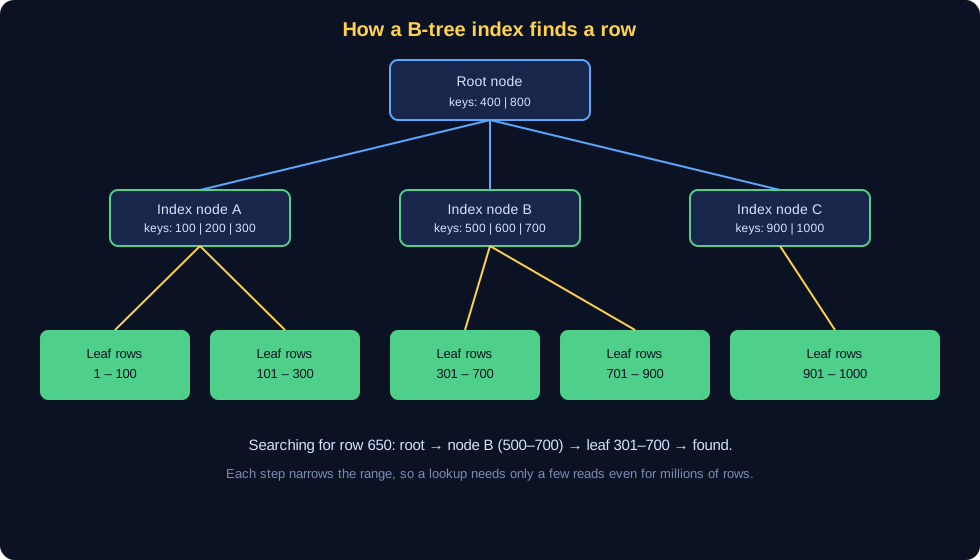
Without an index, finding one customer among a million rows means reading the whole table. An index is a separate, sorted structure that works like the index at the back of a book. Most databases use a B-tree: a root node points to intermediate nodes, which point to leaf nodes that hold the row locations. Each level narrows the search range, so a lookup needs only a few reads even for millions of rows.
Creating and using indexes
CREATE INDEX idx_orders_customer ON orders (customer_id);Index the columns you filter, join and sort on most often. A foreign key column is usually a good candidate, because joins depend on it. Be selective: every index costs disk space, and every insert, update and delete must update each index on the table.
When an index does not help
- Small tables, which are fast to scan anyway.
- Columns with very few distinct values, such as a yes/no flag, unless the query is highly selective.
- Write-heavy tables where the extra index updates cost more than the reads save.
Reading a query plan with EXPLAIN
Put EXPLAIN (or EXPLAIN ANALYZE in PostgreSQL) in front of a query to see how the database plans to run it. Look for sequential scans on large tables, large differences between estimated and actual row counts, and sorts or hash joins that spill to disk. Change one thing at a time, then measure again.
Part 5: Transactions and concurrency
ACID
A transaction groups several statements so that they succeed together or fail together. Four properties describe a well-behaved transaction:
- Atomicity: all of the changes happen, or none do.
- Consistency: the data still obeys the rules (constraints) after the transaction.
- Isolation: concurrent transactions do not see each other's half-done work.
- Durability: once committed, the change survives a crash.
A money transfer shows why this matters. Subtracting from one account and adding to another must happen together. If the system crashes between the two steps, the transaction is rolled back and no money disappears.
Isolation levels and the problems they prevent
| Problem | What happens | Typical fix |
|---|---|---|
| Dirty read | You read data another transaction has not committed yet | Read committed or higher |
| Non-repeatable read | The same row returns different values within one transaction | Repeatable read |
| Phantom read | New rows appear in a repeated range query | Serializable, or range locks |
| Lost update | Two transactions overwrite each other's change | Row locks, or optimistic version checks |
Higher isolation levels are safer but can cause more waiting and retries. Most applications use the default level and protect specific updates explicitly.
Locks and deadlocks
When two transactions need the same rows, the database makes one wait. If each waits for a lock the other holds, that is a deadlock, and the database aborts one of them. Keep transactions short, touch rows in the same order everywhere, and retry aborted transactions in the application. Locking the rows you need with SELECT ... FOR UPDATE is one way to make a read-then-write safe.
Part 6: Connecting from Java
JDBC
JDBC (Java Database Connectivity) is the standard Java API for talking to relational databases. You load a driver for your DBMS, open a connection with a URL, user and password, then prepare and run statements. Always use PreparedStatement with parameters rather than building SQL strings yourself, because it prevents SQL injection and lets the database reuse the plan.
Connection pools
Opening a database connection is slow, so applications keep a pool of open connections and lend them out. A pool also limits how many connections the database must serve at once. Size the pool carefully: a pool that is too large can overload the database, while one that is too small makes requests queue. Set a maximum lifetime and a timeout so that broken connections are replaced.
Part 7: Running a database server
Checking the server
- Is the service running and accepting connections?
- How many connections are open, and how many are idle?
- Which queries take the most time, and which transactions have been open for a long time?
- How full are the disk, the log directory and the backup target?
Backups and restores
A backup you have never restored is not proven. Use a logical backup (such as pg_dump for PostgreSQL) for portability, and a physical or base backup together with transaction logs when you need point-in-time recovery. Store copies in another location, keep a retention policy, and test a full restore on a separate machine at least every quarter.
Security
- Give each application its own database user with only the privileges it needs.
- Do not expose the database port to the public internet. Use a private network, a firewall or a VPN.
- Use strong passwords or certificates, and rotate them when staff leave.
- Encrypt connections with TLS and back up the encryption keys safely.
Replication and high availability
Replication keeps copies of the data on other servers. A standby can take over if the primary fails, and read-only replicas can take some of the query load. Replication is not a backup: a mistaken DELETE is copied to the replicas as well, so keep separate backups.
Part 8: Troubleshooting
| Symptom | Likely cause | What to check |
|---|---|---|
| A query is slow | Missing index, full table scan, stale statistics | EXPLAIN, index on filter and join columns, ANALYZE |
| Too many connections | Pool too large, connection leaks, long transactions | Open connections by state, pool settings, idle-in-transaction sessions |
| Deadlock errors | Transactions lock rows in different orders | Lock order, transaction length, retry logic |
| Disk is full | Growing logs, large tables, unused indexes | Table and index sizes, log retention, old backups |
| Wrong results | Wrong JOIN type, NULL handling, filter in the wrong place | Run the parts of the query separately and compare counts |
When something breaks, change one thing at a time, keep notes of what you tried, and check the database log first. Most answers are in the log.
Part 9: Exercises
- Which SQL statement reads data from a table? Answer: SELECT.
- How do you stop duplicate customer ids? Answer: make the id a PRIMARY KEY (or add a UNIQUE constraint).
- How do you list every customer, including those with no orders? Answer: a LEFT JOIN from customers to orders.
- What is the main benefit of an index? Answer: it lets the database find matching rows without reading the whole table.
- A transaction fails and you want to undo its changes. What do you do? Answer: ROLLBACK.
Try writing the queries yourself on a small test database before you check the answers.
Part 10: Learning path
- Install PostgreSQL or MySQL locally and create a small shop database with customers, products and orders.
- Practise SELECT, WHERE, JOIN and GROUP BY until you can write each one without help.
- Design a second database from a real problem, draw the ER diagram and normalize it.
- Add indexes, run EXPLAIN on slow queries and measure the difference.
- Write a small Java or Python program that uses a connection pool and transactions.
- Practise a backup and a restore on a test server, and write down the steps.
Frequently asked questions
What is the difference between a database, a DBMS and SQL?
A database is the stored data. A DBMS (database management system) is the software that manages it, such as PostgreSQL or MySQL. SQL is the language you use to ask the DBMS to read or change data.
Why do indexes make queries faster?
An index is a sorted structure, usually a B-tree, that lets the database jump to matching rows without reading the whole table. The trade-off is extra storage and slower writes, because the index must be updated too.
What is a transaction?
A transaction groups several changes so that they all succeed or all fail together. This keeps data consistent, for example when money moves from one account to another.
How often should I back up a database?
As often as your data can afford to lose. Many production systems take a full backup every day and keep transaction logs so they can restore to a point in time.