C and C++ from Zero to Professional: 100 Compiled Examples with Real Output
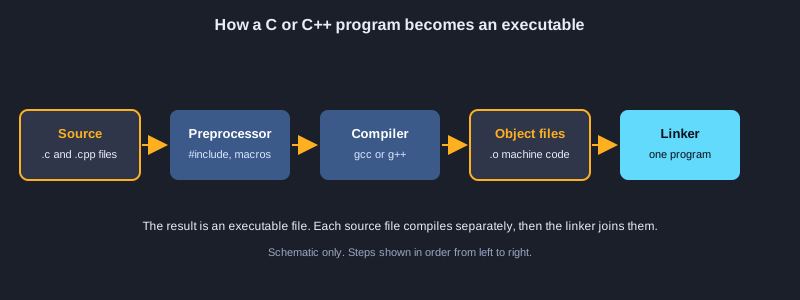
C is a small, fast language that runs close to the hardware. C++ builds on C with classes, templates and a large standard library, and it is used for games, browsers, databases and embedded systems. This article takes you from the first printf to modern C++20 in 100 examples. The first 50 are C: variables, control flow, functions, arrays, pointers, structs, memory, files and the preprocessor. The last 50 are C++: references, classes, RAII, smart pointers, templates, the standard library, concepts, exceptions, threads and formatting. Every example was compiled with GCC 16 and run, and the real output is shown after the code.
What you need
A computer with GCC or Clang installed (on Windows, install the WinLibs GCC or MSYS2 toolchain; on macOS, Xcode command-line tools; on Linux, your package manager). Check the installation with gcc --version and g++ --version. A plain text editor is enough. You need no programming experience, but the first examples assume you know what a number and a word are.
How to compile and run
C examples use gcc -std=c17 and C++ examples use g++ -std=c++20, one file per example. For example, save a C++ program as main.cpp, compile it with g++ -std=c++20 -Wall -Wextra main.cpp -o main, and run ./main. The output shown in the article comes from a real run with GCC 16.
Topic 1: Getting Started, Variables and Types
Every C program starts at main. These examples show how to print, store values in variables, and choose the right type for each value.
The structure of a C program
A C program is a set of functions, and main is where it starts. #include <stdio.h> brings in the printf function. printf prints text, and the format specifiers %d, %f and %c print an int, a double and a char. Return 0 from main to report success.
Integer and floating-point types
int, short and long hold whole numbers, but the exact size depends on the platform, so use sizeof to check it. float and double store decimals with limited precision. 1.0 / 3.0 is not exactly one third, which is why printing with more digits shows the error.
Constants
const creates a typed value that the compiler protects from change. #define replaces text before the compiler runs, so it has no type. Prefer const for typed values in new code and use #define mainly for compile-time settings.
Illustrations
Example 1: Hello, World
Your first program: print one line of text.
#include <stdio.h>

int main(void) {
    printf("Hello, World!\n");
    return 0;
}
Output:
Hello, World!
Example 2: Variables and format specifiers
Store values and print them with printf placeholders.
#include <stdio.h>

int main(void) {
    int apples = 7;
    double price = 2.5;
    char initial = 'A';
    printf("%d apples, %.2f each, initial %c\n", apples, price, initial);
    printf("total = %.2f\n", apples * price);
    return 0;
}
Output:
7 apples, 2.50 each, initial A
total = 17.50
Example 3: Integer types and sizeof
Each integer type takes a different number of bytes.
#include <stdio.h>

int main(void) {
    printf("char   : %zu byte(s)\n", sizeof(char));
    printf("short  : %zu byte(s)\n", sizeof(short));
    printf("int    : %zu byte(s)\n", sizeof(int));
    printf("long   : %zu byte(s)\n", sizeof(long));
    printf("long long: %zu byte(s)\n", sizeof(long long));
    return 0;
}
Output:
char   : 1 byte(s)
short  : 2 byte(s)
int    : 4 byte(s)
long   : 4 byte(s)
long long: 8 byte(s)
Example 4: Floating point and precision
float and double store decimals with limited precision.
#include <stdio.h>

int main(void) {
    float f = 1.0f / 3.0f;
    double d = 1.0 / 3.0;
    printf("float  : %.10f\n", f);
    printf("double : %.10f\n", d);
    printf("0.1 + 0.2 == 0.3 ? %s\n", (0.1 + 0.2 == 0.3) ? "yes" : "no");
    return 0;
}
Output:
float  : 0.3333333433
double : 0.3333333333
0.1 + 0.2 == 0.3 ? no
Example 5: char and ASCII values
A char is a small integer; 'a' is 97.
#include <stdio.h>

int main(void) {
    char c = 'a';
    printf("%c is %d\n", c, c);
    printf("upper of %c is %c\n", c, c - 'a' + 'A');
    printf("digit '7' minus '0' = %d\n", '7' - '0');
    return 0;
}
Output:
a is 97
upper of a is A
digit '7' minus '0' = 7
Example 6: Constants: const and #define
Fixed values that the program must not change.
#include <stdio.h>

#define MAX_USERS 100
static const double TAX_RATE = 0.07;

int main(void) {
    double price = 200.0;
    printf("max users: %d\n", MAX_USERS);
    printf("price with tax: %.2f\n", price * (1.0 + TAX_RATE));
    return 0;
}
Output:
max users: 100
price with tax: 214.00
Topic 2: Operators and Conversions
Operators combine values. Converting between types is a common source of bugs, so the rules are worth learning early.
Arithmetic and integer division
+, -, *, / and % work on numbers. Dividing two ints drops the fraction, so 17 / 5 is 3. Use a double operand, such as 17.0 / 5, to keep the decimal part. The % operator gives the remainder.
Increment, compound assignment and comparisons
++ and -- change a variable by one, and the position before or after the name decides when the change is seen. += and *= update in one step. In C, comparisons give 1 for true and 0 for false, so there is no separate boolean type unless you include stdbool.h.
Bitwise operators and casts
&, |, ^, ~ and the shifts << and >> work on the bits of an integer, which is useful for flags. A cast such as (double) changes the type of a value for one expression and does not change the variable.
Example 7: Arithmetic and integer division
Dividing two ints drops the fraction.
#include <stdio.h>

int main(void) {
    int a = 17, b = 5;
    printf("%d %d %d %d %d\n", a + b, a - b, a * b, a / b, a % b);
    printf("17.0 / 5 = %.2f\n", 17.0 / b);
    return 0;
}
Output:
22 12 85 3 2
17.0 / 5 = 3.40
Example 8: Increment and compound assignment
++, -- and += change a variable in one step.
#include <stdio.h>

int main(void) {
    int n = 5;
    printf("%d\n", n++);
    printf("%d\n", ++n);
    n += 10;
    n *= 2;
    printf("final %d\n", n);
    return 0;
}
Output:
5
7
final 34
Example 9: Comparison and logical operators
Tests give 1 for true and 0 for false in C.
#include <stdio.h>

int main(void) {
    int age = 20;
    int has_ticket = 1;
    printf("adult: %d\n", age >= 18);
    printf("can enter: %d\n", age >= 18 && has_ticket);
    printf("needs help: %d\n", !has_ticket || age < 12);
    return 0;
}
Output:
adult: 1
can enter: 1
needs help: 0
Example 10: Bitwise operators and shifts
Work on the individual bits of an integer.
#include <stdio.h>

int main(void) {
    unsigned int flags = 0x5;
    printf("flags & 4 = %u\n", flags & 4u);
    printf("flags | 2 = %u\n", flags | 2u);
    printf("flags ^ 1 = %u\n", flags ^ 1u);
    printf("1 << 4 = %u\n", 1u << 4);
    printf("256 >> 2 = %u\n", 256u >> 2);
    return 0;
}
Output:
flags & 4 = 4
flags | 2 = 7
flags ^ 1 = 4
1 << 4 = 16
256 >> 2 = 64
Example 11: Casting and conversion
Change a value to another type with (type).
#include <stdio.h>

int main(void) {
    int total = 7, count = 2;
    double average = (double)total / count;
    printf("average = %.2f\n", average);
    printf("truncated = %d\n", (int)3.99);
    printf("mixed = %.1f\n", total / 2 + 0.5);
    return 0;
}
Output:
average = 3.50
truncated = 3
mixed = 3.5
Topic 3: Decisions and Loops
Control flow decides what runs and how often. Pick the statement that matches the problem: if for a choice, switch for a set of values, and a loop for repetition.
if, switch and the ternary operator
if and else choose one branch from conditions. switch picks a case by value; without break, execution falls through to the next case, which is occasionally useful but a common bug. The ternary operator is a short if-else that produces a value.
for, while and do-while
for is best when you know how many times to repeat. while checks its condition before each pass, and do-while runs its body at least once. Choose the loop that makes the condition easiest to read.
break, continue and nested loops
break leaves the innermost loop, and continue skips to the next pass. A loop inside another loop is the usual way to walk a grid or a table. Keep nested loops short, and give loop counters clear names.
Example 12: if, else if and else
Choose one branch from several conditions.
#include <stdio.h>

int main(void) {
    int score = 73;
    if (score >= 80) {
        printf("A\n");
    } else if (score >= 70) {
        printf("B\n");
    } else {
        printf("C\n");
    }
    return 0;
}
Output:
B
Example 13: switch with fall-through
Choose a case by value; break stops the fall-through.
#include <stdio.h>

int main(void) {
    for (int day = 1; day <= 3; day++) {
        switch (day) {
            case 1:
            case 2:
                printf("day %d: early\n", day);
                break;
            default:
                printf("day %d: later\n", day);
                break;
        }
    }
    return 0;
}
Output:
day 1: early
day 2: early
day 3: later
Example 14: The ternary operator
A short if-else that produces a value.
#include <stdio.h>

int main(void) {
    int a = 4, b = 9;
    int larger = (a > b) ? a : b;
    printf("larger = %d\n", larger);
    printf("%s\n", (larger % 2 == 0) ? "even" : "odd");
    return 0;
}
Output:
larger = 9
odd
Example 15: The for loop
Repeat a block with a counter.
#include <stdio.h>

int main(void) {
    int sum = 0;
    for (int i = 1; i <= 10; i++) {
        sum += i;
    }
    printf("sum 1..10 = %d\n", sum);
    return 0;
}
Output:
sum 1..10 = 55
Example 16: while and do-while
Loop on a condition; do-while always runs once.
#include <stdio.h>

int main(void) {
    int n = 3;
    while (n > 0) {
        printf("while %d\n", n--);
    }
    int m = 0;
    do {
        printf("do-while runs once, m = %d\n", m);
    } while (m > 0);
    return 0;
}
Output:
while 3
while 2
while 1
do-while runs once, m = 0
Example 17: break and continue
Leave a loop early or skip to the next pass.
#include <stdio.h>

int main(void) {
    for (int i = 1; i <= 10; i++) {
        if (i % 2 == 0) continue;
        if (i > 7) break;
        printf("%d ", i);
    }
    printf("\n");
    return 0;
}
Output:
1 3 5 7
Example 18: Nested loops: a table
A loop inside a loop prints a grid.
#include <stdio.h>

int main(void) {
    for (int row = 1; row <= 3; row++) {
        for (int col = 1; col <= 3; col++) {
            printf("%3d", row * col);
        }
        printf("\n");
    }
    return 0;
}
Output:
  1  2  3
  2  4  6
  3  6  9
Topic 4: Functions
A function gives a name to a block of code, takes inputs and returns a result. Good functions do one job and are easy to test.
Parameters and return values
Declare each parameter with its type and the return type before the name. C passes arguments by value, so the function works on a copy. Return a result with return, and use void for a function that returns nothing.
Pointers as parameters
To change the caller's variable, pass its address with & and read or write it with *. The classic swap function shows the difference: the value version changes only its own copy.
Recursion and static locals
A recursive function calls itself and needs a stopping case, or it never ends and overflows the stack. A static local keeps its value between calls, which is useful for counters and caches, but it makes the function harder to test.
Example 19: Functions with return values
Give a block of code a name and send back a result.
#include <stdio.h>

static int add(int a, int b) {
    return a + b;
}

static double average(int a, int b) {
    return (a + b) / 2.0;
}

int main(void) {
    printf("%d\n", add(3, 4));
    printf("%.1f\n", average(3, 4));
    return 0;
}
Output:
7
3.5
Example 20: Pass by value and by pointer
Copies do not change the caller; pointers do.
#include <stdio.h>

static void try_swap_value(int a, int b) {
    int t = a; a = b; b = t;
}

static void swap(int *a, int *b) {
    int t = *a; *a = *b; *b = t;
}

int main(void) {
    int x = 1, y = 2;
    try_swap_value(x, y);
    printf("after value swap: %d %d\n", x, y);
    swap(&x, &y);
    printf("after pointer swap: %d %d\n", x, y);
    return 0;
}
Output:
after value swap: 1 2
after pointer swap: 2 1
Example 21: Recursion
A function that calls itself, with a stopping case.
#include <stdio.h>

static unsigned long long factorial(unsigned int n) {
    return n <= 1 ? 1ULL : n * factorial(n - 1);
}

static unsigned long long fib(unsigned int n) {
    return n < 2 ? n : fib(n - 1) + fib(n - 2);
}

int main(void) {
    printf("10! = %llu\n", factorial(10));
    printf("fib(20) = %llu\n", fib(20));
    return 0;
}
Output:
10! = 3628800
fib(20) = 6765
Example 22: Static local variables
A local variable that keeps its value between calls.
#include <stdio.h>

static int next_id(void) {
    static int counter = 0;
    counter++;
    return counter;
}

int main(void) {
    for (int i = 0; i < 3; i++) {
        printf("id %d\n", next_id());
    }
    return 0;
}
Output:
id 1
id 2
id 3
Topic 5: Arrays and Strings
Arrays store several values of one type, indexed from 0. In C, a string is an array of char that ends with a zero byte.
Arrays and their length
int scores[5] creates five ints. C does not check indexes, so writing past the end corrupts memory silently. sizeof array / sizeof array[0] gives the number of elements when the array is declared in the same function.
Two-dimensional arrays and arrays of strings
int grid[2][3] is a table with two rows and three columns. An array of const char pointers holds several strings of different lengths, which is the usual way to store a list of names.
String functions
strlen counts characters before the zero byte. strcpy and strcat copy and join strings, but they do not check the buffer size, so they are easy to misuse. strcmp compares strings, returning 0 when they are equal.
Example 23: Arrays
A fixed number of values of one type, indexed from 0.
#include <stdio.h>

int main(void) {
    int scores[5] = {90, 75, 88, 64, 95};
    for (int i = 0; i < 5; i++) {
        printf("scores[%d] = %d\n", i, scores[i]);
    }
    return 0;
}
Output:
scores[0] = 90
scores[1] = 75
scores[2] = 88
scores[3] = 64
scores[4] = 95
Example 24: Sum, minimum and maximum
Walk an array once and track three results.
#include <stdio.h>

int main(void) {
    int values[] = {12, 7, 19, 3, 25};
    int n = (int)(sizeof values / sizeof values[0]);
    int sum = 0, min = values[0], max = values[0];
    for (int i = 0; i < n; i++) {
        sum += values[i];
        if (values[i] < min) min = values[i];
        if (values[i] > max) max = values[i];
    }
    printf("sum=%d min=%d max=%d avg=%.2f\n", sum, min, max, (double)sum / n);
    return 0;
}
Output:
sum=66 min=3 max=25 avg=13.20
Example 25: Two-dimensional arrays
A table of values with rows and columns.
#include <stdio.h>

int main(void) {
    int grid[2][3] = {{1, 2, 3}, {4, 5, 6}};
    for (int r = 0; r < 2; r++) {
        for (int c = 0; c < 3; c++) {
            printf("%d ", grid[r][c]);
        }
        printf("\n");
    }
    return 0;
}
Output:
1 2 3
4 5 6
Example 26: Strings as char arrays
A string is a char array that ends with a zero byte.
#include <stdio.h>

int main(void) {
    char name[] = "Ada";
    printf("%s has %zu characters\n", name, sizeof name - 1);
    name[0] = 'E';
    printf("now: %s\n", name);
    return 0;
}
Output:
Ada has 3 characters
now: Eda
Example 27: String functions from string.h
strlen, strcpy, strcat and strcmp.
#include <stdio.h>
#include <string.h>

int main(void) {
    char buffer[32] = "Hello";
    strcat(buffer, ", C");
    printf("%s (%zu)\n", buffer, strlen(buffer));
    printf("compare: %d\n", strcmp("apple", "banana") < 0);
    char copy[32];
    strcpy(copy, buffer);
    printf("copy: %s\n", copy);
    return 0;
}
Output:
Hello, C (8)
compare: 1
copy: Hello, C
Topic 6: Pointers
A pointer holds the address of a value. Pointers are the heart of C: they let functions change data, walk arrays and build dynamic structures.
Address and dereference
& gives the address of a variable, and * reads or writes the value at a pointer's address. A pointer's type tells the compiler how big each step is, so int * steps by sizeof(int).
Pointer arithmetic on arrays
An array name acts like a pointer to its first element. p + 2 points two elements further, and *(p + 2) reads that element, which is the same as p[2]. Going past the end is undefined behaviour.
Passing arrays and pointers to functions
A function receives an array as a pointer, so it must also receive the length. The const keyword on the pointer tells the reader and the compiler that the function will not change the data.
Example 28: Pointers: address and dereference
& gets an address; * reads or writes the value there.
#include <stdio.h>

int main(void) {
    int value = 42;
    int *p = &value;
    printf("value via pointer: %d\n", *p);
    *p = 100;
    printf("value now: %d\n", value);
    return 0;
}
Output:
value via pointer: 42
value now: 100
Example 29: Pointer arithmetic
Move a pointer along an array with + and -.
#include <stdio.h>

int main(void) {
    int nums[4] = {10, 20, 30, 40};
    int *p = nums;
    for (int i = 0; i < 4; i++) {
        printf("%d ", *(p + i));
    }
    printf("\n");
    printf("third via index: %d, via pointer: %d\n", nums[2], *(nums + 2));
    return 0;
}
Output:
10 20 30 40
third via index: 30, via pointer: 30
Example 30: Passing arrays to functions
An array is passed as a pointer plus its length.
#include <stdio.h>

static int sum(const int *values, size_t count) {
    int total = 0;
    for (size_t i = 0; i < count; i++) {
        total += values[i];
    }
    return total;
}

int main(void) {
    int data[] = {1, 2, 3, 4, 5};
    printf("sum = %d\n", sum(data, sizeof data / sizeof data[0]));
    return 0;
}
Output:
sum = 15
Example 31: Arrays of strings
An array of pointers to text.
#include <stdio.h>

int main(void) {
    const char *fruits[] = {"apple", "banana", "cherry"};
    size_t n = sizeof fruits / sizeof fruits[0];
    for (size_t i = 0; i < n; i++) {
        printf("%zu: %s\n", i, fruits[i]);
    }
    return 0;
}
Output:
0: apple
1: banana
2: cherry
Topic 7: Structs, Unions, Enums and typedef
These types group values together and give names to sets of constants. They are the basis for data structures in C.
Structs and pointers to structs
A struct groups fields under one name. The arrow operator -> reaches a field through a pointer, so p->x is the same as (*p).x. Pass a pointer to a large struct instead of copying it.
Unions and enums
A union shares one block of memory between several types, so only one value is meaningful at a time. An enum gives names to integer constants, which makes switch statements easier to read.
typedef
typedef gives a type a shorter name, such as Rect for struct with two doubles. Function pointer types become much easier to read with typedef.
Example 32: Structs
Group related values under one name.
#include <stdio.h>

struct Point {
    int x;
    int y;
};

int main(void) {
    struct Point p = {3, 4};
    p.x += 1;
    printf("point (%d, %d)\n", p.x, p.y);
    return 0;
}
Output:
point (4, 4)
Example 33: Struct pointers and ->
Reach the fields of a struct through a pointer.
#include <stdio.h>

struct Book {
    const char *title;
    int pages;
};

static void print_book(const struct Book *b) {
    printf("%s has %d pages\n", b->title, b->pages);
}

int main(void) {
    struct Book books[] = {{"C Basics", 120}, {"Pointers", 96}};
    for (int i = 0; i < 2; i++) {
        print_book(&books[i]);
    }
    return 0;
}
Output:
C Basics has 120 pages
Pointers has 96 pages
Example 34: Unions
Several types share the same memory; one value at a time.
#include <stdio.h>

union Value {
    int as_int;
    float as_float;
};

int main(void) {
    union Value v;
    v.as_int = 65;
    printf("as int: %d\n", v.as_int);
    v.as_float = 1.5f;
    printf("as float: %.1f\n", v.as_float);
    return 0;
}
Output:
as int: 65
as float: 1.5
Example 35: Enums
Give names to a set of integer constants.
#include <stdio.h>

enum Color { RED, GREEN = 5, BLUE };

int main(void) {
    enum Color c = BLUE;
    printf("RED=%d GREEN=%d BLUE=%d\n", RED, GREEN, BLUE);
    printf("chosen: %d\n", c);
    return 0;
}
Output:
RED=0 GREEN=5 BLUE=6
chosen: 6
Example 36: typedef and function pointer types
Give a type a shorter name.
#include <stdio.h>

typedef struct {
    double width;
    double height;
} Rect;

typedef double (*Measure)(Rect);

static double area(Rect r) {
    return r.width * r.height;
}

int main(void) {
    Rect r = {3.0, 4.5};
    Measure m = area;
    printf("area = %.2f\n", m(r));
    return 0;
}
Output:
area = 13.50
Topic 8: Dynamic Memory and Files
Dynamic memory lets a program ask for space at run time. Files let it keep data after it stops. Both need careful handling in C, where the programmer is responsible for cleanup.
malloc, calloc, realloc and free
malloc asks for a block of bytes, calloc gives zeroed memory, and realloc resizes a block. Every successful call must be matched by one free. Check for NULL before using the result, because allocation can fail.
Avoiding leaks and dangling pointers
After free, set the pointer to NULL so you do not use it by mistake. Free each block once. Keep track of who owns each block, because a block freed in one function must not be used by another.
Text and binary files
fopen opens a file, and the mode tells it whether to read, write or append. fprintf and fgets handle text, while fwrite and fread copy raw bytes. Always check the return value of fopen and close every file you open.
Example 37: Dynamic memory with malloc and free
Ask for memory at run time and give it back.
#include <stdio.h>
#include <stdlib.h>

int main(void) {
    int n = 5;
    int *squares = malloc(n * sizeof *squares);
    if (squares == NULL) {
        fprintf(stderr, "out of memory\n");
        return 1;
    }
    for (int i = 0; i < n; i++) {
        squares[i] = i * i;
    }
    for (int i = 0; i < n; i++) {
        printf("%d ", squares[i]);
    }
    printf("\n");
    free(squares);
    return 0;
}
Output:
0 1 4 9 16
Example 38: calloc and realloc
Zeroed memory, and resizing a block.
#include <stdio.h>
#include <stdlib.h>

int main(void) {
    int *items = calloc(3, sizeof *items);
    printf("zeroed: %d %d %d\n", items[0], items[1], items[2]);
    int *bigger = realloc(items, 6 * sizeof *bigger);
    if (bigger == NULL) {
        free(items);
        return 1;
    }
    items = bigger;
    items[5] = 99;
    printf("last item: %d\n", items[5]);
    free(items);
    return 0;
}
Output:
zeroed: 0 0 0
last item: 99
Example 39: Freeing memory safely
Free once, then clear the pointer.
#include <stdio.h>
#include <stdlib.h>

static char *make_greeting(const char *name) {
    char *out = malloc(64);
    if (out == NULL) return NULL;
    snprintf(out, 64, "Hello, %s", name);
    return out;
}

int main(void) {
    char *msg = make_greeting("Mali");
    if (msg != NULL) {
        printf("%s\n", msg);
        free(msg);
        msg = NULL;
    }
    return 0;
}
Output:
Hello, Mali
Example 40: Text files: write and read
fopen, fprintf, fgets and fclose.
#include <stdio.h>

int main(void) {
    FILE *out = fopen("notes.txt", "w");
    if (out == NULL) return 1;
    fprintf(out, "first line\nsecond line\n");
    fclose(out);

    FILE *in = fopen("notes.txt", "r");
    if (in == NULL) return 1;
    char line[64];
    while (fgets(line, sizeof line, in) != NULL) {
        printf("read: %s", line);
    }
    fclose(in);
    remove("notes.txt");
    return 0;
}
Output:
read: first line
read: second line
Example 41: Binary files with fwrite and fread
Store raw values in a file and read them back.
#include <stdio.h>

int main(void) {
    int data[] = {10, 20, 30};
    FILE *f = fopen("values.bin", "wb");
    if (f == NULL) return 1;
    fwrite(data, sizeof data[0], 3, f);
    fclose(f);

    int back[3] = {0};
    f = fopen("values.bin", "rb");
    if (f == NULL) return 1;
    size_t got = fread(back, sizeof back[0], 3, f);
    fclose(f);
    remove("values.bin");
    printf("read %zu values: %d %d %d\n", got, back[0], back[1], back[2]);
    return 0;
}
Output:
read 3 values: 10 20 30
Topic 9: The Preprocessor, Function Pointers and Variadic Functions
These tools change how code is built and how functions are called. Used well, they make programs flexible; used carelessly, they make them hard to debug.
Macros and conditional compilation
A macro is text substituted before compilation. Wrap every macro argument and the whole expression in parentheses, or SQUARE(2 + 1) gives the wrong answer. #if and #ifdef include code only when a condition holds at build time.
Function pointers and qsort
A function pointer stores the address of a function, so you can pass behaviour to another function. qsort uses a comparison callback, which lets one routine sort any type of array.
Variadic functions and command-line arguments
stdarg.h lets a function take any number of arguments, read with va_arg. main receives argc and argv, which hold the arguments the user typed after the program name.
Example 42: Command-line arguments
argc and argv give the arguments the user typed.
#include <stdio.h>

int main(int argc, char *argv[]) {
    printf("argument count: %d\n", argc);
    for (int i = 1; i < argc; i++) {
        printf("arg %d: %s\n", i, argv[i]);
    }
    return 0;
}
Output:
argument count: 1
Example 43: Macros and function-like macros
Text substitution done before compiling; parenthesize arguments.
#include <stdio.h>

#define SQUARE(x) ((x) * (x))
#define MAX(a, b) ((a) > (b) ? (a) : (b))

int main(void) {
    printf("SQUARE(4) = %d\n", SQUARE(4));
    printf("SQUARE(2 + 1) = %d\n", SQUARE(2 + 1));
    printf("MAX(3, 9) = %d\n", MAX(3, 9));
    return 0;
}
Output:
SQUARE(4) = 16
SQUARE(2 + 1) = 9
MAX(3, 9) = 9
Example 44: Conditional compilation
Include code only when a condition is true at build time.
#include <stdio.h>

#define DEBUG_MODE 1

int main(void) {
#if DEBUG_MODE
    printf("debug build\n");
#else
    printf("release build\n");
#endif
#ifdef __STDC_VERSION__
    printf("C standard version is known\n");
#endif
    return 0;
}
Output:
debug build
C standard version is known
Example 45: Function pointers
Store a function in a variable and call it through the pointer.
#include <stdio.h>

static int add(int a, int b) { return a + b; }
static int mul(int a, int b) { return a * b; }

static int apply(int (*op)(int, int), int x, int y) {
    return op(x, y);
}

int main(void) {
    int (*ops[])(int, int) = {add, mul};
    printf("add: %d\n", apply(ops[0], 6, 7));
    printf("mul: %d\n", apply(ops[1], 6, 7));
    return 0;
}
Output:
add: 13
mul: 42
Example 46: Sorting with qsort
Sort any array with a comparison callback.
#include <stdio.h>
#include <stdlib.h>

static int compare_ints(const void *a, const void *b) {
    int x = *(const int *)a;
    int y = *(const int *)b;
    return (x > y) - (x < y);
}

int main(void) {
    int nums[] = {42, 7, 19, 3, 25};
    size_t n = sizeof nums / sizeof nums[0];
    qsort(nums, n, sizeof nums[0], compare_ints);
    for (size_t i = 0; i < n; i++) {
        printf("%d ", nums[i]);
    }
    printf("\n");
    return 0;
}
Output:
3 7 19 25 42
Example 47: Variadic functions
A function that takes any number of arguments with stdarg.
#include <stdarg.h>
#include <stdio.h>

static int sum_all(int count, ...) {
    va_list args;
    va_start(args, count);
    int total = 0;
    for (int i = 0; i < count; i++) {
        total += va_arg(args, int);
    }
    va_end(args);
    return total;
}

int main(void) {
    printf("%d\n", sum_all(3, 1, 2, 3));
    printf("%d\n", sum_all(5, 10, 20, 30, 40, 50));
    return 0;
}
Output:
6
150
Topic 10: Bits, Errors and Scope
Low-level bit work, error checking and the rules of scope are the everyday skills of C programmers.
Counting and testing bits
x &= x - 1 clears the lowest set bit, so a loop that does it counts the set bits. Bit masks such as flags & 4 test a single bit without changing the others.
Checking errors with errno
Many library functions return a special value on failure and set errno to say why. Check the return value first, then read errno, and use strerror to turn it into text.
static at file scope
A static function or variable at file scope is visible only in that file. This keeps internal helpers from clashing with names in other files and is a basic step toward good structure.
Example 48: Counting set bits
Clear the lowest set bit in a loop until nothing is left.
#include <stdio.h>

static int count_bits(unsigned int x) {
    int count = 0;
    while (x != 0) {
        x &= x - 1;
        count++;
    }
    return count;
}

int main(void) {
    printf("bits in 0 = %d\n", count_bits(0));
    printf("bits in 7 = %d\n", count_bits(7));
    printf("bits in 255 = %d\n", count_bits(255));
    return 0;
}
Output:
bits in 0 = 0
bits in 7 = 3
bits in 255 = 8
Example 49: Error handling with errno
Check a return value, then read errno for the reason.
#include <errno.h>
#include <stdio.h>
#include <string.h>

int main(void) {
    FILE *f = fopen("no-such-file-here.txt", "r");
    if (f == NULL) {
        printf("open failed: errno set = %s\n", errno != 0 ? "yes" : "no");
        return 0;
    }
    fclose(f);
    return 0;
}
Output:
open failed: errno set = yes
Example 50: Static functions and global state
static limits a name to one file.
#include <stdio.h>

static int call_count = 0;

static void record_call(void) {
    call_count++;
}

static int calls_so_far(void) {
    return call_count;
}

int main(void) {
    record_call();
    record_call();
    printf("calls: %d\n", calls_so_far());
    return 0;
}
Output:
calls: 2
Topic 11: C++ Basics: References, Overloading, Strings and Vectors
C++ keeps C's speed and adds types, references and a standard library. These examples introduce the everyday tools.
References and overloading
A reference is another name for an existing variable, so changing the reference changes the variable. Several functions can share a name when their parameter types differ, and the compiler picks the right one.
std::string and std::vector
std::string grows and shrinks, and knows its own length, so you do not manage the memory by hand. std::vector is a resizable array that owns its items. Both work well with range-based for loops.
auto, default arguments and iostream
auto lets the compiler deduce a type from the value, and default arguments let a caller leave out a parameter. std::cout with << replaces printf and checks types at compile time.
Example 51: Hello with iostream
Print text to the console with std::cout.
#include <iostream>

int main() {
    std::cout << "Hello, C++!" << '\n';
    return 0;
}
Output:
Hello, C++!
Example 52: References
A reference is another name for the same variable.
#include <iostream>

void increment(int &value) {
    ++value;
}

int main() {
    int count = 5;
    int &alias = count;
    alias += 10;
    increment(count);
    std::cout << count << '\n';
}
Output:
16
Example 53: Function overloading
Several functions with the same name, chosen by argument types.
#include <iostream>
#include <string>

std::string describe(int n) { return "int " + std::to_string(n); }
std::string describe(double d) { return "double " + std::to_string(d); }
std::string describe(const std::string &s) { return "string " + s; }

int main() {
    std::cout << describe(7) << '\n';
    std::cout << describe(2.5) << '\n';
    std::cout << describe(std::string("hi")) << '\n';
}
Output:
int 7
double 2.500000
string hi
Example 54: Default arguments
Parameters that can be left out in a call.
#include <iostream>

int power(int base, int exponent = 2) {
    int result = 1;
    for (int i = 0; i < exponent; ++i) result *= base;
    return result;
}

int main() {
    std::cout << power(3) << ' ' << power(3, 4) << '\n';
}
Output:
9 81
Example 55: std::string basics
Join, measure, cut and search text safely.
#include <iostream>
#include <string>

int main() {
    std::string name = "Ada";
    name += " Lovelace";
    std::cout << name << " has " << name.size() << " characters\n";
    std::cout << name.substr(0, 3) << '\n';
    std::cout << (name.find("Love") != std::string::npos) << '\n';
}
Output:
Ada Lovelace has 12 characters
Ada
1
Example 56: std::vector basics
A growable array that owns its items.
#include <iostream>
#include <vector>

int main() {
    std::vector<int> scores{70, 85, 92};
    scores.push_back(64);
    int total = 0;
    for (int s : scores) total += s;
    std::cout << "count=" << scores.size() << " total=" << total << '\n';
}
Output:
count=4 total=311
Example 57: Range-based for and auto
Loop over a container without index arithmetic.
#include <iostream>
#include <map>
#include <string>

int main() {
    std::map<std::string, int> stock{{"apple", 3}, {"pear", 0}};
    for (const auto &[item, qty] : stock) {
        std::cout << item << ": " << qty << '\n';
    }
}
Output:
apple: 3
pear: 0
Topic 12: Classes, RAII and Copy and Move
A class combines data and behaviour, and it is where C++ becomes powerful. RAII ties a resource to an object's lifetime, which makes programs safe without manual cleanup.
Classes, constructors and const members
A constructor sets up an object when it is created. A member function marked const promises not to change the object. Keep data private, expose only what callers need, and validate input before storing it.
Destructors and RAII
A destructor runs when an object goes out of scope, so a resource acquired in a constructor is released there. This is RAII: a file, lock or memory block is released automatically, even when an error occurs.
Copy, move and operators
An object that owns memory needs a copy constructor and copy assignment, or two objects share one block and free it twice. std::move lets an object hand its resources over instead of copying them. Operator overloading makes + and << work for your own types.
Example 58: Classes and constructors
Bundle data and behaviour, and set up objects in a constructor.
#include <iostream>
#include <string>

class Book {
public:
    Book(std::string title, int pages) : title_(std::move(title)), pages_(pages) {}
    std::string title() const { return title_; }
    int pages() const { return pages_; }
private:
    std::string title_;
    int pages_;
};

int main() {
    Book b{"Clean C++", 320};
    std::cout << b.title() << " (" << b.pages() << " pages)\n";
}
Output:
Clean C++ (320 pages)
Example 59: const member functions
Promise that a method does not change the object.
#include <iostream>

class Counter {
public:
    void add(int n) { total_ += n; }
    int total() const { return total_; }
private:
    int total_ = 0;
};

int report(const Counter &c) {
    return c.total();
}

int main() {
    Counter c;
    c.add(4);
    c.add(6);
    std::cout << report(c) << '\n';
}
Output:
10
Example 60: Encapsulation and exceptions
Keep data private and reject invalid input.
#include <iostream>
#include <stdexcept>

class Account {
public:
    explicit Account(int opening) : balance_(opening) {}
    void deposit(int amount) {
        if (amount <= 0) throw std::invalid_argument("amount must be positive");
        balance_ += amount;
    }
    int balance() const { return balance_; }
private:
    int balance_;
};

int main() {
    Account a{100};
    a.deposit(50);
    std::cout << a.balance() << '\n';
}
Output:
150
Example 61: Destructors and RAII
A destructor releases a resource when the object goes out of scope.
#include <iostream>
#include <string>

class Trace {
public:
    explicit Trace(std::string name) : name_(std::move(name)) {
        std::cout << "open " << name_ << '\n';
    }
    ~Trace() { std::cout << "close " << name_ << '\n'; }
private:
    std::string name_;
};

int main() {
    Trace outer{"outer"};
    {
        Trace inner{"inner"};
        std::cout << "work\n";
    }
    std::cout << "done\n";
}
Output:
open outer
open inner
work
close inner
done
close outer
Example 62: Copy constructor and copy assignment
Copy an object that owns memory without sharing it.
#include <iostream>
#include <cstring>

class Buffer {
public:
    explicit Buffer(const char *text) : data_(new char[std::strlen(text) + 1]) {
        std::strcpy(data_, text);
    }
    Buffer(const Buffer &other) : data_(new char[std::strlen(other.data_) + 1]) {
        std::strcpy(data_, other.data_);
    }
    Buffer &operator=(const Buffer &other) {
        if (this != &other) {
            delete[] data_;
            data_ = new char[std::strlen(other.data_) + 1];
            std::strcpy(data_, other.data_);
        }
        return *this;
    }
    ~Buffer() { delete[] data_; }
    const char *text() const { return data_; }
private:
    char *data_;
};

int main() {
    Buffer a{"hello"};
    Buffer b = a;
    b = Buffer{"world"};
    std::cout << a.text() << ' ' << b.text() << '\n';
}
Output:
hello world
Example 63: Move semantics
Transfer a resource instead of copying it.
#include <iostream>
#include <string>
#include <utility>
#include <vector>

int main() {
    std::string source = "a long piece of text";
    std::string target = std::move(source);
    std::cout << "target: " << target << '\n';
    std::cout << "source empty: " << source.empty() << '\n';

    std::vector<std::string> items;
    items.push_back(std::move(target));
    std::cout << "items: " << items.size() << '\n';
}
Output:
target: a long piece of text
source empty: 1
items: 1
Example 64: Operator overloading
Make + and << work with your own type.
#include <iostream>

struct Vec2 {
    double x, y;
    Vec2 operator+(const Vec2 &o) const { return {x + o.x, y + o.y}; }
    Vec2 operator*(double k) const { return {x * k, y * k}; }
};

std::ostream &operator<<(std::ostream &os, const Vec2 &v) {
    return os << '(' << v.x << ", " << v.y << ')';
}

int main() {
    Vec2 a{1, 2}, b{3, 4};
    std::cout << (a + b) * 2.0 << '\n';
}
Output:
(8, 12)
Topic 13: Inheritance, Smart Pointers and Library Types
Inheritance and virtual functions let one piece of code work with many types. Smart pointers, optional and variant express ownership and possibility in the type system.
Inheritance and virtual functions
A derived class inherits from a base class and overrides virtual functions. A pointer to the base class calls the right version at run time. Always give a polymorphic base class a virtual destructor.
unique_ptr and shared_ptr
unique_ptr has exactly one owner and frees its object automatically. shared_ptr counts its owners, and weak_ptr watches an object without keeping it alive. Prefer unique_ptr, and use shared_ptr only when ownership really is shared.
optional, variant and std::function
std::optional holds a value that may be missing. std::variant holds one of several types, and std::visit handles each case. std::function stores any callable, such as a lambda, in a variable.
Example 65: Inheritance and virtual functions
Derived classes change behaviour through a base pointer.
#include <iostream>
#include <string>

class Animal {
public:
    virtual ~Animal() = default;
    virtual std::string sound() const { return "..."; }
};

class Dog : public Animal {
public:
    std::string sound() const override { return "Woof"; }
};

class Cat : public Animal {
public:
    std::string sound() const override { return "Meow"; }
};

int main() {
    Dog d;
    Cat c;
    const Animal *pets[] = {&d, &c};
    for (const Animal *p : pets) std::cout << p->sound() << '\n';
}
Output:
Woof
Meow
Example 66: Abstract classes
A base class with a pure virtual function cannot be created directly.
#include <iostream>
#include <memory>

class Shape {
public:
    virtual ~Shape() = default;
    virtual double area() const = 0;
};

class Square : public Shape {
public:
    explicit Square(double s) : side_(s) {}
    double area() const override { return side_ * side_; }
private:
    double side_;
};

int main() {
    std::unique_ptr<Shape> s = std::make_unique<Square>(3.0);
    std::cout << s->area() << '\n';
}
Output:
9
Example 67: Polymorphism with smart pointers
Store different types in one vector of unique_ptr.
#include <iostream>
#include <memory>
#include <vector>

struct Task {
    virtual ~Task() = default;
    virtual void run() const = 0;
};

struct Print : Task {
    void run() const override { std::cout << "print\n"; }
};

struct Save : Task {
    void run() const override { std::cout << "save\n"; }
};

int main() {
    std::vector<std::unique_ptr<Task>> queue;
    queue.push_back(std::make_unique<Print>());
    queue.push_back(std::make_unique<Save>());
    for (const auto &t : queue) t->run();
}
Output:
print
save
Example 68: unique_ptr ownership
Exactly one owner; the object is freed automatically.
#include <iostream>
#include <memory>

struct Resource {
    explicit Resource(int id) : id_(id) { std::cout << "acquire " << id_ << '\n'; }
    ~Resource() { std::cout << "release " << id_ << '\n'; }
    int id() const { return id_; }
private:
    int id_;
};

std::unique_ptr<Resource> make(int id) {
    return std::make_unique<Resource>(id);
}

int main() {
    auto r = make(7);
    std::cout << "using " << r->id() << '\n';
}
Output:
acquire 7
using 7
release 7
Example 69: shared_ptr and weak_ptr
Shared ownership with a count, and a weak observer.
#include <iostream>
#include <memory>

int main() {
    std::shared_ptr<int> a = std::make_shared<int>(42);
    std::weak_ptr<int> watcher = a;
    std::cout << "use count: " << a.use_count() << '\n';
    {
        std::shared_ptr<int> b = a;
        std::cout << "use count: " << a.use_count() << '\n';
    }
    std::cout << "after scope: " << a.use_count() << '\n';
    std::cout << "still alive: " << !watcher.expired() << '\n';
}
Output:
use count: 1
use count: 2
after scope: 1
still alive: 1
Example 70: std::optional
A value that may be missing, without null pointers.
#include <iostream>
#include <optional>
#include <string>

std::optional<int> parse_int(const std::string &text) {
    try {
        return std::stoi(text);
    } catch (...) {
        return std::nullopt;
    }
}

int main() {
    for (const char *s : {"42", "oops"}) {
        if (auto v = parse_int(s)) {
            std::cout << "value " << *v << '\n';
        } else {
            std::cout << "not a number: " << s << '\n';
        }
    }
}
Output:
value 42
not a number: oops
Example 71: std::variant and std::visit
One value that can be one of several types.
#include <iostream>
#include <string>
#include <variant>

using Value = std::variant<int, double, std::string>;

std::string kind(const Value &v) {
    return std::visit([](const auto &x) -> std::string {
        using T = std::decay_t<decltype(x)>;
        if constexpr (std::is_same_v<T, int>) return "int";
        else if constexpr (std::is_same_v<T, double>) return "double";
        else return "string";
    }, v);
}

int main() {
    std::cout << kind(Value{3}) << ' ' << kind(Value{2.5}) << ' ' << kind(Value{std::string("x")}) << '\n';
}
Output:
int double string
Example 72: Lambdas and captures
Small anonymous functions that can use outside variables.
#include <iostream>

int main() {
    int base = 10;
    auto add_base = [base](int x) { return x + base; };
    auto count = 0;
    auto bump = [&count]() { ++count; };
    bump();
    bump();
    std::cout << add_base(5) << ' ' << count << '\n';
}
Output:
15 2
Example 73: std::function
Store any callable in a variable.
#include <functional>
#include <iostream>
#include <vector>

int main() {
    std::vector<std::function<int(int)>> steps{
        [](int x) { return x + 1; },
        [](int x) { return x * 3; },
    };
    int value = 2;
    for (const auto &step : steps) value = step(value);
    std::cout << value << '\n';
}
Output:
9
Topic 14: Algorithms, Containers and Templates
The standard library provides containers, algorithms and iterators that work together. Templates let you write code once for many types.
Algorithms and iterators
std::sort, std::find_if and std::transform work on any range through iterators. Lambdas make the conditions short and clear. Prefer an algorithm to a hand-written loop when one exists.
Maps, sets and arrays
std::map keeps keys sorted, and std::unordered_map uses hashing for fast lookup. std::set keeps unique values sorted, std::array has a fixed size, and std::pair with structured bindings returns two values neatly.
Templates, specialization and concepts
A function template works for any type that supports the operations it uses. A class template such as Stack<T> is written once. Concepts in C++20 name the requirements a template type must meet, so errors appear at the call site.
Example 74: Algorithms: sort, find_if and transform
Standard algorithms work on any range of values.
#include <algorithm>
#include <iostream>
#include <vector>

int main() {
    std::vector<int> v{5, 2, 9, 1, 7};
    std::sort(v.begin(), v.end());
    auto big = std::find_if(v.begin(), v.end(), [](int x) { return x > 4; });
    std::transform(v.begin(), v.end(), v.begin(), [](int x) { return x * 10; });
    std::cout << "first > 4: " << *big << '\n';
    for (int x : v) std::cout << x << ' ';
    std::cout << '\n';
}
Output:
first > 4: 50
10 20 50 70 90
Example 75: Iterators and std::map
Walk a sorted key-value container with iterators.
#include <iostream>
#include <map>

int main() {
    std::map<int, const char *> names{{3, "c"}, {1, "a"}, {2, "b"}};
    for (auto it = names.begin(); it != names.end(); ++it) {
        std::cout << it->first << '=' << it->second << '\n';
    }
    auto found = names.find(2);
    std::cout << "found " << found->second << '\n';
}
Output:
1=a
2=b
3=c
found b
Example 76: unordered_map word count
Count words with a hash map.
#include <iostream>
#include <sstream>
#include <string>
#include <unordered_map>

int main() {
    std::string text = "the cat and the hat and the bat";
    std::unordered_map<std::string, int> counts;
    std::istringstream words(text);
    std::string w;
    while (words >> w) ++counts[w];
    std::cout << "the=" << counts["the"] << " and=" << counts["and"] << " bat=" << counts["bat"] << '\n';
}
Output:
the=3 and=2 bat=1
Example 77: std::set and std::multiset
Sorted collections without and with duplicates.
#include <iostream>
#include <set>

int main() {
    std::set<int> unique{3, 1, 3, 2};
    std::multiset<int> all{3, 1, 3, 2};
    std::cout << "set size " << unique.size() << '\n';
    std::cout << "multiset size " << all.size() << '\n';
    for (int x : unique) std::cout << x << ' ';
    std::cout << '\n';
}
Output:
set size 3
multiset size 4
1 2 3
Example 78: std::array
A fixed-size array with size and iterators.
#include <array>
#include <iostream>
#include <numeric>

int main() {
    std::array<int, 4> a{1, 2, 3, 4};
    int sum = std::accumulate(a.begin(), a.end(), 0);
    std::cout << "size " << a.size() << " sum " << sum << '\n';
}
Output:
size 4 sum 10
Example 79: std::pair and structured bindings
Return two values and unpack them by name.
#include <iostream>
#include <utility>

std::pair<int, int> divide(int a, int b) {
    return {a / b, a % b};
}

int main() {
    auto [quotient, remainder] = divide(17, 5);
    std::cout << quotient << " remainder " << remainder << '\n';
}
Output:
3 remainder 2
Example 80: Function templates
One function that works for many types.
#include <iostream>
#include <string>

template <typename T>
T largest(T a, T b) {
    return (a > b) ? a : b;
}

int main() {
    std::cout << largest(3, 8) << '\n';
    std::cout << largest(2.5, 1.5) << '\n';
    std::cout << largest(std::string("pear"), std::string("apple")) << '\n';
}
Output:
8
2.5
pear
Example 81: Class templates: a Stack
A generic container you write once.
#include <iostream>
#include <stdexcept>
#include <vector>

template <typename T>
class Stack {
public:
    void push(const T &value) { items_.push_back(value); }
    T pop() {
        if (items_.empty()) throw std::out_of_range("stack is empty");
        T top = items_.back();
        items_.pop_back();
        return top;
    }
    bool empty() const { return items_.empty(); }
private:
    std::vector<T> items_;
};

int main() {
    Stack<int> s;
    s.push(1);
    s.push(2);
    std::cout << s.pop() << ' ' << s.pop() << '\n';
}
Output:
2 1
Example 82: Template specialization
A special version of a template for one type.
#include <iostream>
#include <string>

template <typename T>
std::string describe(const T &) { return "other"; }

template <>
std::string describe<int>(const int &x) { return "int " + std::to_string(x); }

template <>
std::string describe<std::string>(const std::string &s) { return "string of " + std::to_string(s.size()); }

int main() {
    std::cout << describe(4) << '\n';
    std::cout << describe(std::string("hello")) << '\n';
    std::cout << describe(1.5) << '\n';
}
Output:
int 4
string of 5
other
Example 83: Variadic templates
Templates that take any number of arguments.
#include <iostream>

template <typename... Args>
int count_args(Args... args) {
    return sizeof...(args);
}

template <typename T, typename... Rest>
void print_all(const T &first, const Rest &...rest) {
    std::cout << first;
    ((std::cout << ' ' << rest), ...);
    std::cout << '\n';
}

int main() {
    std::cout << count_args(1, 'a', 2.0) << '\n';
    print_all("values:", 1, 2.5, 'x');
}
Output:
3
values: 1 2.5 x
Example 84: Concepts (C++20)
Name the requirements a template type must meet.
#include <concepts>
#include <iostream>

template <typename T>
concept Numeric = std::integral<T> || std::floating_point<T>;

template <Numeric T>
T twice(T value) {
    return value * 2;
}

int main() {
    std::cout << twice(21) << '\n';
    std::cout << twice(1.25) << '\n';
}
Output:
42
2.5
Example 85: constexpr and static_assert
Compute values at compile time and check them.
#include <iostream>

constexpr long long factorial(int n) {
    return n <= 1 ? 1 : n * factorial(n - 1);
}

constexpr long long kTenFactorial = factorial(10);
static_assert(kTenFactorial == 3628800, "factorial check failed at compile time");

int main() {
    std::cout << kTenFactorial << '\n';
}
Output:
3628800
Topic 15: Modern C++: Exceptions, Concurrency, Formatting and Testing
These final topics cover the tools professional C++ code uses every day: error handling, threads, formatting, file I/O, and a small test harness.
Exceptions, namespaces and enum class
throw sends an error up the call stack to a matching catch. Custom exceptions derive from std::runtime_error. Namespaces avoid name clashes, and enum class keeps enumerators scoped and strongly typed.
Threads, mutexes and futures
std::thread runs a function concurrently, and join waits for it to finish. A std::mutex with lock_guard protects shared data from data races. std::async returns a future that gives the result when you call get.
Ranges, format, files and tests
Ranges build readable pipelines with filter and transform. std::format checks its arguments against the format string at compile time. fstream reads and writes files, and a small test harness reports pass or fail for each check.
Example 86: Exceptions: try, catch and throw
Report an error and handle it higher up.
#include <iostream>
#include <stdexcept>

int safe_divide(int a, int b) {
    if (b == 0) throw std::domain_error("division by zero");
    return a / b;
}

int main() {
    try {
        std::cout << safe_divide(10, 2) << '\n';
        std::cout << safe_divide(1, 0) << '\n';
    } catch (const std::domain_error &e) {
        std::cout << "caught: " << e.what() << '\n';
    }
}
Output:
5
caught: division by zero
Example 87: Custom exception hierarchy
Your own error types derived from std::runtime_error.
#include <iostream>
#include <stdexcept>
#include <string>

class AppError : public std::runtime_error {
public:
    using std::runtime_error::runtime_error;
};

class NotFound : public AppError {
public:
    explicit NotFound(const std::string &what) : AppError("not found: " + what) {}
};

void load(const std::string &key) {
    if (key != "config") throw NotFound(key);
}

int main() {
    try {
        load("cache");
    } catch (const AppError &e) {
        std::cout << e.what() << '\n';
    }
}
Output:
not found: cache
Example 88: Namespaces
Group names so they do not clash.
#include <iostream>

namespace geometry {
    namespace units {
        constexpr double kMeter = 1.0;
    }
    double area(double w, double h) { return w * h * units::kMeter; }
}

namespace app = geometry;

int main() {
    std::cout << app::area(3.0, 2.0) << '\n';
    std::cout << geometry::units::kMeter << '\n';
}
Output:
6
1
Example 89: enum class
A strongly typed enumeration.
#include <iostream>

enum class Level { Low = 1, Medium = 5, High = 10 };

std::string_view name(Level l) {
    switch (l) {
        case Level::Low: return "low";
        case Level::Medium: return "medium";
        case Level::High: return "high";
    }
    return "unknown";
}

int main() {
    Level l = Level::Medium;
    std::cout << name(l) << ' ' << static_cast<int>(l) << '\n';
}
Output:
medium 5
Example 90: std::chrono durations
Time values with units that the compiler checks.
#include <chrono>
#include <iostream>

int main() {
    using namespace std::chrono;
    using namespace std::chrono_literals;
    milliseconds timeout{1500};
    seconds rounded = duration_cast<seconds>(timeout);
    seconds wait = rounded + 2min;
    std::cout << timeout.count() << " ms = " << rounded.count() << " s\n";
    std::cout << "wait " << wait.count() << " s\n";
}
Output:
1500 ms = 1 s
wait 121 s
Example 91: std::thread
Run a function on another thread and wait for it.
#include <iostream>
#include <thread>
#include <vector>

int main() {
    std::vector<int> results(4, 0);
    std::vector<std::thread> workers;
    for (int i = 0; i < 4; ++i) {
        workers.emplace_back([&results, i] { results[i] = (i + 1) * (i + 1); });
    }
    for (auto &t : workers) t.join();
    for (int r : results) std::cout << r << ' ';
    std::cout << '\n';
}
Output:
1 4 9 16
Example 92: std::mutex and lock_guard
Protect shared data from data races.
#include <iostream>
#include <mutex>
#include <thread>
#include <vector>

int main() {
    int counter = 0;
    std::mutex m;
    std::vector<std::thread> threads;
    for (int t = 0; t < 4; ++t) {
        threads.emplace_back([&] {
            for (int i = 0; i < 1000; ++i) {
                std::lock_guard<std::mutex> lock(m);
                ++counter;
            }
        });
    }
    for (auto &t : threads) t.join();
    std::cout << "counter = " << counter << '\n';
}
Output:
counter = 4000
Example 93: std::async and std::future
Run work in the background and collect the result.
#include <future>
#include <iostream>

long long sum_range(long long from, long long to) {
    long long total = 0;
    for (long long i = from; i <= to; ++i) total += i;
    return total;
}

int main() {
    auto left = std::async(std::launch::async, sum_range, 1, 500);
    auto right = std::async(std::launch::async, sum_range, 501, 1000);
    std::cout << "total = " << left.get() + right.get() << '\n';
}
Output:
total = 500500
Example 94: Ranges (C++20)
Filter and transform a sequence in one readable pipeline.
#include <iostream>
#include <ranges>
#include <vector>

int main() {
    std::vector<int> nums{1, 2, 3, 4, 5, 6, 7, 8};
    auto result = nums
        | std::views::filter([](int n) { return n % 2 == 0; })
        | std::views::transform([](int n) { return n * n; });
    for (int v : result) std::cout << v << ' ';
    std::cout << '\n';
}
Output:
4 16 36 64
Example 95: std::format (C++20)
Type-safe formatting with a readable template.
#include <format>
#include <iostream>
#include <string>

int main() {
    std::string item = "Coffee";
    double price = 45.5;
    std::cout << std::format("{:<10}|{:>8.2f}", item, price) << '\n';
    std::cout << std::format("{} items, {:03d} id", 3, 7) << '\n';
}
Output:
Coffee    |   45.50
3 items, 007 id
Example 96: Designated initializers (C++20)
Set struct members by name.
#include <iostream>
#include <string>

struct Server {
    std::string host;
    int port = 80;
    bool tls = false;
};

int main() {
    Server s{.host = "example.com", .tls = true};
    std::cout << s.host << ':' << s.port << (s.tls ? " tls" : " plain") << '\n';
}
Output:
example.com:80 tls
Example 97: File I/O with fstream
Write a file, then read it line by line.
#include <fstream>
#include <iostream>
#include <string>

int main() {
    {
        std::ofstream out("log.txt");
        out << "first\n" << "second\n";
    }
    std::ifstream in("log.txt");
    std::string line;
    while (std::getline(in, line)) {
        std::cout << "read: " << line << '\n';
    }
    in.close();
    std::remove("log.txt");
}
Output:
read: first
read: second
Example 98: Parsing with stringstream
Split a text row into typed values.
#include <iostream>
#include <sstream>
#include <string>

int main() {
    std::istringstream row("apple,12,0.5");
    std::string name;
    int qty = 0;
    double price = 0.0;
    std::getline(row, name, ',');
    row >> qty;
    row.ignore(1);
    row >> price;
    std::cout << name << " x" << qty << " @ " << price << '\n';
}
Output:
apple x12 @ 0.5
Example 99: A tiny test harness
Check results and report pass or fail.
#include <iostream>
#include <string>

int failures = 0;

void check(bool ok, const std::string &name) {
    std::cout << (ok ? "PASS " : "FAIL ") << name << '\n';
    if (!ok) ++failures;
}

int add(int a, int b) { return a + b; }

int main() {
    check(add(2, 2) == 4, "add small numbers");
    check(add(-1, 1) == 0, "add opposites");
    check(add(3, 3) == 6, "add positives");
    std::cout << failures << " failure(s)\n";
    return failures == 0 ? 0 : 1;
}
Output:
PASS add small numbers
PASS add opposites
PASS add positives
0 failure(s)
Example 100: Putting it together: an inventory report
Combine classes, smart pointers, optional and format.
#include <algorithm>
#include <format>
#include <iostream>
#include <memory>
#include <optional>
#include <string>
#include <vector>

struct Item {
    std::string name;
    int quantity;
    double unit_price;
};

class Inventory {
public:
    void add(Item item) { items_.push_back(std::move(item)); }

    std::optional<Item> cheapest() const {
        if (items_.empty()) return std::nullopt;
        return *std::min_element(items_.begin(), items_.end(),
            [](const Item &a, const Item &b) { return a.unit_price < b.unit_price; });
    }

    double total_value() const {
        double sum = 0.0;
        for (const auto &i : items_) sum += i.quantity * i.unit_price;
        return sum;
    }

    const std::vector<Item> &items() const { return items_; }

private:
    std::vector<Item> items_;
};

int main() {
    auto inventory = std::make_unique<Inventory>();
    inventory->add({"pen", 40, 5.0});
    inventory->add({"notebook", 12, 45.5});
    inventory->add({"stapler", 3, 120.0});

    for (const auto &i : inventory->items()) {
        std::cout << std::format("{:<10}{:>4} x {:>8.2f}\n", i.name, i.quantity, i.unit_price);
    }
    if (auto c = inventory->cheapest()) {
        std::cout << "cheapest: " << c->name << '\n';
    }
    std::cout << std::format("total value: {:.2f}\n", inventory->total_value());
}
Output:
pen         40 x     5.00
notebook    12 x    45.50
stapler      3 x   120.00
cheapest: pen
total value: 1106.00
Practice Project: A Small Inventory Report
Combine the ideas into one program. Write it yourself first, then compare with the examples. Each step uses one or two examples' worth of work.
1. Write a struct Item with a name, a quantity and a unit price, and store three items in an array.
2. Rewrite the same program in C++ with a class Inventory that holds a std::vector of items and has a total_value method.
3. Add a cheapest method that returns std::optional<Item>, empty when the inventory has no items.
4. Print each row with std::format, aligning the name to ten characters and the price to two decimals.
5. Add a test harness with three checks, and make the program return a non-zero exit code when a check fails.
Next steps
Next, learn a build system such as CMake, write unit tests with a framework such as Catch2 or GoogleTest, and read the C++ Core Guidelines. The output shown for each example was captured from a real run with GCC 16, so if your output differs, check your compiler version and flags first.
Summary
C gives you direct control over memory, and C++ adds classes, templates and a large standard library while keeping that control. Through 100 compiled examples, this article covered variables, control flow, functions, arrays, pointers, structs, dynamic memory, files, the preprocessor, C++ classes and RAII, smart pointers, the standard containers and algorithms, templates, concepts, exceptions, threads and formatting. Each example shows the full code and its real output. Practise by changing a value, predicting the result, and running the program to check.