How to Use Claude to Get Answers You Want and Work Faster
Many people feel that AI does not answer what they wanted, but the problem is often how the request was written. This article covers the principles of asking Claude for results you can use: the structure of a good request, giving examples, specifying the output format, breaking big tasks into steps, iterating on drafts, and saving good prompts for reuse. Every example is a prompt you can copy and use right away.
What you need
No special technical knowledge is needed. You need a Claude account and a real task you want help with, such as writing an email, summarising a document, planning a project or writing code. Caution: do not paste sensitive data such as ID numbers, passwords or customer records into a chat. Replace them with made-up values first, and always verify important facts against trusted sources.
Illustrations
1. Why answers miss the mark
The AI only knows what you write. Short, broad requests get generic answers. The more you state the context, purpose and format you need, the closer the answer will be to the real work.
1. Notice when an answer felt too generic
2. Check whether your request says who the reader is, how long the output should be and what it is for
3. Add the missing detail one item at a time and try again
A request that states the goal and the reader usually gets a usable answer faster than several short follow-up questions.
2. The structure of a good request
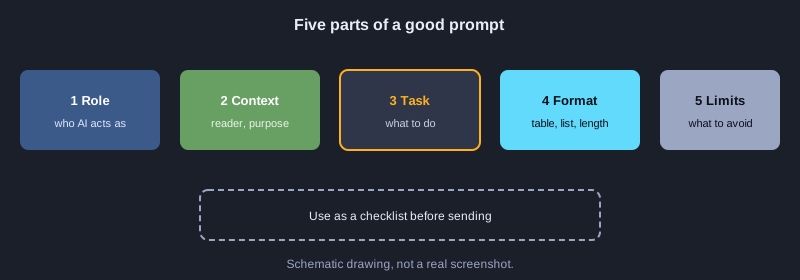
A request that works well often has five parts: the role you give the AI, the context of the task, the task itself, the output format you want, and any constraints. You do not always need all five, but context and format are the parts most often missing.
The diagram above shows the five parts. Use them as a checklist before you send.
3. Before and after: adjusting a request
Compare a short request with one that gives context. The difference lies in the reader, the purpose and the format you want.
**Before:** Write an email asking for leave
**After:**
You are an employee at a mid-sized company. Write an email to my team lead asking for annual leave on 12 to 14 November. Use a polite tone, keep it under 6 lines, give a clear subject line, and suggest one way to hand over my open work.
The improved request gives an email you can almost send as it is, because it names the reader, the length and the handover.
4. Show the result you want
When the format must be specific, showing one or two examples helps more than describing it in words. The AI picks up the pattern from the examples better than from a description.
**Before:** Help me write product descriptions
**After:**
Write a product description in the same style as this example.
Example: Name: Canvas tote bag | Highlights: light, washable | Price: 290 THB
Now do the same for: 3-tier plastic storage box, 40 cm, 350 THB
The answer follows the example's pattern line by line, which suits repetitive tasks with many items.
5. Specify the output format
Say clearly whether you want a table, a list, paragraphs or code, and state the length or order. This saves time you would otherwise spend reformatting.
**Before:** Compare three mobile phone plans
**After:**
Compare the monthly plans of the three carriers I name (ask me for their names first). Use a table with four columns: price, data allowance, speed and special conditions. Then summarise in no more than 3 lines.
You get a table ready to paste into a document, followed by a short summary you can read in seconds.
6. Ask the AI to ask questions first
For big tasks with missing information, such as a marketing plan or a website structure, have the AI ask what it needs before starting. This avoids rewriting the whole piece later.
**Before:** Help me plan marketing for a coffee shop
**After:**
Before you start, ask me every question you need to plan marketing for a coffee shop. Wait for my answers before writing the plan. Limit yourself to 6 questions.
The AI asks about customers, budget, channels and goals, then proposes a plan that fits the real shop.
7. Break a big task into steps
Instead of asking for everything in one request, split the work into steps you can check one at a time: outline first, then each section, then the combined final version. This makes errors easy to spot and changes easy to target.
1. Ask for an outline first and check that it covers everything
2. Ask for each section in turn, referring to the agreed outline
3. Ask for one combined version and check that it reads smoothly
Each step can be checked straight away, and the combined result is more consistent than a single large request.
8. Iterate: draft, critique, revise
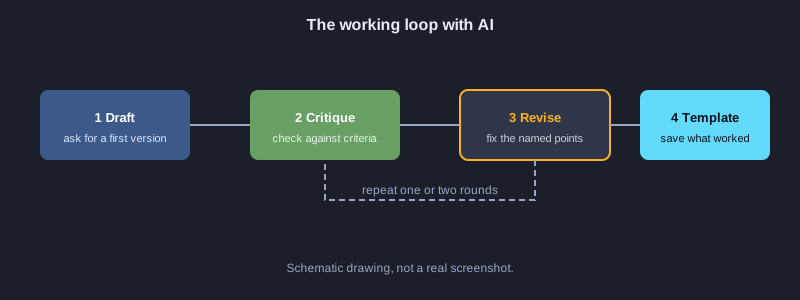
Ask the AI to critique its own work against stated criteria, then revise based on the critique. A few rounds usually beat asking for a perfect result in one go.
**Before:** Make this text better
**After:**
This is my draft announcement. Critique it on three points: clarity, politeness and length. Then revise it based on those points and list what you changed.
You get the revised text and the reasons for each change, so you learn while you work.
9. Save good requests as templates
When a request works well, save it as a template with placeholders you can change, such as [recipient], [budget] or [deadline]. Reusing the template means you do not have to think of a new request each time.
**Before:** Write a weekly report
**After:**
Write a weekly report to [recipient]. Summarise the completed work [list], the problems found [list] and next week's plan [list]. Use short headings and keep it under one page.
This template works every week. You only change the values in the square brackets.
10. Check results and protect personal data
AI can give answers that sound right but are wrong, especially for numbers, law and technical details. Check them before you use them, and do not paste personal or confidential data into a chat. Use made-up data instead.
1. Check numbers and proper names against trusted sources
2. Ask the AI to point out where it is unsure or which assumptions it made
3. Replace names, numbers and customer data with made-up values before pasting
Checked work is safer and more reliable.
11. Example workflow: the weekly report
Combine the principles into a weekly routine. Start from the template, let the AI ask for missing data, revise once, then check the numbers before sending.
1. Open the report template and fill in this week's figures
2. Let the AI ask for any missing information before writing
3. Let the AI draft the report, critique it and revise once
4. Check the numbers against the real data, then send
A report that used to take hours becomes a matter of entering data and checking it.
Next steps
Start with one task you repeat every week. Write the first template until it works, then extend it to other tasks. Keep the requests that worked well in one place, and review them from time to time.
Summary
A good request states the context, the task and the output format. Give examples when you need a specific style, break big tasks into steps, revise in rounds, save what works as templates, and always check facts and protect personal data.