Microsoft Azure from Zero to Professional: 100 Examples with CLI, Bicep and Python
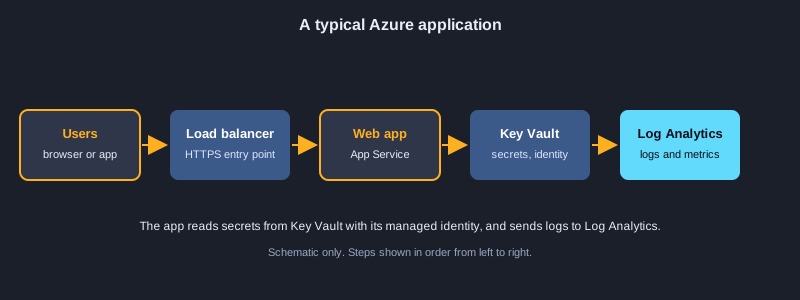
Microsoft Azure is a cloud platform for running websites, databases, containers, data pipelines and AI services without buying servers. This article takes you from your first sign-in to a production-minded setup in 100 examples. You will learn the Azure CLI, resource groups and tags, infrastructure as code with Bicep, identity with managed identities and RBAC, virtual machines, App Service, containers and Kubernetes, storage with SAS and lifecycle rules, SQL and Cosmos DB, serverless Functions, virtual networks and private endpoints, Service Bus and Event Hubs, monitoring with Log Analytics and Application Insights, Key Vault, and cost control. Honesty note: the cloud commands and the SDK examples were not run, because they need an Azure subscription. The examples marked as run were executed on a computer and their real output is shown after the code.
What you need
An Azure account with a subscription (a free trial is enough for most examples), the Azure CLI, Python 3.10 or newer, and a text editor such as Visual Studio Code with the Bicep extension. Use a sandbox subscription for learning and never paste real secrets into commands or code. Costs apply to some resources, so delete the lab resource group when you finish.
How to use an example
Bash examples use the Azure CLI, Bicep examples use the Azure CLI or VS Code, and Python examples that need no Azure account run with python and show their real output. Examples that call Azure need a subscription before they will work.
Topic 1: Getting Started with Azure
Azure is organised as subscriptions, resource groups and resources. Learn to sign in, check where your commands will run, and use names that are easy to find and charge.
The Azure CLI and sign-in
The Azure CLI is one tool for every Azure service. Install it, run az login, and check az account show. Commands act on the subscription you have selected, so confirm it before you create or delete anything.
Regions and naming
Each resource lives in a region, so choose the one closest to your users and check that your services are available there. Storage names are strict: 3 to 24 lowercase letters and digits and unique across Azure.
Naming conventions
A pattern such as rg-app-env-region-01 keeps names consistent, so people can find resources and understand their cost. Build names with a small function and reuse it in every script.
Illustrations
Example 1: Install the Azure CLI and sign in
Set up the command-line tool and log in to your account.
winget install -e --id Microsoft.AzureCLI
az --version
az login
*This example was not run here because it needs an Azure subscription or Azure tools.*
Example 2: Check the active subscription
See which subscription your commands will change.
az account show --output table
az account list --query "[].{name:name, id:id, default:isDefault}" --output table
*This example was not run here because it needs an Azure subscription or Azure tools.*
Example 3: Create a resource group
A container for related resources in one region.
az group create --name rg-learn-dev --location southeastasia
*This example was not run here because it needs an Azure subscription or Azure tools.*
Example 4: List Azure regions
Find the regions you can deploy to.
az account list-locations --query "[?metadata.regionCategory=='Recommended'].name" --output tsv
*This example was not run here because it needs an Azure subscription or Azure tools.*
Example 5: Validate a storage account name
Storage names are 3 to 24 lowercase letters and digits.
import re

def valid_storage_name(name):
    return re.fullmatch(r"[a-z0-9]{3,24}", name) is not None

for candidate in ("stlearndev01", "Store-1", "ab", "a" * 25):
    print(repr(candidate), valid_storage_name(candidate))
Output:
'stlearndev01' True
'Store-1' False
'ab' False
'aaaaaaaaaaaaaaaaaaaaaaaaa' False
Example 6: Build a resource name from a convention
Consistent names make resources easy to find and charge.
def resource_name(kind, app, env, region, index=1):
    return f"{kind}-{app}-{env}-{region}-{index:02d}"

print(resource_name("rg", "shop", "dev", "sea"))
print(resource_name("app", "shop", "prod", "sea", 3))
Output:
rg-shop-dev-sea-01
app-shop-prod-sea-03
Topic 2: Resource Groups, Tags and CLI Output
A resource group holds the resources of one application or environment. Tags record who owns them and what they cost, and the CLI can filter and format its output for people or scripts.
Resource groups and deletion
Put related resources in one group so you can manage and delete them together. Deleting a group removes everything inside it, so use --no-wait only when you are sure, and never delete a group you did not create.
Tags for ownership and cost
Tags are key and value pairs such as owner and costcenter. Add them when you create resources and check for missing ones with a script. Cost reports can group spending by tag.
Output, queries and defaults
Use --output table for people and json for scripts. --query uses JMESPath to filter fields. Set default group and location with az configure so you do not repeat them.
Example 7: Tag a resource group
Tags record the owner, cost centre and environment.
az group update --name rg-learn-dev \
  --tags owner=team-a costcenter=1001 environment=dev
*This example was not run here because it needs an Azure subscription or Azure tools.*
Example 8: Check required tags
Find resources that are missing the tags your team needs.
REQUIRED = {"owner", "costcenter", "environment"}

def missing_tags(tags):
    return sorted(REQUIRED - set(tags))

print(missing_tags({"owner": "team-a", "environment": "dev"}))
print(missing_tags({"owner": "x", "costcenter": "1", "environment": "prod"}))
Output:
['costcenter']
[]
Example 9: Delete a resource group without waiting
Remove a whole group of resources in one command.
az group delete --name rg-learn-test --yes --no-wait
*This example was not run here because it needs an Azure subscription or Azure tools.*
Example 10: Pick the closest region by latency
Choose the region that answers fastest for your users.
latency_ms = {"southeastasia": 42, "japaneast": 71, "eastus": 210, "westeurope": 185}

best = min(latency_ms, key=latency_ms.get)
print("closest region:", best, latency_ms[best], "ms")
Output:
closest region: southeastasia 42 ms
Example 11: Filter output with a JMESPath query
Show only the fields and rows you need.
az vm list \
  --query "[?powerState=='VM running'].{name:name, rg:resourceGroup}" \
  --output table
*This example was not run here because it needs an Azure subscription or Azure tools.*
Example 12: Choose an output format
Table, JSON or YAML for people or for scripts.
az group list --output table
az group list --output json
az group list --output yaml
*This example was not run here because it needs an Azure subscription or Azure tools.*
Example 13: Loop over resources in a script
Run one command for every resource group.
for rg in $(az group list --query "[].name" -o tsv); do
  echo "resource group: $rg"
done
*This example was not run here because it needs an Azure subscription or Azure tools.*
Example 14: Set default group and location
Stop typing the same options in every command.
az configure --defaults group=rg-learn-dev location=southeastasia
az configure --list-defaults
*This example was not run here because it needs an Azure subscription or Azure tools.*
Topic 3: Scripting and Automation
Repeated work belongs in a script. Loops, retries and parsed JSON turn one-off commands into reliable automation that a pipeline can run.
Loops over resources
A shell loop runs one command for every resource in a list. Keep the list small and check the result before you change anything.
Parsing JSON output
Ask the CLI for JSON and parse it instead of reading text. Group resources by type to produce a summary that is easy to read.
Retries and backoff
The Azure API throttles busy clients. Retry with an increasing wait, so the script recovers without flooding the service.
Example 15: Parse CLI JSON output
Turn a list of resources into a summary.
import json

sample = """[{"name": "vm-web-01", "type": "Microsoft.Compute/virtualMachines", "location": "southeastasia"},
           {"name": "stlearn01", "type": "Microsoft.Storage/storageAccounts", "location": "southeastasia"}]"""

resources = json.loads(sample)
by_type = {}
for r in resources:
    by_type.setdefault(r["type"].split("/")[-1], []).append(r["name"])
for kind, names in sorted(by_type.items()):
    print(kind, names)
Output:
storageAccounts ['stlearn01']
virtualMachines ['vm-web-01']
Example 16: Retry a flaky call with backoff
Wait longer after each throttled request.
import time

def call_with_retry(fn, attempts=4, base_delay=0.05):
    for n in range(attempts):
        try:
            return fn()
        except ConnectionError as e:
            if n == attempts - 1:
                raise
            delay = base_delay * (2 ** n)
            print(f"attempt {n + 1} failed ({e}); retrying in {delay:.2f}s")
            time.sleep(delay)

state = {"calls": 0}
def flaky_list():
    state["calls"] += 1
    if state["calls"] < 3:
        raise ConnectionError("throttled")
    return ["rg-learn-dev"]

print(call_with_retry(flaky_list))
Output:
attempt 1 failed (throttled); retrying in 0.05s
attempt 2 failed (throttled); retrying in 0.10s
['rg-learn-dev']
Example 17: Check the CLI version and extensions
Keep the tool and its extensions up to date.
az version
az extension list --output table
az extension add --name containerapp --upgrade
*This example was not run here because it needs an Azure subscription or Azure tools.*
Example 18: Create a service principal safely
An app identity for automation, with the smallest scope.
# Store the output securely: it contains a password. Never commit it to Git.
az ad sp create-for-rbac --name sp-learn-deploy --role Contributor \
  --scopes /subscriptions/<subscription-id>/resourceGroups/rg-learn-dev
*This example was not run here because it needs an Azure subscription or Azure tools.*
Topic 4: Infrastructure as Code with Bicep
Bicep describes Azure resources as code. A template can be reviewed, versioned and deployed the same way every time, which is safer than clicking in the portal.
Resources, parameters and outputs
A resource declaration names the type and API version, and sets its properties. Parameters make a template reusable, and @secure keeps passwords out of logs. Outputs return values such as an ID to the caller.
Modules, conditions and loops
A module splits a large template into reusable files. A condition creates a resource only when it is true, such as in production. A loop creates several resources from one list.
Deploying safely
Use az deployment group what-if to preview changes, then create. Names built with uniqueString avoid clashes between environments in the same subscription.
Example 19: A minimal Bicep storage account
Describe a storage account as code.
param location string = resourceGroup().location
param storageName string

resource storage 'Microsoft.Storage/storageAccounts@2023-05-01' = {
  name: storageName
  location: location
  sku: {
    name: 'Standard_LRS'
  }
  kind: 'StorageV2'
  properties: {
    minimumTlsVersion: 'TLS1_2'
    allowBlobPublicAccess: false
  }
}
*This example was not run here because it needs an Azure subscription or Azure tools.*
Example 20: Parameters, outputs and secure values
Reuse templates and keep passwords out of the file.
@minLength(3)
@maxLength(24)
param storageName string

@allowed([
  'dev'
  'test'
  'prod'
])
param environment string = 'dev'

@secure()
param adminPassword string

output storageId string = storage.id
resource storage 'Microsoft.Storage/storageAccounts@2023-05-01' = {
  name: storageName
  location: resourceGroup().location
  sku: { name: environment == 'prod' ? 'Standard_GRS' : 'Standard_LRS' }
  kind: 'StorageV2'
}
*This example was not run here because it needs an Azure subscription or Azure tools.*
Example 21: Deploy a module from main.bicep
Split a large template into reusable modules.
// main.bicep
targetScope = 'resourceGroup'
module network './modules/network.bicep' = {
  name: 'networkDeploy'
  params: {
    prefix: 'shop-dev'
  }
}
output vnetId string = network.outputs.vnetId
*This example was not run here because it needs an Azure subscription or Azure tools.*
Example 22: Conditional resources
Create a resource only in production.
param environment string

resource logs 'Microsoft.OperationalInsights/workspaces@2022-10-01' = if (environment == 'prod') {
  name: 'log-shop-prod'
  location: resourceGroup().location
  properties: {
    retentionInDays: 90
  }
}
*This example was not run here because it needs an Azure subscription or Azure tools.*
Example 23: Loop over containers in Bicep
Create several blob containers from one list.
param containerNames array = [
  'uploads'
  'exports'
  'backups'
]

resource storage 'Microsoft.Storage/storageAccounts@2023-05-01' existing = {
  name: 'stlearndev01'
}

resource containers 'Microsoft.Storage/storageAccounts/blobServices/containers@2023-05-01' = [for name in containerNames: {
  name: '${storage.name}/default/${name}'
}]
*This example was not run here because it needs an Azure subscription or Azure tools.*
Example 24: Unique names with uniqueString
Generate a name that does not clash in the subscription.
param prefix string = 'shop'

var uniqueSuffix = uniqueString(resourceGroup().id)
var storageName = toLower('st${prefix}${uniqueSuffix}')

output generatedName string = storageName
*This example was not run here because it needs an Azure subscription or Azure tools.*
Example 25: Deploy a Bicep file
Create or update resources from the template.
az deployment group create \
  --resource-group rg-learn-dev \
  --template-file main.bicep \
  --parameters storageName=stlearndev01 environment=dev
*This example was not run here because it needs an Azure subscription or Azure tools.*
Example 26: Preview changes with what-if
See what a deployment will add, change or delete first.
az deployment group what-if \
  --resource-group rg-learn-dev \
  --template-file main.bicep \
  --parameters storageName=stlearndev01
*This example was not run here because it needs an Azure subscription or Azure tools.*
Topic 5: Identity and Access Control
Security starts with who can do what. Managed identities give applications credentials without passwords, and role-based access control grants only the permissions each identity needs.
Managed identities
A managed identity is an account that Azure runs for your app, so the app gets tokens without storing a secret. Use user-assigned identities when several resources share one identity.
RBAC and least privilege
A role assignment connects an identity to a role at a scope, such as one storage account. Prefer built-in roles that match the job, and create a custom role only when none fits.
Service principals and tokens
A service principal is an identity for automation. Its password is a secret, so store it in the pipeline's vault. A token is a signed string with an expiry time, and you can read that time from its payload.
Example 27: A user-assigned managed identity
An identity your app uses without storing a password.
param location string = resourceGroup().location

resource appIdentity 'Microsoft.ManagedIdentity/userAssignedIdentities@2023-01-31' = {
  name: 'id-shop-dev'
  location: location
}

output principalId string = appIdentity.properties.principalId
*This example was not run here because it needs an Azure subscription or Azure tools.*
Example 28: Grant read access with RBAC
Give an identity only the role it needs.
PRINCIPAL_ID=$(az identity show --name id-shop-dev --resource-group rg-learn-dev --query principalId -o tsv)
az role assignment create \
  --assignee-object-id "$PRINCIPAL_ID" \
  --assignee-principal-type ServicePrincipal \
  --role "Storage Blob Data Reader" \
  --scope /subscriptions/<subscription-id>/resourceGroups/rg-learn-dev/providers/Microsoft.Storage/storageAccounts/stlearndev01
*This example was not run here because it needs an Azure subscription or Azure tools.*
Example 29: Sign in a pipeline with a service principal
Automation logs in with secrets from the pipeline.
az login --service-principal \
  --username "$AZURE_CLIENT_ID" \
  --password "$AZURE_CLIENT_SECRET" \
  --tenant "$AZURE_TENANT_ID"
*This example was not run here because it needs an Azure subscription or Azure tools.*
Example 30: Check role assignments
Review who can do what on a resource.
assignments = [
    {"principal": "id-shop-dev", "role": "Storage Blob Data Reader", "scope": "stlearndev01"},
    {"principal": "sp-learn-deploy", "role": "Contributor", "scope": "rg-learn-dev"},
    {"principal": "id-shop-dev", "role": "Key Vault Secrets User", "scope": "kv-shop-dev"},
]

def roles_for(principal):
    return sorted(a["role"] for a in assignments if a["principal"] == principal)

print(roles_for("id-shop-dev"))
print(roles_for("nobody"))
Output:
['Key Vault Secrets User', 'Storage Blob Data Reader']
[]
Example 31: Sign in on a VM with its managed identity
A VM gets a token without any password.
az login --identity
az account show --query "user.assignedIdentityInfo" -o tsv
*This example was not run here because it needs an Azure subscription or Azure tools.*
Example 32: Read token expiry from a JWT
Tokens carry an expiry time in their payload.
import base64
import json

def jwt_payload(token):
    part = token.split(".")[1]
    part += "=" * (-len(part) % 4)
    return json.loads(base64.urlsafe_b64decode(part))

payload = {"aud": "https://management.azure.com/", "exp": 1767225600, "upn": "[email protected]"}
raw = base64.urlsafe_b64encode(json.dumps(payload).encode()).decode().rstrip("=")
token = f"header.{raw}.signature"

claims = jwt_payload(token)
print("audience:", claims["aud"])
print("expires at unix time:", claims["exp"])
Output:
audience: https://management.azure.com/
expires at unix time: 1767225600
Example 33: A least-privilege custom role
Allow only one action on one scope.
{
  "Name": "Blob Uploader",
  "IsCustom": true,
  "Description": "Can upload blobs to one storage account only.",
  "Actions": [],
  "DataActions": [
    "Microsoft.Storage/storageAccounts/blobServices/containers/blobs/write"
  ],
  "AssignableScopes": [
    "/subscriptions/<subscription-id>/resourceGroups/rg-learn-dev"
  ]
}
*This example was not run here because it needs an Azure subscription or Azure tools.*
Example 34: Create the custom role
Register the role definition in the subscription.
az role definition create --role-definition @blob-uploader.json
*This example was not run here because it needs an Azure subscription or Azure tools.*
Topic 6: Compute: Virtual Machines and App Service
Azure runs your code on virtual machines or on managed platforms. App Service removes most server work, while a VM gives you full control of the operating system.
Virtual machines and scale sets
A VM has a size, an image, disks and a network interface. A scale set runs identical VMs and adds or removes them with demand. Turn dev machines off at night to save money.
App Service plans and web apps
A plan defines the machines and their price, and the web app runs on it. Deploy code as a zip file, set app settings for configuration, and use a deployment slot to test before users see a change.
Autoscaling decisions
Scaling rules compare a metric, such as average CPU, with thresholds, and add or remove an instance. A cooldown stops the system from flapping between sizes.
Example 35: Create a Linux VM
Start a virtual machine with a chosen size and image.
az vm create \
  --resource-group rg-learn-dev \
  --name vm-web-01 \
  --image Ubuntu2204 \
  --size Standard_B2s \
  --admin-username azureuser \
  --generate-ssh-keys
*This example was not run here because it needs an Azure subscription or Azure tools.*
Example 36: List VM sizes and disks
Check capacity and storage before you resize.
az vm list-sizes --location southeastasia --output table | head -n 10
az vm disk list --resource-group rg-learn-dev --output table
*This example was not run here because it needs an Azure subscription or Azure tools.*
Example 37: A virtual machine scale set
Run identical VMs that grow and shrink together.
resource vmss 'Microsoft.Compute/virtualMachineScaleSets@2023-09-01' = {
  name: 'vmss-web'
  location: resourceGroup().location
  sku: {
    name: 'Standard_B2s'
    capacity: 2
  }
  properties: {
    upgradePolicy: { mode: 'Rolling' }
    // osProfile, networkProfile and storageProfile go here
  }
}
*This example was not run here because it needs an Azure subscription or Azure tools.*
Example 38: Auto-shutdown for a dev VM
Switch off a test machine every night to save money.
az vm auto-shutdown --resource-group rg-learn-dev --name vm-web-01 --time 2100
*This example was not run here because it needs an Azure subscription or Azure tools.*
Example 39: Create an App Service plan and web app
Host a web app on managed Linux servers.
az appservice plan create --name plan-shop-dev --resource-group rg-learn-dev --sku B1 --is-linux
az webapp create --name app-shop-dev-01 --resource-group rg-learn-dev \
  --plan plan-shop-dev --runtime "PYTHON:3.12"
*This example was not run here because it needs an Azure subscription or Azure tools.*
Example 40: Deploy code from a zip file
Upload the application package to the web app.
zip -r app.zip . -x "*.git*"
az webapp deploy --resource-group rg-learn-dev --name app-shop-dev-01 \
  --src-path app.zip --type zip
*This example was not run here because it needs an Azure subscription or Azure tools.*
Example 41: App settings and a staging slot
Test a new version before it reaches users.
az webapp config appsettings set --resource-group rg-learn-dev --name app-shop-dev-01 \
  --settings ENVIRONMENT=dev LOG_LEVEL=info
az webapp deployment slot create --resource-group rg-learn-dev --name app-shop-dev-01 --slot staging
*This example was not run here because it needs an Azure subscription or Azure tools.*
Example 42: Scale decisions from CPU
Add instances when busy and remove them when quiet.
def scale_decision(cpu_samples, instances, minimum=1, maximum=5):
    average = sum(cpu_samples) / len(cpu_samples)
    if average > 75 and instances < maximum:
        return instances + 1, f"scale out (avg CPU {average:.0f}%)"
    if average < 25 and instances > minimum:
        return instances - 1, f"scale in (avg CPU {average:.0f}%)"
    return instances, f"hold (avg CPU {average:.0f}%)"

print(scale_decision([82, 90, 78], 2))
print(scale_decision([10, 12, 15], 2))
print(scale_decision([40, 45, 50], 2))
Output:
(3, 'scale out (avg CPU 83%)')
(1, 'scale in (avg CPU 12%)')
(2, 'hold (avg CPU 45%)')
Topic 7: Containers: Registry, Container Apps and Kubernetes
Containers package an application with everything it needs. Azure stores the images in a registry and runs them in Container Apps or in Kubernetes, depending on how much control you need.
Azure Container Registry
A registry is a private store for images. Build the image in Azure with az acr build, so the build does not depend on your computer, and push the result to the registry.
Container Apps and AKS
Container Apps runs containers without managing a cluster and scales to zero. AKS is managed Kubernetes for larger systems. AKS can pull images from your registry with its managed identity, so no password is needed.
Tags and cleanup
Tag each image with the version, date and commit so you can roll back. Schedule a purge task to delete old untagged images and keep storage costs under control.
Example 43: Create a container registry
A private place to store container images.
az acr create --resource-group rg-learn-dev --name acrshopdev01 --sku Basic
az acr login --name acrshopdev01
*This example was not run here because it needs an Azure subscription or Azure tools.*
Example 44: Build and push an image
Build the image in Azure and store it in the registry.
az acr build --registry acrshopdev01 --image shop-api:1.0.0 .
az acr repository show-tags --name acrshopdev01 --repository shop-api -o table
*This example was not run here because it needs an Azure subscription or Azure tools.*
Example 45: Run a container app
Run a container without managing servers.
az containerapp env create --name cae-shop-dev --resource-group rg-learn-dev --location southeastasia
az containerapp create --name ca-shop-api --resource-group rg-learn-dev \
  --environment cae-shop-dev \
  --image acrshopdev01.azurecr.io/shop-api:1.0.0 \
  --target-port 8080 --ingress external --min-replicas 0 --max-replicas 3
*This example was not run here because it needs an Azure subscription or Azure tools.*
Example 46: Create an AKS cluster
A managed Kubernetes cluster that pulls from your registry.
az aks create \
  --resource-group rg-learn-dev \
  --name aks-shop-dev \
  --node-count 2 \
  --enable-managed-identity \
  --attach-acr acrshopdev01 \
  --generate-ssh-keys
az aks get-credentials --resource-group rg-learn-dev --name aks-shop-dev
*This example was not run here because it needs an Azure subscription or Azure tools.*
Example 47: Deploy to Kubernetes
Apply a manifest and wait for the rollout.
kubectl apply -f deployment.yaml
kubectl rollout status deployment/shop-api
kubectl get pods -l app=shop-api
*This example was not run here because it needs an Azure subscription or Azure tools.*
Example 48: A Kubernetes deployment manifest
Describe the pods, replicas and resources.
apiVersion: apps/v1
kind: Deployment
metadata:
  name: shop-api
spec:
  replicas: 2
  selector:
    matchLabels:
      app: shop-api
  template:
    metadata:
      labels:
        app: shop-api
    spec:
      containers:
        - name: shop-api
          image: acrshopdev01.azurecr.io/shop-api:1.0.0
          ports:
            - containerPort: 8080
          resources:
            requests:
              cpu: 100m
              memory: 128Mi
*This example was not run here because it needs an Azure subscription or Azure tools.*
Example 49: Generate an image tag
Tag each image with the version, date and commit.
from datetime import date

def image_tag(version, commit, when):
    short = commit[:7]
    return f"{version}-{when.strftime('%Y%m%d')}-{short}"

print(image_tag("1.4.2", "9f3c1ab7e54d0a12", date(2026, 1, 15)))
Output:
1.4.2-20260115-9f3c1ab
Example 50: Purge old images with a task
Delete untagged images on a schedule to save storage.
az acr task create --name purge-old-images --registry acrshopdev01 \
  --cmd "acr purge --filter 'shop-api:.*' --ago 30d --untagged" \
  --schedule "0 1 * * *" --context /dev/null
*This example was not run here because it needs an Azure subscription or Azure tools.*
Topic 8: Storage: Blobs, Queues and Access Control
Storage accounts hold files, messages and tables. Secure access with Entra ID, use short-lived SAS links when you must share, and let lifecycle rules move old data to cheaper tiers.
Blobs and naming paths
Blob containers hold files. Use paths that include the device and date so you can list and delete a day's data quickly. Keep public access off unless the content must be public.
Shared access signatures
A SAS link grants limited access for a short time. Give only the permissions needed, such as read, and choose the shortest expiry that works.
Lifecycle rules and queues
Lifecycle rules move blobs to cool or archive tiers and delete them after a set number of days. Queues hold messages for background workers, so a slow job does not block a web request.
Example 51: Create a storage account
Secure defaults: TLS 1.2 and no public blob access.
az storage account create \
  --name stlearndev01 \
  --resource-group rg-learn-dev \
  --location southeastasia \
  --sku Standard_LRS \
  --kind StorageV2 \
  --min-tls-version TLS1_2 \
  --allow-blob-public-access false
*This example was not run here because it needs an Azure subscription or Azure tools.*
Example 52: Blob paths with date partitions
Organise uploads by device and date so queries stay fast.
from datetime import datetime

def blob_path(device, when, filename):
    return f"telemetry/{device}/{when:%Y/%m/%d}/{when:%H%M%S}-{filename}"

print(blob_path("sensor-7", datetime(2026, 1, 15, 8, 30, 5), "batch.json"))
Output:
telemetry/sensor-7/2026/01/15/083005-batch.json
Example 53: Upload a blob
Copy a file into a container with the CLI.
az storage container create --name uploads --account-name stlearndev01 --auth-mode login
az storage blob upload --account-name stlearndev01 --container-name uploads \
  --name reports/2026-01.csv --file ./report.csv --auth-mode login
*This example was not run here because it needs an Azure subscription or Azure tools.*
Example 54: Upload from Python with Entra ID
Use your Azure identity instead of an account key.
from azure.identity import DefaultAzureCredential
from azure.storage.blob import BlobServiceClient

client = BlobServiceClient(
    account_url="https://stlearndev01.blob.core.windows.net",
    credential=DefaultAzureCredential(),
)
blob = client.get_blob_client(container="uploads", blob="reports/2026-01.csv")
with open("report.csv", "rb") as data:
    blob.upload_blob(data, overwrite=True)
*This example was not run here because it needs an Azure subscription or Azure tools.*
Example 55: Create a short-lived SAS
A link that expires and grants only read access.
EXPIRY=$(date -u -d "+1 hour" '+%Y-%m-%dT%H:%MZ')
az storage blob generate-sas --account-name stlearndev01 --container-name uploads \
  --name reports/2026-01.csv --permissions r --expiry "$EXPIRY" --auth-mode login --as-user --output tsv
*This example was not run here because it needs an Azure subscription or Azure tools.*
Example 56: Describe SAS permissions
Explain what a shared access signature allows and for how long.
from datetime import datetime, timedelta, timezone

def describe_sas(permissions, expiry):
    names = {"r": "read", "w": "write", "d": "delete", "c": "create"}
    allowed = ", ".join(names[p] for p in permissions)
    left = expiry - datetime(2026, 1, 15, 8, 0, tzinfo=timezone.utc)
    return f"allows {allowed} for {int(left.total_seconds() // 60)} minutes"

print(describe_sas("rw", datetime(2026, 1, 15, 9, 0, tzinfo=timezone.utc)))
Output:
allows read, write for 60 minutes
Example 57: Lifecycle rules for blobs
Move old data to cheaper storage and then delete it.
{
  "rules": [
    {
      "enabled": true,
      "name": "archive-telemetry",
      "type": "Lifecycle",
      "definition": {
        "filters": { "blobTypes": ["blockBlob"], "prefixMatch": ["telemetry/"] },
        "actions": {
          "baseBlob": {
            "tierToCool": { "daysAfterModificationGreaterThan": 30 },
            "delete": { "daysAfterModificationGreaterThan": 365 }
          }
        }
      }
    }
  ]
}
*This example was not run here because it needs an Azure subscription or Azure tools.*
Example 58: Queue storage for background work
Put jobs on a queue and let workers process them later.
az storage queue create --name jobs --account-name stlearndev01 --auth-mode login
az storage message put --queue-name jobs --content "resize:photo-42" \
  --account-name stlearndev01 --auth-mode login
*This example was not run here because it needs an Azure subscription or Azure tools.*
Topic 9: Databases: Azure SQL and Cosmos DB
Azure offers a managed relational database and a globally distributed NoSQL database. Connect with identity instead of passwords, and always use parameters in queries.
Azure SQL
Azure SQL is a managed SQL Server database. Turn on Microsoft Entra ID authentication and private endpoints, so the database has no stored password and no public address.
Parameterised queries
Pass user input as parameters, never by joining text into SQL. The database then treats the input as data, which prevents SQL injection.
Cosmos DB and partition keys
Cosmos DB stores JSON documents in containers. The partition key decides how data is spread across machines. A key with many distinct values, such as customer ID, keeps the load balanced.
Example 59: Azure SQL server and database
A managed relational database with private networking.
az sql server create --name sql-shop-dev-01 --resource-group rg-learn-dev \
  --location southeastasia --enable-public-network false --enable-ad-only-auth \
  --external-admin-principal-type User --external-admin-name [email protected]
az sql db create --resource-group rg-learn-dev --server sql-shop-dev-01 \
  --name shopdb --service-objective S0
*This example was not run here because it needs an Azure subscription or Azure tools.*
Example 60: Connect to Azure SQL without a password
Entra ID authentication instead of a stored password.
import pyodbc

conn = pyodbc.connect(
    "Driver={ODBC Driver 18 for SQL Server};"
    "Server=tcp:sql-shop-dev-01.database.windows.net,1433;"
    "Database=shopdb;Encrypt=yes;"
    "Authentication=ActiveDirectoryDefault;"
)
cursor = conn.cursor()
cursor.execute("SELECT TOP 5 name FROM sys.tables")
print([row.name for row in cursor.fetchall()])
*This example was not run here because it needs an Azure subscription or Azure tools.*
Example 61: Parameterised queries
Pass values as parameters so input cannot change the query.
import sqlite3

conn = sqlite3.connect(":memory:")
conn.execute("CREATE TABLE orders (id INTEGER, customer TEXT, total REAL)")
conn.executemany("INSERT INTO orders VALUES (?, ?, ?)",
                 [(1, "ana", 120.0), (2, "ben", 75.5)])

customer = "ana' OR '1'='1"          # hostile input stays a plain value
rows = conn.execute("SELECT id, total FROM orders WHERE customer = ?", (customer,)).fetchall()
print("matches:", rows)
conn.close()
Output:
matches: []
Example 62: Create a Cosmos DB container
A globally distributed database with a partition key.
az cosmosdb create --name cosmos-shop-dev-01 --resource-group rg-learn-dev \
  --locations regionName=southeastasia failoverPriority=0
az cosmosdb sql database create --account-name cosmos-shop-dev-01 --resource-group rg-learn-dev \
  --name shop
az cosmosdb sql container create --account-name cosmos-shop-dev-01 --resource-group rg-learn-dev \
  --database-name shop --name orders --partition-key-path "/customerId"
*This example was not run here because it needs an Azure subscription or Azure tools.*
Example 63: Write an item to Cosmos DB
Store a JSON document in a container.
from azure.cosmos import CosmosClient
from azure.identity import DefaultAzureCredential

client = CosmosClient("https://cosmos-shop-dev-01.documents.azure.com:443/", DefaultAzureCredential())
container = client.get_database_client("shop").get_container_client("orders")
container.upsert_item({"id": "o-1001", "customerId": "ana", "total": 120.0})
*This example was not run here because it needs an Azure subscription or Azure tools.*
Example 64: Spread items with a partition key hash
A good key spreads data evenly across partitions.
import hashlib

def partition_for(key, partitions=4):
    digest = hashlib.sha256(key.encode("utf-8")).hexdigest()
    return int(digest, 16) % partitions

counts = [0, 0, 0, 0]
for customer in ["ana", "ben", "chai", "dao", "eve", "fon", "gus", "hana"]:
    counts[partition_for(customer)] += 1
print("items per partition:", counts)
Output:
items per partition: [4, 1, 1, 2]
Topic 10: Serverless with Azure Functions
Azure Functions run small pieces of code when something happens: an HTTP request, a timer, or a message in a queue. You pay for executions, and you do not manage servers.
Triggers and bindings
A trigger starts the function, such as an HTTP request or a timer. Bindings connect the function to other services, such as writing to a queue, so less connection code is needed.
Timers and cron schedules
A timer trigger uses a six-field NCRONTAB expression, with seconds first. The expression 0 */5 * * * * runs every five minutes.
Idempotent processing
Queues can deliver a message more than once. Record the IDs you have processed, and skip duplicates, so running a job twice does not charge a customer twice.
Example 65: Create a function app
Serverless code on the Consumption plan.
az storage account create --name stfuncshopdev01 --resource-group rg-learn-dev --sku Standard_LRS
az functionapp create --name func-shop-dev-01 --resource-group rg-learn-dev \
  --storage-account stfuncshopdev01 --consumption-plan-location southeastasia \
  --runtime python --runtime-version 3.12 --functions-version 4 --os-type Linux
*This example was not run here because it needs an Azure subscription or Azure tools.*
Example 66: An HTTP-triggered function
Run code when a web request arrives.
import azure.functions as func

app = func.FunctionApp(http_auth_level=func.AuthLevel.FUNCTION)

@app.route(route="hello", methods=["GET"])
def hello(req: func.HttpRequest) -> func.HttpResponse:
    name = req.params.get("name", "world")
    return func.HttpResponse(f"Hello, {name}!", status_code=200)
*This example was not run here because it needs an Azure subscription or Azure tools.*
Example 67: A timer function with a cron schedule
Run code every five minutes without a server.
import logging
import azure.functions as func

app = func.FunctionApp()

@app.timer_trigger(schedule="0 */5 * * * *", arg_name="timer", run_on_startup=False)
def every_five_minutes(timer: func.TimerRequest) -> None:
    logging.info("checking sensors")
*This example was not run here because it needs an Azure subscription or Azure tools.*
Example 68: Next run of a cron expression
Work out when a schedule fires next.
def next_minutes(expression, current_minute):
    field = expression.split()[1]           # minute field, for example */5
    step = int(field.removeprefix("*/"))
    return step - (current_minute % step) if current_minute % step else step

for minute in (0, 3, 12, 14):
    print(f"at minute {minute:2d}: next run in {next_minutes('0 */5 * * * *', minute)} min")
Output:
at minute  0: next run in 5 min
at minute  3: next run in 2 min
at minute 12: next run in 3 min
at minute 14: next run in 1 min
Example 69: Publish a function app
Deploy the Python code to Azure Functions.
func azure functionapp publish func-shop-dev-01 --python
*This example was not run here because it needs an Azure subscription or Azure tools.*
Example 70: A queue-triggered function
Process each message and write the result to another queue.
import azure.functions as func

app = func.FunctionApp()

@app.queue_trigger(arg_name="msg", queue_name="jobs", connection="AzureWebJobsStorage")
@app.queue_output(arg_name="out", queue_name="done", connection="AzureWebJobsStorage")
def process(msg: func.QueueMessage, out: func.Out[str]) -> None:
    out.set(f"processed:{msg.get_body().decode('utf-8')}")
*This example was not run here because it needs an Azure subscription or Azure tools.*
Example 71: Idempotent message handling
Process a message once even if it arrives twice.
processed_ids = set()

def handle(message):
    if message["id"] in processed_ids:
        return "skipped duplicate"
    processed_ids.add(message["id"])
    return f"processed {message['id']}"

events = [{"id": "e1"}, {"id": "e2"}, {"id": "e1"}]
for event in events:
    print(handle(event))
Output:
processed e1
processed e2
skipped duplicate
Example 72: Key Vault references in app settings
Load a secret into the app without copying it.
az functionapp config appsettings set --name func-shop-dev-01 --resource-group rg-learn-dev \
  --settings "[email protected](VaultName=kv-shop-dev;SecretName=db-password)"
*This example was not run here because it needs an Azure subscription or Azure tools.*
Topic 11: Networking: Virtual Networks, NSGs and Private Endpoints
A virtual network is your private network inside Azure. Subnets separate tiers, security rules limit traffic, and private endpoints keep services off the public internet.
Virtual networks and subnets
Choose an address range such as 10.10.0.0/16, then split it into subnets for web and data. Azure reserves five addresses in every subnet, so a /24 gives 251 usable addresses.
Network security groups
A network security group is a list of allow and deny rules with priorities. Allow only the ports you need, such as 443 for HTTPS, and deny the rest by default.
Private endpoints and DNS
A private endpoint gives a service a private IP address inside your network. A private DNS zone makes its name resolve to that address, so applications need no code changes.
Example 73: Virtual network and subnets
A private network with separate subnets for web and data.
az network vnet create --name vnet-shop-dev --resource-group rg-learn-dev \
  --address-prefix 10.10.0.0/16 --subnet-name snet-web --subnet-prefix 10.10.1.0/24
az network vnet subnet create --vnet-name vnet-shop-dev --resource-group rg-learn-dev \
  --name snet-data --address-prefixes 10.10.2.0/24
*This example was not run here because it needs an Azure subscription or Azure tools.*
Example 74: Network security group rule
Allow only HTTPS from the internet.
az network nsg create --name nsg-web --resource-group rg-learn-dev
az network nsg rule create --nsg-name nsg-web --resource-group rg-learn-dev \
  --name allow-https --priority 100 --direction Inbound --access Allow \
  --protocol Tcp --destination-port-ranges 443 --source-address-prefixes Internet
*This example was not run here because it needs an Azure subscription or Azure tools.*
Example 75: Private endpoint for storage
Reach the storage account only from inside your network.
az network private-endpoint create --name pe-storage --resource-group rg-learn-dev \
  --vnet-name vnet-shop-dev --subnet snet-data \
  --private-connection-resource-id $(az storage account show -n stlearndev01 -g rg-learn-dev --query id -o tsv) \
  --group-id blob --connection-name conn-storage
*This example was not run here because it needs an Azure subscription or Azure tools.*
Example 76: Private DNS zone
Resolve private endpoint names inside the virtual network.
az network private-dns zone create --resource-group rg-learn-dev \
  --name privatelink.blob.core.windows.net
az network private-dns link vnet create --resource-group rg-learn-dev \
  --zone-name privatelink.blob.core.windows.net --name link-shop \
  --virtual-network vnet-shop-dev --registration-enabled false
*This example was not run here because it needs an Azure subscription or Azure tools.*
Example 77: Public load balancer
Spread incoming traffic across several virtual machines.
az network public-ip create --name pip-lb --resource-group rg-learn-dev --sku Standard
az network lb create --name lb-shop --resource-group rg-learn-dev --sku Standard \
  --public-ip-address pip-lb --backend-pool-name be-web
az network lb probe create --lb-name lb-shop --resource-group rg-learn-dev \
  --name probe-https --protocol Tcp --port 443
*This example was not run here because it needs an Azure subscription or Azure tools.*
Example 78: Subnet size calculator
Count the usable addresses in a CIDR block.
import ipaddress

def usable_hosts(cidr):
    net = ipaddress.ip_network(cidr)
    return net.num_addresses - 5          # Azure reserves 5 addresses in every subnet

for block in ("10.10.1.0/24", "10.10.2.0/27", "10.10.0.0/16"):
    print(block, usable_hosts(block))
Output:
10.10.1.0/24 251
10.10.2.0/27 27
10.10.0.0/16 65531
Topic 12: Messaging and Streaming: Service Bus and Event Hubs
Services talk to each other through messages. Service Bus is for reliable business messages, and Event Hubs is for high-volume streams such as telemetry.
Service Bus queues
A queue holds messages until a receiver completes them. Complete a message only after you have processed it, so a crash leads to a retry instead of a lost order. Messages that fail too often go to a dead-letter queue.
Event Hubs and partitions
An event hub splits its stream into partitions that many readers can consume in parallel. Send events in batches, and keep each batch under the size limit.
Choosing between them
Use Service Bus when each message matters and must be processed exactly as intended, and Event Hubs when you collect large volumes of events and can process them in order within a partition.
Example 79: Service Bus queue
Reliable messaging between applications, with dead-lettering.
az servicebus namespace create --name sb-shop-dev --resource-group rg-learn-dev --location southeastasia --sku Standard
az servicebus queue create --namespace-name sb-shop-dev --resource-group rg-learn-dev \
  --name orders --max-delivery-count 5 --dead-lettering-on-message-expiration true
*This example was not run here because it needs an Azure subscription or Azure tools.*
Example 80: Send a Service Bus message
Put an order on a queue from Python.
from azure.identity import DefaultAzureCredential
from azure.servicebus import ServiceBusClient, ServiceBusMessage

with ServiceBusClient("sb-shop-dev.servicebus.windows.net", DefaultAzureCredential()) as client:
    with client.get_queue_sender("orders") as sender:
        sender.send_messages(ServiceBusMessage('{"orderId": "o-1001"}'))
*This example was not run here because it needs an Azure subscription or Azure tools.*
Example 81: Receive and complete a message
Remove a message only after you have processed it.
from azure.identity import DefaultAzureCredential
from azure.servicebus import ServiceBusClient

with ServiceBusClient("sb-shop-dev.servicebus.windows.net", DefaultAzureCredential()) as client:
    with client.get_queue_receiver("orders", max_wait_time=5) as receiver:
        for msg in receiver:
            print(str(msg))
            receiver.complete_message(msg)     # removes it only after processing succeeded
*This example was not run here because it needs an Azure subscription or Azure tools.*
Example 82: Event Hubs for telemetry
A stream that takes millions of events per second.
az eventhubs namespace create --name evhns-shop-dev --resource-group rg-learn-dev --location southeastasia --sku Standard
az eventhubs eventhub create --name telemetry --namespace-name evhns-shop-dev --resource-group rg-learn-dev \
  --partition-count 4 --message-retention 1
*This example was not run here because it needs an Azure subscription or Azure tools.*
Example 83: Send batches to Event Hubs
Group events into batches for efficiency.
import json
from azure.eventhub import EventData, EventHubProducerClient
from azure.identity import DefaultAzureCredential

producer = EventHubProducerClient(
    fully_qualified_namespace="evhns-shop-dev.servicebus.windows.net",
    eventhub_name="telemetry",
    credential=DefaultAzureCredential(),
)
with producer:
    batch = producer.create_batch()
    batch.add(EventData(json.dumps({"device": "sensor-7", "temp_c": 21.5})))
    producer.send_batch(batch)
*This example was not run here because it needs an Azure subscription or Azure tools.*
Example 84: Split messages by size limit
Keep each batch under the maximum size.
def make_batches(messages, limit_bytes=60):
    batches, current, size = [], [], 0
    for msg in messages:
        n = len(msg.encode("utf-8"))
        if current and size + n > limit_bytes:
            batches.append(current)
            current, size = [], 0
        current.append(msg)
        size += n
    if current:
        batches.append(current)
    return batches

events = [f'{{"id": {i}, "temp": 21.{i}}}' for i in range(6)]
for number, batch in enumerate(make_batches(events), start=1):
    print("batch", number, len(batch), "messages")
Output:
batch 1 2 messages
batch 2 2 messages
batch 3 2 messages
Topic 13: Monitoring: Log Analytics, Application Insights and Alerts
You cannot fix what you cannot see. Azure Monitor collects logs and metrics, Log Analytics lets you query them with KQL, and alerts tell the team when something is wrong.
Log Analytics and KQL
A Log Analytics workspace stores logs from many resources. The Kusto Query Language filters, summarises and charts them, such as counting failures per hour.
Application Insights
Application Insights traces requests, dependencies and custom events from your code. Use it to find which call is slow, not just that the app is slow.
Alerts without false alarms
A metric alert fires when a measure crosses a threshold. Require the condition to hold for several samples in a row, so a single spike does not wake the on-call engineer.
Example 85: Log Analytics workspace
A central place to query logs from every resource.
az monitor log-analytics workspace create --resource-group rg-learn-dev \
  --workspace-name log-shop-dev --location southeastasia --retention-time 30
*This example was not run here because it needs an Azure subscription or Azure tools.*
Example 86: KQL query for failures
Count failed requests per hour with Kusto Query Language.
AppRequests
| where TimeGenerated > ago(24h)
| where Success == false
| summarize failures = count() by bin(TimeGenerated, 1h), ResultCode
| order by TimeGenerated desc
*This example was not run here because it needs an Azure subscription or Azure tools.*
Example 87: Diagnostic settings
Send platform logs and metrics to the workspace.
az monitor diagnostic-settings create \
  --name diag-storage \
  --resource /subscriptions/<subscription-id>/resourceGroups/rg-learn-dev/providers/Microsoft.Storage/storageAccounts/stlearndev01 \
  --workspace log-shop-dev \
  --logs '[{"category":"StorageRead","enabled":true}]' \
  --metrics '[{"category":"Transaction","enabled":true}]'
*This example was not run here because it needs an Azure subscription or Azure tools.*
Example 88: Application Insights telemetry
Trace requests and custom events from Python code.
from opentelemetry import trace
from azure.monitor.opentelemetry import configure_azure_monitor

configure_azure_monitor(connection_string="InstrumentationKey=<key>;IngestionEndpoint=https://southeastasia-1.in.applicationinsights.azure.com/")
tracer = trace.get_tracer("shop")
with tracer.start_as_current_span("checkout") as span:
    span.set_attribute("order.total", 120.0)
*This example was not run here because it needs an Azure subscription or Azure tools.*
Example 89: Metric alert on response time
Notify the on-call team when the API is slow.
az monitor metrics alert create --name alert-slow-api --resource-group rg-learn-dev \
  --scopes /subscriptions/<subscription-id>/resourceGroups/rg-learn-dev/providers/Microsoft.Web/sites/app-shop-dev-01 \
  --condition "avg HttpResponseTime > 2" --window-size 5m --evaluation-frequency 1m \
  --action /subscriptions/<subscription-id>/resourceGroups/rg-learn-dev/providers/microsoft.insights/actionGroups/ag-oncall
*This example was not run here because it needs an Azure subscription or Azure tools.*
Example 90: Alert after several bad samples
Avoid false alarms by requiring a streak of bad readings.
def should_alert(samples, threshold=2.0, required=3):
    streak = 0
    for value in samples:
        streak = streak + 1 if value > threshold else 0
        if streak >= required:
            return True
    return False

print(should_alert([1.0, 2.5, 2.7, 2.9, 1.1]))
print(should_alert([2.5, 1.0, 2.5, 2.5, 1.0]))
Output:
True
False
Topic 14: Security: Key Vault, Secrets and Threat Protection
Secrets belong in a vault, not in code or logs. Key Vault stores them with access control, and Defender for Cloud watches your resources for threats.
Key Vault and access
Key Vault stores secrets, keys and certificates. Use role-based access, give each app read access to the secrets it needs only, and log every access.
Reading secrets safely
DefaultAzureCredential uses the managed identity in Azure and your own login on your computer, so the same code works in both places. Never print a secret, and never write it into a log.
Defender for Cloud
Defender for Cloud scores your security posture and turns on threat protection for VMs, storage and key vaults. Review its recommendations regularly.
Example 91: Key Vault and a secret
Store a password in a vault with access control.
az keyvault create --name kv-shop-dev --resource-group rg-learn-dev --location southeastasia \
  --enable-rbac-authorization true
az keyvault secret set --vault-name kv-shop-dev --name db-password --value "$DB_PASSWORD"
*This example was not run here because it needs an Azure subscription or Azure tools.*
Example 92: Read a secret from Python
Use DefaultAzureCredential to fetch a secret.
from azure.identity import DefaultAzureCredential
from azure.keyvault.secrets import SecretClient

client = SecretClient(vault_url="https://kv-shop-dev.vault.azure.net/", credential=DefaultAzureCredential())
password = client.get_secret("db-password").value
# use the value, never print it
*This example was not run here because it needs an Azure subscription or Azure tools.*
Example 93: Redact secrets from logs
Hide passwords and keys before anything is written.
import re

def redact(text):
    text = re.sub(r"(password|secret|token)=\S+", r"\1=***", text, flags=re.IGNORECASE)
    text = re.sub(r"(AccountKey=)[^;\s]+", r"\1***", text)
    return text

print(redact("connecting with password=hunter2 to host"))
print(redact("AccountKey=abc123==;EndpointSuffix=core.windows.net"))
Output:
connecting with password=*** to host
AccountKey=***;EndpointSuffix=core.windows.net
Example 94: Defender for Cloud plans
Turn on threat protection for VMs, storage and key vaults.
az security pricing create --name VirtualMachines --tier Standard
az security pricing create --name StorageAccounts --tier Standard
az security pricing create --name KeyVaults --tier Standard
*This example was not run here because it needs an Azure subscription or Azure tools.*
Topic 15: DevOps, Cost and Governance
Production systems need a repeatable pipeline, a spending limit and rules that every new resource must follow. These practices keep Azure reliable and affordable as the team grows.
Pipelines and rollback
A pipeline tests every change and deploys from the main branch. Watch the error rate and latency after a release, and roll back when they cross your limits.
Budgets and cost estimates
A budget sets a monthly limit and sends alerts before you reach it. Estimate costs from hours and storage, then compare with the real bill and export daily reports.
Azure Policy
A policy checks resources against a rule, such as requiring an owner tag. A deny effect stops non-compliant resources from being created, which enforces the standards you agreed.
Example 95: Azure DevOps pipeline
Test on every push and deploy the web app from main.
trigger:
  branches:
    include: [main]

pool:
  vmImage: ubuntu-latest

steps:
  - task: UsePythonVersion@0
    inputs:
      versionSpec: '3.12'
  - script: pip install -r requirements.txt && pytest
    displayName: Test
  - task: AzureWebApp@1
    inputs:
      azureSubscription: sc-shop-dev
      appName: app-shop-dev-01
      package: '$(System.DefaultWorkingDirectory)'
*This example was not run here because it needs an Azure subscription or Azure tools.*
Example 96: Monthly budget
Set a spending limit and alert before it is reached.
az consumption budget create --budget-name budget-dev --amount 200 \
  --category Cost --time-grain Monthly \
  --start-date 2026-01-01 --end-date 2026-12-31 \
  --resource-group rg-learn-dev
*This example was not run here because it needs an Azure subscription or Azure tools.*
Example 97: Estimate a monthly bill
Turn usage hours and storage into a rough cost.
def monthly_cost(hours_per_day, hourly_rate, storage_gb, storage_rate, days=30):
    compute = hours_per_day * days * hourly_rate
    storage = storage_gb * storage_rate
    return round(compute + storage, 2)

print(monthly_cost(10, 0.05, 120, 0.02))
print(monthly_cost(24, 0.05, 120, 0.02))
Output:
17.4
38.4
Example 98: Export cost data
Send daily cost reports to a storage account.
az costmanagement export create --name daily-costs \
  --scope "/subscriptions/<subscription-id>/resourceGroups/rg-learn-dev" \
  --storage-account-id /subscriptions/<subscription-id>/resourceGroups/rg-learn-dev/providers/Microsoft.Storage/storageAccounts/stlearndev01 \
  --storage-container exports --timeframe MonthToDate --recurrence Daily \
  --recurrence-period from=2026-01-01T00:00:00Z to=2026-12-31T00:00:00Z
*This example was not run here because it needs an Azure subscription or Azure tools.*
Example 99: Decide a rollback
Use error rate and latency to decide whether to roll back.
def should_roll_back(error_rate, previous_error_rate, latency_ms, latency_limit=800):
    if error_rate > 0.05:
        return True, "error rate above 5 percent"
    if error_rate > previous_error_rate * 2 and error_rate > 0.01:
        return True, "error rate doubled since the last release"
    if latency_ms > latency_limit:
        return True, "latency above limit"
    return False, "healthy"

print(should_roll_back(0.02, 0.01, 300))
print(should_roll_back(0.07, 0.01, 300))
Output:
(False, 'healthy')
(True, 'error rate above 5 percent')
Example 100: Require tags with Azure Policy
Deny new resources that have no owner tag.
az policy definition create --name require-owner-tag --display-name "Require owner tag" \
  --rules '{"if":{"field":"tags[owner]","exists":"false"},"then":{"effect":"deny"}}' --mode Indexed
az policy assignment create --name require-owner --policy require-owner-tag \
  --scope /subscriptions/<subscription-id>/resourceGroups/rg-learn-dev
*This example was not run here because it needs an Azure subscription or Azure tools.*
Practice Project: A Secure Web App with Storage and Monitoring
Build one small, secure setup that uses ideas from several sections. Write the Bicep and scripts yourself first, then compare with the examples. Delete the resource group when you finish to avoid charges.
1. Create a resource group with owner and environment tags, and check for missing tags with a script.
2. Write a Bicep template for a storage account with TLS 1.2 and no public blob access, and preview it with what-if before you deploy.
3. Create a user-assigned managed identity and give it the Storage Blob Data Reader role on the storage account only.
4. Deploy a web app that reads blobs with its managed identity, and add an alert when the average response time stays above two seconds.
5. Create a budget at 80 percent of your monthly limit, then delete the resource group and confirm the deletion in the portal.
Next steps
Next, study Azure architecture guidance, take a role-based certification such as AZ-900 or AZ-104, and practise with infrastructure pipelines in GitHub Actions or Azure DevOps. Run every command in a sandbox subscription first, and read the service documentation for the version you deploy.
Summary
Azure becomes a professional platform when you describe it as code, secure it with identities instead of passwords, monitor it, and control its cost. Through 100 examples, this article covered the Azure CLI, resource groups and tags, scripting, Bicep, identity and RBAC, virtual machines and App Service, containers and Kubernetes, storage, databases, serverless functions, networking, messaging, monitoring, Key Vault and security, and DevOps with cost governance. Build the secure web app in the lab, and change one setting at a time to learn how each part behaves.