用 Unity 制作第一人称射击游戏(FPS):鼠标视角、移动、射击与测试
第一人称射击游戏(FPS)通过角色的眼睛看世界。核心系统包括:鼠标控制视角、WASD 移动、用射线开火,以及带血量的目标。本文将在 Unity 中从新建项目开始,逐步完成每个系统,直到代码通过测试。
注:代码保留了原始泰语版本中的注释。代码未在 Unity 编辑器中运行。测试是针对为本文编写的 Unity API 模拟库进行的,只验证脚本的逻辑。完整的模拟库文件见泰语版本。
需要准备的东西
- Unity Hub 和最新的 LTS 版 Unity 编辑器
- VS Code 或 Visual Studio
- 2D 版文章的基础知识(GameObject 与组件)会有帮助
第 1 步:创建 3D 项目并设置输入
1. 打开 Unity Hub,点击 **New project**,选择 **Universal 3D**(URP)或 **3D**(Built-in)模板,命名为 `MyFPS`。
2. 进入 **Edit → Project Settings → Player**,将 **Active Input Handling** 设为 **Both** 或 **Input Manager (Old)**,按提示重启编辑器。
3. 在 **Edit → Project Settings → Input Manager** 中确认存在 **Mouse X**、**Mouse Y**、**Horizontal**、**Vertical** 轴以及 **Jump** 按钮。标准模板中已包含。
第 2 步:创建地面和目标
1. 在 Hierarchy 中右键,选择 **3D Object → Plane**,命名为 `Ground`,将 Scale 设为 `X = 5, Y = 1, Z = 5`。
2. 再次右键,选择 **3D Object → Cube**,命名为 `Target`,放在约 10 米远处,例如 Position `Z = 10`、`Y = 1`。
3. 给立方体添加 **Target** 组件(在第 6 步编写)。立方体自带 Box Collider,射线需要它才能命中。
第 3 步:创建玩家
1. 在 Hierarchy 中右键,选择 **Create Empty**,命名为 `Player`,Position 设为 `Y = 1`。
2. 给 `Player` 添加 **Character Controller**。它无需 Rigidbody 即可移动角色。
3. 右键 `Player`,选择 **Camera**,使其成为子对象。将 Position 设为 `Y = 0.6`,使视角位于眼睛的高度。
4. 删除原来的 Main Camera,子摄像机将代替它。
结构为 `Player` → `Camera`。`Player` 之后还会挂载 `MouseLook`、`FPSMovement` 和 `Weapon`。
第 4 步:鼠标视角控制
创建名为 `MouseLook` 的脚本,粘贴以下代码。
using UnityEngine;

// หมุนกล้องตามเมาส์: ก้ม-เงยที่กล้อง (pitch) และหันซ้าย-ขวาที่ตัวละคร (yaw)
public class MouseLook : MonoBehaviour
{
    [SerializeField] private float sensitivity = 2f;   // ความไวเมาส์
    [SerializeField] private float minPitch = -80f;    // ก้มลงได้สุดกี่องศา
    [SerializeField] private float maxPitch = 80f;     // เงยขึ้นได้สุดกี่องศา
    [SerializeField] private Transform body;           // ตัวละครที่ต้องหมุนตามแนวนอน

    private float pitch;

    public float Pitch => pitch;

    private void Update()
    {
        float mouseX = Input.GetAxis("Mouse X") * sensitivity;
        float mouseY = Input.GetAxis("Mouse Y") * sensitivity;

        // เมาส์ขึ้นคือเงยหน้า จึงต้องลบค่า mouseY
        pitch = Mathf.Clamp(pitch - mouseY, minPitch, maxPitch);
        transform.localRotation = Quaternion.Euler(pitch, 0f, 0f);

        body.Rotate(0f, mouseX, 0f);
    }
}
要点:
- 上下旋转作用于摄像机,身体不会跟着倾斜。
- 左右旋转作用于身体,使行走方向跟随视线。
- `Mathf.Clamp` 限制俯仰角,防止视角翻转。
在 Inspector 中,把 `Player` 拖到摄像机上 `MouseLook` 的 **Body** 栏。
第 5 步:WASD 移动与跳跃
创建名为 `FPSMovement` 的脚本,粘贴以下代码,并挂载到 `Player` 上。
using UnityEngine;

// เดินแบบ FPS ด้วย WASD โดยใช้ CharacterController (ไม่ใช้ Rigidbody)
[RequireComponent(typeof(CharacterController))]
public class FPSMovement : MonoBehaviour
{
    [SerializeField] private float speed = 6f;        // ความเร็วเดิน
    [SerializeField] private float jumpHeight = 1.5f; // ความสูงกระโดด (เมตร)
    [SerializeField] private float gravity = -20f;    // แรงโน้มถ่วง

    private CharacterController controller;
    private float verticalVelocity;

    public bool IsGrounded => controller.isGrounded;

    private void Awake()
    {
        controller = GetComponent<CharacterController>();
    }

    private void Update()
    {
        // แกน x คือซ้าย-ขวา และแกน z คือหน้า-หลัง ทั้งคู่อิงทิศทางที่ตัวละครหันอยู่
        float h = Input.GetAxis("Horizontal");
        float v = Input.GetAxis("Vertical");
        Vector3 move = transform.right * h + transform.forward * v;

        // จำกัดความยาวเวกเตอร์ไม่ให้เดินเฉียงเร็วกว่าเดินตรง
        if (move.magnitude > 1f) move = move.normalized;
        controller.Move(move * speed * Time.deltaTime);

        // แรงโน้มถ่วงและการกระโดด
        if (controller.isGrounded && verticalVelocity < 0f)
        {
            verticalVelocity = -2f;                       // กดให้ติดพื้นเล็กน้อย
        }
        if (Input.GetButtonDown("Jump") && controller.isGrounded)
        {
            verticalVelocity = Mathf.Sqrt(jumpHeight * -2f * gravity);
        }
        verticalVelocity += gravity * Time.deltaTime;
        controller.Move(new Vector3(0f, verticalVelocity * Time.deltaTime, 0f));
    }
}
要点:
- `CharacterController.Move` 会自动处理与墙壁的碰撞,比直接修改位置更适合 FPS。
- 斜向移动必须限制速度,否则斜走会比直走快约 41%(2 的平方根)。
- 公式 `Sqrt(jumpHeight * -2 * gravity)` 给出能跳到指定高度的初速度。
第 6 步:射线武器与带血量的目标
瞬时命中(hitscan)武器从枪口向前发射一条射线。如果射线击中带有 `Target` 组件的对象,该目标就会掉血。
创建名为 `Weapon` 的脚本,挂载到 `Player` 上。
using UnityEngine;

// ปืนแบบ hitscan: ยิงรังสีจากปากกระบอกปืน ถ้าโดนเป้าหมายก็ลดเลือด
public class Weapon : MonoBehaviour
{
    [SerializeField] private Transform muzzle;        // จุดปากกระบอกปืน
    [SerializeField] private float range = 100f;      // ระยะยิงสูงสุด
    [SerializeField] private int damage = 25;         // ดาเมจต่อนัด
    [SerializeField] private float fireInterval = 0.2f; // เวลาขั้นต่ำระหว่างนัด (วินาที)
    [SerializeField] private int maxAmmo = 10;        // กระสุนเต็มซอง

    private int ammo;
    private float nextFireTime;

    public int Ammo => ammo;

    private void Awake()
    {
        ammo = maxAmmo;
    }

    private void Update()
    {
        if (Input.GetMouseButtonDown(0))
        {
            TryShoot();
        }
    }

    // คืน true ถ้ายิงจริง, false ถ้ากระสุนหมดหรือยังยิงไม่ได้
    public bool TryShoot()
    {
        if (ammo <= 0 || Time.time < nextFireTime) return false;

        ammo--;
        nextFireTime = Time.time + fireInterval;

        RaycastHit hit;
        if (Physics.Raycast(muzzle.position, muzzle.forward, out hit, range))
        {
            Target target = hit.collider.GetComponent<Target>();
            if (target != null)
            {
                target.TakeDamage(damage);
            }
        }
        return true;
    }
}
在摄像机下创建一个名为 `Muzzle` 的空对象,放在枪口前方,然后把它拖到 `Weapon` 的 **Muzzle** 栏。
创建名为 `Target` 的脚本,挂载到立方体上。
using UnityEngine;

// เป้าหมายที่ถูกยิงได้: มีเลือด เมื่อเลือดหมดจะตาย
public class Target : MonoBehaviour
{
    [SerializeField] private int maxHealth = 100;

    private int health;

    public int Health => health;
    public bool IsDead => health <= 0;

    private void Awake()
    {
        health = maxHealth;
    }

    public void TakeDamage(int amount)
    {
        if (IsDead) return;

        health -= amount;
        if (health < 0) health = 0;
        if (IsDead)
        {
            Die();
        }
    }

    private void Die()
    {
        // ในเกมจริงอาจใช้ Destroy(gameObject) หรือเล่นแอนิเมชันตาย
        gameObject.SetActive(false);
    }
}
关于代码的说明:`Target` 的第一个版本写的是 `health = Mathf.Max(0, health - amount);`。这段代码无法通过编译,因为 `Mathf.Max` 返回 float,而 `health` 是 int。编译器在运行测试之前就发现了这个错误。上面的版本直接做减法,并将结果限制在 0 以上。
第 7 步:自动化测试
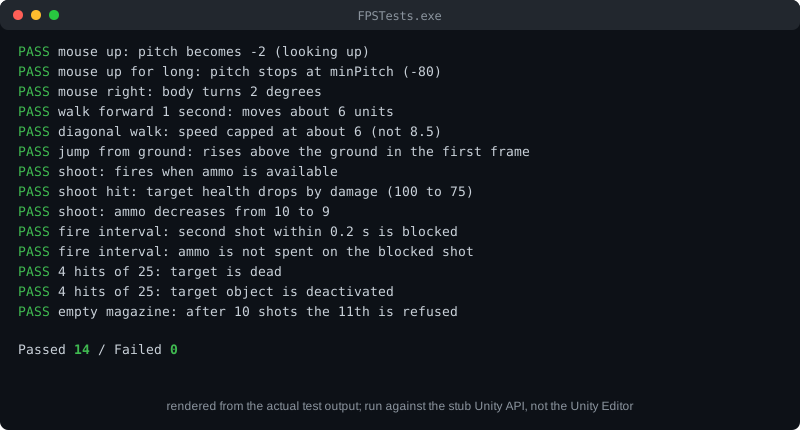
测试框架使用 Unity API 模拟库(`UnityStubs.cs`,完整内容见泰语版本)以及测试文件 `FPSTests.cs`。测试内容包括鼠标视角、移动、跳跃、射击、射击间隔、弹药上限和目标死亡。
编译与运行:
1. 创建 `build` 文件夹,把 `UnityStubs.cs`、`FPSTests.cs` 和四个脚本复制进去。
2. 只在副本中删除 `using UnityEngine;` 这一行。Unity 项目中的真实脚本应保留该行。
3. 使用较新的 C# 编译器编译(例如 `csc -langversion:latest -out:FPSTests.exe *.cs`),然后运行 `FPSTests.exe`。
测试结果
PASS  mouse up: pitch becomes -2 (looking up)
PASS  mouse up for long: pitch stops at minPitch (-80)
PASS  mouse right: body turns 2 degrees
PASS  walk forward 1 second: moves about 6 units
PASS  diagonal walk: speed capped at about 6 (not 8.5)
PASS  jump from ground: rises above the ground in the first frame
PASS  shoot: fires when ammo is available
PASS  shoot hit: target health drops by damage (100 to 75)
PASS  shoot: ammo decreases from 10 to 9
PASS  fire interval: second shot within 0.2 s is blocked
PASS  fire interval: ammo is not spent on the blocked shot
PASS  4 hits of 25: target is dead
PASS  4 hits of 25: target object is deactivated
PASS  empty magazine: after 10 shots the 11th is refused

Passed 14 / Failed 0
这些结果来自模拟库,而不是 Unity 本身。物理碰撞、动画和真实的摄像机表现,仍需在编辑器中按 Play 进行检查。
第 8 步:在编辑器中测试
按 **Play** 后检查:
- 移动鼠标,摄像机左右转动,上下俯仰,但不会超过 -80 或 80 度。
- 按 W、A、S、D,角色朝面对的方向移动。
- 按空格,角色跳跃。
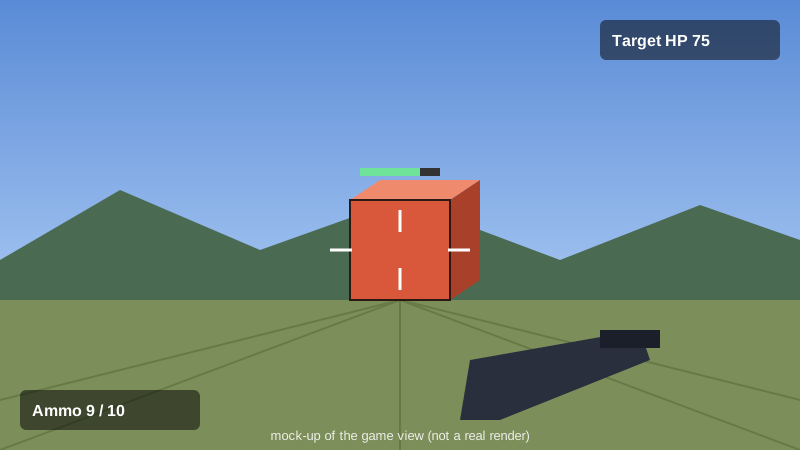
- 左键开火。目标每次被击中都会掉血,被击中四次后消失。
- 射击十次后,再点击将不会发射。
常见问题
- **摄像机不转动:** 检查 Active Input Handling 设置,并确认 `MouseLook` 的 Body 栏中是 `Player`。
- **角色穿墙:** 检查墙壁是否有碰撞体,以及 Character Controller 是否与角色大小匹配。
- **射击没有命中:** 检查 Muzzle 是否朝前(Z 轴),目标是否同时有碰撞体和 `Target` 组件。
- **Mathf.Max 报错:** 不要对 int 变量使用 `Mathf.Max`,改用文章中的写法。
总结
FPS 主要包括四个系统:摄像机视角、移动、射线射击,以及带血量的目标。每个系统都是可以单独测试的小脚本。测试在运行游戏之前就发现了编译错误,节省了后续的调试时间。下一步可以添加会移动的敌人、屏幕上的弹药计数和换弹功能。