使用 YOLO 进行目标检测:在图像和视频中找到物体
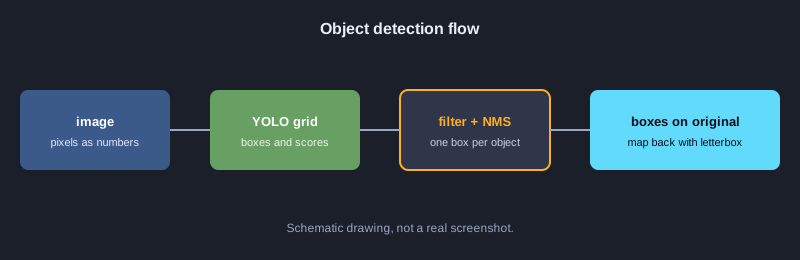
目标检测要找出图像中有哪些物体以及它们的位置。输出是带有类别名称和置信度的边界框。YOLO 系列模型的速度足以用于视频。本文讲解其背后的原理:框的坐标、IoU、NMS、网格单元的解码、letterbox 缩放,以及用 precision、recall 和 AP 衡量效果。所有示例都是只使用标准库的 JavaScript,无需下载模型即可直接运行。
需要准备的东西
需要 Node.js 18 或更高版本以及 JavaScript 基础。用 node 文件名.js 运行每个示例,无需安装额外的包。若要用 YOLO 模型对真实图像做推理,需要 Python 和 ultralytics 库。本文的测试环境没有运行这部分,因此只在后续步骤中介绍。
示意图
示例 1: 图像就是数字的数组
数字图像是像素值的网格,所以模型处理的是数字。本例构建一个 4x4 的黑白图像,并统计较亮的像素。
// ภาพขาวดำ 4x4 เก็บเป็นอาร์เรย์ของค่าความสว่าง 0-255
const image = [
  [0, 0, 255, 255],
  [0, 0, 255, 255],
  [0, 0, 0, 0],
  [0, 0, 0, 0],
];
const height = image.length;
const width = image[0].length;
console.log(`ขนาดภาพ: กว้าง ${width} x สูง ${height}`);
let bright = 0;
for (const row of image) for (const p of row) if (p > 127) bright++;
console.log("จำนวนพิกเซลสว่าง:", bright);
console.log("ค่าพิกเซลมุมบนซ้าย:", image[0][0]);
**实际输出**
ขนาดภาพ: กว้าง 4 x สูง 4
จำนวนพิกเซลสว่าง: 4
ค่าพิกเซลมุมบนซ้าย: 0
示例 2: 转换框的格式
YOLO 返回中心点以及宽高(cx, cy, w, h)。绘制和计算 IoU 通常需要左上角和右下角坐标(x1, y1, x2, y2)。
// โมเดล YOLO คืนกรอบเป็น (cx, cy, w, h) แต่การวาดและคำนวณมักใช้ (x1, y1, x2, y2)
function xywhToXyxy([cx, cy, w, h]) {
  return [cx - w / 2, cy - h / 2, cx + w / 2, cy + h / 2];
}
const box = [320, 240, 100, 50];
const [x1, y1, x2, y2] = xywhToXyxy(box);
console.log("มุมบนซ้าย:", x1, y1);
console.log("มุมล่างขวา:", x2, y2);
console.log("กว้าง:", x2 - x1, "สูง:", y2 - y1);
**实际输出**
มุมบนซ้าย: 270 215
มุมล่างขวา: 370 265
กว้าง: 100 สูง: 50
示例 3: 用 IoU 衡量框的重叠
IoU 是重叠面积除以总面积,取值在 0 到 1 之间。1 表示两个框完全相同。
// IoU = พื้นที่ที่ซ้อนกัน / พื้นที่รวมของทั้งสองกรอบ
function area([x1, y1, x2, y2]) {
  return Math.max(0, x2 - x1) * Math.max(0, y2 - y1);
}
function iou(a, b) {
  const ix1 = Math.max(a[0], b[0]);
  const iy1 = Math.max(a[1], b[1]);
  const ix2 = Math.min(a[2], b[2]);
  const iy2 = Math.min(a[3], b[3]);
  const inter = Math.max(0, ix2 - ix1) * Math.max(0, iy2 - iy1);
  return inter / (area(a) + area(b) - inter);
}
const a = [0, 0, 100, 100];
console.log("กรอบเดียวกัน:", iou(a, a).toFixed(2));
console.log("ซ้อนกันหนึ่งในสาม:", iou(a, [50, 0, 150, 100]).toFixed(2));
console.log("ไม่ซ้อนกัน:", iou(a, [200, 200, 300, 300]).toFixed(2));
**实际输出**
กรอบเดียวกัน: 1.00
ซ้อนกันหนึ่งในสาม: 0.33
ไม่ซ้อนกัน: 0.00
示例 4: 按置信度过滤
模型会预测大量的框。置信度低于阈值的框会在下一步之前被丢弃。
// กรองกรอบที่มั่นใจน้อยออกก่อน ด้วยเกณฑ์ความมั่นใจ (confidence threshold)
const detections = [
  { label: "car", score: 0.94, box: [40, 60, 180, 140] },
  { label: "car", score: 0.31, box: [200, 70, 260, 130] },
  { label: "person", score: 0.88, box: [300, 50, 340, 170] },
  { label: "dog", score: 0.12, box: [10, 150, 60, 200] },
];
const THRESHOLD = 0.5;
const kept = detections.filter(d => d.score >= THRESHOLD);
console.log(`เหลือ ${kept.length} จาก ${detections.length} กรอบ (เกณฑ์ ${THRESHOLD})`);
for (const d of kept) console.log(d.label, d.score.toFixed(2));
**实际输出**
เหลือ 2 จาก 4 กรอบ (เกณฑ์ 0.5)
car 0.94
person 0.88
示例 5: 非极大值抑制(NMS)
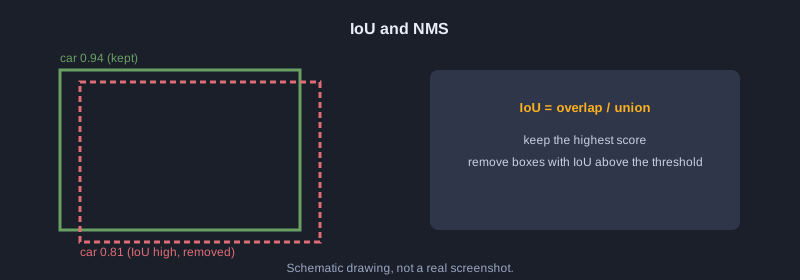
NMS 按置信度排序,保留最高的框,并删除与它 IoU 较大的其他框。结果是每个物体只剩一个框。
// Non-Maximum Suppression: เก็บกรอบที่มั่นใจสุด และตัดกรอบที่ซ้อนทับกันมากออก
function iou(a, b) {
  const ix1 = Math.max(a[0], b[0]), iy1 = Math.max(a[1], b[1]);
  const ix2 = Math.min(a[2], b[2]), iy2 = Math.min(a[3], b[3]);
  const inter = Math.max(0, ix2 - ix1) * Math.max(0, iy2 - iy1);
  const areaA = (a[2] - a[0]) * (a[3] - a[1]);
  const areaB = (b[2] - b[0]) * (b[3] - b[1]);
  return inter / (areaA + areaB - inter);
}
function nms(dets, iouThreshold) {
  const sorted = [...dets].sort((p, q) => q.score - p.score);
  const keep = [];
  for (const d of sorted) {
    if (keep.every(k => iou(k.box, d.box) < iouThreshold)) keep.push(d);
  }
  return keep;
}
const dets = [
  { label: "car", score: 0.94, box: [40, 60, 180, 140] },
  { label: "car", score: 0.81, box: [45, 62, 185, 142] },
  { label: "car", score: 0.67, box: [200, 70, 260, 130] },
  { label: "person", score: 0.88, box: [300, 50, 340, 170] },
];
const result = nms(dets, 0.5);
console.log(`ก่อน NMS ${dets.length} กรอบ -> หลัง NMS ${result.length} กรอบ`);
for (const d of result) console.log(d.label, d.score.toFixed(2));
**实际输出**
ก่อน NMS 4 กรอบ -> หลัง NMS 3 กรอบ
car 0.94
person 0.88
car 0.67
示例 6: 按类别进行 NMS
如果把所有类别一起做 NMS,重叠的汽车和狗可能会丢掉一个框。应当对每个类别分别执行。
// NMS แยกตามคลาส: กรอบของคนละคลาสที่ซ้อนกันยังเก็บไว้ทั้งคู่
function iou(a, b) {
  const ix1 = Math.max(a[0], b[0]), iy1 = Math.max(a[1], b[1]);
  const ix2 = Math.min(a[2], b[2]), iy2 = Math.min(a[3], b[3]);
  const inter = Math.max(0, ix2 - ix1) * Math.max(0, iy2 - iy1);
  return inter / ((a[2] - a[0]) * (a[3] - a[1]) + (b[2] - b[0]) * (b[3] - b[1]) - inter);
}
function nms(dets, iouThreshold) {
  const sorted = [...dets].sort((p, q) => q.score - p.score);
  const keep = [];
  for (const d of sorted) if (keep.every(k => iou(k.box, d.box) < iouThreshold)) keep.push(d);
  return keep;
}
function nmsPerClass(dets, iouThreshold) {
  const groups = {};
  for (const d of dets) (groups[d.label] = groups[d.label] || []).push(d);
  return Object.values(groups).flatMap(g => nms(g, iouThreshold));
}
const dets = [
  { label: "car", score: 0.94, box: [40, 60, 180, 140] },
  { label: "dog", score: 0.90, box: [50, 65, 170, 150] },
  { label: "car", score: 0.85, box: [45, 62, 185, 142] },
];
const result = nmsPerClass(dets, 0.5);
console.log("หลัง NMS แยกคลาส:");
for (const d of result) console.log(d.label, d.score.toFixed(2));
**实际输出**
หลัง NMS แยกคลาส:
car 0.94
dog 0.90
示例 7: 解码网格单元
YOLO 把图像分成网格,每个单元预测原始数值。中心点要用 sigmoid,宽高要用 exp,才能得到以像素为单位的坐标。
// YOLO แบ่งภาพเป็นตาราง แต่ละเซลล์ทำนายกรอบออกมา ค่าดิบต้องแปลงด้วย sigmoid และ exp
const sigmoid = x => 1 / (1 + Math.exp(-x));
const STRIDE = 100; // ภาพ 400x400 แบ่งเป็น 4x4 เซลล์ ขนาดเซลล์ละ 100 พิกเซล
const raw = [
  { name: "เซลล์ A", row: 1, col: 2, tx: 0.2, ty: -0.4, tw: 0.0, th: 0.5, obj: 3.0 },
  { name: "เซลล์ B", row: 3, col: 0, tx: -1.5, ty: 1.0, tw: -0.3, th: 0.1, obj: -2.0 },
];
for (const r of raw) {
  const cx = (r.col + sigmoid(r.tx)) * STRIDE;
  const cy = (r.row + sigmoid(r.ty)) * STRIDE;
  const w = Math.exp(r.tw) * STRIDE;
  const h = Math.exp(r.th) * STRIDE;
  const conf = sigmoid(r.obj);
  console.log(`${r.name}: cx=${cx.toFixed(1)} cy=${cy.toFixed(1)} w=${w.toFixed(1)} h=${h.toFixed(1)} conf=${conf.toFixed(2)}`);
}
**实际输出**
เซลล์ A: cx=255.0 cy=140.1 w=100.0 h=164.9 conf=0.95
เซลล์ B: cx=18.2 cy=373.1 w=74.1 h=110.5 conf=0.12
示例 8: 用 Softmax 选择类别
原始的类别分数被转换为概率,总和为 100%。概率最高的类别就是预测结果。
// แปลงคะแนนดิบของแต่ละคลาสเป็นความน่าจะเป็นด้วย softmax แล้วเลือกคลาสที่สูงสุด
const names = ["person", "car", "dog"];
const logits = [1.2, 3.1, 0.4];
const exps = logits.map(Math.exp);
const sum = exps.reduce((a, b) => a + b, 0);
const probs = exps.map(e => e / sum);
probs.forEach((p, i) => console.log(names[i].padEnd(8), (p * 100).toFixed(1) + "%"));
const best = probs.indexOf(Math.max(...probs));
console.log("ผลทาย:", names[best]);
**实际输出**
person   12.3%
car      82.2%
dog      5.5%
ผลทาย: car
示例 9: Letterbox 与坐标还原
模型接受固定尺寸的输入,例如 640x640,因此需要保持宽高比缩放并填充边缘。检测完成后要去掉填充,再除以缩放比例,还原到原图尺寸。
// โมเดลรับภาพขนาดคงที่ 640x640 จึงต้องย่อโดยรักษาสัดส่วน แล้วเติมขอบดำ (letterbox)
// และต้องแปลงพิกัดกรอบกลับไปยังขนาดภาพจริง
const orig = { w: 1280, h: 720 };
const INPUT = 640;
const scale = Math.min(INPUT / orig.w, INPUT / orig.h);
const newW = Math.round(orig.w * scale);
const newH = Math.round(orig.h * scale);
const padX = (INPUT - newW) / 2;
const padY = (INPUT - newH) / 2;
console.log(`scale=${scale} ขนาดใหม่=${newW}x${newH} padX=${padX} padY=${padY}`);
// กรอบที่โมเดลทำนายในพื้นที่ 640x640
const boxInInput = [100, 200, 300, 400];
const back = [
  (boxInInput[0] - padX) / scale,
  (boxInInput[1] - padY) / scale,
  (boxInInput[2] - padX) / scale,
  (boxInInput[3] - padY) / scale,
];
console.log("กรอบในภาพจริง:", back.map(v => Math.round(v)));
**实际输出**
scale=0.5 ขนาดใหม่=640x360 padX=0 padY=140
กรอบในภาพจริง: [ 200, 120, 600, 520 ]
示例 10: 用字符绘制框
本例在 40x12 个字符的画布上绘制框,无需图形库即可看到物体的位置。
// วาดกรอบลงบนผืนผ้าใบตัวอักษร เพื่อดูผลการตรวจจับโดยไม่ต้องใช้ไลบรารีกราฟิก
// ภาพจริง 400x240 พิกเซล ย่อเป็นตาราง 40x12 ช่อง (ช่องละ 10x20 พิกเซล)
const COLS = 40, ROWS = 12, SX = 10, SY = 20;
const canvas = Array.from({ length: ROWS }, () => Array(COLS).fill("."));
const dets = [
  { label: "car", box: [40, 60, 180, 140] },
  { label: "person", box: [300, 50, 340, 170] },
];
for (const d of dets) {
  const [x1, y1, x2, y2] = d.box;
  const c1 = Math.floor(x1 / SX), c2 = Math.floor(x2 / SX);
  const r1 = Math.floor(y1 / SY), r2 = Math.floor(y2 / SY);
  for (let c = c1; c <= c2; c++) { canvas[r1][c] = "-"; canvas[r2][c] = "-"; }
  for (let r = r1; r <= r2; r++) { canvas[r][c1] = "|"; canvas[r][c2] = "|"; }
  canvas[r1][c1] = d.label[0].toUpperCase();
}
console.log(canvas.map(row => row.join("")).join("\n"));
**实际输出**
........................................
........................................
..............................P---|.....
....C-------------|...........|...|.....
....|.............|...........|...|.....
....|.............|...........|...|.....
....|.............|...........|...|.....
....|-------------|...........|...|.....
..............................|---|.....
........................................
........................................
........................................
示例 11: 将结果输出为 SVG
SVG 是可以由代码生成的文本格式,用于在图像上叠加框和标签,任何浏览器都能打开。
// สร้างไฟล์ SVG ซ้อนกรอบบนภาพ เพื่อนำไปแสดงหรือบันทึกผลการตรวจจับ
const dets = [
  { label: "car", score: 0.94, box: [40, 60, 180, 140] },
  { label: "person", score: 0.88, box: [300, 50, 340, 170] },
];
const lines = ['<svg xmlns="http://www.w3.org/2000/svg" width="400" height="240">'];
lines.push('<rect width="400" height="240" fill="#1b1f2a"/>');
for (const d of dets) {
  const [x1, y1, x2, y2] = d.box;
  lines.push(`<rect x="${x1}" y="${y1}" width="${x2 - x1}" height="${y2 - y1}" fill="none" stroke="#ffb020" stroke-width="2"/>`);
  lines.push(`<text x="${x1}" y="${y1 - 4}" font-size="12" fill="#ffb020">${d.label} ${d.score.toFixed(2)}</text>`);
}
lines.push("</svg>");
const svg = lines.join("\n");
console.log(svg);
console.log("จำนวนบรรทัด:", lines.length, "ความยาว:", svg.length, "ตัวอักษร");
**实际输出**
<svg xmlns="http://www.w3.org/2000/svg" width="400" height="240">
<rect width="400" height="240" fill="#1b1f2a"/>
<rect x="40" y="60" width="140" height="80" fill="none" stroke="#ffb020" stroke-width="2"/>
<text x="40" y="56" font-size="12" fill="#ffb020">car 0.94</text>
<rect x="300" y="50" width="40" height="120" fill="none" stroke="#ffb020" stroke-width="2"/>
<text x="300" y="46" font-size="12" fill="#ffb020">person 0.88</text>
</svg>
จำนวนบรรทัด: 7 ความยาว: 441 ตัวอักษร
示例 12: Precision 与 Recall
将预测与标准答案进行比较。TP 是正确检出,FP 是误报,FN 是漏检。Precision 是预测中正确的比例,Recall 是真实物体中被找到的比例。
// เทียบผลทายกับเฉลย: กรอบที่ IoU >= 0.5 และคลาสตรงกันคือ TP ที่เหลือคือ FP
// เฉลยที่ยังไม่ถูกทายคือ FN
function iou(a, b) {
  const ix1 = Math.max(a[0], b[0]), iy1 = Math.max(a[1], b[1]);
  const ix2 = Math.min(a[2], b[2]), iy2 = Math.min(a[3], b[3]);
  const inter = Math.max(0, ix2 - ix1) * Math.max(0, iy2 - iy1);
  return inter / ((a[2] - a[0]) * (a[3] - a[1]) + (b[2] - b[0]) * (b[3] - b[1]) - inter);
}
const gts = [
  { label: "car", box: [40, 60, 180, 140] },
  { label: "person", box: [300, 50, 340, 170] },
  { label: "dog", box: [10, 150, 60, 200] },
];
const preds = [
  { label: "car", score: 0.94, box: [40, 60, 180, 140] },
  { label: "person", score: 0.88, box: [305, 55, 345, 175] },
  { label: "car", score: 0.40, box: [200, 70, 260, 130] },
];
const used = new Array(gts.length).fill(false);
let tp = 0, fp = 0;
for (const p of [...preds].sort((a, b) => b.score - a.score)) {
  let best = -1, bestIou = 0.5;
  gts.forEach((g, i) => {
    const v = iou(p.box, g.box);
    if (!used[i] && g.label === p.label && v >= bestIou) { bestIou = v; best = i; }
  });
  if (best >= 0) { used[best] = true; tp++; } else fp++;
  console.log(`${p.label.padEnd(7)} ${p.score.toFixed(2)} ${best >= 0 ? "TP" : "FP"}`);
}
const fn = gts.length - tp;
console.log(`TP=${tp} FP=${fp} FN=${fn}`);
console.log("precision =", (tp / (tp + fp)).toFixed(2));
console.log("recall =", (tp / (tp + fn)).toFixed(2));
**实际输出**
car     0.94 TP
person  0.88 TP
car     0.40 FP
TP=2 FP=1 FN=1
precision = 0.67
recall = 0.67
示例 13: 平均精度(AP)
AP 是按置信度排序后的 precision-recall 曲线下的面积,可以用一个数字比较不同模型。
// Average Precision (AP): สรุปกราฟ precision-recall เป็นตัวเลขเดียว
// เรียงกรอบตามความมั่นใจ แล้วคำนวณ precision และ recall สะสมทีละกรอบ
function iou(a, b) {
  const ix1 = Math.max(a[0], b[0]), iy1 = Math.max(a[1], b[1]);
  const ix2 = Math.min(a[2], b[2]), iy2 = Math.min(a[3], b[3]);
  const inter = Math.max(0, ix2 - ix1) * Math.max(0, iy2 - iy1);
  return inter / ((a[2] - a[0]) * (a[3] - a[1]) + (b[2] - b[0]) * (b[3] - b[1]) - inter);
}
const gts = [
  { label: "car", box: [40, 60, 180, 140] },
  { label: "person", box: [300, 50, 340, 170] },
  { label: "dog", box: [10, 150, 60, 200] },
];
const preds = [
  { label: "car", score: 0.94, box: [40, 60, 180, 140] },
  { label: "person", score: 0.88, box: [305, 55, 345, 175] },
  { label: "car", score: 0.40, box: [200, 70, 260, 130] },
  { label: "dog", score: 0.30, box: [12, 152, 62, 202] },
];
const sorted = [...preds].sort((a, b) => b.score - a.score);
const used = new Array(gts.length).fill(false);
const flags = sorted.map(p => {
  let best = -1, bestIou = 0.5;
  gts.forEach((g, i) => {
    const v = iou(p.box, g.box);
    if (!used[i] && g.label === p.label && v >= bestIou) { bestIou = v; best = i; }
  });
  if (best >= 0) { used[best] = true; return 1; }
  return 0;
});
let tp = 0, fp = 0;
const precision = [], recall = [];
flags.forEach(f => {
  if (f) tp++; else fp++;
  precision.push(tp / (tp + fp));
  recall.push(tp / gts.length);
});
for (let i = precision.length - 2; i >= 0; i--) precision[i] = Math.max(precision[i], precision[i + 1]);
let ap = 0, prevRecall = 0;
recall.forEach((r, i) => { ap += (r - prevRecall) * precision[i]; prevRecall = r; });
sorted.forEach((p, i) => console.log(`${p.score.toFixed(2)} ${flags[i] ? "TP" : "FP"} recall=${recall[i].toFixed(2)} precision=${precision[i].toFixed(2)}`));
console.log("AP =", ap.toFixed(3));
**实际输出**
0.94 TP recall=0.33 precision=1.00
0.88 TP recall=0.67 precision=1.00
0.40 FP recall=0.67 precision=0.75
0.30 TP recall=1.00 precision=0.75
AP = 0.917
示例 14: 完整的流水线
把各步骤组合在一起:解码原始输出、过滤、NMS,并把框还原到原始图像。
// ตัวอย่างรวม: ถอดผลดิบ -> กรองด้วยเกณฑ์ -> NMS -> แปลงพิกัดกลับไปยังภาพจริง
const sigmoid = x => 1 / (1 + Math.exp(-x));
const NAMES = ["person", "car", "dog"];
const STRIDE = 100, INPUT = 400;
const ORIG = { w: 1280, h: 720 };
const scale = Math.min(INPUT / ORIG.w, INPUT / ORIG.h);
const padX = (INPUT - ORIG.w * scale) / 2;
const padY = (INPUT - ORIG.h * scale) / 2;
const raw = [
  { row: 1, col: 1, tx: 0.1, ty: -0.2, tw: 0.2, th: 0.0, obj: 2.5, cls: [-1.0, 3.0, 0.2] },
  { row: 1, col: 2, tx: 0.0, ty: 0.1, tw: 0.1, th: 0.2, obj: 2.0, cls: [-0.5, 2.8, 0.0] },
  { row: 2, col: 0, tx: 0.3, ty: 0.0, tw: -0.4, th: -0.2, obj: 1.5, cls: [2.5, -1.0, 0.1] },
  { row: 3, col: 3, tx: -0.5, ty: 0.2, tw: 0.0, th: 0.1, obj: -2.0, cls: [0.0, 0.0, 3.0] },
];
const dets = raw.map(r => {
  const cls = r.cls.map(sigmoid);
  const best = cls.indexOf(Math.max(...cls));
  const cx = (r.col + sigmoid(r.tx)) * STRIDE;
  const cy = (r.row + sigmoid(r.ty)) * STRIDE;
  const w = Math.exp(r.tw) * STRIDE;
  const h = Math.exp(r.th) * STRIDE;
  const score = sigmoid(r.obj) * cls[best];
  return { label: NAMES[best], score, box: [cx - w / 2, cy - h / 2, cx + w / 2, cy + h / 2] };
});
const kept = dets.filter(d => d.score >= 0.5);
console.log("หลังกรองด้วยเกณฑ์ 0.5:", kept.length, "กรอบ");
function iou(a, b) {
  const ix1 = Math.max(a[0], b[0]), iy1 = Math.max(a[1], b[1]);
  const ix2 = Math.min(a[2], b[2]), iy2 = Math.min(a[3], b[3]);
  const inter = Math.max(0, ix2 - ix1) * Math.max(0, iy2 - iy1);
  return inter / ((a[2] - a[0]) * (a[3] - a[1]) + (b[2] - b[0]) * (b[3] - b[1]) - inter);
}
const final = [];
for (const d of [...kept].sort((a, b) => b.score - a.score)) {
  if (final.every(f => f.label !== d.label || iou(f.box, d.box) < 0.5)) final.push(d);
}
console.log("หลัง NMS:", final.length, "กรอบ");
for (const d of final) {
  const [x1, y1, x2, y2] = d.box.map((v, i) => (v - (i % 2 === 0 ? padX : padY)) / scale);
  console.log(`${d.label.padEnd(7)} ${d.score.toFixed(2)} [${[x1, y1, x2, y2].map(v => Math.round(v)).join(", ")}]`);
}
**实际输出**
หลังกรองด้วยเกณฑ์ 0.5: 3 กรอบ
หลัง NMS: 3 กรอบ
car     0.88 [293, 24, 683, 344]
car     0.83 [623, 13, 977, 403]
person  0.76 [77, 389, 291, 651]
示例 15: 统计视频中的物体
视频就是连续的多帧。本例统计每一帧中的类别,并用最近三帧中出现最多的类别来减少闪烁。
// วิดีโอคือภาพต่อกันหลายเฟรม ตรวจทุกเฟรมแล้วนับคลาส
// การดูค่าจากหลายเฟรมที่อยู่ใกล้กันช่วยลดการกระพริบของผลทาย
const frames = [
  ["car", "car", "person"],
  ["car", "person", "person"],
  ["car", "car", "person"],
  ["car", "car"],
  ["person", "car", "car"],
];
frames.forEach((objs, i) => {
  const counts = {};
  for (const o of objs) counts[o] = (counts[o] || 0) + 1;
  console.log(`เฟรม ${i + 1}:`, JSON.stringify(counts));
});
// ใช้คลาสที่ปรากฏบ่อยที่สุดในหน้าต่าง 3 เฟรม
function majority(window) {
  const c = {};
  for (const x of window) c[x] = (c[x] || 0) + 1;
  return Object.entries(c).sort((a, b) => b[1] - a[1])[0][0];
}
const labels = frames.map(f => f[0]);
const smoothed = labels.map((_, i) => majority(labels.slice(Math.max(0, i - 2), i + 1)));
console.log("ป้ายรายเฟรม:", labels.join(" "));
console.log("หลังดูย้อนหลัง 3 เฟรม:", smoothed.join(" "));
**实际输出**
เฟรม 1: {"car":2,"person":1}
เฟรม 2: {"car":1,"person":2}
เฟรม 3: {"car":2,"person":1}
เฟรม 4: {"car":2}
เฟรม 5: {"person":1,"car":2}
ป้ายรายเฟรม: car car car car person
หลังดูย้อนหลัง 3 เฟรม: car car car car car
下一步
要运行真实的模型,请安装 Python 3.12,执行 pip install ultralytics,然后加载训练好的模型,例如 YOLO('yolo11n.pt')。把图像传入模型即可得到框、类别和置信度。输出格式与本文示例一致,因此 NMS 和坐标转换的逻辑仍然适用。
总结
目标检测在图像中找出物体的框和类别。主要步骤是解码网格输出、按置信度过滤、应用 NMS,再把框还原到原始图像。效果用 precision、recall 和 AP 衡量。本文中的每个输出都来自对示例代码的真实运行。