Angular、Node.js 与 MySQL 全栈开发:从零到专业的 100 个示例
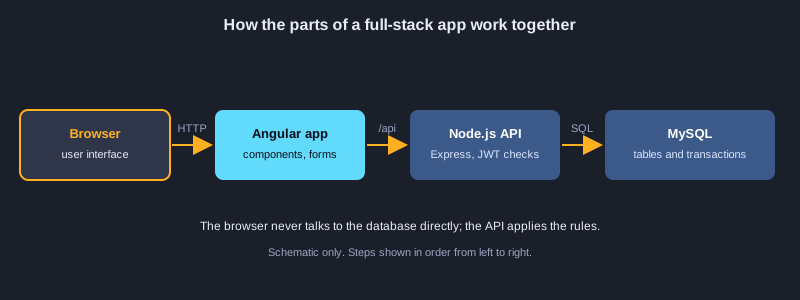
全栈应用由三个必须相互配合的部分组成:用户在浏览器中使用的 Angular 前端、执行业务规则的 Node.js API,以及保证数据安全的 MySQL 数据库。本文通过 100 个示例,把一个空文件夹逐步搭建成一个面向生产环境的小型商店。你将完成项目设置,学习构建 REST API 所需的 Node.js 和 Express 基础,设计 MySQL 表并编写安全的查询,使用事务把 API 连接到数据库,验证输入,用哈希密码和 JWT 令牌实现登录,构建 Angular 组件、服务、路由、表单和拦截器,通过代理和环境文件把一切连接起来,分层测试每一部分,用 Docker 打包整个系统,并为生产环境做好准备。需要坦诚说明:准备本文所用的计算机上没有安装 MySQL,也没有安装 Angular CLI,因此这 100 个示例都没有在这里实际运行。代码遵循当前 Node.js、Express、mysql2、Angular 和 MySQL 的语法,但在依赖它们之前,请你自己运行每个部分。
需要准备的东西
Node.js 20 或更高版本(含 npm)、MySQL 8.4(或用 Docker 在容器中运行)、Angular CLI,以及 Visual Studio Code 等代码编辑器。具备基础的 JavaScript 和 HTML 知识会有帮助。请使用 <strong-password> 之类的占位密码和 shop.example.com 之类的占位域名,切勿提交真实的 .env 文件,也不要把真实凭据粘贴到代码或命令中。
如何使用示例
bash 示例使用 npm、Angular CLI 和 Docker。JavaScript 与 TypeScript 示例放入正文指定的 Node.js 与 Angular 项目文件中。SQL 示例在 MySQL 8.4 中运行,HTML 示例放入 Angular 模板。
知识点 1: 项目设置
从清晰的结构开始:API 一个文件夹,Angular 应用一个文件夹,数据库脚本一个文件夹。良好的结构让每个部分都便于测试、部署,也便于向新人解释。
三个部分,一个仓库
把 API、Web 应用和数据库脚本放在同一个仓库中,这样一次修改就能同时更新三个部分。每个部分都有自己的包文件和命令。
工具与版本
首先检查 Node.js、npm 和 MySQL。推荐使用 Node.js 20 或更高版本,因为它内置了测试运行器和现代的 fetch。Angular CLI 负责生成代码并运行开发服务器。
机密不进入 Git
密码和签名密钥应放在列入 .gitignore 的 .env 文件中。提交一个带占位值的示例文件,让其他人知道需要哪些设置。
示意图
示例 1: 检查工具
确认已安装 Node.js、npm 和 MySQL。
node --version
npm --version
mysql --version
*此示例未在本机运行,因为准备本文的计算机没有安装 MySQL 或 Angular CLI。*
示例 2: 创建项目文件夹
把 API、Web 应用和数据库分开。
mkdir shop-fullstack && cd shop-fullstack
mkdir api web db
git init
*此示例未在本机运行,因为准备本文的计算机没有安装 MySQL 或 Angular CLI。*
示例 3: 设置 Node.js API
安装 Express、MySQL 驱动和 dotenv。
cd api
npm init -y
npm install express mysql2 dotenv
npm install --save-dev nodemon
*此示例未在本机运行,因为准备本文的计算机没有安装 MySQL 或 Angular CLI。*
示例 4: 安装 Angular CLI
创建带路由的 Angular 前端。
npm install -g @angular/cli
cd ..
ng new web --routing --style=css --skip-git
*此示例未在本机运行,因为准备本文的计算机没有安装 MySQL 或 Angular CLI。*
示例 5: 项目结构
把三个部分放在清晰的文件夹中。
shop-fullstack/
  api/        Node.js + Express + MySQL
  web/        Angular front end
  db/         SQL schema and seed data
  docker-compose.yml
*此示例未在本机运行,因为准备本文的计算机没有安装 MySQL 或 Angular CLI。*
示例 6: 让机密远离 Git
忽略 .env,改为提交示例文件。
cat > .gitignore <<'EOF'
node_modules/
.env
dist/
EOF
cat > api/.env.example <<'EOF'
DB_HOST=localhost
DB_USER=shop
DB_PASSWORD=<strong-password>
DB_NAME=shop
PORT=3000
EOF
*此示例未在本机运行,因为准备本文的计算机没有安装 MySQL 或 Angular CLI。*
知识点 2: Node.js 基础
Node.js 在浏览器之外运行 JavaScript。学习模块、异步代码、环境变量,以及每个服务器文件都会用到的少量核心概念。
模块与异步代码
每个文件都是一个模块,导出其他文件需要的内容。服务器端的大部分工作是异步的,因此应使用 Promise 配合 async 和 await,并用 try 和 catch 处理错误,避免一次失败使整个进程崩溃。
来自环境的配置
从 process.env 读取端口和数据库地址等设置。dotenv 包在开发时加载 .env 文件;生产服务器通常由平台提供这些变量。
脚本与事件循环
npm 脚本让团队每个人都使用相同的命令。请记住,一个缓慢的同步操作会阻塞所有请求,因此应把繁重的工作放在请求处理函数之外。
示例 7: 用 Node.js 读取文件
同步读取文件及其取舍。
const fs = require("node:fs");

const text = fs.readFileSync("notes.txt", "utf8");
console.log(text.split("\n").length, "lines");
*此示例未在本机运行,因为准备本文的计算机没有安装 MySQL 或 Angular CLI。*
示例 8: 异步读取文件
用 async 和 await 处理 Promise。
const fs = require("node:fs/promises");

async function main() {
  const text = await fs.readFile("notes.txt", "utf8");
  console.log(text.trim());
}
main().catch(console.error);
*此示例未在本机运行,因为准备本文的计算机没有安装 MySQL 或 Angular CLI。*
示例 9: Node.js 模块
导出函数,并在另一个文件中导入。
// math.js
exports.add = (a, b) => a + b;

// main.js
const { add } = require("./math");
console.log(add(2, 3));
*此示例未在本机运行,因为准备本文的计算机没有安装 MySQL 或 Angular CLI。*
示例 10: 环境变量
用 dotenv 从 .env 读取配置。
require("dotenv").config();

const port = Number(process.env.PORT || 3000);
console.log("port", port);
*此示例未在本机运行,因为准备本文的计算机没有安装 MySQL 或 Angular CLI。*
示例 11: 数组与过滤
用 API 的方式过滤和转换数据。
const orders = [
  { id: 1, total: 120 },
  { id: 2, total: 80 },
  { id: 3, total: 200 },
];
const big = orders.filter((o) => o.total >= 100).map((o) => o.id);
console.log(big); // [1, 3]
*此示例未在本机运行,因为准备本文的计算机没有安装 MySQL 或 Angular CLI。*
示例 12: Promise 与 await
等待工作完成,同时不阻塞服务器。
const wait = (ms) => new Promise((resolve) => setTimeout(resolve, ms));

async function run() {
  console.log("start");
  await wait(500);
  console.log("done after 500 ms");
}
run();
*此示例未在本机运行,因为准备本文的计算机没有安装 MySQL 或 Angular CLI。*
示例 13: 用 try 和 catch 处理错误
处理失败并返回安全的默认值。
async function readConfig(path) {
  try {
    const fs = require("node:fs/promises");
    return JSON.parse(await fs.readFile(path, "utf8"));
  } catch (err) {
    console.error("could not read config:", err.message);
    return {};
  }
}
*此示例未在本机运行,因为准备本文的计算机没有安装 MySQL 或 Angular CLI。*
示例 14: npm 脚本
用一条命令启动、开发和测试 API。
{
  "name": "api",
  "scripts": {
    "start": "node server.js",
    "dev": "nodemon server.js",
    "test": "node --test"
  }
}
*此示例未在本机运行,因为准备本文的计算机没有安装 MySQL 或 Angular CLI。*
知识点 3: Express 构建的 REST API
Express 把 HTTP 方法和路径映射到函数。REST API 用 GET 读取、POST 创建、PUT 或 PATCH 修改、DELETE 删除,并返回前端可以显示的 JSON。
路由、参数与请求体
app.get、app.post 等方法将请求方法与路径匹配。在调用 app.use(express.json()) 之后,从 req.params 读取 URL 参数,从 req.query 读取查询字符串,从 req.body 读取 JSON 请求体。
路由器与中间件
路由器把某一资源的路由放在同一个文件中。中间件会对每个请求按顺序执行,因此它是放置日志、身份验证和错误处理的合适位置。
有意义的状态码
读取成功返回 200,创建资源返回 201,删除且无响应体返回 204,输入错误返回 400,用户未登录返回 401,权限不足返回 403,数据不存在返回 404。
示例 15: 第一个 Express 服务器
几行代码即可响应请求。
const express = require("express");
const app = express();

app.get("/", (req, res) => {
  res.send("Shop API is running");
});

app.listen(3000, () => console.log("listening on http://localhost:3000"));
*此示例未在本机运行,因为准备本文的计算机没有安装 MySQL 或 Angular CLI。*
示例 16: 返回 JSON 的路由
为前端返回结构化数据。
app.get("/api/health", (req, res) => {
  res.json({ status: "ok", time: new Date().toISOString() });
});
*此示例未在本机运行,因为准备本文的计算机没有安装 MySQL 或 Angular CLI。*
示例 17: 路由参数与查询字符串
从 URL 中读取值。
app.get("/api/products/:id", (req, res) => {
  const id = Number(req.params.id);
  const detail = req.query.detail === "1";
  res.json({ id, detail });
});
*此示例未在本机运行,因为准备本文的计算机没有安装 MySQL 或 Angular CLI。*
示例 18: 解析 JSON 请求体
接收来自表单或 Angular 的数据。
app.use(express.json());

app.post("/api/products", (req, res) => {
  const { name, price } = req.body;
  res.status(201).json({ name, price });
});
*此示例未在本机运行,因为准备本文的计算机没有安装 MySQL 或 Angular CLI。*
示例 19: 用路由器组织路由
每个功能放在自己的文件中。
// routes/products.js
const { Router } = require("express");
const router = Router();

router.get("/", (req, res) => res.json([]));
router.get("/:id", (req, res) => res.json({ id: req.params.id }));

module.exports = router;

// server.js
app.use("/api/products", require("./routes/products"));
*此示例未在本机运行,因为准备本文的计算机没有安装 MySQL 或 Angular CLI。*
示例 20: 请求日志中间件
记录方法、路径、状态码和耗时。
app.use((req, res, next) => {
  const started = Date.now();
  res.on("finish", () => {
    console.log(req.method, req.originalUrl, res.statusCode, Date.now() - started, "ms");
  });
  next();
});
*此示例未在本机运行,因为准备本文的计算机没有安装 MySQL 或 Angular CLI。*
示例 21: 集中的错误处理器
让所有路由返回统一的错误格式。
app.use((err, req, res, next) => {
  console.error(err);
  res.status(err.status || 500).json({ error: "Something went wrong" });
});
*此示例未在本机运行,因为准备本文的计算机没有安装 MySQL 或 Angular CLI。*
示例 22: 未知路由返回 404
URL 不存在时清楚地告知。
app.use((req, res) => {
  res.status(404).json({ error: "Not found" });
});
*此示例未在本机运行,因为准备本文的计算机没有安装 MySQL 或 Angular CLI。*
知识点 4: MySQL 基础与 SQL
MySQL 把数据存放在具有类型化列、键和关系的表中。SQL 用于创建、读取、修改和删除行,良好的设计能在代码运行之前就避免许多错误。
数据库、用户与最小权限
为商店创建一个数据库,以及只能读写该数据库的用户。切勿让应用以 root 账户连接,否则一旦密码泄露,整台服务器都会暴露。
表、键与数据类型
为每张表设置主键,选择与数据匹配的类型(例如金额使用 DECIMAL),并使用外键,使订单不能引用不存在的商品。对于不得重复的值(如邮箱地址),使用 UNIQUE。
读取与修改行
带 WHERE、ORDER BY 和 LIMIT 的 SELECT 只返回所需的行。UPDATE 和 DELETE 应始终带有 WHERE 子句,并且最好先用 SELECT 测试,因为缺少条件会修改每一行。
示例 23: 创建数据库和用户
只授予应用所需的权限。
CREATE DATABASE IF NOT EXISTS shop CHARACTER SET utf8mb4 COLLATE utf8mb4_unicode_ci;
CREATE USER IF NOT EXISTS 'shop'@'localhost' IDENTIFIED BY '<strong-password>';
GRANT SELECT, INSERT, UPDATE, DELETE ON shop.* TO 'shop'@'localhost';
*此示例未在本机运行,因为准备本文的计算机没有安装 MySQL 或 Angular CLI。*
示例 24: 创建表
定义列、键和默认值。
USE shop;
CREATE TABLE products (
  id INT UNSIGNED AUTO_INCREMENT PRIMARY KEY,
  name VARCHAR(120) NOT NULL,
  price DECIMAL(10,2) NOT NULL,
  stock INT NOT NULL DEFAULT 0,
  created_at TIMESTAMP DEFAULT CURRENT_TIMESTAMP
);
*此示例未在本机运行,因为准备本文的计算机没有安装 MySQL 或 Angular CLI。*
示例 25: 插入多行数据
用一条语句添加多行。
INSERT INTO products (name, price, stock)
VALUES ('Keyboard', 790.00, 12),
       ('Mouse', 350.00, 30),
       ('Monitor', 5490.00, 4);
*此示例未在本机运行,因为准备本文的计算机没有安装 MySQL 或 Angular CLI。*
示例 26: 带过滤和排序的 SELECT
按顺序只读取需要的行。
SELECT id, name, price
FROM products
WHERE stock > 0
ORDER BY price DESC;
*此示例未在本机运行,因为准备本文的计算机没有安装 MySQL 或 Angular CLI。*
示例 27: 更新一行
用 WHERE 子句修改值。
UPDATE products
SET price = 690.00
WHERE name = 'Keyboard';
*此示例未在本机运行,因为准备本文的计算机没有安装 MySQL 或 Angular CLI。*
示例 28: 安全地删除一行
删除时始终限定为预期的行。
DELETE FROM products
WHERE id = 3
LIMIT 1;
*此示例未在本机运行,因为准备本文的计算机没有安装 MySQL 或 Angular CLI。*
示例 29: 连接与聚合
用 GROUP BY 统计每个商品的销量。
CREATE TABLE orders (
  id INT UNSIGNED AUTO_INCREMENT PRIMARY KEY,
  product_id INT UNSIGNED NOT NULL,
  quantity INT NOT NULL,
  ordered_at TIMESTAMP DEFAULT CURRENT_TIMESTAMP,
  FOREIGN KEY (product_id) REFERENCES products(id)
);
SELECT p.name, SUM(o.quantity) AS sold
FROM orders o
JOIN products p ON p.id = o.product_id
GROUP BY p.name
ORDER BY sold DESC;
*此示例未在本机运行,因为准备本文的计算机没有安装 MySQL 或 Angular CLI。*
示例 30: 为被搜索的列建立索引
加快查找,并用 EXPLAIN 检查执行计划。
CREATE INDEX idx_products_name ON products (name);
EXPLAIN SELECT * FROM products WHERE name = 'Mouse';
*此示例未在本机运行,因为准备本文的计算机没有安装 MySQL 或 Angular CLI。*
知识点 5: 从 Node.js 访问数据
API 通过连接池与 MySQL 通信。参数化查询使用户输入与 SQL 分离,事务使相关的修改保持一致,分页使响应保持较小的体积。
连接池
连接池保存一组已打开的连接,把其中一个分配给每个请求,用完后归还。在启动时创建一次并重复使用,而不是为每个请求都打开新的连接。
占位符防止 SQL 注入
切勿把用户输入拼接进 SQL 文本。在查询中写 ?,并把值放在数组中传入,驱动程序会对其进行转义。这一个习惯就能防止网络上最常见的安全漏洞之一。
事务与分页
事务把多条语句组合在一起,要么全部成功,要么全部不生效。当订单既要减少库存又要创建订单记录时,这一点尤为重要。使用 LIMIT 和 OFFSET,或者更好的 keyset 方式,每次返回一页。
示例 31: 连接池
复用连接,而不是每个请求都新建。
const mysql = require("mysql2/promise");

const pool = mysql.createPool({
  host: process.env.DB_HOST,
  user: process.env.DB_USER,
  password: process.env.DB_PASSWORD,
  database: process.env.DB_NAME,
  waitForConnections: true,
  connectionLimit: 10,
});
module.exports = pool;
*此示例未在本机运行,因为准备本文的计算机没有安装 MySQL 或 Angular CLI。*
示例 32: 从 Node.js 查询
在路由中发送 SQL 并返回数据行。
const pool = require("./db");

app.get("/api/products", async (req, res, next) => {
  try {
    const [rows] = await pool.query("SELECT id, name, price, stock FROM products ORDER BY name");
    res.json(rows);
  } catch (err) {
    next(err);
  }
});
*此示例未在本机运行,因为准备本文的计算机没有安装 MySQL 或 Angular CLI。*
示例 33: 用占位符防止 SQL 注入
不要把用户输入拼接进 SQL 文本。
// Unsafe: never build SQL by joining user input
// const [rows] = await pool.query("SELECT * FROM products WHERE name = '" + name + "'");

// Safe: the driver escapes the value
const [rows] = await pool.query("SELECT * FROM products WHERE name = ?", [name]);
*此示例未在本机运行,因为准备本文的计算机没有安装 MySQL 或 Angular CLI。*
示例 34: 插入并返回新 id
创建数据行并把 id 告知客户端。
app.post("/api/products", async (req, res, next) => {
  try {
    const { name, price, stock = 0 } = req.body;
    const [result] = await pool.execute(
      "INSERT INTO products (name, price, stock) VALUES (?, ?, ?)",
      [name, price, stock]
    );
    res.status(201).json({ id: result.insertId, name, price, stock });
  } catch (err) {
    next(err);
  }
});
*此示例未在本机运行,因为准备本文的计算机没有安装 MySQL 或 Angular CLI。*
示例 35: 带检查的更新
没有匹配行时返回 404。
app.put("/api/products/:id", async (req, res, next) => {
  try {
    const { price, stock } = req.body;
    const [result] = await pool.execute(
      "UPDATE products SET price = ?, stock = ? WHERE id = ?",
      [price, stock, req.params.id]
    );
    if (result.affectedRows === 0) return res.status(404).json({ error: "Not found" });
    res.json({ updated: true });
  } catch (err) {
    next(err);
  }
});
*此示例未在本机运行,因为准备本文的计算机没有安装 MySQL 或 Angular CLI。*
示例 36: 带检查的删除
根据结果返回 204 或 404。
app.delete("/api/products/:id", async (req, res, next) => {
  try {
    const [result] = await pool.execute("DELETE FROM products WHERE id = ?", [req.params.id]);
    res.status(result.affectedRows ? 204 : 404).end();
  } catch (err) {
    next(err);
  }
});
*此示例未在本机运行,因为准备本文的计算机没有安装 MySQL 或 Angular CLI。*
示例 37: 事务
同时保留库存并创建订单,要么全部成功,要么全部不做。
async function placeOrder(productId, quantity) {
  const conn = await pool.getConnection();
  try {
    await conn.beginTransaction();
    const [stock] = await conn.execute("SELECT stock FROM products WHERE id = ? FOR UPDATE", [productId]);
    if (stock[0].stock < quantity) throw new Error("not enough stock");
    await conn.execute("UPDATE products SET stock = stock - ? WHERE id = ?", [quantity, productId]);
    await conn.execute("INSERT INTO orders (product_id, quantity) VALUES (?, ?)", [productId, quantity]);
    await conn.commit();
  } catch (err) {
    await conn.rollback();
    throw err;
  } finally {
    conn.release();
  }
}
*此示例未在本机运行,因为准备本文的计算机没有安装 MySQL 或 Angular CLI。*
示例 38: 分页
返回一页结果,而不是整张表。
app.get("/api/products", async (req, res, next) => {
  const page = Math.max(1, Number(req.query.page) || 1);
  const size = Math.min(50, Number(req.query.size) || 20);
  try {
    const [rows] = await pool.execute(
      "SELECT id, name, price FROM products ORDER BY id LIMIT ? OFFSET ?",
      [size, (page - 1) * size]
    );
    res.json({ page, size, items: rows });
  } catch (err) {
    next(err);
  }
});
*此示例未在本机运行,因为准备本文的计算机没有安装 MySQL 或 Angular CLI。*
知识点 6: 验证与错误处理
API 永远不应信任浏览器。检查每一项输入,为错误返回清晰的消息,并把数据库错误转换为前端可以展示、又不泄露内部细节的响应。
在服务器端验证
Angular 中的检查能改善用户体验,但服务器必须再次检查,因为任何人都可以直接发送请求。模式(schema)库只需描述一次字段,并在一个响应中报告所有问题。
统一的错误格式
使用集中的错误处理器,让每个失败都返回相同的 JSON 结构。把重复键等已知数据库错误映射为 409,在服务器上记录完整错误,但只向客户端发送安全的提示信息。
异步路由中的错误
Express 4 不会自动捕获路由处理函数中被拒绝的 Promise。需要包装异步路由,使错误能到达错误处理器;或者使用会自动处理这些错误的 Express 5。
示例 39: 验证输入
在数据到达数据库前检查字段。
function validateProduct(body) {
  const errors = [];
  if (typeof body.name !== "string" || body.name.trim().length < 2) errors.push("name must be at least 2 characters");
  if (typeof body.price !== "number" || body.price < 0) errors.push("price must be a number >= 0");
  return errors;
}
*此示例未在本机运行,因为准备本文的计算机没有安装 MySQL 或 Angular CLI。*
示例 40: 错误输入返回 400
逐条向客户端说明验证错误。
app.post("/api/products", async (req, res, next) => {
  const errors = validateProduct(req.body);
  if (errors.length) return res.status(400).json({ errors });
  // ...insert as in example 34
});
*此示例未在本机运行,因为准备本文的计算机没有安装 MySQL 或 Angular CLI。*
示例 41: 用 schema 验证
一次描述数据,并复用规则。
const { z } = require("zod");

const productSchema = z.object({
  name: z.string().min(2).max(120),
  price: z.number().nonnegative(),
  stock: z.number().int().nonnegative().default(0),
});

const parsed = productSchema.safeParse(req.body);
if (!parsed.success) return res.status(400).json({ errors: parsed.error.issues });
*此示例未在本机运行,因为准备本文的计算机没有安装 MySQL 或 Angular CLI。*
示例 42: 把数据库错误转换为响应
将重复和缺失的引用映射为清晰的错误码。
app.use((err, req, res, next) => {
  if (err.code === "ER_DUP_ENTRY") return res.status(409).json({ error: "Already exists" });
  if (err.code === "ER_NO_REFERENCED_ROW_2") return res.status(422).json({ error: "Related item not found" });
  next(err);
});
*此示例未在本机运行,因为准备本文的计算机没有安装 MySQL 或 Angular CLI。*
示例 43: 自定义错误类
在错误消息中携带 HTTP 状态码。
class HttpError extends Error {
  constructor(status, message) {
    super(message);
    this.status = status;
  }
}

// usage
throw new HttpError(404, "Product not found");
*此示例未在本机运行,因为准备本文的计算机没有安装 MySQL 或 Angular CLI。*
示例 44: 异步路由包装器
把异步路由中的错误交给处理器。
const asyncRoute = (fn) => (req, res, next) => Promise.resolve(fn(req, res, next)).catch(next);

app.get("/api/products/:id", asyncRoute(async (req, res) => {
  const [rows] = await pool.execute("SELECT * FROM products WHERE id = ?", [req.params.id]);
  if (!rows.length) throw new HttpError(404, "Product not found");
  res.json(rows[0]);
}));
*此示例未在本机运行,因为准备本文的计算机没有安装 MySQL 或 Angular CLI。*
示例 45: 为 Angular 开发服务器启用 CORS
允许浏览器从另一个端口调用 API。
const cors = require("cors");

app.use(cors({ origin: "http://localhost:4200" }));
*此示例未在本机运行,因为准备本文的计算机没有安装 MySQL 或 Angular CLI。*
示例 46: 安全响应头
用 helmet 设置安全的 HTTP 头。
const helmet = require("helmet");

app.use(helmet());
app.disable("x-powered-by");
*此示例未在本机运行,因为准备本文的计算机没有安装 MySQL 或 Angular CLI。*
知识点 7: 身份验证与授权
身份验证证明用户是谁,授权决定该用户可以做什么。以哈希形式存储密码,签发有效期较短的令牌,并在每条受保护的路由上检查角色。
哈希后的密码
bcrypt 把密码转换为单向哈希,并内置盐值和成本因子。只存储哈希,登录时用 bcrypt.compare 比较,切勿记录密码或在响应中返回密码。
令牌及其有效期
JSON Web Token 携带用户 ID 和角色,并用密钥签名。有效期应较短,例如一小时;若需要较长的会话,使用可被撤销的刷新令牌。刷新令牌应以哈希形式存入数据库。
角色与路由保护
在中间件中验证令牌,对仅管理员可执行的操作再检查角色。请记住,前端可以隐藏按钮,但只有服务器才能真正执行规则。
示例 47: 哈希密码
保存 bcrypt 哈希,而不是密码本身。
const bcrypt = require("bcrypt");

async function hashPassword(plain) {
  return bcrypt.hash(plain, 12);
}

async function checkPassword(plain, hash) {
  return bcrypt.compare(plain, hash);
}
*此示例未在本机运行,因为准备本文的计算机没有安装 MySQL 或 Angular CLI。*
示例 48: 用户表
保存唯一邮箱、密码哈希和角色。
CREATE TABLE users (
  id INT UNSIGNED AUTO_INCREMENT PRIMARY KEY,
  email VARCHAR(190) NOT NULL UNIQUE,
  password_hash VARCHAR(255) NOT NULL,
  role ENUM('customer', 'admin') NOT NULL DEFAULT 'customer',
  created_at TIMESTAMP DEFAULT CURRENT_TIMESTAMP
);
*此示例未在本机运行,因为准备本文的计算机没有安装 MySQL 或 Angular CLI。*
示例 49: 注册用户
创建带哈希密码的账户。
app.post("/api/auth/register", asyncRoute(async (req, res) => {
  const { email, password } = req.body;
  const hash = await hashPassword(password);
  const [result] = await pool.execute(
    "INSERT INTO users (email, password_hash) VALUES (?, ?)",
    [email.toLowerCase(), hash]
  );
  res.status(201).json({ id: result.insertId, email });
})));
*此示例未在本机运行,因为准备本文的计算机没有安装 MySQL 或 Angular CLI。*
示例 50: 登录并签发令牌
密码正确后返回已签名的 JWT。
const jwt = require("jsonwebtoken");

app.post("/api/auth/login", asyncRoute(async (req, res) => {
  const [rows] = await pool.execute("SELECT id, password_hash, role FROM users WHERE email = ?", [req.body.email]);
  if (!rows.length || !(await checkPassword(req.body.password, rows[0].password_hash))) {
    throw new HttpError(401, "Wrong email or password");
  }
  const token = jwt.sign({ sub: rows[0].id, role: rows[0].role }, process.env.JWT_SECRET, { expiresIn: "1h" });
  res.json({ token });
})));
*此示例未在本机运行,因为准备本文的计算机没有安装 MySQL 或 Angular CLI。*
示例 51: 在中间件中验证 JWT
读取 Bearer 令牌,并拒绝无效或过期的令牌。
const jwt = require("jsonwebtoken");

function requireAuth(req, res, next) {
  const header = req.headers.authorization || "";
  const token = header.startsWith("Bearer ") ? header.slice(7) : null;
  if (!token) return res.status(401).json({ error: "Missing token" });
  try {
    req.user = jwt.verify(token, process.env.JWT_SECRET);
    next();
  } catch {
    res.status(401).json({ error: "Invalid or expired token" });
  }
}
*此示例未在本机运行,因为准备本文的计算机没有安装 MySQL 或 Angular CLI。*
示例 52: 只允许特定角色
用户缺少角色时返回 403。
function requireRole(...roles) {
  return (req, res, next) => {
    if (!req.user || !roles.includes(req.user.role)) {
      return res.status(403).json({ error: "Forbidden" });
    }
    next();
  };
}
*此示例未在本机运行,因为准备本文的计算机没有安装 MySQL 或 Angular CLI。*
示例 53: 保护路由
订单需要登录,删除操作只允许管理员。
app.get("/api/orders", requireAuth, asyncRoute(async (req, res) => {
  const [rows] = await pool.execute("SELECT id, product_id, quantity FROM orders WHERE user_id = ?", [req.user.sub]);
  res.json(rows);
})));

app.delete("/api/products/:id", requireAuth, requireRole("admin"), asyncRoute(async (req, res) => {
  await pool.execute("DELETE FROM products WHERE id = ?", [req.params.id]);
  res.status(204).end();
}));
*此示例未在本机运行,因为准备本文的计算机没有安装 MySQL 或 Angular CLI。*
示例 54: 存储刷新令牌
保存每个刷新令牌的哈希,以便撤销。
CREATE TABLE refresh_tokens (
  id INT UNSIGNED AUTO_INCREMENT PRIMARY KEY,
  user_id INT UNSIGNED NOT NULL,
  token_hash CHAR(64) NOT NULL,
  expires_at DATETIME NOT NULL,
  revoked TINYINT(1) NOT NULL DEFAULT 0,
  FOREIGN KEY (user_id) REFERENCES users(id) ON DELETE CASCADE
);
*此示例未在本机运行,因为准备本文的计算机没有安装 MySQL 或 Angular CLI。*
知识点 8: Angular 组件与模板
Angular 通过组件构建界面。每个组件包含一个保存逻辑的类,以及一个包含标记和样式的模板。独立组件、控制流和数据绑定是现代的编写方式。
独立组件
独立组件自己列出 import,不需要 NgModule。使用 ng generate component 生成,然后在另一个模板中使用它的选择器来显示。
数据绑定
插值使用双花括号显示值。属性绑定使用方括号设置 DOM 属性,事件绑定使用圆括号调用方法。双向绑定也可以使用,但单向数据流更容易调试。
控制流
使用 @if 按条件显示内容,使用带 track 表达式的 @for 重复渲染条目,使用 @switch 在多个视图之间选择。按 id 追踪,可以在列表变化时保持页面高效。
示例 55: 独立的 Angular 组件
无需 NgModule 的组件。
import { Component } from "@angular/core";

@Component({
  selector: "app-hello",
  standalone: true,
  template: `<h1>Welcome to the shop</h1>`,
})
export class HelloComponent {}
*此示例未在本机运行,因为准备本文的计算机没有安装 MySQL 或 Angular CLI。*
示例 56: 模板中的数据绑定
显示值、绑定属性并处理点击。
<h2>{{ product.name }}</h2>
<p>Price: {{ product.price | currency:'THB' }}</p>
<button [disabled]="product.stock === 0" (click)="addToCart(product)">Add to cart</button>
*此示例未在本机运行,因为准备本文的计算机没有安装 MySQL 或 Angular CLI。*
示例 57: 用 @if 和 @for 控制流程
在模板中显示列表和空状态。
@if (products.length > 0) {
  <ul>
    @for (p of products; track p.id) {
      <li>{{ p.name }} ({{ p.stock }} left)</li>
    }
  </ul>
} @else {
  <p>No products yet.</p>
}
*此示例未在本机运行,因为准备本文的计算机没有安装 MySQL 或 Angular CLI。*
示例 58: 输入与输出
把数据传入子组件,并把事件传回父组件。
import { Component, Input, Output, EventEmitter } from "@angular/core";

@Component({ selector: "app-product-card", standalone: true, template: "" })
export class ProductCardComponent {
  @Input({ required: true }) product!: { id: number; name: string; price: number };
  @Output() added = new EventEmitter<number>();

  add() {
    this.added.emit(this.product.id);
  }
}
*此示例未在本机运行,因为准备本文的计算机没有安装 MySQL 或 Angular CLI。*
示例 59: 启动独立应用
在启动时提供路由器和 HttpClient。
import { bootstrapApplication } from "@angular/platform-browser";
import { provideRouter } from "@angular/router";
import { provideHttpClient } from "@angular/common/http";
import { AppComponent } from "./app/app.component";
import { routes } from "./app/app.routes";

bootstrapApplication(AppComponent, {
  providers: [provideRouter(routes), provideHttpClient()],
});
*此示例未在本机运行,因为准备本文的计算机没有安装 MySQL 或 Angular CLI。*
示例 60: 用 CLI 生成并运行
创建组件和服务,然后启动应用。
cd web
ng generate component products/product-list
ng generate service products/product
ng serve --open
*此示例未在本机运行,因为准备本文的计算机没有安装 MySQL 或 Angular CLI。*
知识点 9: 服务、HTTP 与路由
服务保存逻辑并与 API 通信,使组件保持精简。路由器把 URL 映射到组件,守卫保护页面,懒加载使首次下载体积更小。
可注入服务与 HttpClient
将服务标记为 providedIn root,使 Angular 为整个应用只创建一个实例。注入 HttpClient,并返回带有响应接口类型的 Observable,这样编译器就能检查你使用的字段。
路由与参数
以路径与组件配对的数组定义路由。从 ActivatedRoute 读取参数,并在末尾添加通配路由来显示“未找到”页面。
守卫与懒加载
CanActivate 守卫返回 true 或重定向。懒加载路由使用带动态 import 的 loadComponent,使管理员代码只在用户打开时才下载。
示例 61: 可注入的服务
用一个实例在组件之间共享状态。
import { Injectable } from "@angular/core";

@Injectable({ providedIn: "root" })
export class CartService {
  private items: { id: number; qty: number }[] = [];

  add(id: number) {
    const found = this.items.find((i) => i.id === id);
    if (found) found.qty++;
    else this.items.push({ id, qty: 1 });
  }

  count() {
    return this.items.reduce((sum, i) => sum + i.qty, 0);
  }
}
*此示例未在本机运行,因为准备本文的计算机没有安装 MySQL 或 Angular CLI。*
示例 62: 用 HttpClient 调用 API
返回 Observable 的带类型请求。
import { Injectable, inject } from "@angular/core";
import { HttpClient } from "@angular/common/http";
import { Observable } from "rxjs";

export interface Product { id: number; name: string; price: number; stock: number; }

@Injectable({ providedIn: "root" })
export class ProductService {
  private http = inject(HttpClient);

  list(): Observable<Product[]> {
    return this.http.get<Product[]>("/api/products");
  }
}
*此示例未在本机运行,因为准备本文的计算机没有安装 MySQL 或 Angular CLI。*
示例 63: 定义路由
把 URL 映射到组件,并提供兜底页面。
import { Routes } from "@angular/router";

export const routes: Routes = [
  { path: "", pathMatch: "full", redirectTo: "products" },
  { path: "products", component: ProductListComponent },
  { path: "products/:id", component: ProductDetailComponent },
  { path: "**", component: NotFoundComponent },
];
*此示例未在本机运行,因为准备本文的计算机没有安装 MySQL 或 Angular CLI。*
示例 64: 路由守卫
把未登录用户送到登录页。
import { inject } from "@angular/core";
import { CanActivateFn, Router } from "@angular/router";
import { AuthService } from "./auth.service";

export const authGuard: CanActivateFn = () => {
  const auth = inject(AuthService);
  return auth.isLoggedIn() || inject(Router).createUrlTree(["/login"]);
};
*此示例未在本机运行,因为准备本文的计算机没有安装 MySQL 或 Angular CLI。*
示例 65: 读取路由参数
从 URL 加载一个商品。
import { Component, inject } from "@angular/core";
import { ActivatedRoute } from "@angular/router";

@Component({ selector: "app-product-detail", standalone: true, template: "" })
export class ProductDetailComponent {
  private route = inject(ActivatedRoute);
  readonly id = Number(this.route.snapshot.paramMap.get("id"));
}
*此示例未在本机运行,因为准备本文的计算机没有安装 MySQL 或 Angular CLI。*
示例 66: 懒加载功能模块
只有在需要时才下载管理后台代码。
export const routes: Routes = [
  {
    path: "admin",
    canActivate: [authGuard],
    loadComponent: () => import("./admin/admin.component").then((m) => m.AdminComponent),
  },
];
*此示例未在本机运行,因为准备本文的计算机没有安装 MySQL 或 Angular CLI。*
知识点 10: 表单与验证
表单收集 API 要存储的数据。响应式表单把模型保存在 TypeScript 中,使验证和测试都很直接,并让模板保持简洁。
响应式表单
用 FormBuilder 构建表单,为每个字段描述默认值和验证器,并用 formGroup 与 formControlName 绑定模板。表单的值带有类型,因此提交代码会由编译器检查。
自定义与异步验证
验证器是一个函数:值有效时返回 null,否则返回描述错误的对象。对于内置验证器无法覆盖的规则(例如只包含空格的值),需要自己编写。
显示错误与提交数据
只在用户接触过某个字段之后才显示提示,避免表单一开始就处于错误状态。服务器返回验证错误时,应把它们显示在表单旁边,而不是弹出笼统的提示框。
示例 67: 响应式表单
在 TypeScript 中用验证器构建表单。
import { Component, inject } from "@angular/core";
import { FormBuilder, ReactiveFormsModule, Validators } from "@angular/forms";

@Component({ selector: "app-product-form", standalone: true, imports: [ReactiveFormsModule], templateUrl: "./product-form.html" })
export class ProductFormComponent {
  private fb = inject(FormBuilder);
  form = this.fb.nonNullable.group({
    name: ["", [Validators.required, Validators.minLength(2)]],
    price: [0, [Validators.required, Validators.min(0)]],
    stock: [0, [Validators.min(0)]],
  });
}
*此示例未在本机运行,因为准备本文的计算机没有安装 MySQL 或 Angular CLI。*
示例 68: 表单模板
把输入框绑定到表单模型。
<form [formGroup]="form" (ngSubmit)="save()">
  <label>Name <input formControlName="name"></label>
  <label>Price <input type="number" formControlName="price"></label>
  <label>Stock <input type="number" formControlName="stock"></label>
  <button type="submit" [disabled]="form.invalid">Save</button>
</form>
*此示例未在本机运行,因为准备本文的计算机没有安装 MySQL 或 Angular CLI。*
示例 69: 自定义验证器
拒绝只包含空格的值。
import { AbstractControl, ValidationErrors } from "@angular/forms";

export function noSpacesOnly(control: AbstractControl): ValidationErrors | null {
  const value = String(control.value ?? "");
  return value.trim().length === 0 && value.length > 0 ? { spacesOnly: true } : null;
}
*此示例未在本机运行,因为准备本文的计算机没有安装 MySQL 或 Angular CLI。*
示例 70: 显示验证消息
用户操作字段后显示错误。
@if (form.controls.name.touched && form.controls.name.invalid) {
  <p class="error">
    @if (form.controls.name.errors?.['required']) { Name is required. }
    @if (form.controls.name.errors?.['minlength']) { Name must be at least 2 characters. }
  </p>
}
*此示例未在本机运行,因为准备本文的计算机没有安装 MySQL 或 Angular CLI。*
示例 71: 把表单提交到 API
提交数据,成功后跳转页面。
save() {
  if (this.form.invalid) return;
  this.http.post("/api/products", this.form.getRawValue()).subscribe({
    next: () => this.router.navigate(["/products"]),
    error: (err) => (this.serverError = err.error?.errors ?? ["Could not save"]),
  });
}
*此示例未在本机运行,因为准备本文的计算机没有安装 MySQL 或 Angular CLI。*
示例 72: 显示服务器错误
显示 API 返回的验证消息。
// After a 400 response, the API sends { errors: ["price must be a number >= 0"] }
serverError: string[] = [];

// in the template
// @for (e of serverError; track e) { <p class="error">{{ e }}</p> }
*此示例未在本机运行,因为准备本文的计算机没有安装 MySQL 或 Angular CLI。*
知识点 11: 状态、Observable 与拦截器
数据会随时间变化,许多请求需要相互协调。Observable 和 Signal 用于描述这种变化,拦截器则为每个请求添加横切的行为,例如附加令牌和记录错误。
Observable 与 async 管道
Observable 会随时间发出值。async 管道在模板中订阅,并自动取消订阅,从而避免内存泄漏以及手动订阅的代码。
用于本地状态的 Signal
Signal 保存一个值,并在它变化时通知模板。computed 从 Signal 派生出新值,effect 在它们变化时运行代码。Signal 适合计数器或购物车总额等简单状态。
拦截器
HTTP 拦截器可以看到每一个请求和响应。可以用一个拦截器附加 Authorization 头,用另一个记录失败,或在令牌过期时跳转到登录页。
示例 73: Observable 与 async 管道
无需手动订阅即可渲染列表。
@Component({
  selector: "app-products",
  standalone: true,
  imports: [AsyncPipe],
  template: `
    @for (p of products$ | async; track p.id) {
      <div>{{ p.name }}</div>
    }`,
})
export class ProductsComponent {
  products$ = inject(ProductService).list();
}
*此示例未在本机运行,因为准备本文的计算机没有安装 MySQL 或 Angular CLI。*
示例 74: 添加令牌的拦截器
为每个请求附加 Authorization 头。
import { HttpInterceptorFn } from "@angular/common/http";
import { inject } from "@angular/core";
import { AuthService } from "./auth.service";

export const authInterceptor: HttpInterceptorFn = (req, next) => {
  const token = inject(AuthService).token();
  return next(token ? req.clone({ setHeaders: { Authorization: `Bearer ${token}` } }) : req);
};
*此示例未在本机运行,因为准备本文的计算机没有安装 MySQL 或 Angular CLI。*
示例 75: 全局错误拦截器
在一个地方记录 API 失败。
import { HttpErrorResponse, HttpInterceptorFn } from "@angular/common/http";
import { catchError, throwError } from "rxjs";

export const errorInterceptor: HttpInterceptorFn = (req, next) =>
  next(req).pipe(
    catchError((err: HttpErrorResponse) => {
      console.error("API error", err.status, req.url);
      return throwError(() => err);
    })
  );
*此示例未在本机运行,因为准备本文的计算机没有安装 MySQL 或 Angular CLI。*
示例 76: 用信号管理本地状态
跟踪一个值,并由它派生另一个值。
import { Component, computed, signal } from "@angular/core";

@Component({ selector: "app-counter", standalone: true, template: "" })
export class CounterComponent {
  count = signal(0);
  double = computed(() => this.count() * 2);

  increment() {
    this.count.update((n) => n + 1);
  }
}
*此示例未在本机运行,因为准备本文的计算机没有安装 MySQL 或 Angular CLI。*
示例 77: 用信号实现的小型状态库
把购物车状态保存在一个服务中。
import { Injectable, computed, signal } from "@angular/core";

@Injectable({ providedIn: "root" })
export class CartStore {
  private readonly lines = signal<{ id: number; qty: number }[]>([]);
  readonly totalQty = computed(() => this.lines().reduce((s, l) => s + l.qty, 0));

  add(id: number) {
    this.lines.update((ls) => [...ls, { id, qty: 1 }]);
  }
}
*此示例未在本机运行,因为准备本文的计算机没有安装 MySQL 或 Angular CLI。*
示例 78: 自动取消订阅
组件销毁时停止数据流。
import { Component, DestroyRef, inject } from "@angular/core";
import { takeUntilDestroyed } from "@angular/core/rxjs-interop";

export class ClockComponent {
  constructor() {
    interval(1000).pipe(takeUntilDestroyed()).subscribe(() => this.tick());
  }
  tick() {}
}
*此示例未在本机运行,因为准备本文的计算机没有安装 MySQL 或 Angular CLI。*
知识点 12: 全栈集成
许多项目在连接各个部分时出问题。开发时的代理、每次部署的环境文件以及共享类型,能使前端与 API 保持同步。
开发代理
把 Angular 开发服务器上的 /api 转发到 Node.js 服务器,这样浏览器只看到一个源,开发期间无需配置 CORS。修改代理文件后,请重新启动 ng serve。
环境文件
Angular 的环境文件让每次构建都拥有自己的设置,例如 API 地址。如果生产地址属于机密,就不要放在源码中,而应从构建配置中读取。
共享类型
在共享文件夹中只描述一次 Product 的结构,并同时在 API 和前端中导入。在一侧重命名的字段会在另一侧产生编译错误,而不是运行时的 bug。
示例 79: 开发时代理 API 请求
把 /api 转发到 Node.js 服务器。
{
  "/api": {
    "target": "http://localhost:3000",
    "secure": false,
    "changeOrigin": true
  }
}
*此示例未在本机运行,因为准备本文的计算机没有安装 MySQL 或 Angular CLI。*
示例 80: 环境文件
在生产环境中使用不同的 API 地址。
// src/environments/environment.ts
export const environment = {
  production: false,
  apiBaseUrl: "/api",
};

// src/environments/environment.prod.ts
export const environment = {
  production: true,
  apiBaseUrl: "https://api.shop.example.com",
};
*此示例未在本机运行,因为准备本文的计算机没有安装 MySQL 或 Angular CLI。*
示例 81: 构建 API 地址
在一处组合基础地址和路径。
import { environment } from "../environments/environment";

export const api = (path: string) => `${environment.apiBaseUrl}${path}`;
*此示例未在本机运行,因为准备本文的计算机没有安装 MySQL 或 Angular CLI。*
示例 82: 同时运行 API 和前端
在两个终端中分别启动两个服务。
# terminal 1
cd api && npm run dev
# terminal 2
cd web && ng serve --proxy-config proxy.conf.json
*此示例未在本机运行,因为准备本文的计算机没有安装 MySQL 或 Angular CLI。*
示例 83: 在前端和后端之间共享类型
让两端的 Product 结构保持一致。
// shared/product.ts (used by both web and api through a path alias)
export interface Product {
  id: number;
  name: string;
  price: number;
  stock: number;
}

export type CreateProduct = Omit<Product, "id">;
*此示例未在本机运行,因为准备本文的计算机没有安装 MySQL 或 Angular CLI。*
示例 84: 从 Angular 检查 API 健康状态
显示后端是否可以访问。
export class AppComponent {
  private http = inject(HttpClient);
  apiOk = signal<boolean | null>(null);

  constructor() {
    this.http.get<{ status: string }>("/api/health").subscribe({
      next: (r) => this.apiOk.set(r.status === "ok"),
      error: () => this.apiOk.set(false),
    });
  }
}
*此示例未在本机运行,因为准备本文的计算机没有安装 MySQL 或 Angular CLI。*
知识点 13: 测试每一层
测试能在用户发现错误之前把它们找出来。测试纯函数、API 路由、Angular 组件和服务,最后用一个独立的数据库测试整个系统。
API 测试
Supertest 直接向 Express 应用发送请求,无需打开真实端口;Jest 或 node:test 检查结果。既要测试成功的路径,也要至少测试一个失败的情况,例如缺少令牌或价格无效。
Angular 测试
TestBed 连同依赖一起创建组件。HttpTestingController 使用伪造的数据应答 HTTP 调用,因此无需运行 API 即可测试组件。
集成测试与覆盖率
在一个独立的测试数据库上运行集成测试,并在每次运行前重置,这样测试永远不会修改真实数据。覆盖率显示哪些代码没有被任何测试触及,它是一个起点,而不是质量保证。
示例 85: 测试 Express 路由
用 Supertest 调用路由并检查响应。
const request = require("supertest");
const app = require("../app");

test("GET /api/health returns ok", async () => {
  const res = await request(app).get("/api/health");
  expect(res.status).toBe(200);
  expect(res.body.status).toBe("ok");
});
*此示例未在本机运行,因为准备本文的计算机没有安装 MySQL 或 Angular CLI。*
示例 86: 测试纯函数
使用内置的 node:test 运行器。
const { test } = require("node:test");
const assert = require("node:assert/strict");
const { validateProduct } = require("../validate");

test("rejects a short name", () => {
  assert.equal(validateProduct({ name: "A", price: 10 }).length, 1);
});
*此示例未在本机运行,因为准备本文的计算机没有安装 MySQL 或 Angular CLI。*
示例 87: 测试组件
用 TestBed 创建组件。
import { TestBed } from "@angular/core/testing";
import { ProductListComponent } from "./product-list.component";

it("creates the component", () => {
  TestBed.configureTestingModule({ imports: [ProductListComponent] });
  const fixture = TestBed.createComponent(ProductListComponent);
  expect(fixture.componentInstance).toBeTruthy();
});
*此示例未在本机运行,因为准备本文的计算机没有安装 MySQL 或 Angular CLI。*
示例 88: 用 HttpTestingController 模拟 HTTP
无需真实服务器即可响应请求。
import { TestBed } from "@angular/core/testing";
import { provideHttpClient } from "@angular/common/http";
import { HttpTestingController, provideHttpClientTesting } from "@angular/common/http/testing";
import { ProductService } from "./product.service";

it("loads products", () => {
  TestBed.configureTestingModule({ providers: [provideHttpClient(), provideHttpClientTesting()] });
  const service = TestBed.inject(ProductService);
  const http = TestBed.inject(HttpTestingController);
  service.list().subscribe((items) => expect(items.length).toBe(1));
  http.expectOne("/api/products").flush([{ id: 1, name: "Mouse", price: 350, stock: 3 }]);
  http.verify();
});
*此示例未在本机运行,因为准备本文的计算机没有安装 MySQL 或 Angular CLI。*
示例 89: 使用测试数据库的集成测试
让 API 连接一个独立的数据库运行。
# create a separate test database
mysql -u root -p -e "CREATE DATABASE IF NOT EXISTS shop_test"
DB_NAME=shop_test npm test -- --runInBand
*此示例未在本机运行,因为准备本文的计算机没有安装 MySQL 或 Angular CLI。*
示例 90: 覆盖率报告
衡量测试覆盖了多少代码。
cd api && npx jest --coverage
cd ../web && ng test --code-coverage --watch=false
*此示例未在本机运行,因为准备本文的计算机没有安装 MySQL 或 Angular CLI。*
知识点 14: Docker 与部署
容器会将每个部分与其精确的依赖一起打包。Docker Compose 同时启动数据库、API 和 Web 服务器,同样的镜像可以在笔记本电脑、测试服务器或云服务上运行。
API 与 Web 应用的镜像
使用多阶段构建:在一个阶段中安装和构建,然后只复制最终镜像所需的内容。API 镜像以非 root 用户运行,Angular 镜像只包含由 Nginx 提供服务的构建产物。
Compose 与数据库启动
Compose 先启动 MySQL,并等它的健康检查通过后再启动 API。把模式脚本放在 init 目录中,MySQL 只会在数据卷为空时运行它们。
反向代理
Nginx 提供 Angular 的文件,把 /api 转发给 API 容器,并处理 try_files 规则,使客户端路由在刷新页面后依然有效。
示例 91: API 的 Dockerfile
以非 root 用户运行的小型生产镜像。
FROM node:20-alpine AS deps
WORKDIR /app
COPY package*.json ./
RUN npm ci --omit=dev

FROM node:20-alpine
WORKDIR /app
ENV NODE_ENV=production
COPY --from=deps /app/node_modules ./node_modules
COPY . .
USER node
EXPOSE 3000
CMD ["node", "server.js"]
*此示例未在本机运行,因为准备本文的计算机没有安装 MySQL 或 Angular CLI。*
示例 92: Angular 应用的 Dockerfile
构建应用并用 Nginx 提供服务。
FROM node:20-alpine AS build
WORKDIR /app
COPY package*.json ./
RUN npm ci
COPY . .
RUN npx ng build --configuration production

FROM nginx:1.27-alpine
COPY --from=build /app/dist/web/browser /usr/share/nginx/html
COPY nginx.conf /etc/nginx/conf.d/default.conf
*此示例未在本机运行,因为准备本文的计算机没有安装 MySQL 或 Angular CLI。*
示例 93: 包含 MySQL、API 和网页的 Compose
用一条命令启动整个系统。
services:
  db:
    image: mysql:8.4
    environment:
      MYSQL_DATABASE: shop
      MYSQL_USER: shop
      MYSQL_PASSWORD: <strong-password>
      MYSQL_ROOT_PASSWORD: <root-password>
    volumes:
      - db-data:/var/lib/mysql
      - ./db/init:/docker-entrypoint-initdb.d:ro
    healthcheck:
      test: ["CMD", "mysqladmin", "ping", "-h", "localhost"]
      interval: 5s
      retries: 20
  api:
    build: ./api
    env_file: ./api/.env
    depends_on:
      db:
        condition: service_healthy
  web:
    build: ./web
    ports:
      - "80:80"
    depends_on:
      - api
volumes:
  db-data:
*此示例未在本机运行,因为准备本文的计算机没有安装 MySQL 或 Angular CLI。*
示例 94: 首次启动时运行表结构脚本
在新卷中自动创建数据表。
# db/init/01-schema.sql is run once when the data volume is empty
services:
  db:
    volumes:
      - ./db/init:/docker-entrypoint-initdb.d:ro
*此示例未在本机运行,因为准备本文的计算机没有安装 MySQL 或 Angular CLI。*
知识点 15: 生产运维
运行一次并不代表发布完成。生产环境需要安全的配置、结构化日志、备份、持续集成流水线,以及能阻止糟糕发布的检查清单。
安全的配置
签名密钥缺失时拒绝启动;只有在前面有代理时才信任代理的请求头;关闭会暴露服务器软件的框架响应头。
日志与备份
写入包含请求 ID 的结构化 JSON 日志,使一个问题能在整个系统中被追踪。使用 mysqldump 加 --single-transaction 备份数据库,并在另一台机器上测试恢复。
流水线与发布检查清单
CI 工作流在每次推送时运行 API 测试、Angular 测试和生产构建。发布脚本在宣布新版本之前检查健康端点和容器状态。
示例 95: API 的生产环境设置
没有密钥时拒绝启动。
const isProd = process.env.NODE_ENV === "production";

if (isProd && !process.env.JWT_SECRET) {
  throw new Error("JWT_SECRET must be set in production");
}
app.set("trust proxy", 1);
*此示例未在本机运行,因为准备本文的计算机没有安装 MySQL 或 Angular CLI。*
示例 96: 用 Nginx 做反向代理
提供应用页面,并把 /api 转发给 API。
server {
  listen 80;
  root /usr/share/nginx/html;
  location /api/ {
    proxy_pass http://api:3000;
    proxy_set_header Host $host;
  }
  location / {
    try_files $uri /index.html;
  }
}
*此示例未在本机运行,因为准备本文的计算机没有安装 MySQL 或 Angular CLI。*
示例 97: 用 pino 输出结构化日志
写出工具可以搜索的 JSON 日志。
const pino = require("pino");
const logger = pino({ level: process.env.LOG_LEVEL || "info" });

app.use(require("pino-http")({ logger }));
logger.info({ port: 3000 }, "API started");
*此示例未在本机运行,因为准备本文的计算机没有安装 MySQL 或 Angular CLI。*
示例 98: 备份 MySQL 数据库
生成一致的转储并压缩。
mysqldump -h db -u shop -p shop --single-transaction > backup-$(date +%F).sql
gzip backup-$(date +%F).sql
*此示例未在本机运行,因为准备本文的计算机没有安装 MySQL 或 Angular CLI。*
示例 99: GitHub Actions 的 CI 工作流
每次推送到 main 时测试并构建。
name: ci
on:
  push:
    branches: [main]
jobs:
  test:
    runs-on: ubuntu-latest
    steps:
      - uses: actions/checkout@v4
      - uses: actions/setup-node@v4
        with:
          node-version: 20
      - run: npm ci --prefix api
      - run: npm test --prefix api
      - run: npm ci --prefix web
      - run: npx ng test --watch=false --prefix web
      - run: npx ng build --configuration production --prefix web
*此示例未在本机运行,因为准备本文的计算机没有安装 MySQL 或 Angular CLI。*
示例 100: 发布检查清单脚本
任一检查失败时阻止发布。
#!/usr/bin/env bash
set -euo pipefail
curl -fsS https://shop.example.com/api/health | grep -q '"status":"ok"'
docker compose ps --format json | grep -q '"Health":"healthy"'
gzip -t backup-latest.sql.gz
echo "release checks passed"
*此示例未在本机运行,因为准备本文的计算机没有安装 MySQL 或 Angular CLI。*
实验:构建、测试并发布一个小型商店
把本文内容整合到一个项目中:带登录和商品路由的 API、带安全查询层的 MySQL 模式、带响应式表单的 Angular 商品页面、各层的测试,以及 Docker Compose 系统。
1. 创建 api 和 web 文件夹,在 API 中安装 Express、mysql2、dotenv 和 bcrypt,并用路由生成 Angular 应用。
2. 在 MySQL 中用权限受限的用户创建 products 和 users 表,然后插入几件商品。
3. 使用占位符、验证和集中的错误处理器编写商品路由,并用 curl 或 Supertest 检查。
4. 添加使用哈希密码和 JWT 的注册与登录,并用中间件保护订单路由。
5. 用 HttpClient 构建 Angular 商品列表、商品详情路由,以及用于添加商品的响应式表单。
6. 添加代理文件,同时运行 API 和 Web 应用,然后在浏览器中测试完整流程。
7. 编写一个 API 测试和一个组件测试并运行,然后用 docker compose up 启动整个系统,并运行示例 100 的发布检查清单。
下一步
完成实验后,阅读 Angular、Express 和 MySQL 的官方文档,为商店添加分页和搜索,并在不复制代码的情况下从头到尾完成第二个功能。把示例保存在仓库中,每次升级依赖后重新运行测试,因为框架会在主版本之间发生变化。
总结
全栈应用连接着三个必须相互配合的部分。你学会了设置项目和工具、编写 Node.js 和 Express 代码、设计 MySQL 表和安全查询、使用连接池和事务连接 API、验证输入并处理错误、用哈希密码和令牌保护路由、构建 Angular 组件、服务、路由、表单和拦截器、把前端与 API 连接起来、测试每一层、用 Docker 打包系统,并为生产环境做好准备。