用 C 和 raylib 制作 FPS:从第一个窗口到射击敌人
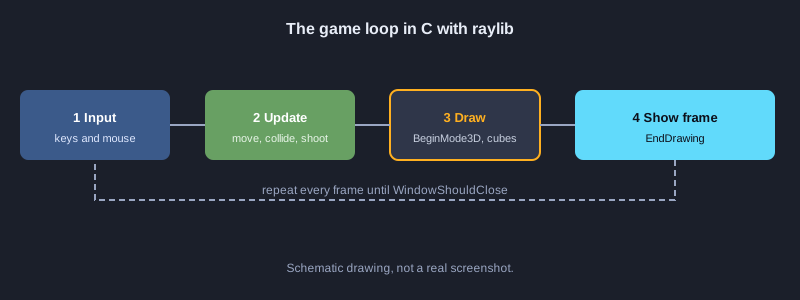
本文介绍如何用 C 语言制作第一人称射击游戏(FPS)。窗口、3D 图形和输入使用开源引擎库 raylib。地图、墙体碰撞、射击和 HUD 等游戏逻辑全部用 C 编写。每一部分都是可以逐步跟做的步骤,并提供结构图和可以直接复制的代码文件。
需要准备的东西
需要 Windows 10 或 11 电脑,安装了 C++(MSVC)工具集和 Windows SDK 的 Visual Studio 2022 Build Tools,以及从 GitHub Releases 下载的 raylib。raylib 采用 zlib 许可证发布,允许商业使用。注意:本文的代码是依据 raylib 5 和 6 的文档编写的,但撰写本文的机器上没有编译和测试完整程序。列出的结果是步骤正确完成后应看到的效果。raylib 默认字体只能显示拉丁字母,因此示例的屏幕文字使用英文。
示意图
1. 安装工具和 raylib
用 MSVC 编译 C 代码,并使用 raylib 作为开源引擎库。
1. 从 Microsoft 官网下载 Visual Studio 2022 Build Tools,并安装“使用 C++ 的桌面开发”工作负载
2. 从开始菜单打开 Developer Command Prompt for VS 2022
3. 访问 github.com/raysan5/raylib/releases,下载文件名以 win64_msvc16.zip 结尾的 Windows 版本
4. 解压后,把 include 和 lib 文件夹复制到名为 raylib 的项目文件夹中
**应看到的结果:** raylib/include 文件夹中有 raylib.h,raylib/lib 文件夹中有 raylib.lib。
2. 项目结构
把游戏代码放在 src 文件夹中,raylib 库单独存放。
**代码: project-tree.txt**
fps-c-raylib/
├── raylib/                 ไลบรารี raylib ที่ดาวน์โหลดจาก GitHub Releases
│   ├── include/raylib.h
│   └── lib/raylib.lib
├── src/
│   └── main.c              โค้ดเกมทั้งหมด
├── build.bat               คำสั่งคอมไพล์สำหรับ MSVC
└── fps-c-raylib.exe        ไฟล์ที่ได้หลังคอมไพล์
3. 打开窗口并绘制文字
每个 raylib 游戏都遵循相同的循环:打开窗口,循环直到窗口关闭,并逐帧绘制。
1. 创建 src 文件夹,并在其中创建 main.c 文件
2. 把下面的代码粘贴到 main.c 中
**代码: 01_window.c**
// ไฟล์: src/main.c  (ขั้นแรก เปิดหน้าต่างและวาดข้อความ)
#include "raylib.h"

int main(void)
{
    InitWindow(960, 540, "FPS ด้วย C และ raylib");
    SetTargetFPS(60);

    while (!WindowShouldClose())
    {
        BeginDrawing();
        ClearBackground(RAYWHITE);
        DrawText("Hello FPS", 40, 40, 32, DARKGRAY);
        EndDrawing();
    }

    CloseWindow();
    return 0;
}
**应看到的结果:** 打开 960x540 的窗口,背景为白色,左上角显示文字 Hello FPS。
4. 把地图绘制为 3D 墙体
地图以 1 和 0 组成的数组保存。1 表示墙,0 表示空地。遍历数组,为每个墙格绘制一个方框。
**代码: 02_map_render.c**
// ไฟล์: src/main.c  (ขั้นที่สอง แผนที่เป็นตารางตัวเลข แล้ววาดกำแพงเป็นกล่อง 3 มิติ)
#include "raylib.h"

#define MAP_W 8
#define MAP_H 8
#define CELL 4.0f // ขนาดของหนึ่งช่องในโลก 3 มิติ

// 1 = กำแพง, 0 = พื้นที่ว่าง
static const int map[MAP_H][MAP_W] = {
    {1, 1, 1, 1, 1, 1, 1, 1},
    {1, 0, 0, 0, 0, 0, 0, 1},
    {1, 0, 1, 1, 0, 0, 0, 1},
    {1, 0, 0, 0, 0, 1, 0, 1},
    {1, 0, 0, 1, 0, 1, 0, 1},
    {1, 0, 0, 0, 0, 0, 0, 1},
    {1, 1, 1, 1, 1, 1, 1, 1},
    {1, 1, 1, 1, 1, 1, 1, 1},
};

static void DrawMap(void)
{
    for (int row = 0; row < MAP_H; row++)
    {
        for (int col = 0; col < MAP_W; col++)
        {
            if (map[row][col] == 1)
            {
                // ช่อง (col, row) ครอบคลุมพื้นที่ [col*CELL, (col+1)*CELL] ดังนั้นศูนย์กลางอยู่ที่ +CELL/2
                Vector3 pos = { (col + 0.5f) * CELL, CELL / 2.0f, (row + 0.5f) * CELL };
                DrawCube(pos, CELL, CELL, CELL, DARKGRAY);
                DrawCubeWires(pos, CELL, CELL, CELL, BLACK);
            }
        }
    }
}

int main(void)
{
    InitWindow(960, 540, "แผนที่ FPS");
    SetTargetFPS(60);

    Camera3D camera = { 0 };
    camera.position = (Vector3){ 6.0f, 2.0f, 6.0f };
    camera.target = (Vector3){ 10.0f, 1.0f, 10.0f };
    camera.up = (Vector3){ 0.0f, 1.0f, 0.0f };
    camera.fovy = 60.0f;
    camera.projection = CAMERA_PERSPECTIVE;

    while (!WindowShouldClose())
    {
        BeginDrawing();
        ClearBackground(SKYBLUE);

        BeginMode3D(camera);
        DrawPlane((Vector3){ 16.0f, 0.0f, 16.0f }, (Vector2){ 32.0f, 32.0f }, LIGHTGRAY);
        DrawMap();
        EndMode3D();

        DrawFPS(10, 10);
        EndDrawing();
    }

    CloseWindow();
    return 0;
}
**应看到的结果:** 深灰色的墙体组成 3D 地图,左上角显示 FPS 计数。
5. 用 WASD 和鼠标移动与转动视角
raylib 的 UpdateCamera 支持 CAMERA_FIRST_PERSON 模式,用 WASD 移动,用鼠标转动视角,无需自己编写角度计算。
**代码: 03_movement.c**
// ไฟล์: src/main.c  (ขั้นที่สาม การเดินและหมุนกล้องด้วยคีย์บอร์ดและเมาส์)
#include "raylib.h"

int main(void)
{
    InitWindow(960, 540, "เดินในแผนที่");
    SetTargetFPS(60);
    DisableCursor(); // ซ่อนเคอร์เซอร์เพื่อให้หมุนกล้องด้วยเมาส์ได้

    Camera3D camera = { 0 };
    camera.position = (Vector3){ 6.0f, 2.0f, 6.0f };
    camera.target = (Vector3){ 10.0f, 1.0f, 10.0f };
    camera.up = (Vector3){ 0.0f, 1.0f, 0.0f };
    camera.fovy = 60.0f;
    camera.projection = CAMERA_PERSPECTIVE;

    while (!WindowShouldClose())
    {
        // WASD เดิน และเมาส์หมุนมอง ทำงานตามโหมด CAMERA_FIRST_PERSON
        UpdateCamera(&camera, CAMERA_FIRST_PERSON);

        BeginDrawing();
        ClearBackground(SKYBLUE);
        BeginMode3D(camera);
        DrawPlane((Vector3){ 16.0f, 0.0f, 16.0f }, (Vector2){ 32.0f, 32.0f }, LIGHTGRAY);
        EndMode3D();
        DrawText("WASD move, mouse look", 10, 40, 20, DARKGRAY);
        EndDrawing();
    }

    CloseWindow();
    return 0;
}
**应看到的结果:** 按 W A S D 镜头移动,移动鼠标改变视角,光标被隐藏。
6. 墙体碰撞检测
在接受新位置之前,检查玩家周围的四个角。若撞墙,只把撞到的那个轴恢复,使玩家能沿着墙滑动。注视点也按相同距离平移,使视线方向不变。
**代码: 04_collision.c**
// ไฟล์: src/main.c  (ขั้นที่สี่ ตรวจชนกำแพงก่อนยอมรับการขยับ)
#include "raylib.h"
#include "raymath.h"

#define MAP_W 8
#define MAP_H 8
#define CELL 4.0f
#define PLAYER_RADIUS 0.4f

static const int map[MAP_H][MAP_W] = {
    {1, 1, 1, 1, 1, 1, 1, 1},
    {1, 0, 0, 0, 0, 0, 0, 1},
    {1, 0, 1, 1, 0, 0, 0, 1},
    {1, 0, 0, 0, 0, 1, 0, 1},
    {1, 0, 0, 1, 0, 1, 0, 1},
    {1, 0, 0, 0, 0, 0, 0, 1},
    {1, 1, 1, 1, 1, 1, 1, 1},
    {1, 1, 1, 1, 1, 1, 1, 1},
};

// ตรวจว่าจุด (x, z) ในโลกอยู่ในช่องกำแพงหรือไม่
static bool IsWall(float x, float z)
{
    int col = (int)(x / CELL);
    int row = (int)(z / CELL);
    if (col < 0 || col >= MAP_W || row < 0 || row >= MAP_H) return true;
    return map[row][col] == 1;
}

// ตรวจทั้งสี่มุมรอบตัวผู้เล่น ถ้ามีมุมใดชนกำแพงให้ถือว่าไปไม่ได้
static bool CanMoveTo(Vector3 p)
{
    float r = PLAYER_RADIUS;
    return !IsWall(p.x - r, p.z - r) && !IsWall(p.x + r, p.z - r) &&
           !IsWall(p.x - r, p.z + r) && !IsWall(p.x + r, p.z + r);
}

int main(void)
{
    InitWindow(960, 540, "ชนกำแพง");
    SetTargetFPS(60);
    DisableCursor();

    Camera3D camera = { 0 };
    camera.position = (Vector3){ 6.0f, 2.0f, 6.0f };
    camera.target = (Vector3){ 10.0f, 1.0f, 10.0f };
    camera.up = (Vector3){ 0.0f, 1.0f, 0.0f };
    camera.fovy = 60.0f;
    camera.projection = CAMERA_PERSPECTIVE;

    while (!WindowShouldClose())
    {
        // เก็บตำแหน่งก่อนขยับ แล้วให้ UpdateCamera คำนวณตำแหน่งใหม่
        Vector3 before = camera.position;
        UpdateCamera(&camera, CAMERA_FIRST_PERSON);

        // ถ้าตำแหน่งใหม่ชนกำแพง ให้ย้อนกลับไปเฉพาะแกนที่ชน เพื่อให้เลื่อนไปตามกำแพงได้
        Vector3 wanted = camera.position;
        Vector3 fixed = wanted;
        if (!CanMoveTo((Vector3){ fixed.x, fixed.y, before.z })) fixed.x = before.x;
        if (!CanMoveTo(fixed)) fixed.z = before.z;

        // ย้ายจุดมองตามไปด้วย เพื่อให้ทิศทางการมองไม่เพี้ยน
        Vector3 shift = Vector3Subtract(fixed, wanted);
        camera.position = fixed;
        camera.target = Vector3Add(camera.target, shift);

        BeginDrawing();
        ClearBackground(SKYBLUE);
        BeginMode3D(camera);
        DrawPlane((Vector3){ 16.0f, 0.0f, 16.0f }, (Vector2){ 32.0f, 32.0f }, LIGHTGRAY);
        for (int row = 0; row < MAP_H; row++)
            for (int col = 0; col < MAP_W; col++)
                if (map[row][col] == 1)
                {
                    Vector3 pos = { (col + 0.5f) * CELL, CELL / 2.0f, (row + 0.5f) * CELL };
                    DrawCube(pos, CELL, CELL, CELL, DARKGRAY);
                }
        EndMode3D();
        DrawText("Walls block you", 10, 40, 20, DARKGRAY);
        EndDrawing();
    }

    CloseWindow();
    return 0;
}
**应看到的结果:** 走向墙时会停下,不会穿过墙,但仍可以沿着墙滑动。
7. 从屏幕中心发射射线进行射击
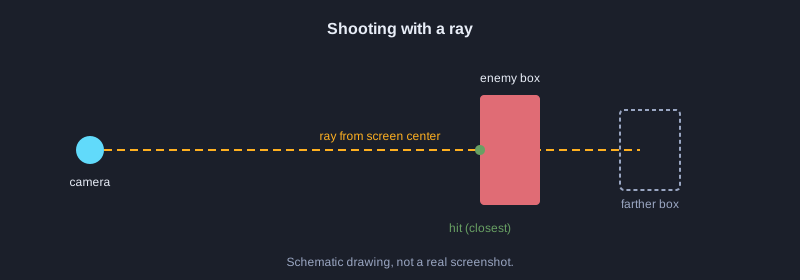
GetMouseRay 从屏幕上的一点创建射线。本例使用屏幕中心,再用 GetRayCollisionBox 判断射线是否击中敌人的方框。
**代码: 05_shoot.c**
// ไฟล์: src/main.c  (ขั้นที่ห้า ยิงด้วยรังสีจากเมาส์ไปชนกล่องของศัตรู)
#include "raylib.h"

// กล่องขอบเขตของศัตรูหนึ่งตัว
static BoundingBox enemyBox = {
    { 14.0f, 0.0f, 14.0f }, // มุมต่ำสุด
    { 15.5f, 2.5f, 15.5f }, // มุมสูงสุด
};
static bool enemyAlive = true;

int main(void)
{
    InitWindow(960, 540, "ยิงศัตรู");
    SetTargetFPS(60);
    DisableCursor();

    Camera3D camera = { 0 };
    camera.position = (Vector3){ 6.0f, 2.0f, 6.0f };
    camera.target = (Vector3){ 14.0f, 1.0f, 14.0f };
    camera.up = (Vector3){ 0.0f, 1.0f, 0.0f };
    camera.fovy = 60.0f;
    camera.projection = CAMERA_PERSPECTIVE;

    while (!WindowShouldClose())
    {
        UpdateCamera(&camera, CAMERA_FIRST_PERSON);

        // คลิกซ้ายแล้วยิงรังสีจากกลางจอไปข้างหน้า
        if (IsMouseButtonPressed(MOUSE_BUTTON_LEFT) && enemyAlive)
        {
            Ray ray = GetMouseRay((Vector2){ GetScreenWidth() / 2.0f, GetScreenHeight() / 2.0f }, camera);
            RayCollision hit = GetRayCollisionBox(ray, enemyBox);
            if (hit.hit)
            {
                enemyAlive = false; // ยิงโดนแล้วศัตรูหายไป
            }
        }

        BeginDrawing();
        ClearBackground(SKYBLUE);
        BeginMode3D(camera);
        DrawPlane((Vector3){ 16.0f, 0.0f, 16.0f }, (Vector2){ 32.0f, 32.0f }, LIGHTGRAY);
        if (enemyAlive)
        {
            Vector3 center = { 14.75f, 1.25f, 14.75f };
            DrawCubeV(center, (Vector3){ 1.5f, 2.5f, 1.5f }, RED);
        }
        EndMode3D();

        DrawLine(GetScreenWidth() / 2 - 10, GetScreenHeight() / 2, GetScreenWidth() / 2 + 10, GetScreenHeight() / 2, BLACK);
        DrawLine(GetScreenWidth() / 2, GetScreenHeight() / 2 - 10, GetScreenWidth() / 2, GetScreenHeight() / 2 + 10, BLACK);
        EndDrawing();
    }

    CloseWindow();
    return 0;
}
**应看到的结果:** 瞄准红色方框并左键点击,方框会消失。射向其他位置则没有任何反应。
8. 显示弹药和生命值的 HUD
HUD 在调用 EndMode3D 之后用 2D 绘制文字和条形。每次射击后弹药减少。
**代码: 06_hud.c**
// ไฟล์: src/main.c  (ขั้นที่หก หน้าจอข้อมูล HUD แสดงกระสุนและพลังชีวิต)
#include <stdio.h>
#include "raylib.h"

typedef struct
{
    int ammo;
    int health;
} Player;

static void DrawHud(const Player *p)
{
    char text[64];

    // แถบพลังชีวิตมุมซ้ายล่าง
    DrawRectangle(20, GetScreenHeight() - 40, 200, 20, DARKGRAY);
    DrawRectangle(20, GetScreenHeight() - 40, (int)(200 * p->health / 100.0f), 20, RED);

    // จำนวนกระสุนมุมขวาล่าง
    snprintf(text, sizeof(text), "Ammo %d", p->ammo);
    DrawText(text, GetScreenWidth() - 180, GetScreenHeight() - 40, 24, BLACK);
}

int main(void)
{
    InitWindow(960, 540, "HUD");
    SetTargetFPS(60);

    Player player = { .ammo = 12, .health = 100 };

    while (!WindowShouldClose())
    {
        if (IsMouseButtonPressed(MOUSE_BUTTON_LEFT) && player.ammo > 0)
        {
            player.ammo--; // ยิงหนึ่งนัดจะลดกระสุน
        }

        BeginDrawing();
        ClearBackground(SKYBLUE);
        DrawHud(&player);
        EndDrawing();
    }

    CloseWindow();
    return 0;
}
**应看到的结果:** 右下角显示 Ammo 12,左下角的红色条表示满血。每次点击弹药减少 1。
9. 整合为一个完整程序
此文件整合了地图、墙体碰撞、两个带生命值的敌人、射向最近命中目标的射击,以及 HUD。
**代码: 07_full_main.c**
// ไฟล์: src/main.c  (รวมทุกขั้นตอนเป็นไฟล์เดียว)
#include <stdio.h>
#include "raylib.h"
#include "raymath.h"

#define MAP_W 8
#define MAP_H 8
#define CELL 4.0f
#define PLAYER_RADIUS 0.4f
#define ENEMY_COUNT 2

static const int map[MAP_H][MAP_W] = {
    {1, 1, 1, 1, 1, 1, 1, 1},
    {1, 0, 0, 0, 0, 0, 0, 1},
    {1, 0, 1, 1, 0, 0, 0, 1},
    {1, 0, 0, 0, 0, 1, 0, 1},
    {1, 0, 0, 1, 0, 1, 0, 1},
    {1, 0, 0, 0, 0, 0, 0, 1},
    {1, 1, 1, 1, 1, 1, 1, 1},
    {1, 1, 1, 1, 1, 1, 1, 1},
};

typedef struct
{
    BoundingBox box;
    int health;
} Enemy;

typedef struct
{
    int ammo;
    int health;
} Player;

static bool IsWall(float x, float z)
{
    int col = (int)(x / CELL);
    int row = (int)(z / CELL);
    if (col < 0 || col >= MAP_W || row < 0 || row >= MAP_H) return true;
    return map[row][col] == 1;
}

static bool CanMoveTo(Vector3 p)
{
    float r = PLAYER_RADIUS;
    return !IsWall(p.x - r, p.z - r) && !IsWall(p.x + r, p.z - r) &&
           !IsWall(p.x - r, p.z + r) && !IsWall(p.x + r, p.z + r);
}

static void ApplyCollision(Camera3D *camera, Vector3 before)
{
    Vector3 wanted = camera->position;
    Vector3 fixed = wanted;
    if (!CanMoveTo((Vector3){ fixed.x, fixed.y, before.z })) fixed.x = before.x;
    if (!CanMoveTo(fixed)) fixed.z = before.z;
    Vector3 shift = Vector3Subtract(fixed, wanted);
    camera->position = fixed;
    camera->target = Vector3Add(camera->target, shift);
}

static void DrawMap(void)
{
    for (int row = 0; row < MAP_H; row++)
    {
        for (int col = 0; col < MAP_W; col++)
        {
            if (map[row][col] == 1)
            {
                Vector3 pos = { (col + 0.5f) * CELL, CELL / 2.0f, (row + 0.5f) * CELL };
                DrawCube(pos, CELL, CELL, CELL, DARKGRAY);
                DrawCubeWires(pos, CELL, CELL, CELL, BLACK);
            }
        }
    }
}

int main(void)
{
    InitWindow(960, 540, "FPS ด้วย C และ raylib");
    SetTargetFPS(60);
    DisableCursor();

    Camera3D camera = { 0 };
    camera.position = (Vector3){ 6.0f, 2.0f, 6.0f };
    camera.target = (Vector3){ 10.0f, 1.0f, 10.0f };
    camera.up = (Vector3){ 0.0f, 1.0f, 0.0f };
    camera.fovy = 60.0f;
    camera.projection = CAMERA_PERSPECTIVE;

    Player player = { .ammo = 12, .health = 100 };
    Enemy enemies[ENEMY_COUNT] = {
        { { { 14.0f, 0.0f, 14.0f }, { 15.5f, 2.5f, 15.5f } }, 50 },
        { { { 18.0f, 0.0f, 4.0f }, { 19.5f, 2.5f, 5.5f } }, 50 },
    };

    while (!WindowShouldClose())
    {
        Vector3 before = camera.position;
        UpdateCamera(&camera, CAMERA_FIRST_PERSON);
        ApplyCollision(&camera, before);

        if (IsMouseButtonPressed(MOUSE_BUTTON_LEFT) && player.ammo > 0)
        {
            player.ammo--;
            Vector2 center = { GetScreenWidth() / 2.0f, GetScreenHeight() / 2.0f };
            Ray ray = GetMouseRay(center, camera);

            // ยิงหาศัตรูที่ใกล้ที่สุดที่รังสีชน
            int target = -1;
            float best = 1e9f;
            for (int i = 0; i < ENEMY_COUNT; i++)
            {
                if (enemies[i].health <= 0) continue;
                RayCollision hit = GetRayCollisionBox(ray, enemies[i].box);
                if (hit.hit && hit.distance < best)
                {
                    best = hit.distance;
                    target = i;
                }
            }
            if (target >= 0) enemies[target].health -= 25;
        }

        BeginDrawing();
        ClearBackground(SKYBLUE);
        BeginMode3D(camera);
        DrawPlane((Vector3){ 16.0f, 0.0f, 16.0f }, (Vector2){ 32.0f, 32.0f }, LIGHTGRAY);
        DrawMap();
        for (int i = 0; i < ENEMY_COUNT; i++)
        {
            if (enemies[i].health <= 0) continue;
            Vector3 c = {
                (enemies[i].box.min.x + enemies[i].box.max.x) / 2.0f,
                1.25f,
                (enemies[i].box.min.z + enemies[i].box.max.z) / 2.0f,
            };
            DrawCubeV(c, (Vector3){ 1.5f, 2.5f, 1.5f }, RED);
        }
        EndMode3D();

        // จุดเล็งกลางจอ
        DrawLine(GetScreenWidth() / 2 - 10, GetScreenHeight() / 2, GetScreenWidth() / 2 + 10, GetScreenHeight() / 2, BLACK);
        DrawLine(GetScreenWidth() / 2, GetScreenHeight() / 2 - 10, GetScreenWidth() / 2, GetScreenHeight() / 2 + 10, BLACK);

        // HUD
        char text[64];
        snprintf(text, sizeof(text), "Ammo %d", player.ammo);
        DrawText(text, GetScreenWidth() - 180, GetScreenHeight() - 40, 24, BLACK);
        DrawRectangle(20, GetScreenHeight() - 40, 200, 20, DARKGRAY);
        DrawRectangle(20, GetScreenHeight() - 40, (int)(200 * player.health / 100.0f), 20, RED);
        DrawFPS(10, 10);
        EndDrawing();
    }

    CloseWindow();
    return 0;
}
**应看到的结果:** 在有墙的房间中行走并射击红色敌人。一个敌人需要命中两次才会消失,每次射击弹药减少。
10. 编译与运行
在 Developer Command Prompt 中使用 cl 命令编译,并与 raylib.lib 链接。
1. 打开 Developer Command Prompt for VS 2022 并进入项目文件夹
2. 运行下方代码块中的编译命令
3. 运行生成的 fps-c-raylib.exe
cl /nologo /W3 /I raylib\include src\main.c /link /LIBPATH:raylib\lib raylib.lib winmm.lib gdi32.lib user32.lib shell32.lib
**应看到的结果:** 编译过程中没有错误,运行 .exe 时会打开游戏窗口。
下一步
接下来可以添加射击音效、会走向玩家的敌人、开始菜单,并从文本文件读取地图。更多示例见 github.com/raysan5/raylib/tree/master/examples。
总结
使用开源引擎 raylib 配合 C 语言,地图、移动、墙体碰撞、射线射击和 HUD 均自行编写。用 MSVC 编译后得到一个 .exe 文件。每个步骤都可以按顺序完成。