从零到专业的 Microsoft Azure:100 个示例,涵盖 CLI、Bicep 与 Python
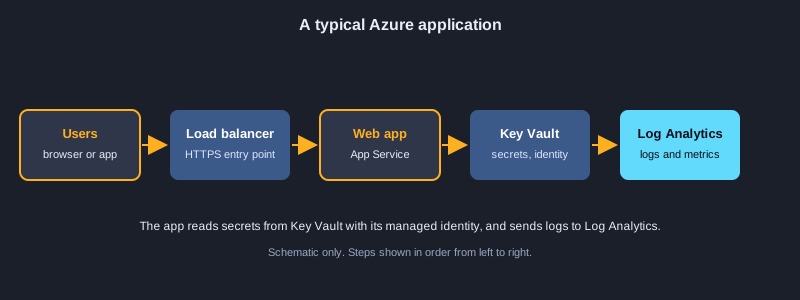
Microsoft Azure 是一个云平台,无需购买服务器即可运行网站、数据库、容器、数据管道和 AI 服务。本文用 100 个示例,带你从第一次登录一直到面向生产的配置。你将学习 Azure CLI、资源组与标签、用 Bicep 实现基础设施即代码、用托管标识和 RBAC 管理身份、虚拟机、App Service、容器与 Kubernetes、用 SAS 与生命周期规则管理存储、SQL 与 Cosmos DB、无服务器的 Functions、虚拟网络与专用终结点、Service Bus 与 Event Hubs、用 Log Analytics 与 Application Insights 监控、Key Vault,以及成本控制。诚实说明:云命令和 SDK 示例没有实际运行,因为它们需要 Azure 订阅。标注为可运行的示例已在本机执行,真实输出显示在代码之后。
需要准备的东西
一个带订阅的 Azure 账户(免费试用对大多数示例已足够)、Azure CLI、Python 3.10 或更新版本,以及安装了 Bicep 扩展的 Visual Studio Code 等编辑器。学习时请使用沙盒订阅,切勿把真实的机密粘贴到命令或代码中。部分资源会产生费用,学习结束后请删除实验用的资源组。
如何使用示例
bash 示例使用 Azure CLI,Bicep 示例使用 Azure CLI 或 VS Code。不需要 Azure 账户的 Python 示例可以用 python 运行,并显示真实输出。调用 Azure 的示例需要先有订阅才能工作。
知识点 1: Azure 入门
Azure 由订阅、资源组和资源组成。学习登录、检查命令将作用于哪里,并使用便于查找和计费的名称。
Azure CLI 与登录
Azure CLI 是所有 Azure 服务共用的一个工具。安装它,运行 az login,并用 az account show 检查。命令作用于你当前选择的订阅,因此在创建或删除任何资源之前,请先确认订阅。
区域与命名
每个资源都位于一个区域中,因此应选择离用户最近的区域,并确认你需要的服务在该区域可用。存储账户名称要求严格:3 到 24 个小写字母和数字,并且在整个 Azure 中唯一。
命名约定
像 rg-app-env-region-01 这样的模式能让名称保持一致,使人们易于找到资源并理解其费用。用一个小函数生成名称,并在每个脚本中复用。
示意图
示例 1: 安装 Azure CLI 并登录
设置命令行工具,并登录你的账户。
winget install -e --id Microsoft.AzureCLI
az --version
az login
*此示例未在本机运行,因为它需要 Azure 订阅或 Azure 工具。*
示例 2: 检查当前订阅
确认你的命令会作用于哪个订阅。
az account show --output table
az account list --query "[].{name:name, id:id, default:isDefault}" --output table
*此示例未在本机运行,因为它需要 Azure 订阅或 Azure 工具。*
示例 3: 创建资源组
在一个区域中容纳相关资源的容器。
az group create --name rg-learn-dev --location southeastasia
*此示例未在本机运行,因为它需要 Azure 订阅或 Azure 工具。*
示例 4: 列出 Azure 区域
查找你可以部署到的区域。
az account list-locations --query "[?metadata.regionCategory=='Recommended'].name" --output tsv
*此示例未在本机运行,因为它需要 Azure 订阅或 Azure 工具。*
示例 5: 验证存储账户名称
存储名称为 3 到 24 个小写字母和数字。
import re

def valid_storage_name(name):
    return re.fullmatch(r"[a-z0-9]{3,24}", name) is not None

for candidate in ("stlearndev01", "Store-1", "ab", "a" * 25):
    print(repr(candidate), valid_storage_name(candidate))
输出:
'stlearndev01' True
'Store-1' False
'ab' False
'aaaaaaaaaaaaaaaaaaaaaaaaa' False
示例 6: 按命名规范生成资源名
统一的名称便于查找资源和核算费用。
def resource_name(kind, app, env, region, index=1):
    return f"{kind}-{app}-{env}-{region}-{index:02d}"

print(resource_name("rg", "shop", "dev", "sea"))
print(resource_name("app", "shop", "prod", "sea", 3))
输出:
rg-shop-dev-sea-01
app-shop-prod-sea-03
知识点 2: 资源组、标签与 CLI 输出
资源组容纳某个应用或环境的资源。标签记录资源的所有者和成本,CLI 可以为人或脚本过滤和格式化输出。
资源组与删除
把相关资源放在同一个组中,便于一起管理和删除。删除资源组会移除其中的所有内容,因此只有在确定时才使用 --no-wait,且绝不删除不是你创建的资源组。
用于所有权和成本的标签
标签是 owner、costcenter 这样的键值对。创建资源时添加它们,并用脚本检查缺失的标签。费用报告可以按标签对支出进行分组。
输出、查询与默认值
给人看时使用 --output table,给脚本用 json。--query 用 JMESPath 过滤字段。用 az configure 设置默认资源组和区域,避免重复输入。
示例 7: 给资源组打标签
标签记录所有者、成本中心和环境。
az group update --name rg-learn-dev \
  --tags owner=team-a costcenter=1001 environment=dev
*此示例未在本机运行,因为它需要 Azure 订阅或 Azure 工具。*
示例 8: 检查必需标签
找出缺少团队所需标签的资源。
REQUIRED = {"owner", "costcenter", "environment"}

def missing_tags(tags):
    return sorted(REQUIRED - set(tags))

print(missing_tags({"owner": "team-a", "environment": "dev"}))
print(missing_tags({"owner": "x", "costcenter": "1", "environment": "prod"}))
输出:
['costcenter']
[]
示例 9: 不等待地删除资源组
用一条命令删除整组资源。
az group delete --name rg-learn-test --yes --no-wait
*此示例未在本机运行,因为它需要 Azure 订阅或 Azure 工具。*
示例 10: 按延迟选择最近的区域
为用户选择响应最快的区域。
latency_ms = {"southeastasia": 42, "japaneast": 71, "eastus": 210, "westeurope": 185}

best = min(latency_ms, key=latency_ms.get)
print("closest region:", best, latency_ms[best], "ms")
输出:
closest region: southeastasia 42 ms
示例 11: 用 JMESPath 查询过滤输出
只显示你需要的字段和行。
az vm list \
  --query "[?powerState=='VM running'].{name:name, rg:resourceGroup}" \
  --output table
*此示例未在本机运行,因为它需要 Azure 订阅或 Azure 工具。*
示例 12: 选择输出格式
表格、JSON 或 YAML,分别适合人或脚本。
az group list --output table
az group list --output json
az group list --output yaml
*此示例未在本机运行,因为它需要 Azure 订阅或 Azure 工具。*
示例 13: 在脚本中遍历资源
对每个资源组执行一次命令。
for rg in $(az group list --query "[].name" -o tsv); do
  echo "resource group: $rg"
done
*此示例未在本机运行,因为它需要 Azure 订阅或 Azure 工具。*
示例 14: 设置默认资源组和区域
不必在每条命令中重复输入同样的选项。
az configure --defaults group=rg-learn-dev location=southeastasia
az configure --list-defaults
*此示例未在本机运行,因为它需要 Azure 订阅或 Azure 工具。*
知识点 3: 脚本与自动化
重复性的工作应放进脚本。循环、重试和解析 JSON,可以把一次性的命令变成流水线能够可靠运行的自动化。
对资源的循环
shell 循环会对列表中的每个资源执行一次命令。保持列表较小,并在改动任何东西之前先检查结果。
解析 JSON 输出
让 CLI 输出 JSON,然后用程序解析,而不是读文本。按类型对资源分组,可以得到易读的摘要。
重试与退避
Azure API 会对过于频繁的客户端进行限流。使用逐步增加的等待时间重试,脚本就能恢复,而不会压垮服务。
示例 15: 解析 CLI 的 JSON 输出
把资源列表汇总成摘要。
import json

sample = """[{"name": "vm-web-01", "type": "Microsoft.Compute/virtualMachines", "location": "southeastasia"},
           {"name": "stlearn01", "type": "Microsoft.Storage/storageAccounts", "location": "southeastasia"}]"""

resources = json.loads(sample)
by_type = {}
for r in resources:
    by_type.setdefault(r["type"].split("/")[-1], []).append(r["name"])
for kind, names in sorted(by_type.items()):
    print(kind, names)
输出:
storageAccounts ['stlearn01']
virtualMachines ['vm-web-01']
示例 16: 用退避重试不稳定的调用
每次请求被限流后等待更久。
import time

def call_with_retry(fn, attempts=4, base_delay=0.05):
    for n in range(attempts):
        try:
            return fn()
        except ConnectionError as e:
            if n == attempts - 1:
                raise
            delay = base_delay * (2 ** n)
            print(f"attempt {n + 1} failed ({e}); retrying in {delay:.2f}s")
            time.sleep(delay)

state = {"calls": 0}
def flaky_list():
    state["calls"] += 1
    if state["calls"] < 3:
        raise ConnectionError("throttled")
    return ["rg-learn-dev"]

print(call_with_retry(flaky_list))
输出:
attempt 1 failed (throttled); retrying in 0.05s
attempt 2 failed (throttled); retrying in 0.10s
['rg-learn-dev']
示例 17: 检查 CLI 版本和扩展
保持工具及其扩展为最新。
az version
az extension list --output table
az extension add --name containerapp --upgrade
*此示例未在本机运行,因为它需要 Azure 订阅或 Azure 工具。*
示例 18: 安全地创建服务主体
为自动化创建应用身份,并使用最小的作用范围。
# Store the output securely: it contains a password. Never commit it to Git.
az ad sp create-for-rbac --name sp-learn-deploy --role Contributor \
  --scopes /subscriptions/<subscription-id>/resourceGroups/rg-learn-dev
*此示例未在本机运行,因为它需要 Azure 订阅或 Azure 工具。*
知识点 4: 用 Bicep 实现基础设施即代码
Bicep 用代码描述 Azure 资源。模板可以被审查、版本化,并且每次都以相同方式部署,比在门户中手动点击更安全。
资源、参数与输出
资源声明会指定类型和 API 版本,并设置其属性。参数让模板可复用,@secure 则防止密码出现在日志中。输出会把资源 ID 等值返回给调用者。
模块、条件与循环
模块把大型模板拆分为可复用的文件。条件只在为真时才创建资源,例如仅在生产环境中。循环则从一个列表创建多个资源。
安全部署
用 az deployment group what-if 预览变更,然后再创建。用 uniqueString 生成的名称可以避免同一订阅中不同环境之间的冲突。
示例 19: 最简单的 Bicep 存储账户
用代码描述存储账户。
param location string = resourceGroup().location
param storageName string

resource storage 'Microsoft.Storage/storageAccounts@2023-05-01' = {
  name: storageName
  location: location
  sku: {
    name: 'Standard_LRS'
  }
  kind: 'StorageV2'
  properties: {
    minimumTlsVersion: 'TLS1_2'
    allowBlobPublicAccess: false
  }
}
*此示例未在本机运行,因为它需要 Azure 订阅或 Azure 工具。*
示例 20: 参数、输出与安全值
复用模板,并且不把密码写进文件。
@minLength(3)
@maxLength(24)
param storageName string

@allowed([
  'dev'
  'test'
  'prod'
])
param environment string = 'dev'

@secure()
param adminPassword string

output storageId string = storage.id
resource storage 'Microsoft.Storage/storageAccounts@2023-05-01' = {
  name: storageName
  location: resourceGroup().location
  sku: { name: environment == 'prod' ? 'Standard_GRS' : 'Standard_LRS' }
  kind: 'StorageV2'
}
*此示例未在本机运行,因为它需要 Azure 订阅或 Azure 工具。*
示例 21: 从 main.bicep 部署模块
把大型模板拆分为可复用的模块。
// main.bicep
targetScope = 'resourceGroup'
module network './modules/network.bicep' = {
  name: 'networkDeploy'
  params: {
    prefix: 'shop-dev'
  }
}
output vnetId string = network.outputs.vnetId
*此示例未在本机运行,因为它需要 Azure 订阅或 Azure 工具。*
示例 22: 条件资源
只在生产环境中创建资源。
param environment string

resource logs 'Microsoft.OperationalInsights/workspaces@2022-10-01' = if (environment == 'prod') {
  name: 'log-shop-prod'
  location: resourceGroup().location
  properties: {
    retentionInDays: 90
  }
}
*此示例未在本机运行,因为它需要 Azure 订阅或 Azure 工具。*
示例 23: 在 Bicep 中遍历容器
用一个列表创建多个 Blob 容器。
param containerNames array = [
  'uploads'
  'exports'
  'backups'
]

resource storage 'Microsoft.Storage/storageAccounts@2023-05-01' existing = {
  name: 'stlearndev01'
}

resource containers 'Microsoft.Storage/storageAccounts/blobServices/containers@2023-05-01' = [for name in containerNames: {
  name: '${storage.name}/default/${name}'
}]
*此示例未在本机运行,因为它需要 Azure 订阅或 Azure 工具。*
示例 24: 用 uniqueString 生成唯一名称
生成在订阅内不会冲突的名称。
param prefix string = 'shop'

var uniqueSuffix = uniqueString(resourceGroup().id)
var storageName = toLower('st${prefix}${uniqueSuffix}')

output generatedName string = storageName
*此示例未在本机运行,因为它需要 Azure 订阅或 Azure 工具。*
示例 25: 部署 Bicep 文件
根据模板创建或更新资源。
az deployment group create \
  --resource-group rg-learn-dev \
  --template-file main.bicep \
  --parameters storageName=stlearndev01 environment=dev
*此示例未在本机运行,因为它需要 Azure 订阅或 Azure 工具。*
示例 26: 用 what-if 预览变更
先看部署会新增、修改还是删除什么。
az deployment group what-if \
  --resource-group rg-learn-dev \
  --template-file main.bicep \
  --parameters storageName=stlearndev01
*此示例未在本机运行,因为它需要 Azure 订阅或 Azure 工具。*
知识点 5: 身份与访问控制
安全始于确定谁能做什么。托管标识让应用无需密码即可获得凭据,基于角色的访问控制则只授予每个身份所需的权限。
托管标识
托管标识是 Azure 为你的应用运行的账户,因此应用无需保存机密即可获得令牌。当多个资源共享同一个身份时,使用用户分配的标识。
RBAC 与最小权限
角色分配把身份与某个作用域(例如一个存储账户)上的角色关联起来。优先选择与工作匹配的内置角色,只有在没有合适角色时才创建自定义角色。
服务主体与令牌
服务主体是自动化使用的身份。它的密码是机密,因此应保存在流水线的保管库中。令牌是带签名且有过期时间的字符串,过期时间可以从其载荷中读取。
示例 27: 用户分配的托管标识
应用无需存储密码即可使用的身份。
param location string = resourceGroup().location

resource appIdentity 'Microsoft.ManagedIdentity/userAssignedIdentities@2023-01-31' = {
  name: 'id-shop-dev'
  location: location
}

output principalId string = appIdentity.properties.principalId
*此示例未在本机运行,因为它需要 Azure 订阅或 Azure 工具。*
示例 28: 用 RBAC 授予读取权限
只给身份所需的角色。
PRINCIPAL_ID=$(az identity show --name id-shop-dev --resource-group rg-learn-dev --query principalId -o tsv)
az role assignment create \
  --assignee-object-id "$PRINCIPAL_ID" \
  --assignee-principal-type ServicePrincipal \
  --role "Storage Blob Data Reader" \
  --scope /subscriptions/<subscription-id>/resourceGroups/rg-learn-dev/providers/Microsoft.Storage/storageAccounts/stlearndev01
*此示例未在本机运行,因为它需要 Azure 订阅或 Azure 工具。*
示例 29: 用服务主体登录流水线
自动化使用流水线中的密钥登录。
az login --service-principal \
  --username "$AZURE_CLIENT_ID" \
  --password "$AZURE_CLIENT_SECRET" \
  --tenant "$AZURE_TENANT_ID"
*此示例未在本机运行,因为它需要 Azure 订阅或 Azure 工具。*
示例 30: 检查角色分配
查看谁可以对资源执行哪些操作。
assignments = [
    {"principal": "id-shop-dev", "role": "Storage Blob Data Reader", "scope": "stlearndev01"},
    {"principal": "sp-learn-deploy", "role": "Contributor", "scope": "rg-learn-dev"},
    {"principal": "id-shop-dev", "role": "Key Vault Secrets User", "scope": "kv-shop-dev"},
]

def roles_for(principal):
    return sorted(a["role"] for a in assignments if a["principal"] == principal)

print(roles_for("id-shop-dev"))
print(roles_for("nobody"))
输出:
['Key Vault Secrets User', 'Storage Blob Data Reader']
[]
示例 31: 用 VM 的托管标识登录
VM 无需密码即可获取令牌。
az login --identity
az account show --query "user.assignedIdentityInfo" -o tsv
*此示例未在本机运行,因为它需要 Azure 订阅或 Azure 工具。*
示例 32: 从 JWT 读取令牌过期时间
令牌的载荷中包含过期时间。
import base64
import json

def jwt_payload(token):
    part = token.split(".")[1]
    part += "=" * (-len(part) % 4)
    return json.loads(base64.urlsafe_b64decode(part))

payload = {"aud": "https://management.azure.com/", "exp": 1767225600, "upn": "[email protected]"}
raw = base64.urlsafe_b64encode(json.dumps(payload).encode()).decode().rstrip("=")
token = f"header.{raw}.signature"

claims = jwt_payload(token)
print("audience:", claims["aud"])
print("expires at unix time:", claims["exp"])
输出:
audience: https://management.azure.com/
expires at unix time: 1767225600
示例 33: 最小权限的自定义角色
只允许在一个范围内执行一个操作。
{
  "Name": "Blob Uploader",
  "IsCustom": true,
  "Description": "Can upload blobs to one storage account only.",
  "Actions": [],
  "DataActions": [
    "Microsoft.Storage/storageAccounts/blobServices/containers/blobs/write"
  ],
  "AssignableScopes": [
    "/subscriptions/<subscription-id>/resourceGroups/rg-learn-dev"
  ]
}
*此示例未在本机运行,因为它需要 Azure 订阅或 Azure 工具。*
示例 34: 创建自定义角色
在订阅中注册角色定义。
az role definition create --role-definition @blob-uploader.json
*此示例未在本机运行,因为它需要 Azure 订阅或 Azure 工具。*
知识点 6: 计算:虚拟机与 App Service
Azure 在虚拟机或托管平台上运行你的代码。App Service 去掉了大部分服务器工作,而虚拟机让你完全控制操作系统。
虚拟机与规模集
虚拟机有规格、镜像、磁盘和网络接口。规模集运行相同的虚拟机,并随需求增减。开发用的机器可在夜间关闭以节省费用。
App Service 计划与 Web 应用
计划定义了机器及其价格,Web 应用运行在其上。以 zip 文件部署代码,用应用设置进行配置,并使用部署槽在用户看到变更之前进行测试。
自动扩缩决策
扩缩规则把平均 CPU 等指标与阈值比较,并添加或删除实例。冷却时间可以防止系统在不同规格之间来回切换。
示例 35: 创建 Linux 虚拟机
用选定的规格和镜像启动虚拟机。
az vm create \
  --resource-group rg-learn-dev \
  --name vm-web-01 \
  --image Ubuntu2204 \
  --size Standard_B2s \
  --admin-username azureuser \
  --generate-ssh-keys
*此示例未在本机运行,因为它需要 Azure 订阅或 Azure 工具。*
示例 36: 列出 VM 规格和磁盘
调整大小前先检查容量和存储。
az vm list-sizes --location southeastasia --output table | head -n 10
az vm disk list --resource-group rg-learn-dev --output table
*此示例未在本机运行,因为它需要 Azure 订阅或 Azure 工具。*
示例 37: 虚拟机规模集
一起扩展和收缩的相同虚拟机。
resource vmss 'Microsoft.Compute/virtualMachineScaleSets@2023-09-01' = {
  name: 'vmss-web'
  location: resourceGroup().location
  sku: {
    name: 'Standard_B2s'
    capacity: 2
  }
  properties: {
    upgradePolicy: { mode: 'Rolling' }
    // osProfile, networkProfile and storageProfile go here
  }
}
*此示例未在本机运行,因为它需要 Azure 订阅或 Azure 工具。*
示例 38: 开发用 VM 的自动关机
每晚关闭测试机器以节省费用。
az vm auto-shutdown --resource-group rg-learn-dev --name vm-web-01 --time 2100
*此示例未在本机运行,因为它需要 Azure 订阅或 Azure 工具。*
示例 39: 创建 App Service 计划与 Web 应用
在托管的 Linux 服务器上运行 Web 应用。
az appservice plan create --name plan-shop-dev --resource-group rg-learn-dev --sku B1 --is-linux
az webapp create --name app-shop-dev-01 --resource-group rg-learn-dev \
  --plan plan-shop-dev --runtime "PYTHON:3.12"
*此示例未在本机运行,因为它需要 Azure 订阅或 Azure 工具。*
示例 40: 从 zip 文件部署代码
把应用包上传到 Web 应用。
zip -r app.zip . -x "*.git*"
az webapp deploy --resource-group rg-learn-dev --name app-shop-dev-01 \
  --src-path app.zip --type zip
*此示例未在本机运行,因为它需要 Azure 订阅或 Azure 工具。*
示例 41: 应用设置与暂存槽
在用户看到新版本之前先测试。
az webapp config appsettings set --resource-group rg-learn-dev --name app-shop-dev-01 \
  --settings ENVIRONMENT=dev LOG_LEVEL=info
az webapp deployment slot create --resource-group rg-learn-dev --name app-shop-dev-01 --slot staging
*此示例未在本机运行,因为它需要 Azure 订阅或 Azure 工具。*
示例 42: 基于 CPU 的扩缩决策
忙碌时增加实例,空闲时减少实例。
def scale_decision(cpu_samples, instances, minimum=1, maximum=5):
    average = sum(cpu_samples) / len(cpu_samples)
    if average > 75 and instances < maximum:
        return instances + 1, f"scale out (avg CPU {average:.0f}%)"
    if average < 25 and instances > minimum:
        return instances - 1, f"scale in (avg CPU {average:.0f}%)"
    return instances, f"hold (avg CPU {average:.0f}%)"

print(scale_decision([82, 90, 78], 2))
print(scale_decision([10, 12, 15], 2))
print(scale_decision([40, 45, 50], 2))
输出:
(3, 'scale out (avg CPU 83%)')
(1, 'scale in (avg CPU 12%)')
(2, 'hold (avg CPU 45%)')
知识点 7: 容器:注册表、Container Apps 与 Kubernetes
容器把应用与其所需的一切打包在一起。Azure 把镜像存放在注册表中,并根据你所需的控制程度,在 Container Apps 或 Kubernetes 中运行它们。
Azure 容器注册表
注册表是私有的镜像存储。用 az acr build 在 Azure 中构建镜像,使构建不依赖你的电脑,并把结果推送到注册表。
Container Apps 与 AKS
Container Apps 无需管理集群即可运行容器,并可缩放到零。AKS 是面向大型系统的托管 Kubernetes。AKS 可以借助其托管标识从你的注册表拉取镜像,因此无需密码。
标签与清理
为每个镜像标注版本、日期和提交号,以便回滚。计划一个清理任务来删除旧的未标记镜像,从而控制存储成本。
示例 43: 创建容器注册表
私有的容器镜像存放位置。
az acr create --resource-group rg-learn-dev --name acrshopdev01 --sku Basic
az acr login --name acrshopdev01
*此示例未在本机运行,因为它需要 Azure 订阅或 Azure 工具。*
示例 44: 构建并推送镜像
在 Azure 中构建镜像,并保存到注册表。
az acr build --registry acrshopdev01 --image shop-api:1.0.0 .
az acr repository show-tags --name acrshopdev01 --repository shop-api -o table
*此示例未在本机运行,因为它需要 Azure 订阅或 Azure 工具。*
示例 45: 运行容器应用
无需管理服务器即可运行容器。
az containerapp env create --name cae-shop-dev --resource-group rg-learn-dev --location southeastasia
az containerapp create --name ca-shop-api --resource-group rg-learn-dev \
  --environment cae-shop-dev \
  --image acrshopdev01.azurecr.io/shop-api:1.0.0 \
  --target-port 8080 --ingress external --min-replicas 0 --max-replicas 3
*此示例未在本机运行,因为它需要 Azure 订阅或 Azure 工具。*
示例 46: 创建 AKS 集群
托管的 Kubernetes 集群,从你的注册表拉取镜像。
az aks create \
  --resource-group rg-learn-dev \
  --name aks-shop-dev \
  --node-count 2 \
  --enable-managed-identity \
  --attach-acr acrshopdev01 \
  --generate-ssh-keys
az aks get-credentials --resource-group rg-learn-dev --name aks-shop-dev
*此示例未在本机运行,因为它需要 Azure 订阅或 Azure 工具。*
示例 47: 部署到 Kubernetes
应用清单并等待发布完成。
kubectl apply -f deployment.yaml
kubectl rollout status deployment/shop-api
kubectl get pods -l app=shop-api
*此示例未在本机运行,因为它需要 Azure 订阅或 Azure 工具。*
示例 48: Kubernetes 部署清单
描述 Pod、副本数和资源。
apiVersion: apps/v1
kind: Deployment
metadata:
  name: shop-api
spec:
  replicas: 2
  selector:
    matchLabels:
      app: shop-api
  template:
    metadata:
      labels:
        app: shop-api
    spec:
      containers:
        - name: shop-api
          image: acrshopdev01.azurecr.io/shop-api:1.0.0
          ports:
            - containerPort: 8080
          resources:
            requests:
              cpu: 100m
              memory: 128Mi
*此示例未在本机运行,因为它需要 Azure 订阅或 Azure 工具。*
示例 49: 生成镜像标签
用版本、日期和提交号给镜像打标签。
from datetime import date

def image_tag(version, commit, when):
    short = commit[:7]
    return f"{version}-{when.strftime('%Y%m%d')}-{short}"

print(image_tag("1.4.2", "9f3c1ab7e54d0a12", date(2026, 1, 15)))
输出:
1.4.2-20260115-9f3c1ab
示例 50: 用任务清理旧镜像
按计划删除未打标签的镜像以节省存储。
az acr task create --name purge-old-images --registry acrshopdev01 \
  --cmd "acr purge --filter 'shop-api:.*' --ago 30d --untagged" \
  --schedule "0 1 * * *" --context /dev/null
*此示例未在本机运行,因为它需要 Azure 订阅或 Azure 工具。*
知识点 8: 存储:Blob、队列与访问控制
存储账户保存文件、消息和表。用 Entra ID 保护访问,需要分享时使用短期有效的 SAS 链接,并让生命周期规则把旧数据移到更便宜的层级。
Blob 与路径命名
Blob 容器保存文件。使用包含设备和日期的路径,便于快速列出或删除某一天的数据。除非内容必须公开,否则应关闭公共访问。
共享访问签名
SAS 链接在短时间内授予有限的访问权限。只授予所需的权限,例如只读,并选择仍然可用的最短过期时间。
生命周期规则与队列
生命周期规则会把 Blob 移到冷层或归档层,并在设定的天数后删除。队列为后台工作进程保存消息,因此慢速任务不会阻塞 Web 请求。
示例 51: 创建存储账户
安全的默认设置:TLS 1.2,并禁止公共 Blob 访问。
az storage account create \
  --name stlearndev01 \
  --resource-group rg-learn-dev \
  --location southeastasia \
  --sku Standard_LRS \
  --kind StorageV2 \
  --min-tls-version TLS1_2 \
  --allow-blob-public-access false
*此示例未在本机运行,因为它需要 Azure 订阅或 Azure 工具。*
示例 52: 按日期分区的 Blob 路径
按设备和日期组织上传内容,使查询保持快速。
from datetime import datetime

def blob_path(device, when, filename):
    return f"telemetry/{device}/{when:%Y/%m/%d}/{when:%H%M%S}-{filename}"

print(blob_path("sensor-7", datetime(2026, 1, 15, 8, 30, 5), "batch.json"))
输出:
telemetry/sensor-7/2026/01/15/083005-batch.json
示例 53: 上传 Blob
用 CLI 把文件复制到容器中。
az storage container create --name uploads --account-name stlearndev01 --auth-mode login
az storage blob upload --account-name stlearndev01 --container-name uploads \
  --name reports/2026-01.csv --file ./report.csv --auth-mode login
*此示例未在本机运行,因为它需要 Azure 订阅或 Azure 工具。*
示例 54: 用 Entra ID 从 Python 上传
使用 Azure 身份而不是账户密钥。
from azure.identity import DefaultAzureCredential
from azure.storage.blob import BlobServiceClient

client = BlobServiceClient(
    account_url="https://stlearndev01.blob.core.windows.net",
    credential=DefaultAzureCredential(),
)
blob = client.get_blob_client(container="uploads", blob="reports/2026-01.csv")
with open("report.csv", "rb") as data:
    blob.upload_blob(data, overwrite=True)
*此示例未在本机运行,因为它需要 Azure 订阅或 Azure 工具。*
示例 55: 创建短期有效的 SAS
一个会过期、且只允许读取的链接。
EXPIRY=$(date -u -d "+1 hour" '+%Y-%m-%dT%H:%MZ')
az storage blob generate-sas --account-name stlearndev01 --container-name uploads \
  --name reports/2026-01.csv --permissions r --expiry "$EXPIRY" --auth-mode login --as-user --output tsv
*此示例未在本机运行,因为它需要 Azure 订阅或 Azure 工具。*
示例 56: 说明 SAS 的权限
解释共享访问签名允许什么以及有效多久。
from datetime import datetime, timedelta, timezone

def describe_sas(permissions, expiry):
    names = {"r": "read", "w": "write", "d": "delete", "c": "create"}
    allowed = ", ".join(names[p] for p in permissions)
    left = expiry - datetime(2026, 1, 15, 8, 0, tzinfo=timezone.utc)
    return f"allows {allowed} for {int(left.total_seconds() // 60)} minutes"

print(describe_sas("rw", datetime(2026, 1, 15, 9, 0, tzinfo=timezone.utc)))
输出:
allows read, write for 60 minutes
示例 57: Blob 生命周期规则
把旧数据转移到更便宜的存储,然后删除。
{
  "rules": [
    {
      "enabled": true,
      "name": "archive-telemetry",
      "type": "Lifecycle",
      "definition": {
        "filters": { "blobTypes": ["blockBlob"], "prefixMatch": ["telemetry/"] },
        "actions": {
          "baseBlob": {
            "tierToCool": { "daysAfterModificationGreaterThan": 30 },
            "delete": { "daysAfterModificationGreaterThan": 365 }
          }
        }
      }
    }
  ]
}
*此示例未在本机运行,因为它需要 Azure 订阅或 Azure 工具。*
示例 58: 用于后台工作的存储队列
把任务放入队列,让工作进程之后处理。
az storage queue create --name jobs --account-name stlearndev01 --auth-mode login
az storage message put --queue-name jobs --content "resize:photo-42" \
  --account-name stlearndev01 --auth-mode login
*此示例未在本机运行,因为它需要 Azure 订阅或 Azure 工具。*
知识点 9: 数据库:Azure SQL 与 Cosmos DB
Azure 提供托管的关系型数据库和全球分布的 NoSQL 数据库。使用身份而不是密码进行连接,并且在查询中始终使用参数。
Azure SQL
Azure SQL 是托管的 SQL Server 数据库。开启 Microsoft Entra ID 认证和专用终结点,数据库就不会保存密码,也没有公网地址。
参数化查询
把用户输入作为参数传递,切勿把文本拼接进 SQL。数据库会把输入当作数据处理,从而防止 SQL 注入。
Cosmos DB 与分区键
Cosmos DB 在容器中存储 JSON 文档。分区键决定数据如何分布到各台机器上。像客户 ID 这样取值很多的键,可以让负载保持均衡。
示例 59: Azure SQL 服务器与数据库
支持专用网络的托管关系型数据库。
az sql server create --name sql-shop-dev-01 --resource-group rg-learn-dev \
  --location southeastasia --enable-public-network false --enable-ad-only-auth \
  --external-admin-principal-type User --external-admin-name [email protected]
az sql db create --resource-group rg-learn-dev --server sql-shop-dev-01 \
  --name shopdb --service-objective S0
*此示例未在本机运行,因为它需要 Azure 订阅或 Azure 工具。*
示例 60: 不使用密码连接 Azure SQL
用 Entra ID 认证,而不是保存的密码。
import pyodbc

conn = pyodbc.connect(
    "Driver={ODBC Driver 18 for SQL Server};"
    "Server=tcp:sql-shop-dev-01.database.windows.net,1433;"
    "Database=shopdb;Encrypt=yes;"
    "Authentication=ActiveDirectoryDefault;"
)
cursor = conn.cursor()
cursor.execute("SELECT TOP 5 name FROM sys.tables")
print([row.name for row in cursor.fetchall()])
*此示例未在本机运行,因为它需要 Azure 订阅或 Azure 工具。*
示例 61: 参数化查询
把值作为参数传入,使输入无法改变查询。
import sqlite3

conn = sqlite3.connect(":memory:")
conn.execute("CREATE TABLE orders (id INTEGER, customer TEXT, total REAL)")
conn.executemany("INSERT INTO orders VALUES (?, ?, ?)",
                 [(1, "ana", 120.0), (2, "ben", 75.5)])

customer = "ana' OR '1'='1"          # hostile input stays a plain value
rows = conn.execute("SELECT id, total FROM orders WHERE customer = ?", (customer,)).fetchall()
print("matches:", rows)
conn.close()
输出:
matches: []
示例 62: 创建 Cosmos DB 容器
带分区键、可全球分布的数据库。
az cosmosdb create --name cosmos-shop-dev-01 --resource-group rg-learn-dev \
  --locations regionName=southeastasia failoverPriority=0
az cosmosdb sql database create --account-name cosmos-shop-dev-01 --resource-group rg-learn-dev \
  --name shop
az cosmosdb sql container create --account-name cosmos-shop-dev-01 --resource-group rg-learn-dev \
  --database-name shop --name orders --partition-key-path "/customerId"
*此示例未在本机运行,因为它需要 Azure 订阅或 Azure 工具。*
示例 63: 向 Cosmos DB 写入项
在容器中存储一个 JSON 文档。
from azure.cosmos import CosmosClient
from azure.identity import DefaultAzureCredential

client = CosmosClient("https://cosmos-shop-dev-01.documents.azure.com:443/", DefaultAzureCredential())
container = client.get_database_client("shop").get_container_client("orders")
container.upsert_item({"id": "o-1001", "customerId": "ana", "total": 120.0})
*此示例未在本机运行,因为它需要 Azure 订阅或 Azure 工具。*
示例 64: 用分区键的哈希分散数据
好的键能把数据均匀分布到各分区。
import hashlib

def partition_for(key, partitions=4):
    digest = hashlib.sha256(key.encode("utf-8")).hexdigest()
    return int(digest, 16) % partitions

counts = [0, 0, 0, 0]
for customer in ["ana", "ben", "chai", "dao", "eve", "fon", "gus", "hana"]:
    counts[partition_for(customer)] += 1
print("items per partition:", counts)
输出:
items per partition: [4, 1, 1, 2]
知识点 10: 使用 Azure Functions 的无服务器架构
Azure Functions 会在某件事发生时运行一小段代码:HTTP 请求、定时器或队列中的消息。你按执行次数付费,无需管理服务器。
触发器与绑定
触发器用于启动函数,例如 HTTP 请求或定时器。绑定把函数连接到其他服务,例如写入队列,因此需要的连接代码更少。
定时器与 cron 计划
定时器触发器使用六个字段的 NCRONTAB 表达式,秒在最前面。表达式 0 */5 * * * * 每五分钟运行一次。
幂等处理
队列可能会把同一条消息投递不止一次。记录已处理的 ID 并跳过重复项,这样运行两次作业也不会对客户重复收费。
示例 65: 创建函数应用
消费计划上的无服务器代码。
az storage account create --name stfuncshopdev01 --resource-group rg-learn-dev --sku Standard_LRS
az functionapp create --name func-shop-dev-01 --resource-group rg-learn-dev \
  --storage-account stfuncshopdev01 --consumption-plan-location southeastasia \
  --runtime python --runtime-version 3.12 --functions-version 4 --os-type Linux
*此示例未在本机运行,因为它需要 Azure 订阅或 Azure 工具。*
示例 66: 由 HTTP 触发的函数
收到网络请求时运行代码。
import azure.functions as func

app = func.FunctionApp(http_auth_level=func.AuthLevel.FUNCTION)

@app.route(route="hello", methods=["GET"])
def hello(req: func.HttpRequest) -> func.HttpResponse:
    name = req.params.get("name", "world")
    return func.HttpResponse(f"Hello, {name}!", status_code=200)
*此示例未在本机运行,因为它需要 Azure 订阅或 Azure 工具。*
示例 67: 带 cron 计划的定时器函数
无需服务器,每五分钟运行一次代码。
import logging
import azure.functions as func

app = func.FunctionApp()

@app.timer_trigger(schedule="0 */5 * * * *", arg_name="timer", run_on_startup=False)
def every_five_minutes(timer: func.TimerRequest) -> None:
    logging.info("checking sensors")
*此示例未在本机运行,因为它需要 Azure 订阅或 Azure 工具。*
示例 68: cron 表达式的下一次运行时间
计算计划任务下一次何时触发。
def next_minutes(expression, current_minute):
    field = expression.split()[1]           # minute field, for example */5
    step = int(field.removeprefix("*/"))
    return step - (current_minute % step) if current_minute % step else step

for minute in (0, 3, 12, 14):
    print(f"at minute {minute:2d}: next run in {next_minutes('0 */5 * * * *', minute)} min")
输出:
at minute  0: next run in 5 min
at minute  3: next run in 2 min
at minute 12: next run in 3 min
at minute 14: next run in 1 min
示例 69: 发布函数应用
把 Python 代码部署到 Azure Functions。
func azure functionapp publish func-shop-dev-01 --python
*此示例未在本机运行,因为它需要 Azure 订阅或 Azure 工具。*
示例 70: 由队列触发的函数
处理每条消息,并把结果写入另一个队列。
import azure.functions as func

app = func.FunctionApp()

@app.queue_trigger(arg_name="msg", queue_name="jobs", connection="AzureWebJobsStorage")
@app.queue_output(arg_name="out", queue_name="done", connection="AzureWebJobsStorage")
def process(msg: func.QueueMessage, out: func.Out[str]) -> None:
    out.set(f"processed:{msg.get_body().decode('utf-8')}")
*此示例未在本机运行,因为它需要 Azure 订阅或 Azure 工具。*
示例 71: 幂等的消息处理
即使消息重复到达,也只处理一次。
processed_ids = set()

def handle(message):
    if message["id"] in processed_ids:
        return "skipped duplicate"
    processed_ids.add(message["id"])
    return f"processed {message['id']}"

events = [{"id": "e1"}, {"id": "e2"}, {"id": "e1"}]
for event in events:
    print(handle(event))
输出:
processed e1
processed e2
skipped duplicate
示例 72: 应用设置中的 Key Vault 引用
把机密加载到应用中,而不必复制它。
az functionapp config appsettings set --name func-shop-dev-01 --resource-group rg-learn-dev \
  --settings "[email protected](VaultName=kv-shop-dev;SecretName=db-password)"
*此示例未在本机运行,因为它需要 Azure 订阅或 Azure 工具。*
知识点 11: 网络:虚拟网络、NSG 与专用终结点
虚拟网络是你在 Azure 内部的私有网络。子网划分各个层级,安全规则限制流量,专用终结点让服务远离公共互联网。
虚拟网络与子网
选择一个地址范围,例如 10.10.0.0/16,然后把它划分为用于 Web 和数据的子网。Azure 会在每个子网中保留五个地址,因此 /24 提供 251 个可用地址。
网络安全组
网络安全组是带优先级的允许与拒绝规则列表。只开放所需端口,例如用于 HTTPS 的 443,其余默认拒绝。
专用终结点与 DNS
专用终结点为服务在你的网络内分配一个私有 IP 地址。专用 DNS 区域让它的名称解析到该地址,因此应用无需修改代码。
示例 73: 虚拟网络与子网
为 Web 和数据分别划分子网的私有网络。
az network vnet create --name vnet-shop-dev --resource-group rg-learn-dev \
  --address-prefix 10.10.0.0/16 --subnet-name snet-web --subnet-prefix 10.10.1.0/24
az network vnet subnet create --vnet-name vnet-shop-dev --resource-group rg-learn-dev \
  --name snet-data --address-prefixes 10.10.2.0/24
*此示例未在本机运行,因为它需要 Azure 订阅或 Azure 工具。*
示例 74: 网络安全组规则
只允许来自互联网的 HTTPS。
az network nsg create --name nsg-web --resource-group rg-learn-dev
az network nsg rule create --nsg-name nsg-web --resource-group rg-learn-dev \
  --name allow-https --priority 100 --direction Inbound --access Allow \
  --protocol Tcp --destination-port-ranges 443 --source-address-prefixes Internet
*此示例未在本机运行,因为它需要 Azure 订阅或 Azure 工具。*
示例 75: 存储的专用终结点
只允许从你的网络内部访问存储账户。
az network private-endpoint create --name pe-storage --resource-group rg-learn-dev \
  --vnet-name vnet-shop-dev --subnet snet-data \
  --private-connection-resource-id $(az storage account show -n stlearndev01 -g rg-learn-dev --query id -o tsv) \
  --group-id blob --connection-name conn-storage
*此示例未在本机运行,因为它需要 Azure 订阅或 Azure 工具。*
示例 76: 专用 DNS 区域
在虚拟网络内解析专用终结点的名称。
az network private-dns zone create --resource-group rg-learn-dev \
  --name privatelink.blob.core.windows.net
az network private-dns link vnet create --resource-group rg-learn-dev \
  --zone-name privatelink.blob.core.windows.net --name link-shop \
  --virtual-network vnet-shop-dev --registration-enabled false
*此示例未在本机运行,因为它需要 Azure 订阅或 Azure 工具。*
示例 77: 公共负载均衡器
把传入流量分散到多台虚拟机。
az network public-ip create --name pip-lb --resource-group rg-learn-dev --sku Standard
az network lb create --name lb-shop --resource-group rg-learn-dev --sku Standard \
  --public-ip-address pip-lb --backend-pool-name be-web
az network lb probe create --lb-name lb-shop --resource-group rg-learn-dev \
  --name probe-https --protocol Tcp --port 443
*此示例未在本机运行,因为它需要 Azure 订阅或 Azure 工具。*
示例 78: 子网大小计算器
统计 CIDR 块中可用的地址数量。
import ipaddress

def usable_hosts(cidr):
    net = ipaddress.ip_network(cidr)
    return net.num_addresses - 5          # Azure reserves 5 addresses in every subnet

for block in ("10.10.1.0/24", "10.10.2.0/27", "10.10.0.0/16"):
    print(block, usable_hosts(block))
输出:
10.10.1.0/24 251
10.10.2.0/27 27
10.10.0.0/16 65531
知识点 12: 消息与流:Service Bus 与 Event Hubs
服务之间通过消息通信。Service Bus 用于可靠的业务消息,Event Hubs 用于遥测等大量数据流。
Service Bus 队列
队列会保存消息,直到接收方将其完成。只在处理完成后才完成消息,这样发生崩溃时会重试,而不会丢失订单。失败次数过多的消息会进入死信队列。
Event Hubs 与分区
事件中心把数据流划分为多个分区,许多读取方可以并行消费。以批次发送事件,并让每个批次保持在大小限制之内。
如何选择
当每条消息都很重要、并且必须按预期精确处理时,使用 Service Bus。当你要收集大量事件、并且可以在分区内按顺序处理时,使用 Event Hubs。
示例 79: Service Bus 队列
应用之间可靠的消息传递,并支持死信。
az servicebus namespace create --name sb-shop-dev --resource-group rg-learn-dev --location southeastasia --sku Standard
az servicebus queue create --namespace-name sb-shop-dev --resource-group rg-learn-dev \
  --name orders --max-delivery-count 5 --dead-lettering-on-message-expiration true
*此示例未在本机运行,因为它需要 Azure 订阅或 Azure 工具。*
示例 80: 发送 Service Bus 消息
从 Python 把订单放入队列。
from azure.identity import DefaultAzureCredential
from azure.servicebus import ServiceBusClient, ServiceBusMessage

with ServiceBusClient("sb-shop-dev.servicebus.windows.net", DefaultAzureCredential()) as client:
    with client.get_queue_sender("orders") as sender:
        sender.send_messages(ServiceBusMessage('{"orderId": "o-1001"}'))
*此示例未在本机运行,因为它需要 Azure 订阅或 Azure 工具。*
示例 81: 接收并完成消息
只有在处理成功后才删除消息。
from azure.identity import DefaultAzureCredential
from azure.servicebus import ServiceBusClient

with ServiceBusClient("sb-shop-dev.servicebus.windows.net", DefaultAzureCredential()) as client:
    with client.get_queue_receiver("orders", max_wait_time=5) as receiver:
        for msg in receiver:
            print(str(msg))
            receiver.complete_message(msg)     # removes it only after processing succeeded
*此示例未在本机运行,因为它需要 Azure 订阅或 Azure 工具。*
示例 82: 用于遥测的 Event Hubs
每秒可接收数百万事件的数据流。
az eventhubs namespace create --name evhns-shop-dev --resource-group rg-learn-dev --location southeastasia --sku Standard
az eventhubs eventhub create --name telemetry --namespace-name evhns-shop-dev --resource-group rg-learn-dev \
  --partition-count 4 --message-retention 1
*此示例未在本机运行,因为它需要 Azure 订阅或 Azure 工具。*
示例 83: 向 Event Hubs 批量发送
把事件分组成批次以提高效率。
import json
from azure.eventhub import EventData, EventHubProducerClient
from azure.identity import DefaultAzureCredential

producer = EventHubProducerClient(
    fully_qualified_namespace="evhns-shop-dev.servicebus.windows.net",
    eventhub_name="telemetry",
    credential=DefaultAzureCredential(),
)
with producer:
    batch = producer.create_batch()
    batch.add(EventData(json.dumps({"device": "sensor-7", "temp_c": 21.5})))
    producer.send_batch(batch)
*此示例未在本机运行,因为它需要 Azure 订阅或 Azure 工具。*
示例 84: 按大小限制拆分消息
确保每个批次不超过最大尺寸。
def make_batches(messages, limit_bytes=60):
    batches, current, size = [], [], 0
    for msg in messages:
        n = len(msg.encode("utf-8"))
        if current and size + n > limit_bytes:
            batches.append(current)
            current, size = [], 0
        current.append(msg)
        size += n
    if current:
        batches.append(current)
    return batches

events = [f'{{"id": {i}, "temp": 21.{i}}}' for i in range(6)]
for number, batch in enumerate(make_batches(events), start=1):
    print("batch", number, len(batch), "messages")
输出:
batch 1 2 messages
batch 2 2 messages
batch 3 2 messages
知识点 13: 监控:Log Analytics、Application Insights 与告警
看不见的东西无法修复。Azure Monitor 收集日志和指标,Log Analytics 让你用 KQL 查询它们,告警则在出现问题时通知团队。
Log Analytics 与 KQL
Log Analytics 工作区存储来自许多资源的日志。Kusto 查询语言可以过滤、汇总和绘图,例如统计每小时的失败次数。
Application Insights
Application Insights 跟踪你代码中的请求、依赖项和自定义事件。用它找出哪一个调用很慢,而不仅仅是知道应用很慢。
不误报的告警
指标告警在某个度量越过阈值时触发。要求条件在连续多个样本中都成立,这样单次尖峰就不会唤醒值班工程师。
示例 85: Log Analytics 工作区
集中查询所有资源日志的地方。
az monitor log-analytics workspace create --resource-group rg-learn-dev \
  --workspace-name log-shop-dev --location southeastasia --retention-time 30
*此示例未在本机运行,因为它需要 Azure 订阅或 Azure 工具。*
示例 86: 查找失败的 KQL 查询
用 Kusto 查询语言统计每小时的失败请求。
AppRequests
| where TimeGenerated > ago(24h)
| where Success == false
| summarize failures = count() by bin(TimeGenerated, 1h), ResultCode
| order by TimeGenerated desc
*此示例未在本机运行,因为它需要 Azure 订阅或 Azure 工具。*
示例 87: 诊断设置
把平台日志和指标发送到工作区。
az monitor diagnostic-settings create \
  --name diag-storage \
  --resource /subscriptions/<subscription-id>/resourceGroups/rg-learn-dev/providers/Microsoft.Storage/storageAccounts/stlearndev01 \
  --workspace log-shop-dev \
  --logs '[{"category":"StorageRead","enabled":true}]' \
  --metrics '[{"category":"Transaction","enabled":true}]'
*此示例未在本机运行,因为它需要 Azure 订阅或 Azure 工具。*
示例 88: Application Insights 遥测
从 Python 代码跟踪请求和自定义事件。
from opentelemetry import trace
from azure.monitor.opentelemetry import configure_azure_monitor

configure_azure_monitor(connection_string="InstrumentationKey=<key>;IngestionEndpoint=https://southeastasia-1.in.applicationinsights.azure.com/")
tracer = trace.get_tracer("shop")
with tracer.start_as_current_span("checkout") as span:
    span.set_attribute("order.total", 120.0)
*此示例未在本机运行,因为它需要 Azure 订阅或 Azure 工具。*
示例 89: 响应时间的指标告警
API 变慢时通知值班团队。
az monitor metrics alert create --name alert-slow-api --resource-group rg-learn-dev \
  --scopes /subscriptions/<subscription-id>/resourceGroups/rg-learn-dev/providers/Microsoft.Web/sites/app-shop-dev-01 \
  --condition "avg HttpResponseTime > 2" --window-size 5m --evaluation-frequency 1m \
  --action /subscriptions/<subscription-id>/resourceGroups/rg-learn-dev/providers/microsoft.insights/actionGroups/ag-oncall
*此示例未在本机运行,因为它需要 Azure 订阅或 Azure 工具。*
示例 90: 连续多次异常后才告警
要求连续异常,以避免误报。
def should_alert(samples, threshold=2.0, required=3):
    streak = 0
    for value in samples:
        streak = streak + 1 if value > threshold else 0
        if streak >= required:
            return True
    return False

print(should_alert([1.0, 2.5, 2.7, 2.9, 1.1]))
print(should_alert([2.5, 1.0, 2.5, 2.5, 1.0]))
输出:
True
False
知识点 14: 安全:Key Vault、机密与威胁防护
机密应放在保管库中,而不是代码或日志里。Key Vault 以访问控制的方式存储它们,Defender for Cloud 则监视你的资源是否存在威胁。
Key Vault 与访问
Key Vault 存储机密、密钥和证书。使用基于角色的访问控制,只让每个应用读取它所需的机密,并记录每一次访问。
安全地读取机密
DefaultAzureCredential 在 Azure 中使用托管标识,在你的电脑上使用你自己的登录,因此同一段代码在两处都能运行。切勿打印机密,也不要把它写入日志。
Defender for Cloud
Defender for Cloud 评估你的安全状况,并为虚拟机、存储和 Key Vault 开启威胁防护。定期查看它的建议。
示例 91: Key Vault 与机密
把密码存放在有访问控制的保管库中。
az keyvault create --name kv-shop-dev --resource-group rg-learn-dev --location southeastasia \
  --enable-rbac-authorization true
az keyvault secret set --vault-name kv-shop-dev --name db-password --value "$DB_PASSWORD"
*此示例未在本机运行,因为它需要 Azure 订阅或 Azure 工具。*
示例 92: 从 Python 读取机密
用 DefaultAzureCredential 获取机密。
from azure.identity import DefaultAzureCredential
from azure.keyvault.secrets import SecretClient

client = SecretClient(vault_url="https://kv-shop-dev.vault.azure.net/", credential=DefaultAzureCredential())
password = client.get_secret("db-password").value
# use the value, never print it
*此示例未在本机运行,因为它需要 Azure 订阅或 Azure 工具。*
示例 93: 在日志中隐藏机密
在写入任何内容之前隐藏密码和密钥。
import re

def redact(text):
    text = re.sub(r"(password|secret|token)=\S+", r"\1=***", text, flags=re.IGNORECASE)
    text = re.sub(r"(AccountKey=)[^;\s]+", r"\1***", text)
    return text

print(redact("connecting with password=hunter2 to host"))
print(redact("AccountKey=abc123==;EndpointSuffix=core.windows.net"))
输出:
connecting with password=*** to host
AccountKey=***;EndpointSuffix=core.windows.net
示例 94: Defender for Cloud 计划
为虚拟机、存储和 Key Vault 开启威胁防护。
az security pricing create --name VirtualMachines --tier Standard
az security pricing create --name StorageAccounts --tier Standard
az security pricing create --name KeyVaults --tier Standard
*此示例未在本机运行,因为它需要 Azure 订阅或 Azure 工具。*
知识点 15: DevOps、成本与治理
生产系统需要可重复的流水线、支出上限,以及每个新资源都必须遵守的规则。这些做法能让 Azure 随着团队扩大依然可靠且经济。
流水线与回滚
流水线会测试每一次变更,并从 main 分支部署。发布后要关注错误率和延迟,一旦超过限制就回滚。
预算与成本估算
预算设定月度上限,并在达到之前发出提醒。根据时长和存储估算成本,再与实际账单对比,并导出每日报告。
Azure Policy
策略会依据规则检查资源,例如要求必须有所有者标签。deny 效果会阻止创建不合规的资源,从而强制执行团队约定的标准。
示例 95: Azure DevOps 流水线
每次推送都测试,并从 main 部署 Web 应用。
trigger:
  branches:
    include: [main]

pool:
  vmImage: ubuntu-latest

steps:
  - task: UsePythonVersion@0
    inputs:
      versionSpec: '3.12'
  - script: pip install -r requirements.txt && pytest
    displayName: Test
  - task: AzureWebApp@1
    inputs:
      azureSubscription: sc-shop-dev
      appName: app-shop-dev-01
      package: '$(System.DefaultWorkingDirectory)'
*此示例未在本机运行,因为它需要 Azure 订阅或 Azure 工具。*
示例 96: 月度预算
设置支出上限,并在达到前发出提醒。
az consumption budget create --budget-name budget-dev --amount 200 \
  --category Cost --time-grain Monthly \
  --start-date 2026-01-01 --end-date 2026-12-31 \
  --resource-group rg-learn-dev
*此示例未在本机运行,因为它需要 Azure 订阅或 Azure 工具。*
示例 97: 估算月度账单
把使用时长和存储换算成大致费用。
def monthly_cost(hours_per_day, hourly_rate, storage_gb, storage_rate, days=30):
    compute = hours_per_day * days * hourly_rate
    storage = storage_gb * storage_rate
    return round(compute + storage, 2)

print(monthly_cost(10, 0.05, 120, 0.02))
print(monthly_cost(24, 0.05, 120, 0.02))
输出:
17.4
38.4
示例 98: 导出成本数据
把每日成本报告发送到存储账户。
az costmanagement export create --name daily-costs \
  --scope "/subscriptions/<subscription-id>/resourceGroups/rg-learn-dev" \
  --storage-account-id /subscriptions/<subscription-id>/resourceGroups/rg-learn-dev/providers/Microsoft.Storage/storageAccounts/stlearndev01 \
  --storage-container exports --timeframe MonthToDate --recurrence Daily \
  --recurrence-period from=2026-01-01T00:00:00Z to=2026-12-31T00:00:00Z
*此示例未在本机运行,因为它需要 Azure 订阅或 Azure 工具。*
示例 99: 决定是否回滚
根据错误率和延迟决定是否回滚。
def should_roll_back(error_rate, previous_error_rate, latency_ms, latency_limit=800):
    if error_rate > 0.05:
        return True, "error rate above 5 percent"
    if error_rate > previous_error_rate * 2 and error_rate > 0.01:
        return True, "error rate doubled since the last release"
    if latency_ms > latency_limit:
        return True, "latency above limit"
    return False, "healthy"

print(should_roll_back(0.02, 0.01, 300))
print(should_roll_back(0.07, 0.01, 300))
输出:
(False, 'healthy')
(True, 'error rate above 5 percent')
示例 100: 用 Azure Policy 强制标签
拒绝没有 owner 标签的新资源。
az policy definition create --name require-owner-tag --display-name "Require owner tag" \
  --rules '{"if":{"field":"tags[owner]","exists":"false"},"then":{"effect":"deny"}}' --mode Indexed
az policy assignment create --name require-owner --policy require-owner-tag \
  --scope /subscriptions/<subscription-id>/resourceGroups/rg-learn-dev
*此示例未在本机运行,因为它需要 Azure 订阅或 Azure 工具。*
练习项目:带存储和监控的安全 Web 应用
构建一个小型的安全配置,综合运用多个章节的思路。先自己编写 Bicep 和脚本,然后与示例进行比较。完成后删除资源组,以避免产生费用。
1. 创建一个带有 owner 和 environment 标签的资源组,并用脚本检查缺失的标签。
2. 为一个使用 TLS 1.2 且禁止公共 Blob 访问的存储账户编写 Bicep 模板,部署前用 what-if 预览。
3. 创建一个用户分配的托管标识,并且只在该存储账户上授予 Storage Blob Data Reader 角色。
4. 部署一个用其托管标识读取 Blob 的 Web 应用,并添加一条告警,当平均响应时间持续超过两秒时触发。
5. 按月度上限的 80% 创建预算,然后删除资源组,并在门户中确认已删除。
下一步
接下来,请学习 Azure 架构指南,考取 AZ-900 或 AZ-104 等基于角色的认证,并用 GitHub Actions 或 Azure DevOps 练习基础设施流水线。请先在沙盒订阅中运行所有命令,并阅读你所部署版本的服务文档。
总结
当你用代码描述 Azure、用身份而非密码来保护它、监控它并控制成本时,它才真正成为专业的平台。通过 100 个示例,本文涵盖了 Azure CLI、资源组与标签、脚本编写、Bicep、身份与 RBAC、虚拟机与 App Service、容器与 Kubernetes、存储、数据库、无服务器的 Functions、网络、消息、监控、Key Vault 与安全,以及带成本治理的 DevOps。请在实验中构建安全的 Web 应用,并每次只改变一项设置,以了解每个部分的行为。