สร้างเกมยิงมุมมองบุคคลที่หนึ่ง (FPS) ด้วย Unity: หมุนกล้องด้วยเมาส์ เดิน ยิง และทดสอบ
เกม FPS (First-Person Shooter) คือเกมที่มองผ่านตาของตัวละคร ระบบพื้นฐานที่ต้องมีคือ การหมุนกล้องด้วยเมาส์ การเดินด้วย WASD การยิงด้วยรังสี และเป้าหมายที่มีเลือด บทความนี้จะทำทีละส่วนด้วย Unity ตั้งแต่โปรเจกต์ใหม่ ไปจนถึงการทดสอบโค้ดให้ผ่านจริง
หมายเหตุ: โค้ดในบทความนี้ใช้คอมเมนต์ภาษาไทย และไม่ได้รันใน Unity Editor จริง การทดสอบทำผ่านตัวจำลอง Unity API ที่เขียนขึ้นเอง ซึ่งยืนยันเฉพาะ logic ของสคริปต์
สิ่งที่ต้องเตรียม
- Unity Hub และ Unity Editor รุ่น LTS ล่าสุด
- VS Code หรือ Visual Studio
- ความรู้พื้นฐานจากบทความ Unity 2D (การสร้างโปรเจกต์ GameObject และ Component) จะช่วยให้เข้าใจเร็วขึ้น
ขั้นที่ 1: สร้างโปรเจกต์ 3D และตั้งค่าอินพุต
1. เปิด Unity Hub กด **New project** เลือกเทมเพลต **Universal 3D** (URP) หรือ **3D** (Built-in) แล้วตั้งชื่อ เช่น `MyFPS`
2. ไปที่ **Edit → Project Settings → Player** แล้วตั้ง **Active Input Handling** เป็น **Both** หรือ **Input Manager (Old)** แล้วรีสตาร์ทเอดิเตอร์
3. ตรวจว่ามีแกน **Mouse X**, **Mouse Y**, **Horizontal**, **Vertical** และปุ่ม **Jump** ใน **Edit → Project Settings → Input Manager** (มีมาให้ในเทมเพลตปกติ)
ขั้นที่ 2: สร้างพื้นและกำแพงเป้าหมาย
1. คลิกขวาใน Hierarchy เลือก **3D Object → Plane** ตั้งชื่อ `Ground` ตั้ง Scale เป็น `X = 5, Y = 1, Z = 5`
2. คลิกขวาอีกครั้งเลือก **3D Object → Cube** ตั้งชื่อ `Target` วางไว้ห่างจากผู้เล่นประมาณ 10 เมตร เช่น Position `Z = 10`, `Y = 1`
3. เพิ่มคอมโพเนนต์ **Target** (ทำในขั้นที่ 5) ให้ Cube นี้ เพราะ Cube มี Box Collider อยู่แล้ว ซึ่งจำเป็นสำหรับการยิงโดน
ขั้นที่ 3: สร้างตัวละครผู้เล่น
1. คลิกขวาใน Hierarchy เลือก **Create Empty** ตั้งชื่อ `Player` และตั้ง Position เป็น `Y = 1`
2. เพิ่ม **Character Controller** ที่ `Player` (ใช้สำหรับเดินโดยไม่ต้องใช้ Rigidbody)
3. สร้าง **Camera** เป็นลูกของ `Player` (คลิกขวา `Player` → **Camera**) แล้วตั้ง Position เป็น `Y = 0.6` เพื่อให้มองเห็นจากระดับตา
4. ลบ Main Camera เดิมออก เพราะกล้องลูกของ Player จะใช้แทน
โครงสร้างที่ได้จะเป็น `Player` → `Camera` และ `Player` มี `Weapon` (ทำในขั้นที่ 6) และ `MouseLook`, `FPSMovement`
ขั้นที่ 4: หมุนกล้องด้วยเมาส์
สร้างสคริปต์ `MouseLook` แล้วใส่โค้ดนี้
using UnityEngine;

// หมุนกล้องตามเมาส์: ก้ม-เงยที่กล้อง (pitch) และหันซ้าย-ขวาที่ตัวละคร (yaw)
public class MouseLook : MonoBehaviour
{
    [SerializeField] private float sensitivity = 2f;   // ความไวเมาส์
    [SerializeField] private float minPitch = -80f;    // ก้มลงได้สุดกี่องศา
    [SerializeField] private float maxPitch = 80f;     // เงยขึ้นได้สุดกี่องศา
    [SerializeField] private Transform body;           // ตัวละครที่ต้องหมุนตามแนวนอน

    private float pitch;

    public float Pitch => pitch;

    private void Update()
    {
        float mouseX = Input.GetAxis("Mouse X") * sensitivity;
        float mouseY = Input.GetAxis("Mouse Y") * sensitivity;

        // เมาส์ขึ้นคือเงยหน้า จึงต้องลบค่า mouseY
        pitch = Mathf.Clamp(pitch - mouseY, minPitch, maxPitch);
        transform.localRotation = Quaternion.Euler(pitch, 0f, 0f);

        body.Rotate(0f, mouseX, 0f);
    }
}
หลักการสำคัญ
- การหมุน **ขึ้นลง** ทำกับกล้อง (`transform` ของกล้อง) เพื่อไม่ให้ตัวละครก้มเงยไปด้วย
- การหมุน **ซ้ายขวา** ทำกับตัวละคร (`body`) เพื่อให้ทิศทางเดินเปลี่ยนตามการหันไปด้วย
- `Mathf.Clamp` จำกัดมุมก้มเงย ป้องกันการหมุนคอข้ามไปด้านหลัง
ตั้งค่าใน Inspector: ลาก `Player` ไปที่ช่อง **Body** ของ `MouseLook` ที่ติดอยู่บนกล้อง
ขั้นที่ 5: เดินด้วย WASD และกระโดด
สร้างสคริปต์ `FPSMovement` แล้วใส่โค้ดนี้ และติดไว้ที่ `Player`
using UnityEngine;

// เดินแบบ FPS ด้วย WASD โดยใช้ CharacterController (ไม่ใช้ Rigidbody)
[RequireComponent(typeof(CharacterController))]
public class FPSMovement : MonoBehaviour
{
    [SerializeField] private float speed = 6f;        // ความเร็วเดิน
    [SerializeField] private float jumpHeight = 1.5f; // ความสูงกระโดด (เมตร)
    [SerializeField] private float gravity = -20f;    // แรงโน้มถ่วง

    private CharacterController controller;
    private float verticalVelocity;

    public bool IsGrounded => controller.isGrounded;

    private void Awake()
    {
        controller = GetComponent<CharacterController>();
    }

    private void Update()
    {
        // แกน x คือซ้าย-ขวา และแกน z คือหน้า-หลัง ทั้งคู่อิงทิศทางที่ตัวละครหันอยู่
        float h = Input.GetAxis("Horizontal");
        float v = Input.GetAxis("Vertical");
        Vector3 move = transform.right * h + transform.forward * v;

        // จำกัดความยาวเวกเตอร์ไม่ให้เดินเฉียงเร็วกว่าเดินตรง
        if (move.magnitude > 1f) move = move.normalized;
        controller.Move(move * speed * Time.deltaTime);

        // แรงโน้มถ่วงและการกระโดด
        if (controller.isGrounded && verticalVelocity < 0f)
        {
            verticalVelocity = -2f;                       // กดให้ติดพื้นเล็กน้อย
        }
        if (Input.GetButtonDown("Jump") && controller.isGrounded)
        {
            verticalVelocity = Mathf.Sqrt(jumpHeight * -2f * gravity);
        }
        verticalVelocity += gravity * Time.deltaTime;
        controller.Move(new Vector3(0f, verticalVelocity * Time.deltaTime, 0f));
    }
}
หลักการสำคัญ
- `CharacterController.Move` เลื่อนตัวละครโดยคำนึงถึงการชนกำแพงให้เอง จึงเหมาะกับ FPS มากกว่าการแก้ตำแหน่งตรง ๆ
- การเดินเฉียงต้องจำกัดความยาวเวกเตอร์ ไม่เช่นนั้นกดเดินเฉียงจะเร็วกว่าเดินตรงประมาณ 41 เปอร์เซ็นต์ (รากที่สองของ 2)
- สูตร `Sqrt(jumpHeight * -2 * gravity)` คำนวณความเร็วเริ่มต้นที่ทำให้กระโดดได้ถึงความสูงที่กำหนด
ขั้นที่ 6: ปืนแบบ Raycast และเป้าหมายที่มีเลือด
ปืนแบบ hitscan คือการยิงรังสีจากปากกระบอกไปข้างหน้า ถ้ารังสีชนอะไรที่มีคอมโพเนนต์ `Target` ก็ลดเลือด
สร้างสคริปต์ `Weapon` แล้วใส่โค้ดนี้ ติดไว้ที่ `Player`
using UnityEngine;

// ปืนแบบ hitscan: ยิงรังสีจากปากกระบอกปืน ถ้าโดนเป้าหมายก็ลดเลือด
public class Weapon : MonoBehaviour
{
    [SerializeField] private Transform muzzle;        // จุดปากกระบอกปืน
    [SerializeField] private float range = 100f;      // ระยะยิงสูงสุด
    [SerializeField] private int damage = 25;         // ดาเมจต่อนัด
    [SerializeField] private float fireInterval = 0.2f; // เวลาขั้นต่ำระหว่างนัด (วินาที)
    [SerializeField] private int maxAmmo = 10;        // กระสุนเต็มซอง

    private int ammo;
    private float nextFireTime;

    public int Ammo => ammo;

    private void Awake()
    {
        ammo = maxAmmo;
    }

    private void Update()
    {
        if (Input.GetMouseButtonDown(0))
        {
            TryShoot();
        }
    }

    // คืน true ถ้ายิงจริง, false ถ้ากระสุนหมดหรือยังยิงไม่ได้
    public bool TryShoot()
    {
        if (ammo <= 0 || Time.time < nextFireTime) return false;

        ammo--;
        nextFireTime = Time.time + fireInterval;

        RaycastHit hit;
        if (Physics.Raycast(muzzle.position, muzzle.forward, out hit, range))
        {
            Target target = hit.collider.GetComponent<Target>();
            if (target != null)
            {
                target.TakeDamage(damage);
            }
        }
        return true;
    }
}
ตั้งค่าใน Inspector: สร้าง Empty ลูกของ Camera ชื่อ `Muzzle` วางไว้หน้ากระบอกปืน แล้วลากเข้าไปที่ช่อง **Muzzle** ของ `Weapon`
สคริปต์ `Target` ใส่บน Cube เป้าหมาย
using UnityEngine;

// เป้าหมายที่ถูกยิงได้: มีเลือด เมื่อเลือดหมดจะตาย
public class Target : MonoBehaviour
{
    [SerializeField] private int maxHealth = 100;

    private int health;

    public int Health => health;
    public bool IsDead => health <= 0;

    private void Awake()
    {
        health = maxHealth;
    }

    public void TakeDamage(int amount)
    {
        if (IsDead) return;

        health -= amount;
        if (health < 0) health = 0;
        if (IsDead)
        {
            Die();
        }
    }

    private void Die()
    {
        // ในเกมจริงอาจใช้ Destroy(gameObject) หรือเล่นแอนิเมชันตาย
        gameObject.SetActive(false);
    }
}
หมายเหตุเรื่องโค้ด: เวอร์ชันแรกของ `Target` เขียน `health = Mathf.Max(0, health - amount);` ซึ่งคอมไพล์ไม่ผ่าน เพราะ `Mathf.Max` คืนค่าเป็น float แต่ `health` เป็น int การคอมไพล์จึงจับข้อผิดพลาดนี้ได้ก่อนเล่น ฉบับในบทความแก้เป็นการลบค่าตรง ๆ และกันค่าติดลบด้วย `if`
ขั้นที่ 7: ทดสอบอัตโนมัติ
การทดสอบด้วยตัวจำลองช่วยตรวจว่าการคำนวณถูกต้อง โดยไม่ต้องยิงทดสอบทีละครั้งในเอดิเตอร์ ตัวจำลองประกอบด้วยไฟล์ `UnityStubs.cs` (ตามด้านล่าง) และไฟล์ทดสอบ `FPSTests.cs`
ไฟล์จำลอง Unity API (UnityStubs.cs)
using System;
using System.Collections.Generic;
using System.Reflection;

public struct Vector3
{
    public float x, y, z;
    public Vector3(float x, float y, float z) { this.x = x; this.y = y; this.z = z; }

    public float magnitude => (float)Math.Sqrt(x * x + y * y + z * z);
    public Vector3 normalized { get { float m = magnitude; return m > 0 ? new Vector3(x / m, y / m, z / m) : this; } }

    public static Vector3 operator +(Vector3 a, Vector3 b) => new Vector3(a.x + b.x, a.y + b.y, a.z + b.z);
    public static Vector3 operator *(Vector3 a, float s) => new Vector3(a.x * s, a.y * s, a.z * s);
    public static Vector3 operator *(float s, Vector3 a) => a * s;
}

public static class Mathf
{
    public static float Clamp(float v, float min, float max) => v < min ? min : (v > max ? max : v);
    public static float Max(float a, float b) => a > b ? a : b;
    public static float Sqrt(float v) => (float)Math.Sqrt(v);
}

public struct Quaternion
{
    public float x, y, z;
    public static Quaternion Euler(float x, float y, float z) => new Quaternion { x = x, y = y, z = z };
}

public class Transform
{
    public Vector3 position;
    public Vector3 forward = new Vector3(0, 0, 1);
    public Vector3 right = new Vector3(1, 0, 0);
    public Quaternion localRotation;
    public float eulerY;   // บันทึกการหมุนแนวนอนที่ Rotate ทำ

    public void Rotate(float x, float y, float z) { eulerY += y; }
}

public static class Input
{
    public static readonly Dictionary<string, float> Axes = new Dictionary<string, float>();
    public static readonly HashSet<string> ButtonsDown = new HashSet<string>();
    public static bool MouseButtonDown0;

    public static float GetAxis(string name)
    {
        float v;
        return Axes.TryGetValue(name, out v) ? v : 0f;
    }

    public static bool GetButtonDown(string name) => ButtonsDown.Contains(name);

    public static bool GetMouseButtonDown(int button) => button == 0 && MouseButtonDown0;
}

public static class Time
{
    public static float time;
    public static float deltaTime;
}

public class GameObject
{
    public bool activeSelf = true;
    public void SetActive(bool value) { activeSelf = value; }
}

public class Collider
{
    public MonoBehaviour Owner;

    public T GetComponent<T>() where T : class => Owner.GetComponent<T>();
}

public struct RaycastHit
{
    public Collider collider;
}

public static class Physics
{
    // ค่าที่ผู้ทดสอบตั้งไว้: ถ้า HitCollider ไม่เป็น null การยิงจะโดนวัตถุนั้น
    public static Collider HitCollider;

    public static bool Raycast(Vector3 origin, Vector3 direction, out RaycastHit hit, float maxDistance)
    {
        hit = new RaycastHit { collider = HitCollider };
        return HitCollider != null;
    }
}

public class CharacterController
{
    private readonly MonoBehaviour owner;
    public bool isGrounded;

    public CharacterController(MonoBehaviour owner) { this.owner = owner; }

    // เลื่อนตัวละครตามเวกเตอร์ที่ส่งมา เหมือน CharacterController.Move ของ Unity
    public void Move(Vector3 motion) { owner.transform.position = owner.transform.position + motion; }
}

public class SerializeFieldAttribute : Attribute { }

[AttributeUsage(AttributeTargets.Class, AllowMultiple = true)]
public class RequireComponentAttribute : Attribute
{
    public RequireComponentAttribute(Type type) { }
}

public class MonoBehaviour
{
    public readonly Dictionary<Type, object> Components = new Dictionary<Type, object>();
    public Transform transform = new Transform();
    public GameObject gameObject = new GameObject();

    public T GetComponent<T>() where T : class
    {
        object value;
        return Components.TryGetValue(typeof(T), out value) ? (T)value : null;
    }

    // เรียกเมธอดวงจรชีวิตตามชื่อ เหมือนที่ Unity เรียกให้ในแต่ละเฟรม
    public void Call(string methodName)
    {
        var method = GetType().GetMethod(methodName,
            BindingFlags.Instance | BindingFlags.Public | BindingFlags.NonPublic);
        method.Invoke(this, null);
    }

    // ตั้งค่าฟิลด์ที่เป็น private (เช่น [SerializeField]) เหมือนที่ตั้งใน Inspector
    public void SetField(string name, object value)
    {
        GetType().GetField(name, BindingFlags.Instance | BindingFlags.NonPublic | BindingFlags.Public)
            .SetValue(this, value);
    }
}
ไฟล์ทดสอบ (FPSTests.cs)
using System;

public static class FPSTests
{
    private static int passed = 0, failed = 0;

    private static void Check(string name, bool condition)
    {
        if (condition) { passed++; Console.WriteLine("PASS  " + name); }
        else { failed++; Console.WriteLine("FAIL  " + name); }
    }

    // รีเซ็ตค่าอินพุตและเวลาให้เป็นค่าเริ่มต้นก่อนแต่ละเฟรมทดสอบ
    private static void ResetFrame()
    {
        Input.Axes.Clear();
        Input.ButtonsDown.Clear();
        Input.MouseButtonDown0 = false;
        Time.deltaTime = 1f / 60f;
    }

    // สร้างตัวละครที่มี FPSMovement และ CharacterController พร้อมใช้งาน
    private static FPSMovement CreatePlayer()
    {
        var player = new FPSMovement();
        player.Components[typeof(CharacterController)] = new CharacterController(player);
        player.Call("Awake");
        return player;
    }

    public static int Main()
    {
        Console.OutputEncoding = System.Text.Encoding.UTF8;

        // ---------- MouseLook ----------
        {
            Physics.HitCollider = null;
            ResetFrame();
            var look = new MouseLook();
            look.SetField("body", new Transform());
            look.SetField("sensitivity", 2f);
            Input.Axes["Mouse Y"] = 1f;
            look.Call("Update");
            Check("mouse up: pitch becomes -2 (looking up)", Math.Abs(look.Pitch + 2f) < 0.001f);
        }
        {
            ResetFrame();
            var look = new MouseLook();
            look.SetField("body", new Transform());
            look.SetField("sensitivity", 2f);
            Input.Axes["Mouse Y"] = 1f;
            for (int i = 0; i < 100; i++) look.Call("Update");
            Check("mouse up for long: pitch stops at minPitch (-80)", Math.Abs(look.Pitch + 80f) < 0.001f);
        }
        {
            ResetFrame();
            var look = new MouseLook();
            var body = new Transform();
            look.SetField("body", body);
            look.SetField("sensitivity", 2f);
            Input.Axes["Mouse X"] = 1f;
            look.Call("Update");
            Check("mouse right: body turns 2 degrees", Math.Abs(body.eulerY - 2f) < 0.001f);
        }

        // ---------- FPSMovement ----------
        {
            ResetFrame();
            var player = CreatePlayer();
            var cc = player.GetComponent<CharacterController>();
            cc.isGrounded = true;
            for (int i = 0; i < 60; i++)
            {
                ResetFrame();
                Input.Axes["Vertical"] = 1f;
                player.Call("Update");
            }
            Check("walk forward 1 second: moves about 6 units", Math.Abs(player.transform.position.z - 6f) < 0.05f);
        }
        {
            ResetFrame();
            var player = CreatePlayer();
            player.GetComponent<CharacterController>().isGrounded = true;
            for (int i = 0; i < 60; i++)
            {
                ResetFrame();
                Input.Axes["Horizontal"] = 1f;
                Input.Axes["Vertical"] = 1f;
                player.Call("Update");
            }
            float distance = (float)Math.Sqrt(
                player.transform.position.x * player.transform.position.x +
                player.transform.position.z * player.transform.position.z);
            Check("diagonal walk: speed capped at about 6 (not 8.5)", Math.Abs(distance - 6f) < 0.05f);
        }
        {
            ResetFrame();
            var player = CreatePlayer();
            player.GetComponent<CharacterController>().isGrounded = true;
            Input.ButtonsDown.Add("Jump");
            player.Call("Update");
            Check("jump from ground: rises above the ground in the first frame", player.transform.position.y > 0f);
        }

        // ---------- Weapon and Target ----------
        {
            ResetFrame();
            var target = new Target();
            target.Components[typeof(Target)] = target;
            target.Call("Awake");

            var gun = new Weapon();
            gun.SetField("muzzle", new Transform());
            gun.Call("Awake");

            Physics.HitCollider = new Collider { Owner = target };
            Time.time = 10f;
            bool fired = gun.TryShoot();
            Check("shoot: fires when ammo is available", fired);
            Check("shoot hit: target health drops by damage (100 to 75)", target.Health == 75);
            Check("shoot: ammo decreases from 10 to 9", gun.Ammo == 9);
        }
        {
            ResetFrame();
            var target = new Target();
            target.Components[typeof(Target)] = target;
            target.Call("Awake");
            var gun = new Weapon();
            gun.SetField("muzzle", new Transform());
            gun.Call("Awake");
            Physics.HitCollider = new Collider { Owner = target };

            Time.time = 10f;
            gun.TryShoot();
            Time.time = 10.05f;                       // ยังไม่ถึงเวลาเว้นระยะ 0.2 วินาที
            bool secondShotAllowed = gun.TryShoot();
            Check("fire interval: second shot within 0.2 s is blocked", secondShotAllowed == false);
            Check("fire interval: ammo is not spent on the blocked shot", gun.Ammo == 9);
        }
        {
            ResetFrame();
            var target = new Target();
            target.Components[typeof(Target)] = target;
            target.Call("Awake");
            var gun = new Weapon();
            gun.SetField("muzzle", new Transform());
            gun.Call("Awake");
            Physics.HitCollider = new Collider { Owner = target };

            for (int i = 0; i < 4; i++)
            {
                Time.time += 1f;                       // รอให้พ้นเวลาเว้นระยะทุกนัด
                gun.TryShoot();
            }
            Check("4 hits of 25: target is dead", target.IsDead);
            Check("4 hits of 25: target object is deactivated", target.gameObject.activeSelf == false);
        }
        {
            ResetFrame();
            var gun = new Weapon();
            gun.SetField("muzzle", new Transform());
            gun.Call("Awake");
            Physics.HitCollider = null;               // ยิงโดนไม่มีอะไรเลย
            for (int i = 0; i < 10; i++)
            {
                Time.time += 1f;
                gun.TryShoot();
            }
            Time.time += 1f;
            bool shotWhenEmpty = gun.TryShoot();
            Check("empty magazine: after 10 shots the 11th is refused", shotWhenEmpty == false && gun.Ammo == 0);
        }

        Console.WriteLine();
        Console.WriteLine("Passed " + passed + " / Failed " + failed);
        return failed == 0 ? 0 : 1;
    }
}
วิธีคอมไพล์และรัน
1. สร้างโฟลเดอร์ `build` แล้วคัดลอก `UnityStubs.cs`, `FPSTests.cs` และสคริปต์ทั้งสี่ไฟล์ (`MouseLook.cs`, `FPSMovement.cs`, `Weapon.cs`, `Target.cs`) ไปไว้ในนั้น
2. ในสำเนาเหล่านั้น ลบบรรทัด `using UnityEngine;` ออก (ใช้เฉพาะตอนทดสอบด้วยตัวจำลอง ไฟล์จริงใน Unity ต้องคงบรรทัดนี้ไว้)
3. คอมไพล์ด้วย Roslyn (ตัวอย่าง: `csc.exe -langversion:latest -out:FPSTests.exe *.cs`) แล้วรัน `FPSTests.exe`
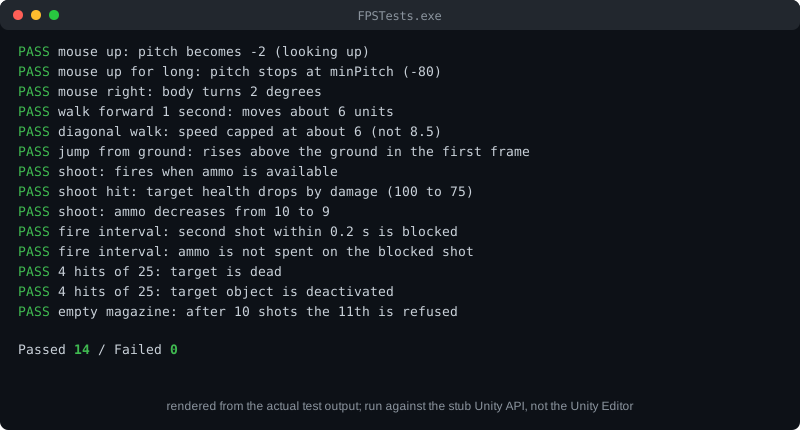
ผลการรันทดสอบ
PASS  mouse up: pitch becomes -2 (looking up)
PASS  mouse up for long: pitch stops at minPitch (-80)
PASS  mouse right: body turns 2 degrees
PASS  walk forward 1 second: moves about 6 units
PASS  diagonal walk: speed capped at about 6 (not 8.5)
PASS  jump from ground: rises above the ground in the first frame
PASS  shoot: fires when ammo is available
PASS  shoot hit: target health drops by damage (100 to 75)
PASS  shoot: ammo decreases from 10 to 9
PASS  fire interval: second shot within 0.2 s is blocked
PASS  fire interval: ammo is not spent on the blocked shot
PASS  4 hits of 25: target is dead
PASS  4 hits of 25: target object is deactivated
PASS  empty magazine: after 10 shots the 11th is refused

Passed 14 / Failed 0
ข้อควรระวัง: ผลนี้มาจากตัวจำลอง ไม่ใช่ Unity จริง ฟิสิกส์การชน แอนิเมชัน และระยะกล้องจริงยังต้องทดสอบด้วยการกด Play ใน Editor
ขั้นที่ 8: ทดสอบในเอดิเตอร์
กด **Play** แล้วตรวจ
- เลื่อนเมาส์ กล้องหมุนซ้ายขวาและก้มเงยได้ ไม่ก้มเกิน -80 องศาหรือเงยเกิน 80 องศา
- กด W A S D ตัวละครเดินตามทิศทางที่หัน
- กด Space ตัวละครกระโดด
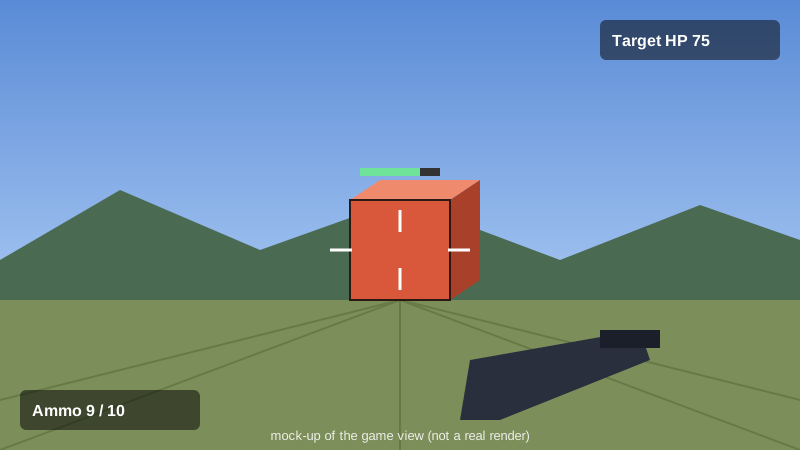
- คลิกซ้าย ปืนยิงออกไป เป้าหมายลดเลือดหลังโดน 4 นัดแล้วหายไป
- ยิงครบ 10 นัด แล้วคลิกอีก ปืนจะไม่ยิง
ปัญหาที่พบบ่อย
- **กล้องไม่หมุน:** ตรวจว่าเลือก Active Input Handling ถูกต้อง และช่อง Body ใน MouseLook มี Player
- **เดินแล้วทะลุกำแพง:** ตรวจว่ากำแพงมี Collider และ Character Controller ของ Player มีขนาดพอดีตัว
- **ยิงไม่โดน:** ตรวจว่า Muzzle ชี้ไปข้างหน้า (แกน Z) และเป้าหมายมี Collider กับคอมโพเนนต์ Target
- **เกมขึ้นข้อความว่า Mathf.Max ไม่ตรง:** อย่าใช้ `Mathf.Max` กับตัวแปร int ให้ใช้การเช็คแบบในบทความแทน
สรุป
เกม FPS ประกอบด้วยสี่ระบบหลัก คือการหมุนกล้อง การเดิน การยิงด้วยรังสี และเป้าหมายที่มีเลือด แต่ละระบบเป็นสคริปต์เล็ก ๆ ที่ทดสอบได้แยกกัน การทดสอบพบข้อผิดพลาดตั้งแต่การคอมไพล์ จึงช่วยลดเวลาแก้บั๊กในเอดิเตอร์ ก่อนขยายเกม ควรเพิ่มระบบเช่น ศัตรูที่เคลื่อนที่ ตัวนับกระสุนบนจอ และการโหลดกระสุนใหม่