Object Detection ด้วย YOLO: ตรวจจับวัตถุในภาพและวิดีโอ
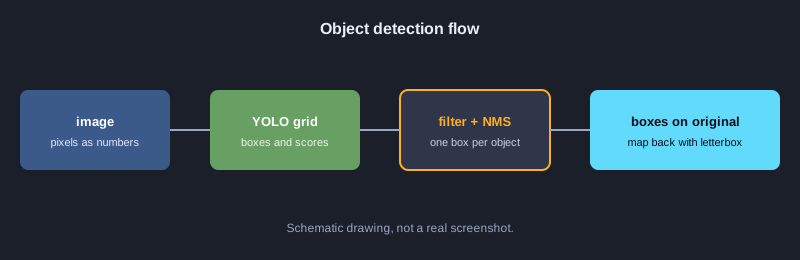
Object Detection คือการหาว่าในภาพมีวัตถุอะไรบ้าง และอยู่ตรงไหน ผลลัพธ์คือกรอบสี่เหลี่ยม (bounding box) พร้อมชื่อคลาสและค่าความมั่นใจ โมเดลตระกูล YOLO ทำงานได้เร็วพอสำหรับวิดีโอ บทความนี้อธิบายหลักการที่อยู่เบื้องหลัง ได้แก่ พิกัดกรอบ IoU, NMS, การถอดผลจากตารางเซลล์, การย่อภาพแบบ letterbox และการวัดคุณภาพด้วย precision, recall และ AP ทุกตัวอย่างเป็นโค้ด JavaScript ที่ใช้ไลบรารีมาตรฐานเท่านั้น จึงรันได้ทันทีโดยไม่ต้องดาวน์โหลดโมเดล
สิ่งที่ต้องเตรียม
ต้องมี Node.js 18 ขึ้นไปและพื้นฐาน JavaScript แต่ละตัวอย่างรันด้วยคำสั่ง node ชื่อไฟล์.js ไม่ต้องติดตั้งแพ็กเกจเพิ่ม ส่วนการรันโมเดล YOLO จริงกับภาพ ต้องใช้ Python และไลบรารี ultralytics ซึ่งบทความนี้ไม่ได้รันในเครื่องทดสอบ จึงแนะนำไว้ในหัวข้อขั้นต่อไปเท่านั้น
ภาพประกอบ
ตัวอย่างที่ 1: ภาพคืออาร์เรย์ของตัวเลข
ภาพดิจิทัลคือตารางของค่าพิกเซล โมเดลจึงประมวลผลภาพเป็นตัวเลขทั้งหมด ตัวอย่างนี้สร้างภาพขาวดำ 4x4 แล้วนับพิกเซลที่สว่าง
// ภาพขาวดำ 4x4 เก็บเป็นอาร์เรย์ของค่าความสว่าง 0-255
const image = [
  [0, 0, 255, 255],
  [0, 0, 255, 255],
  [0, 0, 0, 0],
  [0, 0, 0, 0],
];
const height = image.length;
const width = image[0].length;
console.log(`ขนาดภาพ: กว้าง ${width} x สูง ${height}`);
let bright = 0;
for (const row of image) for (const p of row) if (p > 127) bright++;
console.log("จำนวนพิกเซลสว่าง:", bright);
console.log("ค่าพิกเซลมุมบนซ้าย:", image[0][0]);
**ผลลัพธ์ที่ได้จากการรันจริง**
ขนาดภาพ: กว้าง 4 x สูง 4
จำนวนพิกเซลสว่าง: 4
ค่าพิกเซลมุมบนซ้าย: 0
ตัวอย่างที่ 2: แปลงรูปแบบของกรอบ
YOLO คืนกรอบเป็นจุดกลาง กว้าง และสูง (cx, cy, w, h) แต่การวาดและการคำนวณ IoU มักต้องการมุมบนซ้ายและมุมล่างขวา (x1, y1, x2, y2)
// โมเดล YOLO คืนกรอบเป็น (cx, cy, w, h) แต่การวาดและคำนวณมักใช้ (x1, y1, x2, y2)
function xywhToXyxy([cx, cy, w, h]) {
  return [cx - w / 2, cy - h / 2, cx + w / 2, cy + h / 2];
}
const box = [320, 240, 100, 50];
const [x1, y1, x2, y2] = xywhToXyxy(box);
console.log("มุมบนซ้าย:", x1, y1);
console.log("มุมล่างขวา:", x2, y2);
console.log("กว้าง:", x2 - x1, "สูง:", y2 - y1);
**ผลลัพธ์ที่ได้จากการรันจริง**
มุมบนซ้าย: 270 215
มุมล่างขวา: 370 265
กว้าง: 100 สูง: 50
ตัวอย่างที่ 3: IoU วัดการซ้อนทับของกรอบ
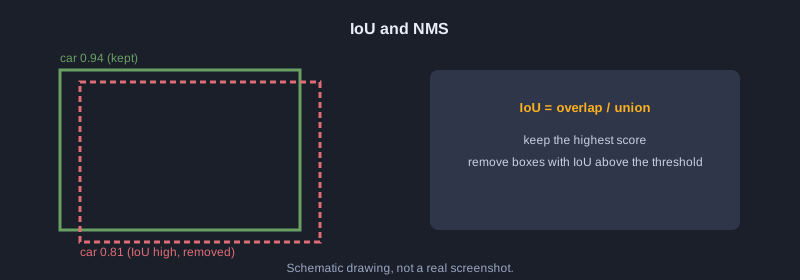
IoU คือพื้นที่ซ้อนกันหารด้วยพื้นที่รวม ค่าอยู่ระหว่าง 0 ถึง 1 ค่า 1 หมายถึงกรอบตรงกันทุกประการ
// IoU = พื้นที่ที่ซ้อนกัน / พื้นที่รวมของทั้งสองกรอบ
function area([x1, y1, x2, y2]) {
  return Math.max(0, x2 - x1) * Math.max(0, y2 - y1);
}
function iou(a, b) {
  const ix1 = Math.max(a[0], b[0]);
  const iy1 = Math.max(a[1], b[1]);
  const ix2 = Math.min(a[2], b[2]);
  const iy2 = Math.min(a[3], b[3]);
  const inter = Math.max(0, ix2 - ix1) * Math.max(0, iy2 - iy1);
  return inter / (area(a) + area(b) - inter);
}
const a = [0, 0, 100, 100];
console.log("กรอบเดียวกัน:", iou(a, a).toFixed(2));
console.log("ซ้อนกันหนึ่งในสาม:", iou(a, [50, 0, 150, 100]).toFixed(2));
console.log("ไม่ซ้อนกัน:", iou(a, [200, 200, 300, 300]).toFixed(2));
**ผลลัพธ์ที่ได้จากการรันจริง**
กรอบเดียวกัน: 1.00
ซ้อนกันหนึ่งในสาม: 0.33
ไม่ซ้อนกัน: 0.00
ตัวอย่างที่ 4: กรองตามความมั่นใจ
โมเดลทำนายกรอบจำนวนมาก กรอบที่ความมั่นใจต่ำกว่าเกณฑ์จะถูกทิ้งก่อนขั้นตอนถัดไป
// กรองกรอบที่มั่นใจน้อยออกก่อน ด้วยเกณฑ์ความมั่นใจ (confidence threshold)
const detections = [
  { label: "car", score: 0.94, box: [40, 60, 180, 140] },
  { label: "car", score: 0.31, box: [200, 70, 260, 130] },
  { label: "person", score: 0.88, box: [300, 50, 340, 170] },
  { label: "dog", score: 0.12, box: [10, 150, 60, 200] },
];
const THRESHOLD = 0.5;
const kept = detections.filter(d => d.score >= THRESHOLD);
console.log(`เหลือ ${kept.length} จาก ${detections.length} กรอบ (เกณฑ์ ${THRESHOLD})`);
for (const d of kept) console.log(d.label, d.score.toFixed(2));
**ผลลัพธ์ที่ได้จากการรันจริง**
เหลือ 2 จาก 4 กรอบ (เกณฑ์ 0.5)
car 0.94
person 0.88
ตัวอย่างที่ 5: Non-Maximum Suppression (NMS)
NMS เรียงกรอบตามความมั่นใจ เก็บกรอบที่สูงสุด แล้วตัดกรอบอื่นที่มี IoU สูงกับกรอบที่เก็บไว้ ผลคือกรอบเดียวต่อวัตถุหนึ่งชิ้น
// Non-Maximum Suppression: เก็บกรอบที่มั่นใจสุด และตัดกรอบที่ซ้อนทับกันมากออก
function iou(a, b) {
  const ix1 = Math.max(a[0], b[0]), iy1 = Math.max(a[1], b[1]);
  const ix2 = Math.min(a[2], b[2]), iy2 = Math.min(a[3], b[3]);
  const inter = Math.max(0, ix2 - ix1) * Math.max(0, iy2 - iy1);
  const areaA = (a[2] - a[0]) * (a[3] - a[1]);
  const areaB = (b[2] - b[0]) * (b[3] - b[1]);
  return inter / (areaA + areaB - inter);
}
function nms(dets, iouThreshold) {
  const sorted = [...dets].sort((p, q) => q.score - p.score);
  const keep = [];
  for (const d of sorted) {
    if (keep.every(k => iou(k.box, d.box) < iouThreshold)) keep.push(d);
  }
  return keep;
}
const dets = [
  { label: "car", score: 0.94, box: [40, 60, 180, 140] },
  { label: "car", score: 0.81, box: [45, 62, 185, 142] },
  { label: "car", score: 0.67, box: [200, 70, 260, 130] },
  { label: "person", score: 0.88, box: [300, 50, 340, 170] },
];
const result = nms(dets, 0.5);
console.log(`ก่อน NMS ${dets.length} กรอบ -> หลัง NMS ${result.length} กรอบ`);
for (const d of result) console.log(d.label, d.score.toFixed(2));
**ผลลัพธ์ที่ได้จากการรันจริง**
ก่อน NMS 4 กรอบ -> หลัง NMS 3 กรอบ
car 0.94
person 0.88
car 0.67
ตัวอย่างที่ 6: NMS แยกตามคลาส
ถ้า NMS รวมทุกคลาสเข้าด้วยกัน รถยนต์กับสุนัขที่ซ้อนกันอาจหายไปหนึ่งกรอบ จึงควรทำ NMS แยกแต่ละคลาส
// NMS แยกตามคลาส: กรอบของคนละคลาสที่ซ้อนกันยังเก็บไว้ทั้งคู่
function iou(a, b) {
  const ix1 = Math.max(a[0], b[0]), iy1 = Math.max(a[1], b[1]);
  const ix2 = Math.min(a[2], b[2]), iy2 = Math.min(a[3], b[3]);
  const inter = Math.max(0, ix2 - ix1) * Math.max(0, iy2 - iy1);
  return inter / ((a[2] - a[0]) * (a[3] - a[1]) + (b[2] - b[0]) * (b[3] - b[1]) - inter);
}
function nms(dets, iouThreshold) {
  const sorted = [...dets].sort((p, q) => q.score - p.score);
  const keep = [];
  for (const d of sorted) if (keep.every(k => iou(k.box, d.box) < iouThreshold)) keep.push(d);
  return keep;
}
function nmsPerClass(dets, iouThreshold) {
  const groups = {};
  for (const d of dets) (groups[d.label] = groups[d.label] || []).push(d);
  return Object.values(groups).flatMap(g => nms(g, iouThreshold));
}
const dets = [
  { label: "car", score: 0.94, box: [40, 60, 180, 140] },
  { label: "dog", score: 0.90, box: [50, 65, 170, 150] },
  { label: "car", score: 0.85, box: [45, 62, 185, 142] },
];
const result = nmsPerClass(dets, 0.5);
console.log("หลัง NMS แยกคลาส:");
for (const d of result) console.log(d.label, d.score.toFixed(2));
**ผลลัพธ์ที่ได้จากการรันจริง**
หลัง NMS แยกคลาส:
car 0.94
dog 0.90
ตัวอย่างที่ 7: ถอดผลดิบจากตารางเซลล์
YOLO แบ่งภาพเป็นตาราง แต่ละเซลล์ทำนายค่าดิบ ต้องใช้ sigmoid กับจุดกลาง และ exp กับความกว้างความสูง จึงจะได้พิกัดในหน่วยพิกเซล
// YOLO แบ่งภาพเป็นตาราง แต่ละเซลล์ทำนายกรอบออกมา ค่าดิบต้องแปลงด้วย sigmoid และ exp
const sigmoid = x => 1 / (1 + Math.exp(-x));
const STRIDE = 100; // ภาพ 400x400 แบ่งเป็น 4x4 เซลล์ ขนาดเซลล์ละ 100 พิกเซล
const raw = [
  { name: "เซลล์ A", row: 1, col: 2, tx: 0.2, ty: -0.4, tw: 0.0, th: 0.5, obj: 3.0 },
  { name: "เซลล์ B", row: 3, col: 0, tx: -1.5, ty: 1.0, tw: -0.3, th: 0.1, obj: -2.0 },
];
for (const r of raw) {
  const cx = (r.col + sigmoid(r.tx)) * STRIDE;
  const cy = (r.row + sigmoid(r.ty)) * STRIDE;
  const w = Math.exp(r.tw) * STRIDE;
  const h = Math.exp(r.th) * STRIDE;
  const conf = sigmoid(r.obj);
  console.log(`${r.name}: cx=${cx.toFixed(1)} cy=${cy.toFixed(1)} w=${w.toFixed(1)} h=${h.toFixed(1)} conf=${conf.toFixed(2)}`);
}
**ผลลัพธ์ที่ได้จากการรันจริง**
เซลล์ A: cx=255.0 cy=140.1 w=100.0 h=164.9 conf=0.95
เซลล์ B: cx=18.2 cy=373.1 w=74.1 h=110.5 conf=0.12
ตัวอย่างที่ 8: Softmax เลือกคลาส
คะแนนดิบของแต่ละคลาสถูกแปลงเป็นความน่าจะเป็นที่รวมกันได้ 100 เปอร์เซ็นต์ คลาสที่มีค่าสูงสุดคือผลทาย
// แปลงคะแนนดิบของแต่ละคลาสเป็นความน่าจะเป็นด้วย softmax แล้วเลือกคลาสที่สูงสุด
const names = ["person", "car", "dog"];
const logits = [1.2, 3.1, 0.4];
const exps = logits.map(Math.exp);
const sum = exps.reduce((a, b) => a + b, 0);
const probs = exps.map(e => e / sum);
probs.forEach((p, i) => console.log(names[i].padEnd(8), (p * 100).toFixed(1) + "%"));
const best = probs.indexOf(Math.max(...probs));
console.log("ผลทาย:", names[best]);
**ผลลัพธ์ที่ได้จากการรันจริง**
person   12.3%
car      82.2%
dog      5.5%
ผลทาย: car
ตัวอย่างที่ 9: Letterbox และการแปลงพิกัดกลับ
โมเดลรับภาพขนาดคงที่ เช่น 640x640 จึงย่อภาพโดยรักษาสัดส่วนและเติมขอบ เมื่อได้กรอบแล้วต้องลบขอบแล้วหารด้วยอัตราส่วนเพื่อกลับไปยังขนาดภาพจริง
// โมเดลรับภาพขนาดคงที่ 640x640 จึงต้องย่อโดยรักษาสัดส่วน แล้วเติมขอบดำ (letterbox)
// และต้องแปลงพิกัดกรอบกลับไปยังขนาดภาพจริง
const orig = { w: 1280, h: 720 };
const INPUT = 640;
const scale = Math.min(INPUT / orig.w, INPUT / orig.h);
const newW = Math.round(orig.w * scale);
const newH = Math.round(orig.h * scale);
const padX = (INPUT - newW) / 2;
const padY = (INPUT - newH) / 2;
console.log(`scale=${scale} ขนาดใหม่=${newW}x${newH} padX=${padX} padY=${padY}`);
// กรอบที่โมเดลทำนายในพื้นที่ 640x640
const boxInInput = [100, 200, 300, 400];
const back = [
  (boxInInput[0] - padX) / scale,
  (boxInInput[1] - padY) / scale,
  (boxInInput[2] - padX) / scale,
  (boxInInput[3] - padY) / scale,
];
console.log("กรอบในภาพจริง:", back.map(v => Math.round(v)));
**ผลลัพธ์ที่ได้จากการรันจริง**
scale=0.5 ขนาดใหม่=640x360 padX=0 padY=140
กรอบในภาพจริง: [ 200, 120, 600, 520 ]
ตัวอย่างที่ 10: วาดกรอบด้วยตัวอักษร
ตัวอย่างนี้วาดกรอบลงบนผืนผ้าใบตัวอักษรขนาด 40x12 ช่อง เพื่อให้เห็นตำแหน่งของวัตถุโดยไม่ต้องใช้ไลบรารีกราฟิก
// วาดกรอบลงบนผืนผ้าใบตัวอักษร เพื่อดูผลการตรวจจับโดยไม่ต้องใช้ไลบรารีกราฟิก
// ภาพจริง 400x240 พิกเซล ย่อเป็นตาราง 40x12 ช่อง (ช่องละ 10x20 พิกเซล)
const COLS = 40, ROWS = 12, SX = 10, SY = 20;
const canvas = Array.from({ length: ROWS }, () => Array(COLS).fill("."));
const dets = [
  { label: "car", box: [40, 60, 180, 140] },
  { label: "person", box: [300, 50, 340, 170] },
];
for (const d of dets) {
  const [x1, y1, x2, y2] = d.box;
  const c1 = Math.floor(x1 / SX), c2 = Math.floor(x2 / SX);
  const r1 = Math.floor(y1 / SY), r2 = Math.floor(y2 / SY);
  for (let c = c1; c <= c2; c++) { canvas[r1][c] = "-"; canvas[r2][c] = "-"; }
  for (let r = r1; r <= r2; r++) { canvas[r][c1] = "|"; canvas[r][c2] = "|"; }
  canvas[r1][c1] = d.label[0].toUpperCase();
}
console.log(canvas.map(row => row.join("")).join("\n"));
**ผลลัพธ์ที่ได้จากการรันจริง**
........................................
........................................
..............................P---|.....
....C-------------|...........|...|.....
....|.............|...........|...|.....
....|.............|...........|...|.....
....|.............|...........|...|.....
....|-------------|...........|...|.....
..............................|---|.....
........................................
........................................
........................................
ตัวอย่างที่ 11: สร้างภาพผลลัพธ์เป็น SVG
SVG เป็นไฟล์ข้อความ สร้างได้จากโค้ดโดยตรง ใช้ซ้อนกรอบและป้ายชื่อบนภาพ และเปิดได้ในเบราว์เซอร์
// สร้างไฟล์ SVG ซ้อนกรอบบนภาพ เพื่อนำไปแสดงหรือบันทึกผลการตรวจจับ
const dets = [
  { label: "car", score: 0.94, box: [40, 60, 180, 140] },
  { label: "person", score: 0.88, box: [300, 50, 340, 170] },
];
const lines = ['<svg xmlns="http://www.w3.org/2000/svg" width="400" height="240">'];
lines.push('<rect width="400" height="240" fill="#1b1f2a"/>');
for (const d of dets) {
  const [x1, y1, x2, y2] = d.box;
  lines.push(`<rect x="${x1}" y="${y1}" width="${x2 - x1}" height="${y2 - y1}" fill="none" stroke="#ffb020" stroke-width="2"/>`);
  lines.push(`<text x="${x1}" y="${y1 - 4}" font-size="12" fill="#ffb020">${d.label} ${d.score.toFixed(2)}</text>`);
}
lines.push("</svg>");
const svg = lines.join("\n");
console.log(svg);
console.log("จำนวนบรรทัด:", lines.length, "ความยาว:", svg.length, "ตัวอักษร");
**ผลลัพธ์ที่ได้จากการรันจริง**
<svg xmlns="http://www.w3.org/2000/svg" width="400" height="240">
<rect width="400" height="240" fill="#1b1f2a"/>
<rect x="40" y="60" width="140" height="80" fill="none" stroke="#ffb020" stroke-width="2"/>
<text x="40" y="56" font-size="12" fill="#ffb020">car 0.94</text>
<rect x="300" y="50" width="40" height="120" fill="none" stroke="#ffb020" stroke-width="2"/>
<text x="300" y="46" font-size="12" fill="#ffb020">person 0.88</text>
</svg>
จำนวนบรรทัด: 7 ความยาว: 441 ตัวอักษร
ตัวอย่างที่ 12: Precision และ Recall
เทียบผลทายกับเฉลย: TP คือทายถูก FP คือทายเกิน FN คือพลาด Precision คือสัดส่วนที่ทายถูกในสิ่งที่ทาย Recall คือสัดส่วนที่หาเจอในสิ่งที่มีจริง
// เทียบผลทายกับเฉลย: กรอบที่ IoU >= 0.5 และคลาสตรงกันคือ TP ที่เหลือคือ FP
// เฉลยที่ยังไม่ถูกทายคือ FN
function iou(a, b) {
  const ix1 = Math.max(a[0], b[0]), iy1 = Math.max(a[1], b[1]);
  const ix2 = Math.min(a[2], b[2]), iy2 = Math.min(a[3], b[3]);
  const inter = Math.max(0, ix2 - ix1) * Math.max(0, iy2 - iy1);
  return inter / ((a[2] - a[0]) * (a[3] - a[1]) + (b[2] - b[0]) * (b[3] - b[1]) - inter);
}
const gts = [
  { label: "car", box: [40, 60, 180, 140] },
  { label: "person", box: [300, 50, 340, 170] },
  { label: "dog", box: [10, 150, 60, 200] },
];
const preds = [
  { label: "car", score: 0.94, box: [40, 60, 180, 140] },
  { label: "person", score: 0.88, box: [305, 55, 345, 175] },
  { label: "car", score: 0.40, box: [200, 70, 260, 130] },
];
const used = new Array(gts.length).fill(false);
let tp = 0, fp = 0;
for (const p of [...preds].sort((a, b) => b.score - a.score)) {
  let best = -1, bestIou = 0.5;
  gts.forEach((g, i) => {
    const v = iou(p.box, g.box);
    if (!used[i] && g.label === p.label && v >= bestIou) { bestIou = v; best = i; }
  });
  if (best >= 0) { used[best] = true; tp++; } else fp++;
  console.log(`${p.label.padEnd(7)} ${p.score.toFixed(2)} ${best >= 0 ? "TP" : "FP"}`);
}
const fn = gts.length - tp;
console.log(`TP=${tp} FP=${fp} FN=${fn}`);
console.log("precision =", (tp / (tp + fp)).toFixed(2));
console.log("recall =", (tp / (tp + fn)).toFixed(2));
**ผลลัพธ์ที่ได้จากการรันจริง**
car     0.94 TP
person  0.88 TP
car     0.40 FP
TP=2 FP=1 FN=1
precision = 0.67
recall = 0.67
ตัวอย่างที่ 13: Average Precision (AP)
AP คือพื้นที่ใต้กราฟ precision-recall ที่เรียงตามความมั่นใจ ใช้เปรียบเทียบโมเดลได้ด้วยตัวเลขเดียว
// Average Precision (AP): สรุปกราฟ precision-recall เป็นตัวเลขเดียว
// เรียงกรอบตามความมั่นใจ แล้วคำนวณ precision และ recall สะสมทีละกรอบ
function iou(a, b) {
  const ix1 = Math.max(a[0], b[0]), iy1 = Math.max(a[1], b[1]);
  const ix2 = Math.min(a[2], b[2]), iy2 = Math.min(a[3], b[3]);
  const inter = Math.max(0, ix2 - ix1) * Math.max(0, iy2 - iy1);
  return inter / ((a[2] - a[0]) * (a[3] - a[1]) + (b[2] - b[0]) * (b[3] - b[1]) - inter);
}
const gts = [
  { label: "car", box: [40, 60, 180, 140] },
  { label: "person", box: [300, 50, 340, 170] },
  { label: "dog", box: [10, 150, 60, 200] },
];
const preds = [
  { label: "car", score: 0.94, box: [40, 60, 180, 140] },
  { label: "person", score: 0.88, box: [305, 55, 345, 175] },
  { label: "car", score: 0.40, box: [200, 70, 260, 130] },
  { label: "dog", score: 0.30, box: [12, 152, 62, 202] },
];
const sorted = [...preds].sort((a, b) => b.score - a.score);
const used = new Array(gts.length).fill(false);
const flags = sorted.map(p => {
  let best = -1, bestIou = 0.5;
  gts.forEach((g, i) => {
    const v = iou(p.box, g.box);
    if (!used[i] && g.label === p.label && v >= bestIou) { bestIou = v; best = i; }
  });
  if (best >= 0) { used[best] = true; return 1; }
  return 0;
});
let tp = 0, fp = 0;
const precision = [], recall = [];
flags.forEach(f => {
  if (f) tp++; else fp++;
  precision.push(tp / (tp + fp));
  recall.push(tp / gts.length);
});
for (let i = precision.length - 2; i >= 0; i--) precision[i] = Math.max(precision[i], precision[i + 1]);
let ap = 0, prevRecall = 0;
recall.forEach((r, i) => { ap += (r - prevRecall) * precision[i]; prevRecall = r; });
sorted.forEach((p, i) => console.log(`${p.score.toFixed(2)} ${flags[i] ? "TP" : "FP"} recall=${recall[i].toFixed(2)} precision=${precision[i].toFixed(2)}`));
console.log("AP =", ap.toFixed(3));
**ผลลัพธ์ที่ได้จากการรันจริง**
0.94 TP recall=0.33 precision=1.00
0.88 TP recall=0.67 precision=1.00
0.40 FP recall=0.67 precision=0.75
0.30 TP recall=1.00 precision=0.75
AP = 0.917
ตัวอย่างที่ 14: ตัวอย่างรวมทั้งขั้นตอน
รวมขั้นตอนทั้งหมดเข้าด้วยกัน ได้แก่ การถอดผลดิบ การกรอง NMS และการแปลงพิกัดกลับไปยังภาพจริง
// ตัวอย่างรวม: ถอดผลดิบ -> กรองด้วยเกณฑ์ -> NMS -> แปลงพิกัดกลับไปยังภาพจริง
const sigmoid = x => 1 / (1 + Math.exp(-x));
const NAMES = ["person", "car", "dog"];
const STRIDE = 100, INPUT = 400;
const ORIG = { w: 1280, h: 720 };
const scale = Math.min(INPUT / ORIG.w, INPUT / ORIG.h);
const padX = (INPUT - ORIG.w * scale) / 2;
const padY = (INPUT - ORIG.h * scale) / 2;
const raw = [
  { row: 1, col: 1, tx: 0.1, ty: -0.2, tw: 0.2, th: 0.0, obj: 2.5, cls: [-1.0, 3.0, 0.2] },
  { row: 1, col: 2, tx: 0.0, ty: 0.1, tw: 0.1, th: 0.2, obj: 2.0, cls: [-0.5, 2.8, 0.0] },
  { row: 2, col: 0, tx: 0.3, ty: 0.0, tw: -0.4, th: -0.2, obj: 1.5, cls: [2.5, -1.0, 0.1] },
  { row: 3, col: 3, tx: -0.5, ty: 0.2, tw: 0.0, th: 0.1, obj: -2.0, cls: [0.0, 0.0, 3.0] },
];
const dets = raw.map(r => {
  const cls = r.cls.map(sigmoid);
  const best = cls.indexOf(Math.max(...cls));
  const cx = (r.col + sigmoid(r.tx)) * STRIDE;
  const cy = (r.row + sigmoid(r.ty)) * STRIDE;
  const w = Math.exp(r.tw) * STRIDE;
  const h = Math.exp(r.th) * STRIDE;
  const score = sigmoid(r.obj) * cls[best];
  return { label: NAMES[best], score, box: [cx - w / 2, cy - h / 2, cx + w / 2, cy + h / 2] };
});
const kept = dets.filter(d => d.score >= 0.5);
console.log("หลังกรองด้วยเกณฑ์ 0.5:", kept.length, "กรอบ");
function iou(a, b) {
  const ix1 = Math.max(a[0], b[0]), iy1 = Math.max(a[1], b[1]);
  const ix2 = Math.min(a[2], b[2]), iy2 = Math.min(a[3], b[3]);
  const inter = Math.max(0, ix2 - ix1) * Math.max(0, iy2 - iy1);
  return inter / ((a[2] - a[0]) * (a[3] - a[1]) + (b[2] - b[0]) * (b[3] - b[1]) - inter);
}
const final = [];
for (const d of [...kept].sort((a, b) => b.score - a.score)) {
  if (final.every(f => f.label !== d.label || iou(f.box, d.box) < 0.5)) final.push(d);
}
console.log("หลัง NMS:", final.length, "กรอบ");
for (const d of final) {
  const [x1, y1, x2, y2] = d.box.map((v, i) => (v - (i % 2 === 0 ? padX : padY)) / scale);
  console.log(`${d.label.padEnd(7)} ${d.score.toFixed(2)} [${[x1, y1, x2, y2].map(v => Math.round(v)).join(", ")}]`);
}
**ผลลัพธ์ที่ได้จากการรันจริง**
หลังกรองด้วยเกณฑ์ 0.5: 3 กรอบ
หลัง NMS: 3 กรอบ
car     0.88 [293, 24, 683, 344]
car     0.83 [623, 13, 977, 403]
person  0.76 [77, 389, 291, 651]
ตัวอย่างที่ 15: นับวัตถุในวิดีโอ
วิดีโอคือภาพต่อกันหลายเฟรม ตัวอย่างนี้นับคลาสในแต่ละเฟรม แล้วใช้คลาสที่พบบ่อยที่สุดในสามเฟรมล่าสุดเพื่อลดการกระพริบ
// วิดีโอคือภาพต่อกันหลายเฟรม ตรวจทุกเฟรมแล้วนับคลาส
// การดูค่าจากหลายเฟรมที่อยู่ใกล้กันช่วยลดการกระพริบของผลทาย
const frames = [
  ["car", "car", "person"],
  ["car", "person", "person"],
  ["car", "car", "person"],
  ["car", "car"],
  ["person", "car", "car"],
];
frames.forEach((objs, i) => {
  const counts = {};
  for (const o of objs) counts[o] = (counts[o] || 0) + 1;
  console.log(`เฟรม ${i + 1}:`, JSON.stringify(counts));
});
// ใช้คลาสที่ปรากฏบ่อยที่สุดในหน้าต่าง 3 เฟรม
function majority(window) {
  const c = {};
  for (const x of window) c[x] = (c[x] || 0) + 1;
  return Object.entries(c).sort((a, b) => b[1] - a[1])[0][0];
}
const labels = frames.map(f => f[0]);
const smoothed = labels.map((_, i) => majority(labels.slice(Math.max(0, i - 2), i + 1)));
console.log("ป้ายรายเฟรม:", labels.join(" "));
console.log("หลังดูย้อนหลัง 3 เฟรม:", smoothed.join(" "));
**ผลลัพธ์ที่ได้จากการรันจริง**
เฟรม 1: {"car":2,"person":1}
เฟรม 2: {"car":1,"person":2}
เฟรม 3: {"car":2,"person":1}
เฟรม 4: {"car":2}
เฟรม 5: {"person":1,"car":2}
ป้ายรายเฟรม: car car car car person
หลังดูย้อนหลัง 3 เฟรม: car car car car car
ขั้นต่อไป
ขั้นต่อไปให้ติดตั้ง Python 3.12 แล้วรัน pip install ultralytics จากนั้นโหลดโมเดล YOLO ที่ฝึกไว้แล้วด้วยคำสั่ง YOLO('yolo11n.pt') และส่งภาพเข้าไปเพื่อรับกรอบ คลาส และความมั่นใจ ผลที่ได้จะมีรูปแบบเดียวกับที่ตัวอย่างในบทความจัดการ ทำให้ตรรกะ NMS และการแปลงพิกัดยังใช้ได้เหมือนเดิม
สรุป
Object Detection คือการหากรอบและคลาสของวัตถุในภาพ ขั้นตอนหลักคือถอดผลจากตาราง กรองตามความมั่นใจ ตัด NMS แล้วแปลงพิกัดกลับไปยังภาพจริง การวัดคุณภาพใช้ precision, recall และ AP ทุกผลลัพธ์ในบทความนี้มาจากการรันจริงของโค้ดตัวอย่าง