สร้างเกม FPS ด้วยภาษา C และ raylib ตั้งแต่หน้าต่างแรกจนถึงการยิงศัตรู
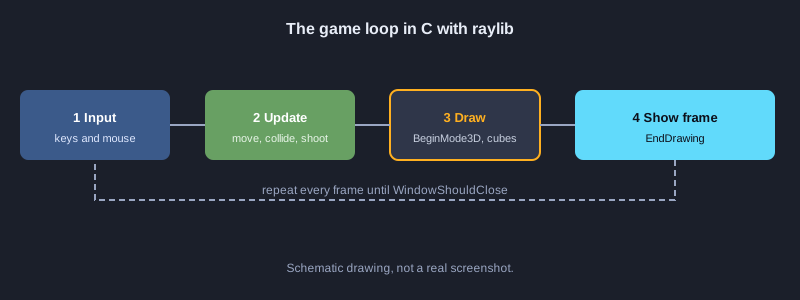
บทความนี้สอนการทำเกมยิงมุมมองบุคคลที่หนึ่ง (FPS) ด้วยภาษา C โดยใช้ raylib เป็นเอนจินโอเพนซอร์สสำหรับหน้าต่าง กราฟิก 3 มิติ และอินพุต ส่วนตรรกะของเกม เช่น แผนที่ การชนกำแพง การยิง และ HUD เขียนเองด้วย C ทั้งหมด เนื้อหาแบ่งเป็นขั้นตอนทีละข้อ มีแผนผังโครงสร้างและไฟล์โค้ดให้คัดลอกไปใช้ได้
สิ่งที่ต้องเตรียม
ต้องมีคอมพิวเตอร์ Windows 10 หรือ 11 ติดตั้ง Visual Studio 2022 Build Tools พร้อมเลือกชุดเครื่องมือ C++ (MSVC) และ Windows SDK และต้องดาวน์โหลด raylib จากหน้า GitHub Releases (raylib เผยแพร่ภายใต้สัญญาอนุญาต zlib ใช้ในงานเชิงพาณิชย์ได้) หมายเหตุ: โค้ดในบทความเขียนตามเอกสารของ raylib 5 และ 6 แต่ยังไม่ได้คอมไพล์และทดสอบทั้งโปรแกรมในเครื่องที่ใช้เขียนบทความนี้ ผลลัพธ์ที่ระบุคือสิ่งที่ควรเห็นเมื่อทำถูกต้อง ฟอนต์เริ่มต้นของ raylib แสดงได้เฉพาะอักษรละติน ตัวอย่างจึงใช้ข้อความภาษาอังกฤษบนหน้าจอ
ภาพประกอบ
1. ติดตั้งเครื่องมือและ raylib
ใช้ MSVC คอมไพล์ภาษา C และใช้ raylib เป็นเอนจินโอเพนซอร์ส
1. ดาวน์โหลด Visual Studio 2022 Build Tools จากเว็บไซต์ของ Microsoft แล้วติดตั้งชุด Desktop development with C++
2. เปิดโปรแกรม Developer Command Prompt for VS 2022 จากเมนู Start
3. ไปที่หน้า github.com/raysan5/raylib/releases แล้วดาวน์โหลดไฟล์สำหรับ Windows ที่ลงท้ายด้วย win64_msvc16.zip
4. แตกไฟล์ zip แล้วคัดลอกโฟลเดอร์ include และ lib ไปไว้ในโฟลเดอร์โปรเจกต์ชื่อ raylib
**ผลที่ควรเห็น:** โฟลเดอร์ raylib/include มีไฟล์ raylib.h และโฟลเดอร์ raylib/lib มีไฟล์ raylib.lib
2. โครงสร้างโปรเจกต์
แยกโค้ดเกมไว้ในโฟลเดอร์ src และเก็บไลบรารี raylib ไว้แยกต่างหาก
**โค้ด: project-tree.txt**
fps-c-raylib/
├── raylib/                 ไลบรารี raylib ที่ดาวน์โหลดจาก GitHub Releases
│   ├── include/raylib.h
│   └── lib/raylib.lib
├── src/
│   └── main.c              โค้ดเกมทั้งหมด
├── build.bat               คำสั่งคอมไพล์สำหรับ MSVC
└── fps-c-raylib.exe        ไฟล์ที่ได้หลังคอมไพล์
3. เปิดหน้าต่างและวาดข้อความ
ทุกเกม raylib มีวงจรเดียวกัน: เปิดหน้าต่าง วนลูปจนกว่าจะปิดหน้าต่าง แล้ววาดทีละเฟรม
1. สร้างโฟลเดอร์ src แล้วสร้างไฟล์ main.c
2. วางโค้ดตามตัวอย่างด้านล่าง
**โค้ด: 01_window.c**
// ไฟล์: src/main.c  (ขั้นแรก เปิดหน้าต่างและวาดข้อความ)
#include "raylib.h"

int main(void)
{
    InitWindow(960, 540, "FPS ด้วย C และ raylib");
    SetTargetFPS(60);

    while (!WindowShouldClose())
    {
        BeginDrawing();
        ClearBackground(RAYWHITE);
        DrawText("Hello FPS", 40, 40, 32, DARKGRAY);
        EndDrawing();
    }

    CloseWindow();
    return 0;
}
**ผลที่ควรเห็น:** หน้าต่างขนาด 960x540 ปรากฏ พื้นสีขาว และมีข้อความ Hello FPS อยู่มุมซ้ายบน
4. วาดแผนที่เป็นกำแพง 3 มิติ
เก็บแผนที่เป็นอาร์เรย์ของเลข 1 และ 0 เลข 1 คือกำแพง เลข 0 คือพื้นที่ว่าง แล้ววนลูปวาดกล่องตรงช่องที่เป็นกำแพง
**โค้ด: 02_map_render.c**
// ไฟล์: src/main.c  (ขั้นที่สอง แผนที่เป็นตารางตัวเลข แล้ววาดกำแพงเป็นกล่อง 3 มิติ)
#include "raylib.h"

#define MAP_W 8
#define MAP_H 8
#define CELL 4.0f // ขนาดของหนึ่งช่องในโลก 3 มิติ

// 1 = กำแพง, 0 = พื้นที่ว่าง
static const int map[MAP_H][MAP_W] = {
    {1, 1, 1, 1, 1, 1, 1, 1},
    {1, 0, 0, 0, 0, 0, 0, 1},
    {1, 0, 1, 1, 0, 0, 0, 1},
    {1, 0, 0, 0, 0, 1, 0, 1},
    {1, 0, 0, 1, 0, 1, 0, 1},
    {1, 0, 0, 0, 0, 0, 0, 1},
    {1, 1, 1, 1, 1, 1, 1, 1},
    {1, 1, 1, 1, 1, 1, 1, 1},
};

static void DrawMap(void)
{
    for (int row = 0; row < MAP_H; row++)
    {
        for (int col = 0; col < MAP_W; col++)
        {
            if (map[row][col] == 1)
            {
                // ช่อง (col, row) ครอบคลุมพื้นที่ [col*CELL, (col+1)*CELL] ดังนั้นศูนย์กลางอยู่ที่ +CELL/2
                Vector3 pos = { (col + 0.5f) * CELL, CELL / 2.0f, (row + 0.5f) * CELL };
                DrawCube(pos, CELL, CELL, CELL, DARKGRAY);
                DrawCubeWires(pos, CELL, CELL, CELL, BLACK);
            }
        }
    }
}

int main(void)
{
    InitWindow(960, 540, "แผนที่ FPS");
    SetTargetFPS(60);

    Camera3D camera = { 0 };
    camera.position = (Vector3){ 6.0f, 2.0f, 6.0f };
    camera.target = (Vector3){ 10.0f, 1.0f, 10.0f };
    camera.up = (Vector3){ 0.0f, 1.0f, 0.0f };
    camera.fovy = 60.0f;
    camera.projection = CAMERA_PERSPECTIVE;

    while (!WindowShouldClose())
    {
        BeginDrawing();
        ClearBackground(SKYBLUE);

        BeginMode3D(camera);
        DrawPlane((Vector3){ 16.0f, 0.0f, 16.0f }, (Vector2){ 32.0f, 32.0f }, LIGHTGRAY);
        DrawMap();
        EndMode3D();

        DrawFPS(10, 10);
        EndDrawing();
    }

    CloseWindow();
    return 0;
}
**ผลที่ควรเห็น:** เห็นกำแพงสีเทาเข้มเป็นรูปแบบแผนที่ในโลก 3 มิติ และเห็นตัวเลข FPS มุมซ้ายบน
5. เดินและหมุนกล้องด้วย WASD และเมาส์
UpdateCamera ของ raylib รองรับโหมด CAMERA_FIRST_PERSON ที่ใช้ WASD เดิน และเมาส์หมุนมอง โดยไม่ต้องเขียนการคำนวณมุมเอง
**โค้ด: 03_movement.c**
// ไฟล์: src/main.c  (ขั้นที่สาม การเดินและหมุนกล้องด้วยคีย์บอร์ดและเมาส์)
#include "raylib.h"

int main(void)
{
    InitWindow(960, 540, "เดินในแผนที่");
    SetTargetFPS(60);
    DisableCursor(); // ซ่อนเคอร์เซอร์เพื่อให้หมุนกล้องด้วยเมาส์ได้

    Camera3D camera = { 0 };
    camera.position = (Vector3){ 6.0f, 2.0f, 6.0f };
    camera.target = (Vector3){ 10.0f, 1.0f, 10.0f };
    camera.up = (Vector3){ 0.0f, 1.0f, 0.0f };
    camera.fovy = 60.0f;
    camera.projection = CAMERA_PERSPECTIVE;

    while (!WindowShouldClose())
    {
        // WASD เดิน และเมาส์หมุนมอง ทำงานตามโหมด CAMERA_FIRST_PERSON
        UpdateCamera(&camera, CAMERA_FIRST_PERSON);

        BeginDrawing();
        ClearBackground(SKYBLUE);
        BeginMode3D(camera);
        DrawPlane((Vector3){ 16.0f, 0.0f, 16.0f }, (Vector2){ 32.0f, 32.0f }, LIGHTGRAY);
        EndMode3D();
        DrawText("WASD move, mouse look", 10, 40, 20, DARKGRAY);
        EndDrawing();
    }

    CloseWindow();
    return 0;
}
**ผลที่ควรเห็น:** กด W A S D แล้วกล้องเคลื่อนที่ และเมาส์หมุนมุมมอง โดยเคอร์เซอร์ถูกซ่อนไว้
6. ตรวจการชนกำแพง
ตรวจมุมทั้งสี่รอบตัวผู้เล่นก่อนยอมรับตำแหน่งใหม่ ถ้าชนให้ย้อนกลับเฉพาะแกนที่ชน เพื่อให้เลื่อนไปตามกำแพงได้ และเลื่อนจุดมองตามไปด้วย
**โค้ด: 04_collision.c**
// ไฟล์: src/main.c  (ขั้นที่สี่ ตรวจชนกำแพงก่อนยอมรับการขยับ)
#include "raylib.h"
#include "raymath.h"

#define MAP_W 8
#define MAP_H 8
#define CELL 4.0f
#define PLAYER_RADIUS 0.4f

static const int map[MAP_H][MAP_W] = {
    {1, 1, 1, 1, 1, 1, 1, 1},
    {1, 0, 0, 0, 0, 0, 0, 1},
    {1, 0, 1, 1, 0, 0, 0, 1},
    {1, 0, 0, 0, 0, 1, 0, 1},
    {1, 0, 0, 1, 0, 1, 0, 1},
    {1, 0, 0, 0, 0, 0, 0, 1},
    {1, 1, 1, 1, 1, 1, 1, 1},
    {1, 1, 1, 1, 1, 1, 1, 1},
};

// ตรวจว่าจุด (x, z) ในโลกอยู่ในช่องกำแพงหรือไม่
static bool IsWall(float x, float z)
{
    int col = (int)(x / CELL);
    int row = (int)(z / CELL);
    if (col < 0 || col >= MAP_W || row < 0 || row >= MAP_H) return true;
    return map[row][col] == 1;
}

// ตรวจทั้งสี่มุมรอบตัวผู้เล่น ถ้ามีมุมใดชนกำแพงให้ถือว่าไปไม่ได้
static bool CanMoveTo(Vector3 p)
{
    float r = PLAYER_RADIUS;
    return !IsWall(p.x - r, p.z - r) && !IsWall(p.x + r, p.z - r) &&
           !IsWall(p.x - r, p.z + r) && !IsWall(p.x + r, p.z + r);
}

int main(void)
{
    InitWindow(960, 540, "ชนกำแพง");
    SetTargetFPS(60);
    DisableCursor();

    Camera3D camera = { 0 };
    camera.position = (Vector3){ 6.0f, 2.0f, 6.0f };
    camera.target = (Vector3){ 10.0f, 1.0f, 10.0f };
    camera.up = (Vector3){ 0.0f, 1.0f, 0.0f };
    camera.fovy = 60.0f;
    camera.projection = CAMERA_PERSPECTIVE;

    while (!WindowShouldClose())
    {
        // เก็บตำแหน่งก่อนขยับ แล้วให้ UpdateCamera คำนวณตำแหน่งใหม่
        Vector3 before = camera.position;
        UpdateCamera(&camera, CAMERA_FIRST_PERSON);

        // ถ้าตำแหน่งใหม่ชนกำแพง ให้ย้อนกลับไปเฉพาะแกนที่ชน เพื่อให้เลื่อนไปตามกำแพงได้
        Vector3 wanted = camera.position;
        Vector3 fixed = wanted;
        if (!CanMoveTo((Vector3){ fixed.x, fixed.y, before.z })) fixed.x = before.x;
        if (!CanMoveTo(fixed)) fixed.z = before.z;

        // ย้ายจุดมองตามไปด้วย เพื่อให้ทิศทางการมองไม่เพี้ยน
        Vector3 shift = Vector3Subtract(fixed, wanted);
        camera.position = fixed;
        camera.target = Vector3Add(camera.target, shift);

        BeginDrawing();
        ClearBackground(SKYBLUE);
        BeginMode3D(camera);
        DrawPlane((Vector3){ 16.0f, 0.0f, 16.0f }, (Vector2){ 32.0f, 32.0f }, LIGHTGRAY);
        for (int row = 0; row < MAP_H; row++)
            for (int col = 0; col < MAP_W; col++)
                if (map[row][col] == 1)
                {
                    Vector3 pos = { (col + 0.5f) * CELL, CELL / 2.0f, (row + 0.5f) * CELL };
                    DrawCube(pos, CELL, CELL, CELL, DARKGRAY);
                }
        EndMode3D();
        DrawText("Walls block you", 10, 40, 20, DARKGRAY);
        EndDrawing();
    }

    CloseWindow();
    return 0;
}
**ผลที่ควรเห็น:** เดินไปชนกำแพงแล้วจะไม่ทะลุ แต่สามารถเดินขนานไปกับกำแพงได้
7. ยิงด้วยรังสีจากกลางจอ
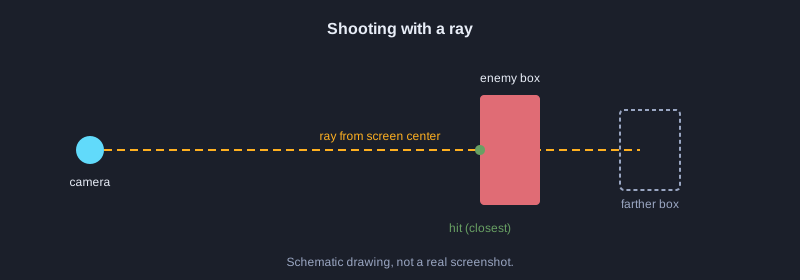
GetMouseRay สร้างรังสีจากตำแหน่งที่กำหนดบนจอ ส่วนนี้ใช้กลางจอเป็นจุดยิง แล้วใช้ GetRayCollisionBox ตรวจว่ารังสีชนกล่องของศัตรูหรือไม่
**โค้ด: 05_shoot.c**
// ไฟล์: src/main.c  (ขั้นที่ห้า ยิงด้วยรังสีจากเมาส์ไปชนกล่องของศัตรู)
#include "raylib.h"

// กล่องขอบเขตของศัตรูหนึ่งตัว
static BoundingBox enemyBox = {
    { 14.0f, 0.0f, 14.0f }, // มุมต่ำสุด
    { 15.5f, 2.5f, 15.5f }, // มุมสูงสุด
};
static bool enemyAlive = true;

int main(void)
{
    InitWindow(960, 540, "ยิงศัตรู");
    SetTargetFPS(60);
    DisableCursor();

    Camera3D camera = { 0 };
    camera.position = (Vector3){ 6.0f, 2.0f, 6.0f };
    camera.target = (Vector3){ 14.0f, 1.0f, 14.0f };
    camera.up = (Vector3){ 0.0f, 1.0f, 0.0f };
    camera.fovy = 60.0f;
    camera.projection = CAMERA_PERSPECTIVE;

    while (!WindowShouldClose())
    {
        UpdateCamera(&camera, CAMERA_FIRST_PERSON);

        // คลิกซ้ายแล้วยิงรังสีจากกลางจอไปข้างหน้า
        if (IsMouseButtonPressed(MOUSE_BUTTON_LEFT) && enemyAlive)
        {
            Ray ray = GetMouseRay((Vector2){ GetScreenWidth() / 2.0f, GetScreenHeight() / 2.0f }, camera);
            RayCollision hit = GetRayCollisionBox(ray, enemyBox);
            if (hit.hit)
            {
                enemyAlive = false; // ยิงโดนแล้วศัตรูหายไป
            }
        }

        BeginDrawing();
        ClearBackground(SKYBLUE);
        BeginMode3D(camera);
        DrawPlane((Vector3){ 16.0f, 0.0f, 16.0f }, (Vector2){ 32.0f, 32.0f }, LIGHTGRAY);
        if (enemyAlive)
        {
            Vector3 center = { 14.75f, 1.25f, 14.75f };
            DrawCubeV(center, (Vector3){ 1.5f, 2.5f, 1.5f }, RED);
        }
        EndMode3D();

        DrawLine(GetScreenWidth() / 2 - 10, GetScreenHeight() / 2, GetScreenWidth() / 2 + 10, GetScreenHeight() / 2, BLACK);
        DrawLine(GetScreenWidth() / 2, GetScreenHeight() / 2 - 10, GetScreenWidth() / 2, GetScreenHeight() / 2 + 10, BLACK);
        EndDrawing();
    }

    CloseWindow();
    return 0;
}
**ผลที่ควรเห็น:** เมื่อกดคลิกซ้ายขณะเล็งที่กล่องสีแดง กล่องจะหายไป เมื่อยิงไปที่อื่นจะไม่มีอะไรเกิดขึ้น
8. หน้าจอ HUD แสดงกระสุนและพลังชีวิต
HUD วาดข้อความและแถบบนหน้าจอ 2 มิติหลังจากปิด BeginMode3D แล้ว ค่ากระสุนลดลงเมื่อยิงแต่ละนัด
**โค้ด: 06_hud.c**
// ไฟล์: src/main.c  (ขั้นที่หก หน้าจอข้อมูล HUD แสดงกระสุนและพลังชีวิต)
#include <stdio.h>
#include "raylib.h"

typedef struct
{
    int ammo;
    int health;
} Player;

static void DrawHud(const Player *p)
{
    char text[64];

    // แถบพลังชีวิตมุมซ้ายล่าง
    DrawRectangle(20, GetScreenHeight() - 40, 200, 20, DARKGRAY);
    DrawRectangle(20, GetScreenHeight() - 40, (int)(200 * p->health / 100.0f), 20, RED);

    // จำนวนกระสุนมุมขวาล่าง
    snprintf(text, sizeof(text), "Ammo %d", p->ammo);
    DrawText(text, GetScreenWidth() - 180, GetScreenHeight() - 40, 24, BLACK);
}

int main(void)
{
    InitWindow(960, 540, "HUD");
    SetTargetFPS(60);

    Player player = { .ammo = 12, .health = 100 };

    while (!WindowShouldClose())
    {
        if (IsMouseButtonPressed(MOUSE_BUTTON_LEFT) && player.ammo > 0)
        {
            player.ammo--; // ยิงหนึ่งนัดจะลดกระสุน
        }

        BeginDrawing();
        ClearBackground(SKYBLUE);
        DrawHud(&player);
        EndDrawing();
    }

    CloseWindow();
    return 0;
}
**ผลที่ควรเห็น:** มุมขวาล่างแสดง Ammo 12 และแถบสีแดงมุมซ้ายล่างแสดงพลังชีวิตเต็ม Ammo drops by 1 เมื่อคลิก
9. รวมทุกส่วนเป็นเกมเดียว
ไฟล์นี้รวมแผนที่ การชนกำแพง ศัตรูสองตัวที่มีพลังชีวิต การยิงหาเป้าที่ใกล้ที่สุด และ HUD เข้าด้วยกัน
**โค้ด: 07_full_main.c**
// ไฟล์: src/main.c  (รวมทุกขั้นตอนเป็นไฟล์เดียว)
#include <stdio.h>
#include "raylib.h"
#include "raymath.h"

#define MAP_W 8
#define MAP_H 8
#define CELL 4.0f
#define PLAYER_RADIUS 0.4f
#define ENEMY_COUNT 2

static const int map[MAP_H][MAP_W] = {
    {1, 1, 1, 1, 1, 1, 1, 1},
    {1, 0, 0, 0, 0, 0, 0, 1},
    {1, 0, 1, 1, 0, 0, 0, 1},
    {1, 0, 0, 0, 0, 1, 0, 1},
    {1, 0, 0, 1, 0, 1, 0, 1},
    {1, 0, 0, 0, 0, 0, 0, 1},
    {1, 1, 1, 1, 1, 1, 1, 1},
    {1, 1, 1, 1, 1, 1, 1, 1},
};

typedef struct
{
    BoundingBox box;
    int health;
} Enemy;

typedef struct
{
    int ammo;
    int health;
} Player;

static bool IsWall(float x, float z)
{
    int col = (int)(x / CELL);
    int row = (int)(z / CELL);
    if (col < 0 || col >= MAP_W || row < 0 || row >= MAP_H) return true;
    return map[row][col] == 1;
}

static bool CanMoveTo(Vector3 p)
{
    float r = PLAYER_RADIUS;
    return !IsWall(p.x - r, p.z - r) && !IsWall(p.x + r, p.z - r) &&
           !IsWall(p.x - r, p.z + r) && !IsWall(p.x + r, p.z + r);
}

static void ApplyCollision(Camera3D *camera, Vector3 before)
{
    Vector3 wanted = camera->position;
    Vector3 fixed = wanted;
    if (!CanMoveTo((Vector3){ fixed.x, fixed.y, before.z })) fixed.x = before.x;
    if (!CanMoveTo(fixed)) fixed.z = before.z;
    Vector3 shift = Vector3Subtract(fixed, wanted);
    camera->position = fixed;
    camera->target = Vector3Add(camera->target, shift);
}

static void DrawMap(void)
{
    for (int row = 0; row < MAP_H; row++)
    {
        for (int col = 0; col < MAP_W; col++)
        {
            if (map[row][col] == 1)
            {
                Vector3 pos = { (col + 0.5f) * CELL, CELL / 2.0f, (row + 0.5f) * CELL };
                DrawCube(pos, CELL, CELL, CELL, DARKGRAY);
                DrawCubeWires(pos, CELL, CELL, CELL, BLACK);
            }
        }
    }
}

int main(void)
{
    InitWindow(960, 540, "FPS ด้วย C และ raylib");
    SetTargetFPS(60);
    DisableCursor();

    Camera3D camera = { 0 };
    camera.position = (Vector3){ 6.0f, 2.0f, 6.0f };
    camera.target = (Vector3){ 10.0f, 1.0f, 10.0f };
    camera.up = (Vector3){ 0.0f, 1.0f, 0.0f };
    camera.fovy = 60.0f;
    camera.projection = CAMERA_PERSPECTIVE;

    Player player = { .ammo = 12, .health = 100 };
    Enemy enemies[ENEMY_COUNT] = {
        { { { 14.0f, 0.0f, 14.0f }, { 15.5f, 2.5f, 15.5f } }, 50 },
        { { { 18.0f, 0.0f, 4.0f }, { 19.5f, 2.5f, 5.5f } }, 50 },
    };

    while (!WindowShouldClose())
    {
        Vector3 before = camera.position;
        UpdateCamera(&camera, CAMERA_FIRST_PERSON);
        ApplyCollision(&camera, before);

        if (IsMouseButtonPressed(MOUSE_BUTTON_LEFT) && player.ammo > 0)
        {
            player.ammo--;
            Vector2 center = { GetScreenWidth() / 2.0f, GetScreenHeight() / 2.0f };
            Ray ray = GetMouseRay(center, camera);

            // ยิงหาศัตรูที่ใกล้ที่สุดที่รังสีชน
            int target = -1;
            float best = 1e9f;
            for (int i = 0; i < ENEMY_COUNT; i++)
            {
                if (enemies[i].health <= 0) continue;
                RayCollision hit = GetRayCollisionBox(ray, enemies[i].box);
                if (hit.hit && hit.distance < best)
                {
                    best = hit.distance;
                    target = i;
                }
            }
            if (target >= 0) enemies[target].health -= 25;
        }

        BeginDrawing();
        ClearBackground(SKYBLUE);
        BeginMode3D(camera);
        DrawPlane((Vector3){ 16.0f, 0.0f, 16.0f }, (Vector2){ 32.0f, 32.0f }, LIGHTGRAY);
        DrawMap();
        for (int i = 0; i < ENEMY_COUNT; i++)
        {
            if (enemies[i].health <= 0) continue;
            Vector3 c = {
                (enemies[i].box.min.x + enemies[i].box.max.x) / 2.0f,
                1.25f,
                (enemies[i].box.min.z + enemies[i].box.max.z) / 2.0f,
            };
            DrawCubeV(c, (Vector3){ 1.5f, 2.5f, 1.5f }, RED);
        }
        EndMode3D();

        // จุดเล็งกลางจอ
        DrawLine(GetScreenWidth() / 2 - 10, GetScreenHeight() / 2, GetScreenWidth() / 2 + 10, GetScreenHeight() / 2, BLACK);
        DrawLine(GetScreenWidth() / 2, GetScreenHeight() / 2 - 10, GetScreenWidth() / 2, GetScreenHeight() / 2 + 10, BLACK);

        // HUD
        char text[64];
        snprintf(text, sizeof(text), "Ammo %d", player.ammo);
        DrawText(text, GetScreenWidth() - 180, GetScreenHeight() - 40, 24, BLACK);
        DrawRectangle(20, GetScreenHeight() - 40, 200, 20, DARKGRAY);
        DrawRectangle(20, GetScreenHeight() - 40, (int)(200 * player.health / 100.0f), 20, RED);
        DrawFPS(10, 10);
        EndDrawing();
    }

    CloseWindow();
    return 0;
}
**ผลที่ควรเห็น:** เดินในห้องที่มีกำแพงและยิงศัตรูสีแดง ศัตรูตัวหนึ่งต้องโดนยิงสองนัดจึงหายไป ammo drops on each shot
10. คอมไพล์และรัน
ใช้คำสั่ง cl ใน Developer Command Prompt คอมไพล์และลิงก์กับ raylib.lib
1. เปิด Developer Command Prompt for VS 2022 แล้วไปที่โฟลเดอร์โปรเจกต์
2. รันคำสั่งคอมไพล์ตามบล็อกด้านล่าง
3. รันไฟล์ fps-c-raylib.exe ที่ได้
cl /nologo /W3 /I raylib\include src\main.c /link /LIBPATH:raylib\lib raylib.lib winmm.lib gdi32.lib user32.lib shell32.lib
**ผลที่ควรเห็น:** ไม่มี error ขึ้นระหว่างคอมไพล์ และหน้าต่างเกมเปิดขึ้นเมื่อรันไฟล์ .exe
ขั้นต่อไป
ขั้นต่อไปให้เพิ่มเสียงยิง แอนิเมชันศัตรูที่เดินตาม ระบบเมนูเริ่มเกม และเปลี่ยนแผนที่จากไฟล์ข้อความ อ่านตัวอย่างของ raylib ที่ github.com/raysan5/raylib/tree/master/examples ได้เพิ่มเติม
สรุป
ใช้ raylib เป็นเอนจินโอเพนซอร์สด้วยภาษา C เขียนแผนที่ การเดิน การชนกำแพง การยิงด้วยรังสี และ HUD เอง แล้วคอมไพล์ด้วย MSVC เป็นไฟล์ .exe เดียว ทุกขั้นตอนทำตามได้ทีละข้อ