C และ C++ ตั้งแต่ศูนย์ถึงระดับมืออาชีพ: 100 ตัวอย่างที่คอมไพล์และผลลัพธ์จริง
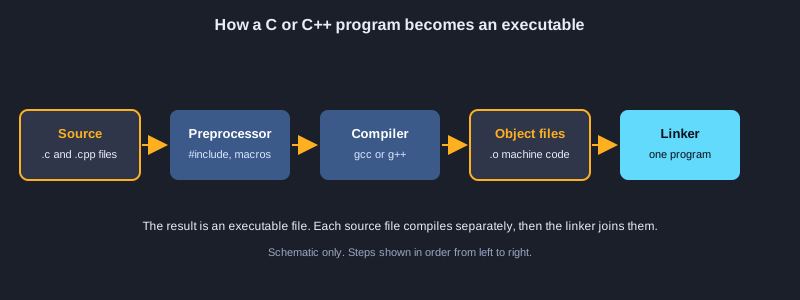
C เป็นภาษาขนาดเล็กและเร็วที่ทำงานใกล้กับฮาร์ดแวร์ ส่วน C++ ต่อยอดจาก C ด้วยคลาส เทมเพลต และไลบรารีมาตรฐานขนาดใหญ่ ใช้ในเกม เบราว์เซอร์ ฐานข้อมูล และระบบฝังตัว บทความนี้พาคุณจาก printf แรกไปถึง C++20 สมัยใหม่ใน 100 ตัวอย่าง 50 ตัวแรกเป็น C ได้แก่ตัวแปร การควบคุมโฟลว์ ฟังก์ชัน อาร์เรย์ ตัวชี้ struct หน่วยความจำ ไฟล์ และพรีโปรเซสเซอร์ 50 ตัวหลังเป็น C++ ได้แก่ reference คลาส RAII สมาร์ตพอยน์เตอร์ เทมเพลต ไลบรารีมาตรฐาน คอนเซปต์ ข้อยกเว้น เธรด และการจัดรูปแบบ ทุกตัวอย่างคอมไพล์ด้วย GCC 16 และรันจริง ผลลัพธ์จริงแสดงหลังโค้ด
สิ่งที่ต้องเตรียม
คอมพิวเตอร์ที่ติดตั้ง GCC หรือ Clang (บน Windows ติดตั้ง WinLibs GCC หรือชุดเครื่องมือ MSYS2 บน macOS ติดตั้ง Xcode command-line tools บน Linux ใช้ตัวจัดการแพ็กเกจ) ตรวจสอบด้วยคำสั่ง gcc --version และ g++ --version โปรแกรมแก้ไขข้อความธรรมดาก็เพียงพอ ไม่จำเป็นต้องมีประสบการณ์เขียนโปรแกรม แต่ตัวอย่างแรก ๆ สมมติว่าคุณรู้ว่าตัวเลขและคำคืออะไร
วิธีคอมไพล์และรัน
ตัวอย่าง C ใช้ gcc -std=c17 และตัวอย่าง C++ ใช้ g++ -std=c++20 ตัวอย่างละไฟล์ เช่น main.cpp คอมไพล์ด้วย g++ -std=c++20 -Wall -Wextra main.cpp -o main แล้วรันด้วย ./main ผลลัพธ์ที่แสดงในบทความได้มาจากการรันจริงด้วย GCC 16
หัวข้อที่ 1: เริ่มต้น ตัวแปร และชนิดข้อมูล
โปรแกรม C ทุกโปรแกรมเริ่มที่ main ตัวอย่างเหล่านี้แสดงวิธีพิมพ์ เก็บค่าในตัวแปร และเลือกชนิดข้อมูลที่เหมาะกับแต่ละค่า
โครงสร้างของโปรแกรม C
โปรแกรม C คือชุดของฟังก์ชัน และ main คือจุดเริ่มต้น #include <stdio.h> นำฟังก์ชัน printf เข้ามาใช้ printf พิมพ์ข้อความ และตัวกำหนดรูปแบบ %d, %f และ %c พิมพ์ int, double และ char ตามลำดับ คืนค่า 0 จาก main เพื่อบอกว่าสำเร็จ
ชนิดจำนวนเต็มและจุดทศนิยม
int, short และ long เก็บจำนวนเต็ม แต่ขนาดที่แน่นอนขึ้นกับแพลตฟอร์ม ใช้ sizeof เพื่อตรวจสอบ float และ double เก็บทศนิยมด้วยความแม่นยำจำกัด 1.0 / 3.0 ไม่เท่ากับหนึ่งในสามพอดี จึงเป็นเหตุให้เมื่อพิมพ์ด้วยทศนิยมมาก ๆ จะเห็นความคลาดเคลื่อน
ค่าคงที่
const สร้างค่าที่มีชนิดข้อมูลและคอมไพเลอร์ป้องกันไม่ให้เปลี่ยนแปลง #define แทนที่ข้อความก่อนคอมไพเลอร์ทำงาน จึงไม่มีชนิดข้อมูล ในโค้ดใหม่ควรใช้ const สำหรับค่าที่มีชนิด และใช้ #define ส่วนใหญ่กับการตั้งค่าตอนคอมไพล์
ภาพประกอบ
ตัวอย่างที่ 1: สวัสดีชาวโลก
โปรแกรมแรกของคุณ: พิมพ์ข้อความหนึ่งบรรทัด
#include <stdio.h>

int main(void) {
    printf("Hello, World!\n");
    return 0;
}
ผลลัพธ์:
Hello, World!
ตัวอย่างที่ 2: ตัวแปรและตัวกำหนดรูปแบบ
เก็บค่าและพิมพ์ด้วยตัวกำหนดรูปแบบของ printf
#include <stdio.h>

int main(void) {
    int apples = 7;
    double price = 2.5;
    char initial = 'A';
    printf("%d apples, %.2f each, initial %c\n", apples, price, initial);
    printf("total = %.2f\n", apples * price);
    return 0;
}
ผลลัพธ์:
7 apples, 2.50 each, initial A
total = 17.50
ตัวอย่างที่ 3: ชนิดจำนวนเต็มและ sizeof
จำนวนเต็มแต่ละชนิดใช้จำนวนไบต์ไม่เท่ากัน
#include <stdio.h>

int main(void) {
    printf("char   : %zu byte(s)\n", sizeof(char));
    printf("short  : %zu byte(s)\n", sizeof(short));
    printf("int    : %zu byte(s)\n", sizeof(int));
    printf("long   : %zu byte(s)\n", sizeof(long));
    printf("long long: %zu byte(s)\n", sizeof(long long));
    return 0;
}
ผลลัพธ์:
char   : 1 byte(s)
short  : 2 byte(s)
int    : 4 byte(s)
long   : 4 byte(s)
long long: 8 byte(s)
ตัวอย่างที่ 4: จุดทศนิยมและความแม่นยำ
float และ double เก็บทศนิยมด้วยความแม่นยำจำกัด
#include <stdio.h>

int main(void) {
    float f = 1.0f / 3.0f;
    double d = 1.0 / 3.0;
    printf("float  : %.10f\n", f);
    printf("double : %.10f\n", d);
    printf("0.1 + 0.2 == 0.3 ? %s\n", (0.1 + 0.2 == 0.3) ? "yes" : "no");
    return 0;
}
ผลลัพธ์:
float  : 0.3333333433
double : 0.3333333333
0.1 + 0.2 == 0.3 ? no
ตัวอย่างที่ 5: char และรหัส ASCII
char คือจำนวนเต็มขนาดเล็ก โดย 'a' มีค่า 97
#include <stdio.h>

int main(void) {
    char c = 'a';
    printf("%c is %d\n", c, c);
    printf("upper of %c is %c\n", c, c - 'a' + 'A');
    printf("digit '7' minus '0' = %d\n", '7' - '0');
    return 0;
}
ผลลัพธ์:
a is 97
upper of a is A
digit '7' minus '0' = 7
ตัวอย่างที่ 6: ค่าคงที่: const และ #define
ค่าที่กำหนดไว้ซึ่งโปรแกรมต้องไม่เปลี่ยน
#include <stdio.h>

#define MAX_USERS 100
static const double TAX_RATE = 0.07;

int main(void) {
    double price = 200.0;
    printf("max users: %d\n", MAX_USERS);
    printf("price with tax: %.2f\n", price * (1.0 + TAX_RATE));
    return 0;
}
ผลลัพธ์:
max users: 100
price with tax: 214.00
หัวข้อที่ 2: ตัวดำเนินการและการแปลงชนิดข้อมูล
ตัวดำเนินการรวมค่าเข้าด้วยกัน การแปลงชนิดข้อมูลเป็นแหล่งของบั๊กที่พบบ่อย จึงควรเรียนกฎตั้งแต่ต้น
การคำนวณและการหารจำนวนเต็ม
+, -, *, / และ % ทำงานกับตัวเลข การหาร int ด้วย int จะตัดส่วนทศนิยมทิ้ง เช่น 17 / 5 ได้ 3 ใช้ตัวถูกดำเนินการเป็น double เช่น 17.0 / 5 เพื่อเก็บทศนิยม ตัวดำเนินการ % ให้เศษจากการหาร
การเพิ่มค่า การกำหนดแบบรวม และการเปรียบเทียบ
++ และ -- เปลี่ยนตัวแปรทีละหนึ่ง และตำแหน่งก่อนหรือหลังชื่อกำหนดว่าการเปลี่ยนแปลงจะมองเห็นเมื่อใด += และ *= ปรับค่าในขั้นตอนเดียว ใน C การเปรียบเทียบให้ 1 เมื่อจริง และ 0 เมื่อเท็จ จึงไม่มีชนิดบูลีนแยกจนกว่าจะ include stdbool.h
ตัวดำเนินการบิตและการแคสต์
&, |, ^, ~ และการเลื่อน << และ >> ทำงานกับบิตของจำนวนเต็ม มีประโยชน์กับแฟลก การแคสต์ เช่น (double) เปลี่ยนชนิดของค่าสำหรับนิพจน์หนึ่งเท่านั้น และไม่เปลี่ยนตัวแปร
ตัวอย่างที่ 7: การคำนวณและการหารจำนวนเต็ม
การหาร int ด้วย int จะตัดส่วนทศนิยมทิ้ง
#include <stdio.h>

int main(void) {
    int a = 17, b = 5;
    printf("%d %d %d %d %d\n", a + b, a - b, a * b, a / b, a % b);
    printf("17.0 / 5 = %.2f\n", 17.0 / b);
    return 0;
}
ผลลัพธ์:
22 12 85 3 2
17.0 / 5 = 3.40
ตัวอย่างที่ 8: การเพิ่มค่าและการกำหนดแบบรวม
++, -- และ += เปลี่ยนค่าตัวแปรในขั้นตอนเดียว
#include <stdio.h>

int main(void) {
    int n = 5;
    printf("%d\n", n++);
    printf("%d\n", ++n);
    n += 10;
    n *= 2;
    printf("final %d\n", n);
    return 0;
}
ผลลัพธ์:
5
7
final 34
ตัวอย่างที่ 9: ตัวดำเนินการเปรียบเทียบและตรรกะ
การทดสอบให้ 1 เมื่อจริง และ 0 เมื่อเท็จ
#include <stdio.h>

int main(void) {
    int age = 20;
    int has_ticket = 1;
    printf("adult: %d\n", age >= 18);
    printf("can enter: %d\n", age >= 18 && has_ticket);
    printf("needs help: %d\n", !has_ticket || age < 12);
    return 0;
}
ผลลัพธ์:
adult: 1
can enter: 1
needs help: 0
ตัวอย่างที่ 10: ตัวดำเนินการบิตและการเลื่อน
ทำงานกับแต่ละบิตของจำนวนเต็ม
#include <stdio.h>

int main(void) {
    unsigned int flags = 0x5;
    printf("flags & 4 = %u\n", flags & 4u);
    printf("flags | 2 = %u\n", flags | 2u);
    printf("flags ^ 1 = %u\n", flags ^ 1u);
    printf("1 << 4 = %u\n", 1u << 4);
    printf("256 >> 2 = %u\n", 256u >> 2);
    return 0;
}
ผลลัพธ์:
flags & 4 = 4
flags | 2 = 7
flags ^ 1 = 4
1 << 4 = 16
256 >> 2 = 64
ตัวอย่างที่ 11: การแปลงชนิดด้วยการแคสต์
เปลี่ยนค่าเป็นชนิดอื่นด้วย (ชนิด)
#include <stdio.h>

int main(void) {
    int total = 7, count = 2;
    double average = (double)total / count;
    printf("average = %.2f\n", average);
    printf("truncated = %d\n", (int)3.99);
    printf("mixed = %.1f\n", total / 2 + 0.5);
    return 0;
}
ผลลัพธ์:
average = 3.50
truncated = 3
mixed = 3.5
หัวข้อที่ 3: การตัดสินใจและการวนลูป
การควบคุมโฟลว์กำหนดว่าอะไรจะทำงาน และทำกี่ครั้ง เลือกคำสั่งที่เหมาะกับปัญหา: if สำหรับการเลือก, switch สำหรับชุดของค่า และลูปสำหรับการทำซ้ำ
if, switch และตัวดำเนินการเงื่อนไข
if และ else เลือกหนึ่งสาขาจากเงื่อนไข switch เลือก case ตามค่า หากไม่มี break การทำงานจะไหลลงไปยัง case ถัดไป ซึ่งบางครั้งมีประโยชน์แต่เป็นบั๊กที่พบบ่อย ตัวดำเนินการเงื่อนไขคือ if-else แบบสั้นที่ให้ค่ากลับมา
for, while และ do-while
for เหมาะเมื่อรู้จำนวนรอบล่วงหน้า while ตรวจเงื่อนไขก่อนทำแต่ละรอบ ส่วน do-while ทำอย่างน้อยหนึ่งรอบ เลือกลูปที่ทำให้เงื่อนไขอ่านง่ายที่สุด
break, continue และลูปซ้อน
break ออกจากลูปที่อยู่ชั้นในสุด และ continue ข้ามไปรอบถัดไป ลูปในลูปเป็นวิธีปกติในการไล่ดูกริดหรือตาราง ควรให้ลูปซ้อนสั้น และตั้งชื่อตัวนับให้ชัดเจน
ตัวอย่างที่ 12: if, else if และ else
เลือกหนึ่งสาขาจากหลายเงื่อนไข
#include <stdio.h>

int main(void) {
    int score = 73;
    if (score >= 80) {
        printf("A\n");
    } else if (score >= 70) {
        printf("B\n");
    } else {
        printf("C\n");
    }
    return 0;
}
ผลลัพธ์:
B
ตัวอย่างที่ 13: switch กับการไหลลงต่อ
เลือก case ตามค่า และ break หยุดการไหลลง
#include <stdio.h>

int main(void) {
    for (int day = 1; day <= 3; day++) {
        switch (day) {
            case 1:
            case 2:
                printf("day %d: early\n", day);
                break;
            default:
                printf("day %d: later\n", day);
                break;
        }
    }
    return 0;
}
ผลลัพธ์:
day 1: early
day 2: early
day 3: later
ตัวอย่างที่ 14: ตัวดำเนินการเงื่อนไข
if-else แบบสั้นที่ให้ค่ากลับมา
#include <stdio.h>

int main(void) {
    int a = 4, b = 9;
    int larger = (a > b) ? a : b;
    printf("larger = %d\n", larger);
    printf("%s\n", (larger % 2 == 0) ? "even" : "odd");
    return 0;
}
ผลลัพธ์:
larger = 9
odd
ตัวอย่างที่ 15: ลูป for
ทำบล็อกซ้ำด้วยตัวนับ
#include <stdio.h>

int main(void) {
    int sum = 0;
    for (int i = 1; i <= 10; i++) {
        sum += i;
    }
    printf("sum 1..10 = %d\n", sum);
    return 0;
}
ผลลัพธ์:
sum 1..10 = 55
ตัวอย่างที่ 16: while และ do-while
วนตามเงื่อนไข และ do-while จะทำอย่างน้อยหนึ่งรอบ
#include <stdio.h>

int main(void) {
    int n = 3;
    while (n > 0) {
        printf("while %d\n", n--);
    }
    int m = 0;
    do {
        printf("do-while runs once, m = %d\n", m);
    } while (m > 0);
    return 0;
}
ผลลัพธ์:
while 3
while 2
while 1
do-while runs once, m = 0
ตัวอย่างที่ 17: break และ continue
ออกจากลูปก่อนกำหนด หรือข้ามไปรอบถัดไป
#include <stdio.h>

int main(void) {
    for (int i = 1; i <= 10; i++) {
        if (i % 2 == 0) continue;
        if (i > 7) break;
        printf("%d ", i);
    }
    printf("\n");
    return 0;
}
ผลลัพธ์:
1 3 5 7
ตัวอย่างที่ 18: ลูปซ้อน: ตารางค่า
ลูปในลูปพิมพ์เป็นตาราง
#include <stdio.h>

int main(void) {
    for (int row = 1; row <= 3; row++) {
        for (int col = 1; col <= 3; col++) {
            printf("%3d", row * col);
        }
        printf("\n");
    }
    return 0;
}
ผลลัพธ์:
  1  2  3
  2  4  6
  3  6  9
หัวข้อที่ 4: ฟังก์ชัน
ฟังก์ชันตั้งชื่อให้ชุดคำสั่ง รับอินพุต และคืนผลลัพธ์ ฟังก์ชันที่ดีทำงานเดียวและทดสอบได้ง่าย
พารามิเตอร์และค่าที่คืนกลับ
ประกาศชนิดของพารามิเตอร์แต่ละตัวและชนิดของค่าที่คืนก่อนชื่อฟังก์ชัน C ส่งอาร์กิวเมนต์แบบค่า ฟังก์ชันจึงทำงานกับสำเนา คืนผลลัพธ์ด้วย return และใช้ void สำหรับฟังก์ชันที่ไม่คืนค่า
ตัวชี้เป็นพารามิเตอร์
เพื่อเปลี่ยนตัวแปรของผู้เรียก ส่งที่อยู่ของมันด้วย & และอ่านหรือเขียนด้วย * ฟังก์ชันสลับค่าแบบคลาสสิกแสดงความต่าง: เวอร์ชันแบบค่าเปลี่ยนเพียงสำเนาของตัวเอง
การเรียกซ้ำและตัวแปร static ภายใน
ฟังก์ชันเรียกซ้ำเรียกตัวเองและต้องมีเงื่อนไขหยุด มิฉะนั้นจะไม่สิ้นสุดและสแตกล้น ตัวแปร static ภายในคงค่าไว้ระหว่างการเรียก มีประโยชน์กับตัวนับและแคช แต่ทำให้ฟังก์ชันทดสอบยากขึ้น
ตัวอย่างที่ 19: ฟังก์ชันที่คืนค่า
ตั้งชื่อให้ชุดคำสั่งและส่งผลลัพธ์กลับมา
#include <stdio.h>

static int add(int a, int b) {
    return a + b;
}

static double average(int a, int b) {
    return (a + b) / 2.0;
}

int main(void) {
    printf("%d\n", add(3, 4));
    printf("%.1f\n", average(3, 4));
    return 0;
}
ผลลัพธ์:
7
3.5
ตัวอย่างที่ 20: ส่งค่าและส่งตัวชี้
การคัดลอกไม่เปลี่ยนตัวแปรของผู้เรียก แต่ตัวชี้เปลี่ยนได้
#include <stdio.h>

static void try_swap_value(int a, int b) {
    int t = a; a = b; b = t;
}

static void swap(int *a, int *b) {
    int t = *a; *a = *b; *b = t;
}

int main(void) {
    int x = 1, y = 2;
    try_swap_value(x, y);
    printf("after value swap: %d %d\n", x, y);
    swap(&x, &y);
    printf("after pointer swap: %d %d\n", x, y);
    return 0;
}
ผลลัพธ์:
after value swap: 1 2
after pointer swap: 2 1
ตัวอย่างที่ 21: การเรียกซ้ำ
ฟังก์ชันที่เรียกตัวเอง พร้อมเงื่อนไขหยุด
#include <stdio.h>

static unsigned long long factorial(unsigned int n) {
    return n <= 1 ? 1ULL : n * factorial(n - 1);
}

static unsigned long long fib(unsigned int n) {
    return n < 2 ? n : fib(n - 1) + fib(n - 2);
}

int main(void) {
    printf("10! = %llu\n", factorial(10));
    printf("fib(20) = %llu\n", fib(20));
    return 0;
}
ผลลัพธ์:
10! = 3628800
fib(20) = 6765
ตัวอย่างที่ 22: ตัวแปร static ภายในฟังก์ชัน
ตัวแปรภายในที่คงค่าไว้ระหว่างการเรียก
#include <stdio.h>

static int next_id(void) {
    static int counter = 0;
    counter++;
    return counter;
}

int main(void) {
    for (int i = 0; i < 3; i++) {
        printf("id %d\n", next_id());
    }
    return 0;
}
ผลลัพธ์:
id 1
id 2
id 3
หัวข้อที่ 5: อาร์เรย์และสตริง
อาร์เรย์เก็บค่าหลายค่าของชนิดเดียวกัน โดยดัชนีเริ่มจาก 0 ใน C สตริงคืออาร์เรย์ของ char ที่ลงท้ายด้วยไบต์ศูนย์
อาร์เรย์และความยาว
int scores[5] สร้าง int ห้าตัว C ไม่ตรวจดัชนี การเขียนเกินขอบจึงทำลายหน่วยความจำอย่างเงียบ ๆ sizeof array / sizeof array[0] ให้จำนวนสมาชิกเมื่อประกาศอาร์เรย์ในฟังก์ชันเดียวกัน
อาร์เรย์สองมิติและอาร์เรย์ของสตริง
int grid[2][3] เป็นตารางสองแถวสามคอลัมน์ อาร์เรย์ของตัวชี้ const char เก็บสตริงหลายความยาว ซึ่งเป็นวิธีปกติในการเก็บรายชื่อ
ฟังก์ชันสตริง
strlen นับอักขระก่อนไบต์ศูนย์ strcpy และ strcat คัดลอกและต่อสตริง แต่ไม่ตรวจขนาดบัฟเฟอร์ จึงใช้ผิดได้ง่าย strcmp เปรียบเทียบสตริง และคืนค่า 0 เมื่อเท่ากัน
ตัวอย่างที่ 23: อาร์เรย์
ค่าจำนวนคงที่ของชนิดเดียวกัน เริ่มดัชนีจาก 0
#include <stdio.h>

int main(void) {
    int scores[5] = {90, 75, 88, 64, 95};
    for (int i = 0; i < 5; i++) {
        printf("scores[%d] = %d\n", i, scores[i]);
    }
    return 0;
}
ผลลัพธ์:
scores[0] = 90
scores[1] = 75
scores[2] = 88
scores[3] = 64
scores[4] = 95
ตัวอย่างที่ 24: ผลรวม ค่าต่ำสุด และค่าสูงสุด
วนอาร์เรย์รอบเดียวและติดตามผลสามอย่าง
#include <stdio.h>

int main(void) {
    int values[] = {12, 7, 19, 3, 25};
    int n = (int)(sizeof values / sizeof values[0]);
    int sum = 0, min = values[0], max = values[0];
    for (int i = 0; i < n; i++) {
        sum += values[i];
        if (values[i] < min) min = values[i];
        if (values[i] > max) max = values[i];
    }
    printf("sum=%d min=%d max=%d avg=%.2f\n", sum, min, max, (double)sum / n);
    return 0;
}
ผลลัพธ์:
sum=66 min=3 max=25 avg=13.20
ตัวอย่างที่ 25: อาร์เรย์สองมิติ
ตารางของค่าที่มีแถวและคอลัมน์
#include <stdio.h>

int main(void) {
    int grid[2][3] = {{1, 2, 3}, {4, 5, 6}};
    for (int r = 0; r < 2; r++) {
        for (int c = 0; c < 3; c++) {
            printf("%d ", grid[r][c]);
        }
        printf("\n");
    }
    return 0;
}
ผลลัพธ์:
1 2 3
4 5 6
ตัวอย่างที่ 26: สตริงเป็นอาร์เรย์ของ char
สตริงคืออาร์เรย์ char ที่ลงท้ายด้วยไบต์ศูนย์
#include <stdio.h>

int main(void) {
    char name[] = "Ada";
    printf("%s has %zu characters\n", name, sizeof name - 1);
    name[0] = 'E';
    printf("now: %s\n", name);
    return 0;
}
ผลลัพธ์:
Ada has 3 characters
now: Eda
ตัวอย่างที่ 27: ฟังก์ชันสตริงจาก string.h
strlen, strcpy, strcat และ strcmp
#include <stdio.h>
#include <string.h>

int main(void) {
    char buffer[32] = "Hello";
    strcat(buffer, ", C");
    printf("%s (%zu)\n", buffer, strlen(buffer));
    printf("compare: %d\n", strcmp("apple", "banana") < 0);
    char copy[32];
    strcpy(copy, buffer);
    printf("copy: %s\n", copy);
    return 0;
}
ผลลัพธ์:
Hello, C (8)
compare: 1
copy: Hello, C
หัวข้อที่ 6: ตัวชี้
ตัวชี้เก็บที่อยู่ของค่า ตัวชี้คือหัวใจของ C ทำให้ฟังก์ชันเปลี่ยนข้อมูลได้ เดินอาร์เรย์ และสร้างโครงสร้างแบบไดนามิก
ที่อยู่และการดีรีเฟอเรนซ์
& ให้ที่อยู่ของตัวแปร และ * อ่านหรือเขียนค่าที่ที่อยู่ของตัวชี้ ชนิดของตัวชี้บอกคอมไพเลอร์ว่าแต่ละก้าวมีขนาดเท่าไร เช่น int * ก้าวทีละ sizeof(int)
การคำนวณตัวชี้บนอาร์เรย์
ชื่ออาร์เรย์ทำหน้าที่เหมือนตัวชี้ไปยังสมาชิกตัวแรก p + 2 ชี้ไปสองสมาชิกข้างหน้า และ *(p + 2) อ่านสมาชิกนั้น ซึ่งเหมือนกับ p[2] การเดินเกินท้ายอาร์เรย์เป็นพฤติกรรมที่ไม่ได้กำหนด
ส่งอาร์เรย์และตัวชี้เข้าฟังก์ชัน
ฟังก์ชันรับอาร์เรย์เป็นตัวชี้ จึงต้องรับความยาวด้วย คีย์เวิร์ด const บนตัวชี้บอกผู้อ่านและคอมไพเลอร์ว่าฟังก์ชันจะไม่เปลี่ยนข้อมูล
ตัวอย่างที่ 28: ตัวชี้: ที่อยู่และการดีรีเฟอเรนซ์
& ได้ที่อยู่ และ * อ่านหรือเขียนค่าที่ตำแหน่งนั้น
#include <stdio.h>

int main(void) {
    int value = 42;
    int *p = &value;
    printf("value via pointer: %d\n", *p);
    *p = 100;
    printf("value now: %d\n", value);
    return 0;
}
ผลลัพธ์:
value via pointer: 42
value now: 100
ตัวอย่างที่ 29: การคำนวณกับตัวชี้
เลื่อนตัวชี้ไปตามอาร์เรย์ด้วย + และ -
#include <stdio.h>

int main(void) {
    int nums[4] = {10, 20, 30, 40};
    int *p = nums;
    for (int i = 0; i < 4; i++) {
        printf("%d ", *(p + i));
    }
    printf("\n");
    printf("third via index: %d, via pointer: %d\n", nums[2], *(nums + 2));
    return 0;
}
ผลลัพธ์:
10 20 30 40
third via index: 30, via pointer: 30
ตัวอย่างที่ 30: ส่งอาร์เรย์เข้าฟังก์ชัน
อาร์เรย์ถูกส่งเป็นตัวชี้พร้อมความยาว
#include <stdio.h>

static int sum(const int *values, size_t count) {
    int total = 0;
    for (size_t i = 0; i < count; i++) {
        total += values[i];
    }
    return total;
}

int main(void) {
    int data[] = {1, 2, 3, 4, 5};
    printf("sum = %d\n", sum(data, sizeof data / sizeof data[0]));
    return 0;
}
ผลลัพธ์:
sum = 15
ตัวอย่างที่ 31: อาร์เรย์ของสตริง
อาร์เรย์ของตัวชี้ที่ชี้ไปยังข้อความ
#include <stdio.h>

int main(void) {
    const char *fruits[] = {"apple", "banana", "cherry"};
    size_t n = sizeof fruits / sizeof fruits[0];
    for (size_t i = 0; i < n; i++) {
        printf("%zu: %s\n", i, fruits[i]);
    }
    return 0;
}
ผลลัพธ์:
0: apple
1: banana
2: cherry
หัวข้อที่ 7: Struct, Union, Enum และ typedef
ชนิดข้อมูลเหล่านี้รวมค่าเข้าด้วยกันและตั้งชื่อให้ชุดของค่าคงที่ เป็นพื้นฐานของโครงสร้างข้อมูลใน C
Struct และตัวชี้ไปยัง struct
struct รวมฟิลด์ไว้ภายใต้ชื่อเดียว ตัวดำเนินการลูกศร -> เข้าถึงฟิลด์ผ่านตัวชี้ ดังนั้น p->x เหมือนกับ (*p).x ส่งตัวชี้ของ struct ขนาดใหญ่แทนการคัดลอก
Union และ enum
union ใช้หน่วยความจำร่วมกันระหว่างหลายชนิด จึงมีความหมายเพียงค่าเดียวในแต่ละครั้ง enum ตั้งชื่อให้ค่าคงที่แบบจำนวนเต็ม ทำให้คำสั่ง switch อ่านง่ายขึ้น
typedef
typedef ตั้งชื่อสั้นให้ชนิดข้อมูล เช่น Rect แทน struct ที่มี double สองค่า ทำให้ชนิดของตัวชี้ฟังก์ชันอ่านง่ายขึ้นมาก
ตัวอย่างที่ 32: โครงสร้าง struct
รวมค่าที่เกี่ยวข้องไว้ภายใต้ชื่อเดียว
#include <stdio.h>

struct Point {
    int x;
    int y;
};

int main(void) {
    struct Point p = {3, 4};
    p.x += 1;
    printf("point (%d, %d)\n", p.x, p.y);
    return 0;
}
ผลลัพธ์:
point (4, 4)
ตัวอย่างที่ 33: ตัวชี้ของ struct และ ->
เข้าถึงฟิลด์ของ struct ผ่านตัวชี้
#include <stdio.h>

struct Book {
    const char *title;
    int pages;
};

static void print_book(const struct Book *b) {
    printf("%s has %d pages\n", b->title, b->pages);
}

int main(void) {
    struct Book books[] = {{"C Basics", 120}, {"Pointers", 96}};
    for (int i = 0; i < 2; i++) {
        print_book(&books[i]);
    }
    return 0;
}
ผลลัพธ์:
C Basics has 120 pages
Pointers has 96 pages
ตัวอย่างที่ 34: union
หลายชนิดใช้หน่วยความจำเดียวกัน ครั้งละหนึ่งค่า
#include <stdio.h>

union Value {
    int as_int;
    float as_float;
};

int main(void) {
    union Value v;
    v.as_int = 65;
    printf("as int: %d\n", v.as_int);
    v.as_float = 1.5f;
    printf("as float: %.1f\n", v.as_float);
    return 0;
}
ผลลัพธ์:
as int: 65
as float: 1.5
ตัวอย่างที่ 35: enum
ตั้งชื่อให้ชุดของค่าคงที่แบบจำนวนเต็ม
#include <stdio.h>

enum Color { RED, GREEN = 5, BLUE };

int main(void) {
    enum Color c = BLUE;
    printf("RED=%d GREEN=%d BLUE=%d\n", RED, GREEN, BLUE);
    printf("chosen: %d\n", c);
    return 0;
}
ผลลัพธ์:
RED=0 GREEN=5 BLUE=6
chosen: 6
ตัวอย่างที่ 36: typedef และชนิดตัวชี้ฟังก์ชัน
ตั้งชื่อสั้น ๆ ให้ชนิดข้อมูล
#include <stdio.h>

typedef struct {
    double width;
    double height;
} Rect;

typedef double (*Measure)(Rect);

static double area(Rect r) {
    return r.width * r.height;
}

int main(void) {
    Rect r = {3.0, 4.5};
    Measure m = area;
    printf("area = %.2f\n", m(r));
    return 0;
}
ผลลัพธ์:
area = 13.50
หัวข้อที่ 8: หน่วยความจำแบบไดนามิกและไฟล์
หน่วยความจำแบบไดนามิกทำให้โปรแกรมขอพื้นที่ขณะรันได้ ไฟล์ทำให้ข้อมูลคงอยู่หลังโปรแกรมหยุด ทั้งสองต้องจัดการอย่างระมัดระวังใน C เพราะโปรแกรมเมอร์รับผิดชอบการเก็บกวาดเอง
malloc, calloc, realloc และ free
malloc ขอบล็อกของไบต์ calloc ให้หน่วยความจำที่เป็นศูนย์ และ realloc ปรับขนาดบล็อก ทุกการเรียกที่สำเร็จต้องมี free หนึ่งครั้งคู่กัน ตรวจว่าไม่ใช่ NULL ก่อนใช้ผลลัพธ์ เพราะการจองอาจล้มเหลวได้
หลีกเลี่ยงหน่วยความจำรั่วและตัวชี้ค้าง
หลัง free ให้ตั้งตัวชี้เป็น NULL เพื่อไม่ให้ใช้ผิดโดยไม่ตั้งใจ คืนแต่ละบล็อกเพียงครั้งเดียว และติดตามว่าใครเป็นเจ้าของบล็อกแต่ละอัน
ไฟล์ข้อความและไฟล์ไบนารี
fopen เปิดไฟล์ และโหมดบอกว่าจะอ่าน เขียน หรือต่อท้าย fprintf และ fgets จัดการข้อความ ส่วน fwrite และ fread คัดลอกไบต์ดิบ ตรวจค่าที่ fopen คืนเสมอ และปิดทุกไฟล์ที่เปิด
ตัวอย่างที่ 37: หน่วยความจำแบบไดนามิกด้วย malloc และ free
ขอหน่วยความจำขณะรันและคืนเมื่อไม่ใช้แล้ว
#include <stdio.h>
#include <stdlib.h>

int main(void) {
    int n = 5;
    int *squares = malloc(n * sizeof *squares);
    if (squares == NULL) {
        fprintf(stderr, "out of memory\n");
        return 1;
    }
    for (int i = 0; i < n; i++) {
        squares[i] = i * i;
    }
    for (int i = 0; i < n; i++) {
        printf("%d ", squares[i]);
    }
    printf("\n");
    free(squares);
    return 0;
}
ผลลัพธ์:
0 1 4 9 16
ตัวอย่างที่ 38: calloc และ realloc
หน่วยความจำที่เป็นศูนย์ และการปรับขนาดบล็อก
#include <stdio.h>
#include <stdlib.h>

int main(void) {
    int *items = calloc(3, sizeof *items);
    printf("zeroed: %d %d %d\n", items[0], items[1], items[2]);
    int *bigger = realloc(items, 6 * sizeof *bigger);
    if (bigger == NULL) {
        free(items);
        return 1;
    }
    items = bigger;
    items[5] = 99;
    printf("last item: %d\n", items[5]);
    free(items);
    return 0;
}
ผลลัพธ์:
zeroed: 0 0 0
last item: 99
ตัวอย่างที่ 39: การคืนหน่วยความจำอย่างปลอดภัย
คืนครั้งเดียว แล้วล้างตัวชี้
#include <stdio.h>
#include <stdlib.h>

static char *make_greeting(const char *name) {
    char *out = malloc(64);
    if (out == NULL) return NULL;
    snprintf(out, 64, "Hello, %s", name);
    return out;
}

int main(void) {
    char *msg = make_greeting("Mali");
    if (msg != NULL) {
        printf("%s\n", msg);
        free(msg);
        msg = NULL;
    }
    return 0;
}
ผลลัพธ์:
Hello, Mali
ตัวอย่างที่ 40: ไฟล์ข้อความ: เขียนและอ่าน
fopen, fprintf, fgets และ fclose
#include <stdio.h>

int main(void) {
    FILE *out = fopen("notes.txt", "w");
    if (out == NULL) return 1;
    fprintf(out, "first line\nsecond line\n");
    fclose(out);

    FILE *in = fopen("notes.txt", "r");
    if (in == NULL) return 1;
    char line[64];
    while (fgets(line, sizeof line, in) != NULL) {
        printf("read: %s", line);
    }
    fclose(in);
    remove("notes.txt");
    return 0;
}
ผลลัพธ์:
read: first line
read: second line
ตัวอย่างที่ 41: ไฟล์ไบนารีด้วย fwrite และ fread
เก็บค่าดิบลงไฟล์และอ่านกลับมา
#include <stdio.h>

int main(void) {
    int data[] = {10, 20, 30};
    FILE *f = fopen("values.bin", "wb");
    if (f == NULL) return 1;
    fwrite(data, sizeof data[0], 3, f);
    fclose(f);

    int back[3] = {0};
    f = fopen("values.bin", "rb");
    if (f == NULL) return 1;
    size_t got = fread(back, sizeof back[0], 3, f);
    fclose(f);
    remove("values.bin");
    printf("read %zu values: %d %d %d\n", got, back[0], back[1], back[2]);
    return 0;
}
ผลลัพธ์:
read 3 values: 10 20 30
หัวข้อที่ 9: พรีโปรเซสเซอร์ ตัวชี้ฟังก์ชัน และฟังก์ชันหลายอาร์กิวเมนต์
เครื่องมือเหล่านี้เปลี่ยนวิธีสร้างโค้ดและวิธีเรียกฟังก์ชัน หากใช้ดีทำให้โปรแกรมยืดหยุ่น แต่หากใช้ผิดทำให้ดีบักยาก
มาโครและการคอมไพล์แบบมีเงื่อนไข
มาโครคือข้อความที่แทนที่ก่อนคอมไพล์ ใส่วงเล็บรอบอาร์กิวเมนต์และนิพจน์ทั้งหมด มิฉะนั้น SQUARE(2 + 1) จะให้ผลผิด #if และ #ifdef รวมโค้ดเฉพาะเมื่อเงื่อนไขเป็นจริงตอนสร้างโปรแกรม
ตัวชี้ฟังก์ชันและ qsort
ตัวชี้ฟังก์ชันเก็บที่อยู่ของฟังก์ชัน ทำให้ส่งพฤติกรรมให้ฟังก์ชันอื่นได้ qsort ใช้คอลแบ็กเปรียบเทียบ จึงเรียงอาร์เรย์ชนิดใดก็ได้ด้วยรูทีนเดียว
ฟังก์ชันหลายอาร์กิวเมนต์และอาร์กิวเมนต์บรรทัดคำสั่ง
stdarg.h ให้ฟังก์ชันรับอาร์กิวเมนต์กี่ตัวก็ได้ อ่านด้วย va_arg main รับ argc และ argv ซึ่งเก็บอาร์กิวเมนต์ที่ผู้ใช้พิมพ์หลังชื่อโปรแกรม
ตัวอย่างที่ 42: อาร์กิวเมนต์บรรทัดคำสั่ง
argc และ argv เก็บอาร์กิวเมนต์ที่ผู้ใช้พิมพ์
#include <stdio.h>

int main(int argc, char *argv[]) {
    printf("argument count: %d\n", argc);
    for (int i = 1; i < argc; i++) {
        printf("arg %d: %s\n", i, argv[i]);
    }
    return 0;
}
ผลลัพธ์:
argument count: 1
ตัวอย่างที่ 43: มาโครและมาโครแบบฟังก์ชัน
แทนที่ข้อความก่อนคอมไพล์ และควรใส่วงเล็บให้อาร์กิวเมนต์
#include <stdio.h>

#define SQUARE(x) ((x) * (x))
#define MAX(a, b) ((a) > (b) ? (a) : (b))

int main(void) {
    printf("SQUARE(4) = %d\n", SQUARE(4));
    printf("SQUARE(2 + 1) = %d\n", SQUARE(2 + 1));
    printf("MAX(3, 9) = %d\n", MAX(3, 9));
    return 0;
}
ผลลัพธ์:
SQUARE(4) = 16
SQUARE(2 + 1) = 9
MAX(3, 9) = 9
ตัวอย่างที่ 44: การคอมไพล์แบบมีเงื่อนไข
รวมโค้ดเฉพาะเมื่อเงื่อนไขเป็นจริงตอนสร้างโปรแกรม
#include <stdio.h>

#define DEBUG_MODE 1

int main(void) {
#if DEBUG_MODE
    printf("debug build\n");
#else
    printf("release build\n");
#endif
#ifdef __STDC_VERSION__
    printf("C standard version is known\n");
#endif
    return 0;
}
ผลลัพธ์:
debug build
C standard version is known
ตัวอย่างที่ 45: ตัวชี้ฟังก์ชัน
เก็บฟังก์ชันไว้ในตัวแปรและเรียกผ่านตัวชี้
#include <stdio.h>

static int add(int a, int b) { return a + b; }
static int mul(int a, int b) { return a * b; }

static int apply(int (*op)(int, int), int x, int y) {
    return op(x, y);
}

int main(void) {
    int (*ops[])(int, int) = {add, mul};
    printf("add: %d\n", apply(ops[0], 6, 7));
    printf("mul: %d\n", apply(ops[1], 6, 7));
    return 0;
}
ผลลัพธ์:
add: 13
mul: 42
ตัวอย่างที่ 46: การเรียงด้วย qsort
เรียงอาร์เรย์ใดก็ได้ด้วยฟังก์ชันเปรียบเทียบ
#include <stdio.h>
#include <stdlib.h>

static int compare_ints(const void *a, const void *b) {
    int x = *(const int *)a;
    int y = *(const int *)b;
    return (x > y) - (x < y);
}

int main(void) {
    int nums[] = {42, 7, 19, 3, 25};
    size_t n = sizeof nums / sizeof nums[0];
    qsort(nums, n, sizeof nums[0], compare_ints);
    for (size_t i = 0; i < n; i++) {
        printf("%d ", nums[i]);
    }
    printf("\n");
    return 0;
}
ผลลัพธ์:
3 7 19 25 42
ตัวอย่างที่ 47: ฟังก์ชันที่รับอาร์กิวเมนต์ได้หลายจำนวน
ฟังก์ชันที่รับอาร์กิวเมนต์กี่ตัวก็ได้ด้วย stdarg
#include <stdarg.h>
#include <stdio.h>

static int sum_all(int count, ...) {
    va_list args;
    va_start(args, count);
    int total = 0;
    for (int i = 0; i < count; i++) {
        total += va_arg(args, int);
    }
    va_end(args);
    return total;
}

int main(void) {
    printf("%d\n", sum_all(3, 1, 2, 3));
    printf("%d\n", sum_all(5, 10, 20, 30, 40, 50));
    return 0;
}
ผลลัพธ์:
6
150
หัวข้อที่ 10: บิต ข้อผิดพลาด และขอบเขต
งานบิตระดับต่ำ การตรวจข้อผิดพลาด และกฎขอบเขตเป็นทักษะประจำวันของโปรแกรมเมอร์ C
นับและทดสอบบิต
x &= x - 1 ลบบิต 1 ที่ต่ำที่สุด ดังนั้นลูปที่ทำเช่นนี้จึงนับบิตที่เป็น 1 ได้ มาสก์บิต เช่น flags & 4 ทดสอบบิตเดียวโดยไม่กระทบบิตอื่น
ตรวจข้อผิดพลาดด้วย errno
ฟังก์ชันไลบรารีหลายตัวคืนค่าพิเศษเมื่อล้มเหลว และตั้ง errno เพื่อบอกสาเหตุ ตรวจค่าที่คืนก่อน แล้วอ่าน errno และใช้ strerror แปลงเป็นข้อความ
static ที่ระดับไฟล์
ฟังก์ชันหรือตัวแปร static ที่ระดับไฟล์มองเห็นได้เฉพาะในไฟล์นั้น ช่วยไม่ให้ตัวช่วยภายในชนกับชื่อในไฟล์อื่น และเป็นขั้นพื้นฐานของโครงสร้างโค้ดที่ดี
ตัวอย่างที่ 48: นับจำนวนบิตที่เป็น 1
ลบบิต 1 ที่ต่ำที่สุดในลูปจนไม่เหลือ
#include <stdio.h>

static int count_bits(unsigned int x) {
    int count = 0;
    while (x != 0) {
        x &= x - 1;
        count++;
    }
    return count;
}

int main(void) {
    printf("bits in 0 = %d\n", count_bits(0));
    printf("bits in 7 = %d\n", count_bits(7));
    printf("bits in 255 = %d\n", count_bits(255));
    return 0;
}
ผลลัพธ์:
bits in 0 = 0
bits in 7 = 3
bits in 255 = 8
ตัวอย่างที่ 49: การจัดการข้อผิดพลาดด้วย errno
ตรวจค่าที่คืนมา แล้วอ่าน errno เพื่อดูสาเหตุ
#include <errno.h>
#include <stdio.h>
#include <string.h>

int main(void) {
    FILE *f = fopen("no-such-file-here.txt", "r");
    if (f == NULL) {
        printf("open failed: errno set = %s\n", errno != 0 ? "yes" : "no");
        return 0;
    }
    fclose(f);
    return 0;
}
ผลลัพธ์:
open failed: errno set = yes
ตัวอย่างที่ 50: ฟังก์ชัน static และสถานะส่วนกลาง
static จำกัดชื่อให้ใช้ได้เฉพาะในไฟล์นั้น
#include <stdio.h>

static int call_count = 0;

static void record_call(void) {
    call_count++;
}

static int calls_so_far(void) {
    return call_count;
}

int main(void) {
    record_call();
    record_call();
    printf("calls: %d\n", calls_so_far());
    return 0;
}
ผลลัพธ์:
calls: 2
หัวข้อที่ 11: พื้นฐาน C++: reference, overloading, string และ vector
C++ คงความเร็วของ C และเพิ่มชนิดข้อมูล reference และไลบรารีมาตรฐาน ตัวอย่างเหล่านี้แนะนำเครื่องมือประจำวัน
reference และการโอเวอร์โหลด
reference คือชื่ออื่นของตัวแปรเดิม จึงการเปลี่ยน reference คือการเปลี่ยนตัวแปร ฟังก์ชันหลายตัวใช้ชื่อเดียวกันได้เมื่อชนิดของพารามิเตอร์ต่างกัน และคอมไพเลอร์เลือกตัวที่ถูกต้องให้
std::string และ std::vector
std::string ขยายและหดได้ และรู้ความยาวของตัวเอง จึงไม่ต้องจัดการหน่วยความจำเอง std::vector เป็นอาร์เรย์ที่ปรับขนาดได้และเป็นเจ้าของรายการ ทั้งสองทำงานดีกับลูป for แบบช่วง
auto, อาร์กิวเมนต์เริ่มต้น และ iostream
auto ให้คอมไพเลอร์อนุมานชนิดจากค่า และอาร์กิวเมนต์เริ่มต้นให้ผู้เรียกละพารามิเตอร์ได้ std::cout กับ << แทนที่ printf และตรวจชนิดตอนคอมไพล์
ตัวอย่างที่ 51: Hello ด้วย iostream
พิมพ์ข้อความออกคอนโซลด้วย std::cout
#include <iostream>

int main() {
    std::cout << "Hello, C++!" << '\n';
    return 0;
}
ผลลัพธ์:
Hello, C++!
ตัวอย่างที่ 52: การอ้างอิง (references)
reference คือชื่ออื่นของตัวแปรตัวเดิม
#include <iostream>

void increment(int &value) {
    ++value;
}

int main() {
    int count = 5;
    int &alias = count;
    alias += 10;
    increment(count);
    std::cout << count << '\n';
}
ผลลัพธ์:
16
ตัวอย่างที่ 53: การโอเวอร์โหลดฟังก์ชัน
ฟังก์ชันหลายตัวที่ชื่อเดียวกัน เลือกตามชนิดของอาร์กิวเมนต์
#include <iostream>
#include <string>

std::string describe(int n) { return "int " + std::to_string(n); }
std::string describe(double d) { return "double " + std::to_string(d); }
std::string describe(const std::string &s) { return "string " + s; }

int main() {
    std::cout << describe(7) << '\n';
    std::cout << describe(2.5) << '\n';
    std::cout << describe(std::string("hi")) << '\n';
}
ผลลัพธ์:
int 7
double 2.500000
string hi
ตัวอย่างที่ 54: อาร์กิวเมนต์ค่าเริ่มต้น
พารามิเตอร์ที่เว้นได้ตอนเรียกฟังก์ชัน
#include <iostream>

int power(int base, int exponent = 2) {
    int result = 1;
    for (int i = 0; i < exponent; ++i) result *= base;
    return result;
}

int main() {
    std::cout << power(3) << ' ' << power(3, 4) << '\n';
}
ผลลัพธ์:
9 81
ตัวอย่างที่ 55: พื้นฐาน std::string
ต่อ วัดความยาว ตัด และค้นหาข้อความอย่างปลอดภัย
#include <iostream>
#include <string>

int main() {
    std::string name = "Ada";
    name += " Lovelace";
    std::cout << name << " has " << name.size() << " characters\n";
    std::cout << name.substr(0, 3) << '\n';
    std::cout << (name.find("Love") != std::string::npos) << '\n';
}
ผลลัพธ์:
Ada Lovelace has 12 characters
Ada
1
ตัวอย่างที่ 56: พื้นฐาน std::vector
อาร์เรย์ที่ขยายได้และเป็นเจ้าของรายการของมันเอง
#include <iostream>
#include <vector>

int main() {
    std::vector<int> scores{70, 85, 92};
    scores.push_back(64);
    int total = 0;
    for (int s : scores) total += s;
    std::cout << "count=" << scores.size() << " total=" << total << '\n';
}
ผลลัพธ์:
count=4 total=311
ตัวอย่างที่ 57: for แบบช่วงและ auto
วนคอนเทนเนอร์โดยไม่ต้องคำนวณดัชนี
#include <iostream>
#include <map>
#include <string>

int main() {
    std::map<std::string, int> stock{{"apple", 3}, {"pear", 0}};
    for (const auto &[item, qty] : stock) {
        std::cout << item << ": " << qty << '\n';
    }
}
ผลลัพธ์:
apple: 3
pear: 0
หัวข้อที่ 12: คลาส RAII และการคัดลอกกับการย้าย
คลาสรวมข้อมูลและพฤติกรรมเข้าด้วยกัน และเป็นจุดที่ C++ มีพลัง RAII ผูกทรัพยากรกับอายุของออบเจกต์ ทำให้โปรแกรมปลอดภัยโดยไม่ต้องเก็บกวาดเอง
คลาส คอนสตรัคเตอร์ และสมาชิก const
คอนสตรัคเตอร์ตั้งค่าออบเจกต์ตอนสร้าง เมทอดที่ระบุ const สัญญาว่าจะไม่เปลี่ยนออบเจกต์ เก็บข้อมูลเป็น private เปิดเผยเฉพาะที่โค้ดอื่นต้องใช้ และตรวจข้อมูลก่อนเก็บ
ดีสตรัคเตอร์และ RAII
ดีสตรัคเตอร์ทำงานเมื่อออบเจกต์พ้นขอบเขต ดังนั้นทรัพยากรที่ได้มาในคอนสตรัคเตอร์จะถูกคืนที่นั่น นี่คือ RAII ไฟล์ ล็อก หรือบล็อกหน่วยความจำจะถูกคืนอัตโนมัติ แม้เกิดข้อผิดพลาด
คัดลอก ย้าย และตัวดำเนินการ
ออบเจกต์ที่เป็นเจ้าของหน่วยความจำต้องมีตัวสร้างสำเนาและการกำหนดค่าแบบคัดลอก มิฉะนั้นสองออบเจกต์จะใช้บล็อกเดียวกันและคืนซ้ำ std::move ให้ออบเจกต์ส่งมอบทรัพยากรแทนการคัดลอก การโอเวอร์โหลดตัวดำเนินการทำให้ + และ << ใช้ได้กับชนิดของคุณเอง
ตัวอย่างที่ 58: คลาสและคอนสตรัคเตอร์
รวมข้อมูลและพฤติกรรม และกำหนดค่าเริ่มต้นในคอนสตรัคเตอร์
#include <iostream>
#include <string>

class Book {
public:
    Book(std::string title, int pages) : title_(std::move(title)), pages_(pages) {}
    std::string title() const { return title_; }
    int pages() const { return pages_; }
private:
    std::string title_;
    int pages_;
};

int main() {
    Book b{"Clean C++", 320};
    std::cout << b.title() << " (" << b.pages() << " pages)\n";
}
ผลลัพธ์:
Clean C++ (320 pages)
ตัวอย่างที่ 59: เมทอด const
สัญญาว่าเมทอดนี้ไม่เปลี่ยนแปลงออบเจกต์
#include <iostream>

class Counter {
public:
    void add(int n) { total_ += n; }
    int total() const { return total_; }
private:
    int total_ = 0;
};

int report(const Counter &c) {
    return c.total();
}

int main() {
    Counter c;
    c.add(4);
    c.add(6);
    std::cout << report(c) << '\n';
}
ผลลัพธ์:
10
ตัวอย่างที่ 60: การห่อหุ้มและข้อยกเว้น
เก็บข้อมูลเป็น private และปฏิเสธข้อมูลที่ไม่ถูกต้อง
#include <iostream>
#include <stdexcept>

class Account {
public:
    explicit Account(int opening) : balance_(opening) {}
    void deposit(int amount) {
        if (amount <= 0) throw std::invalid_argument("amount must be positive");
        balance_ += amount;
    }
    int balance() const { return balance_; }
private:
    int balance_;
};

int main() {
    Account a{100};
    a.deposit(50);
    std::cout << a.balance() << '\n';
}
ผลลัพธ์:
150
ตัวอย่างที่ 61: ดีสตรัคเตอร์และ RAII
ดีสตรัคเตอร์คืนทรัพยากรเมื่อออบเจกต์พ้นขอบเขต
#include <iostream>
#include <string>

class Trace {
public:
    explicit Trace(std::string name) : name_(std::move(name)) {
        std::cout << "open " << name_ << '\n';
    }
    ~Trace() { std::cout << "close " << name_ << '\n'; }
private:
    std::string name_;
};

int main() {
    Trace outer{"outer"};
    {
        Trace inner{"inner"};
        std::cout << "work\n";
    }
    std::cout << "done\n";
}
ผลลัพธ์:
open outer
open inner
work
close inner
done
close outer
ตัวอย่างที่ 62: คอนสตรัคเตอร์คัดลอกและการกำหนดค่าแบบคัดลอก
คัดลอกออบเจกต์ที่ถือหน่วยความจำโดยไม่ใช้ร่วมกัน
#include <iostream>
#include <cstring>

class Buffer {
public:
    explicit Buffer(const char *text) : data_(new char[std::strlen(text) + 1]) {
        std::strcpy(data_, text);
    }
    Buffer(const Buffer &other) : data_(new char[std::strlen(other.data_) + 1]) {
        std::strcpy(data_, other.data_);
    }
    Buffer &operator=(const Buffer &other) {
        if (this != &other) {
            delete[] data_;
            data_ = new char[std::strlen(other.data_) + 1];
            std::strcpy(data_, other.data_);
        }
        return *this;
    }
    ~Buffer() { delete[] data_; }
    const char *text() const { return data_; }
private:
    char *data_;
};

int main() {
    Buffer a{"hello"};
    Buffer b = a;
    b = Buffer{"world"};
    std::cout << a.text() << ' ' << b.text() << '\n';
}
ผลลัพธ์:
hello world
ตัวอย่างที่ 63: ความหมายของการย้าย (move)
ย้ายทรัพยากรแทนการคัดลอก
#include <iostream>
#include <string>
#include <utility>
#include <vector>

int main() {
    std::string source = "a long piece of text";
    std::string target = std::move(source);
    std::cout << "target: " << target << '\n';
    std::cout << "source empty: " << source.empty() << '\n';

    std::vector<std::string> items;
    items.push_back(std::move(target));
    std::cout << "items: " << items.size() << '\n';
}
ผลลัพธ์:
target: a long piece of text
source empty: 1
items: 1
ตัวอย่างที่ 64: การโอเวอร์โหลดตัวดำเนินการ
ทำให้ + และ << ใช้ได้กับชนิดของคุณเอง
#include <iostream>

struct Vec2 {
    double x, y;
    Vec2 operator+(const Vec2 &o) const { return {x + o.x, y + o.y}; }
    Vec2 operator*(double k) const { return {x * k, y * k}; }
};

std::ostream &operator<<(std::ostream &os, const Vec2 &v) {
    return os << '(' << v.x << ", " << v.y << ')';
}

int main() {
    Vec2 a{1, 2}, b{3, 4};
    std::cout << (a + b) * 2.0 << '\n';
}
ผลลัพธ์:
(8, 12)
หัวข้อที่ 13: การสืบทอด สมาร์ตพอยน์เตอร์ และไลบรารีชนิดข้อมูล
การสืบทอดและฟังก์ชัน virtual ทำให้โค้ดชิ้นเดียวทำงานกับหลายชนิดได้ สมาร์ตพอยน์เตอร์ optional และ variant แสดงความเป็นเจ้าของและความเป็นไปได้ในระบบชนิดข้อมูล
การสืบทอดและฟังก์ชัน virtual
คลาสลูกสืบทอดจากคลาสแม่และโอเวอร์ไรด์ฟังก์ชัน virtual ตัวชี้ของคลาสแม่เรียกเวอร์ชันที่ถูกต้องตอนรันไทม์ คลาสแม่ที่เป็นพอลิมอร์ฟิกควรมีดีสตรัคเตอร์แบบ virtual เสมอ
unique_ptr และ shared_ptr
unique_ptr มีเจ้าของเพียงคนเดียวและคืนออบเจกต์อัตโนมัติ shared_ptr นับจำนวนเจ้าของ และ weak_ptr สังเกตออบเจกต์โดยไม่ทำให้มันมีชีวิตต่อ ควรใช้ unique_ptr เป็นหลัก และใช้ shared_ptr เมื่อความเป็นเจ้าของถูกแชร์จริง
optional, variant และ std::function
std::optional เก็บค่าที่อาจไม่มี std::variant เก็บค่าหนึ่งในหลายชนิด และ std::visit จัดการแต่ละกรณี std::function เก็บสิ่งที่เรียกใช้ได้ เช่นแลมบ์ดา ไว้ในตัวแปร
ตัวอย่างที่ 65: การสืบทอดและเมทอด virtual
คลาสลูกเปลี่ยนพฤติกรรมผ่านตัวชี้ของคลาสแม่
#include <iostream>
#include <string>

class Animal {
public:
    virtual ~Animal() = default;
    virtual std::string sound() const { return "..."; }
};

class Dog : public Animal {
public:
    std::string sound() const override { return "Woof"; }
};

class Cat : public Animal {
public:
    std::string sound() const override { return "Meow"; }
};

int main() {
    Dog d;
    Cat c;
    const Animal *pets[] = {&d, &c};
    for (const Animal *p : pets) std::cout << p->sound() << '\n';
}
ผลลัพธ์:
Woof
Meow
ตัวอย่างที่ 66: คลาส abstract
คลาสแม่ที่มีฟังก์ชัน pure virtual สร้างโดยตรงไม่ได้
#include <iostream>
#include <memory>

class Shape {
public:
    virtual ~Shape() = default;
    virtual double area() const = 0;
};

class Square : public Shape {
public:
    explicit Square(double s) : side_(s) {}
    double area() const override { return side_ * side_; }
private:
    double side_;
};

int main() {
    std::unique_ptr<Shape> s = std::make_unique<Square>(3.0);
    std::cout << s->area() << '\n';
}
ผลลัพธ์:
9
ตัวอย่างที่ 67: พอลิมอร์ฟิซึมกับสมาร์ตพอยน์เตอร์
เก็บชนิดต่างกันใน vector ของ unique_ptr เดียว
#include <iostream>
#include <memory>
#include <vector>

struct Task {
    virtual ~Task() = default;
    virtual void run() const = 0;
};

struct Print : Task {
    void run() const override { std::cout << "print\n"; }
};

struct Save : Task {
    void run() const override { std::cout << "save\n"; }
};

int main() {
    std::vector<std::unique_ptr<Task>> queue;
    queue.push_back(std::make_unique<Print>());
    queue.push_back(std::make_unique<Save>());
    for (const auto &t : queue) t->run();
}
ผลลัพธ์:
print
save
ตัวอย่างที่ 68: ความเป็นเจ้าของของ unique_ptr
มีเจ้าของเพียงหนึ่งเดียว และออบเจกต์ถูกคืนอัตโนมัติ
#include <iostream>
#include <memory>

struct Resource {
    explicit Resource(int id) : id_(id) { std::cout << "acquire " << id_ << '\n'; }
    ~Resource() { std::cout << "release " << id_ << '\n'; }
    int id() const { return id_; }
private:
    int id_;
};

std::unique_ptr<Resource> make(int id) {
    return std::make_unique<Resource>(id);
}

int main() {
    auto r = make(7);
    std::cout << "using " << r->id() << '\n';
}
ผลลัพธ์:
acquire 7
using 7
release 7
ตัวอย่างที่ 69: shared_ptr และ weak_ptr
เป็นเจ้าของร่วมพร้อมตัวนับ และ weak_ptr เป็นผู้สังเกตการณ์
#include <iostream>
#include <memory>

int main() {
    std::shared_ptr<int> a = std::make_shared<int>(42);
    std::weak_ptr<int> watcher = a;
    std::cout << "use count: " << a.use_count() << '\n';
    {
        std::shared_ptr<int> b = a;
        std::cout << "use count: " << a.use_count() << '\n';
    }
    std::cout << "after scope: " << a.use_count() << '\n';
    std::cout << "still alive: " << !watcher.expired() << '\n';
}
ผลลัพธ์:
use count: 1
use count: 2
after scope: 1
still alive: 1
ตัวอย่างที่ 70: std::optional
ค่าที่อาจไม่มี โดยไม่ต้องใช้พอยน์เตอร์ null
#include <iostream>
#include <optional>
#include <string>

std::optional<int> parse_int(const std::string &text) {
    try {
        return std::stoi(text);
    } catch (...) {
        return std::nullopt;
    }
}

int main() {
    for (const char *s : {"42", "oops"}) {
        if (auto v = parse_int(s)) {
            std::cout << "value " << *v << '\n';
        } else {
            std::cout << "not a number: " << s << '\n';
        }
    }
}
ผลลัพธ์:
value 42
not a number: oops
ตัวอย่างที่ 71: std::variant และ std::visit
ค่าหนึ่งค่าที่เป็นได้หลายชนิด
#include <iostream>
#include <string>
#include <variant>

using Value = std::variant<int, double, std::string>;

std::string kind(const Value &v) {
    return std::visit([](const auto &x) -> std::string {
        using T = std::decay_t<decltype(x)>;
        if constexpr (std::is_same_v<T, int>) return "int";
        else if constexpr (std::is_same_v<T, double>) return "double";
        else return "string";
    }, v);
}

int main() {
    std::cout << kind(Value{3}) << ' ' << kind(Value{2.5}) << ' ' << kind(Value{std::string("x")}) << '\n';
}
ผลลัพธ์:
int double string
ตัวอย่างที่ 72: แลมบ์ดาและการจับตัวแปร
ฟังก์ชันไม่มีชื่อขนาดเล็กที่ใช้ตัวแปรภายนอกได้
#include <iostream>

int main() {
    int base = 10;
    auto add_base = [base](int x) { return x + base; };
    auto count = 0;
    auto bump = [&count]() { ++count; };
    bump();
    bump();
    std::cout << add_base(5) << ' ' << count << '\n';
}
ผลลัพธ์:
15 2
ตัวอย่างที่ 73: std::function
เก็บสิ่งที่เรียกใช้ได้ทุกชนิดไว้ในตัวแปร
#include <functional>
#include <iostream>
#include <vector>

int main() {
    std::vector<std::function<int(int)>> steps{
        [](int x) { return x + 1; },
        [](int x) { return x * 3; },
    };
    int value = 2;
    for (const auto &step : steps) value = step(value);
    std::cout << value << '\n';
}
ผลลัพธ์:
9
หัวข้อที่ 14: อัลกอริทึม คอนเทนเนอร์ และเทมเพลต
ไลบรารีมาตรฐานมีคอนเทนเนอร์ อัลกอริทึม และ iterator ที่ทำงานร่วมกัน เทมเพลตให้คุณเขียนโค้ดครั้งเดียวสำหรับหลายชนิด
อัลกอริทึมและ iterator
std::sort, std::find_if และ std::transform ทำงานกับช่วงใดก็ได้ผ่าน iterator แลมบ์ดาทำให้เงื่อนไขสั้นและชัดเจน ควรใช้อัลกอริทึมแทนลูปที่เขียนเองเมื่อมีให้ใช้
map, set และ array
std::map เรียงคีย์ และ std::unordered_map ใช้แฮชเพื่อค้นหาอย่างรวดเร็ว std::set เก็บค่าที่ไม่ซ้ำและเรียงแล้ว std::array มีขนาดคงที่ และ std::pair กับ structured bindings คืนค่าสองค่าได้อย่างเรียบร้อย
เทมเพลต การเฉพาะเจาะจง และคอนเซปต์
ฟังก์ชันเทมเพลตใช้ได้กับชนิดใดก็ตามที่รองรับการดำเนินการที่มันใช้ คลาสเทมเพลตอย่าง Stack<T> เขียนครั้งเดียว คอนเซปต์ใน C++20 ตั้งชื่อข้อกำหนดที่ชนิดของเทมเพลตต้องมี ทำให้ข้อผิดพลาดปรากฏที่จุดเรียกใช้
ตัวอย่างที่ 74: อัลกอริทึม: sort, find_if และ transform
อัลกอริทึมมาตรฐานทำงานกับช่วงของค่าใดก็ได้
#include <algorithm>
#include <iostream>
#include <vector>

int main() {
    std::vector<int> v{5, 2, 9, 1, 7};
    std::sort(v.begin(), v.end());
    auto big = std::find_if(v.begin(), v.end(), [](int x) { return x > 4; });
    std::transform(v.begin(), v.end(), v.begin(), [](int x) { return x * 10; });
    std::cout << "first > 4: " << *big << '\n';
    for (int x : v) std::cout << x << ' ';
    std::cout << '\n';
}
ผลลัพธ์:
first > 4: 50
10 20 50 70 90
ตัวอย่างที่ 75: iterator และ std::map
เดินผ่านคอนเทนเนอร์คู่คีย์-ค่าที่เรียงแล้วด้วย iterator
#include <iostream>
#include <map>

int main() {
    std::map<int, const char *> names{{3, "c"}, {1, "a"}, {2, "b"}};
    for (auto it = names.begin(); it != names.end(); ++it) {
        std::cout << it->first << '=' << it->second << '\n';
    }
    auto found = names.find(2);
    std::cout << "found " << found->second << '\n';
}
ผลลัพธ์:
1=a
2=b
3=c
found b
ตัวอย่างที่ 76: นับคำด้วย unordered_map
นับคำด้วยแผนที่แบบแฮช
#include <iostream>
#include <sstream>
#include <string>
#include <unordered_map>

int main() {
    std::string text = "the cat and the hat and the bat";
    std::unordered_map<std::string, int> counts;
    std::istringstream words(text);
    std::string w;
    while (words >> w) ++counts[w];
    std::cout << "the=" << counts["the"] << " and=" << counts["and"] << " bat=" << counts["bat"] << '\n';
}
ผลลัพธ์:
the=3 and=2 bat=1
ตัวอย่างที่ 77: std::set และ std::multiset
คอลเลกชันที่เรียงลำดับ โดยไม่มีและมีค่าซ้ำ
#include <iostream>
#include <set>

int main() {
    std::set<int> unique{3, 1, 3, 2};
    std::multiset<int> all{3, 1, 3, 2};
    std::cout << "set size " << unique.size() << '\n';
    std::cout << "multiset size " << all.size() << '\n';
    for (int x : unique) std::cout << x << ' ';
    std::cout << '\n';
}
ผลลัพธ์:
set size 3
multiset size 4
1 2 3
ตัวอย่างที่ 78: std::array
อาร์เรย์ขนาดคงที่ที่มีขนาดและ iterator
#include <array>
#include <iostream>
#include <numeric>

int main() {
    std::array<int, 4> a{1, 2, 3, 4};
    int sum = std::accumulate(a.begin(), a.end(), 0);
    std::cout << "size " << a.size() << " sum " << sum << '\n';
}
ผลลัพธ์:
size 4 sum 10
ตัวอย่างที่ 79: std::pair และ structured bindings
คืนค่าสองค่า และแยกออกมาด้วยชื่อ
#include <iostream>
#include <utility>

std::pair<int, int> divide(int a, int b) {
    return {a / b, a % b};
}

int main() {
    auto [quotient, remainder] = divide(17, 5);
    std::cout << quotient << " remainder " << remainder << '\n';
}
ผลลัพธ์:
3 remainder 2
ตัวอย่างที่ 80: ฟังก์ชันเทมเพลต
ฟังก์ชันเดียวที่ใช้ได้กับหลายชนิด
#include <iostream>
#include <string>

template <typename T>
T largest(T a, T b) {
    return (a > b) ? a : b;
}

int main() {
    std::cout << largest(3, 8) << '\n';
    std::cout << largest(2.5, 1.5) << '\n';
    std::cout << largest(std::string("pear"), std::string("apple")) << '\n';
}
ผลลัพธ์:
8
2.5
pear
ตัวอย่างที่ 81: คลาสเทมเพลต: Stack
คอนเทนเนอร์ทั่วไปที่เขียนครั้งเดียว
#include <iostream>
#include <stdexcept>
#include <vector>

template <typename T>
class Stack {
public:
    void push(const T &value) { items_.push_back(value); }
    T pop() {
        if (items_.empty()) throw std::out_of_range("stack is empty");
        T top = items_.back();
        items_.pop_back();
        return top;
    }
    bool empty() const { return items_.empty(); }
private:
    std::vector<T> items_;
};

int main() {
    Stack<int> s;
    s.push(1);
    s.push(2);
    std::cout << s.pop() << ' ' << s.pop() << '\n';
}
ผลลัพธ์:
2 1
ตัวอย่างที่ 82: การเฉพาะเจาะจงเทมเพลต (specialization)
เวอร์ชันพิเศษของเทมเพลตสำหรับชนิดหนึ่ง
#include <iostream>
#include <string>

template <typename T>
std::string describe(const T &) { return "other"; }

template <>
std::string describe<int>(const int &x) { return "int " + std::to_string(x); }

template <>
std::string describe<std::string>(const std::string &s) { return "string of " + std::to_string(s.size()); }

int main() {
    std::cout << describe(4) << '\n';
    std::cout << describe(std::string("hello")) << '\n';
    std::cout << describe(1.5) << '\n';
}
ผลลัพธ์:
int 4
string of 5
other
ตัวอย่างที่ 83: เทมเพลตแบบ variadic
เทมเพลตที่รับอาร์กิวเมนต์กี่ตัวก็ได้
#include <iostream>

template <typename... Args>
int count_args(Args... args) {
    return sizeof...(args);
}

template <typename T, typename... Rest>
void print_all(const T &first, const Rest &...rest) {
    std::cout << first;
    ((std::cout << ' ' << rest), ...);
    std::cout << '\n';
}

int main() {
    std::cout << count_args(1, 'a', 2.0) << '\n';
    print_all("values:", 1, 2.5, 'x');
}
ผลลัพธ์:
3
values: 1 2.5 x
ตัวอย่างที่ 84: Concepts (C++20)
ตั้งชื่อข้อกำหนดที่ชนิดของเทมเพลตต้องมี
#include <concepts>
#include <iostream>

template <typename T>
concept Numeric = std::integral<T> || std::floating_point<T>;

template <Numeric T>
T twice(T value) {
    return value * 2;
}

int main() {
    std::cout << twice(21) << '\n';
    std::cout << twice(1.25) << '\n';
}
ผลลัพธ์:
42
2.5
ตัวอย่างที่ 85: constexpr และ static_assert
คำนวณค่าตอนคอมไพล์และตรวจสอบค่านั้น
#include <iostream>

constexpr long long factorial(int n) {
    return n <= 1 ? 1 : n * factorial(n - 1);
}

constexpr long long kTenFactorial = factorial(10);
static_assert(kTenFactorial == 3628800, "factorial check failed at compile time");

int main() {
    std::cout << kTenFactorial << '\n';
}
ผลลัพธ์:
3628800
หัวข้อที่ 15: C++ สมัยใหม่: ข้อยกเว้น คอนคอร์เรนซี การจัดรูปแบบ และการทดสอบ
หัวข้อสุดท้ายครอบคลุมเครื่องมือที่โค้ด C++ มืออาชีพใช้ทุกวัน ได้แก่การจัดการข้อผิดพลาด เธรด การจัดรูปแบบ การอ่านเขียนไฟล์ และตัวทดสอบขนาดเล็ก
ข้อยกเว้น เนมสเปซ และ enum class
throw ส่งข้อผิดพลาดขึ้นไปตามสแตกการเรียกไปยัง catch ที่ตรงกัน ข้อยกเว้นที่กำหนดเองสืบทอดจาก std::runtime_error เนมสเปซป้องกันชื่อชนกัน และ enum class ทำให้ตัวแจงนับมีขอบเขตและชนิดข้อมูลชัดเจน
เธรด มิวเท็กซ์ และฟิวเจอร์
std::thread รันฟังก์ชันพร้อมกัน และ join รอให้เสร็จ std::mutex กับ lock_guard ป้องกันข้อมูลที่ใช้ร่วมกันจาก data race std::async คืน future ที่ให้ผลลัพธ์เมื่อเรียก get
Ranges, format, ไฟล์ และการทดสอบ
Ranges สร้างไปป์ไลน์ที่อ่านง่ายด้วย filter และ transform std::format ตรวจอาร์กิวเมนต์กับสตริงรูปแบบตอนคอมไพล์ fstream อ่านเขียนไฟล์ และตัวทดสอบขนาดเล็กรายงานผ่านหรือไม่ผ่านของแต่ละการตรวจ
ตัวอย่างที่ 86: ข้อยกเว้น: try, catch และ throw
รายงานข้อผิดพลาดแล้วจัดการในระดับที่สูงกว่า
#include <iostream>
#include <stdexcept>

int safe_divide(int a, int b) {
    if (b == 0) throw std::domain_error("division by zero");
    return a / b;
}

int main() {
    try {
        std::cout << safe_divide(10, 2) << '\n';
        std::cout << safe_divide(1, 0) << '\n';
    } catch (const std::domain_error &e) {
        std::cout << "caught: " << e.what() << '\n';
    }
}
ผลลัพธ์:
5
caught: division by zero
ตัวอย่างที่ 87: ลำดับชั้นของข้อยกเว้นที่กำหนดเอง
ชนิดข้อผิดพลาดของคุณที่สืบทอดจาก std::runtime_error
#include <iostream>
#include <stdexcept>
#include <string>

class AppError : public std::runtime_error {
public:
    using std::runtime_error::runtime_error;
};

class NotFound : public AppError {
public:
    explicit NotFound(const std::string &what) : AppError("not found: " + what) {}
};

void load(const std::string &key) {
    if (key != "config") throw NotFound(key);
}

int main() {
    try {
        load("cache");
    } catch (const AppError &e) {
        std::cout << e.what() << '\n';
    }
}
ผลลัพธ์:
not found: cache
ตัวอย่างที่ 88: เนมสเปซ (namespace)
จัดกลุ่มชื่อเพื่อไม่ให้ชนกัน
#include <iostream>

namespace geometry {
    namespace units {
        constexpr double kMeter = 1.0;
    }
    double area(double w, double h) { return w * h * units::kMeter; }
}

namespace app = geometry;

int main() {
    std::cout << app::area(3.0, 2.0) << '\n';
    std::cout << geometry::units::kMeter << '\n';
}
ผลลัพธ์:
6
1
ตัวอย่างที่ 89: enum class
การแจงนับที่มีชนิดข้อมูลชัดเจน
#include <iostream>

enum class Level { Low = 1, Medium = 5, High = 10 };

std::string_view name(Level l) {
    switch (l) {
        case Level::Low: return "low";
        case Level::Medium: return "medium";
        case Level::High: return "high";
    }
    return "unknown";
}

int main() {
    Level l = Level::Medium;
    std::cout << name(l) << ' ' << static_cast<int>(l) << '\n';
}
ผลลัพธ์:
medium 5
ตัวอย่างที่ 90: ช่วงเวลาใน std::chrono
ค่าเวลาที่มีหน่วยซึ่งคอมไพเลอร์ตรวจสอบให้
#include <chrono>
#include <iostream>

int main() {
    using namespace std::chrono;
    using namespace std::chrono_literals;
    milliseconds timeout{1500};
    seconds rounded = duration_cast<seconds>(timeout);
    seconds wait = rounded + 2min;
    std::cout << timeout.count() << " ms = " << rounded.count() << " s\n";
    std::cout << "wait " << wait.count() << " s\n";
}
ผลลัพธ์:
1500 ms = 1 s
wait 121 s
ตัวอย่างที่ 91: std::thread
รันฟังก์ชันบนเธรดอื่นและรอให้เสร็จ
#include <iostream>
#include <thread>
#include <vector>

int main() {
    std::vector<int> results(4, 0);
    std::vector<std::thread> workers;
    for (int i = 0; i < 4; ++i) {
        workers.emplace_back([&results, i] { results[i] = (i + 1) * (i + 1); });
    }
    for (auto &t : workers) t.join();
    for (int r : results) std::cout << r << ' ';
    std::cout << '\n';
}
ผลลัพธ์:
1 4 9 16
ตัวอย่างที่ 92: std::mutex และ lock_guard
ป้องกันข้อมูลที่ใช้ร่วมกันจาก data race
#include <iostream>
#include <mutex>
#include <thread>
#include <vector>

int main() {
    int counter = 0;
    std::mutex m;
    std::vector<std::thread> threads;
    for (int t = 0; t < 4; ++t) {
        threads.emplace_back([&] {
            for (int i = 0; i < 1000; ++i) {
                std::lock_guard<std::mutex> lock(m);
                ++counter;
            }
        });
    }
    for (auto &t : threads) t.join();
    std::cout << "counter = " << counter << '\n';
}
ผลลัพธ์:
counter = 4000
ตัวอย่างที่ 93: std::async และ std::future
รันงานเบื้องหลังและรับผลลัพธ์ภายหลัง
#include <future>
#include <iostream>

long long sum_range(long long from, long long to) {
    long long total = 0;
    for (long long i = from; i <= to; ++i) total += i;
    return total;
}

int main() {
    auto left = std::async(std::launch::async, sum_range, 1, 500);
    auto right = std::async(std::launch::async, sum_range, 501, 1000);
    std::cout << "total = " << left.get() + right.get() << '\n';
}
ผลลัพธ์:
total = 500500
ตัวอย่างที่ 94: Ranges (C++20)
กรองและแปลงลำดับในไปป์ไลน์ที่อ่านง่าย
#include <iostream>
#include <ranges>
#include <vector>

int main() {
    std::vector<int> nums{1, 2, 3, 4, 5, 6, 7, 8};
    auto result = nums
        | std::views::filter([](int n) { return n % 2 == 0; })
        | std::views::transform([](int n) { return n * n; });
    for (int v : result) std::cout << v << ' ';
    std::cout << '\n';
}
ผลลัพธ์:
4 16 36 64
ตัวอย่างที่ 95: std::format (C++20)
การจัดรูปแบบที่ปลอดภัยต่อชนิดด้วยเทมเพลตที่อ่านง่าย
#include <format>
#include <iostream>
#include <string>

int main() {
    std::string item = "Coffee";
    double price = 45.5;
    std::cout << std::format("{:<10}|{:>8.2f}", item, price) << '\n';
    std::cout << std::format("{} items, {:03d} id", 3, 7) << '\n';
}
ผลลัพธ์:
Coffee    |   45.50
3 items, 007 id
ตัวอย่างที่ 96: Designated initializers (C++20)
กำหนดสมาชิกของ struct ด้วยชื่อ
#include <iostream>
#include <string>

struct Server {
    std::string host;
    int port = 80;
    bool tls = false;
};

int main() {
    Server s{.host = "example.com", .tls = true};
    std::cout << s.host << ':' << s.port << (s.tls ? " tls" : " plain") << '\n';
}
ผลลัพธ์:
example.com:80 tls
ตัวอย่างที่ 97: การอ่านเขียนไฟล์ด้วย fstream
เขียนไฟล์ แล้วอ่านทีละบรรทัด
#include <fstream>
#include <iostream>
#include <string>

int main() {
    {
        std::ofstream out("log.txt");
        out << "first\n" << "second\n";
    }
    std::ifstream in("log.txt");
    std::string line;
    while (std::getline(in, line)) {
        std::cout << "read: " << line << '\n';
    }
    in.close();
    std::remove("log.txt");
}
ผลลัพธ์:
read: first
read: second
ตัวอย่างที่ 98: แยกข้อความด้วย stringstream
แยกแถวข้อความเป็นค่าที่มีชนิดข้อมูล
#include <iostream>
#include <sstream>
#include <string>

int main() {
    std::istringstream row("apple,12,0.5");
    std::string name;
    int qty = 0;
    double price = 0.0;
    std::getline(row, name, ',');
    row >> qty;
    row.ignore(1);
    row >> price;
    std::cout << name << " x" << qty << " @ " << price << '\n';
}
ผลลัพธ์:
apple x12 @ 0.5
ตัวอย่างที่ 99: ตัวทดสอบขนาดเล็ก
ตรวจผลลัพธ์และรายงานว่าผ่านหรือไม่ผ่าน
#include <iostream>
#include <string>

int failures = 0;

void check(bool ok, const std::string &name) {
    std::cout << (ok ? "PASS " : "FAIL ") << name << '\n';
    if (!ok) ++failures;
}

int add(int a, int b) { return a + b; }

int main() {
    check(add(2, 2) == 4, "add small numbers");
    check(add(-1, 1) == 0, "add opposites");
    check(add(3, 3) == 6, "add positives");
    std::cout << failures << " failure(s)\n";
    return failures == 0 ? 0 : 1;
}
ผลลัพธ์:
PASS add small numbers
PASS add opposites
PASS add positives
0 failure(s)
ตัวอย่างที่ 100: รวมทุกอย่าง: รายงานคลังสินค้า
รวมคลาส สมาร์ตพอยน์เตอร์ optional และ format เข้าด้วยกัน
#include <algorithm>
#include <format>
#include <iostream>
#include <memory>
#include <optional>
#include <string>
#include <vector>

struct Item {
    std::string name;
    int quantity;
    double unit_price;
};

class Inventory {
public:
    void add(Item item) { items_.push_back(std::move(item)); }

    std::optional<Item> cheapest() const {
        if (items_.empty()) return std::nullopt;
        return *std::min_element(items_.begin(), items_.end(),
            [](const Item &a, const Item &b) { return a.unit_price < b.unit_price; });
    }

    double total_value() const {
        double sum = 0.0;
        for (const auto &i : items_) sum += i.quantity * i.unit_price;
        return sum;
    }

    const std::vector<Item> &items() const { return items_; }

private:
    std::vector<Item> items_;
};

int main() {
    auto inventory = std::make_unique<Inventory>();
    inventory->add({"pen", 40, 5.0});
    inventory->add({"notebook", 12, 45.5});
    inventory->add({"stapler", 3, 120.0});

    for (const auto &i : inventory->items()) {
        std::cout << std::format("{:<10}{:>4} x {:>8.2f}\n", i.name, i.quantity, i.unit_price);
    }
    if (auto c = inventory->cheapest()) {
        std::cout << "cheapest: " << c->name << '\n';
    }
    std::cout << std::format("total value: {:.2f}\n", inventory->total_value());
}
ผลลัพธ์:
pen         40 x     5.00
notebook    12 x    45.50
stapler      3 x   120.00
cheapest: pen
total value: 1106.00
โปรเจกต์ฝึก: รายงานคลังสินค้าขนาดเล็ก
รวมแนวคิดเป็นโปรแกรมเดียว เขียนเองก่อนแล้วเทียบกับตัวอย่าง แต่ละขั้นตอนใช้เวลาเท่ากับหนึ่งถึงสองตัวอย่าง
1. เขียน struct Item ที่มีชื่อ จำนวน และราคาต่อหน่วย แล้วเก็บสามรายการในอาร์เรย์
2. เขียนโปรแกรมเดียวกันใน C++ ด้วยคลาส Inventory ที่เก็บ std::vector ของรายการ และมีเมทอด total_value
3. เพิ่มเมทอด cheapest ที่คืน std::optional<Item> และว่างเมื่อคลังไม่มีรายการ
4. พิมพ์แต่ละแถวด้วย std::format โดยจัดชื่อให้กว้างสิบตัวอักษรและราคาทศนิยมสองตำแหน่ง
5. เพิ่มตัวทดสอบขนาดเล็กที่มีสามการตรวจ และทำให้โปรแกรมคืนรหัสออกที่ไม่เป็นศูนย์เมื่อการตรวจใดล้มเหลว
ขั้นต่อไป
ขั้นต่อไป ให้เรียนระบบบิลด์อย่าง CMake เขียนการทดสอบยูนิตด้วยเฟรมเวิร์กอย่าง Catch2 หรือ GoogleTest และอ่าน C++ Core Guidelines ผลลัพธ์ของแต่ละตัวอย่างถูกบันทึกจากการรันจริงด้วย GCC 16 หากผลลัพธ์ของคุณต่างออกไป ให้ตรวจเวอร์ชันคอมไพเลอร์และตัวเลือกคอมไพล์ก่อน
สรุป
C ให้คุณควบคุมหน่วยความจำโดยตรง ส่วน C++ เพิ่มคลาส เทมเพลต และไลบรารีมาตรฐานขนาดใหญ่ โดยยังคงการควบคุมนั้นไว้ ผ่าน 100 ตัวอย่างที่คอมไพล์แล้ว บทความนี้ครอบคลุมตัวแปร การควบคุมโฟลว์ ฟังก์ชัน อาร์เรย์ ตัวชี้ struct หน่วยความจำแบบไดนามิก ไฟล์ พรีโปรเซสเซอร์ คลาสและ RAII ใน C++ สมาร์ตพอยน์เตอร์ คอนเทนเนอร์และอัลกอริทึมมาตรฐาน เทมเพลต คอนเซปต์ ข้อยกเว้น เธรด และการจัดรูปแบบ แต่ละตัวอย่างแสดงโค้ดเต็มและผลลัพธ์จริง วิธีฝึกที่ดีที่สุดคือเปลี่ยนค่า ทายผลลัพธ์ แล้วรันโปรแกรมเพื่อตรวจสอบ