Angular ตั้งแต่ศูนย์ถึง 100 ตัวอย่าง: คอมโพเนนต์ เทมเพลต ซิกนัล ฟอร์ม เราติ้ง HTTP และพร็อพเพอร์ตี้ทุกประเภท
Angular คือเฟรมเวิร์กจาก Google สำหรับสร้างเว็บแอปพลิเคชันขนาดใหญ่ที่มีโครงสร้างชัดเจนด้วย TypeScript บทความนี้เริ่มจากการสร้างโปรเจกต์แล้วไปถึง 100 ตัวอย่างที่ใช้งานได้จริง คุณจะได้เรียนคอมโพเนนต์และเทมเพลต ไวยากรณ์การควบคุมโฟลว์ pipe อินพุตและเอาต์พุต พร็อพเพอร์ตี้ทุกประเภทที่คอมโพเนนต์ถือได้ ไลฟ์ไซเคิลฮุก การฉีดพึ่งพา เราติ้ง ฟอร์มแบบรีแอคทีฟและแบบ template-driven HTTP กับ RxJS ไดเรกทีฟ ซิกนัล การทดสอบ และการนำขึ้นใช้งาน แต่ละตัวอย่างเป็นโค้ดสั้น ๆ ตัวอย่างที่เป็น TypeScript ถูกตรวจไวยากรณ์ด้วยตัวแยกโค้ดของ TypeScript 5.6 ส่วนเทมเพลตและคำสั่งบิลด์แสดงตามที่เขียนในโปรเจกต์ Angular 19
สิ่งที่ต้องเตรียม
Node.js 20 ขึ้นไปพร้อม npm โปรแกรมแก้ไขโค้ดเช่น Visual Studio Code และเบราว์เซอร์ ติดตั้ง Angular CLI ด้วยคำสั่ง npm install -g @angular/cli ควรรู้ HTML, CSS และ JavaScript พื้นฐาน และรู้ว่าคลาสกับฟังก์ชันคืออะไร จะช่วยให้เข้าใจตัวอย่าง TypeScript ได้ง่ายขึ้น
วิธีใช้ตัวอย่าง
ตัวอย่างโค้ด TypeScript ใช้ได้ในโปรเจกต์ Angular แบบ standalone โดยวางไว้ในไฟล์ของคอมโพเนนต์หรือบริการที่เกี่ยวข้อง ตัวอย่างที่เป็นคำสั่งให้รันในเทอร์มินัลของโปรเจกต์ และตัวอย่าง HTML คือเทมเพลตที่วางในไฟล์ .html ของคอมโพเนนต์
หัวข้อที่ 1: การตั้งค่าโปรเจกต์และคอมโพเนนต์แรก
แอป Angular คือต้นไม้ของคอมโพเนนต์ CLI สร้างโปรเจกต์ให้ และคอมโพเนนต์แต่ละตัวคือคลาสที่มีตัวตกแต่งซึ่งกำหนดตัวเลือกและเทมเพลต
การสร้างโปรเจกต์
ng new สร้างโปรเจกต์ที่มีไฟล์สำหรับแอปแบบ standalone ซึ่งหมายความว่าคอมโพเนนต์ไม่ต้องใช้ NgModule ng serve เปิดเซิร์ฟเวอร์พัฒนาที่โหลดหน้าใหม่อัตโนมัติ และ ng generate สร้างไฟล์ของคอมโพเนนต์ บริการ หรือ pipe ใหม่
การบูตและการตั้งค่า
main.ts เรียก bootstrapApplication พร้อมคอมโพเนนต์หลักและค่าคอนฟิกของแอป ค่าคอนฟิกรวบรวม providers เช่น ราวเตอร์และ HTTP client ไว้ในที่เดียว
คอมโพเนนต์ ตัวเลือก และสไตล์
ตัวตกแต่ง @Component กำหนด selector ซึ่งเป็นแท็ก HTML, เทมเพลต และสไตล์ สไตล์ใช้กับคอมโพเนนต์นั้นเท่านั้น เพราะ Angular เพิ่มแอตทริบิวต์เฉพาะให้องค์ประกอบของคอมโพเนนต์ ดังนั้นคอมโพเนนต์สองตัวจึงใช้คลาสชื่อ card ได้อย่างปลอดภัย
ภาพประกอบ
ตัวอย่างที่ 1: สร้างโปรเจกต์ด้วย CLI
ติดตั้ง Angular CLI และสร้างแอปแบบ standalone
npm install -g @angular/cli
ng new blog --standalone --routing --style=css
cd blog
ng serve
ตัวอย่างที่ 2: สร้างคอมโพเนนต์
CLI สร้างไฟล์ของคอมโพเนนต์ใหม่ให้
ng generate component hello
# short form
ng g c hello --standalone
ตัวอย่างที่ 3: บูตแอป
เริ่มคอมโพเนนต์หลักพร้อมค่าคอนฟิกของแอป
import { bootstrapApplication } from '@angular/platform-browser';
import { AppComponent } from './app/app.component';
import { appConfig } from './app/app.config';

bootstrapApplication(AppComponent, appConfig)
  .catch((err) => console.error(err));
ตัวอย่างที่ 4: คอมโพเนนต์แบบ standalone
คอมโพเนนต์ที่ไม่ต้องใช้ NgModule
import { Component } from '@angular/core';

@Component({
  selector: 'app-root',
  standalone: true,
  template: '<h1>Hello, Angular!</h1>',
})
export class AppComponent {}
ตัวอย่างที่ 5: เทมเพลตอินไลน์หลายบรรทัด
เขียนเทมเพลตหลายบรรทัดด้วยเครื่องหมายแบ็กทิก
import { Component } from '@angular/core';

@Component({
  selector: 'app-card',
  standalone: true,
  template: `
    <section>
      <h2>Welcome</h2>
      <p>This template spans several lines.</p>
    </section>
  `,
})
export class CardComponent {}
ตัวอย่างที่ 6: สไตล์ของคอมโพเนนต์
สไตล์ที่ใช้กับคอมโพเนนต์นี้เท่านั้น
import { Component } from '@angular/core';

@Component({
  selector: 'app-badge',
  standalone: true,
  template: '<span class="badge">New</span>',
  styles: [`.badge { background: #3366ff; color: white; padding: 4px 8px; border-radius: 6px; }`],
})
export class BadgeComponent {}
ตัวอย่างที่ 7: คอนฟิกของแอปพร้อม providers
ลงทะเบียนราวเตอร์และบริการอื่นไว้ในที่เดียว
import { ApplicationConfig } from '@angular/core';
import { provideRouter } from '@angular/router';
import { routes } from './app.routes';

export const appConfig: ApplicationConfig = {
  providers: [provideRouter(routes)],
};
ตัวอย่างที่ 8: องค์ประกอบ root ใน index.html
app-root คือจุดที่ Angular แสดงแอป
<!doctype html>
<html lang="en">
<head>
  <meta charset="utf-8">
  <title>Blog</title>
  <base href="/">
</head>
<body>
  <app-root></app-root>
</body>
</html>
หัวข้อที่ 2: เทมเพลตและการผูกข้อมูล
เทมเพลตคือ HTML ที่มีไวยากรณ์เพิ่มเติม มันแสดงค่าจากคอมโพเนนต์ ส่งการกระทำของผู้ใช้กลับไป และทำให้อินพุตกับค่าตรงกันเสมอ
อินเทอร์โพเลชันและนิพจน์
วงเล็บปีกกาคู่แสดงค่าในข้อความ และนิพจน์นั้นคำนวณได้ ใช้ตัวดำเนินการเงื่อนไขได้ หรือใช้ตัวดำเนินการ ?. เพื่อเข้าถึงค่าอย่างปลอดภัย ทำให้ออบเจกต์ที่หายไปไม่ก่อให้เกิดข้อผิดพลาด
การผูกพร็อพเพอร์ตี้ แอตทริบิวต์ และคลาส
วงเล็บเหลี่ยมผูกพร็อพเพอร์ตี้ของ DOM เช่น [disabled] การผูกแอตทริบิวต์ด้วย attr. จำเป็นสำหรับแอตทริบิวต์ HTML ที่ไม่มีพร็อพเพอร์ตี้ตรงกัน เช่น aria label การผูกคลาสและสไตล์เพิ่มคลาสหรือสไตล์ในบรรทัดจากค่า
การผูกเหตุการณ์และการผูกสองทาง
วงเล็บกลมฟังเหตุการณ์ เช่น (click) การผูกสองทางด้วย [(ngModel)] ทำให้ช่องกรอกกับค่าในคอมโพเนนต์เท่ากัน ซึ่งต้องใช้ FormsModule ตัวแปรอ้างอิงในเทมเพลต เช่น #box ตั้งชื่อองค์ประกอบให้ส่วนอื่นของเทมเพลตใช้
ตัวอย่างที่ 9: อินเทอร์โพเลชัน
แสดงค่าในข้อความด้วยวงเล็บปีกกาคู่
import { Component } from '@angular/core';

@Component({
  selector: 'app-greeting',
  standalone: true,
  template: '<p>Hello, {{ name }}! You have {{ count + 1 }} message(s).</p>',
})
export class GreetingComponent {
  name = 'Ada';
  count = 2;
}
ตัวอย่างที่ 10: นิพจน์ในเทมเพลต
คำนวณค่า ใช้ตัวดำเนินการเงื่อนไข และการเข้าถึงที่ปลอดภัยในเทมเพลต
<p>{{ price * quantity }}</p>
<p>{{ isLoggedIn ? 'Welcome back' : 'Please sign in' }}</p>
<p>{{ user?.name ?? 'Guest' }}</p>
ตัวอย่างที่ 11: property binding
กำหนดพร็อพเพอร์ตี้ขององค์ประกอบจากค่าในคอมโพเนนต์
<img [src]="photoUrl" [alt]="photoAlt" width="120">
<button [disabled]="saving">Save</button>
ตัวอย่างที่ 12: attribute binding
กำหนดแอตทริบิวต์ HTML ที่ไม่มีพร็อพเพอร์ตี้ตรงกัน
<button [attr.aria-label]="closeLabel">X</button>
<td [attr.colspan]="columns">Total</td>
ตัวอย่างที่ 13: event binding
เรียกเมทอดของคอมโพเนนต์เมื่อผู้ใช้คลิก
import { Component } from '@angular/core';

@Component({
  selector: 'app-counter',
  standalone: true,
  template: `
    <p>Clicked {{ clicks }} times</p>
    <button (click)="increment()">Click me</button>
  `,
})
export class CounterComponent {
  clicks = 0;
  increment() {
    this.clicks++;
  }
}
ตัวอย่างที่ 14: two-way binding ด้วย ngModel
ทำให้ช่องกรอกและค่าในคอมโพเนนต์ตรงกันเสมอ
import { Component } from '@angular/core';
import { FormsModule } from '@angular/forms';

@Component({
  selector: 'app-name-field',
  standalone: true,
  imports: [FormsModule],
  template: `
    <input [(ngModel)]="name">
    <p>You typed: {{ name }}</p>
  `,
})
export class NameFieldComponent {
  name = '';
}
ตัวอย่างที่ 15: class binding
เพิ่มหรือลบคลาส CSS ตามค่า
<div [class.active]="isActive" [class.error]="hasError">Panel</div>
<div [ngClass]="{ 'big': size === 'lg', 'hidden': !visible }">Box</div>
ตัวอย่างที่ 16: style binding
กำหนดสไตล์ในบรรทัดจากค่าในคอมโพเนนต์
<p [style.color]="textColor" [style.font-size.px]="fontSize">Styled text</p>
ตัวอย่างที่ 17: ตัวแปรอ้างอิงในเทมเพลต
ตั้งชื่อองค์ประกอบเพื่อให้ส่วนอื่นของเทมเพลตใช้ได้
<input #nameBox type="text">
<button (click)="greet(nameBox.value)">Greet</button>
หัวข้อที่ 3: การควบคุมโฟลว์: @if, @for, @switch และ @defer
ตั้งแต่ Angular 17 เทมเพลตมีบล็อกในตัวสำหรับเงื่อนไขและการวนซ้ำ บล็อกเหล่านี้แทนไดเรกทีฟแบบโครงสร้างรุ่นเก่า และอ่านง่ายกว่า
@if และ @else
@if แสดงบล็อกเฉพาะเมื่อเงื่อนไขเป็นจริง @else if และ @else เลือกหนึ่งจากหลายบล็อก บล็อกซ้อนกันได้ ดังนั้น if อยู่ในลูป for ได้
@for กับ track และ @empty
@for วนซ้ำบล็อกสำหรับแต่ละรายการ track บอก Angular ว่ารายการไหนคือรายการไหน ทำให้วาดใหม่เฉพาะแถวที่เปลี่ยน @empty แสดงข้อความเมื่อรายการว่าง และ track จำเป็นต้องมี
@switch และ @defer
@switch เลือกบล็อกตามค่าของนิพจน์ โดยมี @default เป็นค่าสำรอง @defer โหลดบางส่วนของหน้าภายหลัง เช่นเมื่อมองเห็นหรือเมื่อผู้ใช้โต้ตอบ และแสดง @placeholder หรือ @loading ระหว่างนั้น
ตัวอย่างที่ 18: @if
แสดงบล็อกเฉพาะเมื่อเงื่อนไขเป็นจริง
@if (items.length > 0) {
  <p>You have {{ items.length }} items.</p>
}
ตัวอย่างที่ 19: @if กับ @else
เลือกบล็อกหนึ่งจากหลายบล็อก
@if (isLoggedIn) {
  <p>Welcome back!</p>
} @else if (isGuest) {
  <p>Browsing as a guest.</p>
} @else {
  <p>Please sign in.</p>
}
ตัวอย่างที่ 20: @for กับ track
ทำซ้ำบล็อกสำหรับแต่ละรายการ โดย track ระบุตัวตนของรายการ
<ul>
  @for (fruit of fruits; track fruit.id) {
    <li>{{ fruit.name }}</li>
  }
</ul>
ตัวอย่างที่ 21: @for กับ @empty
แสดงข้อความเมื่อรายการว่างเปล่า
@for (post of posts; track post.id) {
  <article>{{ post.title }}</article>
} @empty {
  <p>No posts yet.</p>
}
ตัวอย่างที่ 22: @switch
เลือกบล็อกตามค่าของนิพจน์
@switch (status) {
  @case ('draft') { <span>Draft</span> }
  @case ('published') { <span>Live</span> }
  @default { <span>Unknown</span> }
}
ตัวอย่างที่ 23: @defer กับ placeholder
โหลดบางส่วนของหน้าภายหลัง โดยแสดง placeholder ก่อน
@defer (on viewport) {
  <app-heavy-chart />
} @placeholder {
  <p>Chart will load when visible.</p>
} @loading {
  <p>Loading chart...</p>
}
ตัวอย่างที่ 24: @let สำหรับค่าท้องถิ่น
ตั้งชื่อค่าหนึ่งครั้งแล้วใช้ซ้ำหลายครั้งในเทมเพลต
@let total = price * quantity;
<p>Total: {{ total }}</p>
หัวข้อที่ 4: Pipe
Pipe แปลงค่าในเทมเพลต เช่นจัดรูปแบบวันที่หรือเงิน โดยค่าในคอมโพเนนต์ยังคงเดิม
pipe จัดรูปแบบในตัว
date, currency, number, uppercase, lowercase, titlecase และ slice จัดรูปแบบค่าในเทมเพลต ส่งอาร์กิวเมนต์หลังเครื่องหมายโคลอน เช่น date: 'longDate' หรือ currency: 'USD'
json, keyvalue และ async
json แสดงออบเจกต์เป็นข้อความ มีประโยชน์ตอนดีบัก keyvalue วนดูคีย์และค่าของออบเจกต์ async สมัครรับ Observable และแสดงค่าล่าสุด และยกเลิกการสมัครให้เองเมื่อคอมโพเนนต์ถูกทำลาย
pipe ที่กำหนดเอง
คลาสที่มีตัวตกแต่ง @Pipe และมีเมทอด transform คือ pipe ใหม่ เขียน pipe เมื่อคุณจัดรูปแบบค่าชนิดเดียวกันหลายที่ และควรไม่มีผลข้างเคียง เพื่อให้ Angular นำผลลัพธ์กลับมาใช้ได้
ตัวอย่างที่ 25: pipe สำหรับวันที่
จัดรูปแบบวันที่เพื่อแสดงผล
<p>{{ today | date: 'longDate' }}</p>
<p>{{ today | date: 'shortTime' }}</p>
ตัวอย่างที่ 26: pipe สำหรับสกุลเงินและตัวเลข
จัดรูปแบบเงินและจำนวนทศนิยม
<p>{{ 1234.5 | currency: 'USD' }}</p>
<p>{{ 3.14159 | number: '1.2-2' }}</p>
ตัวอย่างที่ 27: pipe สำหรับข้อความ
เปลี่ยนตัวพิมพ์หรือตัดข้อความในเทมเพลต
<p>{{ 'angular' | uppercase }}</p>
<p>{{ 'HELLO' | lowercase }}</p>
<p>{{ 'hello world' | titlecase }}</p>
<p>{{ 'Angular' | slice: 0 : 3 }}</p>
ตัวอย่างที่ 28: pipe json และ keyvalue
แสดงออบเจกต์เพื่อดีบัก หรือวนดูคีย์และค่า
<pre>{{ user | json }}</pre>
<ul>
  @for (item of settings | keyvalue; track item.key) {
    <li>{{ item.key }}: {{ item.value }}</li>
  }
</ul>
ตัวอย่างที่ 29: async pipe
สมัครรับ Observable และแสดงค่าล่าสุด
import { Component } from '@angular/core';
import { AsyncPipe } from '@angular/common';
import { Observable, of } from 'rxjs';

@Component({
  selector: 'app-clock',
  standalone: true,
  imports: [AsyncPipe],
  template: '<p>Value: {{ value$ | async }}</p>',
})
export class ClockComponent {
  value$: Observable<number> = of(42);
}
ตัวอย่างที่ 30: pipe ที่กำหนดเอง
เขียน pipe ของตัวเองที่ย่อข้อความ
import { Pipe, PipeTransform } from '@angular/core';

@Pipe({ name: 'shorten', standalone: true })
export class ShortenPipe implements PipeTransform {
  transform(value: string, max = 20): string {
    return value.length > max ? value.slice(0, max) + '...' : value;
  }
}
หัวข้อที่ 5: คอมโพเนนต์คุยกัน
ข้อมูลไหลจากแม่ลงสู่ลูกผ่านอินพุต และเหตุการณ์ไหลขึ้นผ่านเอาต์พุต คอมโพเนนต์ที่ไม่ได้เป็นแม่กับลูกสามารถใช้บริการร่วมกันแทนได้
อินพุต
input() ประกาศค่าที่แม่กำหนดให้ ใส่ค่าเริ่มต้นได้ ใช้ input.required เมื่อแม่ต้องกำหนดค่าเสมอ หรือเพิ่ม alias เมื่อชื่อแอตทริบิวต์ควรต่างออกไป ตัวตกแต่ง @Input แบบเก่ายังใช้ได้
เอาต์พุตและ @Output
output() ประกาศเหตุการณ์ที่ลูกส่งออกด้วย .emit() แม่ฟังด้วยการผูกเหตุการณ์ เช่น (liked)='save()' ส่วน @Output กับ EventEmitter แบบเก่าทำงานเหมือนกัน
การฉายเนื้อหา การค้นหา และบริการร่วม
ng-content ให้แม่วางเนื้อหาของตนในลูกได้ viewChild และ contentChild หาองค์ประกอบหรือเทมเพลตจากชื่อ บริการร่วมที่มี Subject หรือซิกนัลทำให้คอมโพเนนต์ที่อยู่ห่างกันสื่อสารกันได้
ตัวอย่างที่ 31: input() แบบ signal
รับค่าจากคอมโพเนนต์แม่พร้อมค่าเริ่มต้น
import { Component, input } from '@angular/core';

@Component({
  selector: 'app-user-card',
  standalone: true,
  template: '<p>Hello, {{ name() }}</p>',
})
export class UserCardComponent {
  name = input<string>('Guest');
}
ตัวอย่างที่ 32: input ที่บังคับต้องมี
บังคับให้คอมโพเนนต์แม่ส่งค่ามาให้
import { Component, input } from '@angular/core';

@Component({
  selector: 'app-price',
  standalone: true,
  template: '<p>{{ amount() }} THB</p>',
})
export class PriceComponent {
  amount = input.required<number>();
}
ตัวอย่างที่ 33: เหตุการณ์ output()
ส่งเหตุการณ์จากลูกไปยังแม่
import { Component, output } from '@angular/core';

@Component({
  selector: 'app-like-button',
  standalone: true,
  template: '<button (click)="liked.emit()">Like</button>',
})
export class LikeButtonComponent {
  liked = output<void>();
}
ตัวอย่างที่ 34: EventEmitter กับ @Output
วิธีเก่าในการส่งเหตุการณ์จากคอมโพเนนต์ลูก
import { Component, EventEmitter, Output } from '@angular/core';

@Component({
  selector: 'app-search-box',
  standalone: true,
  template: '<input (keyup.enter)="submit($event)">',
})
export class SearchBoxComponent {
  @Output() searched = new EventEmitter<string>();

  submit(event: Event) {
    this.searched.emit((event.target as HTMLInputElement).value);
  }
}
ตัวอย่างที่ 35: viewChild แบบ signal
อ้างอิงองค์ประกอบภายในเทมเพลตของคอมโพเนนต์
import { Component, ElementRef, viewChild } from '@angular/core';

@Component({
  selector: 'app-focus',
  standalone: true,
  template: '<input #box type="text">',
})
export class FocusComponent {
  box = viewChild<ElementRef<HTMLInputElement>>('box');

  focusBox() {
    this.box()?.nativeElement.focus();
  }
}
ตัวอย่างที่ 36: การฉายเนื้อหาด้วย ng-content
ให้คอมโพเนนต์แม่วางเนื้อหาของตนไว้ในคอมโพเนนต์ลูก
import { Component } from '@angular/core';

@Component({
  selector: 'app-panel',
  standalone: true,
  template: `
    <section class="panel">
      <ng-content></ng-content>
    </section>
  `,
})
export class PanelComponent {}
ตัวอย่างที่ 37: contentChild และ ng-template
รับเทมเพลตจากแม่และเรนเดอร์สำหรับแต่ละรายการ
import { Component, contentChild, TemplateRef } from '@angular/core';

@Component({
  selector: 'app-list',
  standalone: true,
  imports: [],
  template: `
    @for (item of items; track item) {
      <ng-container [ngTemplateOutlet]="itemTpl()" [ngTemplateOutletContext]="{ $implicit: item }"></ng-container>
    }
  `,
})
export class ListComponent {
  items = ['a', 'b'];
  itemTpl = contentChild<TemplateRef<unknown>>('itemTpl');
}
ตัวอย่างที่ 38: host binding และ host listener
ผูกค่ากับองค์ประกอบโฮสต์และฟังเหตุการณ์ของมัน
import { Component, HostBinding, HostListener } from '@angular/core';

@Component({
  selector: 'app-hover-card',
  standalone: true,
  template: '<p>Hover me</p>',
})
export class HoverCardComponent {
  @HostBinding('class.highlighted') highlighted = false;

  @HostListener('mouseenter') onEnter() {
    this.highlighted = true;
  }

  @HostListener('mouseleave') onLeave() {
    this.highlighted = false;
  }
}
ตัวอย่างที่ 39: host metadata
กำหนดคลาสและแอตทริบิวต์ของโฮสต์ในตัวตกแต่ง
import { Component } from '@angular/core';

@Component({
  selector: 'app-tag',
  standalone: true,
  template: '<ng-content></ng-content>',
  host: {
    'role': 'note',
    '[class.small]': 'small',
  },
})
export class TagComponent {
  small = true;
}
ตัวอย่างที่ 40: บริการกลางสำหรับส่งข้อความ
ส่งข้อความระหว่างคอมโพเนนต์ที่ไม่ใช่แม่กับลูก
import { Injectable } from '@angular/core';
import { Subject } from 'rxjs';

@Injectable({ providedIn: 'root' })
export class MessageBus {
  private messages = new Subject<string>();
  messages$ = this.messages.asObservable();

  send(text: string) {
    this.messages.next(text);
  }
}
หัวข้อที่ 6: พร็อพเพอร์ตี้ทุกประเภท
คอมโพเนนต์มีพร็อพเพอร์ตี้หลายประเภท แต่ละประเภทเหมาะกับความต้องการต่างกัน ได้แก่ค่าธรรมดา ค่าที่อ่านอย่างเดียว ค่าที่คำนวณ ซิกนัลแบบรีแอคทีฟ และค่าสองทาง
พร็อพเพอร์ตี้ธรรมดา readonly และแบบเลือกได้
พร็อพเพอร์ตี้ธรรมดาคือฟิลด์ที่มีค่าและเปลี่ยนได้ readonly ห้ามกำหนดค่าใหม่หลังจากตั้งค่าครั้งแรก เครื่องหมายคำถามบนพร็อพเพอร์ตี้ เช่น email? หมายความว่าค่าอาจไม่มี โค้ดต้องจัดการกรณี undefined
getter, setter และพร็อพเพอร์ตี้ static
getter รันโค้ดเมื่ออ่านพร็อพเพอร์ตี้ และ setter รันโค้ดเมื่อเขียนค่า พร็อพเพอร์ตี้ static เป็นของตัวคลาสเอง ไม่ใช่ของแต่ละอินสแตนซ์ เหมาะกับค่าเริ่มต้นที่ใช้ร่วมกัน เช่นชื่อธีม
ซิกนัล: signal, computed และ effect
signal() เก็บค่าและแจ้ง Angular เมื่อค่าเปลี่ยน อ่านมันเป็นฟังก์ชัน เช่น count() computed() สร้างค่าจากซิกนัลและอัปเดตเมื่อซิกนัลเปลี่ยน effect() รันโค้ดทุกครั้งที่ซิกนัลที่มันอ่านเปลี่ยน
model(), alias ของอินพุต และ input.required
model() เป็นอินพุตสองทาง คอมโพเนนต์ลูกตั้งค่าได้ และค่าของแม่จะตามไป คล้าย ngModel สำหรับคอมโพเนนต์ที่เราสร้างเอง alias ให้อินพุตชื่อแอตทริบิวต์ที่ต่างออกไป input.required บังคับให้แม่ส่งค่ามา
พร็อพเพอร์ตี้เป็นฟังก์ชันลูกศร
พร็อพเพอร์ตี้ที่เก็บฟังก์ชันลูกศรยังคงค่า this ของคอมโพเนนต์ไว้ เมื่อส่งฟังก์ชันนั้นเป็น callback เพราะฟังก์ชันลูกศรจับค่า this ตอนที่ถูกสร้าง
ตัวอย่างที่ 41: พร็อพเพอร์ตี้ของคลาสพร้อมค่าเริ่มต้น
พร็อพเพอร์ตี้ปกติที่มีค่าเริ่มต้น
import { Component } from '@angular/core';

@Component({
  selector: 'app-profile',
  standalone: true,
  template: '<p>{{ username }} ({{ role }})</p>',
})
export class ProfileComponent {
  username = 'mali';
  role: string = 'editor';
}
ตัวอย่างที่ 42: พร็อพเพอร์ตี้ readonly
พร็อพเพอร์ตี้ที่กำหนดค่าได้เพียงครั้งเดียวตอนประกาศ
import { Component } from '@angular/core';

@Component({
  selector: 'app-version',
  standalone: true,
  template: '<p>Version {{ version }}</p>',
})
export class VersionComponent {
  readonly version = '1.4.0';
}
ตัวอย่างที่ 43: พร็อพเพอร์ตี้แบบ getter และ setter
พร็อพเพอร์ตี้ที่รันโค้ดเมื่ออ่านหรือเขียนค่า
import { Component } from '@angular/core';

@Component({
  selector: 'app-temperature',
  standalone: true,
  template: '<p>{{ fahrenheit }} F</p>',
})
export class TemperatureComponent {
  private celsius = 0;

  get fahrenheit(): number {
    return this.celsius * 9 / 5 + 32;
  }

  set fahrenheit(value: number) {
    this.celsius = (value - 32) * 5 / 9;
  }
}
ตัวอย่างที่ 44: พร็อพเพอร์ตี้ signal กับ set และ update
ค่าที่เปลี่ยนแปลงได้และตอบสนองต่อการเปลี่ยนแปลง
import { Component, signal } from '@angular/core';

@Component({
  selector: 'app-counter-signal',
  standalone: true,
  template: `
    <p>{{ count() }}</p>
    <button (click)="count.update(n => n + 1)">+1</button>
    <button (click)="count.set(0)">Reset</button>
  `,
})
export class CounterSignalComponent {
  count = signal(0);
}
ตัวอย่างที่ 45: พร็อพเพอร์ตี้ computed
ค่าที่คำนวณจาก signal และอัปเดตเองโดยอัตโนมัติ
import { Component, computed, signal } from '@angular/core';

@Component({
  selector: 'app-cart',
  standalone: true,
  template: '<p>Total: {{ total() }}</p>',
})
export class CartComponent {
  prices = signal([120, 80, 50]);
  total = computed(() => this.prices().reduce((sum, p) => sum + p, 0));
}
ตัวอย่างที่ 46: effect
รันโค้ดทุกครั้งที่ signal ที่อ่านอยู่เปลี่ยนค่า
import { Component, effect, signal } from '@angular/core';

@Component({
  selector: 'app-theme',
  standalone: true,
  template: '<p>Theme: {{ theme() }}</p>',
})
export class ThemeComponent {
  theme = signal('light');

  constructor() {
    effect(() => {
      console.log('Theme changed to', this.theme());
    });
  }
}
ตัวอย่างที่ 47: model() แบบสองทาง
อินพุตที่คอมโพเนนต์ลูกก็อัปเดตได้ เหมือน ngModel
import { Component, model } from '@angular/core';

@Component({
  selector: 'app-toggle',
  standalone: true,
  template: '<button (click)="on.set(!on())">{{ on() ? "On" : "Off" }}</button>',
})
export class ToggleComponent {
  on = model(false);
}
ตัวอย่างที่ 48: input พร้อม alias
ใช้ชื่อแอตทริบิวต์ที่ต่างออกไปในเทมเพลต
import { Component, input } from '@angular/core';

@Component({
  selector: 'app-avatar',
  standalone: true,
  template: '<img [alt]="label()">',
})
export class AvatarComponent {
  label = input('Profile picture', { alias: 'caption' });
}
ตัวอย่างที่ 49: พร็อพเพอร์ตี้แบบเลือกได้
พร็อพเพอร์ตี้ที่อาจไม่มีค่า ระบุด้วยเครื่องหมายคำถาม
interface Customer {
  id: number;
  name: string;
  email?: string;
}

const shopper: Customer = { id: 1, name: 'Ploy' };
console.log(shopper.email ?? 'no email');
ตัวอย่างที่ 50: พร็อพเพอร์ตี้ static และแบบลูกศร
ค่าที่ใช้ร่วมกันทั้งคลาส และฟังก์ชันที่คง this ไว้
import { Component } from '@angular/core';

@Component({
  selector: 'app-config',
  standalone: true,
  template: '<p>{{ appName }}</p>',
})
export class ConfigComponent {
  static readonly defaultTheme = 'light';
  appName = 'Blog';
  logName = () => console.log(this.appName);
}
หัวข้อที่ 7: ไลฟ์ไซเคิลฮุก
Angular เรียกเมทอดพิเศษในจุดที่กำหนดในช่วงชีวิตของคอมโพเนนต์ ได้แก่ตอนถูกสร้าง ตอนอินพุตเปลี่ยน หลังวาดวิวแล้ว และก่อนถูกลบ
ngOnInit และ ngOnChanges
ngOnInit รันครั้งเดียวหลังจาก Angular ตั้งค่าอินพุตชุดแรก จึงเป็นที่เหมาะสำหรับโหลดข้อมูล ngOnChanges รันทุกครั้งที่อินพุตเปลี่ยน และรับค่าเก่ากับค่าใหม่ใน SimpleChanges
ngOnDestroy
ngOnDestroy รันก่อนคอมโพเนนต์ถูกลบ ให้ยกเลิกการสมัครรับสตรีมที่ทำงานนานและล้างตัวจับเวลาตรงนั้น เพื่อป้องกันหน่วยความจำรั่ว
ngAfterViewInit และ ngDoCheck
ngAfterViewInit รันหลังวิวของคอมโพเนนต์และวิวลูกถูกวาดแล้ว ทำให้องค์ประกอบของวิวใช้งานได้ ngDoCheck รันทุกรอบการตรวจจับการเปลี่ยนแปลง จึงควรเขียนให้เบา
ตัวอย่างที่ 51: ngOnInit
รันโค้ดเตรียมการครั้งเดียว หลังจาก Angular ตั้งค่า input แล้ว
import { Component, OnInit } from '@angular/core';

@Component({
  selector: 'app-todo-list',
  standalone: true,
  template: '<p>{{ items.length }} tasks loaded</p>',
})
export class TodoListComponent implements OnInit {
  items: string[] = [];

  ngOnInit() {
    this.items = ['Write', 'Test', 'Ship'];
  }
}
ตัวอย่างที่ 52: ngOnChanges
ตอบสนองเมื่อ input จากคอมโพเนนต์แม่เปลี่ยน
import { Component, Input, OnChanges, SimpleChanges } from '@angular/core';

@Component({
  selector: 'app-badge-count',
  standalone: true,
  template: '<span>{{ count }}</span>',
})
export class BadgeCountComponent implements OnChanges {
  @Input() count = 0;

  ngOnChanges(changes: SimpleChanges) {
    if (changes['count']) {
      console.log('Count changed to', changes['count'].currentValue);
    }
  }
}
ตัวอย่างที่ 53: ngOnDestroy
ยกเลิกการสมัครรับและตัวจับเวลาเมื่อคอมโพเนนต์ถูกลบ
import { Component, OnDestroy, OnInit } from '@angular/core';
import { interval, Subscription } from 'rxjs';

@Component({
  selector: 'app-timer',
  standalone: true,
  template: '<p>Ticks: {{ ticks }}</p>',
})
export class TimerComponent implements OnInit, OnDestroy {
  ticks = 0;
  private sub?: Subscription;

  ngOnInit() {
    this.sub = interval(1000).subscribe(() => this.ticks++);
  }

  ngOnDestroy() {
    this.sub?.unsubscribe();
  }
}
ตัวอย่างที่ 54: ngAfterViewInit
ใช้องค์ประกอบของวิวเมื่อเทมเพลตถูกวาดแล้ว
import { AfterViewInit, Component, ElementRef, ViewChild } from '@angular/core';

@Component({
  selector: 'app-autofocus',
  standalone: true,
  template: '<input #field>',
})
export class AutofocusComponent implements AfterViewInit {
  @ViewChild('field') field!: ElementRef<HTMLInputElement>;

  ngAfterViewInit() {
    this.field.nativeElement.focus();
  }
}
ตัวอย่างที่ 55: ngDoCheck
ทำการตรวจสอบในทุกรอบการตรวจจับการเปลี่ยนแปลง
import { Component, DoCheck } from '@angular/core';

@Component({
  selector: 'app-watcher',
  standalone: true,
  template: '<p>Checks run: {{ checks }}</p>',
})
export class WatcherComponent implements DoCheck {
  checks = 0;

  ngDoCheck() {
    this.checks++;
  }
}
หัวข้อที่ 8: การฉีดพึ่งพาและบริการ
บริการเก็บตรรกะและข้อมูลที่หลายคอมโพเนนต์ต้องใช้ Angular สร้างบริการและส่งเข้ามาผ่านการฉีดพึ่งพา ดังนั้นคอมโพเนนต์ไม่ต้องสร้างสำเนาของตัวเอง
@Injectable และ providedIn root
คลาสที่มี @Injectable({ providedIn: 'root' }) ถูกสร้างครั้งเดียวสำหรับทั้งแอป คอมโพเนนต์รับมันด้วย inject() หรือพารามิเตอร์ของคอนสตรักเตอร์ ใช้ซิกนัลในบริการเพื่อเก็บสถานะที่เทมเพลตอ่านได้
InjectionToken และ value providers
โทเค็นระบุค่าที่ไม่ใช่คลาส เช่นออบเจกต์การตั้งค่า คุณลงทะเบียนมันด้วย provider โดยใช้ useValue สำหรับค่าคงที่ useClass สำหรับคลาส หรือ useFactory เพื่อสร้างค่า
provider ระดับคอมโพเนนต์
อาร์เรย์ providers บนคอมโพเนนต์ให้คอมโพเนนต์นั้นและลูกของมันมีอินสแตนซ์ของบริการเป็นของตัวเอง เหมาะกับสถานะที่ควรรีเซ็ตทุกครั้งที่คอมโพเนนต์ถูกสร้าง
ตัวอย่างที่ 56: ฟังก์ชัน inject()
รับบริการโดยไม่ต้องใช้พารามิเตอร์ในคอนสตรักเตอร์
import { Component, inject } from '@angular/core';
import { DataService } from './data.service';

@Component({
  selector: 'app-items',
  standalone: true,
  template: '<p>{{ data.count() }} items</p>',
})
export class ItemsComponent {
  data = inject(DataService);
}
ตัวอย่างที่ 57: บริการที่ฉีดได้
คลาสที่ใช้ร่วมกันซึ่งคอมโพเนนต์ใดก็รับได้
import { Injectable, signal } from '@angular/core';

@Injectable({ providedIn: 'root' })
export class CartService {
  private itemsSignal = signal<string[]>([]);
  readonly items = this.itemsSignal.asReadonly();

  add(item: string) {
    this.itemsSignal.update((list) => [...list, item]);
  }
}
ตัวอย่างที่ 58: InjectionToken
ให้ค่าที่ไม่ใช่คลาส เช่นการตั้งค่า
import { InjectionToken } from '@angular/core';

export interface AppSettings {
  apiUrl: string;
  pageSize: number;
}

export const APP_SETTINGS = new InjectionToken<AppSettings>('app.settings');
ตัวอย่างที่ 59: provider กับ useValue
มอบออบเจกต์ค่าคงที่ให้ injector
import { ApplicationConfig } from '@angular/core';
import { APP_SETTINGS } from './app-settings.token';

export const appConfig: ApplicationConfig = {
  providers: [
    {
      provide: APP_SETTINGS,
      useValue: { apiUrl: 'https://api.example.com', pageSize: 20 },
    },
  ],
};
ตัวอย่างที่ 60: useClass และ useFactory
เลือกคลาสหรือสร้างค่าเมื่อต้องการใช้
import { ApplicationConfig, inject } from '@angular/core';
import { LoggerService } from './logger.service';
import { ConsoleLogger } from './console-logger';

export const appConfig: ApplicationConfig = {
  providers: [
    { provide: LoggerService, useClass: ConsoleLogger },
    {
      provide: 'clock',
      useFactory: () => () => new Date().getFullYear(),
    },
  ],
};
ตัวอย่างที่ 61: provider ระดับคอมโพเนนต์
ให้บริการมีอินสแตนซ์ของตัวเองสำหรับแผนผังคอมโพเนนต์นั้น
import { Component, inject } from '@angular/core';
import { CounterStore } from './counter.store';

@Component({
  selector: 'app-scoped-counter',
  standalone: true,
  template: '<p>{{ store.value() }}</p>',
  providers: [CounterStore],
})
export class ScopedCounterComponent {
  store = inject(CounterStore);
}
หัวข้อที่ 9: การนำทาง (Routing)
ราวเตอร์จับคู่พาธของ URL กับคอมโพเนนต์ แสดงหน้าที่ตรงกันใน router-outlet และโหลดหน้าเมื่อจำเป็นเท่านั้นได้
เส้นทางและลิงก์นำทาง
อาร์เรย์ Routes จับคู่พาธ เช่น '' และ 'about' กับคอมโพเนนต์ routerLink สร้างลิงก์โดยไม่โหลดหน้าใหม่ และ routerLinkActive เพิ่มคลาสให้ลิงก์ของหน้าปัจจุบัน เส้นทาง ** ใช้กับ URL ที่ไม่รู้จัก
พารามิเตอร์และการโหลดแบบ lazy
เส้นทางเช่น 'post/:id' ส่งค่า id ซึ่งคุณอ่านจาก ActivatedRoute โดย loadComponent ที่ใช้ dynamic import โหลดโค้ดของหน้าเฉพาะเมื่อผู้ใช้เปิด ทำให้ดาวน์โหลดครั้งแรกเล็กลง
การ์ด ตัวแก้ปัญหา และการนำทางในโค้ด
การ์ด CanActivate คืนค่า true หรือ UrlTree เพื่อเปลี่ยนเส้นทาง รีโซลเวอร์โหลดข้อมูลก่อนเปิดหน้า Router.navigate ย้ายผู้ใช้จากโค้ด และส่งพารามิเตอร์ของคิวรีได้
ตัวอย่างที่ 62: เส้นทาง (routes)
จับคู่พาธของ URL กับคอมโพเนนต์
import { Routes } from '@angular/router';
import { HomeComponent } from './home/home.component';
import { AboutComponent } from './about/about.component';

export const routes: Routes = [
  { path: '', component: HomeComponent },
  { path: 'about', component: AboutComponent },
  { path: '**', redirectTo: '' },
];
ตัวอย่างที่ 63: routerLink และ router-outlet
สร้างลิงก์ระหว่างหน้าและแสดงหน้าที่ตรงกัน
<nav>
  <a routerLink="/" routerLinkActive="active">Home</a>
  <a routerLink="/about" routerLinkActive="active">About</a>
</nav>
<router-outlet></router-outlet>
ตัวอย่างที่ 64: พารามิเตอร์ของเส้นทาง
อ่านค่าเช่นไอดีจาก URL
import { Component, inject } from '@angular/core';
import { ActivatedRoute } from '@angular/router';

@Component({
  selector: 'app-post',
  standalone: true,
  template: '<p>Post id: {{ id }}</p>',
})
export class PostComponent {
  private route = inject(ActivatedRoute);
  id = this.route.snapshot.paramMap.get('id');
}
ตัวอย่างที่ 65: เส้นทางที่โหลดแบบ lazy
โหลดโค้ดของหน้าเมื่อผู้ใช้เปิดหน้านั้นเท่านั้น
import { Routes } from '@angular/router';

export const routes: Routes = [
  {
    path: 'admin',
    loadComponent: () =>
      import('./admin/admin.component').then((m) => m.AdminComponent),
  },
];
ตัวอย่างที่ 66: การ์ด CanActivate
อนุญาตหรือบล็อกเส้นทางตามการตรวจสอบ
import { inject } from '@angular/core';
import { CanActivateFn, Router } from '@angular/router';
import { AuthService } from './auth.service';

export const authGuard: CanActivateFn = () => {
  const auth = inject(AuthService);
  return auth.isLoggedIn() ? true : inject(Router).createUrlTree(['/login']);
};
ตัวอย่างที่ 67: รีโซลเวอร์
โหลดข้อมูลก่อนเปิดหน้า
import { inject } from '@angular/core';
import { ResolveFn } from '@angular/router';
import { PostService } from './post.service';

export const postResolver: ResolveFn<string> = (route) => {
  return inject(PostService).titleFor(route.paramMap.get('id') ?? '');
};
ตัวอย่างที่ 68: การนำทางด้วยโค้ด
ย้ายไปยังหน้าอื่นจากโค้ด พร้อมพารามิเตอร์ของคิวรี
import { Component, inject } from '@angular/core';
import { Router } from '@angular/router';

@Component({
  selector: 'app-checkout',
  standalone: true,
  template: '<button (click)="finish()">Finish</button>',
})
export class CheckoutComponent {
  private router = inject(Router);

  finish() {
    this.router.navigate(['/thanks'], { queryParams: { ref: 'cart' } });
  }
}
หัวข้อที่ 10: ฟอร์ม
Angular มีฟอร์มสองแบบ ฟอร์มแบบรีแอคทีฟสร้างฟอร์มในโค้ด และเป็นตัวเลือกปกติสำหรับฟอร์มที่ใหญ่ ฟอร์มแบบ template-driven ใช้ ngModel ในเทมเพลต และเหมาะกับฟอร์มเล็ก
FormControl, FormGroup และ FormBuilder
FormControl เก็บค่าหนึ่งค่า FormGroup รวมหลายคอนโทรลเข้าด้วยกัน FormBuilder ลดปริมาณโค้ด และ nonNullable ทำให้ค่าเป็นสตริงแทน null หลังรีเซ็ต
ตัวตรวจสอบและข้อความผิดพลาด
Validators.required, minLength, min, max และ email มีให้ในตัว แสดงข้อผิดพลาดเฉพาะเมื่อคอนโทรลไม่ถูกต้องและผู้ใช้เคยแตะแล้ว เพื่อไม่ให้ผู้ใช้เห็นข้อผิดพลาดก่อนพิมพ์ ตัวตรวจสอบที่กำหนดเองคือฟังก์ชันที่คืนออบเจกต์ข้อผิดพลาดหรือ null
FormArray และ valueChanges
FormArray คือรายการคอนโทรลที่เพิ่มหรือลบได้ valueChanges เป็น Observable ที่ส่งค่าใหม่ทุกครั้งที่ค่าเปลี่ยน มีประโยชน์กับการค้นหาสดหรือบันทึกฉบับร่าง
ตัวอย่างที่ 69: FormControl แบบรีแอคทีฟ
ช่องฟอร์มที่เก็บค่าไว้ในโค้ด
import { Component } from '@angular/core';
import { FormControl, ReactiveFormsModule } from '@angular/forms';

@Component({
  selector: 'app-email-input',
  standalone: true,
  imports: [ReactiveFormsModule],
  template: '<input [formControl]="email">',
})
export class EmailInputComponent {
  email = new FormControl('', { nonNullable: true });
}
ตัวอย่างที่ 70: FormGroup กับ FormBuilder
รวมหลายช่องเป็นฟอร์มรีแอคทีฟหนึ่งชุด
import { Component, inject } from '@angular/core';
import { FormBuilder, ReactiveFormsModule } from '@angular/forms';

@Component({
  selector: 'app-signup',
  standalone: true,
  imports: [ReactiveFormsModule],
  template: '<form [formGroup]="form"></form>',
})
export class SignupComponent {
  private fb = inject(FormBuilder);
  form = this.fb.group({
    name: [''],
    email: [''],
  });
}
ตัวอย่างที่ 71: ตัวตรวจสอบในตัว
ตรวจค่าว่าง ความยาวขั้นต่ำ ค่าต่ำสุด ค่าสูงสุด และอีเมล
import { FormBuilder, Validators } from '@angular/forms';
import { inject } from '@angular/core';

const fb = inject(FormBuilder);
const form = fb.nonNullable.group({
  name: ['', [Validators.required, Validators.minLength(2)]],
  age: [18, [Validators.min(13), Validators.max(120)]],
  email: ['', Validators.email],
});
ตัวอย่างที่ 72: เทมเพลตฟอร์มแบบรีแอคทีฟ
ผูก FormGroup กับ HTML และแสดงข้อผิดพลาด
<form [formGroup]="form" (ngSubmit)="save()">
  <input formControlName="name" placeholder="Name">
  @if (form.controls.name.invalid && form.controls.name.touched) {
    <p class="error">Name is required.</p>
  }
  <button [disabled]="form.invalid">Save</button>
</form>
ตัวอย่างที่ 73: FormArray
รายการของคอนโทรลฟอร์มที่เพิ่มหรือลดได้
import { FormArray, FormControl } from '@angular/forms';

const tags = new FormArray([
  new FormControl('angular'),
  new FormControl('typescript'),
]);

tags.push(new FormControl('rxjs'));
console.log(tags.length);
ตัวอย่างที่ 74: ตัวตรวจสอบที่กำหนดเอง
เขียนกฎของตัวเอง เช่น ห้ามมีช่องว่าง
import { AbstractControl, ValidationErrors, ValidatorFn } from '@angular/forms';

export function noSpaces(): ValidatorFn {
  return (control: AbstractControl): ValidationErrors | null => {
    const value = String(control.value ?? '');
    return value.includes(' ') ? { noSpaces: true } : null;
  };
}
ตัวอย่างที่ 75: ฟอร์มแบบ template-driven
สร้างฟอร์มด้วย ngModel ในเทมเพลตโดยตรง
<form #form="ngForm" (ngSubmit)="submit(form.value)">
  <input name="title" ngModel required>
  <button [disabled]="form.invalid">Post</button>
</form>
ตัวอย่างที่ 76: valueChanges
ตอบสนองทุกครั้งที่ค่าในฟอร์มเปลี่ยน
import { FormControl } from '@angular/forms';

const search = new FormControl('');

search.valueChanges.subscribe((text) => {
  console.log('Searching for', text);
});
หัวข้อที่ 11: HTTP, RxJS และข้อมูลแบบอะซิงโครนัส
HttpClient ส่งคำขอและคืน Observable ตัวดำเนินการของ RxJS แปลงสตรีมเหล่านั้น และ async pipe แสดงผลลัพธ์โดยไม่ต้องสมัครรับเอง
การตั้งค่า HttpClient
เรียก provideHttpClient() ในค่าคอนฟิกของแอป เมธอด get และ post ของ HttpClient คืน Observable ที่ไม่ทำงานจนกว่าจะมีการสมัครรับ จึงใช้ async pipe หรือ toSignal ในเทมเพลต
ตัวดำเนินการ map, filter และ switchMap
map เปลี่ยนแต่ละค่า และ filter เก็บเฉพาะค่าที่ต้องการ switchMap ยกเลิกคำขอก่อนหน้าเมื่อมีค่าใหม่มา เหมาะกับการค้นหาขณะผู้ใช้พิมพ์ เพิ่ม debounceTime เพื่อรอให้หยุดพิมพ์ก่อน
ข้อผิดพลาดและการลองใหม่
catchError จัดการคำขอที่ล้มเหลวและคืนค่าที่ปลอดภัยได้ retry ลองคำขอใหม่ก่อนจะล้มเหลว ควรตัดสินใจเสมอว่าผู้ใช้จะเห็นอะไรเมื่อเกิดข้อผิดพลาด เพราะหน้าจอว่างทำให้สับสน
ตัวอย่างที่ 77: provideHttpClient
เปิดใช้ HttpClient ในค่าคอนฟิกของแอป
import { ApplicationConfig } from '@angular/core';
import { provideHttpClient } from '@angular/common/http';

export const appConfig: ApplicationConfig = {
  providers: [provideHttpClient()],
};
ตัวอย่างที่ 78: ดึงข้อมูลด้วย async pipe
แสดงรายการจาก HTTP โดยไม่ต้องสมัครรับเอง
import { Component, inject } from '@angular/core';
import { AsyncPipe } from '@angular/common';
import { HttpClient } from '@angular/common/http';
import { Observable } from 'rxjs';

@Component({
  selector: 'app-users',
  standalone: true,
  imports: [AsyncPipe],
  template: `
    @for (user of users$ | async; track user.id) {
      <p>{{ user.name }}</p>
    }
  `,
})
export class UsersComponent {
  private http = inject(HttpClient);
  users$: Observable<{ id: number; name: string }[]> =
    this.http.get<{ id: number; name: string }[]>('/api/users');
}
ตัวอย่างที่ 79: map และ filter ของ RxJS
แปลงและเก็บเฉพาะค่าที่ต้องการจากสตรีม
import { map, filter } from 'rxjs';

const prices$ = of(120, 35, 80);
prices$
  .pipe(
    filter((p) => p > 50),
    map((p) => p * 1.07),
  )
  .subscribe((total) => console.log(total.toFixed(2)));
ตัวอย่างที่ 80: switchMap สำหรับการค้นหาสด
รอให้หยุดพิมพ์ แล้วยกเลิกคำขอเดิม
import { Component, inject } from '@angular/core';
import { FormControl, ReactiveFormsModule } from '@angular/forms';
import { HttpClient } from '@angular/common/http';
import { debounceTime, distinctUntilChanged, switchMap } from 'rxjs';

@Component({
  selector: 'app-live-search',
  standalone: true,
  imports: [ReactiveFormsModule],
  template: '<input [formControl]="query">',
})
export class LiveSearchComponent {
  private http = inject(HttpClient);
  query = new FormControl('', { nonNullable: true });

  results$ = this.query.valueChanges.pipe(
    debounceTime(300),
    distinctUntilChanged(),
    switchMap((q) => this.http.get<string[]>('/api/search', { params: { q } })),
  );
}
ตัวอย่างที่ 81: catchError และ retry
ลองคำขอที่ล้มเหลวอีกครั้ง และใช้ค่าสำรองที่ปลอดภัย
import { inject } from '@angular/core';
import { HttpClient } from '@angular/common/http';
import { catchError, of, retry } from 'rxjs';

const http = inject(HttpClient);
const safeList$ = http.get<string[]>('/api/tags').pipe(
  retry(2),
  catchError(() => of([] as string[])),
);
ตัวอย่างที่ 82: HTTP POST
ส่งข้อมูลไปยังเซิร์ฟเวอร์ด้วยเนื้อหาของคำขอ
import { inject } from '@angular/core';
import { HttpClient } from '@angular/common/http';

export class PostService {
  private http = inject(HttpClient);

  createPost(title: string) {
    return this.http.post<{ id: number }>('/api/posts', { title });
  }
}
หัวข้อที่ 12: ไดเรกทีฟ
ไดเรกทีฟเปลี่ยนวิธีที่องค์ประกอบทำงาน หรือเปลี่ยนว่าองค์ประกอบจะปรากฏหรือไม่ ไดเรกทีฟแบบแอตทริบิวต์เปลี่ยนองค์ประกอบ ส่วนไดเรกทีฟแบบโครงสร้างเพิ่มหรือลบองค์ประกอบ
ไดเรกทีฟแบบแอตทริบิวต์
ไดเรกทีฟที่มี selector อยู่ในวงเล็บเหลี่ยม เช่น [appHighlight] ใช้ HostListener ตอบสนองต่อเหตุการณ์เมาส์และเปลี่ยนสไตล์ขององค์ประกอบได้ ควรให้ตรรกะเล็ก และใส่พฤติกรรมที่ซับซ้อนไว้ในคอมโพเนนต์
ไดเรกทีฟแบบโครงสร้างและ TemplateRef
ไดเรกทีฟแบบโครงสร้างรับ TemplateRef และ ViewContainerRef มาใช้ เมื่อเงื่อนไขเป็นจริงมันสร้างวิวด้วย createEmbeddedView และล้างวิวเมื่อเป็นเท็จ *ngIf และ @if ของ Angular ทำงานแบบเดียวกัน
setter ของอินพุตในไดเรกทีฟ
setter ของอินพุตรันทุกครั้งที่แม่ส่งค่าใหม่ ใช้มันเพื่อตอบสนองต่อค่าโดยตรง เช่นสร้างวิวใหม่ โดยไม่ต้องเขียน ngOnChanges
ตัวอย่างที่ 83: ไดเรกทีฟแบบแอตทริบิวต์
ไดเรกทีฟที่เปลี่ยนลักษณะขององค์ประกอบ
import { Directive, ElementRef, HostListener, inject, input } from '@angular/core';

@Directive({
  selector: '[appHighlight]',
  standalone: true,
})
export class HighlightDirective {
  color = input('yellow', { alias: 'appHighlight' });
  private el = inject<ElementRef<HTMLElement>>(ElementRef);

  @HostListener('mouseenter') onEnter() {
    this.el.nativeElement.style.backgroundColor = this.color();
  }

  @HostListener('mouseleave') onLeave() {
    this.el.nativeElement.style.backgroundColor = '';
  }
}
ตัวอย่างที่ 84: ไดเรกทีฟแบบโครงสร้าง
ไดเรกทีฟที่เพิ่มหรือลบองค์ประกอบในหน้า
import { Directive, inject, Input, TemplateRef, ViewContainerRef } from '@angular/core';

@Directive({
  selector: '[appUnless]',
  standalone: true,
})
export class UnlessDirective {
  private template = inject<TemplateRef<unknown>>(TemplateRef);
  private view = inject(ViewContainerRef);

  @Input() set appUnless(condition: boolean) {
    this.view.clear();
    if (!condition) {
      this.view.createEmbeddedView(this.template);
    }
  }
}
ตัวอย่างที่ 85: setter ของ input
รันโค้ดทุกครั้งที่แม่ส่งค่าใหม่มา
import { Component, Input } from '@angular/core';

@Component({
  selector: 'app-tag-list',
  standalone: true,
  template: '<p>{{ tags.join(", ") }}</p>',
})
export class TagListComponent {
  private _tags: string[] = [];

  @Input()
  set tags(value: string[]) {
    this._tags = value.map((t) => t.trim());
  }
  get tags(): string[] {
    return this._tags;
  }
}
หัวข้อที่ 13: การเรนเดอร์ ซิกนัล และการตรวจจับการเปลี่ยนแปลง
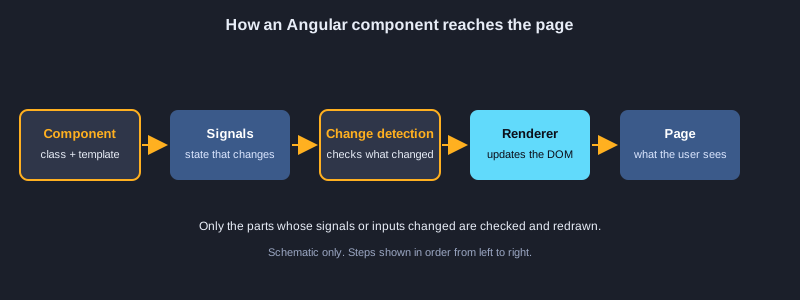
Angular ตัดสินใจว่าจะวาดส่วนใดใหม่ด้วยการตรวจจับการเปลี่ยนแปลง ซิกนัลและ OnPush ช่วยควบคุมเรื่องนี้ เพื่อให้หน้าขนาดใหญ่ยังคงเร็ว
รายการที่มี index และค่าที่คำนวณ
ภายใน @for ใช้ $index, $first และ $last เพื่อจัดแต่งแต่ละแถวได้ ซิกนัลแบบ computed กรองรายการ ทำให้ผลที่กรองแล้วอัปเดตเมื่อข้อความค้นหาหรือรายการเปลี่ยน
การตรวจจับแบบ OnPush
เมื่อใช้ ChangeDetectionStrategy.OnPush Angular ตรวจคอมโพเนนต์เฉพาะเมื่ออินพุตเปลี่ยน มีเหตุการณ์เกิดขึ้นในคอมโพเนนต์ หรือซิกนัลที่มันอ่านเปลี่ยน ทำให้เร็วขึ้นมากในหน้าที่มีคอมโพเนนต์จำนวนมาก
zoneless และ toSignal
แอปแบบ zoneless ทำงานโดยไม่ใช้ zone.js ดังนั้นวิวอัปเดตเพราะซิกนัลและเหตุการณ์ ไม่ใช่ทุกเหตุการณ์ของเบราว์เซอร์ toSignal แปลง Observable เป็นซิกนัล ที่อ่านในเทมเพลตได้โดยไม่ต้องสมัครรับ
ตัวอย่างที่ 86: @for กับ $index และ $first
ใช้ตำแหน่งของแต่ละรายการในลูป
@for (step of steps; track step; let i = $index, first = $first, last = $last) {
  <li [class.first]="first" [class.last]="last">{{ i + 1 }}. {{ step }}</li>
}
ตัวอย่างที่ 87: การกรองด้วย computed
แสดงรายการที่กรองแล้วซึ่งอัปเดตขณะผู้ใช้พิมพ์
import { Component, computed, signal } from '@angular/core';

@Component({
  selector: 'app-fruit-filter',
  standalone: true,
  template: `
    <input (input)="query.set($any($event.target).value)">
    @for (fruit of shown(); track fruit) {
      <p>{{ fruit }}</p>
    }
  `,
})
export class FruitFilterComponent {
  fruits = ['apple', 'banana', 'cherry'];
  query = signal('');
  shown = computed(() =>
    this.fruits.filter((f) => f.includes(this.query().toLowerCase())),
  );
}
ตัวอย่างที่ 88: การตรวจจับการเปลี่ยนแปลงแบบ OnPush
ตรวจคอมโพเนนต์เฉพาะเมื่อ input ของมันเปลี่ยน
import { ChangeDetectionStrategy, Component, Input } from '@angular/core';

@Component({
  selector: 'app-price-tag',
  standalone: true,
  changeDetection: ChangeDetectionStrategy.OnPush,
  template: '<p>{{ price }} THB</p>',
})
export class PriceTagComponent {
  @Input() price = 0;
}
ตัวอย่างที่ 89: การตรวจจับการเปลี่ยนแปลงแบบ zoneless
รัน Angular โดยไม่ใช้ zone.js และใช้ signal อัปเดตวิว
import { ApplicationConfig, provideZonelessChangeDetection } from '@angular/core';

export const appConfig: ApplicationConfig = {
  providers: [provideZonelessChangeDetection()],
};
ตัวอย่างที่ 90: toSignal
แปลง Observable เป็น signal ที่อ่านในเทมเพลตได้
import { Component, inject } from '@angular/core';
import { toSignal } from '@angular/core/rxjs-interop';
import { interval, map } from 'rxjs';

@Component({
  selector: 'app-seconds',
  standalone: true,
  template: '<p>Seconds: {{ seconds() }}</p>',
})
export class SecondsComponent {
  seconds = toSignal(interval(1000).pipe(map((n) => n + 1)), { initialValue: 0 });
}
หัวข้อที่ 14: การทดสอบและแอนิเมชัน
การทดสอบตรวจคอมโพเนนต์และบริการแยกจากกัน แอนิเมชันเปลี่ยนองค์ประกอบอย่างนุ่มนวลเมื่อสถานะของมันเปลี่ยน
TestBed และการทดสอบคอมโพเนนต์
TestBed สร้างคอมโพเนนต์ในโมดูลทดสอบ detectChanges รันการตรวจจับการเปลี่ยนแปลง และการทดสอบตรวจข้อความของ nativeElement ให้แต่ละการทดสอบตรวจพฤติกรรมเดียว เพื่อให้เมื่อล้มเหลวรู้สาเหตุได้ทันที
HttpTestingController และ fakeAsync
provideHttpClientTesting แทนที่เครือข่ายจริงด้วยของปลอม expectOne และ flush ให้การทดสอบได้รับการตอบกลับ fakeAsync กับ tick เลื่อนเวลาไปข้างหน้า ทำให้ทดสอบการทำงานที่หน่วงเวลาได้โดยไม่ต้องรอ
ทริกเกอร์แอนิเมชัน
ทริกเกอร์แอนิเมชันกำหนดสถานะ เช่น open และ closed และการเปลี่ยนสถานะระหว่างกัน พร้อมจังหวะเวลา ผูกทริกเกอร์กับค่าในเทมเพลต และ Angular เล่นการเปลี่ยนแปลงเมื่อค่านั้นเปลี่ยน
ตัวอย่างที่ 91: การทดสอบคอมโพเนนต์ด้วย TestBed
สร้างคอมโพเนนต์ในการทดสอบและตรวจข้อความ
import { ComponentFixture, TestBed } from '@angular/core/testing';
import { CounterComponent } from './counter.component';

describe('CounterComponent', () => {
  let fixture: ComponentFixture<CounterComponent>;

  beforeEach(async () => {
    await TestBed.configureTestingModule({ imports: [CounterComponent] }).compileComponents();
    fixture = TestBed.createComponent(CounterComponent);
  });

  it('starts at zero', () => {
    fixture.detectChanges();
    expect(fixture.nativeElement.textContent).toContain('0');
  });
});
ตัวอย่างที่ 92: HttpTestingController
ทดสอบบริการ HTTP โดยไม่ต้องใช้เซิร์ฟเวอร์จริง
import { TestBed } from '@angular/core/testing';
import { provideHttpClient } from '@angular/common/http';
import { HttpTestingController, provideHttpClientTesting } from '@angular/common/http/testing';
import { UserService } from './user.service';

describe('UserService', () => {
  it('loads users', () => {
    TestBed.configureTestingModule({
      providers: [provideHttpClient(), provideHttpClientTesting()],
    });
    const service = TestBed.inject(UserService);
    const http = TestBed.inject(HttpTestingController);

    service.users().subscribe((list) => expect(list.length).toBe(2));
    http.expectOne('/api/users').flush([{ id: 1 }, { id: 2 }]);
    http.verify();
  });
});
ตัวอย่างที่ 93: fakeAsync และ tick
เลื่อนเวลาในการทดสอบเพื่อตรวจการทำงานที่หน่วงเวลา
import { fakeAsync, tick } from '@angular/core/testing';

it('runs a delayed action', fakeAsync(() => {
  let done = false;
  setTimeout(() => (done = true), 500);
  tick(500);
  expect(done).toBeTrue();
}));
ตัวอย่างที่ 94: ทริกเกอร์แอนิเมชัน
เคลื่อนไหวองค์ประกอบเมื่อสถานะของมันเปลี่ยน
import { Component } from '@angular/core';
import { trigger, state, style, transition, animate } from '@angular/animations';

@Component({
  selector: 'app-drawer',
  standalone: true,
  animations: [
    trigger('slide', [
      state('closed', style({ height: '0px' })),
      state('open', style({ height: '200px' })),
      transition('closed <=> open', animate('300ms ease-in')),
    ]),
  ],
  template: '<div [@slide]="isOpen ? \'open\' : \'closed\'">Content</div>',
})
export class DrawerComponent {
  isOpen = false;
}
หัวข้อที่ 15: การตั้งค่า ข้อผิดพลาด และการนำขึ้นใช้งาน
แอปจริงต้องมีการตั้งค่าสำหรับแต่ละสภาพแวดล้อม แผนรับมือข้อผิดพลาดที่ไม่คาดคิด และบิลด์สำหรับใช้งานจริงที่พร้อมเผยแพร่
ไฟล์สภาพแวดล้อมและ initializer
เก็บการตั้งค่า เช่นที่อยู่ API ไว้ในไฟล์สภาพแวดล้อม โดยมีค่าต่างกันสำหรับการพัฒนาและการใช้งานจริง provideAppInitializer รันโค้ด เช่นการโหลดค่าคอนฟิก ก่อนวาดหน้าแรก
ข้อผิดพลาดและ ErrorHandler
Angular ส่งข้อผิดพลาดที่ไม่ได้จับไปยัง ErrorHandler คุณให้คลาสของตัวเองเพื่อบันทึกหรือส่งไปยังบริการรายงาน เพื่อให้มีจุดเดียวที่ตัดสินว่าจะจัดการข้อผิดพลาดที่ไม่คาดคิดอย่างไร
บิลด์ ทดสอบ และนำขึ้นใช้งาน
ng build --configuration production สร้างไฟล์ที่ปรับให้เหมาะสมในโฟลเดอร์ dist/ ส่วน ng test --watch=false รันการทดสอบยูนิตหนึ่งครั้งในไปป์ไลน์การบิลด์ นำไฟล์สแตติกไปโฮสต์บนเว็บเซิร์ฟเวอร์หรือบริการโฮสติ้งสแตติกที่รองรับแอปแบบ single-page
ตัวอย่างที่ 95: ค่าคอนฟิกของสภาพแวดล้อม
เก็บการตั้งค่าเช่นที่อยู่ API ไว้ในไฟล์เดียว
export const environment = {
  production: false,
  apiUrl: 'http://localhost:3000/api',
};
ตัวอย่างที่ 96: ErrorHandler ที่กำหนดเอง
รายงานข้อผิดพลาดที่ไม่คาดคิดไว้ในที่เดียว
import { ErrorHandler, Injectable } from '@angular/core';

@Injectable()
export class ReportingErrorHandler implements ErrorHandler {
  handleError(error: unknown): void {
    console.error('Unexpected error:', error);
  }
}
ตัวอย่างที่ 97: provideAppInitializer
โหลดค่าคอนฟิกก่อนแอปเริ่มทำงาน
import { ApplicationConfig, provideAppInitializer, inject } from '@angular/core';
import { ConfigService } from './config.service';

export const appConfig: ApplicationConfig = {
  providers: [
    provideAppInitializer(() => inject(ConfigService).load()),
  ],
};
ตัวอย่างที่ 98: imports ในคอมโพเนนต์ standalone
ระบุไดเรกทีฟและ pipe ที่คอมโพเนนต์ใช้
import { Component } from '@angular/core';
import { NgClass } from '@angular/common';
import { HighlightDirective } from './highlight.directive';
import { ShortenPipe } from './shorten.pipe';

@Component({
  selector: 'app-note',
  standalone: true,
  imports: [NgClass, HighlightDirective, ShortenPipe],
  template: '<p [ngClass]="{ bold: true }" appHighlight="pink">{{ text | shorten: 10 }}</p>',
})
export class NoteComponent {
  text = 'A long note about Angular standalone components';
}
ตัวอย่างที่ 99: @defer เมื่อผู้ใช้โต้ตอบ
โหลดบางส่วนของหน้าหลังจากผู้ใช้คลิกเท่านั้น
<button #openBtn>Show comments</button>

@defer (on interaction(openBtn)) {
  <app-comments />
} @placeholder {
  <p>Comments will load after you click.</p>
}
ตัวอย่างที่ 100: คำสั่งบิลด์และทดสอบ
คำสั่ง Angular CLI หลักที่ใช้ในงานประจำวัน
# development server
ng serve
# production build (outputs to dist/)
ng build --configuration production
# unit tests
ng test --watch=false
โปรเจกต์ฝึก: รายการงาน
สร้างแอปขนาดเล็กหนึ่งตัวที่ใช้แนวคิดจากทุกหัวข้อ เขียนเองก่อน แล้วเทียบกับตัวอย่าง
1. สร้างโปรเจกต์แบบ standalone แล้วสร้างคอมโพเนนต์ TaskList ที่มีซิกนัลเก็บอาร์เรย์ของงาน
2. เพิ่มฟอร์มที่มีช่องข้อความซึ่งต้องกรอก แล้วเพิ่มงานใหม่เข้ารายการด้วยเมทอดที่ผูกกับ (ngSubmit)
3. แสดงงานด้วย @for และ track พร้อมข้อความ @empty เมื่อรายการว่าง
4. เพิ่มซิกนัลแบบ computed ที่นับงานที่ยังไม่เสร็จ และแสดงค่านั้นในเทมเพลต
5. เพิ่มเส้นทางไปยังหน้ารายละเอียดงาน ที่อ่านไอดีจาก URL ด้วย ActivatedRoute
6. เขียนการทดสอบคอมโพเนนต์หนึ่งรายการที่ตรวจข้อความเมื่อรายการว่าง แล้วรัน ng test --watch=false
ขั้นต่อไป
ขั้นต่อไป ให้เรียนราวเตอร์อย่างลึกซึ้ง การจัดการสถานะด้วยซิกนัลหรือ NgRx การเรนเดอร์ฝั่งเซิร์ฟเวอร์ด้วย Angular SSR และไลบรารีคอมโพเนนต์เช่น Angular Material เอกสารทางการที่ angular.dev เป็นแหล่งอ้างอิงที่ดีที่สุด และตัวอย่างในบทความนี้ใช้ไวยากรณ์ที่แนะนำสำหรับ Angular 17 ขึ้นไป
สรุป
Angular สร้างแอปจากคอมโพเนนต์ เทมเพลตผูกข้อมูลและเหตุการณ์ บล็อกการควบคุมโฟลว์แสดงหรือวนซ้ำเนื้อหา pipe จัดรูปแบบค่า และอินพุตกับเอาต์พุตเชื่อมแม่กับลูก คอมโพเนนต์เก็บสถานะในพร็อพเพอร์ตี้ธรรมดา ค่า readonly getter และซิกนัล บริการถูกใช้ร่วมกันผ่านการฉีดพึ่งพา ราวเตอร์จับคู่ URL กับหน้า ฟอร์มตรวจความถูกต้องของข้อมูล และ HttpClient กับ RxJS โหลดข้อมูล การทดสอบ การตั้งค่า และการบิลด์สำหรับใช้งานจริงทำให้เวิร์กโฟลว์สมบูรณ์ วิธีจำตัวอย่างทั้ง 100 ตัวอย่างที่ดีที่สุดคือสร้างโปรเจกต์รายการงาน แล้วเปลี่ยนทีละอย่าง