C と C++ をゼロからプロレベルまで: 実際の出力付きの 100 のコンパイル済みの例
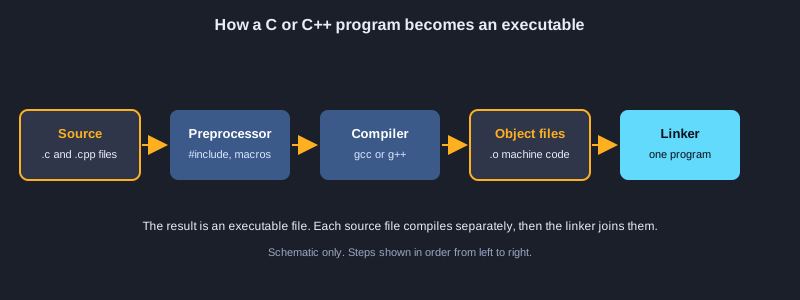
C はハードウェアに近い所で動く、小さく高速な言語です。C++ は C の上に、クラス、テンプレート、大きな標準ライブラリを加えたもので、ゲーム、ブラウザ、データベース、組み込みシステムで使われています。この記事は、最初の printf から現代の C++20 まで 100 の例で導きます。最初の 50 は C で、変数、制御構文、関数、配列、ポインター、構造体、メモリ、ファイル、プリプロセッサーを扱います。後の 50 は C++ で、参照、クラス、RAII、スマートポインター、テンプレート、標準ライブラリ、コンセプト、例外、スレッド、書式化を扱います。すべての例は GCC 16 でコンパイルして実行し、実際の出力をコードの後ろに示しています。
必要なもの
GCC または Clang をインストールしたコンピューターです(Windows では WinLibs GCC または MSYS2 のツールチェーン、macOS では Xcode のコマンドラインツール、Linux ではパッケージマネージャー)。gcc --version と g++ --version で確認できます。テキストエディターがあれば十分です。プログラミングの経験は必要ありませんが、最初の例では数と文字の意味がわかっていることを前提にしています。
コンパイルと実行の方法
C の例は gcc -std=c17、C++ の例は g++ -std=c++20 を使います。例は一つのファイルに一つずつです。例えば C++ のプログラムを main.cpp として保存し、g++ -std=c++20 -Wall -Wextra main.cpp -o main でコンパイルして ./main で実行します。記事に示す出力は GCC 16 で実際に実行して得たものです。
トピック 1: 入門、変数、型
C のすべてのプログラムは main から始まります。これらの例では、表示し、値を変数に保存し、それぞれの値に適した型を選ぶ方法を示します。
C プログラムの構造
C のプログラムは関数の集まりで、プログラムは main から始まります。#include <stdio.h> は printf 関数を取り込みます。printf は文字を表示し、%d、%f、%c の書式指定子で int、double、char を表示します。main から 0 を返すと成功を示します。
整数型と浮動小数点型
int、short、long は整数を保存しますが、正確なサイズはプラットフォームによって異なるので、sizeof で確かめます。float と double は精度に限りのある小数を保存します。1.0 / 3.0 は正確に三分の一ではないため、桁数を増やして表示すると誤差が見えます。
定数
const は、コンパイラが変更を防ぐ型付きの値を作ります。#define はコンパイラが動く前に文字列を置き換えるので、型はありません。新しいコードでは型のある値に const を使い、#define は主にコンパイル時の設定に使いましょう。
図解
例 1: Hello, World
最初のプログラム: 一行の文字を表示します。
#include <stdio.h>

int main(void) {
    printf("Hello, World!\n");
    return 0;
}
出力:
Hello, World!
例 2: 変数と書式指定子
値を保存し、printf の書式指定子で表示します。
#include <stdio.h>

int main(void) {
    int apples = 7;
    double price = 2.5;
    char initial = 'A';
    printf("%d apples, %.2f each, initial %c\n", apples, price, initial);
    printf("total = %.2f\n", apples * price);
    return 0;
}
出力:
7 apples, 2.50 each, initial A
total = 17.50
例 3: 整数型と sizeof
整数型ごとに使うバイト数が異なります。
#include <stdio.h>

int main(void) {
    printf("char   : %zu byte(s)\n", sizeof(char));
    printf("short  : %zu byte(s)\n", sizeof(short));
    printf("int    : %zu byte(s)\n", sizeof(int));
    printf("long   : %zu byte(s)\n", sizeof(long));
    printf("long long: %zu byte(s)\n", sizeof(long long));
    return 0;
}
出力:
char   : 1 byte(s)
short  : 2 byte(s)
int    : 4 byte(s)
long   : 4 byte(s)
long long: 8 byte(s)
例 4: 浮動小数点と精度
float と double は精度に限りのある小数を保存します。
#include <stdio.h>

int main(void) {
    float f = 1.0f / 3.0f;
    double d = 1.0 / 3.0;
    printf("float  : %.10f\n", f);
    printf("double : %.10f\n", d);
    printf("0.1 + 0.2 == 0.3 ? %s\n", (0.1 + 0.2 == 0.3) ? "yes" : "no");
    return 0;
}
出力:
float  : 0.3333333433
double : 0.3333333333
0.1 + 0.2 == 0.3 ? no
例 5: char と ASCII 値
char は小さな整数で、'a' は 97 です。
#include <stdio.h>

int main(void) {
    char c = 'a';
    printf("%c is %d\n", c, c);
    printf("upper of %c is %c\n", c, c - 'a' + 'A');
    printf("digit '7' minus '0' = %d\n", '7' - '0');
    return 0;
}
出力:
a is 97
upper of a is A
digit '7' minus '0' = 7
例 6: 定数: const と #define
プログラムが変更してはならない固定の値です。
#include <stdio.h>

#define MAX_USERS 100
static const double TAX_RATE = 0.07;

int main(void) {
    double price = 200.0;
    printf("max users: %d\n", MAX_USERS);
    printf("price with tax: %.2f\n", price * (1.0 + TAX_RATE));
    return 0;
}
出力:
max users: 100
price with tax: 214.00
トピック 2: 演算子と型変換
演算子は値を組み合わせます。型の変換はよくあるバグの原因なので、規則を早めに覚える価値があります。
算術演算と整数除算
+、-、*、/、% は数値に働きます。int を int で割ると小数部分が切り捨てられ、17 / 5 は 3 になります。小数部分を残すには 17.0 / 5 のように、片方のオペランドを double にします。% は余りを求めます。
増減、複合代入、比較
++ と -- は変数を一つ増減させ、名前の前か後かで変化が見えるタイミングが決まります。+= と *= は一度の操作で更新します。C の比較は真なら 1、偽なら 0 を返すので、stdbool.h を含めない限り別の真偽値型はありません。
ビット演算子とキャスト
&、|、^、~ と、シフトの << と >> は整数のビットに働き、フラグに便利です。(double) のようなキャストは、その式の間だけ値の型を変えるもので、変数は変わりません。
例 7: 算術と整数除算
int を int で割ると小数部分は切り捨てられます。
#include <stdio.h>

int main(void) {
    int a = 17, b = 5;
    printf("%d %d %d %d %d\n", a + b, a - b, a * b, a / b, a % b);
    printf("17.0 / 5 = %.2f\n", 17.0 / b);
    return 0;
}
出力:
22 12 85 3 2
17.0 / 5 = 3.40
例 8: 増減と複合代入
++、--、+= は一度の操作で変数を変えます。
#include <stdio.h>

int main(void) {
    int n = 5;
    printf("%d\n", n++);
    printf("%d\n", ++n);
    n += 10;
    n *= 2;
    printf("final %d\n", n);
    return 0;
}
出力:
5
7
final 34
例 9: 比較と論理演算子
C では真は 1、偽は 0 になります。
#include <stdio.h>

int main(void) {
    int age = 20;
    int has_ticket = 1;
    printf("adult: %d\n", age >= 18);
    printf("can enter: %d\n", age >= 18 && has_ticket);
    printf("needs help: %d\n", !has_ticket || age < 12);
    return 0;
}
出力:
adult: 1
can enter: 1
needs help: 0
例 10: ビット演算子とシフト
整数の個々のビットに働きます。
#include <stdio.h>

int main(void) {
    unsigned int flags = 0x5;
    printf("flags & 4 = %u\n", flags & 4u);
    printf("flags | 2 = %u\n", flags | 2u);
    printf("flags ^ 1 = %u\n", flags ^ 1u);
    printf("1 << 4 = %u\n", 1u << 4);
    printf("256 >> 2 = %u\n", 256u >> 2);
    return 0;
}
出力:
flags & 4 = 4
flags | 2 = 7
flags ^ 1 = 4
1 << 4 = 16
256 >> 2 = 64
例 11: キャストと変換
(型) で値を別の型に変換します。
#include <stdio.h>

int main(void) {
    int total = 7, count = 2;
    double average = (double)total / count;
    printf("average = %.2f\n", average);
    printf("truncated = %d\n", (int)3.99);
    printf("mixed = %.1f\n", total / 2 + 0.5);
    return 0;
}
出力:
average = 3.50
truncated = 3
mixed = 3.5
トピック 3: 条件分岐と繰り返し
制御構文は何を実行し、何回実行するかを決めます。問題に合う文を選びましょう。選択には if、値の集合には switch、繰り返しにはループを使います。
if、switch、条件演算子
if と else は条件から一つの分岐を選びます。switch は値で case を選びます。break がないと次の case へ処理が流れ込みます。これは時に便利ですが、よくあるバグです。条件演算子は値を返す短い if-else です。
for、while、do-while
for は繰り返し回数がわかっているときに最適です。while は各回の前に条件を確認し、do-while は本体を少なくとも一回実行します。条件が最も読みやすくなるループを選びましょう。
break、continue、入れ子のループ
break は最も内側のループを抜け、continue は次の回へ進みます。ループの中のループは、格子や表を走査する普通の方法です。入れ子のループは短く保ち、カウンターには分かりやすい名前を付けましょう。
例 12: if、else if、else
複数の条件から一つの分岐を選びます。
#include <stdio.h>

int main(void) {
    int score = 73;
    if (score >= 80) {
        printf("A\n");
    } else if (score >= 70) {
        printf("B\n");
    } else {
        printf("C\n");
    }
    return 0;
}
出力:
B
例 13: switch とフォールスルー
値で case を選び、break で続けての実行を止めます。
#include <stdio.h>

int main(void) {
    for (int day = 1; day <= 3; day++) {
        switch (day) {
            case 1:
            case 2:
                printf("day %d: early\n", day);
                break;
            default:
                printf("day %d: later\n", day);
                break;
        }
    }
    return 0;
}
出力:
day 1: early
day 2: early
day 3: later
例 14: 条件演算子
値を返す短い if-else です。
#include <stdio.h>

int main(void) {
    int a = 4, b = 9;
    int larger = (a > b) ? a : b;
    printf("larger = %d\n", larger);
    printf("%s\n", (larger % 2 == 0) ? "even" : "odd");
    return 0;
}
出力:
larger = 9
odd
例 15: for ループ
カウンターでブロックを繰り返します。
#include <stdio.h>

int main(void) {
    int sum = 0;
    for (int i = 1; i <= 10; i++) {
        sum += i;
    }
    printf("sum 1..10 = %d\n", sum);
    return 0;
}
出力:
sum 1..10 = 55
例 16: while と do-while
条件で繰り返します。do-while は必ず一回実行されます。
#include <stdio.h>

int main(void) {
    int n = 3;
    while (n > 0) {
        printf("while %d\n", n--);
    }
    int m = 0;
    do {
        printf("do-while runs once, m = %d\n", m);
    } while (m > 0);
    return 0;
}
出力:
while 3
while 2
while 1
do-while runs once, m = 0
例 17: break と continue
ループを途中で抜けるか、次の回へ進みます。
#include <stdio.h>

int main(void) {
    for (int i = 1; i <= 10; i++) {
        if (i % 2 == 0) continue;
        if (i > 7) break;
        printf("%d ", i);
    }
    printf("\n");
    return 0;
}
出力:
1 3 5 7
例 18: 入れ子のループ: 表
ループの中のループで格子状に表示します。
#include <stdio.h>

int main(void) {
    for (int row = 1; row <= 3; row++) {
        for (int col = 1; col <= 3; col++) {
            printf("%3d", row * col);
        }
        printf("\n");
    }
    return 0;
}
出力:
  1  2  3
  2  4  6
  3  6  9
トピック 4: 関数
関数はコードの塊に名前を付け、入力を受け取り、結果を返します。良い関数は一つの仕事をし、テストしやすいものです。
引数と戻り値
各引数の型と戻り値の型を、名前の前に宣言します。C は引数を値渡しするので、関数はコピーに対して働きます。return で結果を返し、何も返さない関数には void を使います。
引数としてのポインター
呼び出し側の変数を変えるには、& でアドレスを渡し、* で読み書きします。古典的な swap 関数が違いを示します。値渡しの版は、自分のコピーを入れ替えるだけです。
再帰と static のローカル変数
再帰関数は自分自身を呼び出し、終了条件が必要です。なければ終わらず、スタックがあふれます。static のローカル変数は呼び出しの間で値を保持し、カウンターやキャッシュに便利ですが、テストは難しくなります。
例 19: 戻り値のある関数
処理に名前を付け、結果を返します。
#include <stdio.h>

static int add(int a, int b) {
    return a + b;
}

static double average(int a, int b) {
    return (a + b) / 2.0;
}

int main(void) {
    printf("%d\n", add(3, 4));
    printf("%.1f\n", average(3, 4));
    return 0;
}
出力:
7
3.5
例 20: 値渡しとポインター渡し
値のコピーは呼び出し側を変えず、ポインターは変えます。
#include <stdio.h>

static void try_swap_value(int a, int b) {
    int t = a; a = b; b = t;
}

static void swap(int *a, int *b) {
    int t = *a; *a = *b; *b = t;
}

int main(void) {
    int x = 1, y = 2;
    try_swap_value(x, y);
    printf("after value swap: %d %d\n", x, y);
    swap(&x, &y);
    printf("after pointer swap: %d %d\n", x, y);
    return 0;
}
出力:
after value swap: 1 2
after pointer swap: 2 1
例 21: 再帰
自分自身を呼び出す関数で、終了条件が必要です。
#include <stdio.h>

static unsigned long long factorial(unsigned int n) {
    return n <= 1 ? 1ULL : n * factorial(n - 1);
}

static unsigned long long fib(unsigned int n) {
    return n < 2 ? n : fib(n - 1) + fib(n - 2);
}

int main(void) {
    printf("10! = %llu\n", factorial(10));
    printf("fib(20) = %llu\n", fib(20));
    return 0;
}
出力:
10! = 3628800
fib(20) = 6765
例 22: static のローカル変数
呼び出しの間で値を保持するローカル変数です。
#include <stdio.h>

static int next_id(void) {
    static int counter = 0;
    counter++;
    return counter;
}

int main(void) {
    for (int i = 0; i < 3; i++) {
        printf("id %d\n", next_id());
    }
    return 0;
}
出力:
id 1
id 2
id 3
トピック 5: 配列と文字列
配列は同じ型の値を複数格納し、添字は 0 から始まります。C では、文字列は末尾にゼロバイトがある char の配列です。
配列と長さ
int scores[5] は int を五つ作ります。C は添字を検査しないので、末尾を越えて書き込むとメモリが静かに壊れます。同じ関数で宣言された配列なら、sizeof array / sizeof array[0] で要素数がわかります。
二次元配列と文字列の配列
int grid[2][3] は二行三列の表です。const char へのポインターの配列は、長さの異なる複数の文字列を保持します。名前の一覧を保存する普通の方法です。
文字列関数
strlen はゼロバイトまでの文字数を数えます。strcpy と strcat は文字列をコピーや連結しますが、バッファーのサイズを検査しないので誤用しやすいです。strcmp は文字列を比べ、等しいと 0 を返します。
例 23: 配列
同じ型の値を固定個数、0 から始まる添字で並べたものです。
#include <stdio.h>

int main(void) {
    int scores[5] = {90, 75, 88, 64, 95};
    for (int i = 0; i < 5; i++) {
        printf("scores[%d] = %d\n", i, scores[i]);
    }
    return 0;
}
出力:
scores[0] = 90
scores[1] = 75
scores[2] = 88
scores[3] = 64
scores[4] = 95
例 24: 合計、最小値、最大値
配列を一度だけ走査し、三つの結果を求めます。
#include <stdio.h>

int main(void) {
    int values[] = {12, 7, 19, 3, 25};
    int n = (int)(sizeof values / sizeof values[0]);
    int sum = 0, min = values[0], max = values[0];
    for (int i = 0; i < n; i++) {
        sum += values[i];
        if (values[i] < min) min = values[i];
        if (values[i] > max) max = values[i];
    }
    printf("sum=%d min=%d max=%d avg=%.2f\n", sum, min, max, (double)sum / n);
    return 0;
}
出力:
sum=66 min=3 max=25 avg=13.20
例 25: 二次元配列
行と列を持つ値の表です。
#include <stdio.h>

int main(void) {
    int grid[2][3] = {{1, 2, 3}, {4, 5, 6}};
    for (int r = 0; r < 2; r++) {
        for (int c = 0; c < 3; c++) {
            printf("%d ", grid[r][c]);
        }
        printf("\n");
    }
    return 0;
}
出力:
1 2 3
4 5 6
例 26: char 配列としての文字列
文字列は末尾にゼロバイトがある char 配列です。
#include <stdio.h>

int main(void) {
    char name[] = "Ada";
    printf("%s has %zu characters\n", name, sizeof name - 1);
    name[0] = 'E';
    printf("now: %s\n", name);
    return 0;
}
出力:
Ada has 3 characters
now: Eda
例 27: string.h の文字列関数
strlen、strcpy、strcat、strcmp です。
#include <stdio.h>
#include <string.h>

int main(void) {
    char buffer[32] = "Hello";
    strcat(buffer, ", C");
    printf("%s (%zu)\n", buffer, strlen(buffer));
    printf("compare: %d\n", strcmp("apple", "banana") < 0);
    char copy[32];
    strcpy(copy, buffer);
    printf("copy: %s\n", copy);
    return 0;
}
出力:
Hello, C (8)
compare: 1
copy: Hello, C
トピック 6: ポインター
ポインターは値のアドレスを保持します。ポインターは C の中心です。関数がデータを変え、配列を走査し、動的な構造を作ることを可能にします。
アドレスと参照外し
& は変数のアドレスを取り、* はポインターのアドレスにある値を読み書きします。ポインターの型は、一歩の大きさをコンパイラに伝えます。int * は一歩で sizeof(int) 進みます。
配列でのポインター算術
配列名は先頭要素へのポインターのように働きます。p + 2 は二つ先を指し、*(p + 2) はその要素を読みます。これは p[2] と同じです。末尾を越えて進むと未定義の動作になります。
配列とポインターを関数に渡す
関数は配列をポインターとして受け取るので、長さも渡す必要があります。ポインターの const は、関数がデータを変えないことを読者とコンパイラに伝えます。
例 28: ポインター: アドレスと参照外し
& はアドレスを取り、* はその場所の値を読み書きします。
#include <stdio.h>

int main(void) {
    int value = 42;
    int *p = &value;
    printf("value via pointer: %d\n", *p);
    *p = 100;
    printf("value now: %d\n", value);
    return 0;
}
出力:
value via pointer: 42
value now: 100
例 29: ポインターの算術
+ と - で配列の上をポインターが移動します。
#include <stdio.h>

int main(void) {
    int nums[4] = {10, 20, 30, 40};
    int *p = nums;
    for (int i = 0; i < 4; i++) {
        printf("%d ", *(p + i));
    }
    printf("\n");
    printf("third via index: %d, via pointer: %d\n", nums[2], *(nums + 2));
    return 0;
}
出力:
10 20 30 40
third via index: 30, via pointer: 30
例 30: 配列を関数に渡す
配列はポインターと長さの組として渡されます。
#include <stdio.h>

static int sum(const int *values, size_t count) {
    int total = 0;
    for (size_t i = 0; i < count; i++) {
        total += values[i];
    }
    return total;
}

int main(void) {
    int data[] = {1, 2, 3, 4, 5};
    printf("sum = %d\n", sum(data, sizeof data / sizeof data[0]));
    return 0;
}
出力:
sum = 15
例 31: 文字列の配列
文字列へのポインターの配列です。
#include <stdio.h>

int main(void) {
    const char *fruits[] = {"apple", "banana", "cherry"};
    size_t n = sizeof fruits / sizeof fruits[0];
    for (size_t i = 0; i < n; i++) {
        printf("%zu: %s\n", i, fruits[i]);
    }
    return 0;
}
出力:
0: apple
1: banana
2: cherry
トピック 7: 構造体、共用体、列挙型、typedef
これらの型は値をまとめ、定数の集まりに名前を付けます。C のデータ構造の基礎です。
構造体と構造体へのポインター
構造体は複数のフィールドを一つの名前にまとめます。アロー演算子 -> はポインターを通してフィールドにアクセスします。つまり p->x は (*p).x と同じです。大きな構造体はコピーではなくポインターで渡しましょう。
共用体と列挙型
共用体は複数の型でメモリを共有するので、同時に意味を持つのは一つの値だけです。列挙型は整数の定数に名前を付け、switch 文を読みやすくします。
typedef
typedef は型に短い名前を付けます。例えば、二つの double を持つ struct に Rect という名前を付けられます。関数ポインターの型も、typedef を使うとずっと読みやすくなります。
例 32: 構造体
関連する値を一つの名前にまとめます。
#include <stdio.h>

struct Point {
    int x;
    int y;
};

int main(void) {
    struct Point p = {3, 4};
    p.x += 1;
    printf("point (%d, %d)\n", p.x, p.y);
    return 0;
}
出力:
point (4, 4)
例 33: 構造体のポインターと ->
ポインターを通して構造体のフィールドを使います。
#include <stdio.h>

struct Book {
    const char *title;
    int pages;
};

static void print_book(const struct Book *b) {
    printf("%s has %d pages\n", b->title, b->pages);
}

int main(void) {
    struct Book books[] = {{"C Basics", 120}, {"Pointers", 96}};
    for (int i = 0; i < 2; i++) {
        print_book(&books[i]);
    }
    return 0;
}
出力:
C Basics has 120 pages
Pointers has 96 pages
例 34: 共用体
複数の型が同じメモリを共有し、一度に一つの値を持ちます。
#include <stdio.h>

union Value {
    int as_int;
    float as_float;
};

int main(void) {
    union Value v;
    v.as_int = 65;
    printf("as int: %d\n", v.as_int);
    v.as_float = 1.5f;
    printf("as float: %.1f\n", v.as_float);
    return 0;
}
出力:
as int: 65
as float: 1.5
例 35: 列挙型
整数の定数の集まりに名前を付けます。
#include <stdio.h>

enum Color { RED, GREEN = 5, BLUE };

int main(void) {
    enum Color c = BLUE;
    printf("RED=%d GREEN=%d BLUE=%d\n", RED, GREEN, BLUE);
    printf("chosen: %d\n", c);
    return 0;
}
出力:
RED=0 GREEN=5 BLUE=6
chosen: 6
例 36: typedef と関数ポインター型
型に短い名前を付けます。
#include <stdio.h>

typedef struct {
    double width;
    double height;
} Rect;

typedef double (*Measure)(Rect);

static double area(Rect r) {
    return r.width * r.height;
}

int main(void) {
    Rect r = {3.0, 4.5};
    Measure m = area;
    printf("area = %.2f\n", m(r));
    return 0;
}
出力:
area = 13.50
トピック 8: 動的メモリとファイル
動的メモリは、実行中にプログラムが領域を要求することを可能にします。ファイルは、プログラムが終了した後もデータを残します。C では後片付けはプログラマーの責任なので、どちらも慎重に扱う必要があります。
malloc、calloc、realloc、free
malloc はバイトのブロックを要求し、calloc はゼロで初期化されたメモリを返し、realloc はブロックのサイズを変えます。成功したすべての呼び出しには、一つの free を対応させます。割り当ては失敗することがあるので、使う前に NULL でないか確認します。
リークとぶら下がりポインターを避ける
free の後はポインターを NULL にして、誤って使わないようにします。各ブロックは一度だけ解放します。どの関数がどのブロックを所有しているかを追跡しましょう。
テキストファイルとバイナリファイル
fopen はファイルを開き、モードで読み、書き、追記を決めます。fprintf と fgets はテキストを扱い、fwrite と fread は生のバイトをコピーします。fopen の戻り値を必ず確認し、開いたファイルはすべて閉じましょう。
例 37: malloc と free による動的メモリ
実行時にメモリを確保し、使い終わったら返します。
#include <stdio.h>
#include <stdlib.h>

int main(void) {
    int n = 5;
    int *squares = malloc(n * sizeof *squares);
    if (squares == NULL) {
        fprintf(stderr, "out of memory\n");
        return 1;
    }
    for (int i = 0; i < n; i++) {
        squares[i] = i * i;
    }
    for (int i = 0; i < n; i++) {
        printf("%d ", squares[i]);
    }
    printf("\n");
    free(squares);
    return 0;
}
出力:
0 1 4 9 16
例 38: calloc と realloc
ゼロ初期化されたメモリと、ブロックのサイズ変更です。
#include <stdio.h>
#include <stdlib.h>

int main(void) {
    int *items = calloc(3, sizeof *items);
    printf("zeroed: %d %d %d\n", items[0], items[1], items[2]);
    int *bigger = realloc(items, 6 * sizeof *bigger);
    if (bigger == NULL) {
        free(items);
        return 1;
    }
    items = bigger;
    items[5] = 99;
    printf("last item: %d\n", items[5]);
    free(items);
    return 0;
}
出力:
zeroed: 0 0 0
last item: 99
例 39: メモリを安全に解放する
一度だけ解放し、ポインターを NULL にします。
#include <stdio.h>
#include <stdlib.h>

static char *make_greeting(const char *name) {
    char *out = malloc(64);
    if (out == NULL) return NULL;
    snprintf(out, 64, "Hello, %s", name);
    return out;
}

int main(void) {
    char *msg = make_greeting("Mali");
    if (msg != NULL) {
        printf("%s\n", msg);
        free(msg);
        msg = NULL;
    }
    return 0;
}
出力:
Hello, Mali
例 40: テキストファイル: 書き込みと読み込み
fopen、fprintf、fgets、fclose を使います。
#include <stdio.h>

int main(void) {
    FILE *out = fopen("notes.txt", "w");
    if (out == NULL) return 1;
    fprintf(out, "first line\nsecond line\n");
    fclose(out);

    FILE *in = fopen("notes.txt", "r");
    if (in == NULL) return 1;
    char line[64];
    while (fgets(line, sizeof line, in) != NULL) {
        printf("read: %s", line);
    }
    fclose(in);
    remove("notes.txt");
    return 0;
}
出力:
read: first line
read: second line
例 41: fwrite と fread によるバイナリファイル
生の値をファイルに保存し、読み戻します。
#include <stdio.h>

int main(void) {
    int data[] = {10, 20, 30};
    FILE *f = fopen("values.bin", "wb");
    if (f == NULL) return 1;
    fwrite(data, sizeof data[0], 3, f);
    fclose(f);

    int back[3] = {0};
    f = fopen("values.bin", "rb");
    if (f == NULL) return 1;
    size_t got = fread(back, sizeof back[0], 3, f);
    fclose(f);
    remove("values.bin");
    printf("read %zu values: %d %d %d\n", got, back[0], back[1], back[2]);
    return 0;
}
出力:
read 3 values: 10 20 30
トピック 9: プリプロセッサー、関数ポインター、可変長引数
これらの道具は、コードのビルド方法や関数の呼び出し方を変えます。うまく使えばプログラムは柔軟になり、不注意に使うとデバッグが難しくなります。
マクロと条件付きコンパイル
マクロはコンパイル前に置き換えられる文字列です。引数と式全体を括弧で囲みましょう。さもないと SQUARE(2 + 1) が誤った答えを返します。#if と #ifdef は、ビルド時に条件が成り立つときだけコードを含めます。
関数ポインターと qsort
関数ポインターは関数のアドレスを保持するので、振る舞いを別の関数に渡せます。qsort は比較のコールバックを使うので、一つのルーチンでどんな型の配列でも並べ替えられます。
可変長引数とコマンドライン引数
stdarg.h を使うと、関数は任意の個数の引数を受け取り、va_arg で読めます。main は argc と argv を受け取ります。これらには、プログラム名の後にユーザーが入力した引数が入っています。
例 42: コマンドライン引数
argc と argv で利用者が入力した引数を受け取ります。
#include <stdio.h>

int main(int argc, char *argv[]) {
    printf("argument count: %d\n", argc);
    for (int i = 1; i < argc; i++) {
        printf("arg %d: %s\n", i, argv[i]);
    }
    return 0;
}
出力:
argument count: 1
例 43: マクロと関数形式のマクロ
コンパイル前の文字列置換です。引数は括弧で囲みます。
#include <stdio.h>

#define SQUARE(x) ((x) * (x))
#define MAX(a, b) ((a) > (b) ? (a) : (b))

int main(void) {
    printf("SQUARE(4) = %d\n", SQUARE(4));
    printf("SQUARE(2 + 1) = %d\n", SQUARE(2 + 1));
    printf("MAX(3, 9) = %d\n", MAX(3, 9));
    return 0;
}
出力:
SQUARE(4) = 16
SQUARE(2 + 1) = 9
MAX(3, 9) = 9
例 44: 条件付きコンパイル
ビルド時に条件が真のときだけコードを含めます。
#include <stdio.h>

#define DEBUG_MODE 1

int main(void) {
#if DEBUG_MODE
    printf("debug build\n");
#else
    printf("release build\n");
#endif
#ifdef __STDC_VERSION__
    printf("C standard version is known\n");
#endif
    return 0;
}
出力:
debug build
C standard version is known
例 45: 関数ポインター
関数を変数に保存し、ポインターで呼び出します。
#include <stdio.h>

static int add(int a, int b) { return a + b; }
static int mul(int a, int b) { return a * b; }

static int apply(int (*op)(int, int), int x, int y) {
    return op(x, y);
}

int main(void) {
    int (*ops[])(int, int) = {add, mul};
    printf("add: %d\n", apply(ops[0], 6, 7));
    printf("mul: %d\n", apply(ops[1], 6, 7));
    return 0;
}
出力:
add: 13
mul: 42
例 46: qsort による並べ替え
比較のコールバックで任意の配列を並べ替えます。
#include <stdio.h>
#include <stdlib.h>

static int compare_ints(const void *a, const void *b) {
    int x = *(const int *)a;
    int y = *(const int *)b;
    return (x > y) - (x < y);
}

int main(void) {
    int nums[] = {42, 7, 19, 3, 25};
    size_t n = sizeof nums / sizeof nums[0];
    qsort(nums, n, sizeof nums[0], compare_ints);
    for (size_t i = 0; i < n; i++) {
        printf("%d ", nums[i]);
    }
    printf("\n");
    return 0;
}
出力:
3 7 19 25 42
例 47: 可変長引数の関数
stdarg で任意の個数の引数を受け取る関数です。
#include <stdarg.h>
#include <stdio.h>

static int sum_all(int count, ...) {
    va_list args;
    va_start(args, count);
    int total = 0;
    for (int i = 0; i < count; i++) {
        total += va_arg(args, int);
    }
    va_end(args);
    return total;
}

int main(void) {
    printf("%d\n", sum_all(3, 1, 2, 3));
    printf("%d\n", sum_all(5, 10, 20, 30, 40, 50));
    return 0;
}
出力:
6
150
トピック 10: ビット、エラー、スコープ
低レベルのビット操作、エラーの確認、スコープの規則は、C プログラマーが日々使う技術です。
ビットの数え上げと検査
x &= x - 1 は最も下の 1 ビットを消すので、それを繰り返すループは立っているビットを数えられます。flags & 4 のようなビットマスクは、他のビットに触れずに一つのビットを調べます。
errno によるエラーの確認
多くのライブラリ関数は失敗時に特別な値を返し、理由を errno に設定します。まず戻り値を確認し、それから errno を読みます。strerror を使えば文字列にできます。
ファイルスコープの static
ファイルスコープの static 関数や変数は、そのファイルの中でだけ見えます。内部の補助関数が他のファイルの名前と衝突するのを防ぎ、良い構造への基本的な一歩です。
例 48: 立っているビットを数える
最も下の 1 ビットを消していき、0 になるまで数えます。
#include <stdio.h>

static int count_bits(unsigned int x) {
    int count = 0;
    while (x != 0) {
        x &= x - 1;
        count++;
    }
    return count;
}

int main(void) {
    printf("bits in 0 = %d\n", count_bits(0));
    printf("bits in 7 = %d\n", count_bits(7));
    printf("bits in 255 = %d\n", count_bits(255));
    return 0;
}
出力:
bits in 0 = 0
bits in 7 = 3
bits in 255 = 8
例 49: errno によるエラー処理
戻り値を確認し、理由を errno で読み取ります。
#include <errno.h>
#include <stdio.h>
#include <string.h>

int main(void) {
    FILE *f = fopen("no-such-file-here.txt", "r");
    if (f == NULL) {
        printf("open failed: errno set = %s\n", errno != 0 ? "yes" : "no");
        return 0;
    }
    fclose(f);
    return 0;
}
出力:
open failed: errno set = yes
例 50: static 関数と大域的な状態
static は名前をそのファイルの中に限定します。
#include <stdio.h>

static int call_count = 0;

static void record_call(void) {
    call_count++;
}

static int calls_so_far(void) {
    return call_count;
}

int main(void) {
    record_call();
    record_call();
    printf("calls: %d\n", calls_so_far());
    return 0;
}
出力:
calls: 2
トピック 11: C++ の基本: 参照、オーバーロード、string、vector
C++ は C の速さを保ったまま、型、参照、標準ライブラリを加えます。これらの例で日常的な道具を紹介します。
参照とオーバーロード
参照は既存の変数の別名なので、参照を変えると変数が変わります。引数の型が違えば、複数の関数が同じ名前を持てます。コンパイラが正しいものを選びます。
std::string と std::vector
std::string は伸び縮みし、自分の長さを知っているので、メモリを手で管理する必要がありません。std::vector は要素を所有する、大きさを変えられる配列です。どちらも範囲 for ループと相性が良いです。
auto、既定の引数、iostream
auto は値から型をコンパイラに推論させ、既定の引数は呼び出し側が引数を省略できるようにします。std::cout と << は printf に代わり、コンパイル時に型を検査します。
例 51: iostream による Hello
std::cout で文字を表示します。
#include <iostream>

int main() {
    std::cout << "Hello, C++!" << '\n';
    return 0;
}
出力:
Hello, C++!
例 52: 参照
参照は同じ変数の別名です。
#include <iostream>

void increment(int &value) {
    ++value;
}

int main() {
    int count = 5;
    int &alias = count;
    alias += 10;
    increment(count);
    std::cout << count << '\n';
}
出力:
16
例 53: 関数のオーバーロード
同じ名前の関数を、引数の型で選び分けます。
#include <iostream>
#include <string>

std::string describe(int n) { return "int " + std::to_string(n); }
std::string describe(double d) { return "double " + std::to_string(d); }
std::string describe(const std::string &s) { return "string " + s; }

int main() {
    std::cout << describe(7) << '\n';
    std::cout << describe(2.5) << '\n';
    std::cout << describe(std::string("hi")) << '\n';
}
出力:
int 7
double 2.500000
string hi
例 54: 既定の引数
呼び出し時に省略できる引数です。
#include <iostream>

int power(int base, int exponent = 2) {
    int result = 1;
    for (int i = 0; i < exponent; ++i) result *= base;
    return result;
}

int main() {
    std::cout << power(3) << ' ' << power(3, 4) << '\n';
}
出力:
9 81
例 55: std::string の基本
連結、長さ、切り出し、検索を安全に行います。
#include <iostream>
#include <string>

int main() {
    std::string name = "Ada";
    name += " Lovelace";
    std::cout << name << " has " << name.size() << " characters\n";
    std::cout << name.substr(0, 3) << '\n';
    std::cout << (name.find("Love") != std::string::npos) << '\n';
}
出力:
Ada Lovelace has 12 characters
Ada
1
例 56: std::vector の基本
要素を所有し、大きさを変えられる配列です。
#include <iostream>
#include <vector>

int main() {
    std::vector<int> scores{70, 85, 92};
    scores.push_back(64);
    int total = 0;
    for (int s : scores) total += s;
    std::cout << "count=" << scores.size() << " total=" << total << '\n';
}
出力:
count=4 total=311
例 57: 範囲 for と auto
添字の計算なしにコンテナを順に処理します。
#include <iostream>
#include <map>
#include <string>

int main() {
    std::map<std::string, int> stock{{"apple", 3}, {"pear", 0}};
    for (const auto &[item, qty] : stock) {
        std::cout << item << ": " << qty << '\n';
    }
}
出力:
apple: 3
pear: 0
トピック 12: クラス、RAII、コピーと移動
クラスはデータと振る舞いを組み合わせるもので、ここから C++ の力が発揮されます。RAII は資源をオブジェクトの寿命に結び付け、手作業の後片付けなしに安全なプログラムを作ります。
クラス、コンストラクター、const メンバー
コンストラクターは、オブジェクトが作られるときに初期化します。const と印を付けたメンバー関数は、オブジェクトを変更しないと約束します。データは private にし、呼び出し側が必要とするものだけを公開し、保存する前に入力を検査しましょう。
デストラクターと RAII
デストラクターは、オブジェクトがスコープを抜けるときに実行されるので、コンストラクターで取得した資源はそこで解放されます。これが RAII です。エラーが起きても、ファイル、ロック、メモリは自動的に解放されます。
コピー、移動、演算子
メモリを所有するオブジェクトには、コピーコンストラクターとコピー代入が必要です。さもないと、二つのオブジェクトが一つのブロックを共有し、二度解放されてしまいます。std::move は、コピーではなく資源を渡すことを可能にします。演算子のオーバーロードで、独自の型でも + と << が使えます。
例 58: クラスとコンストラクター
データと振る舞いをまとめ、コンストラクターで初期化します。
#include <iostream>
#include <string>

class Book {
public:
    Book(std::string title, int pages) : title_(std::move(title)), pages_(pages) {}
    std::string title() const { return title_; }
    int pages() const { return pages_; }
private:
    std::string title_;
    int pages_;
};

int main() {
    Book b{"Clean C++", 320};
    std::cout << b.title() << " (" << b.pages() << " pages)\n";
}
出力:
Clean C++ (320 pages)
例 59: const メンバー関数
メソッドがオブジェクトを変更しないことを約束します。
#include <iostream>

class Counter {
public:
    void add(int n) { total_ += n; }
    int total() const { return total_; }
private:
    int total_ = 0;
};

int report(const Counter &c) {
    return c.total();
}

int main() {
    Counter c;
    c.add(4);
    c.add(6);
    std::cout << report(c) << '\n';
}
出力:
10
例 60: カプセル化と例外
データを private にし、不正な入力を拒否します。
#include <iostream>
#include <stdexcept>

class Account {
public:
    explicit Account(int opening) : balance_(opening) {}
    void deposit(int amount) {
        if (amount <= 0) throw std::invalid_argument("amount must be positive");
        balance_ += amount;
    }
    int balance() const { return balance_; }
private:
    int balance_;
};

int main() {
    Account a{100};
    a.deposit(50);
    std::cout << a.balance() << '\n';
}
出力:
150
例 61: デストラクターと RAII
スコープを抜けるとき、デストラクターが資源を解放します。
#include <iostream>
#include <string>

class Trace {
public:
    explicit Trace(std::string name) : name_(std::move(name)) {
        std::cout << "open " << name_ << '\n';
    }
    ~Trace() { std::cout << "close " << name_ << '\n'; }
private:
    std::string name_;
};

int main() {
    Trace outer{"outer"};
    {
        Trace inner{"inner"};
        std::cout << "work\n";
    }
    std::cout << "done\n";
}
出力:
open outer
open inner
work
close inner
done
close outer
例 62: コピーコンストラクターとコピー代入
メモリを所有するオブジェクトを、共有せずにコピーします。
#include <iostream>
#include <cstring>

class Buffer {
public:
    explicit Buffer(const char *text) : data_(new char[std::strlen(text) + 1]) {
        std::strcpy(data_, text);
    }
    Buffer(const Buffer &other) : data_(new char[std::strlen(other.data_) + 1]) {
        std::strcpy(data_, other.data_);
    }
    Buffer &operator=(const Buffer &other) {
        if (this != &other) {
            delete[] data_;
            data_ = new char[std::strlen(other.data_) + 1];
            std::strcpy(data_, other.data_);
        }
        return *this;
    }
    ~Buffer() { delete[] data_; }
    const char *text() const { return data_; }
private:
    char *data_;
};

int main() {
    Buffer a{"hello"};
    Buffer b = a;
    b = Buffer{"world"};
    std::cout << a.text() << ' ' << b.text() << '\n';
}
出力:
hello world
例 63: ムーブセマンティクス
コピーの代わりに資源を移します。
#include <iostream>
#include <string>
#include <utility>
#include <vector>

int main() {
    std::string source = "a long piece of text";
    std::string target = std::move(source);
    std::cout << "target: " << target << '\n';
    std::cout << "source empty: " << source.empty() << '\n';

    std::vector<std::string> items;
    items.push_back(std::move(target));
    std::cout << "items: " << items.size() << '\n';
}
出力:
target: a long piece of text
source empty: 1
items: 1
例 64: 演算子のオーバーロード
独自の型で + と << を使えるようにします。
#include <iostream>

struct Vec2 {
    double x, y;
    Vec2 operator+(const Vec2 &o) const { return {x + o.x, y + o.y}; }
    Vec2 operator*(double k) const { return {x * k, y * k}; }
};

std::ostream &operator<<(std::ostream &os, const Vec2 &v) {
    return os << '(' << v.x << ", " << v.y << ')';
}

int main() {
    Vec2 a{1, 2}, b{3, 4};
    std::cout << (a + b) * 2.0 << '\n';
}
出力:
(8, 12)
トピック 13: 継承、スマートポインター、ライブラリの型
継承と仮想関数は、一つのコードで多くの型を扱えるようにします。スマートポインター、optional、variant は、所有権と可能性を型システムで表します。
継承と仮想関数
派生クラスは基底クラスから継承し、仮想関数を上書きします。基底クラスへのポインターは、実行時に正しいバージョンを呼び出します。多態的な基底クラスには、必ず仮想デストラクターを付けましょう。
unique_ptr と shared_ptr
unique_ptr は所有者が一人だけで、オブジェクトを自動的に解放します。shared_ptr は所有者の数を数え、weak_ptr はオブジェクトを生かしたまま監視します。基本は unique_ptr を使い、所有が本当に共有されるときだけ shared_ptr を使いましょう。
optional、variant、std::function
std::optional は、無いかもしれない値を保持します。std::variant は複数の型のうち一つを保持し、std::visit が各場合を処理します。std::function は、ラムダのような呼び出せるものを変数に保存します。
例 65: 継承と仮想関数
派生クラスは基底クラスのポインターを通して振る舞いを変えます。
#include <iostream>
#include <string>

class Animal {
public:
    virtual ~Animal() = default;
    virtual std::string sound() const { return "..."; }
};

class Dog : public Animal {
public:
    std::string sound() const override { return "Woof"; }
};

class Cat : public Animal {
public:
    std::string sound() const override { return "Meow"; }
};

int main() {
    Dog d;
    Cat c;
    const Animal *pets[] = {&d, &c};
    for (const Animal *p : pets) std::cout << p->sound() << '\n';
}
出力:
Woof
Meow
例 66: 抽象クラス
純粋仮想関数を持つ基底クラスは直接生成できません。
#include <iostream>
#include <memory>

class Shape {
public:
    virtual ~Shape() = default;
    virtual double area() const = 0;
};

class Square : public Shape {
public:
    explicit Square(double s) : side_(s) {}
    double area() const override { return side_ * side_; }
private:
    double side_;
};

int main() {
    std::unique_ptr<Shape> s = std::make_unique<Square>(3.0);
    std::cout << s->area() << '\n';
}
出力:
9
例 67: スマートポインターによるポリモーフィズム
異なる型を一つの unique_ptr の vector に入れます。
#include <iostream>
#include <memory>
#include <vector>

struct Task {
    virtual ~Task() = default;
    virtual void run() const = 0;
};

struct Print : Task {
    void run() const override { std::cout << "print\n"; }
};

struct Save : Task {
    void run() const override { std::cout << "save\n"; }
};

int main() {
    std::vector<std::unique_ptr<Task>> queue;
    queue.push_back(std::make_unique<Print>());
    queue.push_back(std::make_unique<Save>());
    for (const auto &t : queue) t->run();
}
出力:
print
save
例 68: unique_ptr の所有権
所有者は一人だけで、オブジェクトは自動的に解放されます。
#include <iostream>
#include <memory>

struct Resource {
    explicit Resource(int id) : id_(id) { std::cout << "acquire " << id_ << '\n'; }
    ~Resource() { std::cout << "release " << id_ << '\n'; }
    int id() const { return id_; }
private:
    int id_;
};

std::unique_ptr<Resource> make(int id) {
    return std::make_unique<Resource>(id);
}

int main() {
    auto r = make(7);
    std::cout << "using " << r->id() << '\n';
}
出力:
acquire 7
using 7
release 7
例 69: shared_ptr と weak_ptr
カウント付きの共有所有と、弱い監視者です。
#include <iostream>
#include <memory>

int main() {
    std::shared_ptr<int> a = std::make_shared<int>(42);
    std::weak_ptr<int> watcher = a;
    std::cout << "use count: " << a.use_count() << '\n';
    {
        std::shared_ptr<int> b = a;
        std::cout << "use count: " << a.use_count() << '\n';
    }
    std::cout << "after scope: " << a.use_count() << '\n';
    std::cout << "still alive: " << !watcher.expired() << '\n';
}
出力:
use count: 1
use count: 2
after scope: 1
still alive: 1
例 70: std::optional
存在しないかもしれない値を、null ポインターなしで表します。
#include <iostream>
#include <optional>
#include <string>

std::optional<int> parse_int(const std::string &text) {
    try {
        return std::stoi(text);
    } catch (...) {
        return std::nullopt;
    }
}

int main() {
    for (const char *s : {"42", "oops"}) {
        if (auto v = parse_int(s)) {
            std::cout << "value " << *v << '\n';
        } else {
            std::cout << "not a number: " << s << '\n';
        }
    }
}
出力:
value 42
not a number: oops
例 71: std::variant と std::visit
複数の型のいずれかになる一つの値です。
#include <iostream>
#include <string>
#include <variant>

using Value = std::variant<int, double, std::string>;

std::string kind(const Value &v) {
    return std::visit([](const auto &x) -> std::string {
        using T = std::decay_t<decltype(x)>;
        if constexpr (std::is_same_v<T, int>) return "int";
        else if constexpr (std::is_same_v<T, double>) return "double";
        else return "string";
    }, v);
}

int main() {
    std::cout << kind(Value{3}) << ' ' << kind(Value{2.5}) << ' ' << kind(Value{std::string("x")}) << '\n';
}
出力:
int double string
例 72: ラムダ式とキャプチャ
外側の変数を使える、無名の小さな関数です。
#include <iostream>

int main() {
    int base = 10;
    auto add_base = [base](int x) { return x + base; };
    auto count = 0;
    auto bump = [&count]() { ++count; };
    bump();
    bump();
    std::cout << add_base(5) << ' ' << count << '\n';
}
出力:
15 2
例 73: std::function
どんな呼び出し可能なものも変数に保存できます。
#include <functional>
#include <iostream>
#include <vector>

int main() {
    std::vector<std::function<int(int)>> steps{
        [](int x) { return x + 1; },
        [](int x) { return x * 3; },
    };
    int value = 2;
    for (const auto &step : steps) value = step(value);
    std::cout << value << '\n';
}
出力:
9
トピック 14: アルゴリズム、コンテナ、テンプレート
標準ライブラリは、互いに連携するコンテナ、アルゴリズム、イテレーターを提供します。テンプレートを使うと、多くの型に対して一度書くだけで済みます。
アルゴリズムとイテレーター
std::sort、std::find_if、std::transform は、イテレーターを通して任意の範囲に働きます。ラムダを使うと条件が短く明確になります。適切なアルゴリズムがあれば、手書きのループより優先しましょう。
マップ、セット、配列
std::map はキーを並べ、std::unordered_map はハッシュを使って素早く検索します。std::set は重複のない値を並べて保持し、std::array は固定サイズです。構造化束縛と組になった std::pair は、二つの値を見やすく返します。
テンプレート、特殊化、コンセプト
関数テンプレートは、使う操作をサポートする任意の型で動きます。Stack<T> のようなクラステンプレートは一度書けば済みます。C++20 のコンセプトは、テンプレートの型が満たすべき要件に名前を付けるので、エラーは呼び出し箇所に現れます。
例 74: アルゴリズム: sort、find_if、transform
標準アルゴリズムは任意の範囲の値に使えます。
#include <algorithm>
#include <iostream>
#include <vector>

int main() {
    std::vector<int> v{5, 2, 9, 1, 7};
    std::sort(v.begin(), v.end());
    auto big = std::find_if(v.begin(), v.end(), [](int x) { return x > 4; });
    std::transform(v.begin(), v.end(), v.begin(), [](int x) { return x * 10; });
    std::cout << "first > 4: " << *big << '\n';
    for (int x : v) std::cout << x << ' ';
    std::cout << '\n';
}
出力:
first > 4: 50
10 20 50 70 90
例 75: イテレーターと std::map
ソートされたキーと値のコンテナをイテレーターで巡ります。
#include <iostream>
#include <map>

int main() {
    std::map<int, const char *> names{{3, "c"}, {1, "a"}, {2, "b"}};
    for (auto it = names.begin(); it != names.end(); ++it) {
        std::cout << it->first << '=' << it->second << '\n';
    }
    auto found = names.find(2);
    std::cout << "found " << found->second << '\n';
}
出力:
1=a
2=b
3=c
found b
例 76: unordered_map による単語数え
ハッシュマップで単語を数えます。
#include <iostream>
#include <sstream>
#include <string>
#include <unordered_map>

int main() {
    std::string text = "the cat and the hat and the bat";
    std::unordered_map<std::string, int> counts;
    std::istringstream words(text);
    std::string w;
    while (words >> w) ++counts[w];
    std::cout << "the=" << counts["the"] << " and=" << counts["and"] << " bat=" << counts["bat"] << '\n';
}
出力:
the=3 and=2 bat=1
例 77: std::set と std::multiset
重複を許さない場合と許す場合の、ソートされた集まりです。
#include <iostream>
#include <set>

int main() {
    std::set<int> unique{3, 1, 3, 2};
    std::multiset<int> all{3, 1, 3, 2};
    std::cout << "set size " << unique.size() << '\n';
    std::cout << "multiset size " << all.size() << '\n';
    for (int x : unique) std::cout << x << ' ';
    std::cout << '\n';
}
出力:
set size 3
multiset size 4
1 2 3
例 78: std::array
サイズとイテレーターを持つ固定長の配列です。
#include <array>
#include <iostream>
#include <numeric>

int main() {
    std::array<int, 4> a{1, 2, 3, 4};
    int sum = std::accumulate(a.begin(), a.end(), 0);
    std::cout << "size " << a.size() << " sum " << sum << '\n';
}
出力:
size 4 sum 10
例 79: std::pair と構造化束縛
二つの値を返し、名前を付けて取り出します。
#include <iostream>
#include <utility>

std::pair<int, int> divide(int a, int b) {
    return {a / b, a % b};
}

int main() {
    auto [quotient, remainder] = divide(17, 5);
    std::cout << quotient << " remainder " << remainder << '\n';
}
出力:
3 remainder 2
例 80: 関数テンプレート
多くの型で使える一つの関数です。
#include <iostream>
#include <string>

template <typename T>
T largest(T a, T b) {
    return (a > b) ? a : b;
}

int main() {
    std::cout << largest(3, 8) << '\n';
    std::cout << largest(2.5, 1.5) << '\n';
    std::cout << largest(std::string("pear"), std::string("apple")) << '\n';
}
出力:
8
2.5
pear
例 81: クラステンプレート: Stack
一度書けば何度でも使える汎用のコンテナです。
#include <iostream>
#include <stdexcept>
#include <vector>

template <typename T>
class Stack {
public:
    void push(const T &value) { items_.push_back(value); }
    T pop() {
        if (items_.empty()) throw std::out_of_range("stack is empty");
        T top = items_.back();
        items_.pop_back();
        return top;
    }
    bool empty() const { return items_.empty(); }
private:
    std::vector<T> items_;
};

int main() {
    Stack<int> s;
    s.push(1);
    s.push(2);
    std::cout << s.pop() << ' ' << s.pop() << '\n';
}
出力:
2 1
例 82: テンプレートの特殊化
特定の型のためのテンプレートの特別な版です。
#include <iostream>
#include <string>

template <typename T>
std::string describe(const T &) { return "other"; }

template <>
std::string describe<int>(const int &x) { return "int " + std::to_string(x); }

template <>
std::string describe<std::string>(const std::string &s) { return "string of " + std::to_string(s.size()); }

int main() {
    std::cout << describe(4) << '\n';
    std::cout << describe(std::string("hello")) << '\n';
    std::cout << describe(1.5) << '\n';
}
出力:
int 4
string of 5
other
例 83: 可変長テンプレート
任意の個数の引数を受け取るテンプレートです。
#include <iostream>

template <typename... Args>
int count_args(Args... args) {
    return sizeof...(args);
}

template <typename T, typename... Rest>
void print_all(const T &first, const Rest &...rest) {
    std::cout << first;
    ((std::cout << ' ' << rest), ...);
    std::cout << '\n';
}

int main() {
    std::cout << count_args(1, 'a', 2.0) << '\n';
    print_all("values:", 1, 2.5, 'x');
}
出力:
3
values: 1 2.5 x
例 84: コンセプト (C++20)
テンプレートの型が満たすべき要件に名前を付けます。
#include <concepts>
#include <iostream>

template <typename T>
concept Numeric = std::integral<T> || std::floating_point<T>;

template <Numeric T>
T twice(T value) {
    return value * 2;
}

int main() {
    std::cout << twice(21) << '\n';
    std::cout << twice(1.25) << '\n';
}
出力:
42
2.5
例 85: constexpr と static_assert
コンパイル時に値を計算し、検査します。
#include <iostream>

constexpr long long factorial(int n) {
    return n <= 1 ? 1 : n * factorial(n - 1);
}

constexpr long long kTenFactorial = factorial(10);
static_assert(kTenFactorial == 3628800, "factorial check failed at compile time");

int main() {
    std::cout << kTenFactorial << '\n';
}
出力:
3628800
トピック 15: 現代の C++: 例外、並行処理、書式化、テスト
最後の節では、プロの C++ コードが毎日使う道具を扱います。エラー処理、スレッド、書式化、ファイル入出力、小さなテストハーネスです。
例外、名前空間、enum class
throw はエラーを呼び出しスタックを上って、対応する catch まで送ります。独自の例外は std::runtime_error から派生させます。名前空間は名前の衝突を避け、enum class は列挙子をスコープに閉じ込め、型を強く保ちます。
スレッド、ミューテックス、フューチャー
std::thread は関数を並行して実行し、join は終わるまで待ちます。std::mutex と lock_guard は、共有データをデータ競合から守ります。std::async は future を返し、get を呼ぶと結果が得られます。
範囲、format、ファイル、テスト
範囲 (ranges) は filter と transform で読みやすいパイプラインを作ります。std::format は、コンパイル時に引数を書式文字列と照合します。fstream はファイルを読み書きし、小さなテストハーネスは各検査の合否を報告します。
例 86: 例外: try、catch、throw
エラーを通知し、上位の層で処理します。
#include <iostream>
#include <stdexcept>

int safe_divide(int a, int b) {
    if (b == 0) throw std::domain_error("division by zero");
    return a / b;
}

int main() {
    try {
        std::cout << safe_divide(10, 2) << '\n';
        std::cout << safe_divide(1, 0) << '\n';
    } catch (const std::domain_error &e) {
        std::cout << "caught: " << e.what() << '\n';
    }
}
出力:
5
caught: division by zero
例 87: 独自の例外の階層
std::runtime_error から派生した、自分のエラー型です。
#include <iostream>
#include <stdexcept>
#include <string>

class AppError : public std::runtime_error {
public:
    using std::runtime_error::runtime_error;
};

class NotFound : public AppError {
public:
    explicit NotFound(const std::string &what) : AppError("not found: " + what) {}
};

void load(const std::string &key) {
    if (key != "config") throw NotFound(key);
}

int main() {
    try {
        load("cache");
    } catch (const AppError &e) {
        std::cout << e.what() << '\n';
    }
}
出力:
not found: cache
例 88: 名前空間
名前が衝突しないように名前をまとめます。
#include <iostream>

namespace geometry {
    namespace units {
        constexpr double kMeter = 1.0;
    }
    double area(double w, double h) { return w * h * units::kMeter; }
}

namespace app = geometry;

int main() {
    std::cout << app::area(3.0, 2.0) << '\n';
    std::cout << geometry::units::kMeter << '\n';
}
出力:
6
1
例 89: enum class
型安全な列挙型です。
#include <iostream>

enum class Level { Low = 1, Medium = 5, High = 10 };

std::string_view name(Level l) {
    switch (l) {
        case Level::Low: return "low";
        case Level::Medium: return "medium";
        case Level::High: return "high";
    }
    return "unknown";
}

int main() {
    Level l = Level::Medium;
    std::cout << name(l) << ' ' << static_cast<int>(l) << '\n';
}
出力:
medium 5
例 90: std::chrono の期間
コンパイラが単位を検査する時間の値です。
#include <chrono>
#include <iostream>

int main() {
    using namespace std::chrono;
    using namespace std::chrono_literals;
    milliseconds timeout{1500};
    seconds rounded = duration_cast<seconds>(timeout);
    seconds wait = rounded + 2min;
    std::cout << timeout.count() << " ms = " << rounded.count() << " s\n";
    std::cout << "wait " << wait.count() << " s\n";
}
出力:
1500 ms = 1 s
wait 121 s
例 91: std::thread
別のスレッドで関数を実行し、終わるまで待ちます。
#include <iostream>
#include <thread>
#include <vector>

int main() {
    std::vector<int> results(4, 0);
    std::vector<std::thread> workers;
    for (int i = 0; i < 4; ++i) {
        workers.emplace_back([&results, i] { results[i] = (i + 1) * (i + 1); });
    }
    for (auto &t : workers) t.join();
    for (int r : results) std::cout << r << ' ';
    std::cout << '\n';
}
出力:
1 4 9 16
例 92: std::mutex と lock_guard
共有データをデータ競合から守ります。
#include <iostream>
#include <mutex>
#include <thread>
#include <vector>

int main() {
    int counter = 0;
    std::mutex m;
    std::vector<std::thread> threads;
    for (int t = 0; t < 4; ++t) {
        threads.emplace_back([&] {
            for (int i = 0; i < 1000; ++i) {
                std::lock_guard<std::mutex> lock(m);
                ++counter;
            }
        });
    }
    for (auto &t : threads) t.join();
    std::cout << "counter = " << counter << '\n';
}
出力:
counter = 4000
例 93: std::async と std::future
バックグラウンドで処理を行い、結果を受け取ります。
#include <future>
#include <iostream>

long long sum_range(long long from, long long to) {
    long long total = 0;
    for (long long i = from; i <= to; ++i) total += i;
    return total;
}

int main() {
    auto left = std::async(std::launch::async, sum_range, 1, 500);
    auto right = std::async(std::launch::async, sum_range, 501, 1000);
    std::cout << "total = " << left.get() + right.get() << '\n';
}
出力:
total = 500500
例 94: Ranges (C++20)
読みやすいパイプラインで列を絞り込み、変換します。
#include <iostream>
#include <ranges>
#include <vector>

int main() {
    std::vector<int> nums{1, 2, 3, 4, 5, 6, 7, 8};
    auto result = nums
        | std::views::filter([](int n) { return n % 2 == 0; })
        | std::views::transform([](int n) { return n * n; });
    for (int v : result) std::cout << v << ' ';
    std::cout << '\n';
}
出力:
4 16 36 64
例 95: std::format (C++20)
読みやすいテンプレートによる、型安全な書式化です。
#include <format>
#include <iostream>
#include <string>

int main() {
    std::string item = "Coffee";
    double price = 45.5;
    std::cout << std::format("{:<10}|{:>8.2f}", item, price) << '\n';
    std::cout << std::format("{} items, {:03d} id", 3, 7) << '\n';
}
出力:
Coffee    |   45.50
3 items, 007 id
例 96: 指示付き初期化子 (C++20)
構造体のメンバーを名前で指定して初期化します。
#include <iostream>
#include <string>

struct Server {
    std::string host;
    int port = 80;
    bool tls = false;
};

int main() {
    Server s{.host = "example.com", .tls = true};
    std::cout << s.host << ':' << s.port << (s.tls ? " tls" : " plain") << '\n';
}
出力:
example.com:80 tls
例 97: fstream によるファイル入出力
ファイルに書き込み、一行ずつ読み込みます。
#include <fstream>
#include <iostream>
#include <string>

int main() {
    {
        std::ofstream out("log.txt");
        out << "first\n" << "second\n";
    }
    std::ifstream in("log.txt");
    std::string line;
    while (std::getline(in, line)) {
        std::cout << "read: " << line << '\n';
    }
    in.close();
    std::remove("log.txt");
}
出力:
read: first
read: second
例 98: stringstream による解析
テキストの一行を型付きの値に分けます。
#include <iostream>
#include <sstream>
#include <string>

int main() {
    std::istringstream row("apple,12,0.5");
    std::string name;
    int qty = 0;
    double price = 0.0;
    std::getline(row, name, ',');
    row >> qty;
    row.ignore(1);
    row >> price;
    std::cout << name << " x" << qty << " @ " << price << '\n';
}
出力:
apple x12 @ 0.5
例 99: 小さなテストハーネス
結果を確認し、合格か不合格かを報告します。
#include <iostream>
#include <string>

int failures = 0;

void check(bool ok, const std::string &name) {
    std::cout << (ok ? "PASS " : "FAIL ") << name << '\n';
    if (!ok) ++failures;
}

int add(int a, int b) { return a + b; }

int main() {
    check(add(2, 2) == 4, "add small numbers");
    check(add(-1, 1) == 0, "add opposites");
    check(add(3, 3) == 6, "add positives");
    std::cout << failures << " failure(s)\n";
    return failures == 0 ? 0 : 1;
}
出力:
PASS add small numbers
PASS add opposites
PASS add positives
0 failure(s)
例 100: まとめ: 在庫レポート
クラス、スマートポインター、optional、format を組み合わせます。
#include <algorithm>
#include <format>
#include <iostream>
#include <memory>
#include <optional>
#include <string>
#include <vector>

struct Item {
    std::string name;
    int quantity;
    double unit_price;
};

class Inventory {
public:
    void add(Item item) { items_.push_back(std::move(item)); }

    std::optional<Item> cheapest() const {
        if (items_.empty()) return std::nullopt;
        return *std::min_element(items_.begin(), items_.end(),
            [](const Item &a, const Item &b) { return a.unit_price < b.unit_price; });
    }

    double total_value() const {
        double sum = 0.0;
        for (const auto &i : items_) sum += i.quantity * i.unit_price;
        return sum;
    }

    const std::vector<Item> &items() const { return items_; }

private:
    std::vector<Item> items_;
};

int main() {
    auto inventory = std::make_unique<Inventory>();
    inventory->add({"pen", 40, 5.0});
    inventory->add({"notebook", 12, 45.5});
    inventory->add({"stapler", 3, 120.0});

    for (const auto &i : inventory->items()) {
        std::cout << std::format("{:<10}{:>4} x {:>8.2f}\n", i.name, i.quantity, i.unit_price);
    }
    if (auto c = inventory->cheapest()) {
        std::cout << "cheapest: " << c->name << '\n';
    }
    std::cout << std::format("total value: {:.2f}\n", inventory->total_value());
}
出力:
pen         40 x     5.00
notebook    12 x    45.50
stapler      3 x   120.00
cheapest: pen
total value: 1106.00
練習プロジェクト: 小さな在庫レポート
考え方を一つのプログラムにまとめます。まず自分で書き、その後で例と比べてください。各ステップは、一つか二つの例に相当する作業量です。
1. 名前、数量、単価を持つ構造体 Item を書き、三つの品目を配列に保存します。
2. 同じプログラムを C++ で書き直し、品目の std::vector を持ち、total_value メソッドを持つクラス Inventory を作ります。
3. std::optional<Item> を返す cheapest メソッドを追加します。在庫が空なら空の値を返します。
4. std::format で各行を表示し、名前は十文字幅、価格は小数点以下二桁に揃えます。
5. 三つの検査を持つ小さなテストハーネスを追加し、どれかの検査が失敗したら 0 以外の終了コードを返すようにします。
次のステップ
次は、CMake のようなビルドシステムを学び、Catch2 や GoogleTest のフレームワークで単体テストを書き、C++ Core Guidelines を読んでください。各例の出力は GCC 16 で実際に実行して得たものです。あなたの出力が違う場合は、まずコンパイラのバージョンとオプションを確認してください。
まとめ
C はメモリを直接制御させ、C++ はその制御を保ったまま、クラス、テンプレート、大きな標準ライブラリを加えます。100 のコンパイル済みの例を通して、この記事では変数、制御構文、関数、配列、ポインター、構造体、動的メモリ、ファイル、プリプロセッサー、C++ のクラスと RAII、スマートポインター、標準のコンテナとアルゴリズム、テンプレート、コンセプト、例外、スレッド、書式化を扱いました。各例は、コードの全体と実際の出力を示しています。最善の練習は、値を変えて結果を予想し、プログラムを実行して確かめることです。