كشف الكائنات بـ YOLO: التعرف على الأشياء في الصور والفيديو
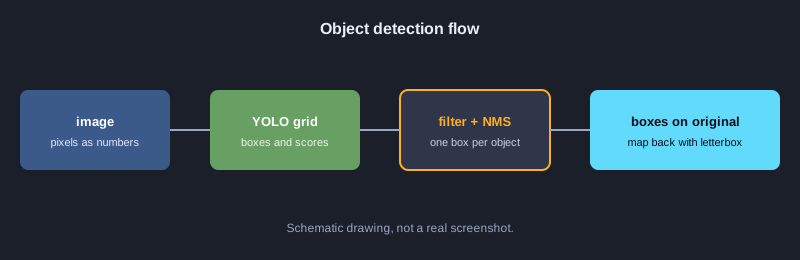
كشف الكائنات يعني معرفة ما الأشياء الموجودة في الصورة وأين تقع. الناتج هو مربع تحديد (bounding box) مع اسم الصنف ودرجة الثقة. تعمل نماذج عائلة YOLO بسرعة تكفي للفيديو. تشرح هذه المقالة الأفكار التي تقوم عليها: إحداثيات المربعات، وIoU، وNMS، وفك ترميز خلايا الشبكة، والتغيير بطريقة letterbox، وقياس الجودة بـ precision وrecall وAP. كل الأمثلة بلغة JavaScript وتستخدم المكتبات القياسية فقط، لذا تعمل فورًا دون تنزيل نموذج.
ما الذي تحتاجه
تحتاج إلى Node.js بالإصدار 18 أو أحدث، وأساسيات JavaScript. شغّل كل مثال بالأمر node اسم_الملف.js، ولا تحتاج إلى حزم إضافية. أما تشغيل نموذج YOLO حقيقي على الصور فيحتاج إلى Python ومكتبة ultralytics، ولم يُشغَّل ذلك في جهاز الاختبار لهذه المقالة، لذلك ورد فقط في الخطوات التالية.
رسوم توضيحية
المثال 1: الصورة مصفوفة من الأرقام
الصورة الرقمية شبكة من قيم البكسل، والنموذج يعمل على الأرقام. يبني هذا المثال صورة أبيض وأسود بحجم 4x4 ويعد البكسلات الساطعة.
// ภาพขาวดำ 4x4 เก็บเป็นอาร์เรย์ของค่าความสว่าง 0-255
const image = [
  [0, 0, 255, 255],
  [0, 0, 255, 255],
  [0, 0, 0, 0],
  [0, 0, 0, 0],
];
const height = image.length;
const width = image[0].length;
console.log(`ขนาดภาพ: กว้าง ${width} x สูง ${height}`);
let bright = 0;
for (const row of image) for (const p of row) if (p > 127) bright++;
console.log("จำนวนพิกเซลสว่าง:", bright);
console.log("ค่าพิกเซลมุมบนซ้าย:", image[0][0]);
**المخرجات الفعلية**
ขนาดภาพ: กว้าง 4 x สูง 4
จำนวนพิกเซลสว่าง: 4
ค่าพิกเซลมุมบนซ้าย: 0
المثال 2: تحويل صيغة المربع
يعيد YOLO مركز المربع مع العرض والارتفاع (cx, cy, w, h). بينما يحتاج الرسم وحساب IoU غالبًا إلى الزاوية العلوية اليسرى والسفلية اليمنى (x1, y1, x2, y2).
// โมเดล YOLO คืนกรอบเป็น (cx, cy, w, h) แต่การวาดและคำนวณมักใช้ (x1, y1, x2, y2)
function xywhToXyxy([cx, cy, w, h]) {
  return [cx - w / 2, cy - h / 2, cx + w / 2, cy + h / 2];
}
const box = [320, 240, 100, 50];
const [x1, y1, x2, y2] = xywhToXyxy(box);
console.log("มุมบนซ้าย:", x1, y1);
console.log("มุมล่างขวา:", x2, y2);
console.log("กว้าง:", x2 - x1, "สูง:", y2 - y1);
**المخرجات الفعلية**
มุมบนซ้าย: 270 215
มุมล่างขวา: 370 265
กว้าง: 100 สูง: 50
المثال 3: IoU يقيس تداخل المربعات
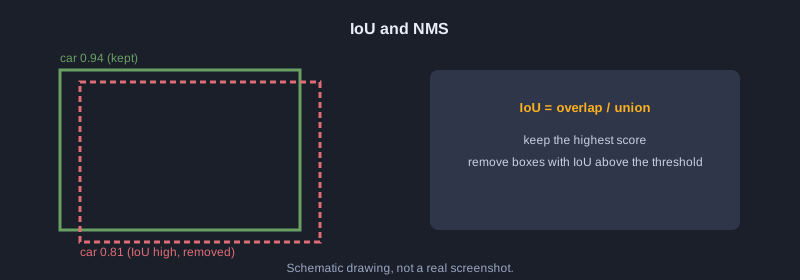
IoU هو مساحة التداخل مقسومة على المساحة الكلية، وقيمته بين 0 و1. القيمة 1 تعني أن المربعين متطابقان تمامًا.
// IoU = พื้นที่ที่ซ้อนกัน / พื้นที่รวมของทั้งสองกรอบ
function area([x1, y1, x2, y2]) {
  return Math.max(0, x2 - x1) * Math.max(0, y2 - y1);
}
function iou(a, b) {
  const ix1 = Math.max(a[0], b[0]);
  const iy1 = Math.max(a[1], b[1]);
  const ix2 = Math.min(a[2], b[2]);
  const iy2 = Math.min(a[3], b[3]);
  const inter = Math.max(0, ix2 - ix1) * Math.max(0, iy2 - iy1);
  return inter / (area(a) + area(b) - inter);
}
const a = [0, 0, 100, 100];
console.log("กรอบเดียวกัน:", iou(a, a).toFixed(2));
console.log("ซ้อนกันหนึ่งในสาม:", iou(a, [50, 0, 150, 100]).toFixed(2));
console.log("ไม่ซ้อนกัน:", iou(a, [200, 200, 300, 300]).toFixed(2));
**المخرجات الفعلية**
กรอบเดียวกัน: 1.00
ซ้อนกันหนึ่งในสาม: 0.33
ไม่ซ้อนกัน: 0.00
المثال 4: التصفية بحسب الثقة
يتنبأ النموذج بمربعات كثيرة. تُحذف المربعات التي تقل ثقتها عن الحد قبل الخطوة التالية.
// กรองกรอบที่มั่นใจน้อยออกก่อน ด้วยเกณฑ์ความมั่นใจ (confidence threshold)
const detections = [
  { label: "car", score: 0.94, box: [40, 60, 180, 140] },
  { label: "car", score: 0.31, box: [200, 70, 260, 130] },
  { label: "person", score: 0.88, box: [300, 50, 340, 170] },
  { label: "dog", score: 0.12, box: [10, 150, 60, 200] },
];
const THRESHOLD = 0.5;
const kept = detections.filter(d => d.score >= THRESHOLD);
console.log(`เหลือ ${kept.length} จาก ${detections.length} กรอบ (เกณฑ์ ${THRESHOLD})`);
for (const d of kept) console.log(d.label, d.score.toFixed(2));
**المخرجات الفعلية**
เหลือ 2 จาก 4 กรอบ (เกณฑ์ 0.5)
car 0.94
person 0.88
المثال 5: Non-Maximum Suppression (NMS)
ترتّب NMS المربعات حسب الثقة، وتحتفظ بأعلاها، ثم تحذف المربعات الأخرى التي لها IoU مرتفع معه. والنتيجة مربع واحد لكل كائن.
// Non-Maximum Suppression: เก็บกรอบที่มั่นใจสุด และตัดกรอบที่ซ้อนทับกันมากออก
function iou(a, b) {
  const ix1 = Math.max(a[0], b[0]), iy1 = Math.max(a[1], b[1]);
  const ix2 = Math.min(a[2], b[2]), iy2 = Math.min(a[3], b[3]);
  const inter = Math.max(0, ix2 - ix1) * Math.max(0, iy2 - iy1);
  const areaA = (a[2] - a[0]) * (a[3] - a[1]);
  const areaB = (b[2] - b[0]) * (b[3] - b[1]);
  return inter / (areaA + areaB - inter);
}
function nms(dets, iouThreshold) {
  const sorted = [...dets].sort((p, q) => q.score - p.score);
  const keep = [];
  for (const d of sorted) {
    if (keep.every(k => iou(k.box, d.box) < iouThreshold)) keep.push(d);
  }
  return keep;
}
const dets = [
  { label: "car", score: 0.94, box: [40, 60, 180, 140] },
  { label: "car", score: 0.81, box: [45, 62, 185, 142] },
  { label: "car", score: 0.67, box: [200, 70, 260, 130] },
  { label: "person", score: 0.88, box: [300, 50, 340, 170] },
];
const result = nms(dets, 0.5);
console.log(`ก่อน NMS ${dets.length} กรอบ -> หลัง NMS ${result.length} กรอบ`);
for (const d of result) console.log(d.label, d.score.toFixed(2));
**المخرجات الفعلية**
ก่อน NMS 4 กรอบ -> หลัง NMS 3 กรอบ
car 0.94
person 0.88
car 0.67
المثال 6: NMS لكل صنف على حدة
إذا طُبّق NMS على كل الأصناف معًا فقد يختفي أحد مربعي سيارة وكلب المتداخلين. لذلك يُطبَّق لكل صنف بشكل منفصل.
// NMS แยกตามคลาส: กรอบของคนละคลาสที่ซ้อนกันยังเก็บไว้ทั้งคู่
function iou(a, b) {
  const ix1 = Math.max(a[0], b[0]), iy1 = Math.max(a[1], b[1]);
  const ix2 = Math.min(a[2], b[2]), iy2 = Math.min(a[3], b[3]);
  const inter = Math.max(0, ix2 - ix1) * Math.max(0, iy2 - iy1);
  return inter / ((a[2] - a[0]) * (a[3] - a[1]) + (b[2] - b[0]) * (b[3] - b[1]) - inter);
}
function nms(dets, iouThreshold) {
  const sorted = [...dets].sort((p, q) => q.score - p.score);
  const keep = [];
  for (const d of sorted) if (keep.every(k => iou(k.box, d.box) < iouThreshold)) keep.push(d);
  return keep;
}
function nmsPerClass(dets, iouThreshold) {
  const groups = {};
  for (const d of dets) (groups[d.label] = groups[d.label] || []).push(d);
  return Object.values(groups).flatMap(g => nms(g, iouThreshold));
}
const dets = [
  { label: "car", score: 0.94, box: [40, 60, 180, 140] },
  { label: "dog", score: 0.90, box: [50, 65, 170, 150] },
  { label: "car", score: 0.85, box: [45, 62, 185, 142] },
];
const result = nmsPerClass(dets, 0.5);
console.log("หลัง NMS แยกคลาส:");
for (const d of result) console.log(d.label, d.score.toFixed(2));
**المخرجات الفعلية**
หลัง NMS แยกคลาส:
car 0.94
dog 0.90
المثال 7: فك ترميز خلايا الشبكة
يقسّم YOLO الصورة إلى شبكة، وتتنبأ كل خلية بقيم خام. نطبّق sigmoid على المركز وexp على العرض والارتفاع للحصول على إحداثيات بالبكسل.
// YOLO แบ่งภาพเป็นตาราง แต่ละเซลล์ทำนายกรอบออกมา ค่าดิบต้องแปลงด้วย sigmoid และ exp
const sigmoid = x => 1 / (1 + Math.exp(-x));
const STRIDE = 100; // ภาพ 400x400 แบ่งเป็น 4x4 เซลล์ ขนาดเซลล์ละ 100 พิกเซล
const raw = [
  { name: "เซลล์ A", row: 1, col: 2, tx: 0.2, ty: -0.4, tw: 0.0, th: 0.5, obj: 3.0 },
  { name: "เซลล์ B", row: 3, col: 0, tx: -1.5, ty: 1.0, tw: -0.3, th: 0.1, obj: -2.0 },
];
for (const r of raw) {
  const cx = (r.col + sigmoid(r.tx)) * STRIDE;
  const cy = (r.row + sigmoid(r.ty)) * STRIDE;
  const w = Math.exp(r.tw) * STRIDE;
  const h = Math.exp(r.th) * STRIDE;
  const conf = sigmoid(r.obj);
  console.log(`${r.name}: cx=${cx.toFixed(1)} cy=${cy.toFixed(1)} w=${w.toFixed(1)} h=${h.toFixed(1)} conf=${conf.toFixed(2)}`);
}
**المخرجات الفعلية**
เซลล์ A: cx=255.0 cy=140.1 w=100.0 h=164.9 conf=0.95
เซลล์ B: cx=18.2 cy=373.1 w=74.1 h=110.5 conf=0.12
المثال 8: Softmax لاختيار الصنف
تتحول درجات الأصناف الخام إلى احتمالات مجموعها 100 بالمئة. الصنف ذو الاحتمال الأعلى هو التنبؤ.
// แปลงคะแนนดิบของแต่ละคลาสเป็นความน่าจะเป็นด้วย softmax แล้วเลือกคลาสที่สูงสุด
const names = ["person", "car", "dog"];
const logits = [1.2, 3.1, 0.4];
const exps = logits.map(Math.exp);
const sum = exps.reduce((a, b) => a + b, 0);
const probs = exps.map(e => e / sum);
probs.forEach((p, i) => console.log(names[i].padEnd(8), (p * 100).toFixed(1) + "%"));
const best = probs.indexOf(Math.max(...probs));
console.log("ผลทาย:", names[best]);
**المخرجات الفعلية**
person   12.3%
car      82.2%
dog      5.5%
ผลทาย: car
المثال 9: Letterbox وإعادة الإحداثيات
يقبل النموذج حجمًا ثابتًا مثل 640x640، لذلك تُصغَّر الصورة مع الحفاظ على نسبة الأبعاد ويُضاف حشو. بعد الكشف نزيل الحشو ونقسم على معامل التصغير للعودة إلى الحجم الأصلي.
// โมเดลรับภาพขนาดคงที่ 640x640 จึงต้องย่อโดยรักษาสัดส่วน แล้วเติมขอบดำ (letterbox)
// และต้องแปลงพิกัดกรอบกลับไปยังขนาดภาพจริง
const orig = { w: 1280, h: 720 };
const INPUT = 640;
const scale = Math.min(INPUT / orig.w, INPUT / orig.h);
const newW = Math.round(orig.w * scale);
const newH = Math.round(orig.h * scale);
const padX = (INPUT - newW) / 2;
const padY = (INPUT - newH) / 2;
console.log(`scale=${scale} ขนาดใหม่=${newW}x${newH} padX=${padX} padY=${padY}`);
// กรอบที่โมเดลทำนายในพื้นที่ 640x640
const boxInInput = [100, 200, 300, 400];
const back = [
  (boxInInput[0] - padX) / scale,
  (boxInInput[1] - padY) / scale,
  (boxInInput[2] - padX) / scale,
  (boxInInput[3] - padY) / scale,
];
console.log("กรอบในภาพจริง:", back.map(v => Math.round(v)));
**المخرجات الفعلية**
scale=0.5 ขนาดใหม่=640x360 padX=0 padY=140
กรอบในภาพจริง: [ 200, 120, 600, 520 ]
المثال 10: رسم المربعات بالحروف
يرسم هذا المثال المربعات على لوحة من الحروف بحجم 40x12 خانة، لنرى مكان الأشياء دون مكتبة رسوم.
// วาดกรอบลงบนผืนผ้าใบตัวอักษร เพื่อดูผลการตรวจจับโดยไม่ต้องใช้ไลบรารีกราฟิก
// ภาพจริง 400x240 พิกเซล ย่อเป็นตาราง 40x12 ช่อง (ช่องละ 10x20 พิกเซล)
const COLS = 40, ROWS = 12, SX = 10, SY = 20;
const canvas = Array.from({ length: ROWS }, () => Array(COLS).fill("."));
const dets = [
  { label: "car", box: [40, 60, 180, 140] },
  { label: "person", box: [300, 50, 340, 170] },
];
for (const d of dets) {
  const [x1, y1, x2, y2] = d.box;
  const c1 = Math.floor(x1 / SX), c2 = Math.floor(x2 / SX);
  const r1 = Math.floor(y1 / SY), r2 = Math.floor(y2 / SY);
  for (let c = c1; c <= c2; c++) { canvas[r1][c] = "-"; canvas[r2][c] = "-"; }
  for (let r = r1; r <= r2; r++) { canvas[r][c1] = "|"; canvas[r][c2] = "|"; }
  canvas[r1][c1] = d.label[0].toUpperCase();
}
console.log(canvas.map(row => row.join("")).join("\n"));
**المخرجات الفعلية**
........................................
........................................
..............................P---|.....
....C-------------|...........|...|.....
....|.............|...........|...|.....
....|.............|...........|...|.....
....|.............|...........|...|.....
....|-------------|...........|...|.....
..............................|---|.....
........................................
........................................
........................................
المثال 11: حفظ النتائج بصيغة SVG
SVG صيغة نصية يمكن للكود توليدها. نستخدمها لرسم المربعات والتسميات فوق الصورة، ويفتحها أي متصفح.
// สร้างไฟล์ SVG ซ้อนกรอบบนภาพ เพื่อนำไปแสดงหรือบันทึกผลการตรวจจับ
const dets = [
  { label: "car", score: 0.94, box: [40, 60, 180, 140] },
  { label: "person", score: 0.88, box: [300, 50, 340, 170] },
];
const lines = ['<svg xmlns="http://www.w3.org/2000/svg" width="400" height="240">'];
lines.push('<rect width="400" height="240" fill="#1b1f2a"/>');
for (const d of dets) {
  const [x1, y1, x2, y2] = d.box;
  lines.push(`<rect x="${x1}" y="${y1}" width="${x2 - x1}" height="${y2 - y1}" fill="none" stroke="#ffb020" stroke-width="2"/>`);
  lines.push(`<text x="${x1}" y="${y1 - 4}" font-size="12" fill="#ffb020">${d.label} ${d.score.toFixed(2)}</text>`);
}
lines.push("</svg>");
const svg = lines.join("\n");
console.log(svg);
console.log("จำนวนบรรทัด:", lines.length, "ความยาว:", svg.length, "ตัวอักษร");
**المخرجات الفعلية**
<svg xmlns="http://www.w3.org/2000/svg" width="400" height="240">
<rect width="400" height="240" fill="#1b1f2a"/>
<rect x="40" y="60" width="140" height="80" fill="none" stroke="#ffb020" stroke-width="2"/>
<text x="40" y="56" font-size="12" fill="#ffb020">car 0.94</text>
<rect x="300" y="50" width="40" height="120" fill="none" stroke="#ffb020" stroke-width="2"/>
<text x="300" y="46" font-size="12" fill="#ffb020">person 0.88</text>
</svg>
จำนวนบรรทัด: 7 ความยาว: 441 ตัวอักษร
المثال 12: Precision وRecall
نقارن التنبؤات بالإجابات الصحيحة. TP كشف صحيح، وFP إنذار خاطئ، وFN كائن فاته الكشف. Precision نسبة التنبؤات الصحيحة من بين ما تنبأنا به، وRecall نسبة الكائنات الحقيقية التي وُجدت.
// เทียบผลทายกับเฉลย: กรอบที่ IoU >= 0.5 และคลาสตรงกันคือ TP ที่เหลือคือ FP
// เฉลยที่ยังไม่ถูกทายคือ FN
function iou(a, b) {
  const ix1 = Math.max(a[0], b[0]), iy1 = Math.max(a[1], b[1]);
  const ix2 = Math.min(a[2], b[2]), iy2 = Math.min(a[3], b[3]);
  const inter = Math.max(0, ix2 - ix1) * Math.max(0, iy2 - iy1);
  return inter / ((a[2] - a[0]) * (a[3] - a[1]) + (b[2] - b[0]) * (b[3] - b[1]) - inter);
}
const gts = [
  { label: "car", box: [40, 60, 180, 140] },
  { label: "person", box: [300, 50, 340, 170] },
  { label: "dog", box: [10, 150, 60, 200] },
];
const preds = [
  { label: "car", score: 0.94, box: [40, 60, 180, 140] },
  { label: "person", score: 0.88, box: [305, 55, 345, 175] },
  { label: "car", score: 0.40, box: [200, 70, 260, 130] },
];
const used = new Array(gts.length).fill(false);
let tp = 0, fp = 0;
for (const p of [...preds].sort((a, b) => b.score - a.score)) {
  let best = -1, bestIou = 0.5;
  gts.forEach((g, i) => {
    const v = iou(p.box, g.box);
    if (!used[i] && g.label === p.label && v >= bestIou) { bestIou = v; best = i; }
  });
  if (best >= 0) { used[best] = true; tp++; } else fp++;
  console.log(`${p.label.padEnd(7)} ${p.score.toFixed(2)} ${best >= 0 ? "TP" : "FP"}`);
}
const fn = gts.length - tp;
console.log(`TP=${tp} FP=${fp} FN=${fn}`);
console.log("precision =", (tp / (tp + fp)).toFixed(2));
console.log("recall =", (tp / (tp + fn)).toFixed(2));
**المخرجات الفعلية**
car     0.94 TP
person  0.88 TP
car     0.40 FP
TP=2 FP=1 FN=1
precision = 0.67
recall = 0.67
المثال 13: متوسط الدقة (AP)
AP هو المساحة تحت منحنى precision-recall بعد ترتيب التنبؤات حسب الثقة. يعطي رقمًا واحدًا لمقارنة النماذج.
// Average Precision (AP): สรุปกราฟ precision-recall เป็นตัวเลขเดียว
// เรียงกรอบตามความมั่นใจ แล้วคำนวณ precision และ recall สะสมทีละกรอบ
function iou(a, b) {
  const ix1 = Math.max(a[0], b[0]), iy1 = Math.max(a[1], b[1]);
  const ix2 = Math.min(a[2], b[2]), iy2 = Math.min(a[3], b[3]);
  const inter = Math.max(0, ix2 - ix1) * Math.max(0, iy2 - iy1);
  return inter / ((a[2] - a[0]) * (a[3] - a[1]) + (b[2] - b[0]) * (b[3] - b[1]) - inter);
}
const gts = [
  { label: "car", box: [40, 60, 180, 140] },
  { label: "person", box: [300, 50, 340, 170] },
  { label: "dog", box: [10, 150, 60, 200] },
];
const preds = [
  { label: "car", score: 0.94, box: [40, 60, 180, 140] },
  { label: "person", score: 0.88, box: [305, 55, 345, 175] },
  { label: "car", score: 0.40, box: [200, 70, 260, 130] },
  { label: "dog", score: 0.30, box: [12, 152, 62, 202] },
];
const sorted = [...preds].sort((a, b) => b.score - a.score);
const used = new Array(gts.length).fill(false);
const flags = sorted.map(p => {
  let best = -1, bestIou = 0.5;
  gts.forEach((g, i) => {
    const v = iou(p.box, g.box);
    if (!used[i] && g.label === p.label && v >= bestIou) { bestIou = v; best = i; }
  });
  if (best >= 0) { used[best] = true; return 1; }
  return 0;
});
let tp = 0, fp = 0;
const precision = [], recall = [];
flags.forEach(f => {
  if (f) tp++; else fp++;
  precision.push(tp / (tp + fp));
  recall.push(tp / gts.length);
});
for (let i = precision.length - 2; i >= 0; i--) precision[i] = Math.max(precision[i], precision[i + 1]);
let ap = 0, prevRecall = 0;
recall.forEach((r, i) => { ap += (r - prevRecall) * precision[i]; prevRecall = r; });
sorted.forEach((p, i) => console.log(`${p.score.toFixed(2)} ${flags[i] ? "TP" : "FP"} recall=${recall[i].toFixed(2)} precision=${precision[i].toFixed(2)}`));
console.log("AP =", ap.toFixed(3));
**المخرجات الفعلية**
0.94 TP recall=0.33 precision=1.00
0.88 TP recall=0.67 precision=1.00
0.40 FP recall=0.67 precision=0.75
0.30 TP recall=1.00 precision=0.75
AP = 0.917
المثال 14: مسار كامل من البداية للنهاية
يجمع هذا المثال الخطوات كلها: فك الترميز الخام، والتصفية، وNMS، وإعادة المربعات إلى الصورة الأصلية.
// ตัวอย่างรวม: ถอดผลดิบ -> กรองด้วยเกณฑ์ -> NMS -> แปลงพิกัดกลับไปยังภาพจริง
const sigmoid = x => 1 / (1 + Math.exp(-x));
const NAMES = ["person", "car", "dog"];
const STRIDE = 100, INPUT = 400;
const ORIG = { w: 1280, h: 720 };
const scale = Math.min(INPUT / ORIG.w, INPUT / ORIG.h);
const padX = (INPUT - ORIG.w * scale) / 2;
const padY = (INPUT - ORIG.h * scale) / 2;
const raw = [
  { row: 1, col: 1, tx: 0.1, ty: -0.2, tw: 0.2, th: 0.0, obj: 2.5, cls: [-1.0, 3.0, 0.2] },
  { row: 1, col: 2, tx: 0.0, ty: 0.1, tw: 0.1, th: 0.2, obj: 2.0, cls: [-0.5, 2.8, 0.0] },
  { row: 2, col: 0, tx: 0.3, ty: 0.0, tw: -0.4, th: -0.2, obj: 1.5, cls: [2.5, -1.0, 0.1] },
  { row: 3, col: 3, tx: -0.5, ty: 0.2, tw: 0.0, th: 0.1, obj: -2.0, cls: [0.0, 0.0, 3.0] },
];
const dets = raw.map(r => {
  const cls = r.cls.map(sigmoid);
  const best = cls.indexOf(Math.max(...cls));
  const cx = (r.col + sigmoid(r.tx)) * STRIDE;
  const cy = (r.row + sigmoid(r.ty)) * STRIDE;
  const w = Math.exp(r.tw) * STRIDE;
  const h = Math.exp(r.th) * STRIDE;
  const score = sigmoid(r.obj) * cls[best];
  return { label: NAMES[best], score, box: [cx - w / 2, cy - h / 2, cx + w / 2, cy + h / 2] };
});
const kept = dets.filter(d => d.score >= 0.5);
console.log("หลังกรองด้วยเกณฑ์ 0.5:", kept.length, "กรอบ");
function iou(a, b) {
  const ix1 = Math.max(a[0], b[0]), iy1 = Math.max(a[1], b[1]);
  const ix2 = Math.min(a[2], b[2]), iy2 = Math.min(a[3], b[3]);
  const inter = Math.max(0, ix2 - ix1) * Math.max(0, iy2 - iy1);
  return inter / ((a[2] - a[0]) * (a[3] - a[1]) + (b[2] - b[0]) * (b[3] - b[1]) - inter);
}
const final = [];
for (const d of [...kept].sort((a, b) => b.score - a.score)) {
  if (final.every(f => f.label !== d.label || iou(f.box, d.box) < 0.5)) final.push(d);
}
console.log("หลัง NMS:", final.length, "กรอบ");
for (const d of final) {
  const [x1, y1, x2, y2] = d.box.map((v, i) => (v - (i % 2 === 0 ? padX : padY)) / scale);
  console.log(`${d.label.padEnd(7)} ${d.score.toFixed(2)} [${[x1, y1, x2, y2].map(v => Math.round(v)).join(", ")}]`);
}
**المخرجات الفعلية**
หลังกรองด้วยเกณฑ์ 0.5: 3 กรอบ
หลัง NMS: 3 กรอบ
car     0.88 [293, 24, 683, 344]
car     0.83 [623, 13, 977, 403]
person  0.76 [77, 389, 291, 651]
المثال 15: عدّ الأشياء في الفيديو
الفيديو سلسلة من الإطارات. يعدّ هذا المثال الأصناف في كل إطار، ثم يستخدم الصنف الأكثر تكرارًا في آخر ثلاثة إطارات لتقليل الوميض.
// วิดีโอคือภาพต่อกันหลายเฟรม ตรวจทุกเฟรมแล้วนับคลาส
// การดูค่าจากหลายเฟรมที่อยู่ใกล้กันช่วยลดการกระพริบของผลทาย
const frames = [
  ["car", "car", "person"],
  ["car", "person", "person"],
  ["car", "car", "person"],
  ["car", "car"],
  ["person", "car", "car"],
];
frames.forEach((objs, i) => {
  const counts = {};
  for (const o of objs) counts[o] = (counts[o] || 0) + 1;
  console.log(`เฟรม ${i + 1}:`, JSON.stringify(counts));
});
// ใช้คลาสที่ปรากฏบ่อยที่สุดในหน้าต่าง 3 เฟรม
function majority(window) {
  const c = {};
  for (const x of window) c[x] = (c[x] || 0) + 1;
  return Object.entries(c).sort((a, b) => b[1] - a[1])[0][0];
}
const labels = frames.map(f => f[0]);
const smoothed = labels.map((_, i) => majority(labels.slice(Math.max(0, i - 2), i + 1)));
console.log("ป้ายรายเฟรม:", labels.join(" "));
console.log("หลังดูย้อนหลัง 3 เฟรม:", smoothed.join(" "));
**المخرجات الفعلية**
เฟรม 1: {"car":2,"person":1}
เฟรม 2: {"car":1,"person":2}
เฟรม 3: {"car":2,"person":1}
เฟรม 4: {"car":2}
เฟรม 5: {"person":1,"car":2}
ป้ายรายเฟรม: car car car car person
หลังดูย้อนหลัง 3 เฟรม: car car car car car
الخطوات التالية
لتشغيل نموذج حقيقي ثبّت Python 3.12 ثم نفّذ الأمر pip install ultralytics، ثم حمّل نموذجًا مدرّبًا مثل YOLO('yolo11n.pt'). مرّر صورة إليه فتحصل على المربعات والأصناف ودرجات الثقة. تشبه صيغة الناتج الأمثلة هنا، لذلك تبقى منطق NMS وتحويل الإحداثيات صالحًا كما هو.
الخلاصة
يعثر كشف الكائنات على المربعات والأصناف في الصورة. الخطوات الأساسية هي فك ترميز ناتج الشبكة، والتصفية بالثقة، وتطبيق NMS، ثم إعادة الإحداثيات إلى الصورة الأصلية. ويُقاس الأداء بـ precision وrecall وAP. وكل المخرجات في هذه المقالة نتيجة تشغيل فعلي لكود الأمثلة.